-
-
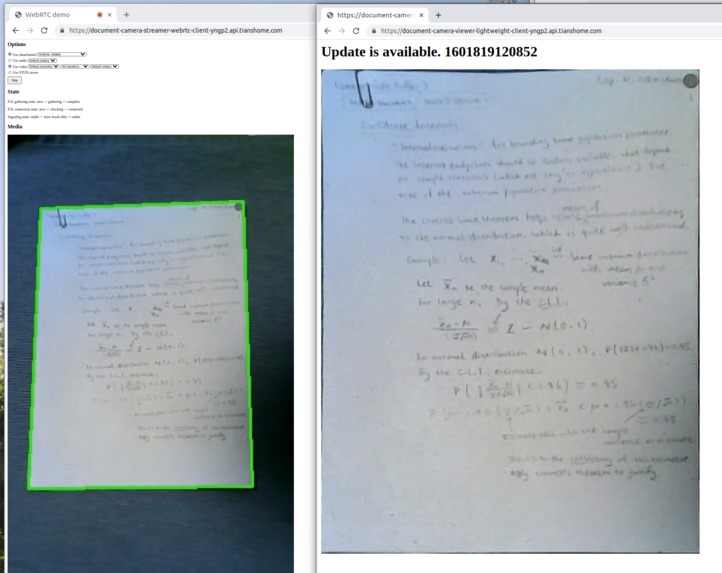
DCAE in action: document detection, cropping, and DNN-based upscaling in real time

Inspiration
Document cameras are everywhere on campus. Professors and TAs frequently resort to these as an alternative to chalkboards.
However, document cameras are by no means perfect. Have you ever feel frustrated because the professor keeps covering their handwritings? Does staring at a projector screen a few meters above you for hours in a row hurt your neck? These challenges are likely even more significant for those who need special help with their visions.
What it does
The Document Camera Accessibility Enabler (DCAE) project seeks to make document cameras more accessible to everyone.
- DCAE attempts to straighten and visually-enhance documents from document camera video inputs in real time.
- DCAE seeks to further improve the quality of captured documents through AI-powered superscaling.
How I built it
CV Backend
DCAE applies the heuristic approach described by Rosebrock (2014) [1] to solve the Computer Vision problem of identifying paper sheet from relatively low-resolution image (360p, approximately 0.17 megapixels per frame) on a real-time basis.
- DCAE starts by calculating the contour edges for each frame by applying the method described by Suzuki and Abe (1985) to a grayscale image of each frame.
- DCAE would then sort the contour lines by the area that each contour line encloses. DCAE keeps only the top five contour lines (sorted by area) to conserve computational resources (this choice was based on Rosebrock 2014.)
- DCAE would apply the Ramer-Douglas-Peucker algorithm to approximate the number and positions of vertices of each of the five contour lines.
- DCAE would keep only contour lines that approximates to a quadrilaterals (based on Rosebrock 2014.) On top of that, DCAE imposes a lower threshold on the area of the quadrilateral relative to the area of the frame. DCAE requires that each quadrilateral should cover at least 30% of the pixels of the frame for that quadrilateral to qualify as a sheet of paper. (The 30% here was obtained empirically.)
- DCAE would apply the four-point transformation of Rosebrock (2014) to straighten and justify the sheet with reference to the four vertices found using the Ramer-Douglas-Peucker algorithm.
- On top of that, DCAE might apply Deep-Learning Super Resolution models to upscale the output image on the server side before sending the image to the viewer clients.
Streamer Frontend
The DCAE streamer frontend (client) captures and sends video input of the document camera to the CV backend over network. That is done through WebRTC using tools from the AIORTC team. This client runs right in the browser, requires no extra installation, and takes up about as much computational resource as a one-on-one video chat.
Additionally, the DCAE streamer frontend presents visual feedback to inform the user (the professor or the teaching assistant) whether their webcam input can be recognized. This video annotation task is done at the server side before the result is sent back to the streamer, also over WebRTC.
Viewer Frontend
The DCAE viewer frontend (client) establishes a socket.io connection (websocket or long-polling) with the backend. The backend would notify the viewer frontend over that socket.io connection whenever a new processed-and-cropped image becomes available. The viewer frontend would then fetch and display that more recent image to the user (a timestamp helps prevent caching.)
There viewer frontend is supposed to be extremely light-weight. Video decoding would not be required.
Backend/Glue/Middleware
DCAE features two separate web servers running at the same time: an AIORTC server and a Flask Socket.io server. The streamer frontend connects to the AIORTC server, which is responsible for handling CV computations alongside WebRTC packets. On the other hand, the viewer frontend is connected to the Flask socket.io server via websocket to listen for image updates, and via HTTP GET to retrieve image files.
The AIORTC server sends updated image files to the Flask server over HTTP POST over a local/internal network. The Flask server would store the most recent image file in memory and send the image back to the viewer client from the memory.
Challenges I ran into
Bridging the Streamer and Viewer frontends
Getting the AIORTC server (which powers the streamer frontends) to speak Socket.io is apparently nontrivial. I resorted to asking the AIORTC server to talk to Flask over HTTP GET or POST, and configuring the Flask server to relay the update to viewer clients over websocket once it hears from AIORTC.
However, it took me a while to realize that I needed the emit() method of my SocketIO instance rather than flask_socketio.emit() if the message is triggered by a non-websocket-request. Discussions at https://github.com/miguelgrinberg/flask-socketio/issues/40 helped a lot with that.
Accomplishments that I'm proud of
Client-Server Model
Most of the computer vision processing, super-resolution inferencing, as well as signaling are done in the cloud. That minimizes the amount of resources required on the faculty and the students' side and could possibly make education more accessible financially. At the same time, when compared to peer-to-peer WebRTC streams, distributing the image files from a server minimizes the amount of information that needs to be shared.
Combination of Analytic and Deep-Learning Approaches
Image of each page is cropped from the input using a non-neural-network analytic Computer Vision approach. On the other hand, these images are subsequently upscaled using a deep neural network. Indeed, identifying the pages using a neural work would be feasible. However, the analytic approach is possibly better-suited for this purpose given the cost and computations savings.
What I learned
- OpenCV modules for identifying and analyzing contours.
- Parsing WebRTC in Python using AIORTC.
- Websocket for real-time communications.
What's next for Document Camera Accessibility Enabler
Identify Page-Flipping
Apply pose-estimation APIs (such as Wrnch.ai) to identify the faculty member turning a page over under the document camera. Store these pages separately for student to go back in their viewer frontend.
Strategies for handling palms in the document camera view
At the moment, the server simply pauses the update when a palm covers the (edge) of the sheet of paper. However, there should be ways to make up for these covered region using pixels from previous frames.
Improve the behavior of the sever when it could not keep up with the computation requirements
When upscaling using massive neural networks without an inference accelerator, the backend server might not be able to keep up with on-the-fly real-time video stream processing. The backend is supposed to drop frames that it can't handle in time rather than queuing them.
Enable support for WebRTC over TURNS
Currently this project works just fine over a local area network. However, TURN might be necessary to allow faculties secure access to the streamer while teaching remotely from outside of the university network.
Reference
[1] Rosebrock, Adrian, "How to Build a ... Mobile Document Scanner in Just 5 Minutes", pyimagesearch.com, 1 Sep 2014.


Log in or sign up for Devpost to join the conversation.