-
-
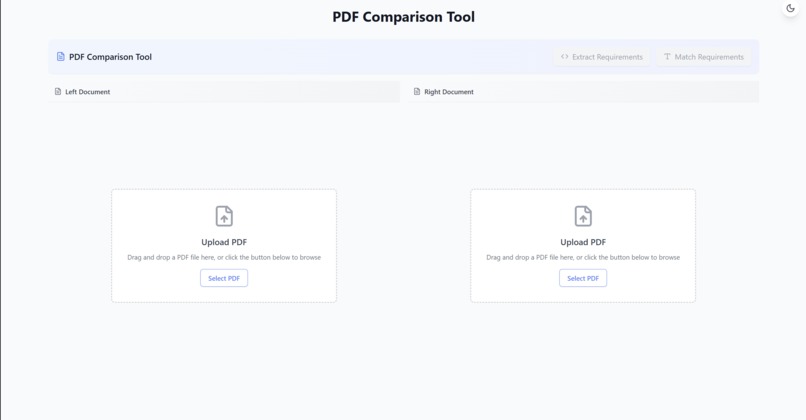
The main page of the project
Inspiration
Comparing system requirement docs with their respective design specification docs is a time-consuming and arduous task in systems engineering. We created SpecMatch to reduce the friction in cross-checking requirements and specifications. Our AI-powered backend automates the task of identifying relationships between requirements and specs, and our user-friendly UI makes it easy to visualize these relationships.
You can view our video demo at: https://www.loom.com/share/d89d3a71ffa544bebbb59b1b39013ac8
What it does
SpecMatch is an intelligent PDF requirement analysis tool that:
- Automatically extracts requirements from PDF documents
- Matches requirements between different documents with confidence scoring
- Highlights matching text in interactive PDF viewers
- Provides clear visualization of requirement relationships
- Focuses on high-confidence matches to ensure accuracy
- Enables quick navigation between related requirements
How we built it
- Frontend: React with TypeScript for a responsive, interactive UI
- Backend: Python with FastAPI for efficient API handling
- AI Integration: Claude API for intelligent requirement extraction and matching
- PDF Processing: pdf js for document rendering and text extraction
Challenges we ran into
- Ensuring accurate requirement extraction from various PDF formats
- Implementing reliable text matching with proper confidence scoring
- Managing state between multiple PDF viewers
- Handling large PDF files efficiently
- Creating an intuitive UI for complex document comparison
- Balancing between showing all matches and maintaining accuracy
Accomplishments that we're proud of
- Successfully implementing AI-powered requirement extraction
- Creating an intuitive interface for document comparison
- Achieving high accuracy in requirement matching
- Building a responsive and user-friendly PDF viewer
- Implementing real-time highlighting of matching text
- Creating a system that saves significant time in document comparison
What we learned
- Advanced PDF processing techniques
- Integration of AI services for document analysis
- State management in complex React applications
- Best practices for handling large documents
- Importance of user experience in technical tools
- Effective ways to present complex data relationships
What's next for SpecMatch
- Add support for more document formats (Word, Excel)
- Implement collaborative features for team usage
- Add export functionality for requirement reports
- Enhance AI matching with more context awareness
- Add batch processing for multiple documents
- Implement version control for requirement tracking
- Add custom confidence level thresholds
- Develop API for integration with other tools

Log in or sign up for Devpost to join the conversation.