-
-
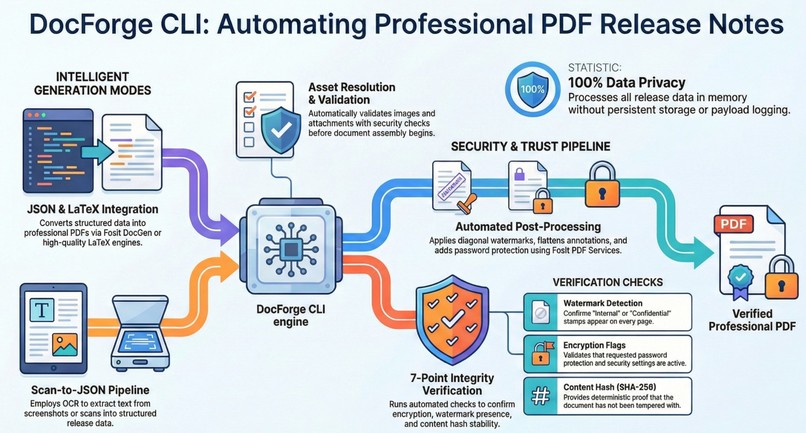
Project flow diagram
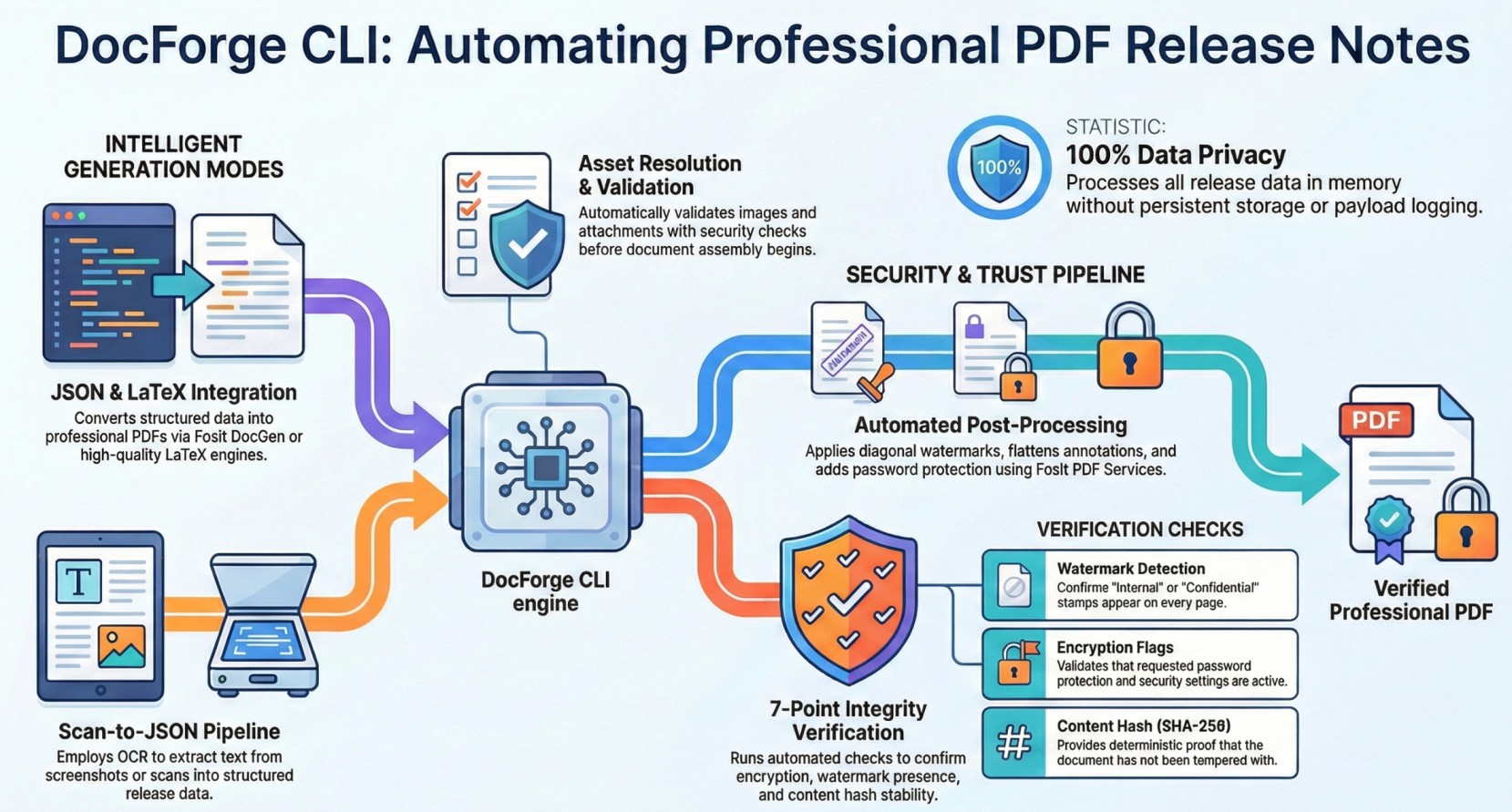
Inspiration
In the modern digital landscape, organizations frequently need to convert diverse document formats (JSON data, images, scanned documents) into professional, verified PDFs for release, compliance, and distribution purposes. The challenge lies in automating this process while maintaining quality, security, and consistency at scale.
What it does
DocForge is a comprehensive document transformation platform that:
- Converts JSON data, images, and scanned documents into polished, professional PDFs
- Applies watermarking and security features for document protection
- Verifies document integrity and authenticity
- Supports batch processing for high-volume operations
- Integrates Foxit Document Generation and PDF Services APIs for enterprise-grade PDF capabilities
- Provides a user-friendly web interface and REST API backend
How we built it
Our solution leverages:
- Frontend: Modern web interface for easy document upload and configuration
- Backend: Robust API built with FastAPI/Python for document processing
- APIs: Foxit Document Generation and PDF Services for professional PDF creation
- Cloud: Google Cloud Run for scalable, serverless deployment
- Architecture: Monolithic service design with clear separation of concerns
Challenges we ran into
- Handling diverse input formats and ensuring consistent output quality
- Optimizing performance for batch processing of multiple documents
- Implementing watermarking and verification while maintaining document readability
- Integrating multiple APIs seamlessly within time constraints
- Ensuring secure handling of documents with potential sensitive information
Accomplishments that we're proud of
- Successfully integrated Foxit APIs for production-grade PDF generation
- Built a fully functional end-to-end document pipeline
- Deployed live application on Google Cloud Run
- Created comprehensive API documentation
- Achieved fast processing times even with batch operations
- Implemented intuitive user interface for non-technical users
What we learned
- The importance of API design for document processing workflows
- Scalability considerations when handling files in cloud environments
- The value of comprehensive error handling and user feedback
- Integration testing strategies for multiple API dependencies
What's next for DocForge
- Advanced OCR capabilities for scanned documents
- Support for additional document formats (Word, Excel, presentations)
- Role-based access control and audit logging
- Template-based document generation
- Webhook support for automated workflows
- Mobile app for on-the-go document processing


Log in or sign up for Devpost to join the conversation.