-
-
Command-based PDF viewer that infer figures/tables/highlights
Inspiration
I work at the intersection of AI research and engineering, and like many people in this field, I keep accumulating papers I want to read but never fully get to. That creates a familiar tension: the need to stay current without spending hours on a full literature review every time a new paper appears.
Most of us are not full-time researchers. We may not have time to read every paper deeply, but we still need to extract the core ideas, verify claims, and remember enough to use them later. That gap - between "I should read this" and "I actually have time to read this" - was the starting point for Docent.
What it does
Docent is an AI-native PDF reader prototype built for skimming with intent. Instead of treating papers as static documents, it helps users move through them quickly while staying grounded in the original text.
It supports a keyboard-driven, vim-style workflow with a command bar, key bindings, voice support, and integrations aimed at research workflows such as Zotero and Obsidian.
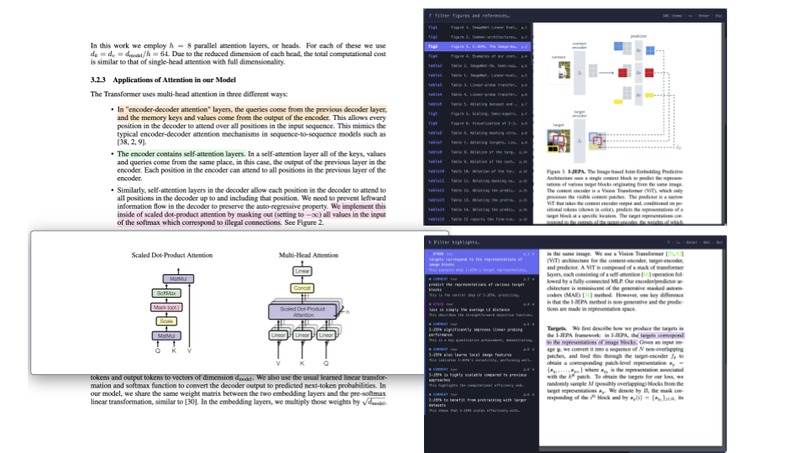
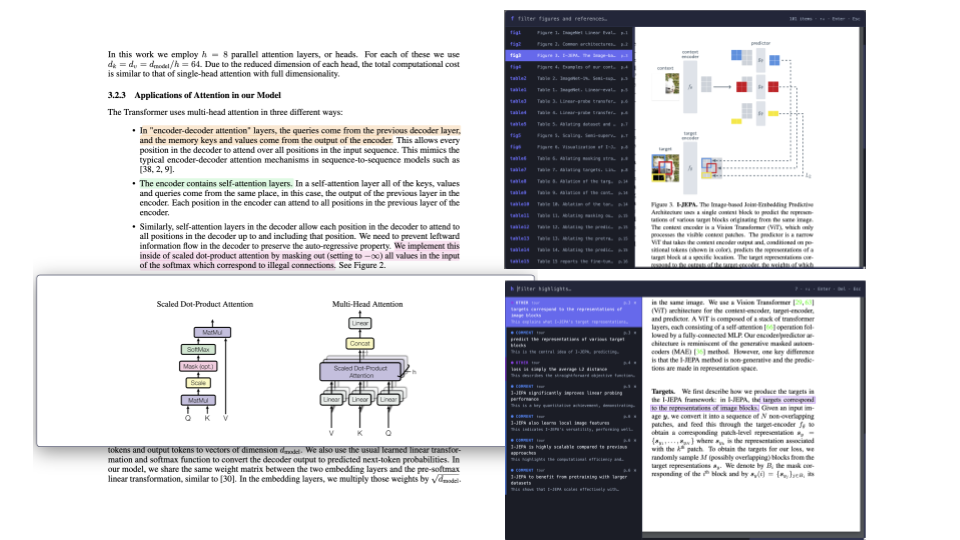
Docent also tries to understand document structure beyond what a typical PDF reader does. Rather than only jumping to a target region, it can interpret parsed elements like figures, tables, sections, and references, making them queryable with previews.
Its most distinctive feature is guided reading. Instead of asking users to manually maintain a careful highlight system while skimming, Docent lets an agent do a first pass: identifying core paragraphs, highlighting them live, and building a guided tour directly from the source text. The goal is a read-along experience that is faster and more grounded than a fully rewritten summary.
How we built it
We built Docent around the idea that speed and grounding matter more than full re-narration.
On the interface side, we focused on a fast, low-friction reader: keyboard-first navigation, floating windows for link previews, voice commands, parsed document elements, and a path into note systems.
On the document-understanding side, Docent parses structural elements such as figures, tables, references, and sections, and visualizes the regions it detects. That gives the system a richer view of the paper than a standard PDF reader and allows users to inspect or manually adjust the parsed layout when needed.
On the AI side, the main design choice was to avoid freely reconstructing the paper in the style of a blog post or lecture. Instead, the agent first identifies paragraphs that seem most worth the reader’s attention, then builds narration and highlights around those passages. This keeps the experience closer to the original paper and makes the highlights easier to revisit for skimming, memory, and verification.
Gemini is used to parse uploaded papers multimodally, infer figure and table regions, power voice transcription and natural-language command understanding, extract and structure highlights, and generate guided-tour style explanations inside the PDF experience.
Challenges we ran into
One challenge was balancing speed with trustworthiness. Many AI systems are strongest when they paraphrase and reorganize content freely, but that also increases the risk of drifting from the source or subtly distorting a finding. We wanted Docent to be helpful without becoming too detached from the paper itself.
Another challenge was document parsing. PDFs are messy, and accurately identifying figures, tables, references, and regions is not always reliable, especially in an early prototype. We had to design the workflow so that parsing errors would not completely break the experience, which is why manual adjustment is still part of the system.
Accomplishments that we're proud of
We are proud of turning the idea into a working prototype with a clear point of view. Even though it is still an early draft and has only been tested on a limited example, it already demonstrates a distinct approach: instead of re-writing a paper from scratch, it guides the reader through key passages in the original source.
We are also proud that the prototype brings several pieces into one flow — PDF reading, structural parsing, guided highlighting, keyboard-first interaction, and note-oriented workflow ideas. More than anything, building it helped clarify what kind of tool Docent wants to be.
What we learned
We learned that constraints can improve AI product design. By intentionally limiting Docent so that it stays tied to core paragraphs rather than fully reauthoring a paper, the result feels easier to trust and better suited to research workflows.
We also learned that skimming is an underserved mode of reading. Many tools assume users either want deep reading or writing help, but in practice, a lot of research work starts with fast orientation: understanding what matters, where to look, and what to revisit later.
What's next for Docent
Docent is still an initial draft. The next step is improving the quality and reliability of document parsing so that figures, tables, references, and regions are detected more accurately across a wider variety of PDFs.
Beyond that, we want to test the workflow on many different papers, improve export into Obsidian and Zotero, strengthen voice interaction, and make the transition from skimming to notes feel more seamless.
Built With
- fastapi
- gemini
- highlight-extraction
- natural-language-command-handling
- next.js
- python
- react
- speech-to-text
- tailwind
- typescript

Log in or sign up for Devpost to join the conversation.