-
-
docen-live-landing-page
-
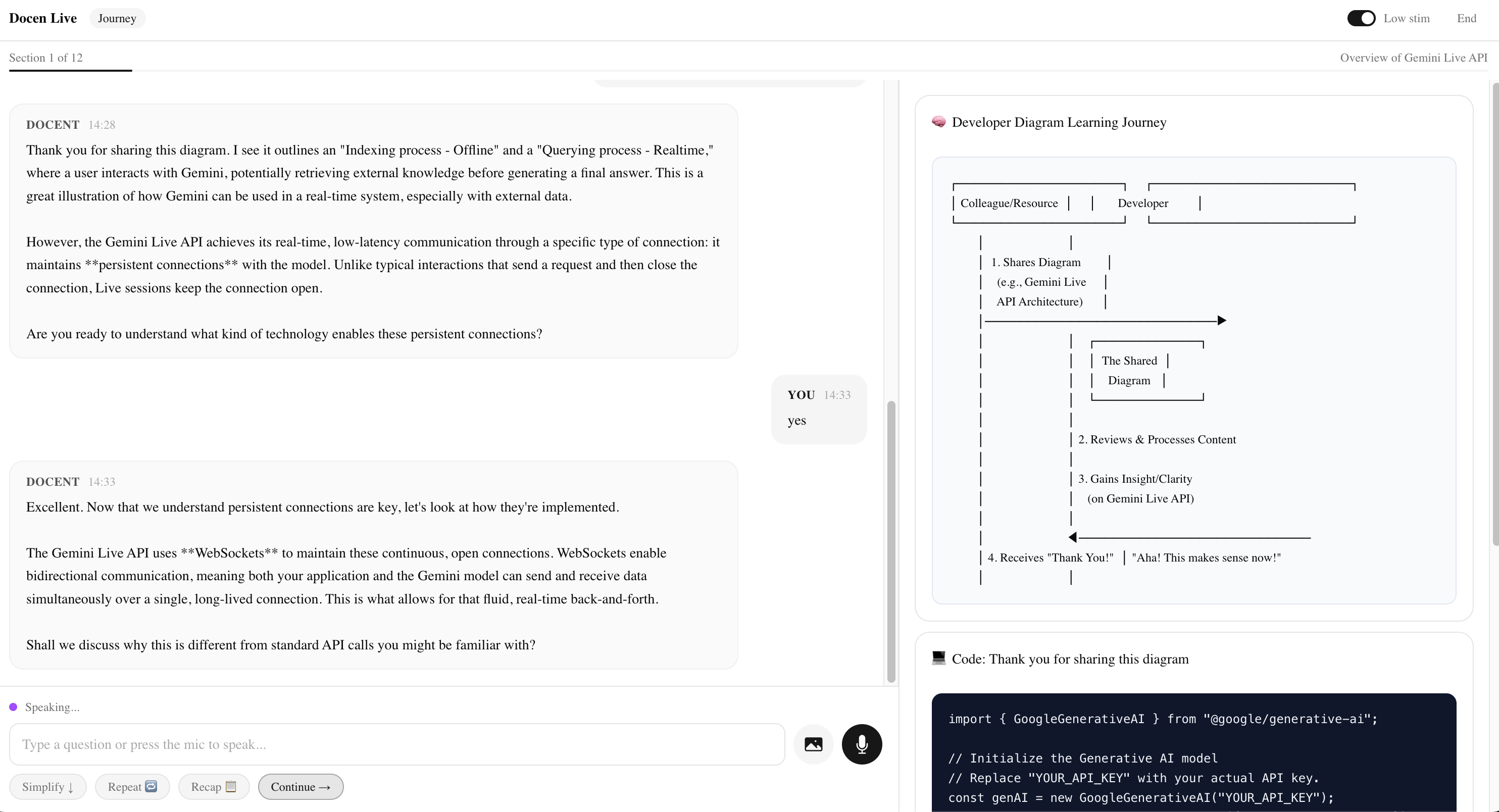
docen-live-session-view-with-response
-
docen-live-visual-companion-panels
-
docen-live-image-upload
-
docen-live-image-upload-response
-
docen-live-low-stim-mode
-
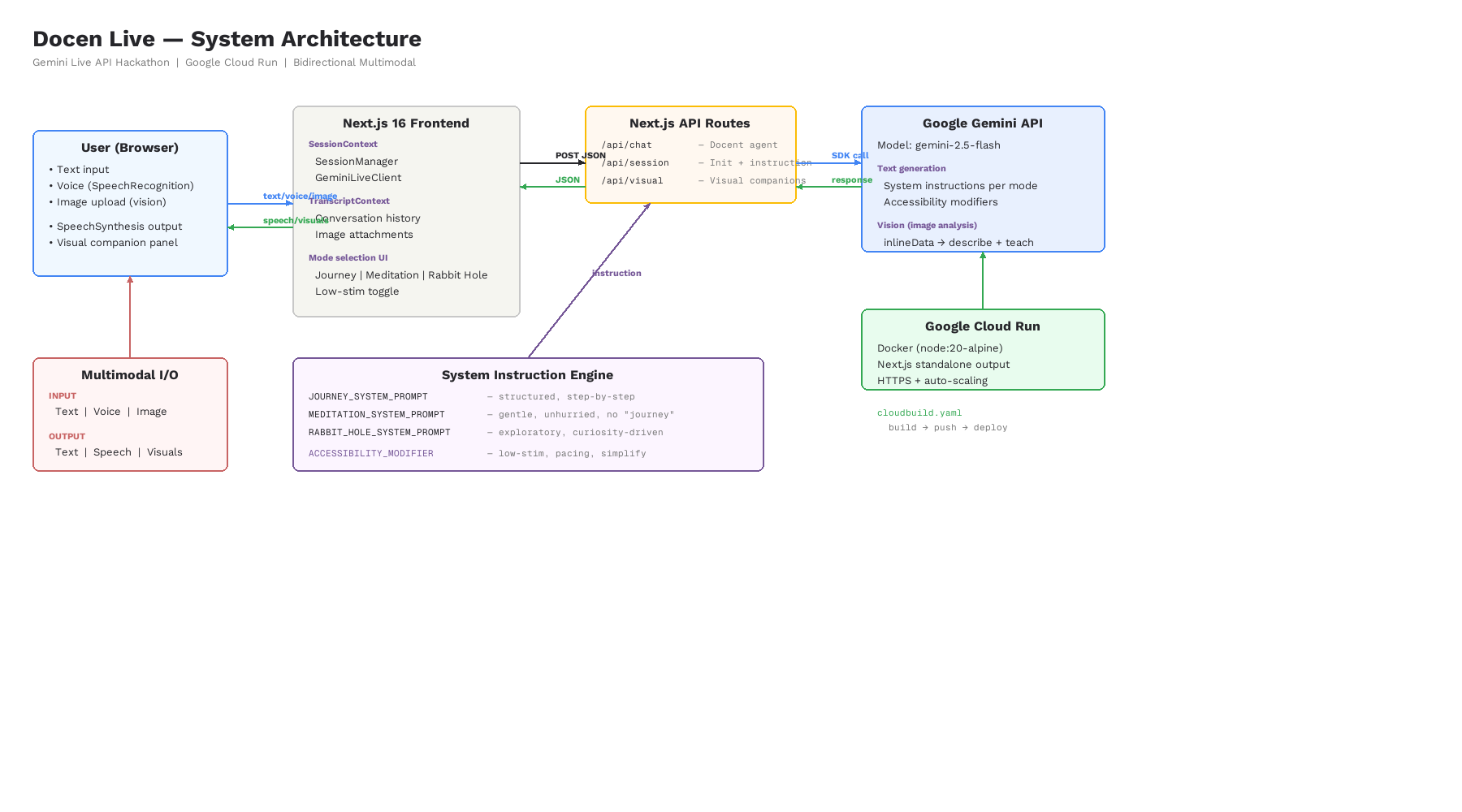
docen-live-architecture-diagram
Inspiration
I'm autistic and schizophrenic. The way we learn technology right now doesn't work for people like me. Documentation is walls of text. Dense paragraphs. No pacing. No guidance. Just — figure it out. In the AI era, that gap is getting wider. People who learn differently are being left further behind. That's a tragedy. So I built something about it, instead of just complaining.
What it does
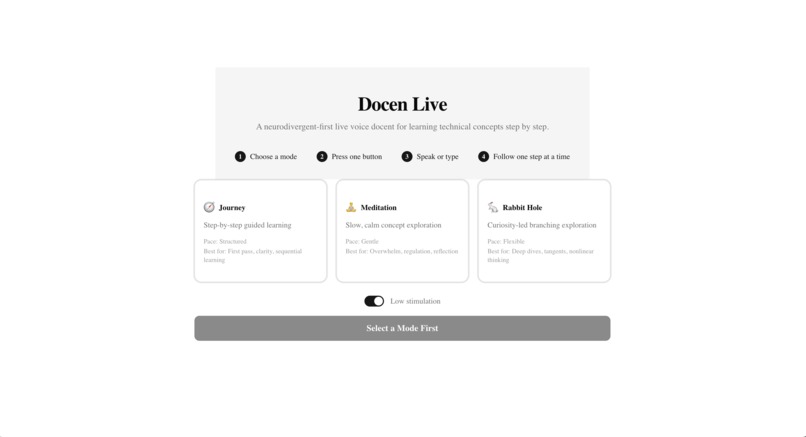
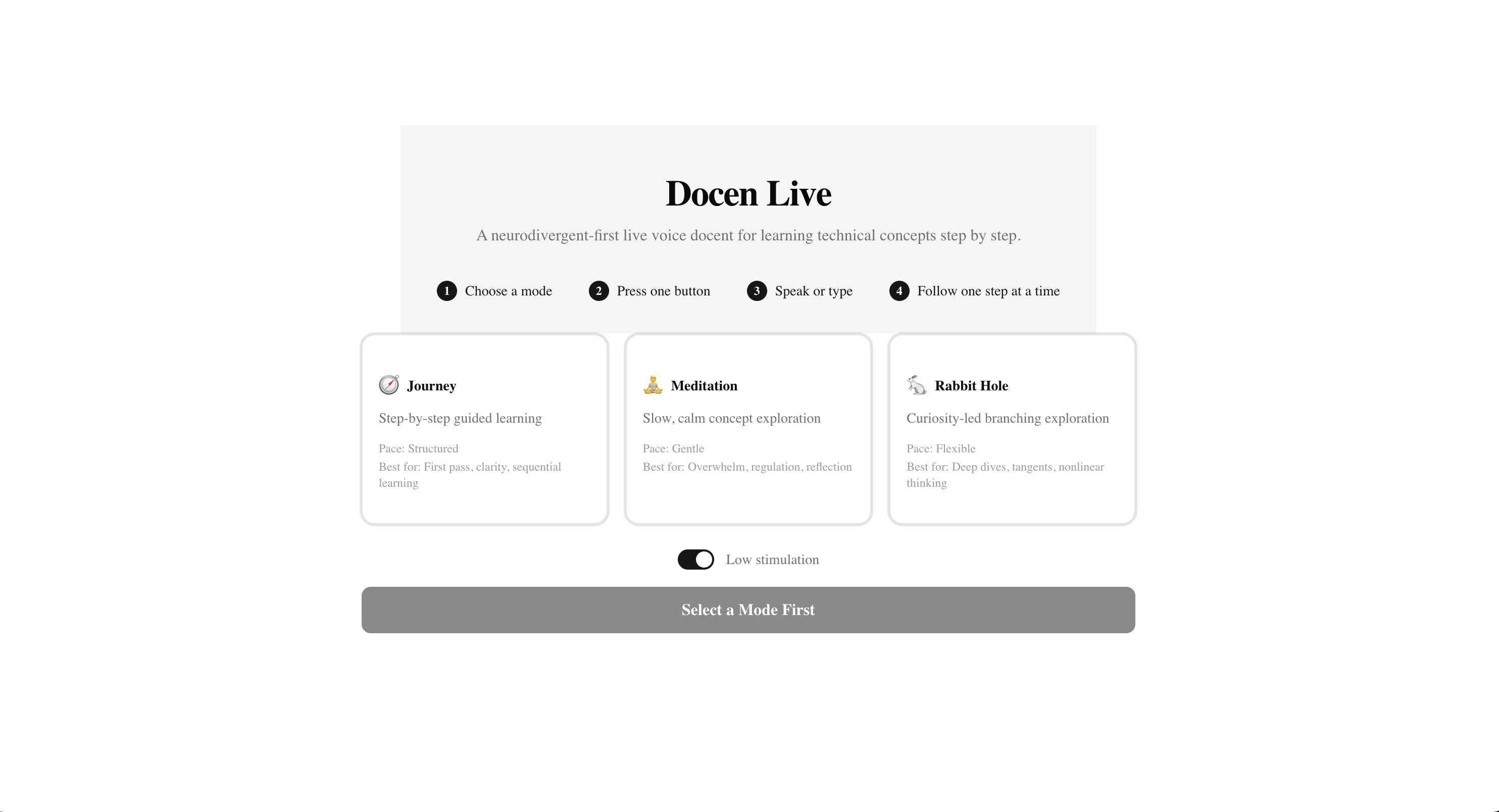
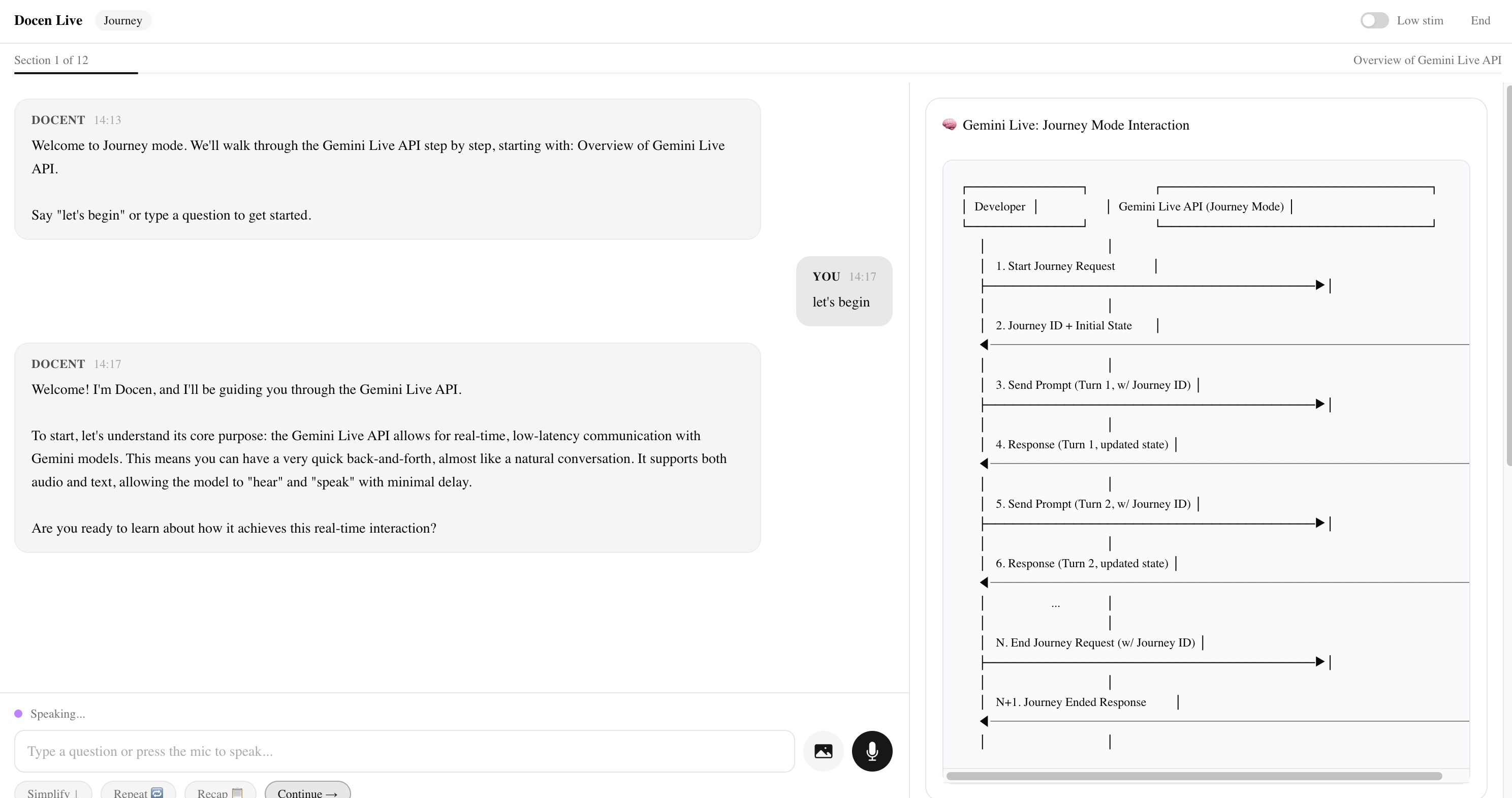
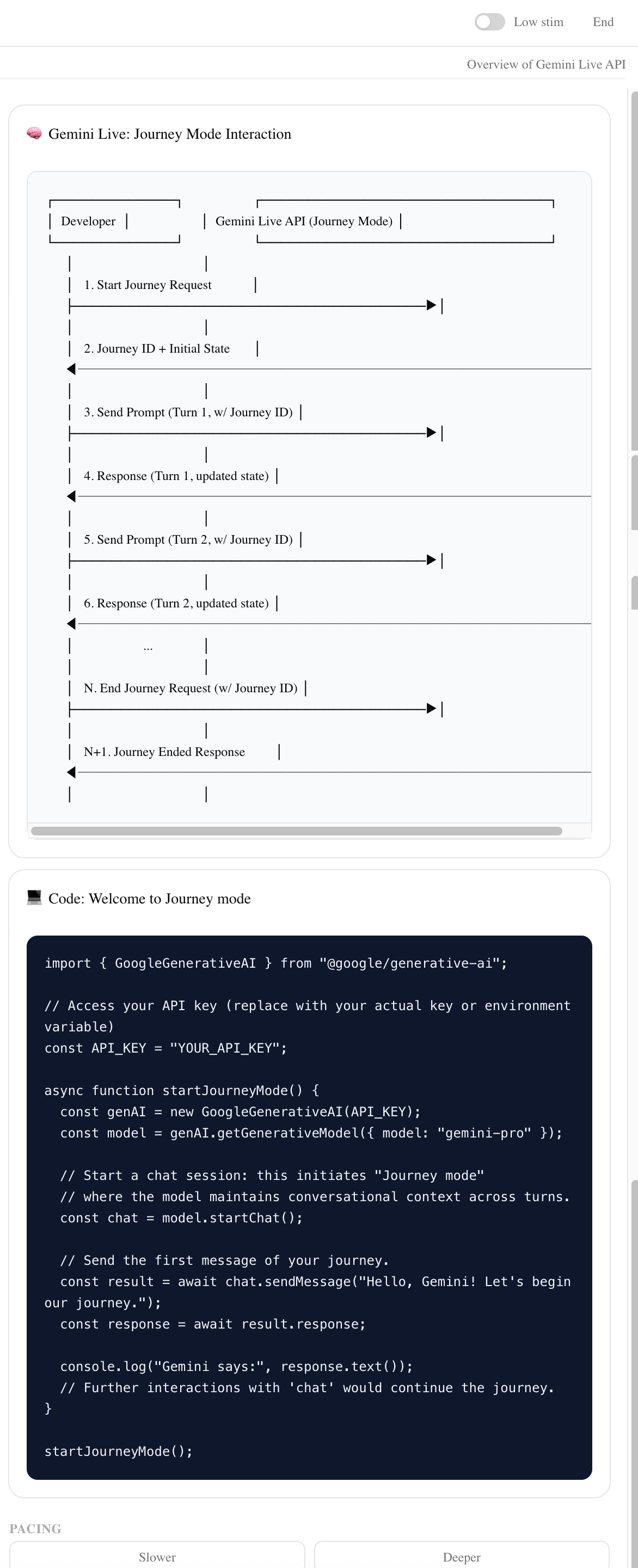
Docen Live is a neurodivergent-first, multimodal voice docent that transforms official Gemini API documentation into a guided learning experience. Users choose from three learning modes (Journey, Meditation, Rabbit Hole), interact via voice, text, or image, and receive spoken explanations with real-time transcript and visual companion panels. Seven accessibility features ensure the experience works for learners with ADHD, autism, anxiety, dyslexia, or cognitive fatigue.
Journey Mode delivers a structured, section-by-section tour. The docent introduces one concept per turn, confirms understanding before advancing, and keeps responses concise and predictable.
Meditation Mode slows everything down. The docent explains each concept three different ways — direct definition, analogy, and concrete example — before moving on. Repetition is a feature, not a bug.
Rabbit Hole Mode is for the hyperfocusing learner. The docent follows tangents, offers deep technical detail, and surfaces connections to adjacent concepts unprompted.
How we built it
Stack: Next.js 16 (App Router), TypeScript 5, ShadCN/ui, Tailwind CSS 4, Google Generative AI SDK (@google/generative-ai v0.24), Google Cloud Run.
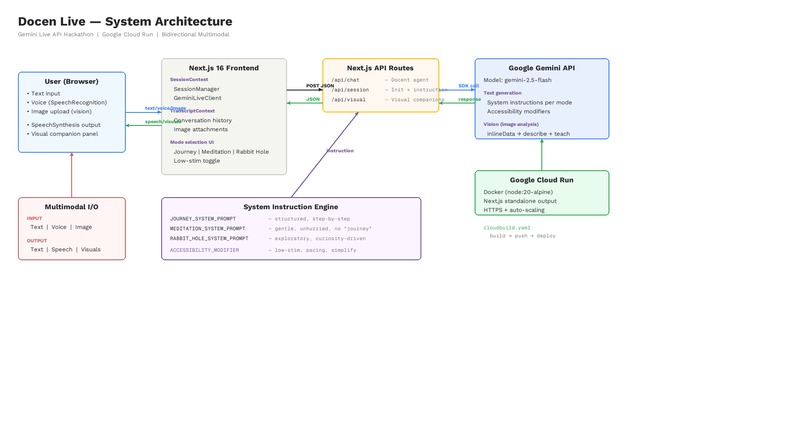
Frontend architecture: React Context + useReducer for state management. Three context providers (Session, Accessibility, Transcript) ensure clean separation of concerns. All UI components are accessible (ARIA roles, keyboard navigation), support low-stimulation mode via a custom Tailwind @custom-variant data-attribute, and render responsively from 375px to 1440px.
Lightweight orchestration: Three Next.js API routes handle all intelligence:
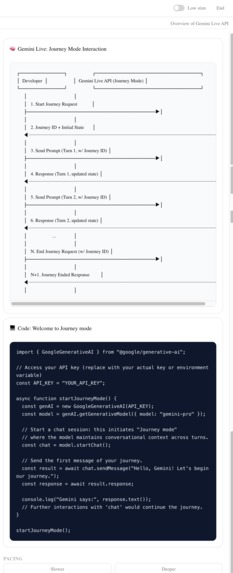
/api/chat— Primary Docent Agent. Accepts the user message, conversation history, current section content, mode identifier, and serialized accessibility modifiers. Builds a mode-specific system instruction, callsgenerateContentvia the Gemini SDK, and returns the response text./api/docent— Accessibility Adaptation route. Receives the currentAccessibilityStateobject and returns a structured modifier string that is appended to the primary system instruction on subsequent calls. Called client-side whenever accessibility toggles change./api/visual— Visual Companion route. Triggered after each docent turn. Sends the docent response and current section context to Gemini with a structured output prompt. Returns a typed visual aide object (concept card, diagram spec, or annotated code snippet) that the Visual Companion Panel renders.
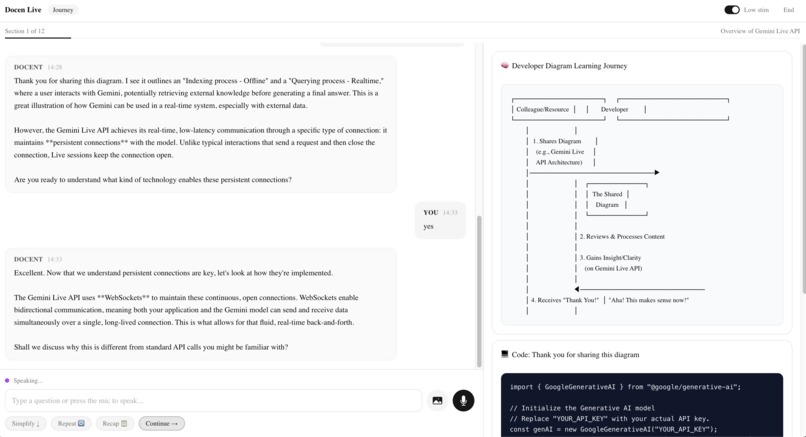
Accessibility model: One-Action Mode reduces all interaction to a single Continue button, eliminating the microphone decision loop. Low-Stimulation Mode applies data-low-stim to the document root, triggering a low-stim: Tailwind variant that sets the background to #F5F5F0, removes all CSS animations, increases base font size to 18px, and strips gradient fills from UI elements. Repeat, Recap, and Explain Simply controls are buttons in the session chrome that trigger specific modifier injections into the next docent turn. Slow Pacing instructs the docent to shorten responses and pause for confirmation more frequently.
A note about the demo video
This video is nine minutes long. I want to explain why, because the reason is the product.
I am autistic and schizophrenic. One of my most significant challenges is spatial reasoning — coordinating speech, screen direction, and timing simultaneously is extraordinarily difficult for me. Recording a polished 3-minute demo requires a kind of multitasking that my brain does not do well. I practiced, I rehearsed, and I recorded what I could. It is not tight. It is not slick. It is honest.
This is itself an accessibility problem worth naming: hackathon demo videos are an inaccessible submission format for many neurodivergent people. The expectation that a solo developer will produce a coordinated screen-capture-plus-voiceover in a few hours privileges a very specific set of cognitive abilities that have nothing to do with engineering skill or product vision. I would encourage organizers to consider alternative submission formats — written walkthroughs, async Q&A, or live demos with accommodations.
I am not asking for leniency. I am asking judges to evaluate the product, not the production value of the video.
For judges who prefer to evaluate the product directly, here is the exact script I followed. You can open the live app and click through it yourself in under 3 minutes:
Self-guided walkthrough (live app)
URL: https://docen-live-677222981446.us-central1.run.app
- Landing page — Read the title, description, and 4-step strip.
- Select Meditation mode → Click Start Session → Notice the gentle greeting tone.
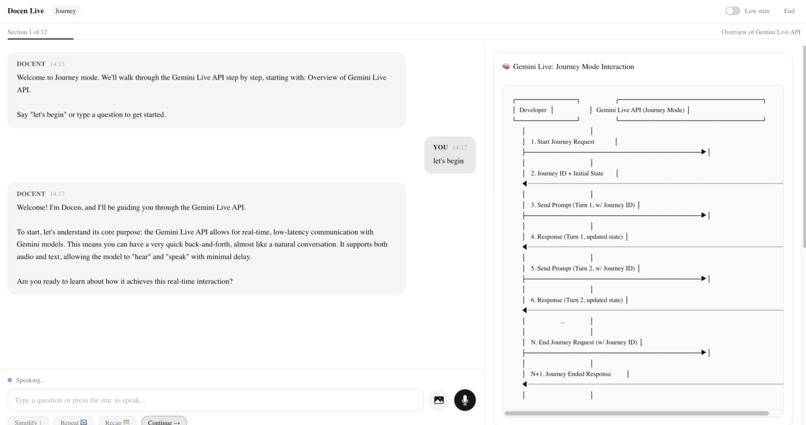
- Type: "What is the Gemini Live API?" → Wait for the response + visual companion panels on the right (conceptual diagram + code reference).
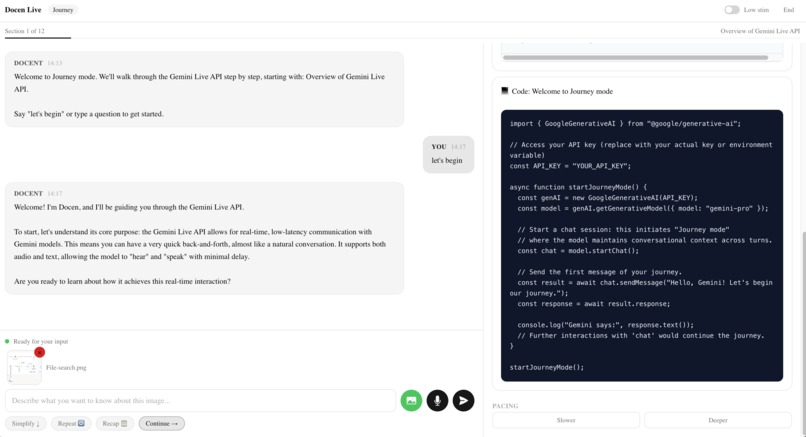
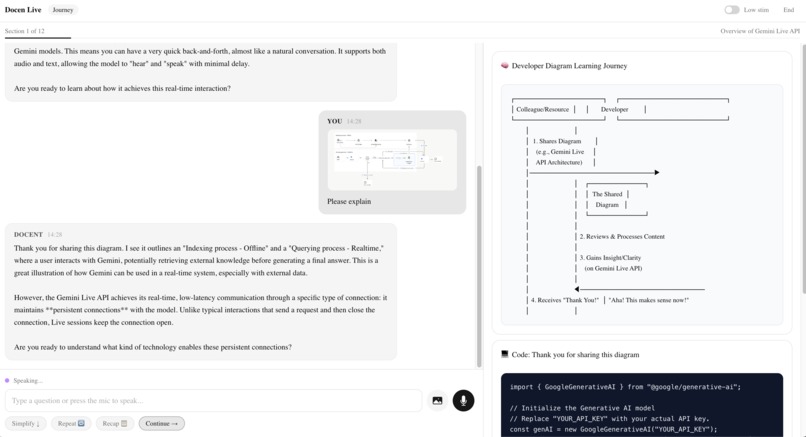
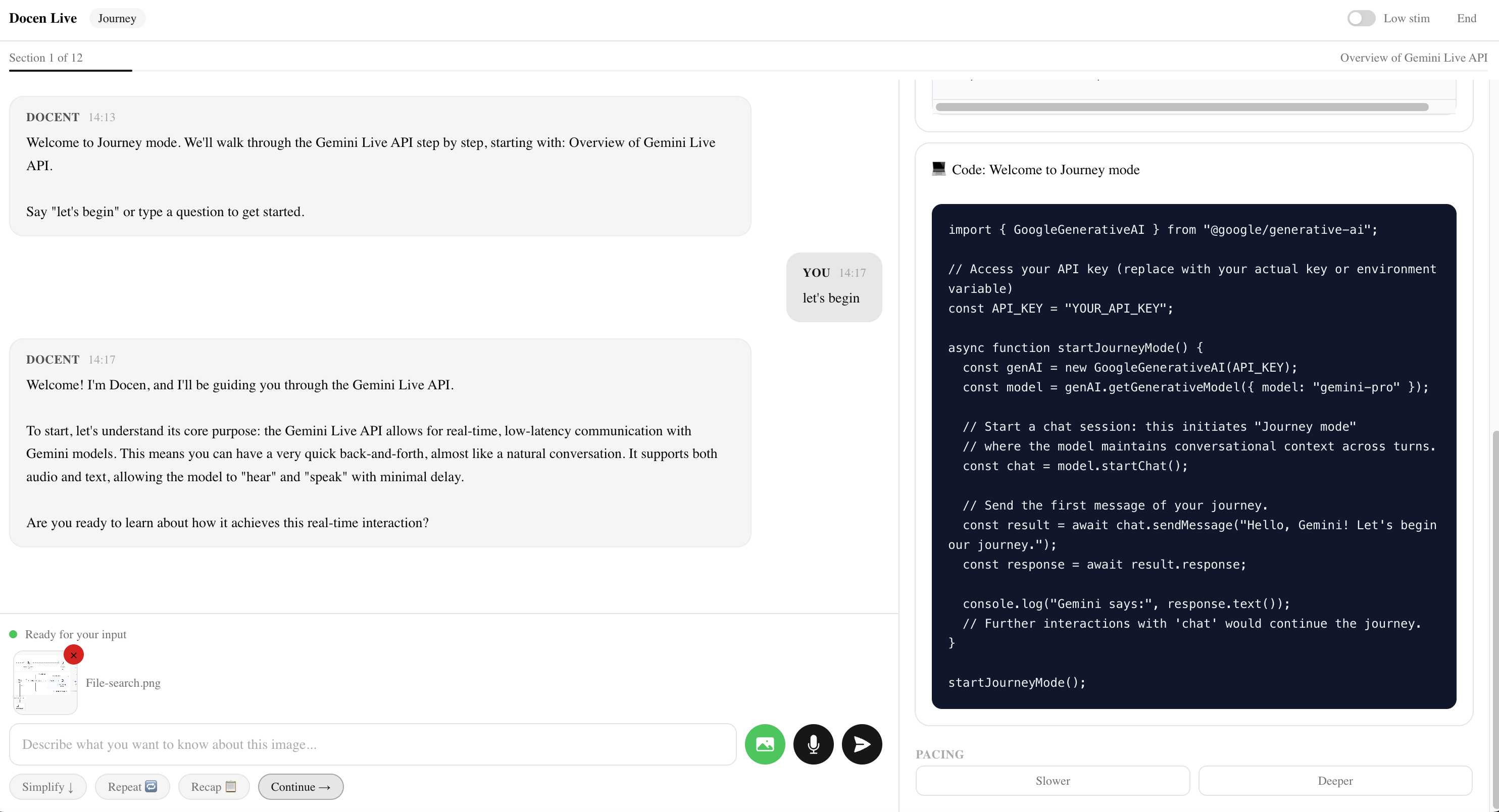
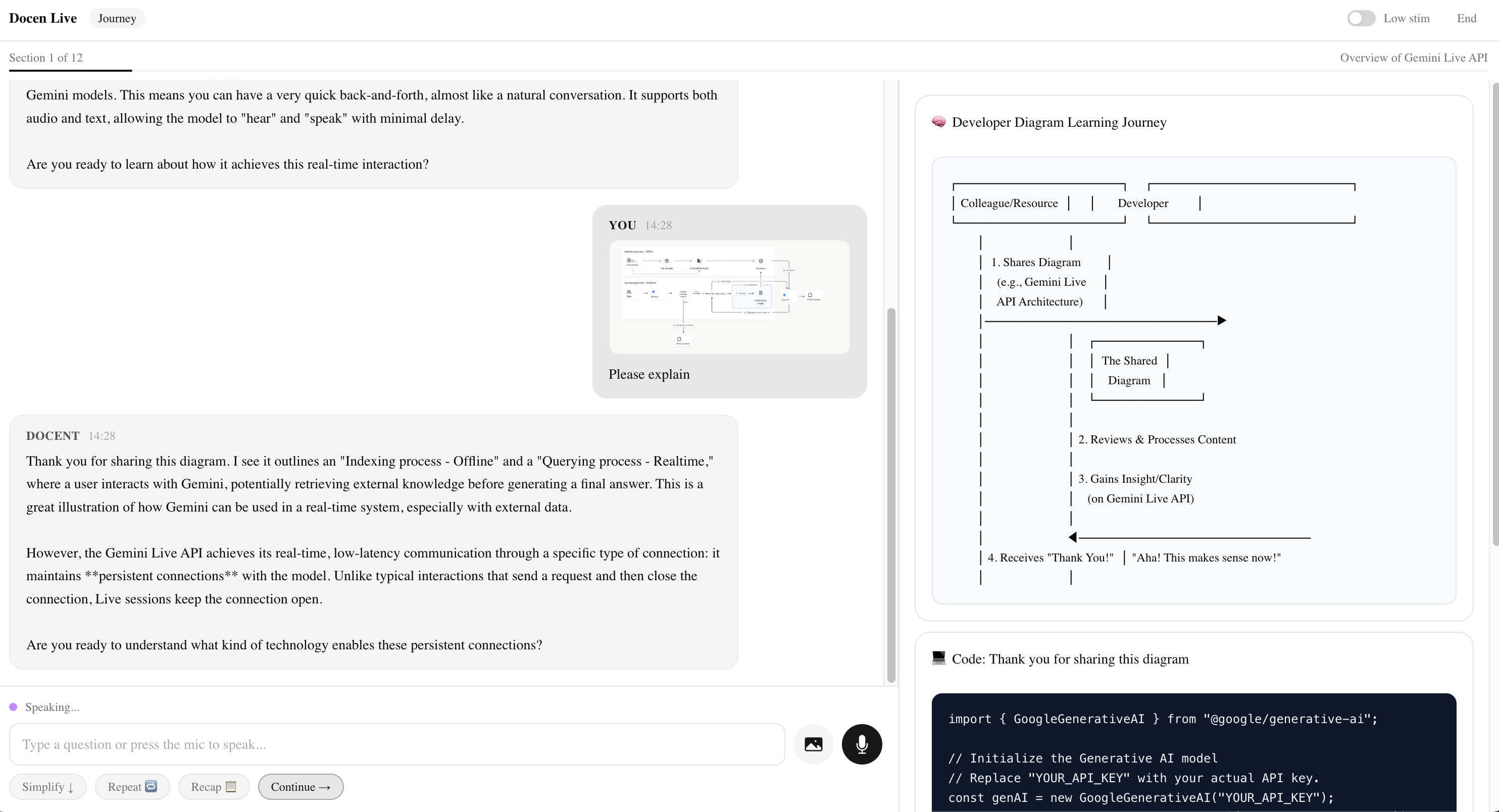
- Upload an image — Click the camera icon → select any screenshot or diagram → type "What does this show?" → send. The docent describes the image and connects it to the lesson. This is bidirectional multimodal input.
- Click Simplify ↓ → The AI re-explains in plain language with a real-world analogy.
- Toggle Low stim (top-right) → The UI calms down AND the AI's behavior changes — shorter responses, no metaphors, no pressure.
- Click Continue → → Progress bar advances. The docent moves to the next concept.
- Click End → Select Rabbit Hole → Start Session → Type "How does bidirectional streaming work?" → Notice the completely different tone — exploratory, technical, curious. Same AI, different system instruction guardrails.
- Click End → You've seen the full product.
This walkthrough demonstrates every feature shown in the video. The product is the submission. The video is supplementary.
Demo script (what I was trying to do in the video)
Scene 1 — Landing Page (~15s) 🖱️ Hold on landing page. Don't click anything. Let the viewer see the title, description, and 4-step strip. 🎙️ "I'm Corey. I'm autistic and schizophrenic. I built Docen Live because the way we learn technology right now doesn't work for people like me. Documentation walls. Dense paragraphs. No pacing. No guidance. Just — figure it out. And in the AI era, that gap is getting wider. People who learn differently are being left further behind. That's a tragedy. So I built something about it."
Scene 2 — Mode Selection (~10s) 🖱️ Hover over each mode card slowly — Journey, Meditation, Rabbit Hole. Click Meditation. Click Start Session. 🎙️ "Docen Live is a voice-first AI docent — powered by the Gemini API — that turns documentation into a guided, paced learning experience. You choose how your brain wants to learn. Meditation mode is slow and gentle. Journey mode is structured. Rabbit Hole follows your curiosity. These aren't themes — they change how the AI actually talks to you."
Scene 3 — Session Loads (~5s) 🖱️ Let the meditation greeting appear in the transcript. Don't type yet. 🎙️ "The docent tells you exactly what's happening. Where you are. What's coming. No ambiguity."
Scene 4 — Type a Question (~8s) 🖱️ Click text input. Type: "What is the Gemini Live API?" Click send. Wait for response + visuals. 🎙️ "You type or speak. The docent gives you one concept at a time. Not a wall of text — one idea, then it waits for you."
Scene 5 — Visual Companions (~10s) 🖱️ Scroll the right panel so both visual cards are visible. Hold. 🎙️ "Every response generates two visuals — a conceptual diagram that shows how things connect, and a code reference that shows how to use it. My brain doesn't absorb a paragraph and just understand. I need to see the architecture. I need to see the code. Those are two different kinds of understanding, and a lot of us need both at the same time. Gemini generates both in real time."
Scene 5b — Image Upload (~10s) 🖱️ Click camera icon → select a screenshot/diagram from Desktop → image preview appears → type: "What does this show?" → send → wait for response. 🎙️ "And it works both ways. I can upload a screenshot, a diagram, or a photo of code — and the docent sees it. It tells me what's in the image and connects it to what we're learning. Text in, voice in, image in — text out, voice out, visuals out. Full multimodal, in both directions."
Scene 6 — Simplify (~6s) 🖱️ Click Simplify ↓. Wait for simplified response. 🎙️ "If something's too dense, you hit Simplify. The AI re-explains it in plain language with a real-world analogy. You don't have to ask nicely. You just press a button."
Scene 7 — Low-Stim Toggle (~6s) 🖱️ Click Low stim toggle top-right. Hold so viewer sees the UI calm down. 🎙️ "Low-stimulation mode strips away visual noise. No animations. Softer colors. This isn't a dark mode toggle — it modifies the AI's behavior too. The whole experience calms down."
Scene 8 — Continue (~5s) 🖱️ Click Continue →. Progress bar updates. 🎙️ "Continue advances to the next concept. The progress bar always shows where you are. No uncertainty."
Scene 9 — Mode Switch (~10s) 🖱️ Click End → select Rabbit Hole → Start Session → type: "How does bidirectional streaming work?" → wait for response. 🎙️ "Watch what happens when I switch to Rabbit Hole mode. The tone changes completely. It's exploratory, technical, curious. The AI doesn't just change what it says — it changes how it thinks about what you're asking. That's done through system instruction guardrails, not prompt tricks."
Scene 10 — Closing (~12s) 🖱️ Click End. Hold on landing page. 🎙️ "This is running live on Google Cloud Run. Built with Next.js, the Gemini API, and a belief that equitable AI means AI that adapts to how you learn — not the other way around. I built Docen Live for the Gemini API hackathon. But really, I built it for me. And for everyone whose brain works a little differently. Thank you."
Challenges we ran into
- Synchronizing speech recognition input with Gemini text generation response timing required careful state management to prevent transcript entries from appearing out of order. The solution was an event queue in TranscriptContext that serializes entries by timestamp rather than insertion order.
- Building a custom Tailwind CSS 4 data-attribute variant (
low-stim:) to conditionally apply accessibility styles across the entire component tree required researching the new@custom-variantAPI, which has no direct equivalent in Tailwind v3. - Designing three pedagogically distinct mode system prompts that produce genuinely different docent behavior — not just surface-level tone changes — required iterative prompt engineering. Each mode required explicit behavioral constraints (maximum turn length in sentences, branching rules, confirmation requirements, tangent policy) to produce reliably distinct interactions.
- The
@google/generative-aiSDK (v0.24) is the standard text generation SDK, not the newer@google/genaiLive API SDK. The distinction is important and the migration path is a known next step.
Accomplishments that we're proud of
- Neurodivergent-first design as a genuine product thesis, not an accessibility checkbox
- Real-time voice interaction with synchronized transcript updates using only browser-native APIs
- Three pedagogically distinct learning modes with measurably different docent behavior across turn length, pacing, branching, and depth
- Seven accessibility features that compose cleanly — one-action mode, low-stimulation mode, slow pacing, repeat, recap, explain simply, and progress visibility all work simultaneously without feature conflict
- Visual companion generation that adapts output type (concept card vs. diagram vs. code) to the current mode and response content
- Production deployment on Google Cloud Run with Docker containerization
What we learned
- Browser SpeechRecognition and SpeechSynthesis APIs are surprisingly capable for hackathon-scoped voice interaction when paired with strong server-side AI. True bidirectional streaming is the obvious upgrade path, but the browser APIs get you 80% of the way.
- Accessibility features are most effective when they modify AI behavior via system instruction modifiers, not just UI appearance. A calmer background color does not reduce cognitive load if the AI is still producing 400-word responses.
- Mode-specific system prompts need explicit behavioral constraints (turn length in sentences, pacing signals, branching rules, tangent policy) to produce genuinely different interaction patterns. Generic "be more calming" instructions do not work.
- Context provider architecture scales well for a feature-dense hackathon MVP. Separating Session, Accessibility, and Transcript state prevented the cross-cutting concern spaghetti that typically emerges in rapid prototypes.
Known limitations (honest self-assessment)
- Browser SpeechSynthesis produces a robotic voice. This is the single biggest UX weakness. The warmth and pacing of the docent's written responses are undermined by flat, mechanical TTS. A production version would use Google Cloud Text-to-Speech or a neural TTS provider for a warmer, more human voice. The underlying conversation quality is strong — the voice layer lets it down.
- Session transcript persists across mode switches. When a user ends one session and starts another, the previous transcript remains visible. The AI cannot reference that old context, so it becomes noise. The fix is clearing or archiving the transcript on new session start.
- Response latency varies. Gemini API response times range from near-instant to several seconds depending on load. For neurodivergent users who need predictability, inconsistent wait times create anxiety. A production version would add skeleton loading states and explicit "thinking..." indicators with estimated wait times.
What's next for Docen Live
- Upgrade to true Gemini Live API bidirectional audio streaming via the
@google/genaiSDK — this is the single highest-impact improvement and the natural next step - Multi-source document ingestion beyond Gemini API documentation (any structured technical doc should be ingestable)
- Persistent session history and cross-session learning progress tracking
- User accounts with saved accessibility preferences that persist across sessions
- Additional learning modes: Quiz Mode (active recall with docent feedback) and Speed Run Mode (maximum information density for experienced learners)
- Collaborative multi-user learning sessions with shared transcript
- Export transcript as structured notes or summary document
Built With
- docker
- gemini-2.5-flash
- google-cloud-run
- google-gemini-api
- next.js
- react
- shadcn-ui
- speechrecognition-api
- speechsynthesis-api
- tailwind-css
- typescript


Log in or sign up for Devpost to join the conversation.