-
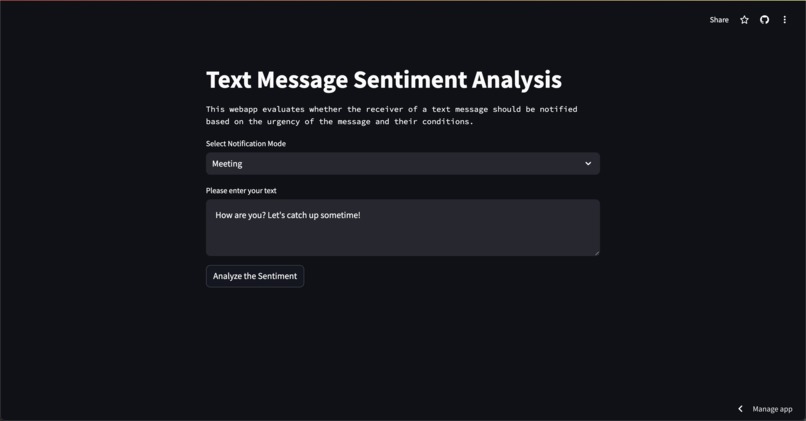
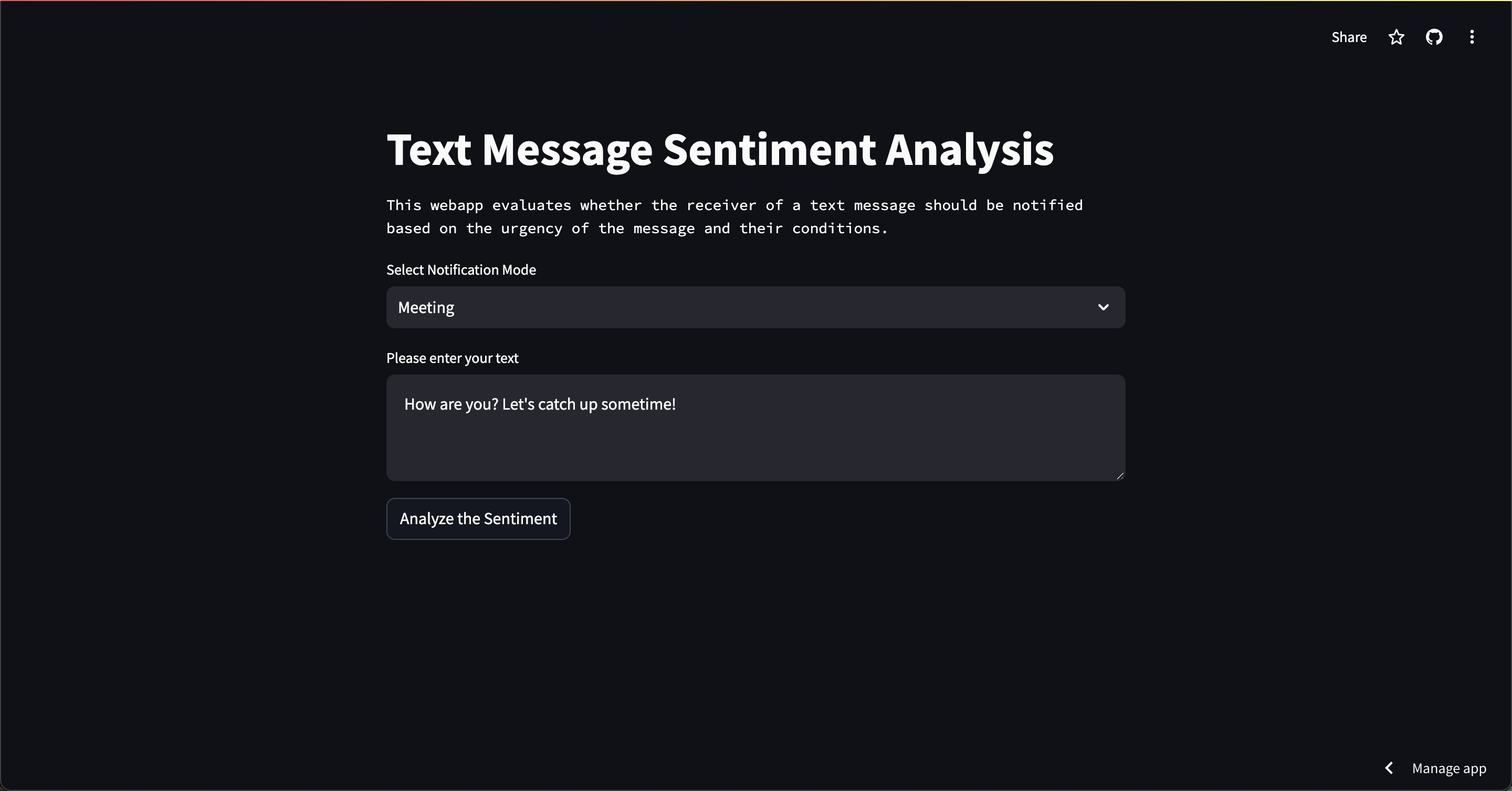
Meeting mode with non-urgent text
-
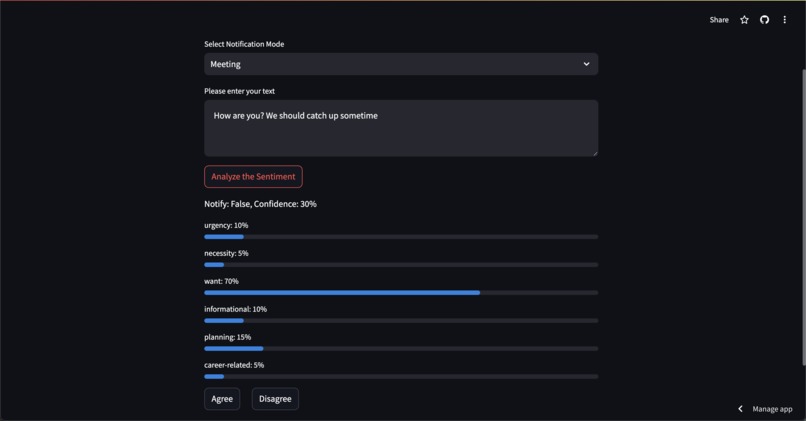
Results with notify as false
-
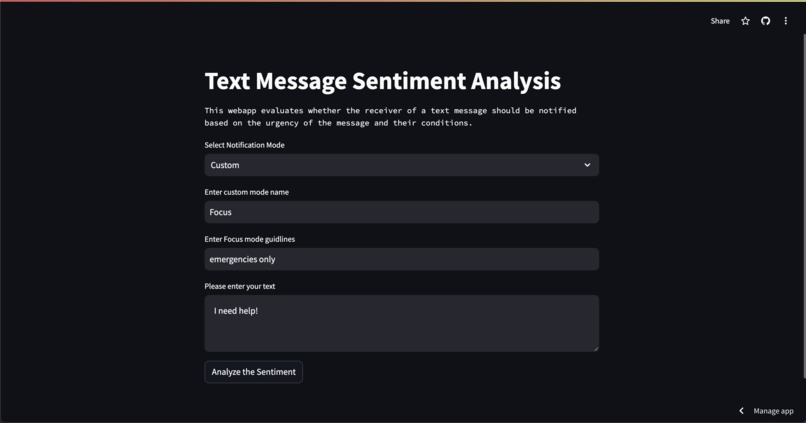
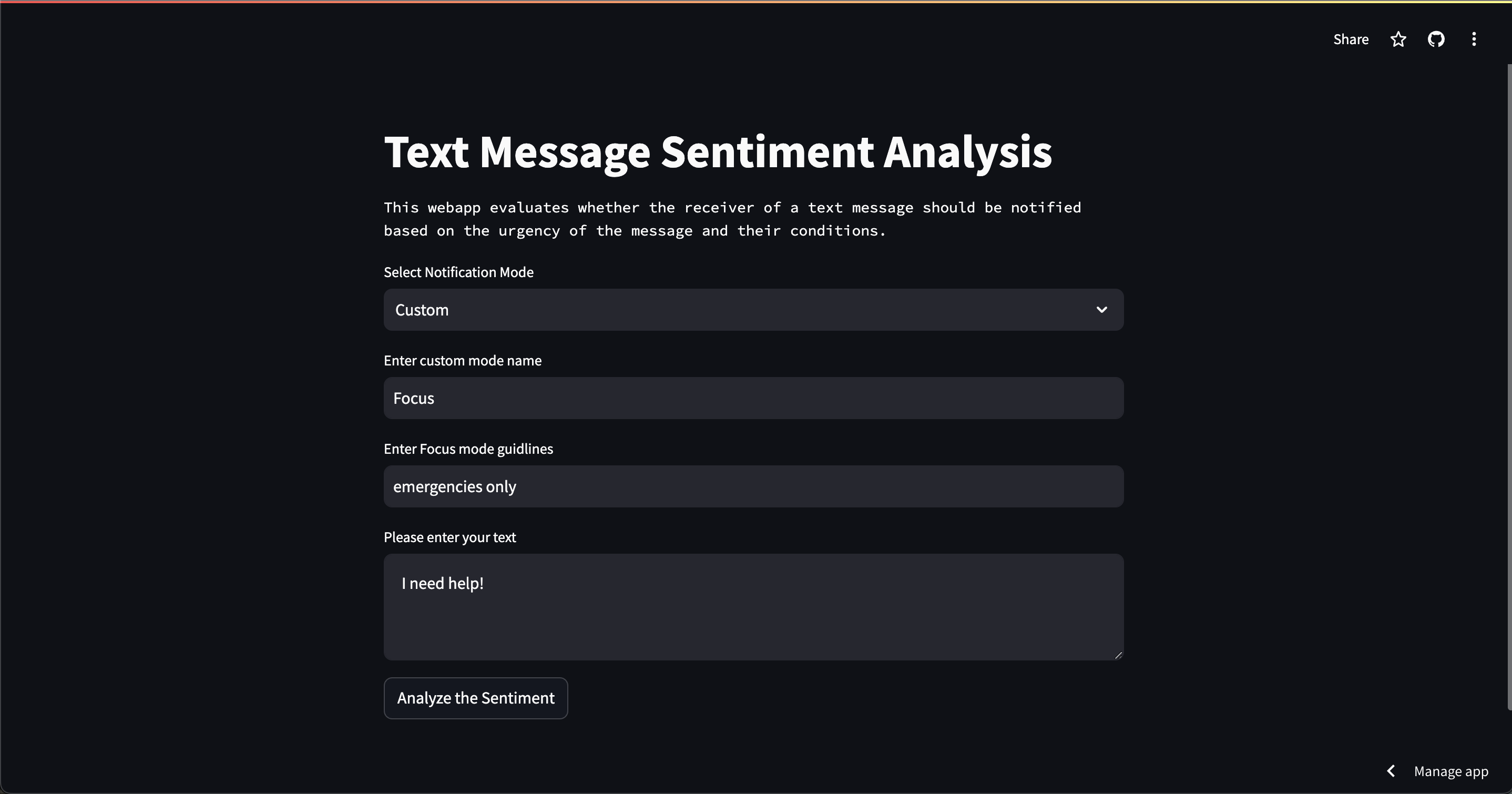
Custom mode with urgent text
-
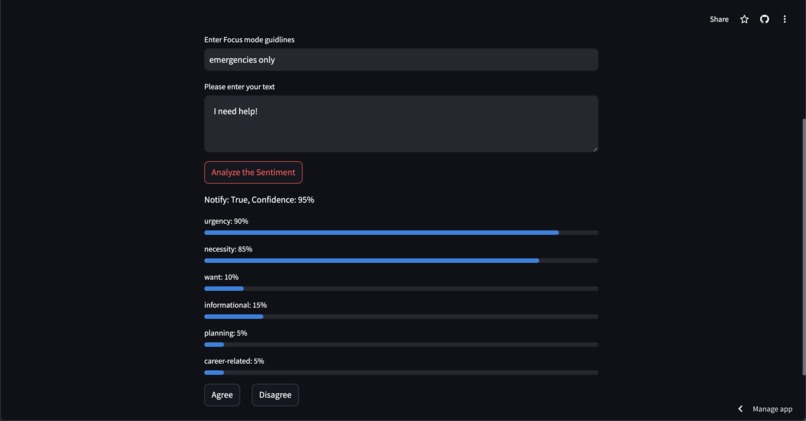
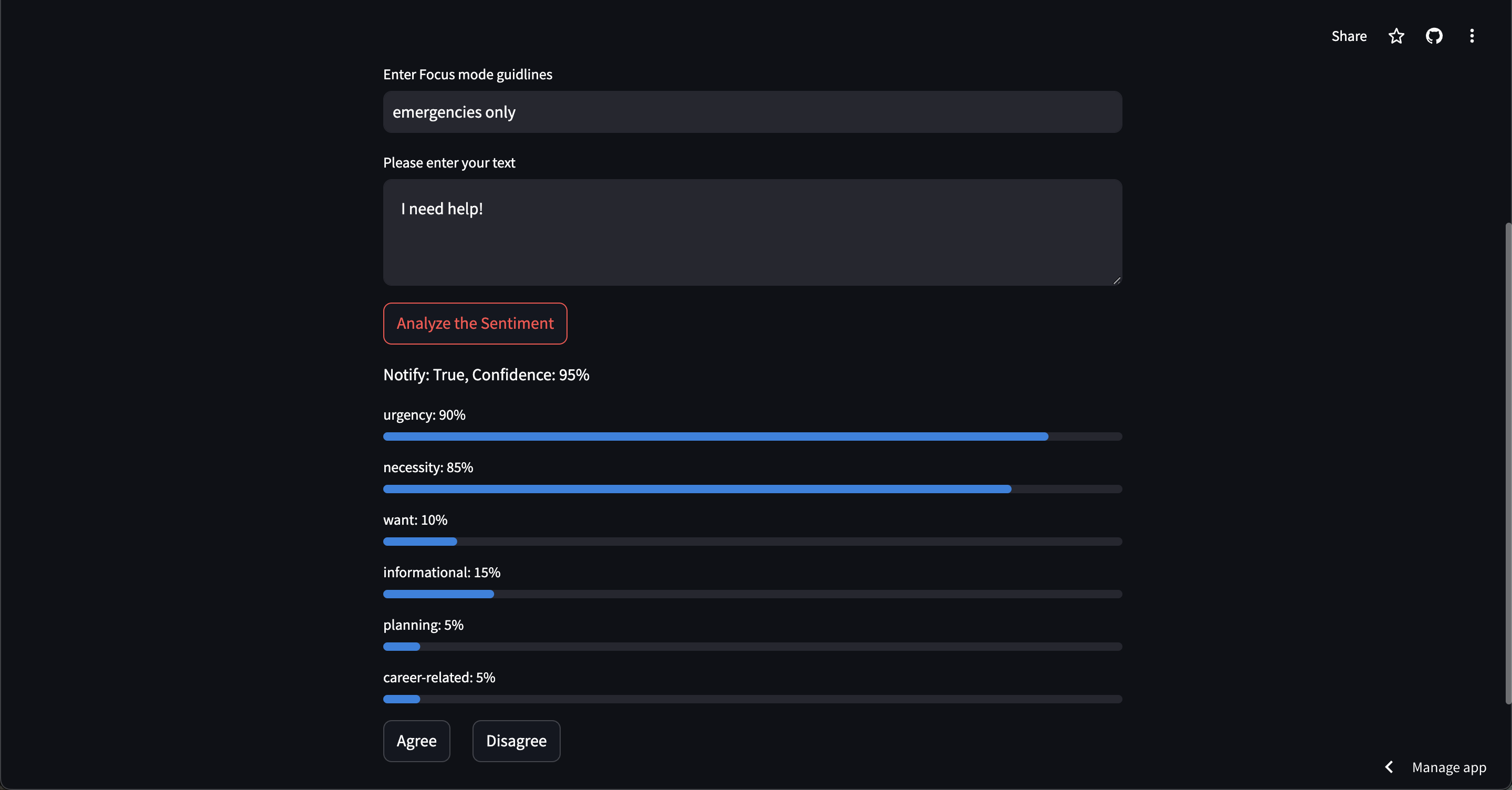
Results with notify as true

Inspiration
We receive many text messages every day – some of which are useful, and some of which are not. Receiving notifications for every single text message distracts us from work, school, social events, etc. However, turning off notifications and turning on "Do Not Disturb" can cause us to miss important messages. We wanted to build a solution using natural language processing that automatically filters messages so we can focus on the world around us.
What it does
Our proof of concept takes in two inputs: the text message and the user’s current activity or do-not-disturb mode (meeting, work, social events, and available). These modes determine the threshold for how urgent a text message needs to be for the user to be notified. For example, suppose the user is in an important meeting. In that case, they can only answer text messages regarding emergencies so other less urgent messages will be silenced until the user has more free time. Using an LLM, our tool determines the importance of a text message along the following criteria:
- Urgency: Does the message require an immediate response or action?
- Necessity: Is the sender requesting something that they need?
- Want: Is the user requesting something they want but don't necessarily need? These are optional and non-urgent
- Informational: Is this message purely informational? This could include a status update or news
- Planning: Is the message related to scheduling or organizing an event, meeting, or other future activity?
- Career-related: Is the message related to work, school, or other academic/professional activities? Each of these criteria is given a score out of 100 based on how they apply to the text message and all of this information is used to determine whether the receiver should be notified of the text message or not.
How we built it
We used the OpenAI API for the backend and Streamlit for the front end. Everything was programmed in Python. Our tool includes a dropdown menu for the user to select the mode of activity they are in and a textbox to enter the text they received. The results are displayed as progress bars out of 100, labeled with their corresponding criteria. The final decision of whether the receiver should be notified or not, along with the confidence level out of 100.
We fine-tuned the model by generating a dataset of text messages, their corresponding scores for each criteria, and whether they are important enough for a user to be notified immediately. Using OpenAI’s fine-tuning functionality, we fine-tuned a gpt-4o-mini model to recognize the importance of a text message with 0.1404 training loss.
In addition to the preset modes in the dropdown menu, there is also an option to create a custom mode. If the user selects this option, they will be able to name and define the mode and the LLM will use that definition in its decision making. Lastly, we added buttons at the bottom for the user to input whether they agree with the decision made by the LLM or not. This data gets stored in a MongoDB database to be used to fine-tune the model towards the user’s preferences.
Challenges we ran into
At first, we chose to go in the direction of patient safety and train a computer vision model to recognize surgical tools going in and out of a patient’s body to ensure that nothing gets left behind. We tried using roboflow and YOLOv8 to accomplish this but, several hours in, we were getting poor accuracy results due to the lack of quality data showing surgical tools in various positions, especially when they are partially covered by hands. After realizing that we were unable to obtain quality results from what we had, we decided to pivot to a new idea, something that was a problem in our daily lives.
As we shifted to our new project, we knew that we could not implement a full app and instead opted to create a proof of concept to demonstrate possible inputs and results. We ran into challenges in deciding what criteria should be used to determine the importance of a text message since it can be subjective and depends on the context of the situation. Therefore, we decided to add context as input so we could give the LLM more information. We also ran into issues formatting our dataset to fine-tune the LLM and formatting the LLM output itself. Implementing MongoDB was also a challenge because none of us had extensive experience with the tool, unlike the OpenAI API and Streamlit.
Accomplishments that we're proud of
We’re proud that we were able to let go of an idea that was not working for us and pivot to something completely different in a small amount of time. We were also able to collaborate smoothly using Github and debug our code together efficiently.
What we learned
We learned that it is very difficult to train an accurate computer vision model without the ability to gather our own data and only rely on datasets that we find online. We also learned how to quickly create and deploy a Streamlit app with MongoDB as a backend. Lastly, we learned how to generate data to fine-tune an LLM using OpenAI.
What's next for Do Not Disturb Pro Max
Going forward, we plan on implementing this solution into an actual mobile app that can block notifications from any messaging app. We will also give users more flexibility in deciding what messages should or should not be blocked based on factors such as the relationship of the sender to the receiver. It would also be beneficial to have the LLM continuously train on the user’s preferences and behaviors to improve the algorithm.
Built With
- openai
- python
- streamlit

Log in or sign up for Devpost to join the conversation.