Inspiration
Let's be honest: hackathons (and deep-work sessions in general) are a battle against your own attention span. I realized that right when I needed to be debugging my code, I was mindlessly opening new tabs for YouTube, Reddit, or Twitter. I tried existing website blockers, but the problem was that whenever my willpower faded, it was way too easy to just click a button and turn the blocker off. I needed a tool that added just enough friction to save me from myself. That’s how Distraction Eater was born.
What it does
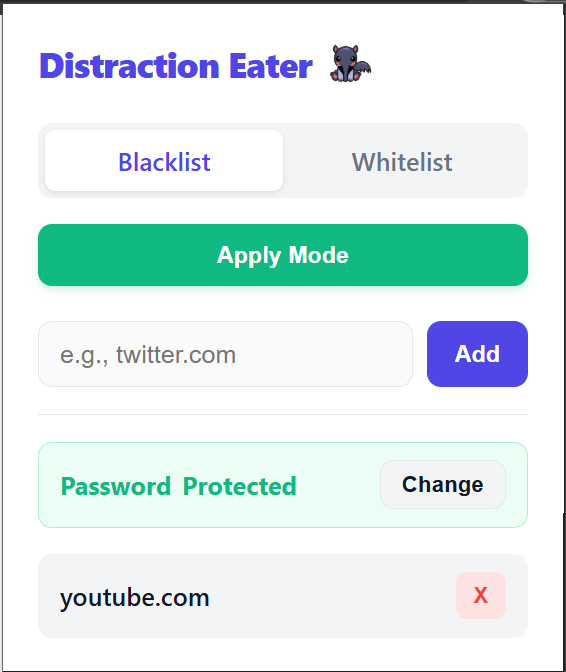
Distraction Eater is a lightweight Chrome extension that intercepts your attempts to visit time-wasting websites. You can run it in Blacklist mode (blocking specific sites) or Whitelist mode (blocking the entire internet except for your essential tools).
Password-Protected Willpower. When you set up the extension, you lock your settings behind a custom password. If you try to remove a site from your blocklist during a moment of weakness, you are forced to type in that password via a custom UI modal. It gives you that crucial second to pause, realize what you are doing, and get back to work.
How I built it
I wanted to keep the extension blazingly fast, so I built it using pure Vanilla JavaScript, HTML5, and CSS3—no heavy frameworks. I leveraged the modern Chrome Extension Manifest V3 API. For the heavy lifting, I used chrome.declarativeNetRequest to handle the URL interception with zero latency. For persistence, I utilized chrome.storage.local to securely save the user's password, mode preferences, and blocklist data. I also implemented a "Draft State" architecture in the popup, ensuring users can stage their settings before officially applying them.
Challenges I ran into
Building a Chrome extension is full of unique quirks! One of my biggest hurdles was dealing with Chrome's strict security around native browser dialogs; trying to use a standard prompt() for my password check kept closing the extension popup entirely. I had to pivot and build a completely custom, hidden HTML modal that slides down within the extension UI. I also wrestled with CSS Flexbox pushing my buttons out of bounds, hunted down some notorious missing bracket SyntaxErrors at 3 AM, and even fought through some Git remote origin conflicts right before deployment!
Accomplishments that I'm proud of
I am incredibly proud that I was able to build and ship a fully functional Minimum Viable Product (MVP) entirely on my own during this hackathon. Taking an idea from zero to a polished, working Chrome extension required me to wear every single hat—from UI/UX designer styling the custom password modals, to backend engineer wiring up the Manifest V3 routing and local storage. Delivering a complete, end-to-end solution that actually solves the core problem without relying on a team is a huge personal win.
What I learned
I learned a ton about the Chrome Extensions API, specifically how service workers (background.js) communicate asynchronously with the frontend (popup.js). I also got a crash course in advanced CSS styling (using CSS variables for a consistent theme) and learned how to properly manage Git version control when pushing local repositories to GitHub under a time crunch.
What's next for Distraction Eater
Rage-quit prevention: I want to make it ridiculously hard to turn off when your willpower tanks. Think blocking the Chrome extensions page completely during a focus block, or forcing you to type a 100-character random password just to unlock the uninstall button.
Earning your doomscrolling: I want to add a system where you actually earn your break time. If you grind for 60 minutes straight without trying to open Reddit or Twitter, the app rewards you with a 5-minute window of unblocked internet.
Going full desktop mode: Right now it's a Chrome extension, but the ultimate goal is to build a lightweight native app. That way, I can lock down the internet at the system level so you literally can't cheat the system.

Log in or sign up for Devpost to join the conversation.