-
-
Custom Attention Vs SDPA
-
Speed Result vs Baseline
-
Agentic Optimization Loop
-
Optimization Loop Result
Distraction - A faster GPU Kernel for Transformer Layers
A from-scratch GPU implementation of Transformer self-attention that runs up to 46× faster than the PyTorch baseline on the official test shapes, with every shape passing the accuracy check.
How it addresses the problem statement
Problem Statement 3 asks for a Transformer layer accelerated with custom GPU kernels, graded against a baseline implementation number by number. The tolerance is the hard part: the obvious routes to speed — lower precision, mathematical shortcuts — are exactly the routes to failing.
The starting point was measurement, not optimization. Profiling the baseline showed that attention is not limited by arithmetic. At long sequences, under a third of the time is spent calculating; the rest goes on moving one enormous table — the grid of relevance scores that attention produces — out to the graphics card's main memory and reading it back, five separate times.
So the solution stops moving it. The attention kernel builds that grid in small pieces that never leave the chip. Each piece is created, scaled, masked, softmaxed and multiplied into the running result while still in fast local memory, then discarded. The full grid is never written anywhere.
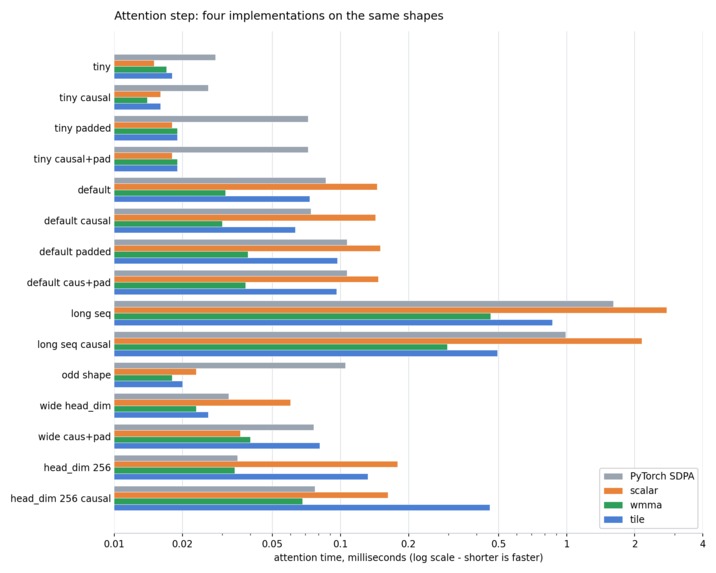
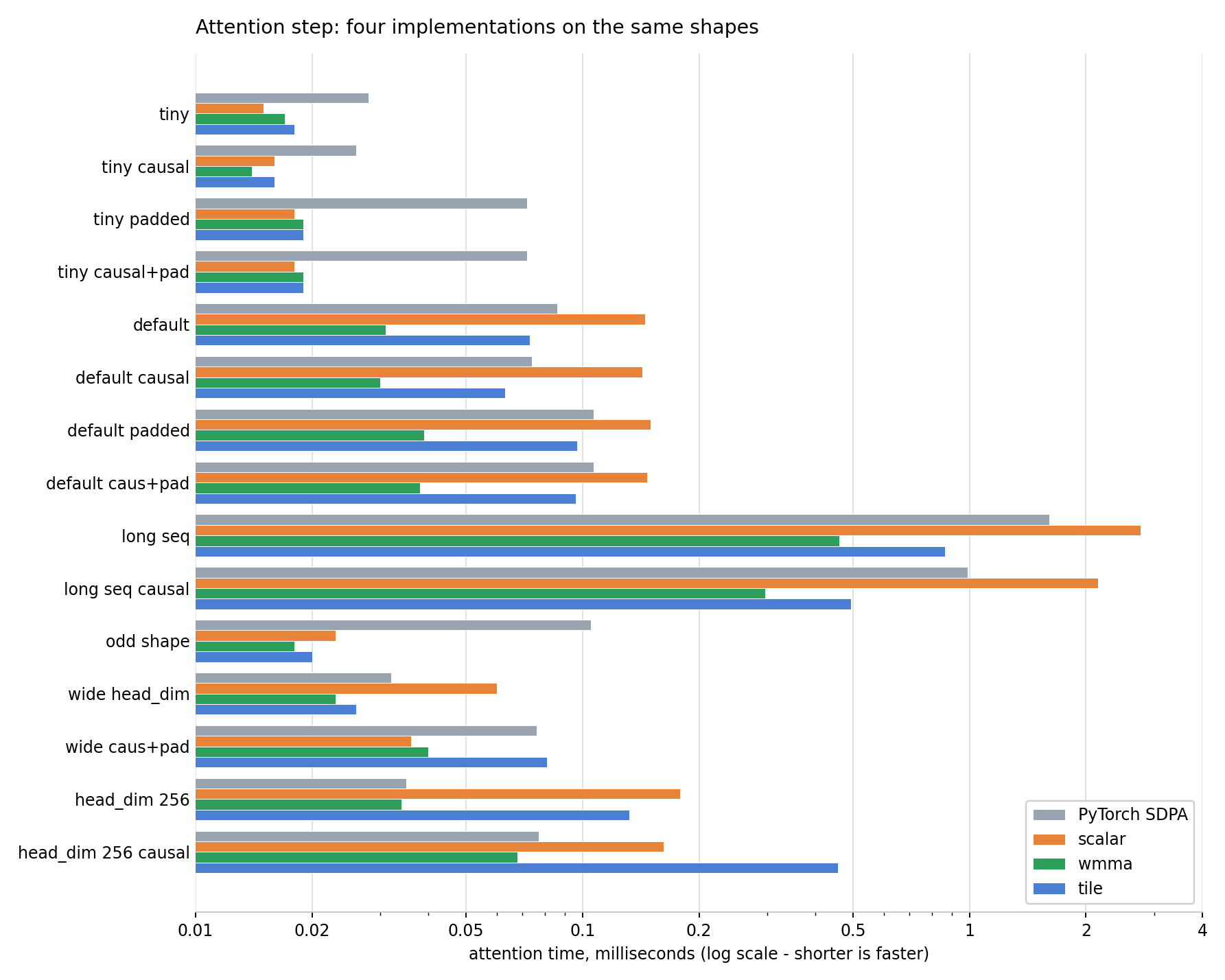
And it is faster than the library it replaces. Timed on the attention step alone, against PyTorch's own fused attention — SDPA, the fastest thing the framework ships — and against this project's two other implementations:

Log scale, so shorter is faster. The tensor-core kernel beats SDPA by 1.7× to 5.8× on every shape where the difference is measurable, and ties at the widest head size. Below about 0.02 ms the work is too small for anything to be decidable — which is the one place the simple kernel edges it.
One layer of the finished model. Grey is a decision made on the processor before anything is sent to the card, green a kernel on the card, amber the fused kernel that replaces four of them:

Every gate above is explained, with the measurement behind it, in the Technical Report — and drawn out in full, one decision at a time, in the dispatch graph.
The agentic optimization development loop
The obvious optimizations run out quickly. What is left is a long tail of changes worth a percent or two each — and that tail is where a person's limit shows. Not because any one is difficult, but because there are many, most will fail, and proposing, building and measuring one carefully enough to tell a small gain from noise costs about the same whether the answer is yes or no. Taken one at a time, the sensible move is always to skip the small ones.
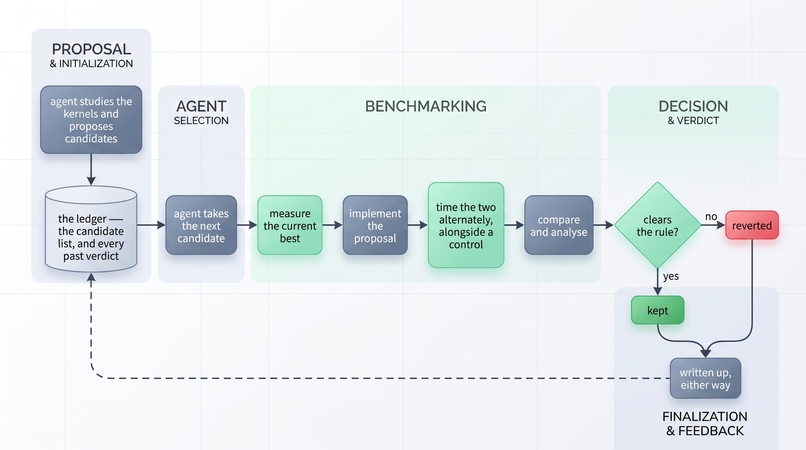
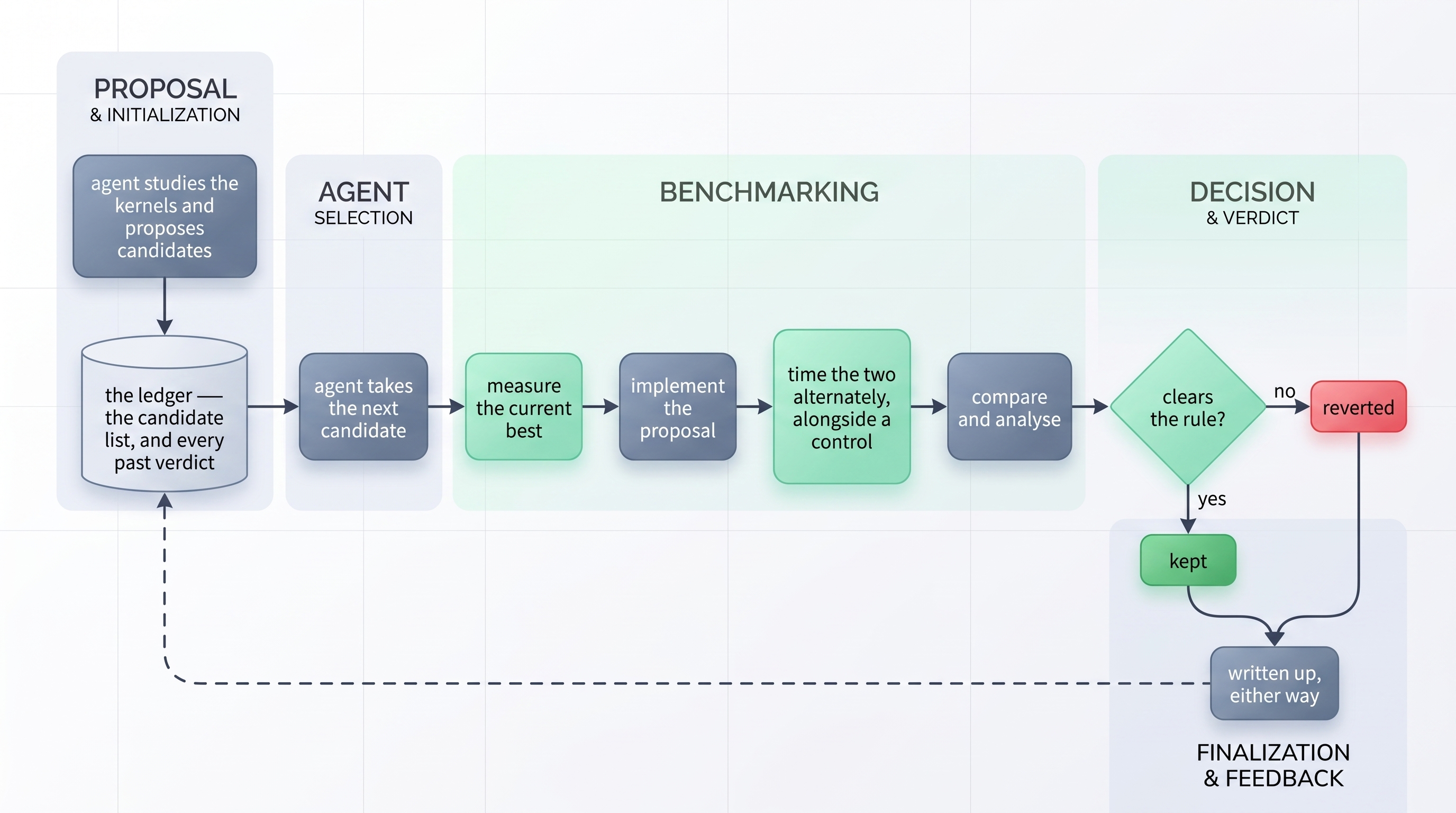
They stack, though: ten changes worth 1% each beat one worth 5%. So the tail was handed to a loop that runs closed — it proposes a change, builds it, times it against the current best, and keeps or reverts it on a fixed rule, then starts again.

Grey is the agent working, green a measurement. Both outcomes are written back to the ledger, so an idea that lost is never proposed a second time.
The rule is arithmetic, not judgement. A change is kept only if all thirteen shapes still pass the accuracy check, the overall score improves, and no single shape gets more than 1% slower — anything else is reverted on the spot. What the rule cannot catch is a change that is faster because it quietly made the problem smaller: a kernel that stops covering a case, a constant fitted on one shape and applied to all of them. Those pass every numeric check, so the loop's system prompt states up front what may be changed and what may not.
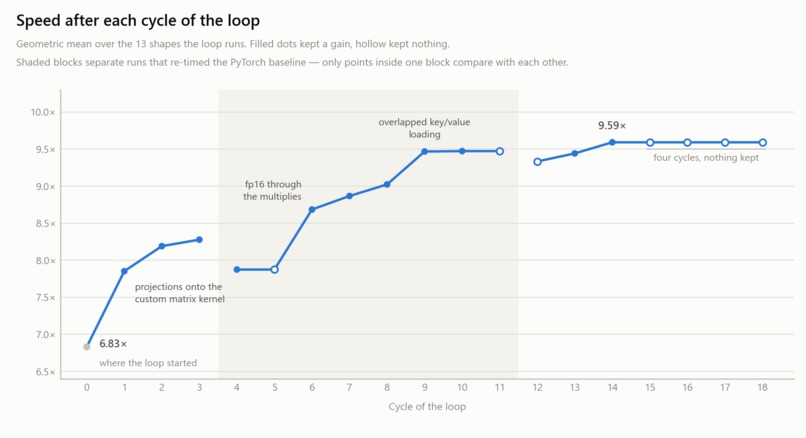
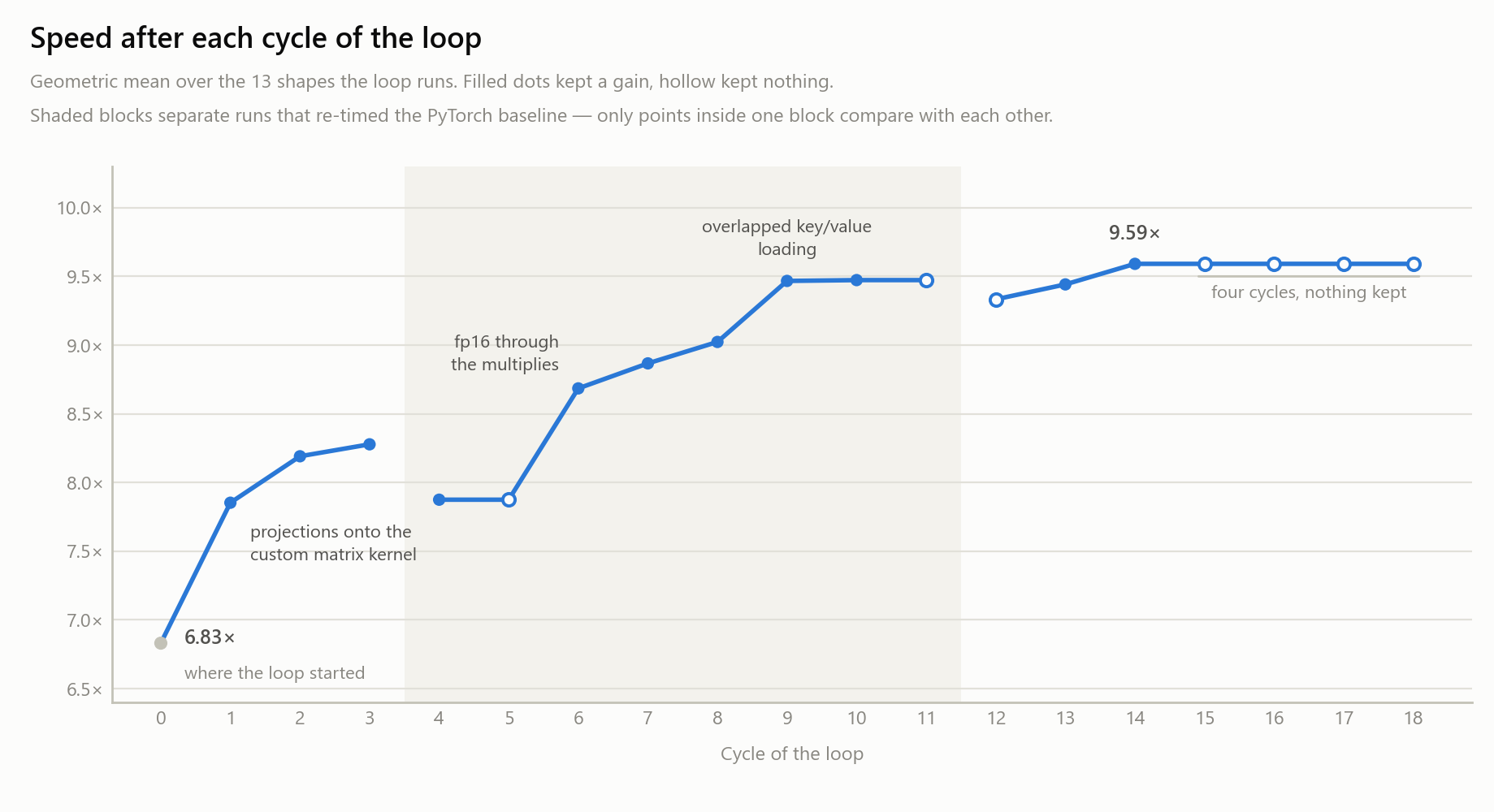
Nineteen cycles have run: twelve kept a change, seven kept nothing. Rejection being the normal outcome is the point rather than a disappointment — it is what makes a small candidate worth trying at all.

The first eighteen cycles, as a geometric mean over the thirteen shapes the loop runs: 6.83× to 9.59×. Filled dots kept a gain, hollow kept nothing.
The gain here is throughput, not insight. Every cycle is a full rebuild, a correctness check and a timed comparison, run on every candidate whether it survives or not — careful, repetitive work, and exactly the part of optimizing that gets dropped when there is not enough of the day left for it. Running it unattended changed what was worth attempting: an idea no longer had to look promising enough to justify an afternoon, only plausible enough to join a list.
Every cycle, accepted or rejected, has a row in the optimization ledger; the system prompt it works to is in the repo.
The optimizations it produced
Twenty-five optimizations in all address what the profiling exposed:
| Optimization | What it does |
|---|---|
| A custom attention kernel | Attention runs on a kernel written for this project rather than PyTorch's own fused attention, SDPA. Timed against it on the attention step alone, it beats SDPA by 1.7× to 5.8× on every shape where the difference is measurable, and ties at the widest head size — the score grid never leaves the chip, both matrix multiplications run on the card's dedicated matrix-multiply hardware in fp16 (same precision as the alternative, roughly twice the speed), and the tile shape is swept per head size rather than fixed once |
| Kernel fusion | Neighbouring steps become single kernels, so intermediate results stay on chip. Below a model width of 64, the entire post-attention chain — normalise, expand, activate, shrink, normalise — is one kernel |
| Skipping discarded work | Under causal masking over half the score grid would be computed and thrown away; those regions are never computed |
| One combined projection | Query, Key and Value become a single wide multiplication instead of three narrow ones too small to fill the card |
| CUDA graph replay | On small shapes the card finishes each instruction before the next arrives. The whole kernel sequence is recorded once and replayed as a single submission |
| Reading data in place | Query, Key and Value are read where they already sit rather than copied into shape first |
| Every large multiplication on a hand-written kernel | The projections and the feed-forward multiplies went to PyTorch's library routine, which at narrow inputs does not use the matrix-multiply hardware at all. A custom fp16 kernel runs the same multiplications 1.2× to 1.7× faster |
Seven of the twenty-five are listed here — the Technical Report covers all of them, each with the measurement that justified it.
Results
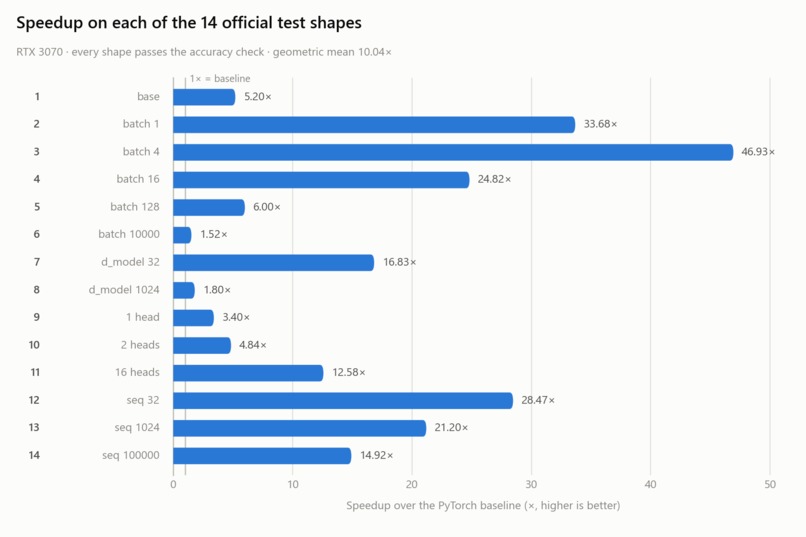
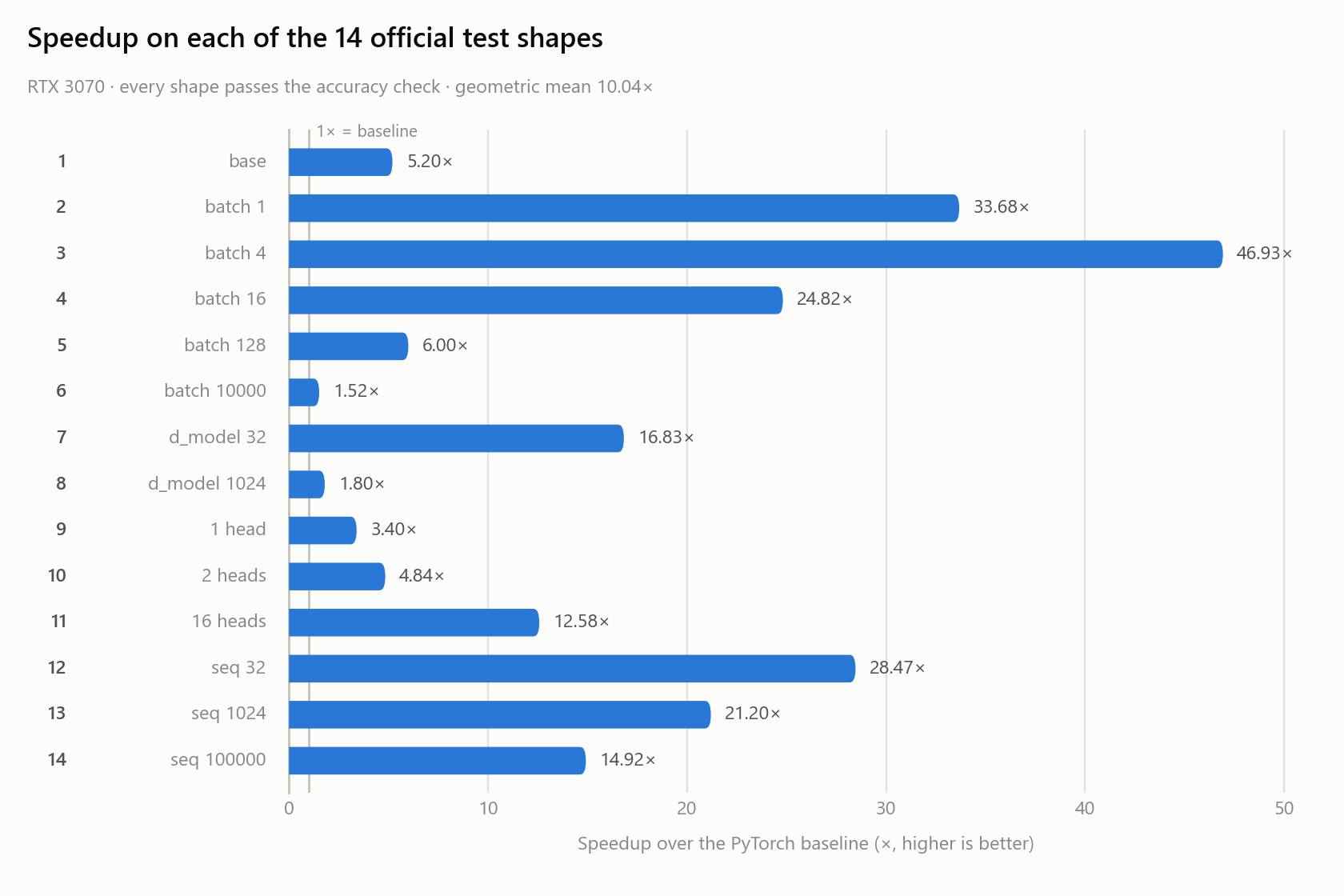
All fourteen official test shapes, on an RTX 3070. Every one passes, with zero failing values out of the 6.93 billion compared.

Every shape runs faster than the baseline. The gains are largest where the card was sitting idle — a small batch spends almost all its time waiting for instructions rather than computing — and smallest on the two shapes the card itself limits rather than the code.
| Across all fourteen shapes | Speedup |
|---|---|
| Best — batch of 4 | 46.93× |
| Median | 13.75× |
| Geometric mean | 10.04× |
| Worst — batch of 10,000 | 1.52× |
| Shapes failing accuracy | 0 of 14 |
The two weakest shapes are both cases where the baseline was already efficient, which says more about the denominator than about the kernels: the widest model keeps the card busy either way, and a batch of 10,000 has a working set that does not fit in 8 GB. The largest shape — 32 sequences of 100,000 words — exceeds the card's memory outright, so the model predicts the requirement in advance and processes it in slices rather than failing.
Challenges I ran into
Test case 14 should not have been runnable at all — and it runs. It is 32 sequences of 100,000 words, needing 12.2 GB of input on a card with 8 GB; the original implementation is worse off still, wanting a 10 GB mask and a 20.5 TB grid of scores. Windows does not fail cleanly on this — it silently spills into system memory and grinds, which hung the machine outright the first time. So the model now estimates what it needs before starting and processes the batch in slices, which is mathematically identical because sequences in a batch never interact. Peak usage fell to 3.8 GB and the case passes with zero failing values out of 6.55 billion, at 22.84×.
AI drifts, and it drifts towards complexity. Asked to implement a feature, an agent will happily return a redesign of something else; asked a yes-or-no question, three paragraphs of terminology to say "no". More than once, elaborate restructuring was proposed where the real answer was a single threshold — one line, one number, measured. What worked was keeping the objective written down and visible, asking for the one-line version before the explanation, refusing any proposal that could not be stated plainly, and requiring a measurement rather than an argument.
What I learned
How NVIDIA's GPU generations differ, and how to get the most out of one. A card has a fixed budget of registers and on-chip memory, its own matrix-multiply unit, and a number format it happens to be fast at — on this one, fp16 runs 2.0× to 2.25× quicker at the same precision. Every tuned value here was measured on this card and does not transfer to another.
Two ways of reaching the matrix-multiply hardware. I wrote attention with wmma, where you
manage fragments of the matrix yourself, and again with NVIDIA's newer tile model, which is far
easier to write. The hand-written one won every case; understanding why the easier one lost was
worth more than the difference.
Profiling with Nsight, including how it misleads. It shows whether a kernel is waiting on arithmetic or on memory — but traced timings are inflated, and a recorded command list logs as one opaque entry, which made a pass read as "2 kernels, 0.3% busy" when it was really 75 kernels at 95.1% busy.
Reading performance instead of guessing at it. The useful question was always whether a kernel waits on arithmetic or on data. Here it was always data: attention uses the matrix-multiply units only 13% of the time, so doing less arithmetic would buy nothing.
AI is confident whether or not it is right. A wrong kernel reads just as reasonably as a correct one — only a measurement separates them. So every optimization was left switchable, and every tuned number written down beside the run that produced it.
Development tools used
| Tool | How it was used |
|---|---|
| Claude Code (Claude Opus) | Primary development environment for writing, debugging and documenting the kernels — and, for the later optimizations, the autonomous loop itself: it proposed each change, built it, measured it, and kept or reverted it on a fixed rule |
| NVIDIA CUDA Toolkit 13.3 | nvcc compiler, plus cuobjdump for inspecting the compiled GPU instructions |
| Microsoft Visual C++ (MSVC 14.44) | Host compiler, located automatically via vswhere and vcvarsall.bat |
| ninja | Build system, driven automatically by PyTorch's extension loader |
| NVIDIA Nsight Systems | Timeline profiling — what share of each pass the GPU spends actually running kernels |
| NVIDIA Nsight Compute | Per-kernel counters — whether a kernel is limited by arithmetic, memory bandwidth, or neither |
| Custom benchmark dashboard | A local web application built for this project, wrapping the benchmark and verification scripts and enforcing the measurement rules automatically |
| Git | Version control |
APIs used
No web or third-party service APIs. The APIs in question are compute interfaces:
| Interface | What it provides |
|---|---|
| CUDA C++ / CUDA Runtime API | The kernels themselves |
| nvcuda::wmma | Fragment-level interface to the GPU's matrix-multiply hardware |
| CUDA tile programming model | NVIDIA's newer block-level interface, used to build a third implementation as a comparison |
| CUDA Graphs | Recording and replaying a kernel sequence to remove launch overhead |
| PyTorch C++ extension API | Compiles the CUDA sources and exposes them to Python |
| Python http.server | The dashboard's web server — ThreadingHTTPServer from the standard library, serving its own JSON endpoints. No web framework |
| Browser fetch and localStorage | The dashboard's front end talks to that server with fetch and remembers the chosen settings in localStorage. No other browser API is used |
| Nsight command-line interfaces | The dashboard drives profiling by invoking ncu and nsys directly and parsing their CSV output |
| Anthropic Claude (Opus) | AI assistance — kernel development, measurement, documentation |
| Google Gemini Flash | AI assistance — supporting questions and concept checks |
Libraries and frameworks used
| Library | How it is used |
|---|---|
| PyTorch 2.12.0+cu132 | Tensors, the baseline implementation, and the benchmark harness |
| cuBLAS (via PyTorch) | The projection and feed-forward matrix multiplications |
| PyTorch's cpp_extension | Just-in-time compilation of the CUDA extension |
| Python standard library | Everything else, including the whole dashboard — its web server, its job queue and all of its parsing are standard-library modules. No NumPy, no web framework |
| Hand-written HTML, CSS and JavaScript | The dashboard's front end is one HTML file, one stylesheet and one script, with no framework, no build step and no CDN — nothing is fetched from a third party at page load |
| CUDA-Agent (ByteDance / Tsinghua) | A published CUDA kernel development agent. Not usable as shipped — it targets a different sandbox and newer hardware — but its optimization ordering and verification checklists were adapted into a project-specific procedure |
Deliberately not used: Triton, and therefore torch.compile, neither of which has a working
Windows build in this environment.
Datasets and assets used
No external datasets. This is a kernel optimization problem, not a modelling one — correctness is judged by comparing two implementations of the same mathematics on identical inputs, so no real-world data is required or would add anything.
| Asset | What it is |
|---|---|
| Randomly generated tensors | Produced by the provided benchmark harness from a fixed seed, so every run is reproducible and both implementations see identical inputs |
| The 14 official test shapes | Transcribed from the problem statement's Appendix into a preset file, editable through the dashboard |
| Model weights | Randomly initialised, then copied from the baseline into the optimized model so both compute with identical parameters |
Documentation
- Technical Report — the full write-up: the baseline analysis and profiling that motivated every change, the design decisions, all twenty-five optimizations, the dispatch architecture, complete results, and limitations.
- README — installation, build, verification, and how the code is organised.


Log in or sign up for Devpost to join the conversation.