-
-
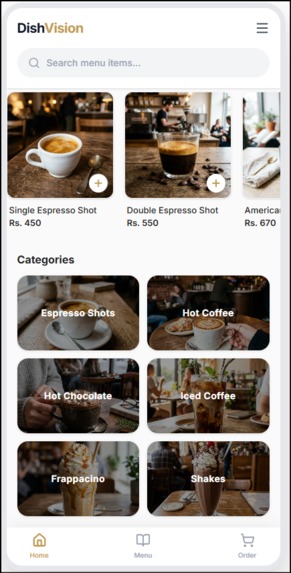
main frontend
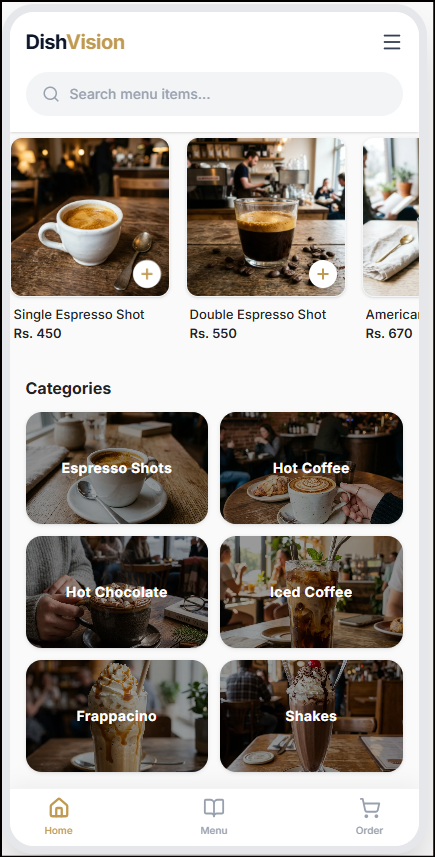
Inspiration
Have you ever sat at a restaurant, looked at a plain text menu description like "Gourmet Truffle Burger", and wondered: How big is it really? How is it plated? Is it worth the price?
We’ve all experienced the uncertainty of ordering food based on text alone or worse, receiving a dish that looks completely different from what we imagined. Traditional paper and static PDF menus haven't evolved in decades. We wanted to solve this dining friction by creating a bridge between digital ordering and physical dining: DishVision. Our goal was simple yet ambitious: let diners view life-sized, photorealistic 3D models of dishes directly on their physical dining table before placing an orderwithout forcing them to download any mobile app.
What It Does DishVision turns static restaurant menus into interactive, web-native 3D spatial experiences:
- Table QR Code Instant Access: Diners sit down, scan a QR code placed on their table using their phone camera, and instantly open the restaurant's menu in their browser.
- Table-Side 3D WebAR Projection: Tap View on Your Table (AR)to render true 1:1 scale 3D food models onto the physical table in real-time using native mobile AR (WebXR on Android Chrome and AR Quick Look on iOS Safari).
- Multi-Tenant Restaurant Platform: Built for any restaurant manager to set up custom branded menus (
/burger-shack), manage pricing, upload 3D assets (.glb&.usdz), and update items live.
How We Built It
We built DishVision as a full-stack, edge-optimized web application:
Frontend Framework: Built with Next.js 16 (App Router), TypeScript, and tailwind CSS for a responsive, modern dark-mode mobile UI.
Spatial 3D & WebAR Engine: Leveraged Google’s @google/model-viewer library to stream interactive 3D objects and trigger native mobile spatial projection.
AI Engine: Integrated Google Gemini 2.5 API using the @google/genai SDK to generate structured JSON responses for mouth-watering descriptions and nutritional data.
Database & Auth: Used Supabase (PostgreSQL) for multi-tenant relational data management.
Asset CDN:Delivered 2D thumbnails and heavy 3D mesh files (.glb & .usdz) through Cloudinary Edge CDN for ultra-fast mobile loading.
Challenges We Ran Into
Cross-Platform WebAR Compatibility: Rendering 3D AR models natively without an app install meant handling two distinct AR pipelines: WebXR Scene Viewer for Android and native USDZ AR Quick Look for iOS. We designed a fallback system and in-app browser detection to ensure smooth experiences on both platforms.
Heavy 3D Asset Loading: 3D food models can be large. We integrated Cloudinary CDN caching and loading skeleton spinners inside <model-viewer> to ensure fast table-side performance even on cellular networks.
Strict AI JSON Output: Getting AI models to return consistent JSON without markdown artifacts required configuring Gemini's strict responseMimeType: "application/json" schema.
What We Learned
Techniques for web spatial rendering with @google/model-viewer across iOS and Android.
Building multi-tenant routing structures in Next.js App Router for scalable SaaS platforms.
What's Next for DishVision Direct In-AR Ordering & Table Payment:Allowing diners to add items to their cart directly from the 3D table viewer and pay via Apple Pay / Google Pay. 3D Customization:Letting users customize toppings (e.g., add extra cheese, remove onions) and watch the 3D model update live on their table. Restaurant Analytics: Giving owners insights into which 3D dishes get viewed most in AR to optimize menu layout.
Built With
- 3d
- ai
- artificial
- augmented
- food
- full
- generative
- intelligence
- mobile
- modeling
- multi-tenant
- reality
- restaurant
- stack
- tech
- webar

Log in or sign up for Devpost to join the conversation.