

Inspiration
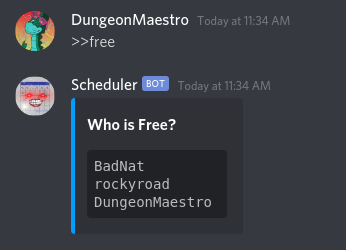
Within our friend group, we are constantly trying to figure out when who is free at different times throughout the day. We all have different schedules, and it is difficult to keep up with what everyone is doing.
What it does
This Discord Bot provides a number of commands which allow users to create and manage schedules, update statuses, and view other members' calendars. You can add and remove events from your calendar, view your schedule laid out in text or in an image format, and update your status based on what you are doing. This allows for more freedom than the basic Discord status. Additionally, the bot will automatically update your status to match any events you currently have going on.
How we built it
Using the Discord API through Discord.js, we were able to build a bot that scans messages to look for specific commands. It stores users' schedules and other information in a JSON file on the backend.
Challenges we ran into
We were faced with the problem of how to translate the JSON file which contains the information for the schedule into an image format for easy viewing. We also had to figure out a good way of reading and writing data to some storage on the backend. Additionally, we had to work around the way Discord.js caches information from the API.
Accomplishments that we're proud of
We were able to generate the schedule images by first laying out a basic webpage using HTML and then creating a PNG based on that HTML. We are also very proud to have created something that we can use on a regular basis. We definitely plan on using this for our personal schedules.
What we learned
We learned how to use the Discord.js package to interface with the Discord API. Additionally, we figured out how to store users' schedules in a backend that can be easily accessed later.
What's next for Discord Schedule Manager
We already have some plans to add this bot to additional servers, such as for some clubs at our university.
Built With
- discord.js
- git
- github
- javascript
- json
- node.js


Log in or sign up for Devpost to join the conversation.