Director's Sandbox
Team Spark
Inspiration
World models are having their moment — you can type a sentence and get back a fully explorable 3D world. But when we first played with them, we hit the same wall every time: you can walk around the world, but you can't do anything with it. It's a beautiful, silent, empty set with no crew, no camera operator, and no story.
We're a team that grew up loving film as much as code, and we kept asking the same question: what if a generated world wasn't the finished product, but the film set? Marble gives you the location. We wanted to give you the director's chair.
What it does
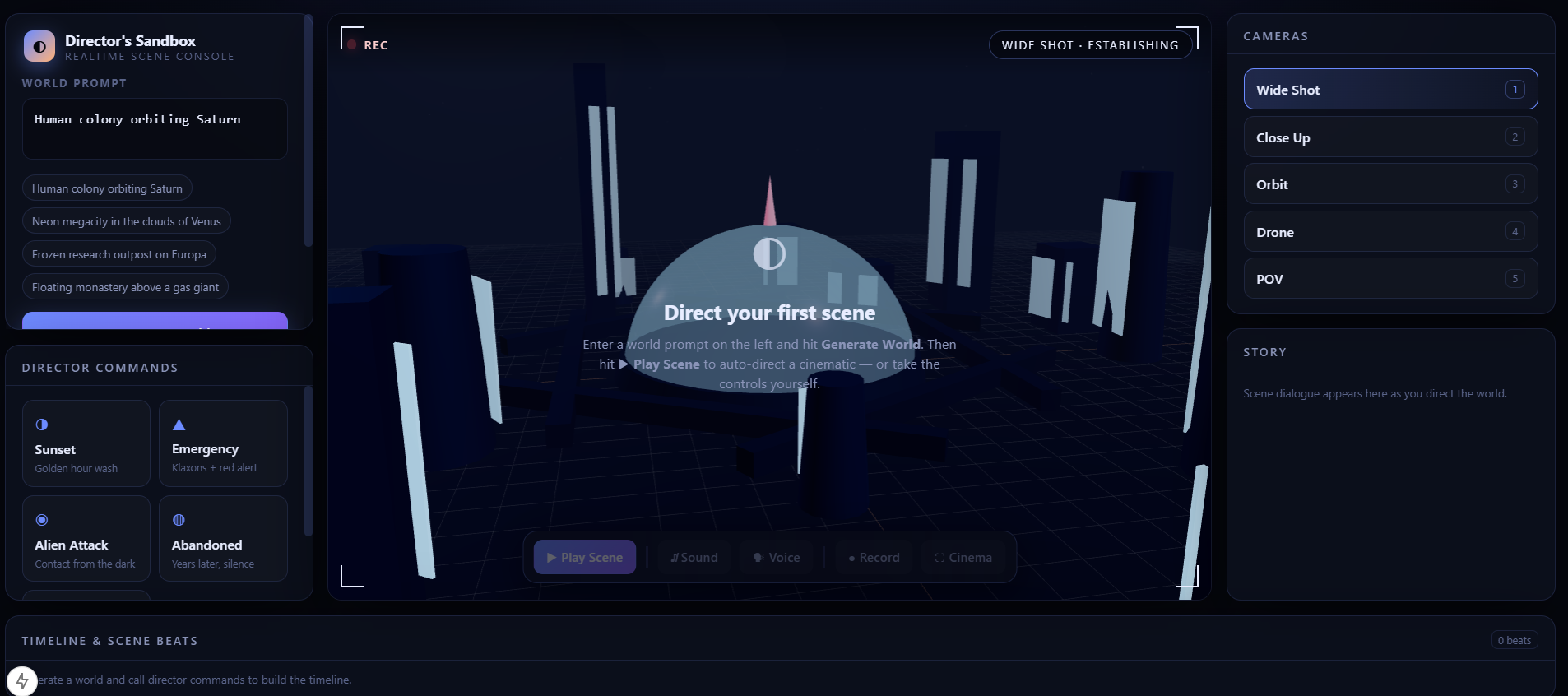
Director's Sandbox turns a text prompt into a directable cinematic scene.
- Generate — You describe a world ("neon megacity in the clouds of Venus"). World Labs' Marble renders an explorable 3D world, which drops into the viewport as a live 360° panoramic backdrop.
- Direct — You shape the scene in real time: call director commands (Golden Hour, Red Alert, Alien Contact, Ruins, Downpour) that re-light and re-score the world, cut between cinematic cameras (Wide, Close-Up, Orbit, Drone, POV), and build a story timeline of beats.
- ▶ Play Scene — Our AI Auto-Director takes your single prompt and composes a full cinematic arc — Establish → Golden Hour → a prompt-aware crisis → Aftermath → Resolution — auto-cutting cameras, cross-fading moods, and playing dialogue on a timer.
- Score & Voice — A procedural soundscape (synthesized live, no audio files) reacts to every mood, and voice narration reads the story aloud with distinct delivery for narration vs. characters.
- Record — One click captures the viewport to a downloadable clip, so your directed scene becomes a shareable film in seconds.
From one line of text to a directed, scored, narrated, recorded scene — in about a minute.
How we built it
- Frontend / engine: Next.js 15 (App Router) + React 19 + TypeScript, with a custom Three.js real-time renderer for the scene, lighting, moods, camera rig, and effects.
- World generation: World Labs Marble API (
worlds:generate→ async operation polling → assets). The key stays server-side in a Next.js API route; the client polls for the ~5-minute job and merges the result in live. - Showing the real world: We load Marble's equirectangular panorama as the Three.js scene background + environment map, so the actual generated world wraps the camera and lights the geometry.
- AI Auto-Director: A prompt-aware scene-script generator that reads the world's spec and Marble's AI caption to choose shots, moods, cameras, and dialogue that fit that world.
- Soundscape: The Web Audio API — detuned oscillators, filtered noise, and a klaxon synth — cross-fading per mood. Zero downloaded assets.
- Narration: The browser SpeechSynthesis API, with distinct voice profiles.
- Recording: MediaRecorder over
canvas.captureStream()→ downloadable WebM.
Challenges we ran into
- A TLS man-in-the-middle broke every API call. Our dev machine's antivirus
intercepts HTTPS and re-signs it, so every World Labs request died with
UNABLE_TO_VERIFY_LEAF_SIGNATURE. We traced it to the intercepting cert and fixed it the right way — pointing Node at the local CA bundle viaNODE_EXTRA_CA_CERTS— instead of disabling TLS verification. - The interactive world viewer can't be embedded. Marble's viewer sends
X-Frame-Options: DENY, so an in-page iframe was impossible. We pivoted to rendering the world's panorama directly in our own Three.js scene — which turned out better, because now the director's cameras and moods work against the real world imagery. - The "generated model" looked like a gray blob. Our first pass loaded Marble's collider mesh, which is an untextured collision proxy. We switched to the panorama as the hero backdrop and made any geometry reflective, so it reads as the real world.
- Generation is asynchronous (~5 min). We couldn't block the UI, so we designed an instant local procedural scene that's fully directable immediately, then hot-swaps in the real Marble world the moment it finishes rendering.
Accomplishments that we're proud of
- You never stare at a loading screen. The scene is directable in seconds and upgrades to the real generated world seamlessly — a genuinely good handling of a slow AI pipeline.
- The Auto-Director actually adapts. A forest gets a storm, a city gets a grid failure, a temple gets a contact event — the story fits the world, not a canned script.
- It's an AI-native experience, end to end — generation, direction, scoring, narration, and capture — with the whole cinematic layer self-contained (no extra API keys), so it demos reliably every single time.
- We turned two hard blockers (TLS interception, un-embeddable viewer) into better design decisions rather than hacks.
What we learned
- World models are most powerful when treated as a starting point for interaction, not a final render. The magic is in what the user does next.
- Real APIs are asynchronous and imperfect — designing for the wait (instant fallback + live swap) matters as much as designing for the result.
- You can build a surprisingly rich, immersive audio-visual experience with just the browser's native APIs (Web Audio, SpeechSynthesis, MediaRecorder) and no assets.
- Constraints (a blocked iframe, a proxy) often point you toward a cleaner architecture than the one you started with.
What's next for Director's Sandbox (Team Spark)
- Branched narratives — let the director choose story forks that reshape the scene, targeting the Branched Narrative track.
- Populate the set — drop in TRIPO-generated 3D characters and props to act inside the world.
- True walkthrough — export Marble's high-quality mesh for free-fly navigation, and bring the experience to PICO headsets for a spatial, in-VR director's chair.
- AI dialogue & shot suggestions — an LLM co-director that writes scene-specific dialogue and proposes the next cut.
- Timeline editing & export — scrub, re-order beats, and export a finished cut with synced score and narration.
Built With
- marble
- webxr
- worldlabai

Log in or sign up for Devpost to join the conversation.