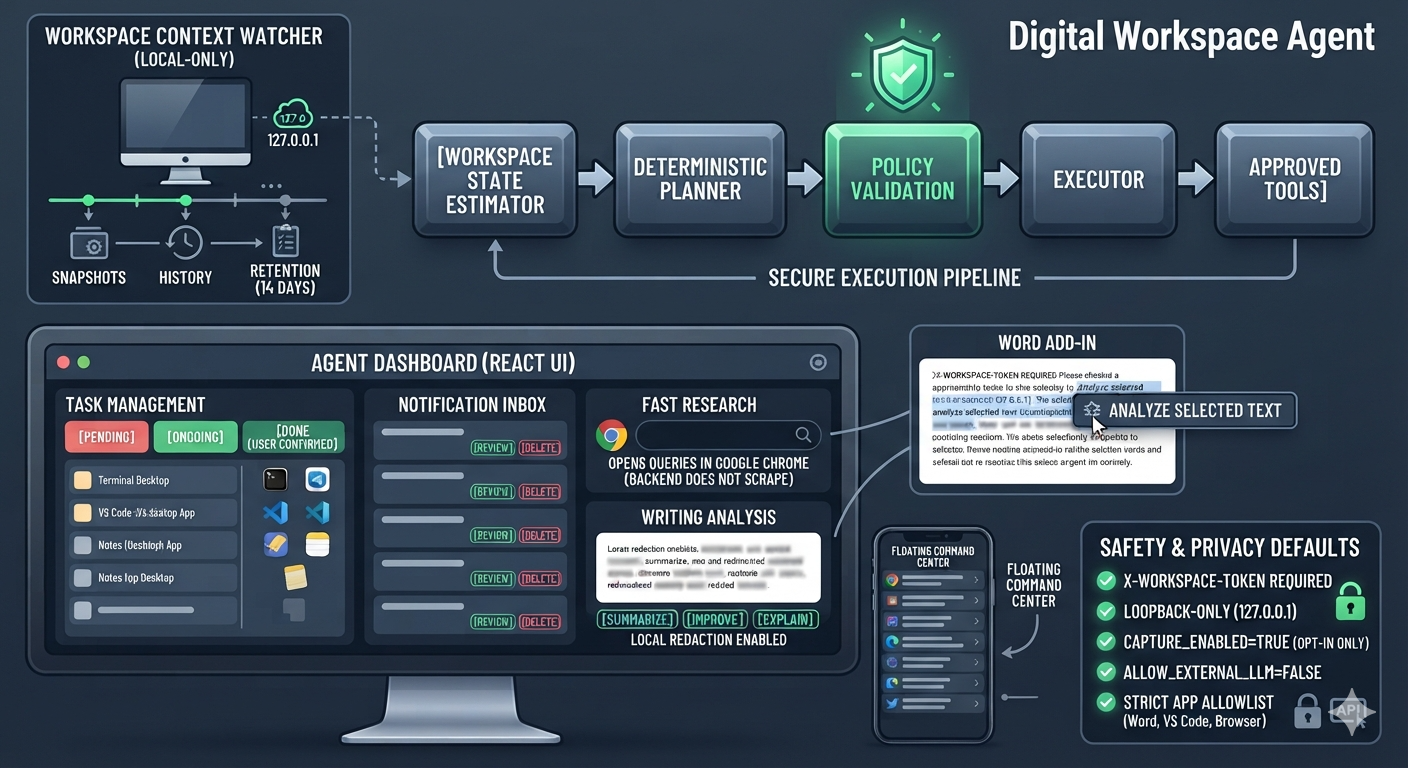
Digital Workspace Agent
A privacy-conscious, local workspace assistant. It observes permitted workspace metadata, builds a deterministic plan, validates that plan against a safety policy, and executes only approved tools.
State estimator -> Planner -> Policy validation -> Executor -> Approved tools
The project is designed to assist with workspace context, tasks, research, explicitly submitted writing, and notification organisation. It is not an unrestricted computer-control agent.
What is implemented
- Workspace state snapshots, history, retention, and context diffs.
- Deterministic State -> Plan -> Validate -> Execute orchestration.
- Task management with
pending,ongoing, and user-confirmeddonestates. - Fast Chrome research: explicit searches open as a query in Google Chrome; the backend does not scrape or summarise result pages.
- Strict desktop-app allowlist: Terminal, VS Code, Browser, Calculator, Notes, Microsoft Word, and Files.
- Notification inbox with review and delete controls.
- Explicit writing analysis (summarize, improve, explain, ideas) with local redaction, including a Word add-in that submits only selected text.
- A unified React dashboard, Chrome companion, and floating desktop widget.
- Local API token authentication, strict CORS, request bounds, SQLite WAL/busy timeout, retention cleanup, and tests.
Privacy and safety defaults
- The backend is loopback-only by default (
127.0.0.1). - Every
/api/*endpoint requiresX-Workspace-Token. - The browser extension has no content script and never records typing. It can summarize a page or analyze selected text only after a click.
- Local state collection is disabled until
CAPTURE_ENABLED=trueis set. - The planner never auto-creates tasks or performs background web research. It proposes assistance instead.
- The app launcher never passes user input to a shell and rejects unknown applications.
- Browser/LLM content processing requires explicit consent; external LLM processing is disabled by default.
Quick start
Prerequisites: Python 3.11+, Node 20+, and npm.
scripts\setup.bat
scripts\run_backend.bat
scripts\run_frontend.bat
On macOS/Linux:
./scripts/setup.sh
./scripts/run_backend.sh
./scripts/run_frontend.sh
The setup script creates or repairs .env, generates a private API token without printing it, installs pinned dependencies, and initializes the schema. Restart Vite after setup so VITE_API_TOKEN is loaded.
Open http://localhost:5173. To start ambient state metadata collection, first review .env and set CAPTURE_ENABLED=true, then run:
.venv\Scripts\python system-agent\local-agent\watcher.py
The optional floating command center can run beside the dashboard after setup:
.venv\Scripts\python system-agent\floating-widget\widget.py
Chrome companion
- Open
chrome://extensions, enable Developer mode, and loadsystem-agent/browser-extension. - Open the extension popup and paste the value of
API_TOKENfrom your local.env. - Optional: enable active-tab metadata sync. It sends only active app/tab title/URL to the local backend.
- Use Analyze selected text for a rewrite, local improvement note, keywords, and related-document searches. The related buttons open only the query you choose in Chrome.
For Open this tab, active-tab sync must be enabled in this popup: Windows' foreground-window watcher cannot obtain a Chrome URL on its own.
When updating the extension files, use Reload for this extension at chrome://extensions before testing. A task made before context capture was available cannot be recovered automatically: focus its intended app or tab, wait for the watcher/extension to report it, then choose Link current app/tab on that task.
The extension does not collect keystrokes, form input, page text, or browser metadata by default.
Word writing assistant
- Start the backend, then in Word for Windows open Home -> Add-ins -> More Add-ins -> My Add-ins -> Upload My Add-in.
- Upload system-agent/word-addin/manifest.xml.
- In its task pane, paste your local
API_TOKEN, select text, and choose Analyze selected text.
The add-in is deliberately selection-based: it does not watch the document while you type. Selecting text produces a local rewrite, improvement note, extracted keywords, and optional related-document Chrome queries. The selected text is never sent to Chrome; only a query you choose is opened there.
Configuration
Copying .env.example is unnecessary; scripts/setup.* maintains .env. Important settings:
| Variable | Default | Meaning |
|---|---|---|
BACKEND_HOST |
127.0.0.1 |
Backend bind address. Non-loopback is rejected outside the Docker container. |
BACKEND_PORT |
8000 |
Local backend port. |
DATABASE_URL |
SQLite app DB | SQLAlchemy database URL. |
API_TOKEN |
generated | Required local API token. |
VITE_API_TOKEN |
same token | Dashboard token, consumed at Vite startup. |
RATE_LIMIT_PER_MINUTE |
600 |
Per local client quota; sized for the dashboard, widget, watcher, and extension together. |
CORS_ORIGIN |
http://localhost:5173 |
Comma-separated allowed browser origins. |
CAPTURE_ENABLED |
false |
Enables the local state watcher only after explicit opt-in. |
SNAPSHOT_RETENTION_DAYS |
14 |
Snapshot retention. |
CONTENT_RETENTION_DAYS |
30 |
Notification/writing retention. |
ALLOW_EXTERNAL_LLM |
false |
Reserved explicit opt-in for future external LLM processing. |
WEB_SEARCH_PROVIDER |
chrome |
Opens explicit research queries in Google Chrome. |
SUGGESTION_POLL_SECONDS |
5 |
How often the local planner checks the latest workspace state. |
DOCUMENT_SUGGESTION_SECONDS |
20 |
Focus time before a recognised document offers related topics. |
Running with Docker
docker compose up --build
Docker publishes both services only to 127.0.0.1. The frontend proxies API requests to the backend container and receives the generated token through its development environment.
Tests and verification
scripts\test.bat
cd frontend; npm run build
The standard test suite covers planning safety and redaction/allowlisting. Add integration tests for every new tool before granting it executor access.
Architecture and API
Known limits
- Windows provides app/window metadata; active browser URL capture comes from the explicit browser extension.
- Linux state capture requires X11 and
xdotool; Wayland support is not yet implemented. - Notification ingestion is an authenticated API capability. Native WhatsApp/system-notification adapters are intentionally not bundled yet because each needs a consented, platform-specific integration.
- All persistence is local SQLite. Back up or delete the database using your normal OS controls; the API provides deletion endpoints for workspace history, notifications, and writing suggestions.
Built With
- batchfile
- css
- html
- javascript
- jupyter-notebook
- python
- shell

Log in or sign up for Devpost to join the conversation.