-
-
Digi-Pad
-
Magic-Pen
-
Magic-Pen PCB

Digi-Pad
Digi-Pad is an application that makes digital drawing less expensive, more convenient, and increases worker productivity and time-efficiency.
Problem Statement
Our team was inspired to create this project when we realized that there were many problems with all digital drawing solutions. Currently, if you want to draw digitally, whether that be professionally or for a hobby, you would have to buy a drawing tablet or an iPad. With Digi-Pad, we solved all of those problems with currently all other digital drawing solutions.
The first common problem we solved is that drawing tablets and iPads are very expensive, costing in the hundreds of dollars. This makes them inaccessible for many artists, students, and hobbyists. However, Digi-Pad solves this problem. With Digi-Pad, all you need is your existing webcam or our $5 Magic-Pen and a piece of paper.
The second common problem we solved is that drawing tablets and iPads don’t feel like real paper. As a result, there’s a large learning curve to being good at drawing digitally versus being good at drawing on physical paper. This is such a massive problem that drawing tablet manufacturers and iPad accessory companies tout their products as having a “paper feel.” Many of them even offer “paper special editions” where the only difference is that the product feels more like paper than their other products. With Digi-Pad, you’ll have no such problem or learning curve.
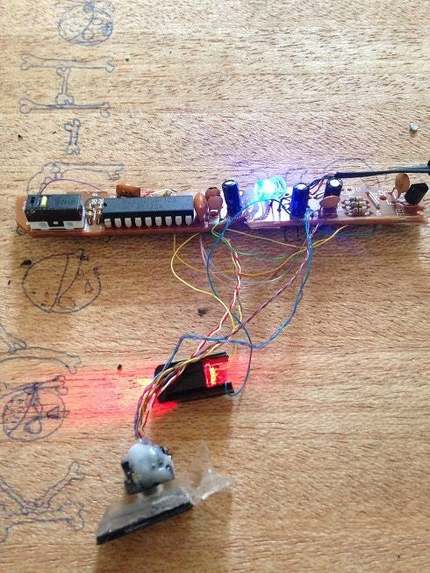
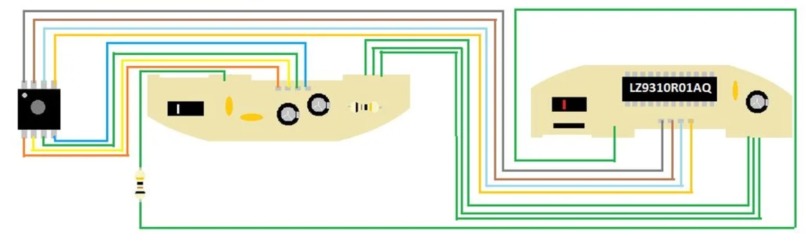
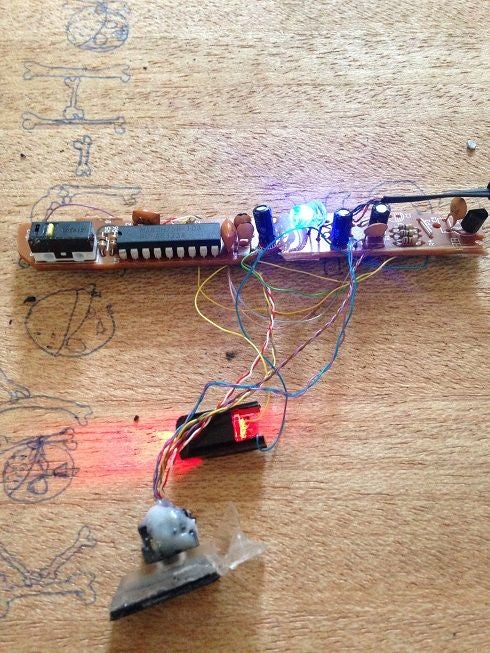
The third problem we solved is that with the cheap webcam accuracy was a bit compromised therefore we developed Magic-pen. This Magic-Pen. It cost just $5 as compared to $399 i-pads. Magic-Pen consists of an LED (that generates the signature red light), a light-detector chip, a switch mechanism and a few other simple components.
Working
Digi-Pad allows you to draw digitally with just a $5Magic-Pen and a piece of paper. This makes it more accessible, more convenient, and more portable than existing digital drawing solutions such as Wacom drawing tablets and iPads.
Digi-Pad uses computer vision to detect, locate, isolate, and locate your hand. It then uses a few complex algorithms to locate the tip of the pencil you are holding or the Magic-Pen. Digi-Pad then uses that information to control mouse movement, clicking, and dragging, allowing you to draw digitally. As a result, Digi-Pad is compatible with all apps — something that’s not true for many other current digital drawing solutions.
The LED installed at the bottom of the mouse emits a bright light in the downward direction. Since it is usually used on plain surfaces, the light bounces back from the surface and enters a photocell that’s also mounted on the bottom, almost next to the LED. This photocell has a frontal lens that magnifies any light reaching it. As you move the magic pen around, the pattern of the reflected beam changes; this is then used by the light-detector chip to figure out how and in which direction you’re moving the magic-pen.
Challenges we ran into
We had some issues locating the hand and the position of the pen/pencil tip. Often, it would be too sensitive, but eventually we managed to fix the issue. At first, we had major latency issues, but we fixed that by heavily optimizing our computer vision code.
What's next for Digi-Pad
Our team would like to further improve the accuracy of the computer vision hand and pen tip detection. Finally, we are interested in polishing the project and selling it as a subscription online. Digi-Pad has business potential in a large market since it makes digital drawing significantly cheaper, and therefore more accessible and more convenient for people around the world. Additionally, Digi-Pad will improve worker productivity and time-efficiency for professional artists and graphic designers since digi-Pad provides a better user experience — a drawing tool and a drawing surface that is a real pencil and real paper instead of just “feeling like pencil and paper” like many other digital drawing solutions from many companies. We are also working on Magic Pen and have developed its prototype. We are currently focusing on making it more compact and to make it user friendly. We are also working on incorporating bluetooth module like HC-06 to even make it wireless.


Log in or sign up for Devpost to join the conversation.