Inspiration
I was completely overwhelmed by the constant scrolling and searching in my inbox. Standard filtering is too simple; I needed a system that understands both the priority of an email and where I need to file it in my life. My inspiration was to create a tool that moves beyond the typical inbox and provides layered intelligence to deliver what I need to know, instantly.
What it does
Digestify is a smart Chrome extension that provides a powerful, two-layer organization and summarization system on top of your existing email client.
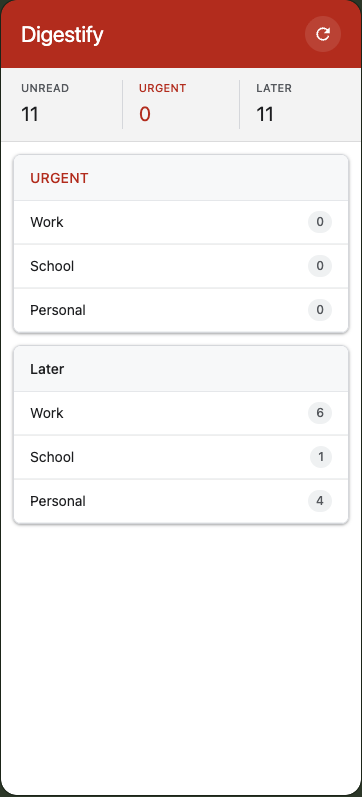
- Two-Tiered Categorization: I built a system that first buckets all emails into two critical groups (URGENT vs. LATER), and then further organizes them by personal inbox type (Work, School, Personal). This provides immediate context for every email.
- Snapshot Metrics: The main screen gives me an instant overview of my most critical metrics (UNREAD count, URGENT count, LATER count) across all inboxes.
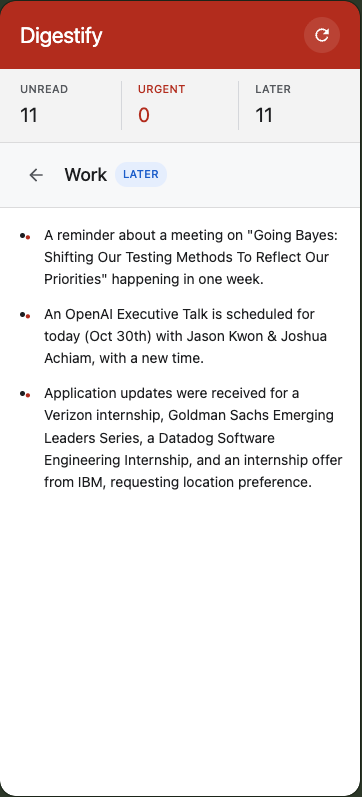
- Aggregated Summary View: When I click into a specific category (e.g., 'Later' $\rightarrow$ 'Work'), the extension instantly analyzes all emails in that group and generates bulleted, actionable summaries of the key content, giving me the essential information without having to open a single email.
How I built it
I built Digestify using a powerful combination of Web Extension APIs and Google's generative AI:
- Generative AI (Gemini Nano): I leveraged the Gemini Nano Prompt API to power the core intelligence of the extension.
- Advanced Categorization: I used the API to analyze email content and accurately sort it into the two-tiered structure (URGENT/LATER and Work/School/Personal), which is far more precise than simple keyword matching.
- Aggregated Summarization: I implemented the Summarizer API to take a batch of emails from a selected category (e.g., 'Later - School') and generate a single, cohesive, bulleted summary of the essential information.
- JavaScript (Content Script): I used this to inject code directly into the Gmail page to run the email scraping and send the content to the AI APIs.
- CSS Selectors: I utilized robust selectors to reliably extract key metadata (sender, subject, thread ID, etc.) from Gmail's complex HTML structure for processing.
- Custom UI/UX: I designed the clean, two-screen interface to efficiently display the results from the AI analysis.
Challenges I ran into
The primary challenge I ran into was dealing with Gmail's highly dynamic and obfuscated HTML structure.
- Selector Fragility: The constant changes in Gmail's class names made it difficult to reliably extract essential information like the email rows. This forced me to spend a significant amount of time testing and refining my CSS selectors.
- Complex Data Handling: Developing the logic to consistently roll up multiple separate email subjects/bodies into a single, cohesive, bulleted summary required careful string and array manipulation.
Accomplishments that I'm proud of
I am most proud of:
- Two-Tiered Intelligence: Successfully implementing a two-level categorization system that is more powerful and informative than native Gmail filtering.
- Instant Summarization: Developing the logic that generates clear, bulleted summaries of entire email groups, dramatically reducing the time needed to process a full inbox.
- Clean Interface: Creating a polished, intuitive UI that makes complex data organization look simple and immediately actionable for the user.
What I learned
I gained significant experience in:
- DOM Reverse-Engineering: Learning to build robust and resilient scrapers for fast-changing web pages by relying on stable attributes over unstable class names.
- UX Focus: The importance of making data immediately useful, proven by the instant gratification of the two-level counts and the bulleted summary screen.
- Code Ownership: Successfully completing and launching a fully functional, self-contained productivity tool entirely on my own.
What's next for Digestify
The immediate next step is to enable active management features to turn this into a true productivity powerhouse:
- One-Click View Filter: The highest priority is to fix the search query bug so users can click on a category (e.g., 'Later - Work') and instantly filter the main Gmail tab to show only those emails.
- Persistent Storage: I plan to use
chrome.storage.localto remember custom keywords for categorization and user settings across sessions. - Active Email Management: Adding buttons to the summary view that allow the user to [Mark All Read] or [Archive All] for a specific category, making inbox zero a reality.
Built With
- css
- html
- javascript
- nano
- promptapi
- summarizerapi

Log in or sign up for Devpost to join the conversation.