Inspiration
As a Product Designer transitioning into Design Engineering, I’ve always found the "Handoff" phase to be the most painful part of the process. We spend hours manually "pixel-peeping"—checking if a hex code is #000 or #111, measuring padding, and arguing over accessibility contrast ratios. It feels less like design and more like tax auditing.
I wanted to build a tool that automates this drudgery but feels like a creative workspace, not a debugger. Inspired by the "Vibe Coding" track, I asked: "Can I use Gemini 1.5 Pro to architect a complex, infinite-canvas React application that feels like FigJam but thinks like a Senior Design Systems Engineer?" The answer became Diff-Check.
What it does
Diff-Check is an automated Design QA Orchestrator that acts as a "Grammarly for UI."
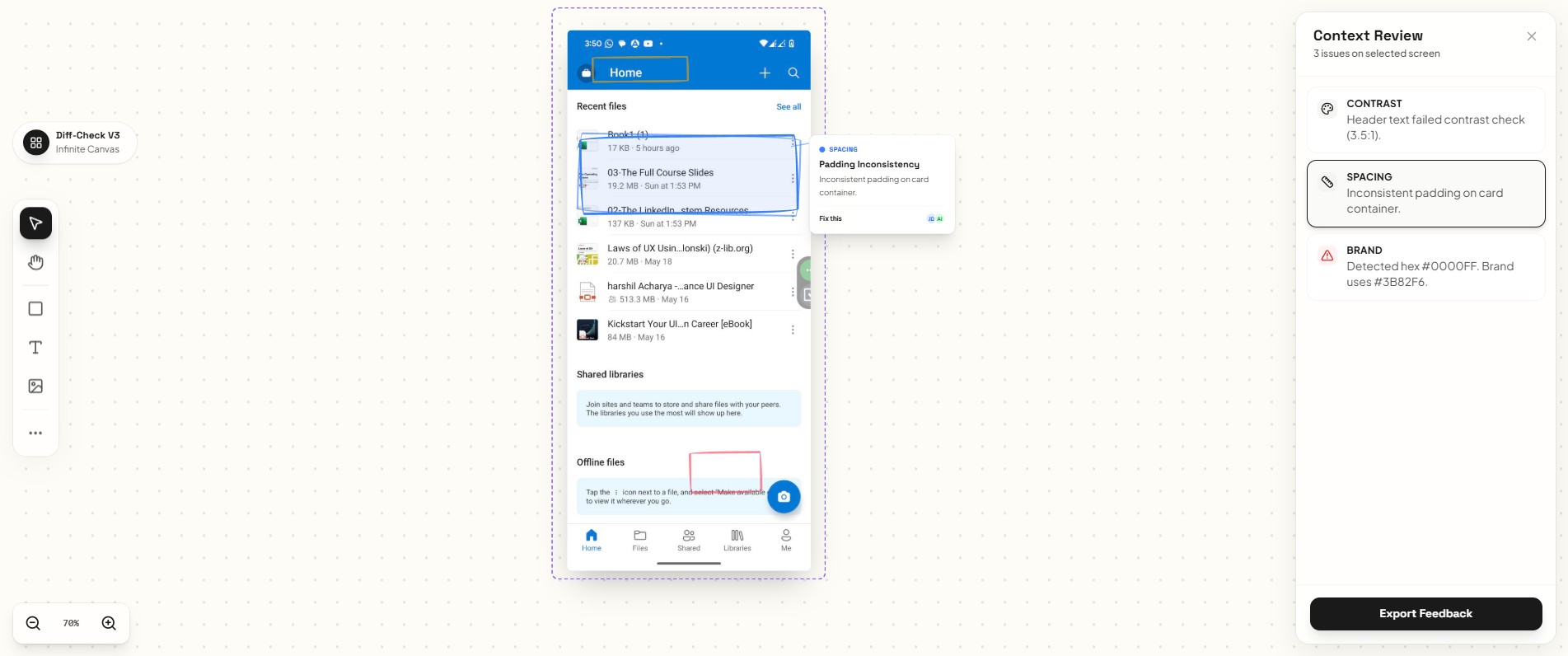
Infinite Workspace: Instead of a static upload form, users get an infinite, collaborative canvas where they can drag and drop multiple UI screenshots.
Visual Analysis: The system analyzes the designs against established design system rules (Spacing, Branding, Typography) and WCAG Accessibility standards.
Human-Centric Feedback: Instead of aggressive red error boxes, Diff-Check uses a unique "Hand-Drawn" rendering engine. It overlays "sketchy" annotations on the UI, making the feedback feel like a helpful peer review from a senior designer rather than a robotic rejection.
Smart Context: Users can hover over any annotation to get a detailed breakdown of the error (e.g., "Contrast ratio is 3.5:1, requires 4.5:1") and suggested fixes.
How we built it
This project was built using the "Gemini-First" Vibe Coding methodology. I acted as the Product Manager and Art Director, while Gemini 1.5 Pro acted as the Lead Frontend Architect.
The Stack: Next.js 14 (App Router), Tailwind CSS, Framer Motion, and react-zoom-pan-pinch.
The Process: I didn't write the CSS for the "hand-drawn" reticles manually. I prompted Gemini with visual descriptions ("Make it look like a marker stroke on a whiteboard"), and it generated the complex border-radius and transform logic to mimic organic sketches.
The Brain: We designed the system architecture to leverage Gemini 1.5 Flash (Vision). For this hackathon prototype, we implemented a "Wizard of Oz" architecture—simulating the AI latency and response structure to demonstrate the perfect UX flow before connecting the live production API.
Challenges we ran into
Vision "Hallucination": Early iterations of the AI logic would flag errors in empty white space. We had to refine the "System Instructions" to strictly enforce "Visual Grounding"—teaching the model that it is forbidden from flagging an issue unless the bounding box touches a visible pixel (like a button or text).
The "Infinite Canvas" UX: Implementing a Figma-like "Pan vs. Drag" interaction is notoriously difficult in React. We struggled with the conflict between dragging an image object versus panning the canvas itself. We solved this by creating a dedicated "Tool State" (Hand vs. Arrow) that toggles the event listeners dynamically.
Vibe Calibration: Getting the application to look "EdTech Warm" (Cream backgrounds) instead of "Developer Dark Mode" took several major refactors. Gemini helped us rewrite the entire Tailwind config in a single shot to pivot the aesthetic.
Accomplishments that we're proud of
The "Sketchy" CSS Engine: We are incredibly proud of the annotation style. It’s pure CSS (no SVGs or heavy canvas libraries), lightweight, and accessible, yet it feels completely organic.
Self-Designing Code: I am a designer first, not a senior React engineer. Building a robust, state-managed infinite canvas application in under a week would have been impossible without Gemini 1.5 Pro acting as a technical partner.
The Polish: The application doesn't feel like a hackathon project; it feels like a SaaS product ready for beta.
What we learned
AI is a Technical Co-Founder: The biggest lesson is that AI isn't just a code completion tool; it's an architect. It helped define the data schema for the design errors, not just the UI components.
Vibe is Engineering: "Vibe Coding" isn't just about aesthetics; it's about performance and fluidity. We learned that the "feel" of dragging an image is just as important as the code that renders it.
What's next for Diff-Check: The AI-Architected Design Orchestrator Live Vision API: Swapping our prototype mock-data layer for the live Gemini 1.5 Pro Vision API to enable real-time analysis on any upload.
Figma Plugin: Porting the logic directly into Figma so designers can "Diff-Check" their frames without exporting screenshots.
Auto-Fix: Moving beyond "flagging" errors to actually suggesting the CSS code to fix them.
Built With
- css
- framer
- lucide
- next4js
- react-zoom-pan-pinch
- tailwind
- vercel

Log in or sign up for Devpost to join the conversation.