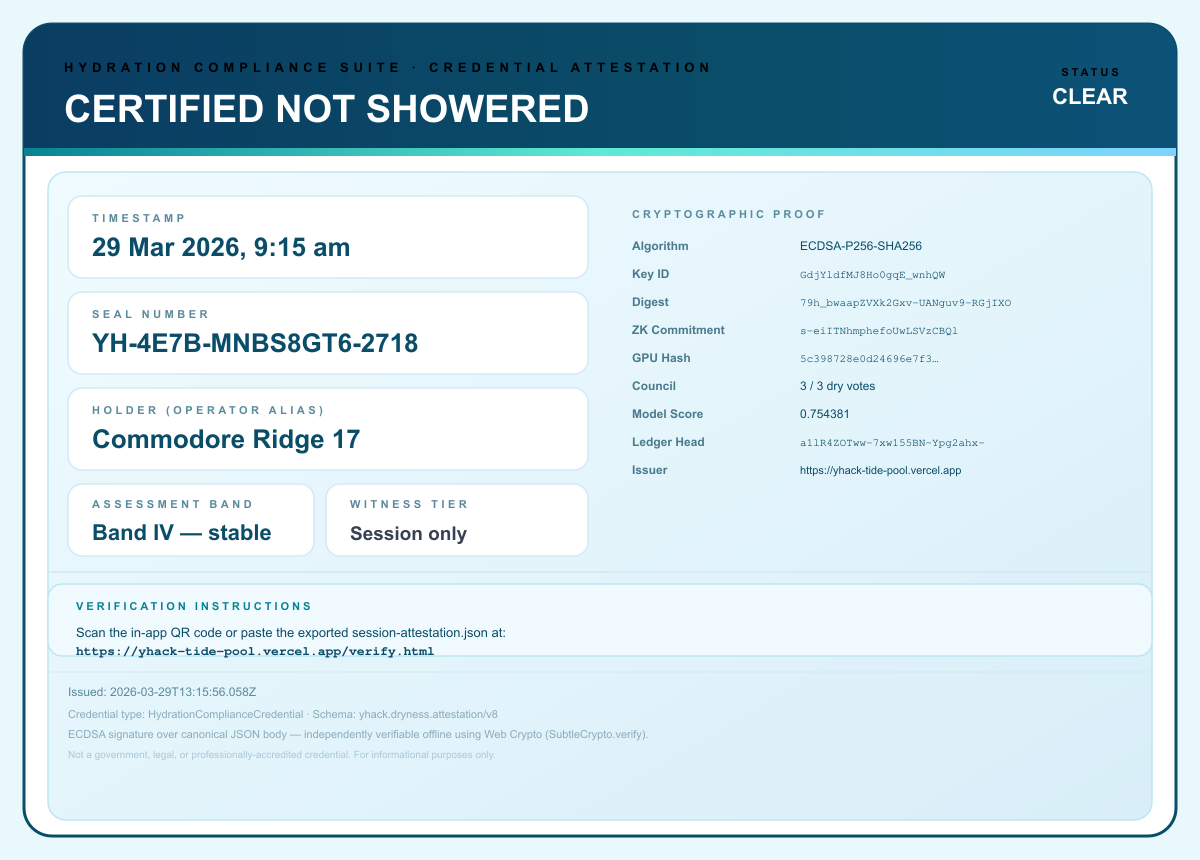

Did you Shower? is a privacy-respecting identity-style attestation app built around one core idea: trust should not require handing your data to a central server. Our app creates a signed attestation directly in the browser, stores evidence locally, lets users export a portable credential, and enables anyone to verify that credential offline.
Instead of asking users to trust screenshots or unverifiable claims, we generate a canonical JSON attestation, hash it, sign it with an in-browser ECDSA P-256 key, package it into a scannable verification flow, and preserve an audit trail locally using IndexedDB and OPFS. We also support optional WebAuthn-based device binding and optional blockchain anchoring so teams can add stronger provenance and public timestamping when needed.
This project is intentionally designed as a serious demonstration of how browser-native security primitives can be composed into a usable identity and attestation experience without requiring a traditional backend account system.
Inspiration
People were getting banned for using the Showers in the basement. I don’t know why some people decided that using its showers is a wise idea. It is not. So how do you know who did not take a shower, to not get disqualified?
That led us to a local-first credential flow built from primitives that modern browsers already provide: Web Crypto for signing, WebAuthn for stronger user-bound assertions, Service Workers for offline resilience, OPFS for append-only audit storage, and optional blockchain anchoring for public proof of existence.
What It Does
The app issues a session attestation entirely in the browser and turns it into a portable credential.
Core capabilities:
- Generates a structured attestation body with certificate metadata, consensus metadata, ledger state, runtime state, commitment data, and witness tier.
- Canonicalizes the attestation into deterministic JSON so the exact same bytes can be hashed and verified anywhere.
- Produces an SHA-256 attestation digest and signs the canonical body using an in-browser ECDSA P-256 keypair.
- Exports the full attestation as JSON and as an SVG credential artifact.
- Builds a compact presentation token for QR-based sharing, so another device can verify the credential without needing the original issuing session.
- Provides a dedicated
verify.htmlflow that validates the digest, validates the ECDSA signature, displays commitment status, and optionally checks whether the digest was anchored on-chain. - Maintains a local audit trail using IndexedDB plus an append-only OPFS ledger file.
- Supports offline shell caching with a Service Worker so verification and core app assets remain available in low-connectivity scenarios.
- Supports optional WebAuthn interaction to distinguish device-bound attestations from session-only attestations.
- Supports optional public blockchain anchoring through an EVM smart contract on Sepolia.
How We Built It
We built the project as a pure web application with a strong local-first architecture.
Trust and storage model:
- Web Crypto powers SHA-256 hashing and ECDSA P-256 signing and verification.
- IndexedDB stores local metadata such as signing key material and audit state.
- OPFS stores an append-only NDJSON audit ledger for durable local evidence.
- A Service Worker caches the app shell so the experience remains resilient offline.
Security and Trust Model
Security is the heart of this project. We did not want a fake credential generator or a glorified screenshot. We wanted a system with explicit integrity properties, transparent limitations, and layered trust signals.
1. Deterministic canonicalization
Before any signature is generated, the attestation body is canonicalized into a stable JSON representation with sorted keys. This matters because signatures are only meaningful if everyone can agree on the exact bytes that were signed.
That gives us a deterministic verification path:
- issuer canonicalizes the body
- issuer hashes the canonical body with SHA-256
- issuer signs the canonical body with ECDSA P-256
- verifier canonicalizes the same body independently
- verifier recomputes the digest
- verifier checks the signature over the same canonical bytes
This prevents ambiguity caused by normal JSON serialization differences and makes tampering visible.
2. Browser-native public key cryptography
The app generates or loads an ECDSA P-256 keypair using Web Crypto. The public JWK is included with the exported attestation, which means verification can happen independently in any browser with no round trip to a server.
Why this matters:
- authenticity is tied to possession of the local signing key
- tampering with the attestation body breaks the signature
- the verifier does not need to trust our server because the proof material travels with the credential
- the verification page uses the same browser cryptography stack to validate the credential offline
This is a meaningful step above a static PDF or unsigned QR code.
3. Attestation digest as a portable integrity root
Every attestation produces a digest derived from the canonical body. That digest becomes the compact integrity root for the credential and shows up across the system:
- in the signed export
- in the verification flow
- in the certificate UI
- in audit events
- in proof-chain blocks
- in the optional chain anchor
Using a single digest root makes provenance easier to inspect and harder to fake.
4. Binding commitment layer
The app creates a commitment object from SHA-256(verdict|timestamp|nonce). The nonce is later revealed in the attestation so a verifier can recompute the commitment and confirm the binding.
This adds an extra integrity checkpoint:
- the commitment is created before issuance finalization
- the revealed nonce lets anyone re-check the exact witness string
- verification detects whether commitment material was altered
In the current implementation this is a cryptographic commitment layer rather than a full zero-knowledge proof system, and we describe it that way explicitly.
5. Device-bound witness tier with WebAuthn
When supported and approved by the user, the app attempts a WebAuthn assertion during issuance. If that succeeds, the credential is labeled device_bound; otherwise it is labeled session_only.
This distinction is important because it communicates the strength of the evidence:
session_onlymeans the attestation was issued in a browser sessiondevice_boundmeans the issuance flow was reinforced by a real authenticator interaction on that device
We do not pretend that storing WebAuthn response bytes alone magically creates universal identity. Instead, we use it as a stronger witness signal and surface the tier transparently in both issuance and verification.
6. WebGPU hash
The runtime can compute a GPU-backed hash over the canonical attestation body and embed that value in the credential. This is not the root of trust, but it adds another integrity signal tied to the runtime environment and demonstrates how compute-backed evidence can be included in a portable credential.
7. Offline-first verification
The verification flow does not depend on a central backend. A recipient can open verify.html, paste an exported JSON blob or verification token, and independently validate:
- structure
- commitment integrity
- canonical body digest
- ECDSA signature
- witness tier metadata
- optional anchor status
That offline verification story is one of the strongest parts of the app because it removes the need for "trust us" infrastructure.
8. Append-only local audit trail
We treat issuance like an auditable event, not just a UI click. The app stores audit evidence in two local layers:
- IndexedDB for structured browser persistence
- OPFS for an append-only NDJSON ledger file
This lets the app export and replay audit history, merge evidence sources, and preserve a forensics-friendly local timeline without shipping raw user data to a remote server.
9. Service Worker resilience
The Service Worker caches the app shell and verification assets, which means credential review and verification can continue even under poor connectivity. For identity and compliance flows, availability matters too. A credential that cannot be verified when the network is unreliable is not especially useful in the real world.
10. Optional public blockchain anchoring
We also built an optional anchoring path using HydrationAttestationAnchor.sol.
The contract stores:
keccak256(sealNumber)as the lookup keykeccak256(attestationDigest)as the anchored payload- timestamp and sender address
This gives the project a public, immutable proof-of-existence layer:
- the credential can be shown to have existed at or before a specific block time
- the digest can be checked against the exported attestation
- a verifier can independently confirm whether the attestation hash was anchored
Just as importantly, we are careful about what it does not mean. On-chain anchoring is not the same as legal accreditation, government identity, or external truth certification. It is a public integrity anchor, not an institutional endorsement.
11. Honest threat-modeling
A big part of security is saying what your system does not do.
This project does not claim to be:
- a government-issued identity system
- a regulated qualified signature platform
- a substitute for a relying-party WebAuthn server
- a guarantee that the attested statement is objectively true
What it does provide is strong evidence that a specific device/session created a specific canonical payload, that the payload has not been altered, that the credential can be verified independently, and that optional additional trust signals were or were not present at issuance time.
Challenges We Ran Into
One of the hardest parts was keeping the credential portable while still making the evidence rich.
A full attestation can include commitment data, witness material, runtime metadata, ledger metadata, GPU evidence, and signature material. That is excellent for verification, but too large for a frictionless QR experience. We solved that by creating a slim presentation token that preserves the essential signed display fields and digest linkage, while stripping heavyweight fields that are better kept in the full export.
Another challenge was balancing ambition with honesty. It is easy to overstate "identity" or "ZK" claims in a demo. We intentionally kept the language precise so that the trust story is strong because it is defensible, not because it is exaggerated.
Accomplishments That We’re Proud Of
- Building a complete local-first issuance and verification flow with no required backend account system.
- Making the credential independently verifiable offline using only browser-native APIs.
- Combining several trust layers in one coherent UX: canonical signing, commitment binding, witness tiering, audit evidence, QR presentation, and optional on-chain anchoring.
- Preserving a serious security narrative while still delivering a polished, understandable product experience.
- Designing the project so users can inspect the raw attestation, export it, replay the audit trail, and understand how trust is being established.
What We Learned
We learned that browsers are much more capable security platforms than many people assume.
With the right architecture, modern web APIs can support:
- real public key signatures
- portable verification
- local durable evidence storage
- authenticator-backed witness flows
- offline application behavior
- public blockchain integration
We also learned that trust UX matters just as much as cryptography. If users cannot tell what is signed, what is optional, what is device-bound, and what is merely decorative, the system becomes confusing. Good identity products need both strong primitives and clear communication about evidence quality.
Built With
- circom
- css
- ecdsa-p-256
- ethers.js
- html
- indexeddb
- javascript
- metamask
- opfs
- qr-based-presentation-tokens
- sepolia
- service-workers
- sha-256
- solidity
- web-crypto
- webauthn
- webgpu


Log in or sign up for Devpost to join the conversation.