Inspiration
The W&M Nano & Biomaterials Lab studies diatoms: single-celled algae that build glass shells (frustules) covered in tiny, species-specific pores. Those pores are why diatomite is useful for filtration, insulation, catalysis and biomedical scaffolds. But to engineer with it, the lab first has to measure it, and today every SEM image is measured by hand: counting shells, sizing them, judging how broken they are, counting pores. It's slow, it doesn't scale, and two people measuring the same image get different numbers.
We took on Challenge #1 because it's a real problem a real lab will keep having after the weekend. We wanted to give scientists back the hours they spend with a digital ruler.
What it does
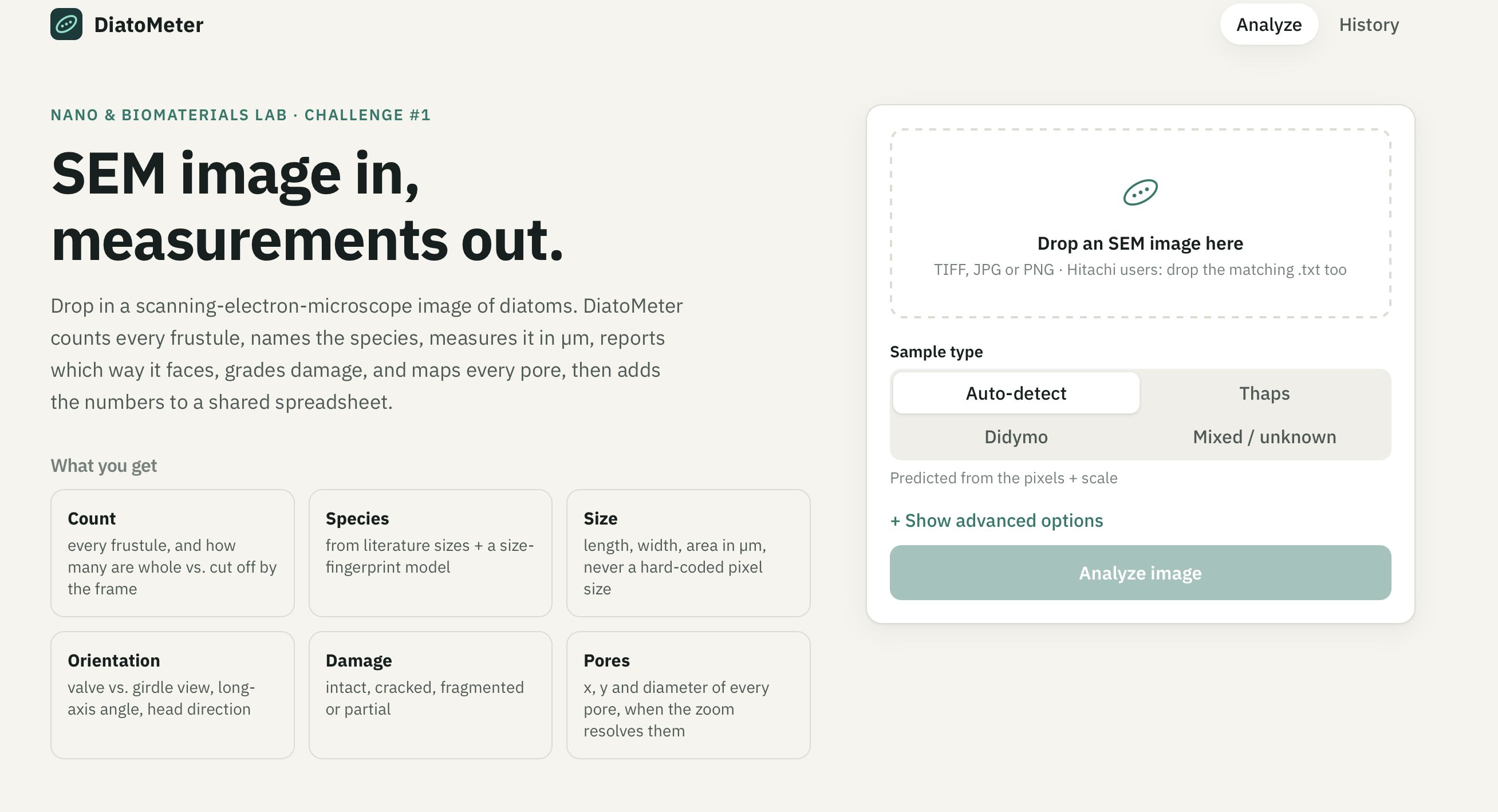
DiatoMeter turns an SEM image into a spreadsheet of measurements in seconds. Drop in an image at diamometer.us and it:
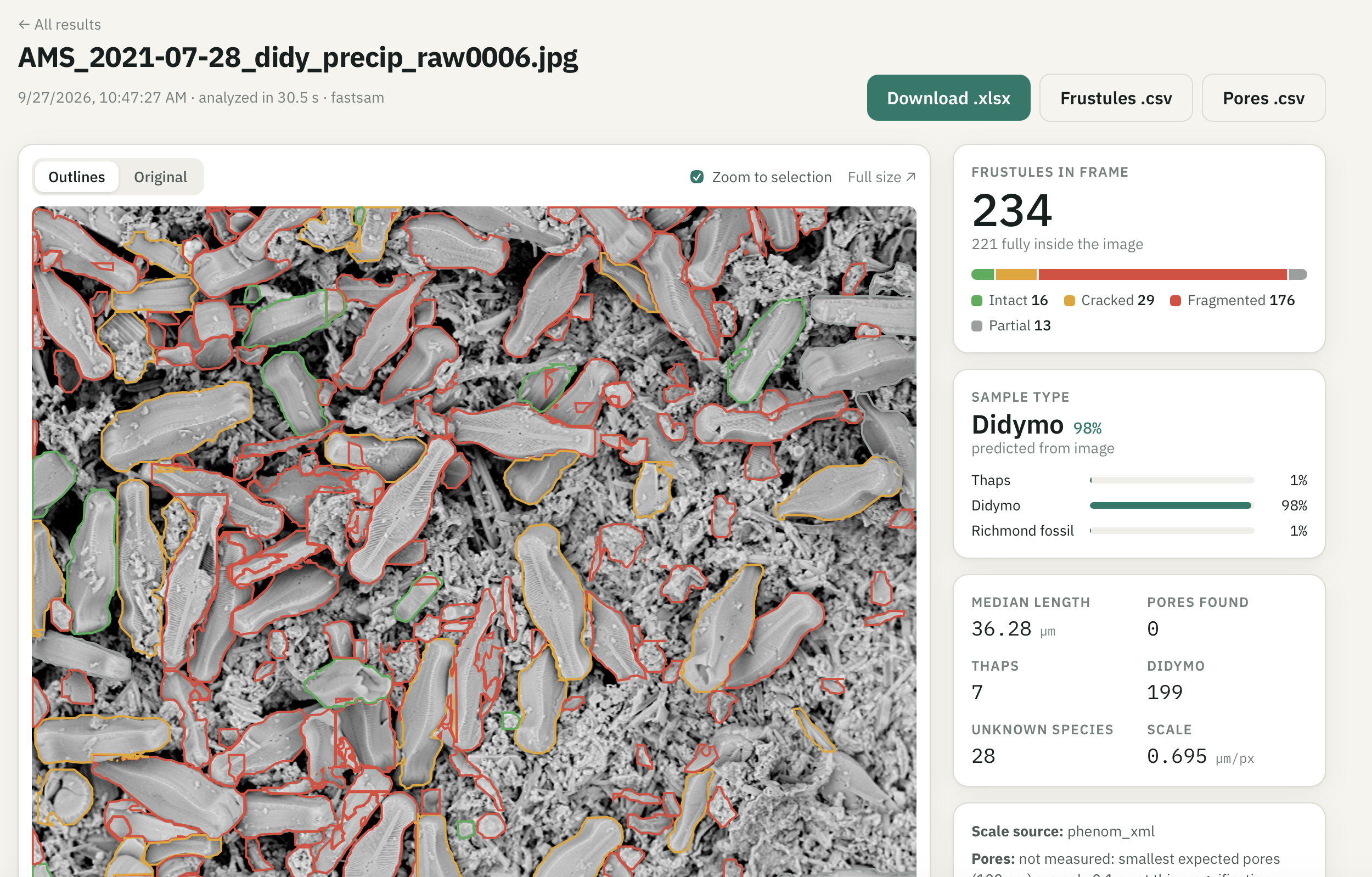
- Counts every frustule and how many are fully inside the frame
- Identifies the sample type (e.g. Thalassiosira pseudonana vs Didymosphenia geminata) from the pixels alone
- Measures each shell in µm: length, width, area, aspect ratio
- Reports orientation: face-on (valve view) vs side-on (girdle view), long-axis angle, and which way the head points
- Grades damage: intact, cracked, fragmented, or cut off by the image edge
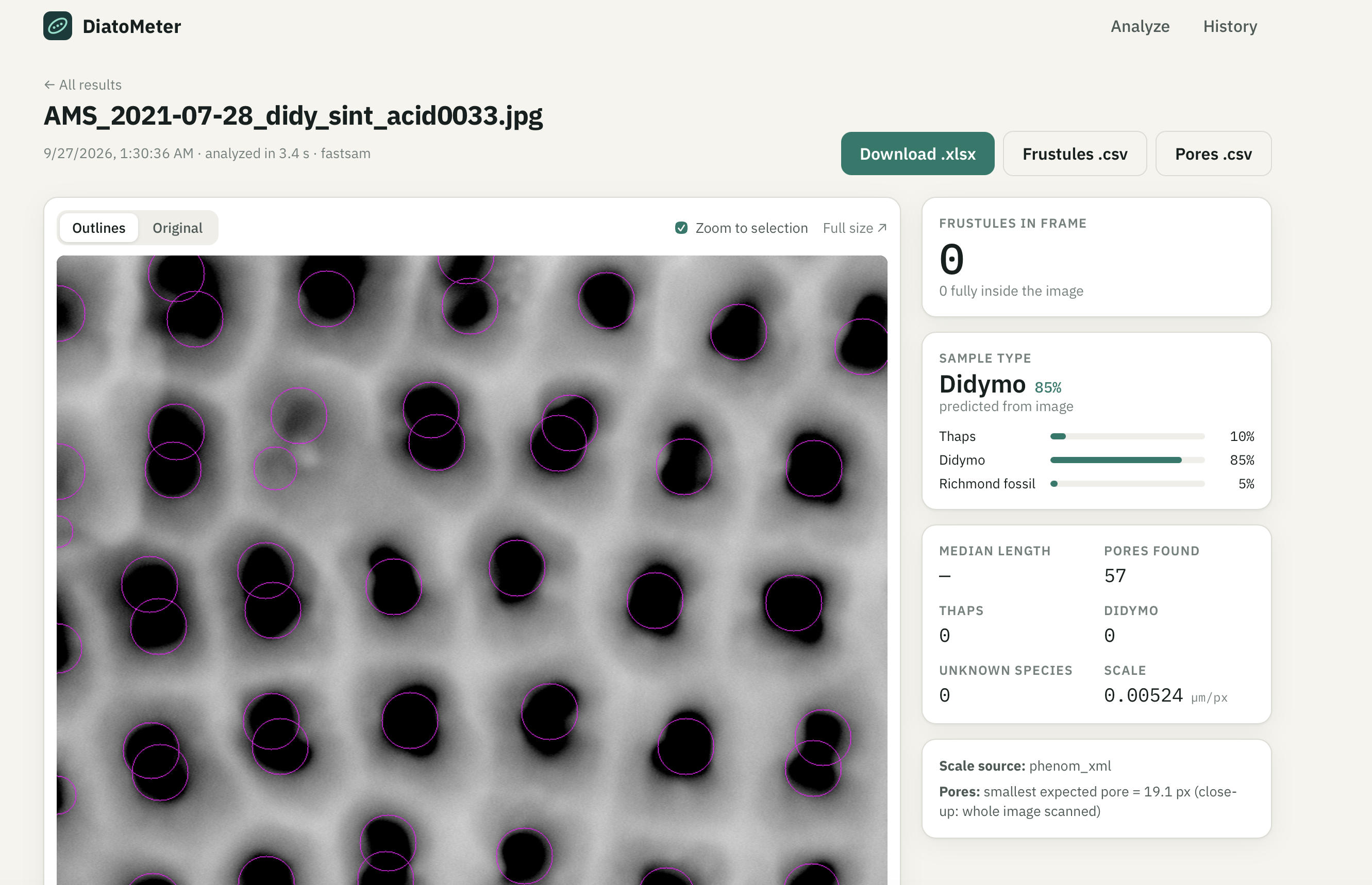
- Maps every pore (x, y, diameter in µm) when the magnification can resolve them, and says "not measured" instead of guessing when it can't
- Exports everything to Excel/CSV: one row per shell, one row per pore, plus a species × damage summary
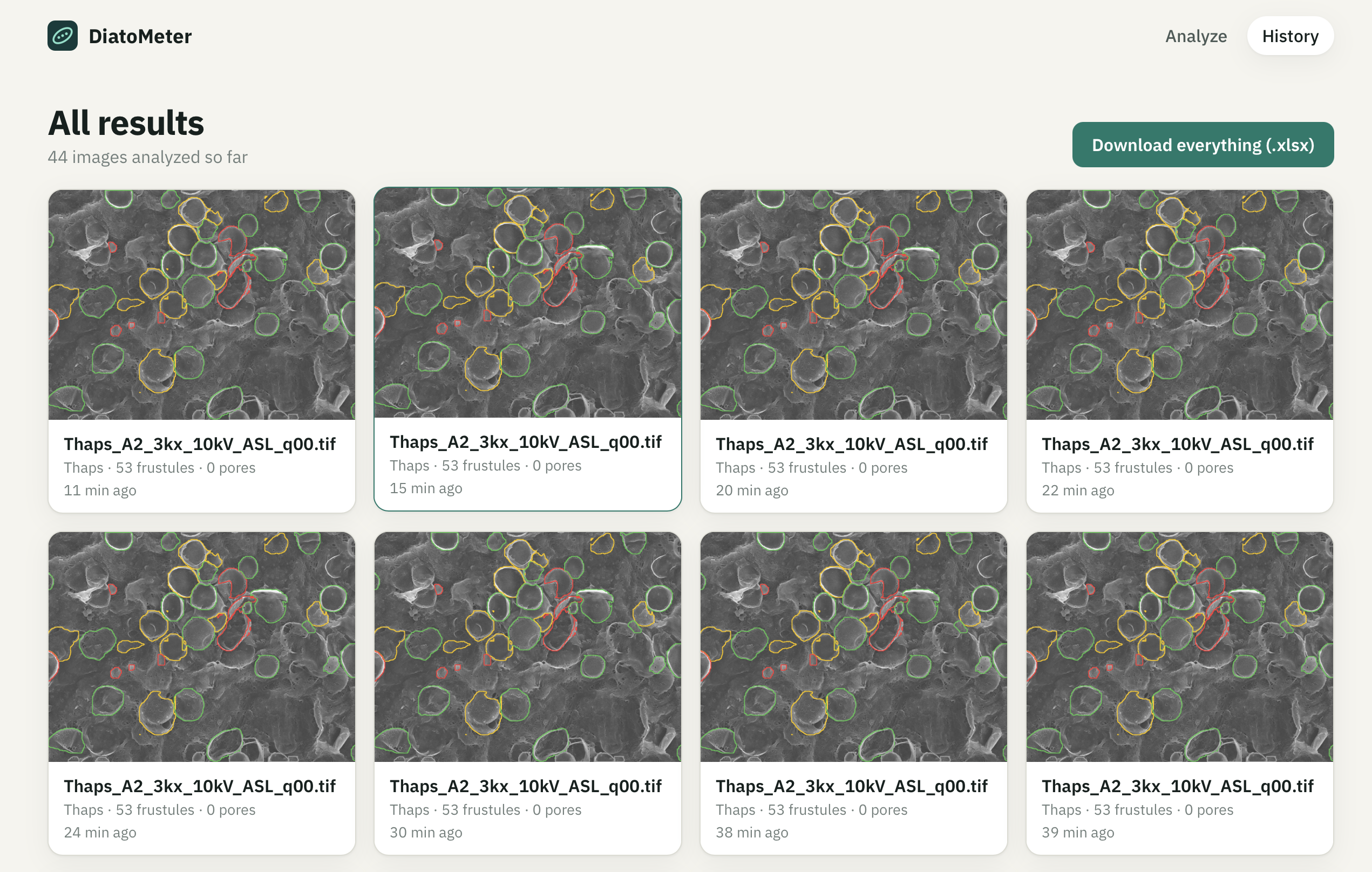
Click any shell and everything else fades out, so you can inspect that one frustule and its pores. Every analysis is saved in a shareable history.
The scale is never hard-coded, as the lab required. It's read from the Phenom's embedded metadata or the Hitachi .txt sidecar, or measured from the printed scale bar itself. Our scale-bar reading matches the microscope's own calibration within 0.12% on all 13 Hitachi images.
How we built it
The pipeline (Python, all open-source, runs on a laptop CPU):
- Scale: parse Phenom XML metadata / Hitachi sidecar files, or OCR the scale-bar label (Tesseract) and divide by the measured tick span of the dotted marker.
- Sample type: we built a "size fingerprint": how much structure exists at 11 physical sizes from 0.05 µm to 51 µm (band-pass energy, bright/dark blob density, texture direction). A random forest trained on it predicts the sample type and answers "unsure" below 60% confidence.
- Segmentation: FastSAM (Segment Anything, via Ultralytics) outlines every object; we drop background-sized and duplicate masks.
- Measurement: Feret diameters, area, solidity and orientation with scikit-image, all converted to µm.
- Species and damage without labels: the lab's hint was "use the relative sizes of the organisms", so we encoded published size ranges (Thaps 2.5–15 µm, Didymo 65–161 µm) and used them to filter debris, name species, and flag fragments. Outline solidity separates intact from cracked from fragmented.
- Pores: Laplacian-of-Gaussian blob detection sized from the literature pore range, run only when a pore spans at least ~2 pixels, and assigned to the shell it sits on.
The app: a FastAPI backend with SQLite and per-run result files, and a React + TypeScript (Vite) frontend that draws each outline as a clickable SVG over the image. It's deployed serverless on Modal (it sleeps when idle, so it's free), with a Cloudflare Worker serving it at our own domain, diamometer.us.
Challenges we ran into
- Zero labels. The lab gave us 123 SEM images from two microscopes with no outlines, counts or species tags, so we couldn't train a normal detector. We combined a pretrained segmentation model with literature size priors, and used folder names only as training labels for the sample-type model.
- Classic image processing failed. Thresholding split single shells into pieces and merged debris into giant blobs. Our size checks caught it: "Didymo" measured 37 µm when the real thing is 65+ µm.
- Three different ways to find the scale. Phenom files, Hitachi sidecars and screenshots all store it differently. We caught a nasty bug where our OCR fallback read the scale bar's label as the image's width, making everything 4× too small. We fixed it by measuring the scale bar itself.
- Speed. A 2048×2048 image with 300 masks took two minutes and timed out behind Cloudflare. Comparing masks only inside overlapping bounding boxes cut that to 10 seconds with identical results.
- Free hosting for a PyTorch app. Hugging Face now charges for Docker Spaces, and most free tiers have 512 MB of RAM (our densest image peaks at ~2.1 GB). We landed on Modal, plus a Cloudflare Worker, because Modal's free tier doesn't support custom domains.
- Honest uncertainty. Deciding when to say "unsure" or "not measured" instead of producing a confident-looking wrong number was a design challenge in itself.
Accomplishments that we're proud of
- It's accurate where we can check it: our Thalassiosira shells measure a median of 3.53 µm, right inside the published 3.5–3.9 µm for cultured cells.
- The sample-type model generalizes: 77% accuracy on imaging sessions it never saw during training, and 86% when it's confident. A model that only knew the magnification scored 47%, so it's really looking at the shells.
- The scale-bar reader matches the microscope's calibration within 0.12%.
- It covers every item on the lab's checklist: count, species, size, orientation, damage, and a pore spreadsheet.
- A scientist with no coding experience can use it: open a website, drop an image, download a spreadsheet.
- It's live on a real domain, free to run, and open-source.
What we learned
- Domain knowledge beats data volume. Published species sizes did the work thousands of labeled examples normally would.
- Validate against physics, not vibes. Checking our measurements against the literature and the scale bar caught bugs no unit test would have.
- "I don't know" is a feature. For scientific tools, a clear "not measured" is worth more than a confident wrong number.
- We learned a lot about SEM metadata, diatom morphology, segmentation models, and how DNS caching can humble you at 5 AM.
What's next for DiatoMeter
- Calibrate damage grading with the lab. A few dozen hand-labeled shells would let us tune the intact/cracked/fragmented thresholds, especially for Didymo, whose natural shape currently reads as damaged too often.
- Accuracy report vs. hand counts: run DiatoMeter on images the lab has already measured manually and publish the error.
- More species with few-shot recognition: 5–10 labeled examples per species plus image embeddings (DINOv2).
- Batch mode: drop a whole folder, get one combined spreadsheet.
- Live Google Sheet export (already built, being connected) so the whole lab shares one growing dataset.
Built With
- cloudflare-workers
- fastapi
- fastsam
- modal
- numpy
- opencv
- pandas
- python
- pytorch
- react
- scikit-image
- scikit-learn
- tesseract
- typescript
- ultralytics
- vite


Log in or sign up for Devpost to join the conversation.