Dhwani — Project Story
Dhwani ("sound" in Malayalam) is an Android-first, offline-first prototype for developmental screening support in Kerala Anganwadis. It guides a frontline worker through a short caregiver–child interaction, captures non-semantic acoustic features on the device, and records a structured developmental questionnaire. It supports screening conversations and follow-up; it does not diagnose a developmental condition and is not validated for clinical use.
Inspiration
Early childhood is an important time to notice possible developmental concerns, but frontline workers often work with limited time, unreliable connectivity, and delayed access to specialists. Caregiver observations are essential, yet a worker may benefit from a consistent additional signal that does not require interpreting a child's words or uploading a child's voice.
Dhwani explores whether everyday caregiver–child interaction can provide that signal. It focuses on non-semantic properties of interaction—response timing, child vocalisation time, and pitch variation—while keeping the audio-processing path on the Android device. The project pairs this prototype acoustic path with age-matched developmental questions, Malayalam consent guidance, local session history, and a referral-oriented workflow.
The aim is deliberately modest: help a worker notice when a screening may warrant closer attention, communicate uncertainty clearly, and make a possible next step visible. It is not a replacement for caregiver judgement, clinical assessment, or validated developmental screening tools.
What the prototype does today
The worker-facing Flutter app implements this flow for children aged 12–36 months:
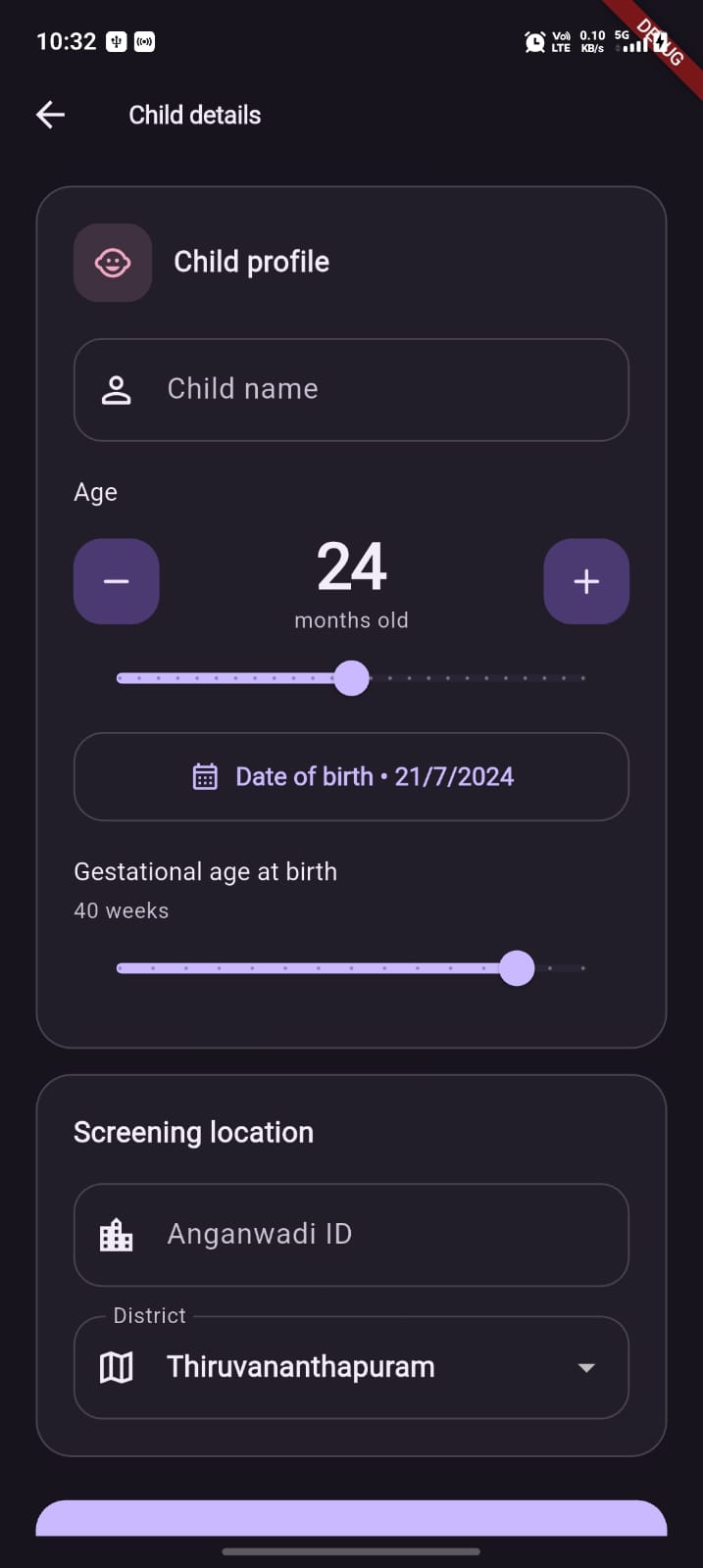
- Create a child profile. The worker enters an optional child name, date of birth/age, gestational age, Anganwadi ID, and district. The app creates a local child UUID.
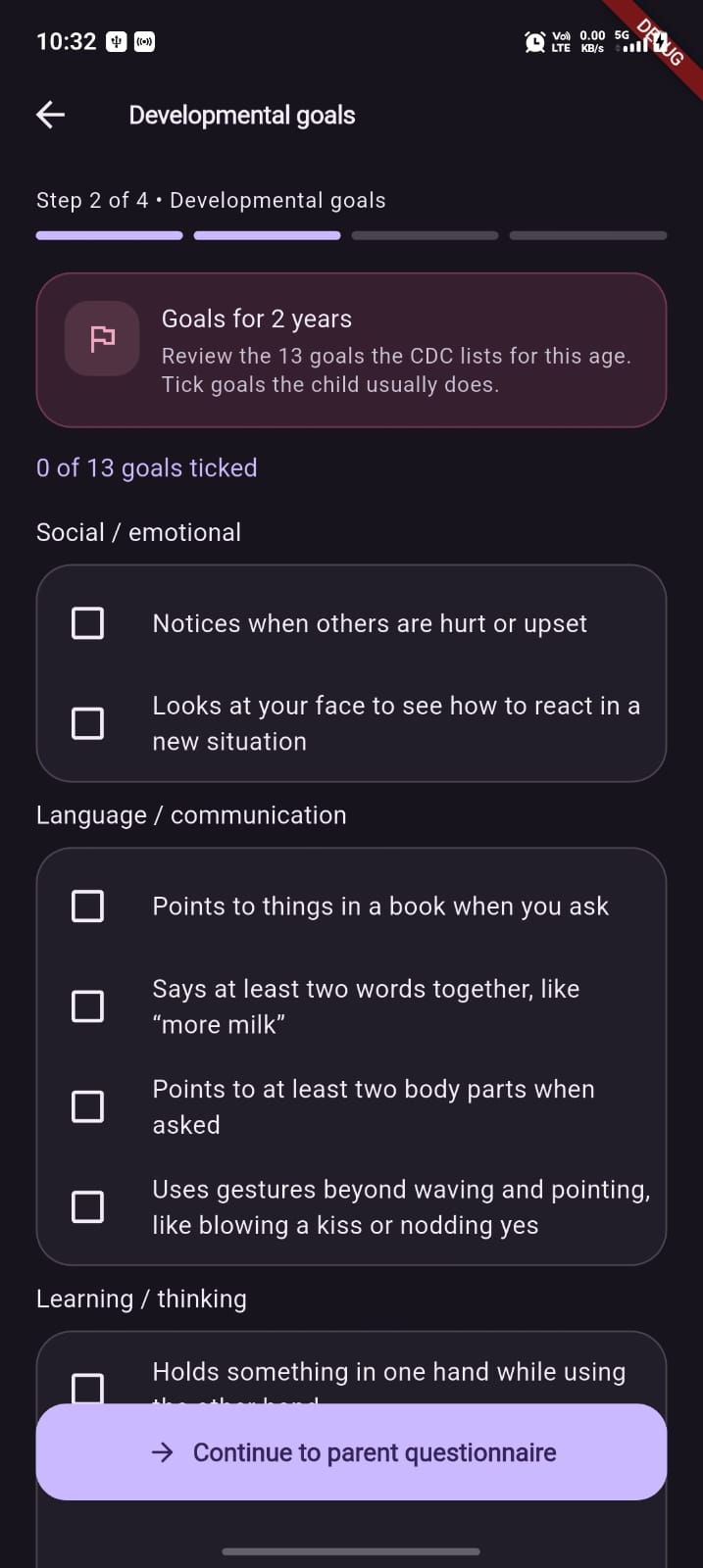
- Review developmental goals. An age-matched CDC-style checklist is shown as a worker reference. These checkbox selections are not currently stored or scored.
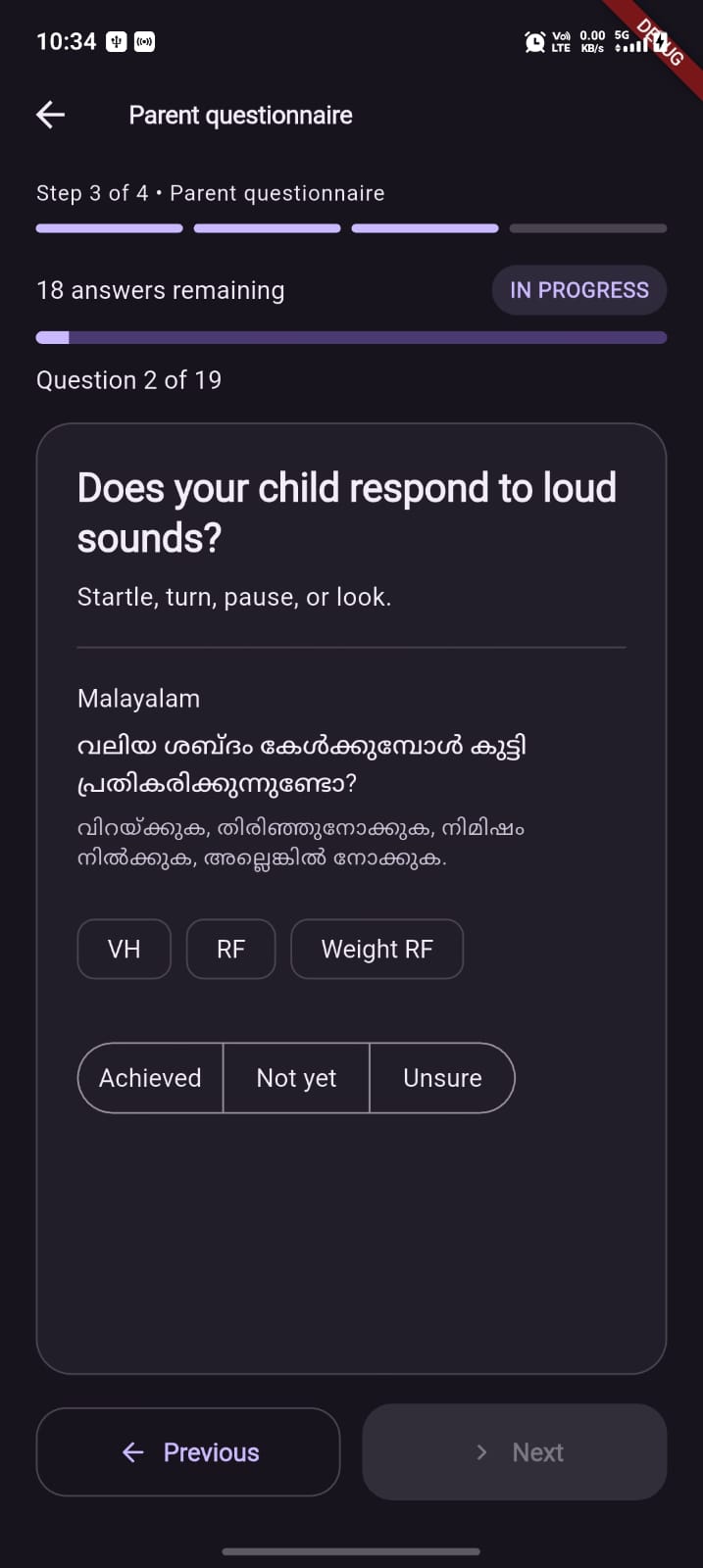
- Complete the parent questionnaire. The app selects MyChild milestone questions for the child's age, includes universal red-flag items, and includes M-CHAT-R items where applicable. Questions are displayed in English and Malayalam, with
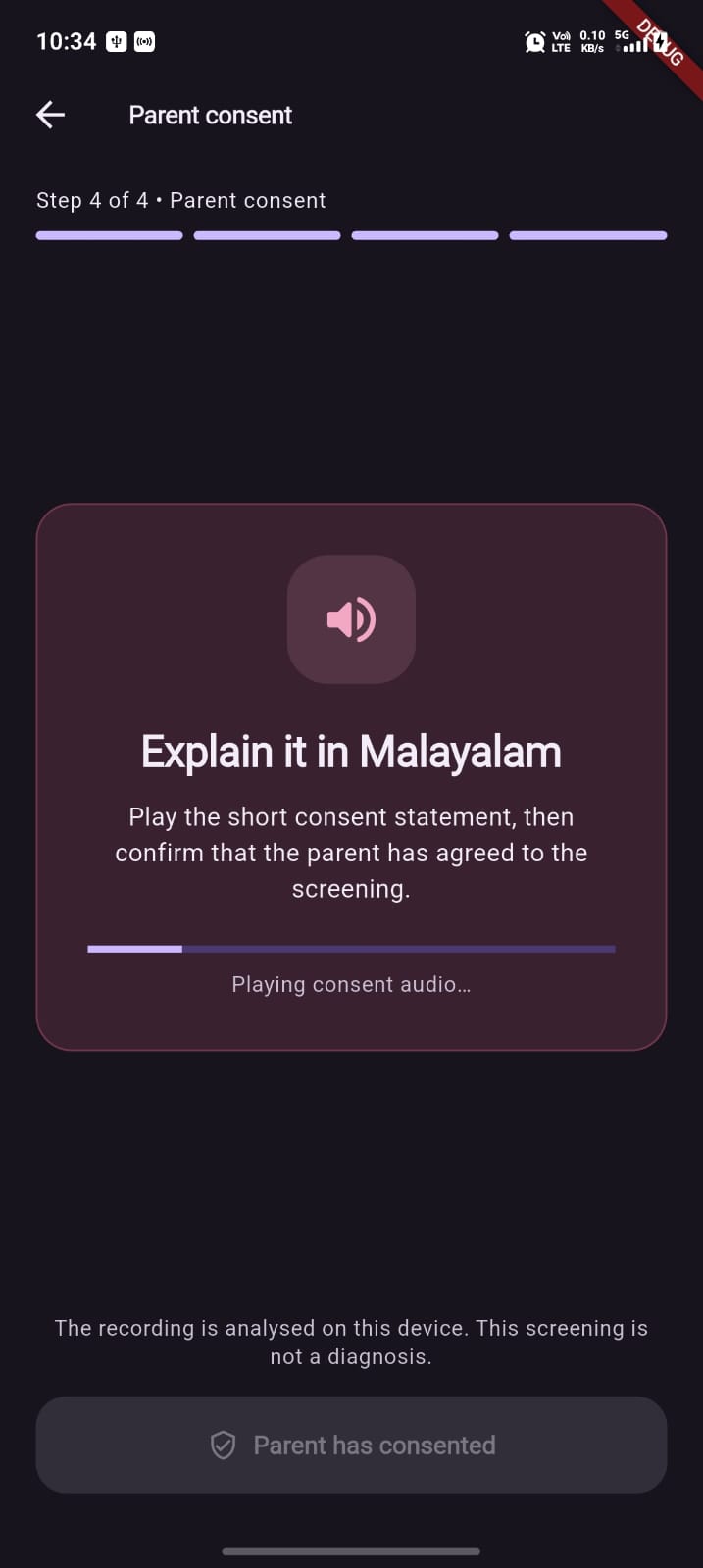
Achieved,Not yet, andUnsureresponses; M-CHAT-R items use Yes/No wording. - Play consent guidance. On Android, on-device Malayalam text-to-speech reads the consent statement. The worker must play it before enabling the “Parent has consented” action.
- Run three guided activities. The app records one continuous interaction while guiding Rattle (60 seconds), Toy hide & reveal (80 seconds), and Imitate “aaa” (60 seconds). Each activity requires at least 45 seconds before the worker can continue.
- Analyse locally. The Android path records 16 kHz mono PCM, processes ten-second chunks, and returns derived acoustic features to Dart.
- Show an explainable acoustic result. VTTL, CVR, and PFV appear as individual biomarker chips, alongside an acoustic GREEN/YELLOW/RED tier and a Malayalam explanation.
- Save offline. Completed sessions, questionnaire analysis, feature values, a peak-level waveform, and a decision trace are stored in local SQLite. Raw PCM is not stored in SQLite.
- Support a RED follow-up. A RED acoustic result opens a referral screen with the Anganwadi ID, biomarker summary, and a WhatsApp sharing path.
- Sync later when configured. The app can queue non-demo local sessions for Supabase sync when environment configuration and connectivity are available.
How scoring works in the current code
Acoustic scoring shown to the worker
The displayed GREEN/YELLOW/RED result is currently produced by ScoringEngine from acoustic features only:
| Biomarker | Current calculation / flag rule |
|---|---|
| VTTL — Vocal Turn-Taking Latency | Median adult-to-child response latency across processed chunks. Flagged when greater than 1000 ms. |
| CVR — Child Vocalisation Ratio | Child-labelled speech duration divided by recording duration. Flagged below 0.08 for 12–24 months, 0.12 for 24–36 months, and 0.15 for 36+ months. |
| PFV — Prosodic F0 Variance | Child pitch frames are converted to semitones, cleaned, and expressed as an age-referenced z-score. A sufficient PFV result is flagged when absolute z-score > 1.75. |
The tier is a simple, inspectable rule:
- GREEN: no acoustic biomarker flags.
- YELLOW: one acoustic biomarker flag.
- RED: two or more acoustic biomarker flags.
PFV needs at least 30 valid pitch frames and an age reference. If that evidence is unavailable, PFV is marked insufficient and does not create a PFV flag. The native PFV age references are explicitly marked in code as placeholder values pending local clinical validation.
Questionnaire scoring
The MyChild engine independently computes a detailed developmental assessment. It can use corrected age for preterm children under 24 months, scores each milestone with age/weight-adjusted grace periods, detects a possible reported regression when historical answers are supplied, and aggregates observations into domains such as gross motor, fine motor, language, social-emotional, red flags, and M-CHAT-R.
It produces question-level explanations, domain status, confidence, recommended actions, and its own GREEN/YELLOW/RED tier. The result screen saves and displays this questionnaire assessment as supporting context.
Important implementation boundary: a CombinedScreeningResult helper exists and is unit-tested, but the current screening flow does not invoke it. The acoustic tier is therefore the tier shown on the main result card and the one that gates the RED referral path. Combining valid questionnaire and acoustic signals remains future work.
Recording quality and uncertainty
The Android native pipeline evaluates three evidence checks:
- at least 20 seconds of voiced audio;
- at least 5 seconds of confidently child-labelled speech; and
- at least 3 adult-to-child transitions.
When these checks fail, the native payload sets analysis_status to INCOMPLETE and records quality reasons. This is a useful diagnostic signal, but it is not yet a hard scoring gate: the current Dart engine still scores available features, and the existing tests assert that an incomplete feature set can produce a YELLOW result. A production version must surface INCOMPLETE prominently and prevent it from being interpreted as a reassuring or actionable colour tier.
How we built it
Mobile application
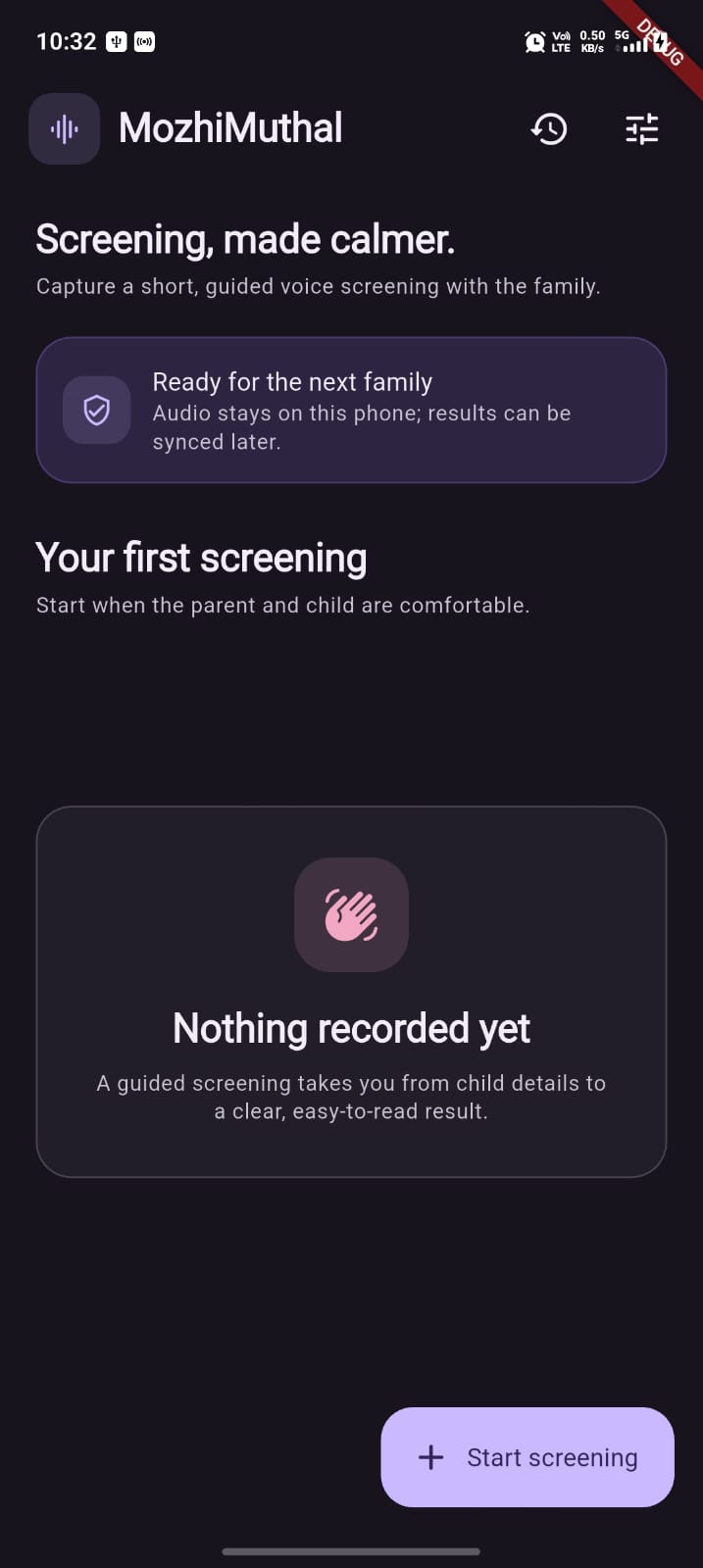
The worker application is written in Flutter/Dart. It uses Riverpod for in-memory session and sync state, GoRouter for navigation, and sqflite for local session persistence. The implemented screens include home, child profile, developmental goals, questionnaire, consent, elicitation, processing, results, referral, settings, and local session history.
The app is Android-first but can run in a browser for a UI demonstration. The browser cannot run the Android audio pipeline; it returns a clearly labelled WEB_TEST_FIXTURE payload so the workflow can be demonstrated without representing it as microphone or model output.
On-device Android audio path
Flutter communicates with Kotlin through method and event channels. On a live Android run, the native layer:
- requests microphone permission;
- records 16 kHz mono PCM with
AudioSource.UNPROCESSED, falling back toVOICE_RECOGNITIONif the preferred source cannot initialise; - publishes peak levels for the visual waveform only—audio samples do not cross into Dart;
- collects rolling ten-second chunks;
- applies a 30 ms voice-activity estimate;
- runs a pinned local Pyannote segmentation ONNX model through ONNX Runtime;
- applies a conservative pitch-based child/adult/unknown label heuristic to segments; and
- extracts VTTL, CVR, PFV frames, quality metadata, and a decision trace.
The model is bundled as an Android asset, and the Gradle build includes a SHA-256 verification task for it. The native ONNX session is configured with two intra-op threads. This is prototype engineering intended to explore feasibility on Android hardware; its speaker labels, thresholds, and robustness need field validation before any clinical interpretation.
Local data, sync, and dashboard
SQLite is the system of record during an offline session. A saved session can contain the child UUID, optional name, profile metadata, acoustic values and flags, questionnaire responses/analysis, audio source, waveform peak values, and decision-window trace. The peak waveform and trace are derived numeric data, not raw audio.
When Supabase is configured at app startup, the sync repository signs in anonymously if needed and sends non-demo sessions through the sync_screening_bundle RPC. The SQL schema defines owner-scoped children, consents, questionnaire_runs, screening_sessions, and sync metadata tables, with Row Level Security policies. The intended cloud payload does not include raw PCM audio.
The repository also includes a Next.js dashboard. Its screenings page can query the child_screening_analysis view when SUPABASE_URL and SUPABASE_SERVICE_ROLE_KEY are configured. The district overview and districts pages currently use mock data, so the dashboard should be described as analytics-ready rather than a completed live monitoring system.
Referral capability
The referral screen currently presents a RED summary and opens a WhatsApp deep link with a pre-filled message. The repository contains a ReferralGenerator utility that can create a local PDF with DEIC information from assets/data/deic_data.json; however, the current referral screen does not call that utility, and the generated PDF text is English rather than Malayalam. Wiring, localisation, and safe sharing of the PDF remain implementation work.
Technology stack
| Area | Technology in the repository |
|---|---|
| Worker app | Flutter, Dart, Material UI, Riverpod, GoRouter |
| Local persistence | SQLite via sqflite |
| Android audio | Kotlin, AudioRecord, Android Text-to-Speech |
| Audio analysis | WebRTC-style VAD adapter, ONNX Runtime Android, bundled Pyannote segmentation model, YIN-style pitch tracker |
| Scoring | Dart acoustic threshold rules and MyChild questionnaire engine |
| Optional sync | Supabase Flutter, Postgres schema, Auth, RLS, RPC |
| Dashboard | Next.js, Tailwind CSS, shadcn-style UI components |
| Referral sharing | url_launcher WhatsApp deep link; PDF helper via pdf package |
Privacy and responsible-use design
Children's voice data is sensitive. Dhwani is designed around local processing and derived features:
- Live PCM is processed in the Android app; it is not passed to Dart or sent to Supabase.
- A temporary local PCM replay copy is deleted after replay, when analysis begins, on elicitation-screen disposal, and when the Android activity is destroyed.
- The cloud-sync model is pseudonymous by design: it uses a locally generated child UUID and numeric session data. An optional child name is nevertheless included in the current sync payload when entered, so a production deployment should remove or separately govern that field.
- Consent playback is enforced in the user interface, but the current persistence model creates a consent UUID at session save rather than retaining a comprehensive, versioned consent audit record.
- The app repeatedly states that the output is a screening signal, not a diagnosis.
These are useful prototype safeguards, not a substitute for a formal privacy impact assessment, security review, ethics approval, clinical governance, or the applicable legal and regulatory work required before deployment.
Challenges we addressed
A workflow must work without connectivity
The core workflow does not require a network connection. Profile data, results, questionnaire analysis, and history are stored locally first; sync is an explicit later action. This is important for a field workflow, but production sync still needs authentication, retry/conflict handling, monitoring, and operational support.
Audio in real-world settings is uncertain
Anganwadi environments can contain fans, multiple speakers, and intermittent child vocalisation. The prototype uses voice-activity estimation, ONNX segmentation, conservative pitch labelling, rolling chunks, and evidence checks to make uncertainty observable. The remaining work is to make that uncertainty a true stop/retry state in the product and then validate it across devices and field conditions.
Results need to be understandable
The result UI provides a colour tier, Malayalam explanation, biomarker chips, detailed values, waveform peak levels, and decision traces. At the same time, the product avoids diagnostic labels. The essential next step is user testing with workers and caregivers to ensure the explanations are understandable, not alarming, and appropriate for follow-up conversations.
Native and browser demonstrations have different capabilities
The Android pipeline depends on microphone APIs and local ONNX inference. The browser implementation therefore uses an explicit fixture to demonstrate the Flutter flow. It must never be presented as live acoustic evidence.
Accomplishments we are proud of
- An end-to-end offline-first mobile workflow from child profile through local history and a RED follow-up path.
- A working bridge between Flutter and Kotlin for microphone permission, recording controls, replay cleanup, waveform events, and feature payloads.
- A bundled, checksum-verified ONNX model path and native feature-extraction prototype.
- An explainable three-biomarker acoustic scoring rule, with unit tests covering PFV and partial-analysis behaviour.
- A detailed developmental-questionnaire engine with Malayalam question content, M-CHAT-R handling, corrected-age logic, domain assessment, and stored explanations.
- Explicit browser fixture and demo-mode concepts that keep non-live data identifiable.
- Local persistence and a Supabase schema/RPC design that deliberately excludes raw audio.
What we learned
The model is only one part of the product
The most substantial work is the flow around the signal: consent, guided capture, local storage, explanations, and a next step. A feature extractor alone does not give a frontline worker a useful or safe experience.
Quality handling must be enforced end to end
The repository makes recording quality measurable, but the current result flow proves that measuring is not enough. A production screening system must prevent low-evidence audio from being treated as a valid colour result.
Privacy choices affect every layer
Keeping raw audio local shapes capture, replay, state transfer, persistence, sync, and dashboard design. It also exposes the remaining governance questions: whether any optional identifiers should sync, how consent is audited, and who can access aggregate records.
Honest prototype boundaries build trust
The code contains promising components, but the PFV references are placeholders, the tier combiner is not yet connected, and dashboard/referral integrations are incomplete. Being explicit about those limits is more responsible than implying clinical readiness.
What is next
- Make quality a hard product gate. Preserve
analysis_statusand reasons in session state, show an INCOMPLETE screen, and require an informed retry instead of scoring incomplete captures. - Define and implement the combined decision policy. Validate how questionnaire and acoustic evidence should interact, wire the combination into the result and referral paths, and make the rationale visible.
- Validate clinically and locally. Run supervised, consented pilots with Anganwadi workers, caregivers, DEIC teams, and clinicians; establish representative local reference data before setting or using thresholds clinically.
- Improve acoustic robustness. Evaluate capture quality, segmentation, child/adult labelling, and pitch tracking across target devices and typical Anganwadi noise conditions.
- Finish the referral path. Wire the PDF generator to the RED flow, localise it appropriately, verify DEIC data, and design a privacy-preserving referral follow-up process.
- Complete production sync. Add worker authentication, robust consent records, payload minimisation, database migrations, sync error handling, and live dashboard queries.
- Conduct formal governance review. Complete privacy, security, accessibility, clinical, regulatory, and safeguarding reviews before any real-world deployment.
Dhwani's long-term ambition is to give frontline workers a respectful, privacy-conscious way to notice possible concerns earlier and connect families to the right support—without overstating what a prototype screening signal can tell them.
Built With
- android
- dart
- flutter
- machine-learning
- nextjs
- onnx
- supabase
- webrtc
