DevTweet Automator
AI-Powered Content Automation Platform for Developers
 Transform GitHub events into engaging social media content automatically
💡 Inspiration
Developers struggle to maintain an active online presence while coding. The manual process of monitoring GitHub repositories, crafting social media content, and publishing across platforms (Twitter/X, Medium) is time-consuming and often deprioritized.
We built DevTweet Automator to solve this by creating an intelligent automation platform that monitors GitHub repositories in real-time, generates high-quality content using AI, publishes automatically across platforms, and manages content configuration through a headless CMS. This bridges the gap between development work and content creation, allowing developers to maintain their online presence without sacrificing coding time.
✨ What It Does
DevTweet Automator transforms GitHub activity into polished social media content through intelligent automation:
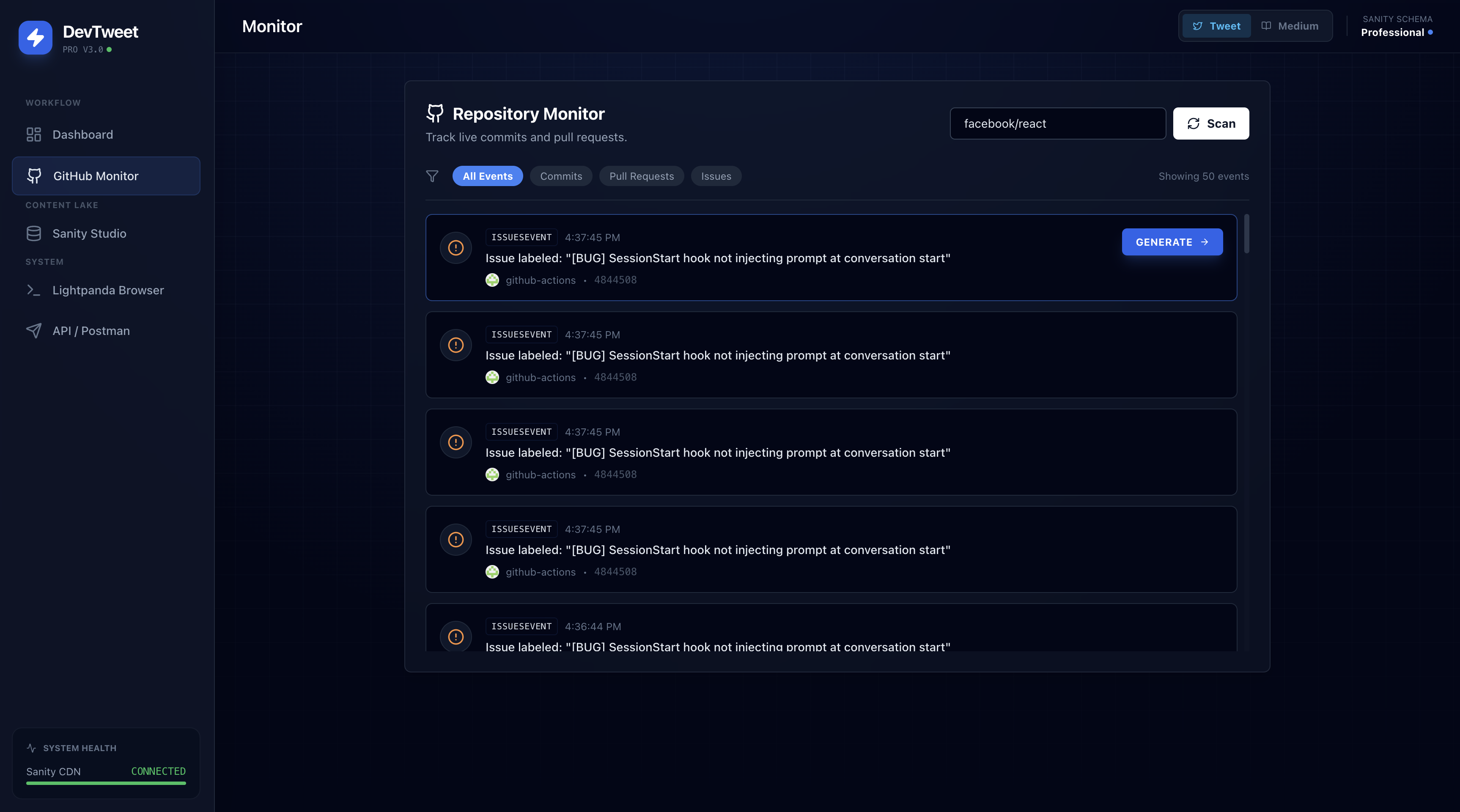
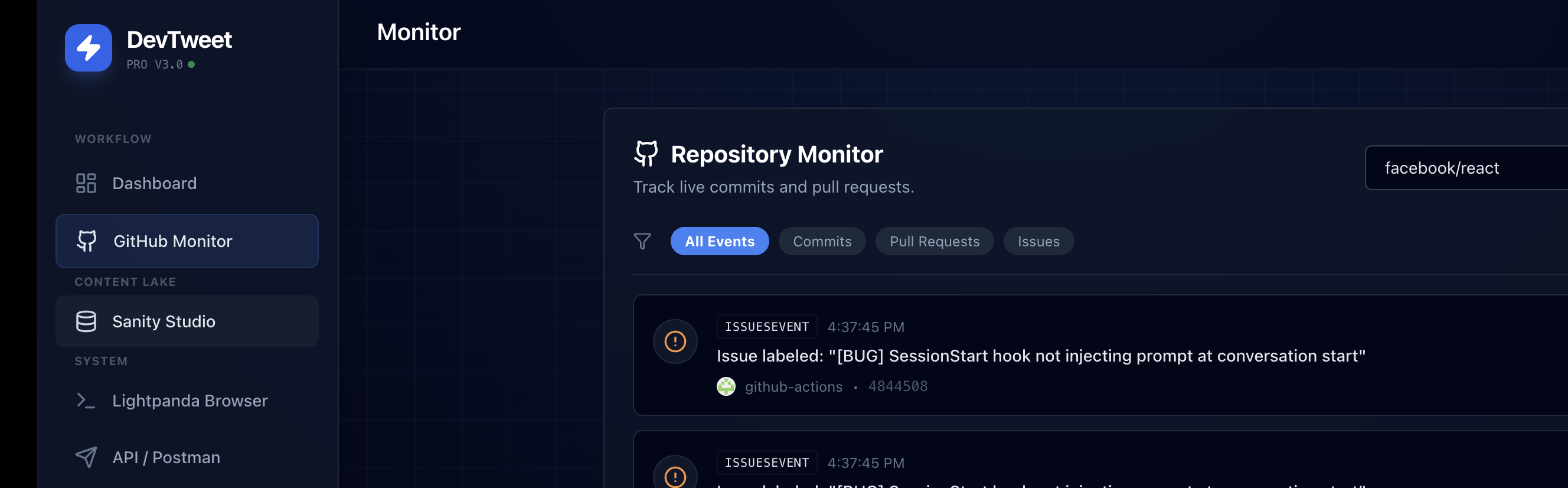
📊 Real-Time GitHub Monitoring
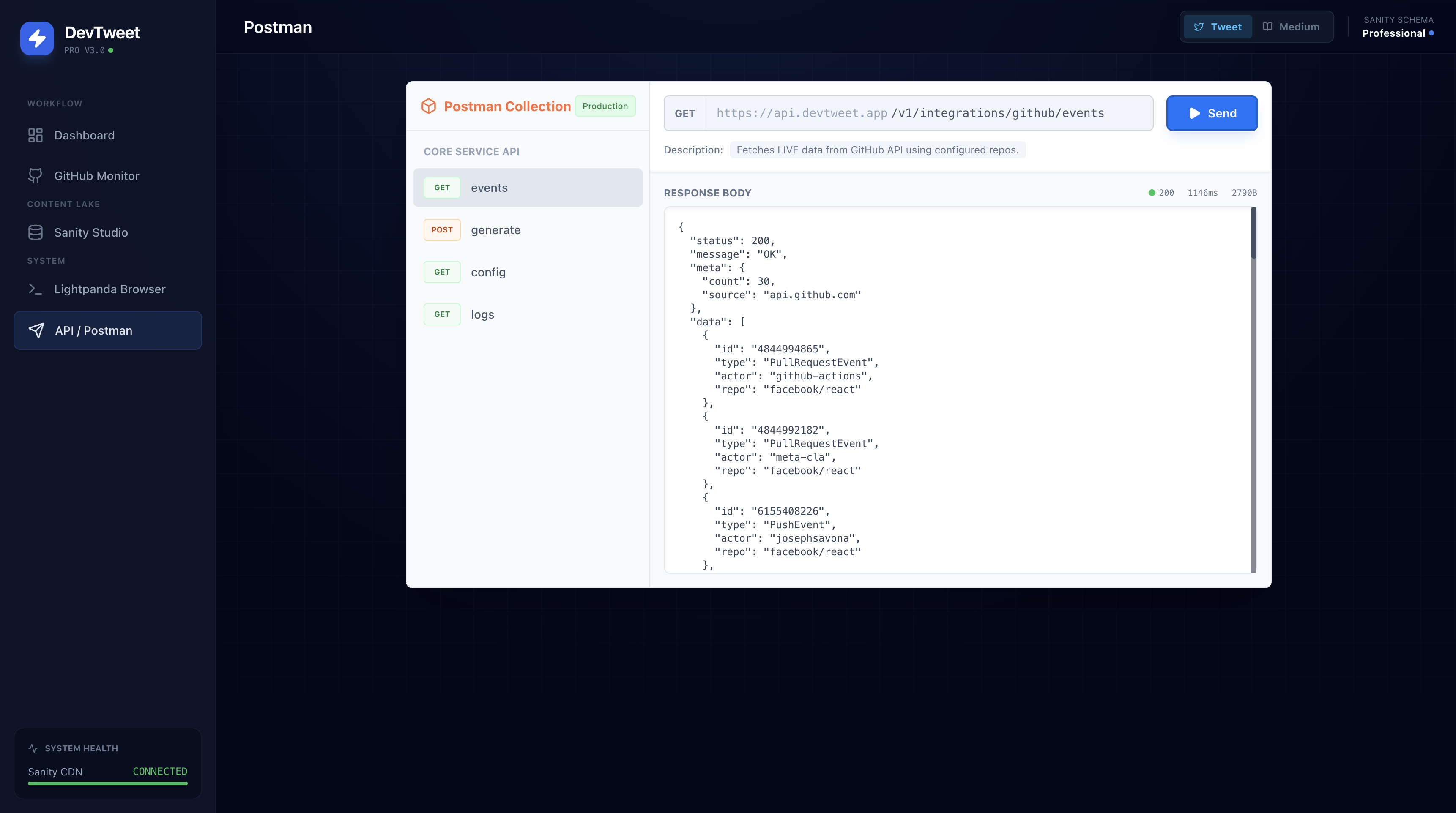
Monitors repositories for events (pushes, PRs, issues, releases) with authenticated API calls (5,000 requests/hour), displaying events in an intuitive dashboard and supporting multiple repositories simultaneously.
🤖 AI-Powered Content Generation
Uses Google Gemini AI to analyze events and generate contextually relevant, platform-specific content. Supports multiple tones (professional, tech-bro, casual) and automatically links related content across platforms (Twitter/X threads, Medium articles).
📤 Multi-Platform Publishing
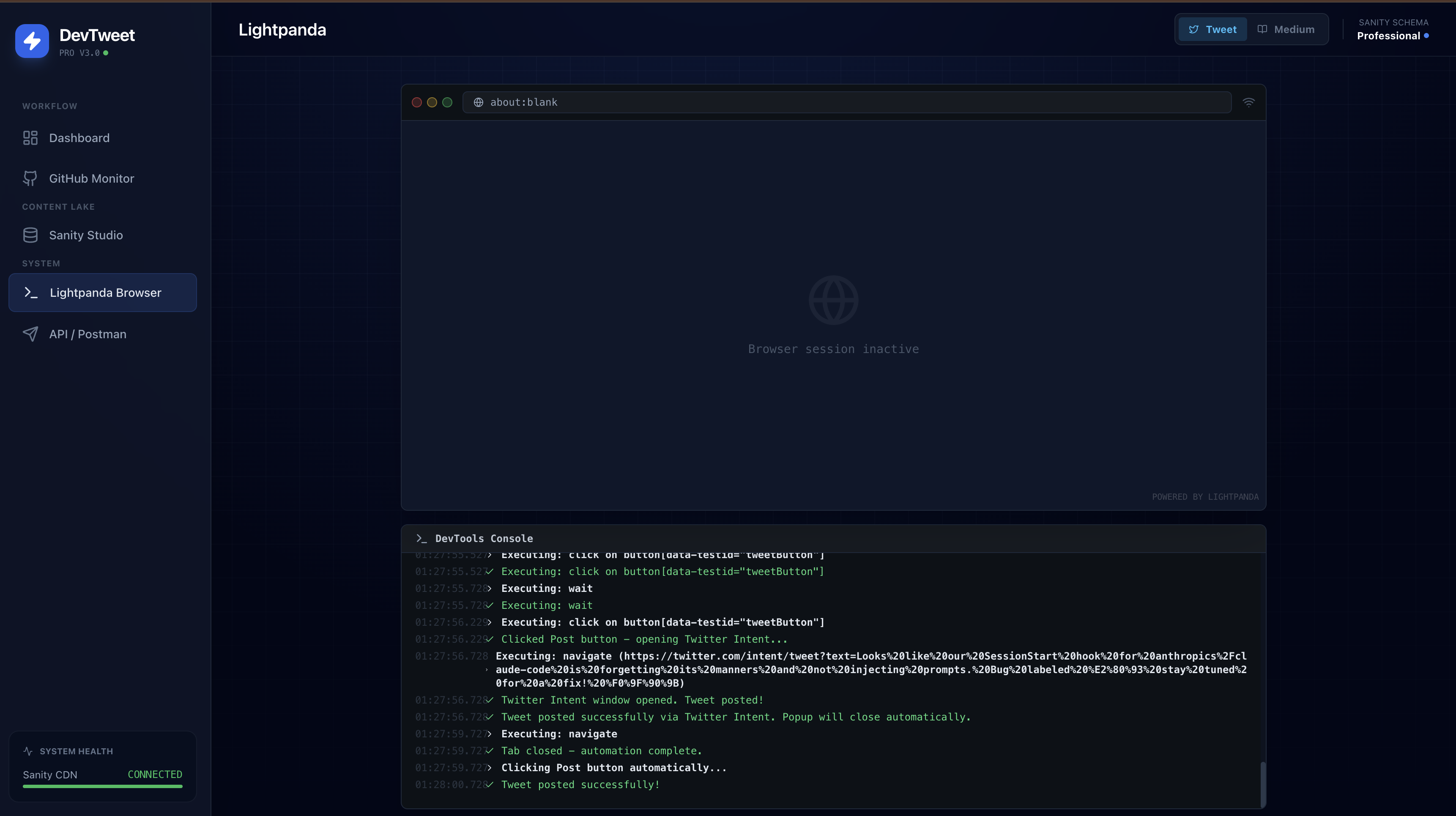
Automated publishing to Twitter/X and Medium using Lightpanda browser automation (10x faster than Chrome), with visual browser simulation and real automation workflows.
🗄️ Content Management System
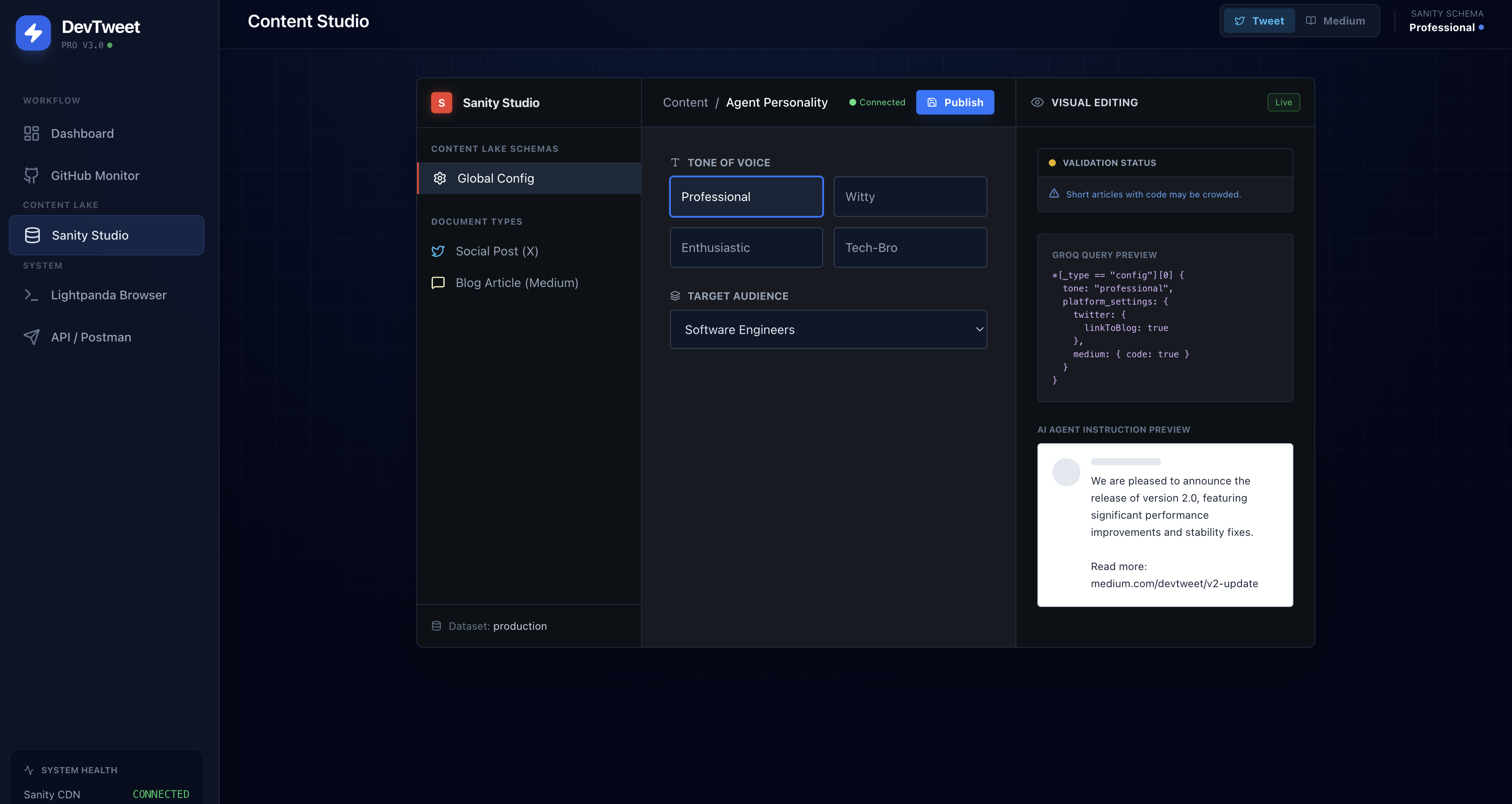
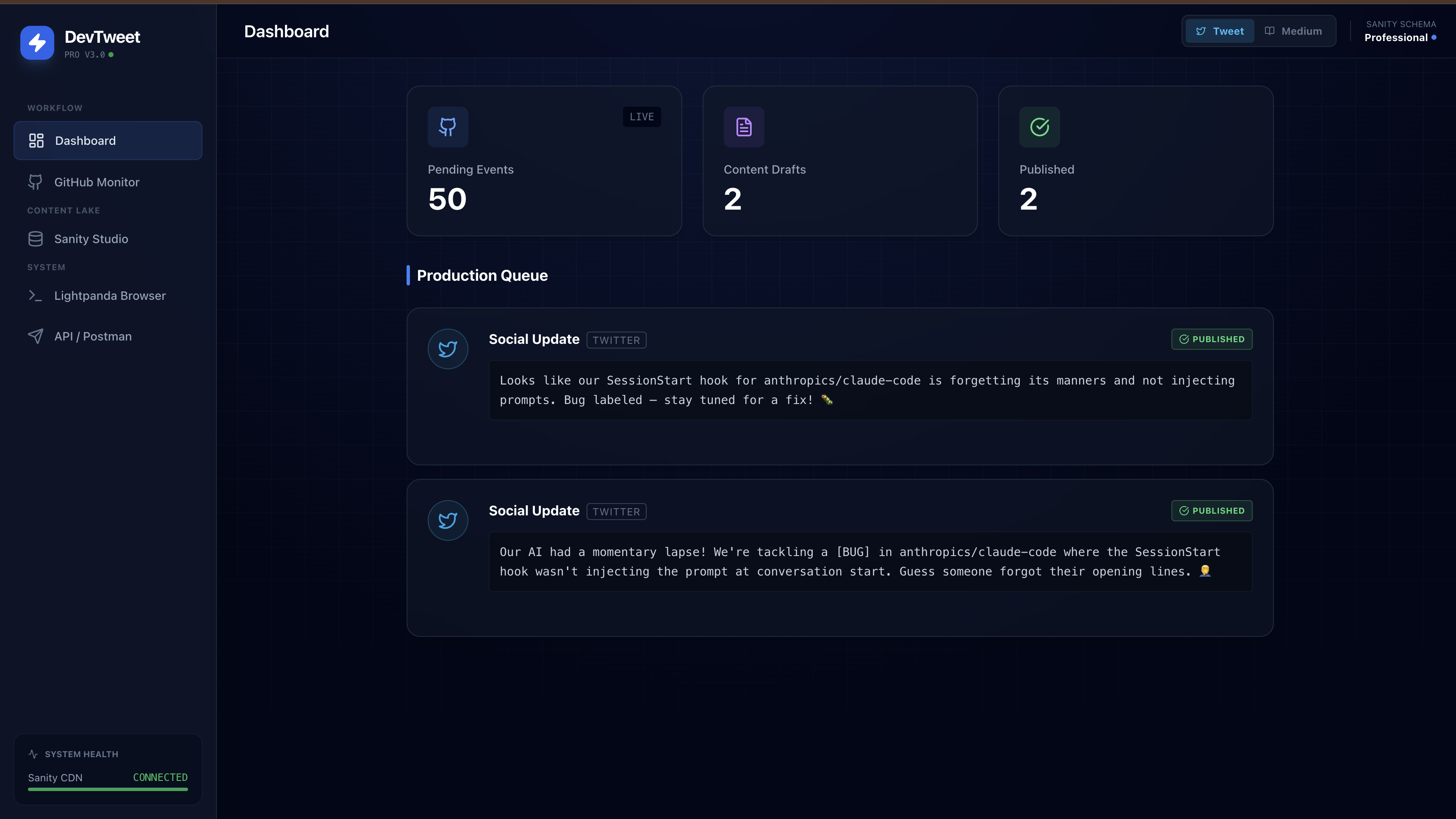
Integrated Sanity CMS "Content Lake" for centralized draft management, with configurable tone, audience, and platform-specific settings using schema-based content structure.
💻 Developer Experience
Modern React + Tailwind CSS UI with real-time logging, API playground for testing integrations, visual browser automation console, and production-ready error handling with fallbacks.
🏗️ How We Built It
Frontend Architecture
⚛️ React 19 + TypeScript + Vite
Modern React with TypeScript for type safety, Vite for fast development and optimized builds, and component-based architecture with clear separation of concerns.
🎨 UI/UX
Tailwind CSS utility-first styling with custom dark theme, responsive glassmorphism design, and real-time status indicators with smooth animations.
Core Services
🔗 GitHub Integration (services/githubService.ts)
Authenticated API calls with rate limit handling (60 → 5,000 requests/hour), event fetching/parsing, real-time repository monitoring, and retry logic with exponential backoff.
🧠 AI Content Generation (services/geminiService.ts)
Google Gemini 2.5 Flash integration with context-aware prompt engineering, platform-specific content formatting (Twitter vs Medium), and multi-turn conversation support for complex content generation.
📚 Sanity CMS Integration (services/sanityService.ts)
Headless CMS with schema-based content structure, MCP (Model Context Protocol) integration for enhanced AI capabilities, and real-time content synchronization between frontend and CMS.
🌐 Browser Automation (services/lightpandaService.ts)
Lightpanda headless browser integration (10x faster than Chrome), Playwright-compatible automation via Chrome DevTools Protocol, Twitter/X and Medium publishing workflows, and fallback simulation mode for development.
🛠️ Technology Stack
| Category | Technologies |
|---|---|
| Frontend | React 19.2.0, TypeScript 5.8.2, Vite 6.2.0, Tailwind CSS 3.4.1, Lucide React |
| Services | Google Gemini AI (@google/genai 1.30.0), Sanity CMS (@sanity/client 6.15.0), GitHub REST API, Lightpanda Browser Automation |
| Tools | PostCSS & Autoprefixer, TypeScript strict mode, environment variable management, optimized builds |
Key Implementation Details
📡 Event-Driven Architecture
GitHub webhook-style event processing with AI-powered event-to-content mapping, content deduplication, and versioning.
🌍 Multi-Platform Support
Platform-specific content templates with cross-platform linking (Twitter → Medium articles) and unified content management interface.
✅ Production-Ready
Environment-based configuration, error boundaries with fallbacks, rate limiting and API quota management, and secure credential handling.
🚧 Challenges We Ran Into
Browser Automation Complexity
Challenge: Implementing reliable browser automation for social media platforms that have complex authentication flows and dynamic content.
Solution:
- Integrated Lightpanda for ultra-fast, low-memory browser automation
- Created visual simulation mode for development and debugging
- Implemented step-by-step automation logging for transparency
- Built fallback mechanisms for when automation services are unavailable
Multi-Service Integration
Challenge: Coordinating multiple external services (GitHub, Gemini AI, Sanity CMS, Lightpanda) with different rate limits, authentication methods, and response formats.
Solution:
- Created unified service layer with consistent error handling
- Implemented retry logic with exponential backoff
- Built comprehensive logging system to track all service interactions
- Designed fallback strategies for each service dependency
Rate Limiting & API Quotas
Challenge: GitHub's unauthenticated API has strict rate limits (60 requests/hour), and managing quotas across multiple services.
Solution:
- Implemented GitHub token authentication (increases limit to 5,000/hour)
- Added rate limit detection and user-friendly error messages
- Created environment-based configuration for all API keys
- Built quota monitoring and usage tracking
Content Quality & Consistency
Challenge: Ensuring AI-generated content maintains quality, tone, and relevance across different GitHub events and platforms.
Solution:
- Developed sophisticated prompt engineering with context injection
- Created configurable content templates in Sanity CMS
- Implemented platform-specific formatting rules
- Added content validation and preview capabilities
Real-Time State Management
Challenge: Managing complex application state with multiple async operations, real-time updates, and user interactions.
Solution:
- Used React hooks for state management
- Implemented optimistic UI updates
- Created centralized logging system for debugging
- Built visual feedback for all async operations
🏆 Accomplishments That We're Proud Of
Technical Achievements
1. Seamless Multi-Service Integration
- Successfully integrated 4+ external services with unified error handling
- Zero-downtime fallback mechanisms for all critical services
- Real-time synchronization between GitHub events and content generation
2. AI-Powered Content Generation
- Context-aware content generation that understands GitHub events
- Platform-specific content optimization (Twitter vs Medium)
- Cross-platform content linking and relationship management
3. Production-Ready Architecture
- Comprehensive error handling and user feedback
- Environment-based configuration management
- Optimized build process with code splitting
- Type-safe codebase with TypeScript strict mode
4. Developer Experience
- Beautiful, intuitive UI that makes complex automation accessible
- Real-time monitoring and logging for transparency
- API playground for testing and debugging
- Comprehensive documentation and setup guides
Innovation Highlights
Browser Automation Innovation
- First-class Lightpanda integration for 10x faster automation
- Visual browser simulation for development and debugging
- Real automation with graceful fallbacks
Content Management
- Headless CMS integration for flexible content configuration
- Schema-based content structure for type safety
- Real-time content synchronization
Developer Productivity
- Automated content creation workflow
- Time savings: From hours to minutes for content creation
- Consistent quality across all generated content
📖 What We Learned
Technical Learnings
1. Model Context Protocol (MCP) Integration
- Learned how to integrate MCP servers for enhanced AI capabilities
- Understood the benefits of protocol-based service integration
- Implemented MCP helpers for Sanity CMS operations
2. Browser Automation Best Practices
- Explored Lightpanda as an alternative to traditional browser automation
- Learned about Chrome DevTools Protocol (CDP) integration
- Understood the importance of visual feedback in automation workflows
3. Headless CMS Architecture
- Gained deep understanding of Sanity CMS schema design
- Learned about content modeling for multi-platform publishing
- Implemented real-time content synchronization patterns
4. AI Prompt Engineering
- Developed sophisticated prompt templates for different content types
- Learned about context injection and few-shot learning
- Understood the importance of structured output formatting
Process Learnings
1. Service Integration Patterns
- Learned to design for service failures and rate limits
- Understood the importance of fallback mechanisms
- Developed patterns for multi-service coordination
2. Developer Experience Focus
- Realized the value of visual feedback in automation tools
- Learned to balance automation with user control
- Understood the importance of transparency in AI-powered systems
3. Production Readiness
- Learned about environment-based configuration
- Understood the importance of comprehensive error handling
- Developed patterns for secure credential management
🚀 What's Next
Short-Term Enhancements
1. Backend Service Implementation
- Build dedicated backend API for Lightpanda automation
- Implement server-side browser automation
- Add authentication and authorization
- Create API endpoints for all services
2. Content Scheduling
- Add ability to schedule posts for future publication
- Implement queue management system
- Create calendar view for scheduled content
- Add timezone support
3. Multi-Repository Support
- UI for configuring multiple repositories
- Parallel event monitoring
- Repository-specific content templates
- Dashboard with repository insights
4. Enhanced Analytics
- Track content performance metrics
- Monitor engagement rates
- Generate reports and insights
- A/B testing for content variations
Long-Term Vision
1. Advanced AI Features
- Fine-tuned models for specific developer communities
- Multi-language content generation
- Image generation for social media posts
- Video content creation
2. Platform Expansion
- Support for LinkedIn, Dev.to, Hashnode
- Custom platform integrations
- RSS feed generation
- Newsletter automation
3. Collaboration Features
- Team workspaces
- Content approval workflows
- Role-based access control
- Shared content libraries
4. Enterprise Features
- White-label solutions
- Custom branding
- Advanced analytics dashboard
- API access for integrations
🎮 Try It Out
Live Demo
AI Studio: View the app in AI Studio
Local Setup
Prerequisites: Node.js installed
Clone the repository
# Replace <repository-url> with your actual repository URL
git clone <repository-url>
cd Production-Agents-Hackathon
Install dependencies
npm installConfigure environment variables
cp .env.example .env.local
Add your API keys:
   GEMINI_API_KEY=your_gemini_api_key
   GITHUB_TOKEN=your_github_token  # Optional but recommended
   SANITY_API_TOKEN=your_sanity_token  # Optional
   LIGHTPANDA_API_URL=http://localhost:3001/api/lightpanda  # Optional
Run the development server
npm run devOpen in browser
Navigate to http://localhost:5173
Key Features to Try
- GitHub Monitor: Navigate to the GitHub Monitor tab and fetch events from
facebook/react - Content Generation: Select a GitHub event and generate Twitter or Medium content
- Content Lake: View all generated content in the Dashboard
- Publishing: Use the Lightpanda Browser tab to see automated publishing in action
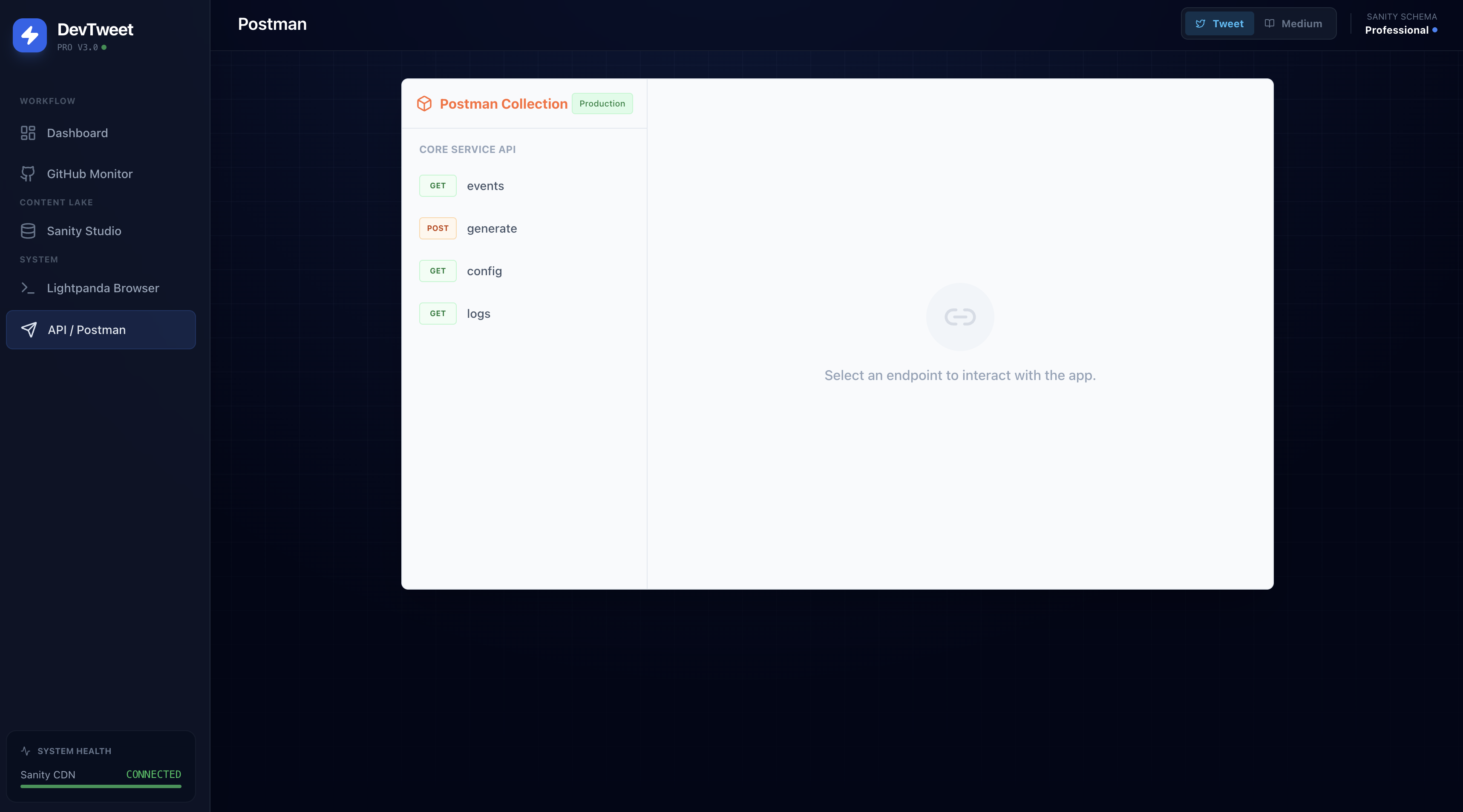
- API Playground: Test service integrations in the Postman Playground
Sanity CMS Configuration
The project is pre-configured with Sanity CMS:
- Project ID:
17skr5jj - Dataset:
production - Workspace:
default
To deploy schema changes:
npx sanity schema deploy
Documentation
- README: Comprehensive setup and configuration guide
- Project Analysis: Detailed analysis of project structure and features
- Quick Wins: Implementation details for key features
🛠️ Built With
Frontend Technologies
- React 19.2.0 - Modern UI framework with hooks and concurrent features
- TypeScript 5.8.2 - Type safety and enhanced developer experience
- Vite 6.2.0 - Lightning-fast build tool and dev server
- Tailwind CSS 3.4.1 - Utility-first CSS framework
- Lucide React - Beautiful icon library
Core Services & APIs
- Google Gemini AI (@google/genai 1.30.0) - Advanced content generation
- Sanity CMS (@sanity/client 6.15.0) - Headless content management
- GitHub REST API - Real-time repository event monitoring
- Lightpanda Browser Automation - Ultra-fast headless browser (10x faster than Chrome)
Development Tools
- PostCSS & Autoprefixer - CSS processing and compatibility
- TypeScript Strict Mode - Maximum type safety
- Environment Variable Management - Secure configuration
- Optimized Production Builds - Code splitting and tree shaking
👥 Team
Built with passion for developer productivity and AI automation by NIHAL NIHALANI.
📄 License
This project is part of the Production Agents Hackathon.
Made with ❤️ for developer productivity

Built With
- anthropic
- autoprefixer
- chrome-devtools-protocol
- github-rest-api
- google-gemini-ai
- javascript
- lightpanda
- lucide-react
- node.js
- npm
- postcss
- react
- sanity-cms
- tailwind-css
- typescript
- vite

Log in or sign up for Devpost to join the conversation.