-
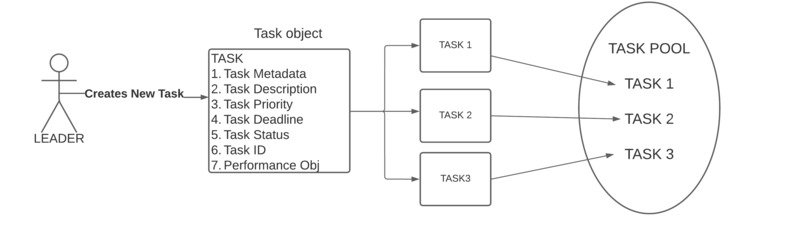
Leader Keeps adding Tasks
-
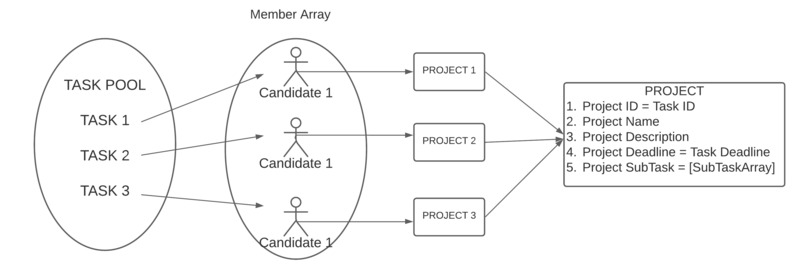
Candidate Selects Tasks according to skill and priority
-
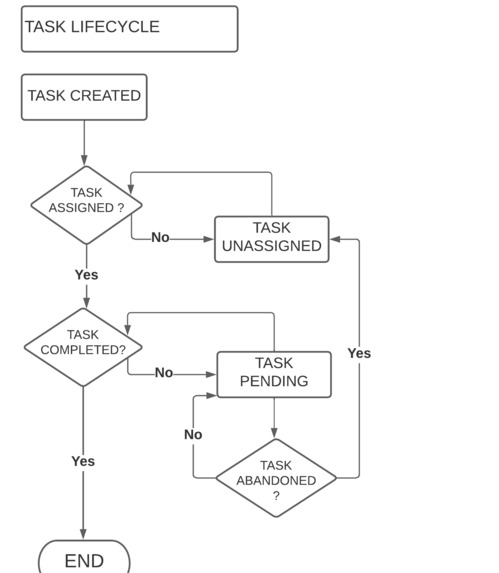
Task Lifecycle


Inspiration
Usually candidates from different countries, regions and timezones participates in Hackathons. This leads to many problems faced by candidates in online hackathons like : -
1. Time zone differences: When participants are in different time zones, it can be challenging to coordinate work and deadlines.
2. Workload balancing: In hackathons, some team members may be more experienced or skilled than others, which can lead to an imbalance in workload.
3. Miscommunications: In a fast-paced environment like a hackathon, miscommunications can happen easily between candidates of different countries or regions.
4. Productivity: Hackathons require participants to work quickly and efficiently to develop solutions within a limited timeframe
5. Accountability: In hackathons, it is important to hold team members accountable for their work and deadlines.
So, I propose an Automated Task Assignment Tool which can create task lists, assign tasks, monitor progress, prioritize tasks, automate reminders, and track performance. It helps increase productivity, reduce errors and miscommunications, and ensure that the project is completed on time and within budget.
What it does
An Automated task assignment tool can : - 1. Create task lists: An automated task assignment system can create task lists based on the project requirements and divide them into smaller, manageable tasks.
2. Assign tasks: The system can assign tasks to team members based on their skills, availability, and workload. This can ensure that tasks are distributed evenly among team members and that everyone has a fair share of the work.
3. Monitor progress: The system can monitor the progress of each task and provide updates to the team members and project managers. This can help identify any issues that arise and take corrective actions to keep the project on track.
4. Prioritize tasks: The system can prioritize tasks based on their urgency and importance, ensuring that critical tasks are completed first.
5. Automate reminders: The system can send reminders to team members about upcoming tasks and deadlines, reducing the risk of missed deadlines.
6. Track performance: The system can track the performance of each team member and provide feedback on their progress. This can help identify areas where team members need support and provide an opportunity for continuous improvement.
How we built it
This Project can be easily created using Reactjs library. Some of the main modules needed to create this project are : -
1. User management module: This module is responsible for managing user accounts
a. user registration.    _using email/pass and storing users on firebase_

b. user login and authentication.    _firebase for authentication and login_

c. user roles and permissions.    _roles : leader/candidate, leader can create tasks, candidate can select tasks_

d. general account management.    _password recovery etc_
2. Task management module: This module is responsible for Task Managment
a. Creating tasks.    _[leader] create tasks, add essential details for task, assign deadline, post task_

b. Assigning Tasks    _[Leader] posts task on a board and candidates selects the tasks and completes it_

c. Task prioritization    _[Leader] each task will have a priority assigned to it for faster completion_

d. Task status tracking    _[Candidate] candidates will post task status at periodic intervals_

e. Task completion    _[Leader] mark the task status as complete_
NOTE : each Task has a state attached to it unassigned, pending, complete, if a task is abandoned it is unassigned.
3. Project management module: This module is responsible for managing projects in the system.
 a. Project creation

 b. Project assignment

 c. Project status tracking

 d. Project reporting.
4. Performance tracking module: This module is responsible for tracking the performance It may
 a. System health monitoring

 b. System usage metrics

 c. Performance analysis.
5. Notification module: This module is responsible for sending notifications to users
 1. Email notifications    _Twilio REST API_

 2. SMS notifications    _Twilio REST API_

 3. push notifications.    _Twilio REST API_
6. Reporting module: This module is responsible for generating reports about tasks, projects, or system performance.
 a. Custom report generation

 b. Data visualization

 c. Report scheduling.
7. Integration module: This module is responsible for integrating the automated task management system with other systems or services. It may include features such as API integration, data synchronization, and webhooks.
Algorithm for Automatically Assigning Tasks
Create an array of tasks, each with a skill level and priority level.
Create an array of candidates, each with their skill level, availability and timezone.
Sort the tasks by priority level, from highest to lowest.
For each task, starting with the highest priority task: a. Filter the candidates array by skill level that matches the task.
b. Sort the filtered candidates by timezone, so that the candidates in the same timezone as the task are first in the array.
c. Filter the candidates array by availability at the time the task needs to be done.
d. Select the first candidate in the filtered array as the person to complete the task.
e. Assign the task to the selected candidate.
Repeat step 4 until all tasks are assigned.
Javascript Pseudo-Code for automated task assigning algorithm
// assume tasks is an array of objects with properties:
// - taskName (string): the name of the task
// - skillRequired (array): an array of strings indicating the required skills
// - priority (number): a priority level for the task, where higher number indicates higher priority

// assume candidates is an array of objects with properties:
// - name (string): the name of the candidate
// - skills (array): an array of strings indicating the candidate's skills
// - timezone (string): the timezone of the candidate, e.g. "UTC-08:00"

// assume candidateAvailability is an object with properties:
// - candidateName (string): the name of the candidate
// - availability (array): an array of objects representing candidate's availability
// - each object in the array has properties:
//   - day (string): the day of the week, e.g. "Monday"
//   - startTime (string): the start time of the candidate's availability in "HH:mm" format
//   - endTime (string): the end time of the candidate's availability in "HH:mm" format

// assume assignedTasks is an empty array that will be filled with objects representing assigned tasks

function assignTasks(tasks, candidates, candidateAvailability) {
  // sort tasks in descending order of priority
  tasks.sort((a, b) => b.priority - a.priority);

  // for each task, find the candidate with the required skills who is available at the earliest time slot
  for (let i = 0; i < tasks.length; i++) {
    const task = tasks[i];
    let earliestStartTime = Infinity;
    let assignedCandidate = null;

    for (let j = 0; j < candidates.length; j++) {
      const candidate = candidates[j];

      // check if candidate has the required skills
      if (candidate.skills.includes(task.skillRequired)) {

        // find candidate's availability for the day of the task, converted to task timezone
        const dayOfTask = convertToTaskTimezone(task.day, candidate.timezone);
        const availability = candidateAvailability.find(avail => avail.candidateName === candidate.name && avail.day === dayOfTask);

        // if candidate is available, find the earliest time slot and assign the candidate
        if (availability && availability.startTime < earliestStartTime) {
          earliestStartTime = availability.startTime;
          assignedCandidate = candidate;
        }
      }
    }

    // add assigned task to assignedTasks array
    assignedTasks.push({
      taskName: task.taskName,
      assignedTo: assignedCandidate ? assignedCandidate.name : "unassigned"
    });
  }

  return assignedTasks;
}

function convertToTaskTimezone(dayOfWeek, candidateTimezone) {
  // code to convert dayOfWeek to task timezone
  // ...
  return dayOfTask;
}
Sample Code
import React, { useState } from 'react';

export function App(props) {
  const [taskList, setTaskList] = useState([]);
  const [teamMembers, setTeamMembers] = useState([]);
  const [selectedMember, setSelectedMember] = useState("");
  const [sortBy, setSortBy] = useState("priority");

  const handleTaskAdd = (task) => {
    setTaskList([...taskList, task]);
  };

  const handleMemberAdd = (member) => {
    setTeamMembers([...teamMembers, member]);
  };

  const handleMemberSelect = (event) => {
    setSelectedMember(event.target.value);
  };

  const assignTask = (taskId) => {
    const task = taskList.find((task) => task.id === taskId);
    task.assignedTo = selectedMember;
    task.status = "In Progress";
    setTaskList([...taskList]);
  };

  const completeTask = (taskId) => {
    const task = taskList.find((task) => task.id === taskId);
    task.status = "Completed";
    setTaskList([...taskList]);
  };

  const getPrioritySortOrder = (taskA, taskB) => {
    return taskB.priority - taskA.priority;
  };

  const getPerformanceSortOrder = (taskA, taskB) => {
    const taskAPerformance = taskA.status === "Completed" ? 1 : 0;
    const taskBPerformance = taskB.status === "Completed" ? 1 : 0;
    return taskBPerformance - taskAPerformance;
  };

  const handleSortChange = (event) => {
    setSortBy(event.target.value);
  };

  const sortTaskList = () => {
    let sortedTaskList;
    if (sortBy === "priority") {
      sortedTaskList = [...taskList].sort(getPrioritySortOrder);
    } else {
      sortedTaskList = [...taskList].sort(getPerformanceSortOrder);
    }
    setTaskList(sortedTaskList);
  };

  return (
    <div>
      <h1>Task Assignment System</h1>
      <div>
        <h2>Add a Task</h2>
        <form onSubmit={handleTaskAdd}>
          <input type="text" placeholder="Task name" />
          <input type="number" placeholder="Priority" />
          <button type="submit">Add Task</button>
        </form>
      </div>
      <div>
        <h2>Add a Team Member</h2>
        <form onSubmit={handleMemberAdd}>
          <input type="text" placeholder="Member name" />
          <button type="submit">Add Member</button>
        </form>
      </div>
      <div>
        <h2>Assign Tasks</h2>
        <select onChange={handleMemberSelect}>
          {teamMembers.map((member) => (
            <option value={member.id}>{member.name}</option>
          ))}
        </select>
        <select onChange={handleSortChange}>
          <option value="priority">Priority</option>
          <option value="performance">Performance</option>
        </select>
        <button onClick={sortTaskList}>Sort</button>
        <ul>
          {taskList.map((task) => (
            <li key={task.id}>
              {task.name} - {task.assignedTo ? task.assignedTo : "Unassigned"}{" "}
              ({task.status}) - Priority: {task.priority}
              {task.status === "In Progress" ? (
                <button onClick={() => completeTask(task.id)}>Complete            </button>
          ) : (
            <button onClick={() => assignTask(task.id)}>Assign</button>
          )}
        </li>
      ))}
    </ul>
  </div>
</div>
  );
}
Notification module
const accountSid = 'AccountSid';
const authToken = 'AuthToken';
const client = require('twilio')(accountSid, authToken);

// function to send SMS notification
function sendNotificationSMS(to, body) {
    client.messages
      .create({
         body: body,
         from: '+12345678901',
         to: to
       })
      .then(message => console.log(message.sid))
      .catch(error => console.error(error));
}
Project Managment Module
const projects = [];

// function to create a new project
function createProject(name, description, deadline) {
  const newProject = {
    id: projects.length + 1,
    name,
    description,
    deadline,
    tasks: []
  };
  projects.push(newProject);
  return newProject;
}

// function to update a project
function updateProject(id, name, description, deadline) {
  const project = projects.find(p => p.id === id);
  if (!project) {
    return null;
  }
  project.name = name || project.name;
  project.description = description || project.description;
  project.deadline = deadline || project.deadline;
  return project;
}

// function to delete a project
function deleteProject(id) {
  const index = projects.findIndex(p => p.id === id);
  if (index === -1) {
    return null;
  }
  projects.splice(index, 1);
  return true;
}

// function to get all projects
function getAllProjects() {
  return projects;
}

module.exports = {
  createProject,
  updateProject,
  deleteProject,
  getAllProjects
};
define an array projects to store all the projects. The createProject function takes a project name, description, and deadline as input parameters, creates a new project object with an ID and an empty tasks array, and adds it to the projects array. The updateProject function takes a project ID and optionally updated name, description, and deadline parameters, and updates the corresponding project object in the projects array. The deleteProject function takes a project ID and deletes the corresponding project object from the projects array. Finally, the getAllProjects function returns all the projects in the projects array.
Task Mgmt Module
const tasks = [];

// function to create a new task for a project
function createTask(projectId, name, description, deadline) {
  const newTask = {
    id: tasks.length + 1,
    projectId,
    name,
    description,
    deadline,
    completed: false
  };
  tasks.push(newTask);
  return newTask;
}

// function to update a task
function updateTask(id, name, description, deadline, completed) {
  const task = tasks.find(t => t.id === id);
  if (!task) {
    return null;
  }
  task.name = name || task.name;
  task.description = description || task.description;
  task.deadline = deadline || task.deadline;
  task.completed = completed || task.completed;
  return task;
}

// function to delete a task
function deleteTask(id) {
  const index = tasks.findIndex(t => t.id === id);
  if (index === -1) {
    return null;
  }
  tasks.splice(index, 1);
  return true;
}

// function to get all tasks for a given project
function getAllTasksForProject(projectId) {
  return tasks.filter(t => t.projectId === projectId);
}

module.exports = {
  createTask,
  updateTask,
  deleteTask,
  getAllTasksForProject
};
define an array tasks to store all the tasks for all projects. The createTask function takes a project ID, task name, description, and deadline as input parameters, creates a new task object with an ID, a reference to the project ID, and a completed flag set to false, and adds it to the tasks array. The updateTask function takes a task ID and optionally updated name, description, deadline, and completed status parameters, and updates the corresponding task object in the tasks array. The deleteTask function takes a task ID and deletes the corresponding task object from the tasks array. Finally, the getAllTasksForProject function takes a project ID and returns all the tasks associated with that project in the tasks array.
Performance Tracking Module
const performance = {};

// function to track task progress
function trackTaskProgress(taskId, percentageComplete) {
  if (!performance[taskId]) {
    performance[taskId] = {
      completed: 0,
      total: 0,
    };
  }
  performance[taskId].completed = percentageComplete;
}

// function to track task completion
function trackTaskCompletion(taskId) {
  if (!performance[taskId]) {
    performance[taskId] = {
      completed: 0,
      total: 0,
    };
  }
  performance[taskId].completed = 100;
}

// function to get the progress of a task
function getTaskProgress(taskId) {
  if (!performance[taskId]) {
    return 0;
  }
  return performance[taskId].completed;
}

// function to track project progress
function trackProjectProgress(projectId) {
  const tasks = getAllTasksForProject(projectId);
  const completedTasks = tasks.filter(t => t.completed);
  const percentageComplete = completedTasks.length / tasks.length * 100;
  performance[projectId] = {
    completed: percentageComplete,
    total: tasks.length,
  };
}

// function to get the progress of a project
function getProjectProgress(projectId) {
  if (!performance[projectId]) {
    return 0;
  }
  return performance[projectId].completed;
}

module.exports = {
  trackTaskProgress,
  trackTaskCompletion,
  getTaskProgress,
  trackProjectProgress,
  getProjectProgress,
};
define an object performance to store the progress and performance data for each task and project. The trackTaskProgress function takes a task ID and the percentage of completion as input parameters, updates the corresponding task object in the performance object with the new progress data, and keeps track of the total number of tasks in the project. The trackTaskCompletion function takes a task ID as input parameter and marks the corresponding task as completed in the performance object. The getTaskProgress function takes a task ID as input parameter and returns the percentage of completion for that task from the performance object. The trackProjectProgress function takes a project ID as input parameter, calculates the percentage of completion for all tasks in the project, and updates the corresponding project object in the performance object with the new progress data. The getProjectProgress function takes a project ID as input parameter and returns the percentage of completion for the project from the performance object.
Algorithm for rewards system on basis of no.of tasks completed and priority of each task
Initialize a variable totalTasks to the total number of tasks in the hackathon.
For each completed task by each candidate, multiply the priority of the task by the total number of tasks and add the result to a running total score for the candidate.
Once all completed tasks have been tallied, calculate each candidate's percentage of the total score by dividing their score by the maximum possible score (which is totalTasks multiplied by the highest priority).
Multiply the reward money by each candidate's percentage of the total score to determine the amount of money they will receive as a reward.
Javascript pseudo-code for rewards system
// Input: an array of completed tasks with their priorities and the total number of tasks
// Output: an object with each candidate's reward money

function distributeRewards(completedTasks, totalTasks, rewardMoney) {
  let totalPriority = 0;
  let totalCompletedTasks = 0;
  let candidateRewards = {};

  // Calculate the total priority of all completed tasks
  for (let i = 0; i < completedTasks.length; i++) {
    totalPriority += completedTasks[i].priority * totalTasks;
    totalCompletedTasks += completedTasks[i].numCompleted;
  }

  // Calculate each candidate's reward money
  for (let i = 0; i < completedTasks.length; i++) {
    let candidate = completedTasks[i].candidate;
    let candidatePriority = completedTasks[i].priority * totalTasks;
    let candidateTasksCompleted = completedTasks[i].numCompleted;
    let candidateReward = (candidatePriority / totalPriority) * rewardMoney
                        + (candidateTasksCompleted * 5);
    candidateRewards[candidate] = candidateReward;
  }

  return candidateRewards;
}
Challenges we ran into
There are several challenges that we can encounter while creating an automated task management system:
1. Complexity: An automated task management system can be quite complex to build, especially if it involves integrating with other systems or requires a lot of custom functionality.
2. Scalability: As the number of tasks and users grows, the system may become slow or difficult to manage. We need to ensure that the system can scale with the needs of the organization.
3. Integration with existing tools: Depending on the organization's existing tools and processes, it may be challenging to integrate the new system into the workflow. This can require additional time and resources to ensure that the system works seamlessly with other tools.
4. Security: Task management systems can contain sensitive information, such as user data and task details. We need to ensure that the system is secure and follows best practices for data privacy and protection.
5. User adoption: The success of any task management system depends on user adoption. If the system is too complex or difficult to use, users may not use it, leading to a lack of adoption and ineffective task management.
6. Maintenance and updates: As with any software system, an automated task management system will require ongoing maintenance and updates to ensure that it remains effective and up to date with changing requirements and technologies.
Accomplishments that we're proud of
What we learned
- Deployment on Cloud services like AWS, Azure
- Creating a scalable system
What's next for Devpost-Hackathon-ATAT
- Creating the whole Project and deploying on cloud computing environment like AWS.
- using Blockchain Technology and smart contracts to decentralize the Application.
Idea for Integration of Blockchain Technology
1. Task Creation: The hackathon organizers create the list of tasks that need to be completed during the event. These tasks are stored in a decentralized blockchain network.
2. Participant Registration: Participants register for the hackathon and create a unique identity on the blockchain network. This identity is used to authenticate participants and their contributions.
3. Task Assignment: The automated task assignment tool analyzes the skills and experience of each participant and assigns them tasks accordingly. The tool considers factors such as the participant's coding skills, past hackathon experience, and other relevant information to make the best task assignment.
4. Task Completion: Participants work on their assigned tasks and submit their progress on the blockchain network. The blockchain network tracks the progress of each participant in real-time.
5. Verification: Once the task is completed, it is verified by the hackathon organizers or a designated panel of judges. Verification is done by checking the quality of the code, the functionality of the task, and adherence to the hackathon rules.
6. Reward Distribution: Once a task is verified, the participant is rewarded with cryptocurrency or other digital assets that are stored on the blockchain network. The reward is distributed automatically to the participant's blockchain wallet.
7. Feedback: Participants receive feedback from the organizers or judges on their completed tasks. Feedback can include suggestions for improvement or recognition for exceptional work.
8. Final Evaluation: At the end of the hackathon, the participants with the most completed tasks or highest quality work are recognized and rewarded with additional prizes. The final evaluation is done based on the participant's overall contribution to the hackathon and their adherence to the hackathon rules.


Log in or sign up for Devpost to join the conversation.