-
-
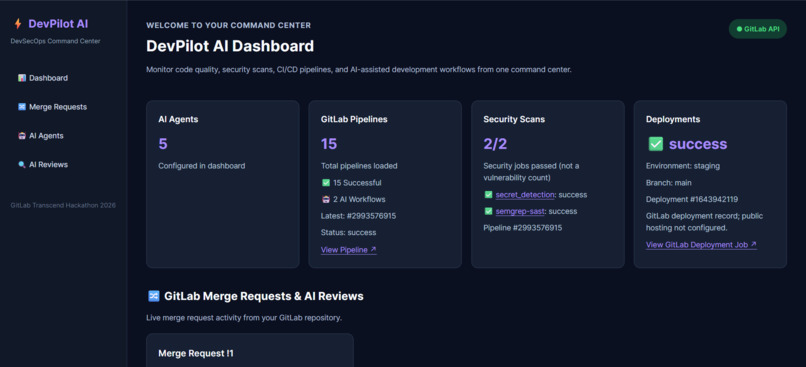
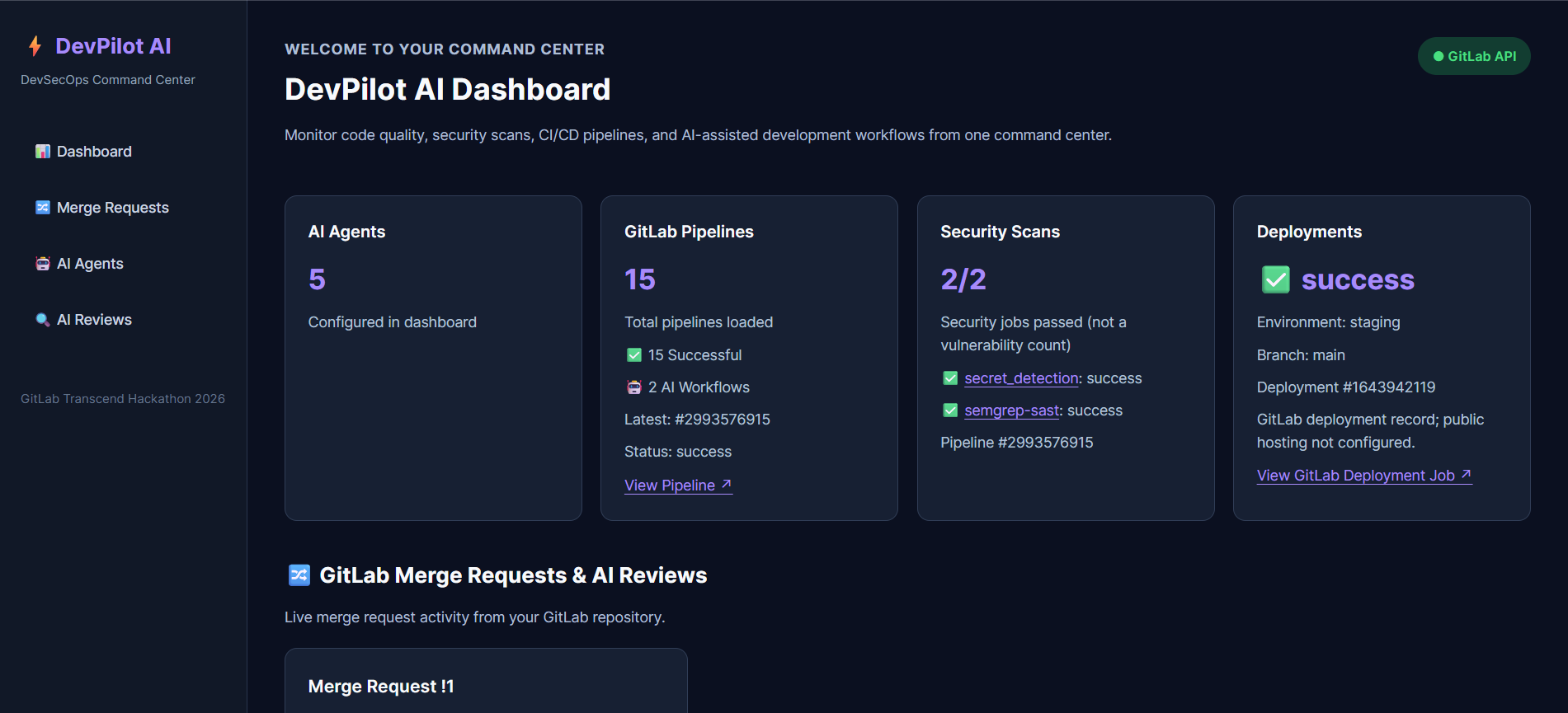
DevPilot AI Dashboard: Your entire DevSecOps workflow at a glance.
-
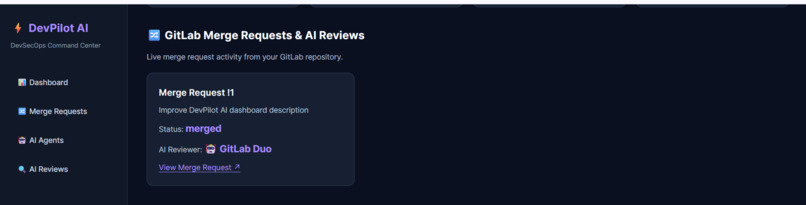
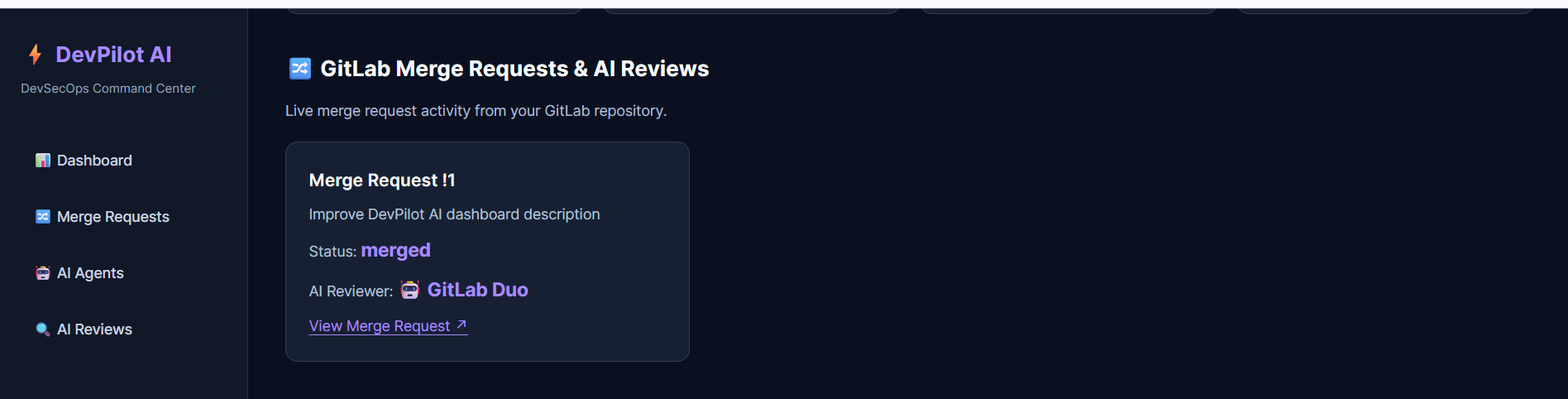
GitLab Merge Requests & AI Review: Track merge requests and AI-assisted reviews effortlessly.
-
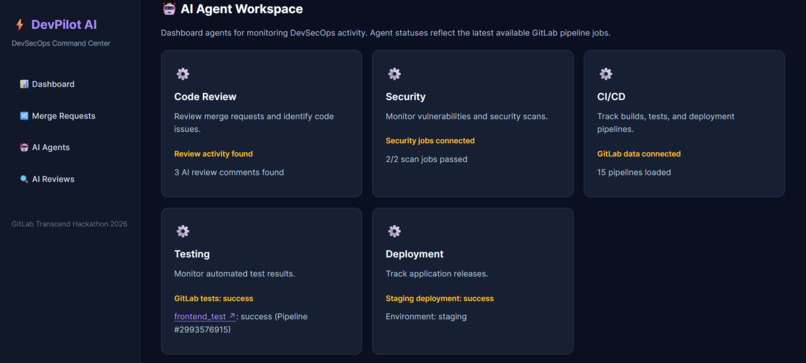
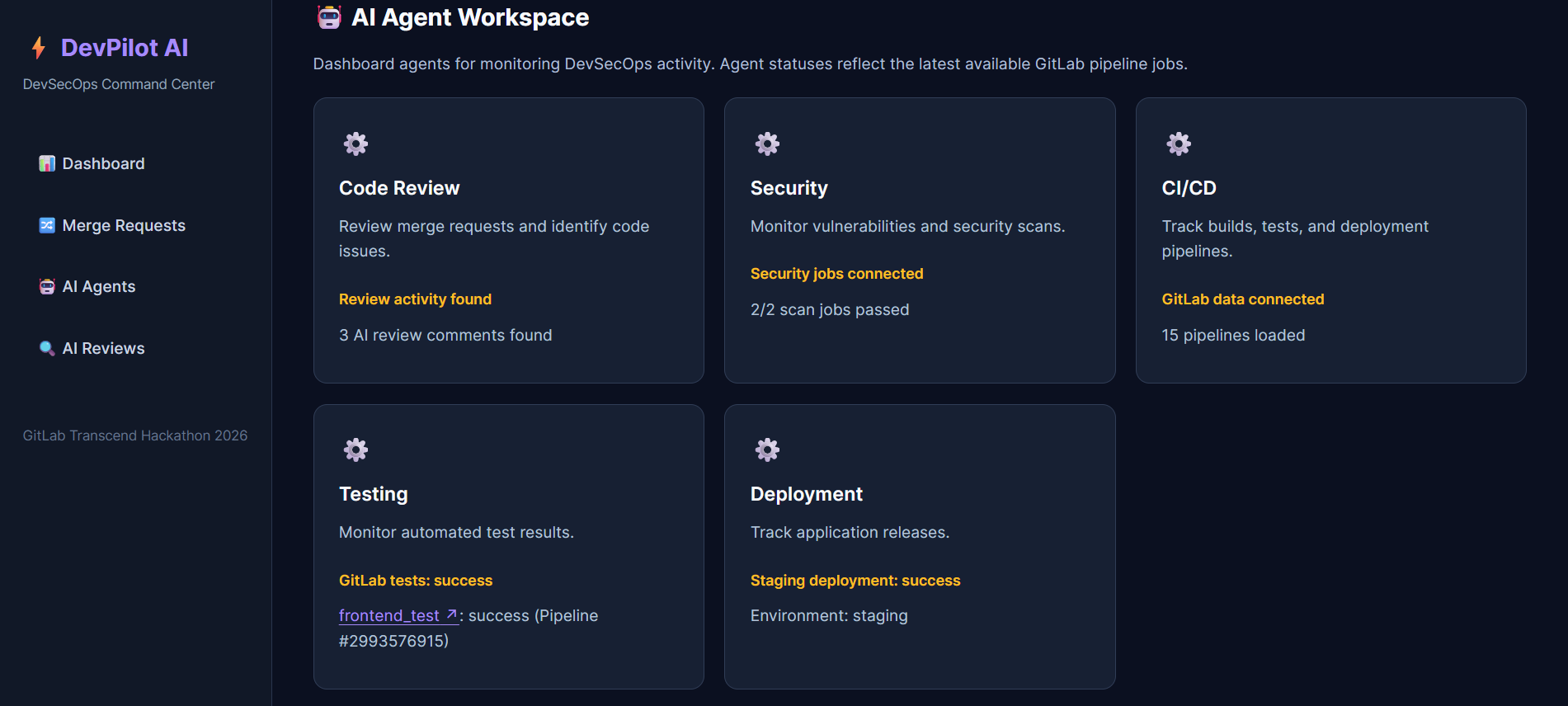
AI Agent Workspace: Five agents, one unified DevSecOps command center.
-
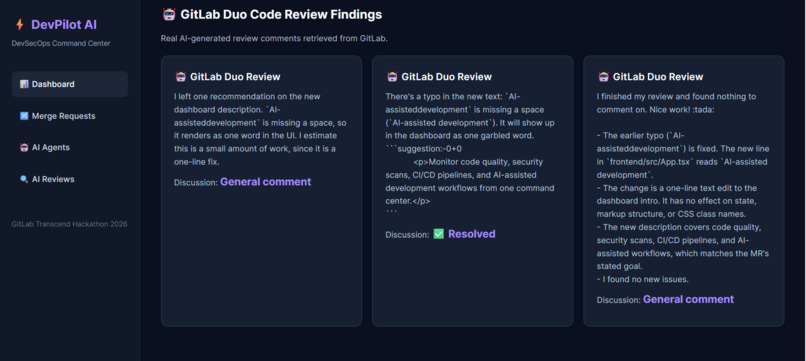
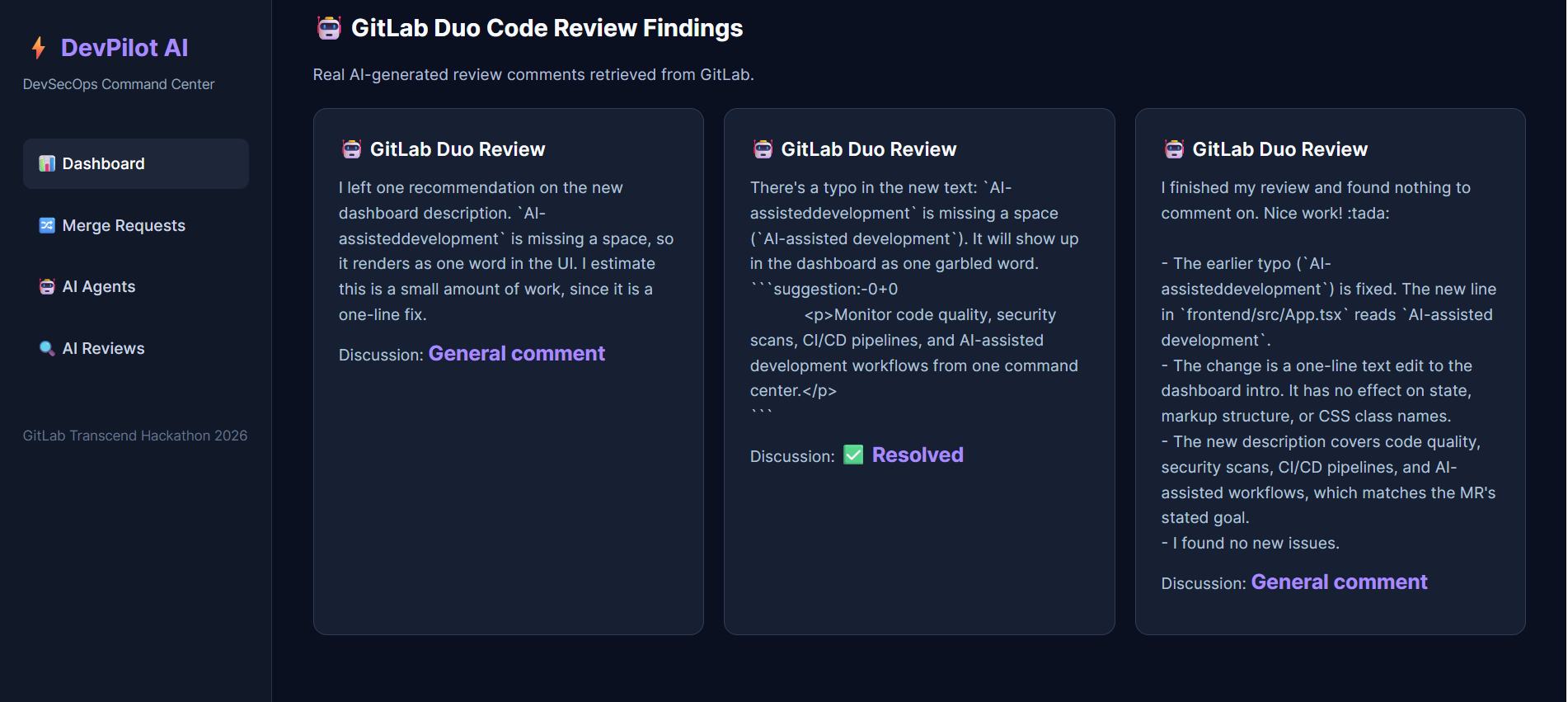
GitLab Duo Code Review Findings: AI-powered insights to improve code quality.
DevPilot AI — Your Intelligent DevSecOps Command Center
Inspiration
Software development doesn't end when we finish writing code. Developers still need to review changes, identify security vulnerabilities, run tests, monitor CI/CD pipelines, and track deployments.
While working with development tools, we realized that understanding the overall health of a project often means switching between multiple pages, checking different pipeline jobs, and manually connecting information from code reviews, security scans, and deployments.
We started thinking: What if developers could see their entire DevSecOps workflow in one place?
That question inspired us to build DevPilot AI, an intelligent DevSecOps command center that brings together GitLab's development workflows and AI-assisted code review capabilities.
Our goal was to make it easier for developers to understand what's happening across their projects, identify issues earlier, and spend less time searching for information.
What it does
DevPilot AI is a centralized dashboard that connects with GitLab and provides visibility into five important areas of the software development lifecycle.
1. AI-Assisted Code Review
DevPilot AI integrates with GitLab Duo review discussions to display AI-generated feedback on merge requests.
Developers can view review comments, examine potential code issues, and navigate directly to the relevant merge requests in GitLab.
2. Security Monitoring
The Security Agent tracks security scanning jobs from GitLab CI/CD, including Semgrep SAST and secret detection.
It displays the status of these jobs so developers can quickly see whether their security checks completed successfully or require attention.
3. CI/CD Pipeline Monitoring
The CI/CD Agent retrieves GitLab pipeline information and displays pipeline execution statuses, successful pipeline counts, and links to individual pipeline runs.
This provides a quick overview of the project's continuous integration activity.
4. Automated Testing
The Testing Agent connects to GitLab CI/CD and retrieves the status of the frontend_test job.
Instead of manually opening the pipeline to check whether tests passed, developers can see the latest available testing status directly in the dashboard.
5. Deployment Tracking
The Deployment Agent retrieves GitLab deployment records and displays information about the staging environment, deployment status, and associated branch.
This helps developers understand which deployment activities have completed successfully.
Together, these features give developers a single place to monitor important DevSecOps activities without constantly switching between different GitLab pages.
How we built it
We built DevPilot AI as a full-stack web application using modern development technologies and GitLab's APIs.
Frontend
We used React, TypeScript, and Vite to create an interactive dashboard.
The interface includes pipeline statistics, merge request information, security scanning results, testing statuses, deployment records, and GitLab Duo review findings.
We designed the dashboard to make technical information easy to understand, with clear status indicators and direct links to GitLab resources.
Backend
We developed a backend using Node.js and Express.
The backend communicates with GitLab APIs to retrieve information such as AI-assisted review discussions and deployment records.
It also provides API endpoints that allow the frontend to access this information.
GitLab Integration
GitLab is at the center of DevPilot AI.
We integrated several GitLab capabilities:
- GitLab REST API: Retrieves merge requests, pipelines, pipeline jobs, review discussions, and deployment information.
- GitLab Duo: Provides AI-assisted code review feedback displayed in our dashboard.
- GitLab CI/CD: Automates frontend testing, linting, and build verification.
- GitLab Security Scanning: Runs Semgrep SAST and secret detection jobs.
- GitLab Environments and Deployments: Provides staging deployment records that can be monitored through the dashboard.
We also configured GitLab CI/CD pipelines to execute automated checks whenever changes are pushed to the repository.
Development Environment
We developed and tested the application locally using Visual Studio Code, PowerShell, Node.js, and Git.
The frontend runs through Vite, while the backend handles API requests and GitLab integrations.
Challenges we ran into
Building DevPilot AI involved several technical challenges that helped us better understand full-stack development and GitLab's ecosystem.
Connecting multiple GitLab APIs
Different GitLab features expose different API endpoints and response structures.
We had to understand how merge requests, review discussions, pipelines, jobs, and deployment records relate to one another before presenting them in a consistent dashboard.
Integrating GitLab Duo reviews
Displaying AI-generated review feedback required retrieving GitLab review discussions and identifying comments generated by GitLab Duo.
We worked through the response structure to display relevant comments and their discussion statuses.
Configuring CI/CD and security scanning
Setting up automated testing, linting, builds, Semgrep SAST, and secret detection required us to understand GitLab CI/CD configuration and how individual jobs behave within a pipeline.
We also needed to ensure that our dashboard reflected actual job results rather than hardcoded statuses.
Frontend and backend communication
During development, we encountered issues with local server ports, frontend imports, and API connectivity.
For example, an outdated frontend import caused the application to load the wrong dashboard version. Debugging this helped us understand how Vite resolves modules and how the frontend connects to the backend.
Making the dashboard reliable
We wanted DevPilot AI to display real GitLab information instead of simulated data.
Handling API requests, loading states, and error messages was important to making the dashboard useful even when information was unavailable.
Accomplishments that we're proud of
One of our biggest accomplishments is turning an idea into a working full-stack DevSecOps dashboard connected to GitLab.
We're particularly proud of:
- Integrating GitLab Duo code reviews: Displaying real AI-generated review feedback directly in our application.
- Connecting five DevSecOps dashboard agents: Bringing code review, security, CI/CD, testing, and deployment tracking into one interface.
- Building a GitLab CI/CD workflow: Configuring automated testing, linting, build verification, and security scanning.
- Displaying real pipeline information: Retrieving actual GitLab pipeline and job statuses instead of relying on sample data.
- Tracking staging deployments: Connecting the dashboard to GitLab deployment records.
- Creating a unified developer experience: Making several important development activities visible from a single dashboard.
We're also proud of the debugging and problem-solving involved in getting the frontend, backend, GitLab APIs, and CI/CD workflows to work together.
What we learned
Developing DevPilot AI taught us that building developer tools requires more than creating a good interface.
We gained hands-on experience with GitLab APIs and learned how different stages of the DevSecOps lifecycle connect.
We also learned how GitLab Duo can support developers during code reviews and how automated CI/CD pipelines help maintain code quality.
Working with security scanning introduced us to the importance of identifying vulnerabilities and exposed secrets early in the development process.
On the technical side, we improved our understanding of React, TypeScript, Express, asynchronous API requests, error handling, Git, and full-stack debugging.
Most importantly, we learned that AI-assisted development becomes more useful when its insights are connected to the tools and workflows developers already use.
What's next for DevPilot AI — Your Intelligent DevSecOps Command Center
Our current version focuses on bringing GitLab development activity into one centralized dashboard.
However, our long-term vision is to make DevPilot AI more proactive and autonomous.
AI-powered issue explanations
We want to introduce AI-generated explanations for failed pipelines, security findings, and testing errors so developers can understand problems more quickly.
Automated remediation suggestions
A future version could analyze common development failures and recommend potential fixes, including suggested code changes for developer approval.
Intelligent workflow orchestration
We plan to explore connecting code review, testing, security scanning, and deployment workflows so that DevPilot AI can recommend appropriate next steps based on project status.
Real-time notifications
We want to add notifications for failed pipelines, unresolved review comments, security scan failures, and deployment changes.
Multi-project support
We also envision a dashboard that allows developers and engineering teams to monitor multiple GitLab repositories from one workspace.
Human-in-the-loop automation
As we expand DevPilot AI's capabilities, we want developers to remain in control of important decisions, especially when applying code changes or deploying applications.
Our ultimate goal is to transform DevPilot AI from a centralized DevSecOps monitoring dashboard into an intelligent development assistant that helps teams move from identifying problems to resolving them.
DevPilot AI is our first step toward a future where developers spend less time monitoring tools and more time building great software.
Built With
- artificial-intelligence
- automation
- devsecops
- express.js
- gitlab
- gitlab-ci
- gitlab-duo
- javascript
- node.js
- react
- rest-api
- security
- semgrep
- typescript
- vite

Log in or sign up for Devpost to join the conversation.