-
-
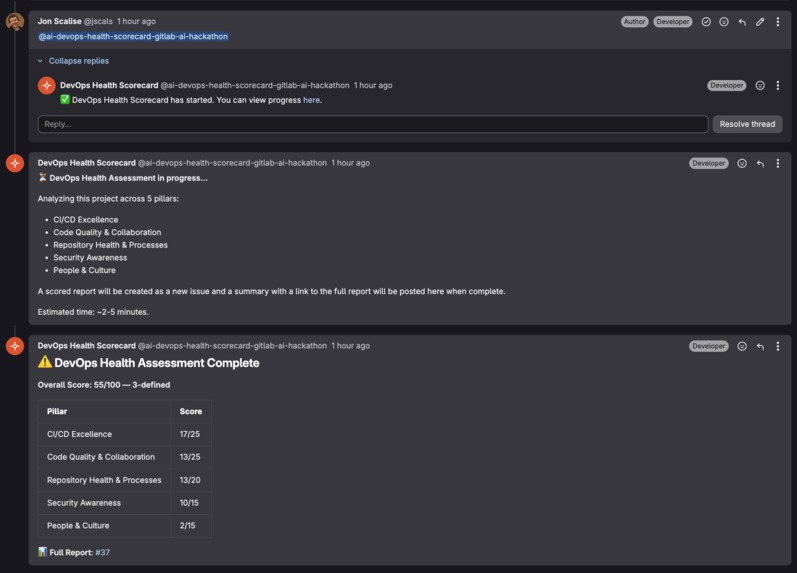
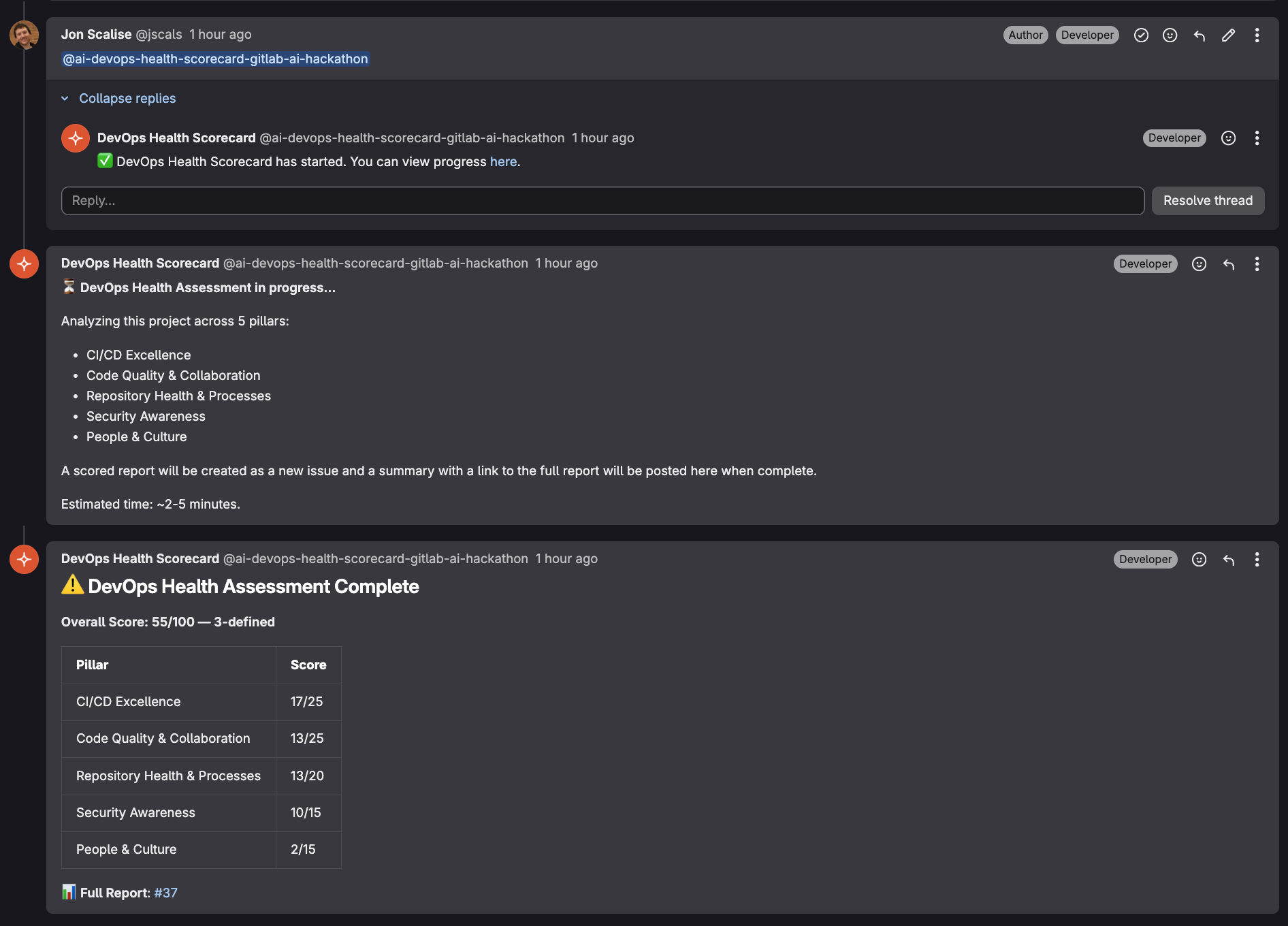
Tag the bot in any work item comment. Follows up with summary
-
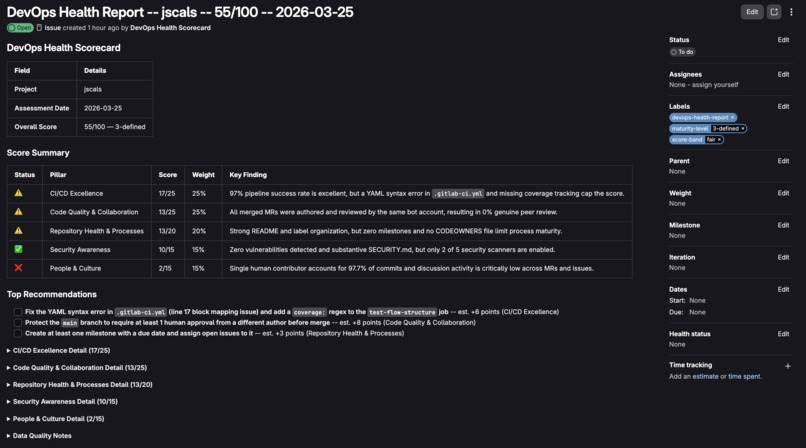
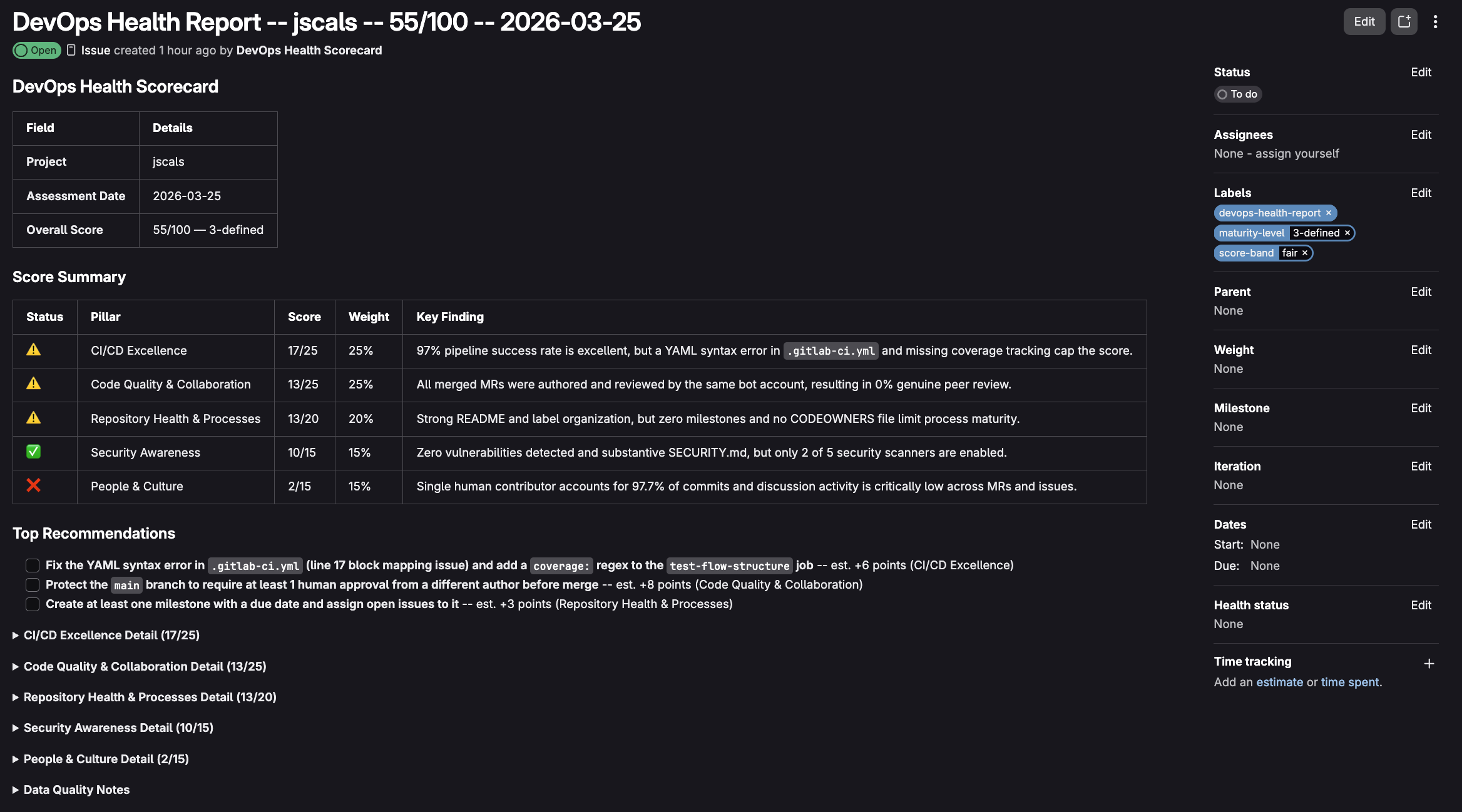
Generates full report as dedicated work item.
-
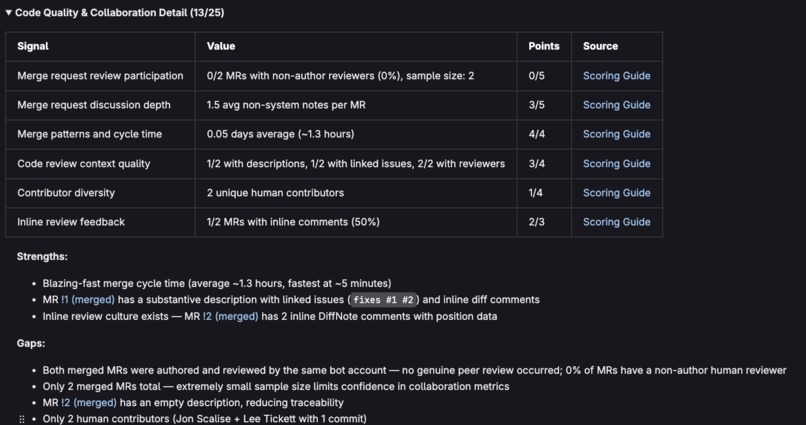
5 Pillar breakdown with comprehensive scoring guide
Inspiration
Talking with various colleges and customers, and both working in and leading various development teams over my career, it is evident that people WANT to practice proper DevOps practice but with constantly evolving tools, processes, frameworks, and acronyms, it can be overwhelming to know what you should be looking at, what's important, how to improve, and what to prioritize.
Most teams might not have dedicated DevOps expertise and new projects are created all the time. It can be really hard to ensure proper procedure and guidelines and being followed across an org.
So i've had an itch for a while to have an automated way to try and help teams get an initial helpful picture of the various things they could be looking at and some ways they could potentially improve based on both industry experience and GitLab best practices. The GitLab APIs supply a vast amount of useful information that can be retrieved and interpreted
With the introduction of the GitLab Duo agent platform as a mechanism to carry this out and the effectiveness of AI tools like Anthropic's Claude Opus model at distilling best practice information and helping to design an useful and effective scoring guide, I was also inspired by the DevOps Maturity Assessment my company, Adaptavist, offers and did some hacking around to see what I could come up with something that might actually be useful to people.
Hopefully what I came up with is something that people can play with and use the results as a starting point to learn something and have meaningful conversations about things they might want to improve.
What it does
On any GitLab work item in your project, you can mention the bot user, and it will go off and make a variety of measured API and tool calls, gather all the information, and based on 26 individual signals within 5 pillars it will generate a full health report.
It follows up with a brief summary comment, then creates a dedicated work item with a full pillar by pillar breakdown, including top priority items.
The 5 pillars are CI/CD Excellence, Code Quality & Collaboration, Repository Health & Processes, Security Awareness, and People & Culture. Each one breaks down into specific signals with transparent scoring.
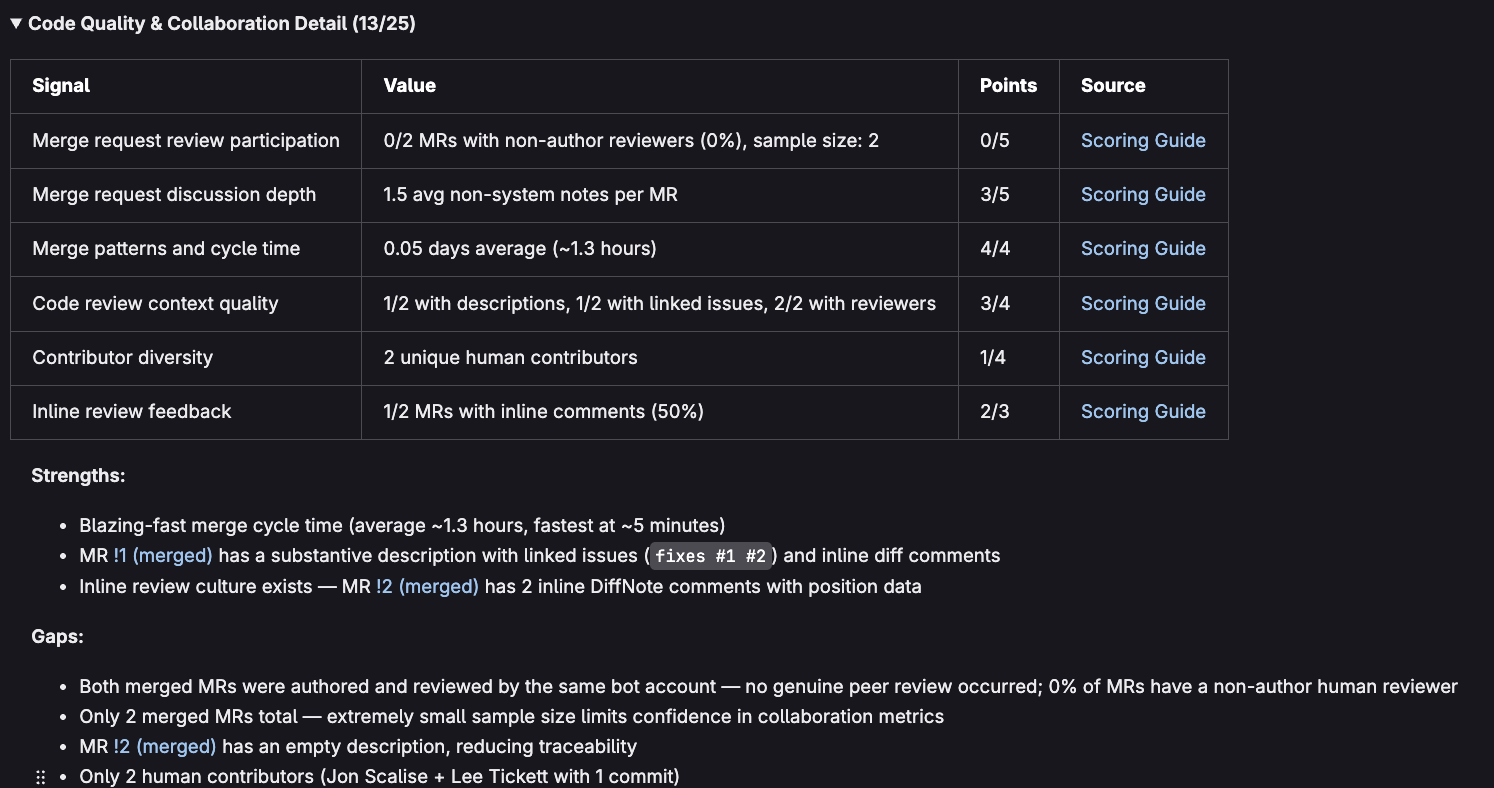
Every signal in the report links directly to a Scoring Guide that explains exactly how the points were calculated and what you can do to improve. Labels get applied automatically for maturity level and score band, so you can track reports on an issue board over time.
It's meant to be a starting point, not a judge. The score helps you reflect and is in no way the final word on your project's health.
How we built it
I built a custom flow with 3 components:
- Acknowledge — figures out the project, posts a follow up comment so the user knows something is happening
- Assess — runs 23 API calls in a fixed sequence, scores all 26 signals against a rubric baked into the prompt.
- Report — creates the dedicated work item with the full report, applies the labels, then posts a summary comment as a follow up on the original comment with a link to the full report.
The scoring rubric lives entirely in the flow prompt. It is informed by GitLab's best practices, industry DevOps standards, and the consulting expertise from doing maturity assessments with enterprise clients at Adaptavist.
I initially started with a validation flow that called various applicable endpoints and tools to see what information we had access to within the constraints of the permissions and authorizations of the hackday group and project setup. I went through a few various of this to figure out how flows actually worked, the proper YAML syntax, and what data we could get so that we could finalize the design of the pillars, signals, and scoring guide.
Once I had that I went through a lot of iterations to get the output consistent. Early on, I was getting runs would give different formats, different tool call counts, even different scores. The agent was taking too much liberty in how it approach the data gathering and assessment. I fixed this by making it more and more precise in the methodology in the prompt. Using Anthropic's Claude (Claude Code, mainly Opus) to analyze the method we were coming up with, and being an agent itself, it was able to help me in inputting steps and instructions in a specific way that the Duo agent wouldn't continue to struggle with on subsequent executions. This eventually led to fairly consistent labelling, call sequences, tool usage, and analysis in the correct order almost every time.
The Scoring guide was also built as a repo file (this could eventually live in a dedicated wiki page in a dedicated DevOps Health Scorecard project) so that each signal in the report can link to the correct section within it. So when someone sees "Merge request review participation: 2/5" they can click through and see exactly what the thresholds are and recommendations on how to improve.
Because we only had access to the one group and one project in the group for the hackday, I had to use the hackday repo as my test repo for the agent to assess. In order to get more realistic scoring, I added a .gitlab-ci.yml to the repo, which validates the flow YAML, runs SAST + secret detection, as well as performs a dummy "deploy". On top of a test SECURITY.md, and CONTRIBUTING.md it gave the test more realistic test data to go off of, while also being the repo that housed the source code for the whole project!
Challenges we ran into
The ai_workflows scope. was a big one. Duo platform tools operate under an OAuth scope with a strict endpoint allowlist, and a lot of the most valuable DevOps signals like DORA metrics, protected branch rules, environment configs were all coming back with 403 errors. I had to iterate on an initial perfect state plan and redesign some of the pillars, signals, and scoring around what was actually accessible. Dedicated tools bypass the restriction, so I leaned on those wherever possible and only used gitlab_api_get for endpoints we'd confirmed were on the allowlist.
Another umbrella challenge was the agent variability. As i mentioned before, getting it to carry out the correct tool calls and get the correct comprehensive amount of information across 20+ tool calls proved difficult as well. It required quite a bit of iteration in order to get a fairly consistent output.
Also getting it to produce consistent output for the formatted report also required quite a bit of iteration, with the report format changing quite a bit across iterations, requiring the dialing in of the prompt to get it to be consistent.
The scale of keeping this prompt organized as constraints grew and we had to be more and more specific was also a challenge. I had to ensure that introducing one tweak didn't cause the agent to break something else we thought we had fixed. Claude really helped with sanity checking here.
As I described in the last section, the test data we were allowed to run on was also a The hackathon environment only gave us access to our own participant project. We couldn't test against a real mature project with a big team, active security scanning, and months of merge request history. So that proved a challenge and I had to figure out how to create the files mentioned earlier in a way that didn't interfere with the overall repo and hackday requirements, or require tonnes of time mocking things like work items, reviewers, and merge requests.
Accomplishments that we're proud of
- Given the time constraints (i found and joined this hackathon VERY late into the period) I am really proud I was actually able to get something useful built. I'm excited to see and feedback both externally and internally and see if it could ACTUALLY be useful to people to have some meaningful conversations. I literally knew nothing about the Duo platform before I started, so i'm really proud I was able to design and build in the timeframe I did.
- Finally getting the prompt improved enough to get consistent formatting and outputs.
- Designing out what I think is a great starting point of a scoring guide. It isn't perfect, but I think it rolls in enough best practice, given the permission constaints of the hack day and the data I had available to me, to really be informative for people starting on the improvement journey. It is also great that each signal can link directly to how it was calculated and how to improve it.
What we learned
- How to build a Duo agent! This was my first one and I had a lot of fun. Excited to see what I can do next.
- I learned a tonne about DevOps and DevOps health. I've been exposed to it over my career managing dev teams and setting up small projects, but learning more about what a mature process looks like and the processes, tooling, and possible maturity levels within all of that was really cool. Definitely something to take with me moving forward and continue to learn.
- It doesn't matter how much automated data you collect, it can never replace meaningful conversation with people to properly assess sentiment and feelings and really dig into the qualitative side of things.
- How amazing Anthropic's Claude Opus 4.6 is at analyzing information and helping with prompt engineering so other agents will better understand what to do and keep them on track.
What's next for DevOps Health Scorecard
- DORA metrics as a 6th pillar when the platform allowlist expands - Deployment frequency, lead time, change failure rate, and time to restore would be a great addition and provide a tonne more useful data to analyze.
- Smarter CI analysis - I was going to add this but ran out of time. Parsing deploy jobs for
when: manualvs automated, environment configs, and promotion chains (zero extra API calls, just deeper analysis of data we already have) - Dedicated reports project - Would be cool (when I have the permissions) to create a standalone DevOps Health Scorecard project that collects all reports in one place, with an issue board organized by maturity level so you can see progress at a glance.
- Scheduled assessments — automated runs at a desired cadence via CI/CD so you don't have to remember to trigger it. The reports accumulate over time and tell the story of how your project is evolving as you make any changes.
- Multi-project scanning — run the scorecard across every project in a group in one shot, with a consolidated rollup report showing which projects need attention first
- Score trending — compare to previous runs and show progress, like "You're up 7 points since last month".
- Better bot filtering — I ran out of time here as well, but minor improvements to help keep automated accounts out of contributor and reviewer metrics
- Expert handoff — Alter the scorecard or prompt in order to better identify and guide the user as to what would make sense to reach out for use the scorecard output as a starting point for deeper, human-led DevOps assessments with dedicated consultants
Built With
- claude-(anthropic)
- gitlab-ci/cd
- gitlab-duo-agent-platform
- gitlab-rest-api
- loom
- yaml


Log in or sign up for Devpost to join the conversation.