Inspiration
As I work on projects with multiple services running locally, I kept running into the same small but annoying problem: every service had a different localhost:<port> address.
One project might be running on localhost:3000, another on localhost:5173, another on localhost:8081, and after restarting services, those ports could change again. It becomes surprisingly easy to lose track of which port belongs to which service.
I wanted local development to feel more like working with real services, where I could simply say:
vault.local.dev
instead of:
localhost:48231
That led to DevMesh — a CLI that gives local development services stable, memorable domains while automatically handling ports, routing, process lifecycle, and /etc/hosts configuration.
What it does
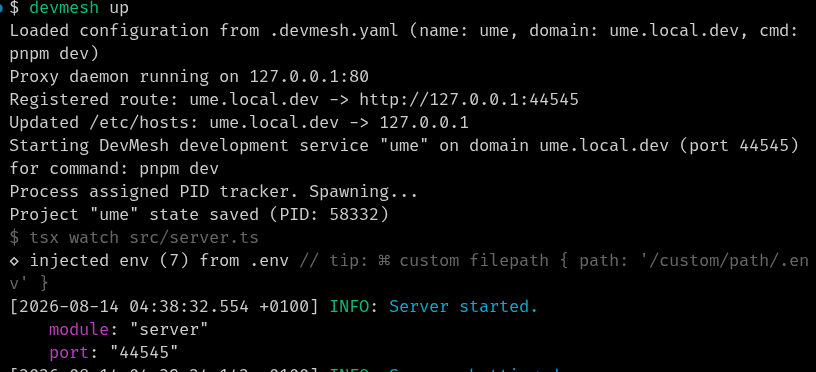
DevMesh lets developers start a service with a name and automatically gives it a local domain.
For example:
devmesh up --cmd "pnpm dev" --name vault
creates:
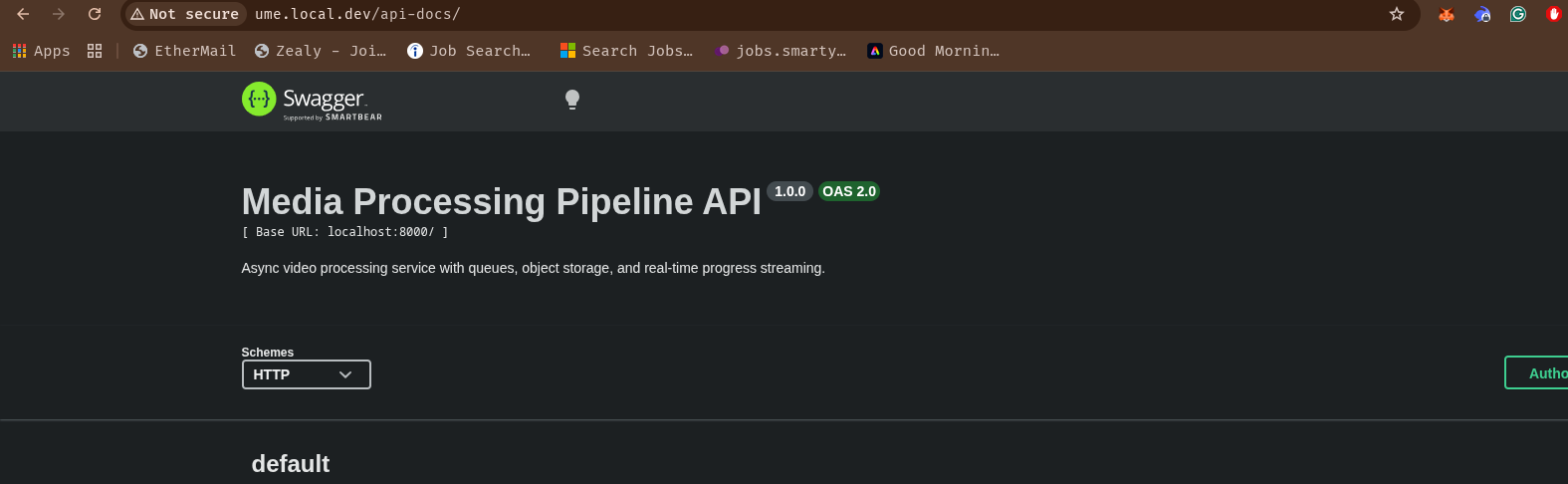
http://vault.local.dev
Behind the scenes, DevMesh:
- Automatically allocates a free port for the service.
- Starts a centralized reverse proxy when needed.
- Routes requests based on the hostname.
- Registers the service with the running proxy without restarting it.
- Manages the required
/etc/hostsentries. - Tracks running processes and their state.
- Properly terminates process groups, including child processes.
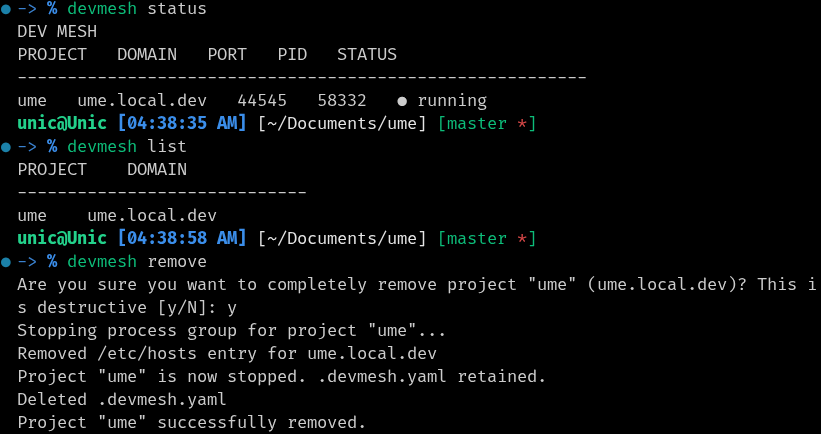
- Provides commands such as
status,list,down,restart, andremove. - Automatically creates a
.devmesh.yamlconfiguration so subsequent starts can simply usedevmesh up.
The goal is simple: stop thinking about ports and start thinking about services.
How I built it
DevMesh is written in Go.
The CLI is built with Cobra and communicates with a lightweight background reverse-proxy daemon over a local HTTP API.
The main components are:
- CLI layer — handles commands and user interaction.
- Process manager — starts development servers, injects dynamically allocated ports, and manages process groups.
- Reverse proxy — uses hostname-based routing to forward requests to the correct local service.
- Route registry — maintains the currently active domain-to-port mappings.
- Hosts manager — safely manages a dedicated block in
/etc/hosts. - State manager — persists project state and checks process liveness.
- Daemon coordination — prevents multiple CLI invocations from racing to start duplicate proxy daemons.
I also built the project using an Agent Orchestrator (AO) workflow. I broke the implementation into phases, delegated each phase to worker agents through the orchestrator, reviewed their output, and then had the orchestrator merge the reviewed work into the project.
This allowed me to use agents as an actual software development workflow rather than simply asking an AI to generate the entire project.
Challenges I ran into
One of the biggest challenges was getting the different pieces of the system to work reliably together.
Process management was more complicated than simply starting a shell command. Development tools such as pnpm, tsx, and file watchers can spawn child processes, so devmesh down needed to terminate the entire process group rather than only the top-level process.
Another challenge was safely managing /etc/hosts. DevMesh needs elevated permissions, but I didn't want users to manually run sudo for every command. I implemented controlled privilege escalation and made DevMesh modify only its own clearly marked section of the hosts file.
The proxy daemon also introduced concurrency problems. Multiple services can be started almost simultaneously, so I had to add coordination around daemon startup to prevent multiple processes from trying to launch their own proxy.
Finally, making the workflow feel seamless required handling edge cases such as port 80 already being occupied, stale process state, daemon readiness, and restarting services without losing their configuration.
Accomplishments that I'm proud of
I'm particularly proud that DevMesh ended up being more than a simple reverse proxy.
The entire workflow can be reduced to:
devmesh up
and the service is running behind a memorable local domain.
I'm also proud of the process lifecycle management and the fact that the tool handles the less visible parts of local networking automatically — port allocation, proxy startup, route registration, hosts-file management, and cleanup.
Another accomplishment is the architecture itself. The proxy is a long-running daemon while the CLI remains lightweight, allowing new services to register routes dynamically without restarting the proxy.
Most importantly, I built the project using an orchestrated multi-agent development workflow and was able to review and integrate the generated work phase by phase rather than treating AI as a black-box code generator.
What I learned
I learned a lot about how local networking actually fits together — particularly HTTP Host headers, reverse proxies, dynamic port allocation, and the relationship between DNS-like name resolution and /etc/hosts.
I also gained a much deeper understanding of process groups and process lifecycle management on Unix systems.
On the AI side, I learned that agent orchestration becomes much more useful when the work is structured into well-defined phases with explicit review points. Instead of asking an agent to "build the project," I could give an orchestrator a larger objective and let it coordinate smaller implementation tasks.
That made the development process much more systematic and gave me a better understanding of where agents are useful and where human review is still important.
What's next for DevMesh
There are several directions I'd like to take DevMesh next:
- Add sticky port allocation so services can retain the same port across restarts.
- Improve Windows support, particularly process-liveness detection.
- Add HTTPS support for local domains.
- Improve service discovery and diagnostics.
- Add better isolation and authentication around the daemon API.
- Explore support for more advanced routing such as paths and subdomains.
- Make installation easier with prebuilt binaries and package-manager support.
Ultimately, I'd like DevMesh to become a small but powerful local development networking layer that makes running multiple services locally feel much closer to working with a real development environment.
Built With
- cli
- cobra
- go
