-
-
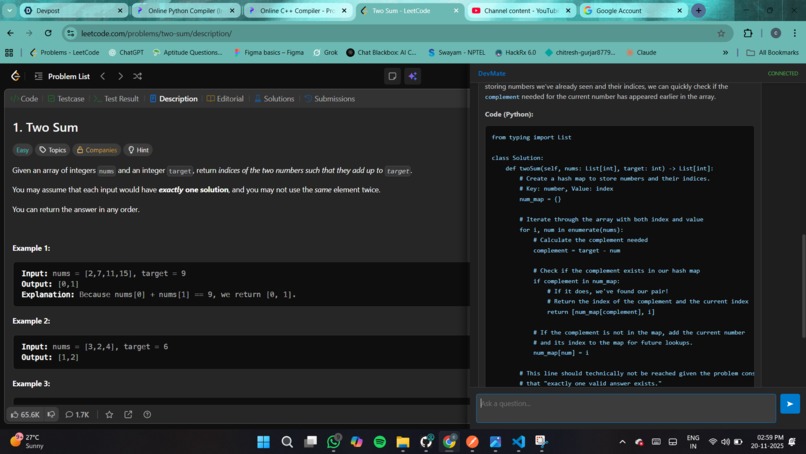
DevMate screen shot

Inspiration I was suffering from "Alt-Tab Fatigue." Every time I found a bug or confusing code on GitHub, I had to copy it, switch windows to ChatGPT, paste it, and write a long prompt explaining the context. I wanted an AI that felt less like a chatbot and more like a pair programmer sitting right next to me—one that could see what I see and adapt its expertise (like a Security Auditor or Senior Dev) instantly. What it does DevMate injects a smart, collapsible sidebar into any webpage. It reads the code currently visible on your screen and analyzes it using Google's Gemini API. Users can assign specific "roles" to the AI—such as Backend Engineer, DevOps Specialist, or Code Reviewer—to get highly specific advice. It can explain logic, refactor code for performance, and fix bugs without the user ever leaving their current tab.
How I built it I built the frontend as a Chrome Extension (Manifest V3) using vanilla JavaScript, HTML, and CSS to ensure a lightweight footprint. For the backend "brain," I used Django REST Framework to handle API requests securely. The core intelligence is powered by Google's Gemini 2.0 Flash model, which receives the code context and the selected persona to generate tailored responses. The two layers communicate via a secure REST API with CORS enabled for the browser environment.
Challenges I ran into The biggest hurdle was modern browser security. Chrome's Manifest V3 strictly forbids loading external scripts (CDNs), so I had to bundle all libraries locally. Additionally, connecting a browser extension to a local Django server caused significant CORS (Cross-Origin Resource Sharing) conflicts, which required configuring custom middleware. I also struggled with asynchronous message passing errors between the popup and content script, which I solved by implementing a robust "fire-and-forget" pattern.
Accomplishments that I'm proud of I'm proud of creating a truly full-stack integration—connecting a browser DOM scraper to a Python backend and an LLM in a seamless loop. I also successfully implemented a "VS Code-inspired" dark theme with a resizable sidebar and a "Copy to Clipboard" feature that injects itself dynamically into the AI's code blocks, making the UI feel like a native developer tool rather than a hacky add-on.
What I learned I learned that context is king in AI tools; simply changing the system prompt based on a "Role" drastically improves the utility of the answer. On the technical side, I gained deep insights into the Chrome Extension architecture (managing state between Service Workers and Content Scripts) and learned why keeping API keys on a backend server is non-negotiable for security.
What's next for DevMate The next step is Write Access. I want DevMate to not just read code, but creating Pull Requests directly on GitHub. I also plan to add Multi-File Context, allowing the AI to read an entire repository structure rather than just the active file, and Voice Interaction for a true hands-free pair programming experience.
