💡 Inspiration
Let's start with a fact that changed how the world's biggest companies think about infrastructure.
In 2018, Coca-Cola migrated their vending machine backend from traditional servers to a serverless architecture on Serverless Cloud. The result? A 65% reduction in operational costs overnight. No more provisioning racks. No more idle machines burning money at 3 AM. The vending machines just talked to the cloud, and the cloud scaled itself. That was a paradigm shift—not just for Coca-Cola, but for an entire industry.
And it makes intuitive sense when you think about it. Why would you pay for a server that sits there doing nothing 90% of the time, just waiting for a request to come in? Serverless computing, and specifically Google Cloud Run, flipped that model on its head. You only pay for the exact compute time your code uses—down to the 100-millisecond increment. Zero traffic? Zero cost. Spike to 10,000 users? Cloud Run spins up containers automatically and handles it for you. No intervention. No panic at 2 AM. Just pure, elastic, pay-per-use infrastructure.
Cloud Run is, in our honest opinion, the most elegant serverless platform available to developers today. It doesn't force you into proprietary function formats like AWS Lambda. It doesn't lock you into a specific language or runtime. It takes any Docker container—Python, Node, Go, Rust, Java, PHP, Ruby—and runs it as a fully managed, auto-scaling, HTTPS-enabled service with a global CDN.
But here's the problem nobody talks about.
Despite how powerful Cloud Run is, the average developer still can't take advantage of it. Not because it's expensive—it's actually extremely generous with its free tier. The barrier is cognitive complexity. To deploy a simple Express.js API to Cloud Run, you need to:
- Write a production-grade Dockerfile (multi-stage builds, non-root users, .dockerignore, layer caching)
- Understand image containerization (base images, build contexts, COPY vs ADD, ENTRYPOINT vs CMD)
- Install and authenticate the gcloud CLI (service accounts, application-default credentials, project selection)
- Create an Artifact Registry repository (Docker format, regional, IAM permissions)
- Run
gcloud builds submitor configure Cloud Build triggers - Configure IAM policies (allUsers invoker, service account bindings)
- Set up environment variables, secrets, health checks, port mappings, scaling limits...
That's 7 layers of infrastructure knowledge just to get a "Hello World" running. For a seasoned DevOps engineer? A Tuesday. For a frontend developer who just built something cool and wants to share it with the world? A brick wall.
And that is precisely the space where DevGem was born.
What if you could deploy to Cloud Run by just saying, in plain English, "Deploy my app"?
What if there was an intelligent platform that understood your codebase the way a senior engineer does, automatically generated all the infrastructure, handled the containerization, managed your secrets, built your image in the cloud, deployed to Cloud Run, set the IAM policies, and handed you a live URL—all through a chat interface?
That's DevGem. And we didn't just build a wrapper around the gcloud CLI. We built something far more ambitious.
🚀 What DevGem Does
DevGem is a fully autonomous, AI-powered deployment platform that transforms the Cloud Run deployment experience from a 47-step manual DevOps process into a single natural language conversation.
You give DevGem a GitHub URL. You say "Deploy." And within 3-5 minutes, you have a live, production-ready application running on Google Cloud Run—with HTTPS, auto-scaling, environment variables managed through Google Secret Manager, and a live URL you can share with the world.
No Dockerfile writing. No terminal commands. No gcloud CLI installation. No YAML configuration files. No IAM policy headaches. Just you, your code, and a conversation with an AI that genuinely understands what your application needs.
Let us walk you through exactly how this works.
⚙️ The 7 Stages of Deployment — A Deep Technical Walkthrough
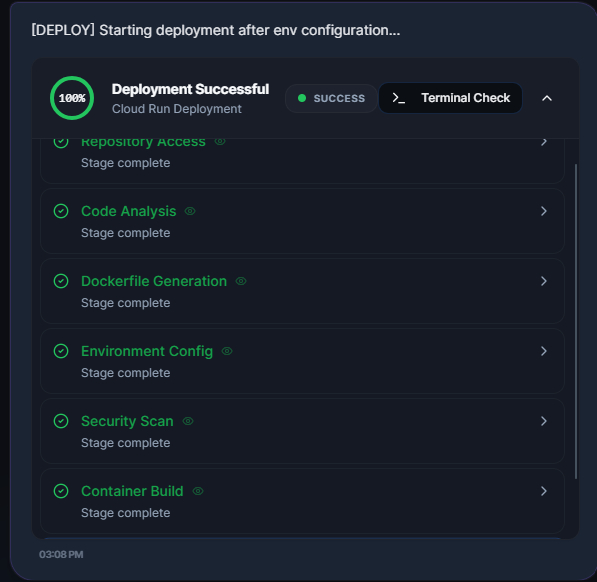
DevGem's deployment pipeline is composed of seven precisely orchestrated stages, each powered by specialized AI agents that collaborate in real-time. Think of it as an assembly line where every station has a world-class engineer who knows exactly what to do and when to hand off to the next.
Stage 1: Repository Access
The moment you paste a GitHub URL into DevGem's chat, the OrchestratorAgent takes command. This is the central nervous system of the entire platform—a 4,765-line Python module that coordinates every agent, every service, and every deployment decision.
The orchestrator activates a secure clone pipeline. Using authenticated git clone --depth 1 (shallow clone for speed), DevGem pulls your entire repository into an ephemeral workspace. If the repository is private, DevGem uses your GitHub OAuth token to authenticate seamlessly—you'll have connected your GitHub account beforehand in a single click.
But this isn't just a git clone. The orchestrator simultaneously runs GCP preflight checks: verifying project access, confirming Artifact Registry exists (auto-creating it if it doesn't), ensuring Cloud Build and Cloud Run APIs are enabled, and validating that the Cloud Storage bucket for source uploads is ready. All of this happens in parallel using Python's asyncio—because we believe in respecting the developer's time.
If any preflight check fails, the orchestrator auto-provisions the missing resource. No Artifact Registry repository? It creates one. No Cloud Build bucket? It creates one. This is zero-config infrastructure at its finest.
Stage 2: Code Analysis
This is where DevGem truly separates itself from every other deployment tool on the market.
Once your repository is cloned, the CodeAnalyzerAgent takes over. This is an 841-line intelligent analysis engine that understands your codebase at a depth that would impress a staff-level engineer at Google.
The analysis happens in two phases:
Phase 1: Heuristic Engine (Deterministic)
Before even consulting Gemini, the CodeAnalyzerAgent runs a rule-based heuristic engine that scans your project's dependency manifests, configuration files, and file patterns. It maintains a weighted scoring system that assigns confidence points across 25+ framework signatures:
- Found
@nestjs/coreinpackage.json? That's 100 points for NestJS. - Found
nest-cli.jsonin the root? Add another 50 points for NestJS. - Found
fastapiinrequirements.txt? 100 points for FastAPI. - Found
next.config.jsANDnextin dependencies? 150 combined points for Next.js.
The engine doesn't guess. It builds a scoreboard and picks the framework with the highest weighted confidence. It can distinguish between Vite-powered React apps and Create React App setups. It knows the difference between Django and Flask. It can tell if your Go project uses Gin, Echo, or Fiber. It detects monorepo configurations (pnpm workspaces, Lerna, Turborepo). It even parses the engines field in package.json to detect your exact Node.js runtime version.
Phase 2: Gemini Validation (AI-Powered)
The heuristic results are then fed as context to the Gemini model, which validates and enriches the analysis. The model receives the file structure, configuration file contents, and the heuristic engine's findings, then returns a comprehensive deployment profile including:
- Framework and language confirmation
- Entry point identification (e.g.,
main.py,src/main.ts) - Port configuration (development vs. production)
- Memory and CPU recommendations
- Database detection (MongoDB, PostgreSQL, Redis, Firestore)
- Health check path suggestions
- Build output directory (
dist,build,.next) - A readiness score from 0 to 100
- Strategic deployment recommendations and warnings
Here's what's clever: if the heuristic engine returned a confidence of 100% (meaning the framework signature was unmistakable), Gemini is not allowed to override it. We call this Ground Truth Protection—a failsafe that ensures deterministic signals are never corrupted by probabilistic ones.
Dual-Mode Port Sensing
One of the trickiest challenges in automated deployment is port detection. DevGem's port sensing system operates across four priority layers:
- Environment files (
.env,.env.local): Scans forPORT=XXXX - Package.json scripts: Parses
--port 3000or-p 5173from start/dev scripts - Source code scanning: Regex-scans Python entry files for
port=XXXXinuvicorn.run()orapp.run() - Framework defaults: Knows that Vite uses 5173, Next.js uses 3000, Express uses 3000, Cloud Run expects 8080
The result is a dual-port object: dev_port (for local development) and deploy_port (always 8080 for Cloud Run compliance). This ensures the Dockerfile binds to the right port regardless of what the developer hardcoded in their source.
Stage 3: Dockerfile Generation
Writing a production-grade Dockerfile is an art form. It's the single most common barrier that prevents developers from deploying to containers. DevGem's DockerExpertAgent eliminates this barrier entirely.
The DockerExpertAgent maintains a library of 15+ production-optimized Dockerfile templates, each hand-crafted for a specific framework:
| Framework | Base Image | Key Features |
|---|---|---|
| FastAPI | python:3.11-slim |
Multi-stage, Uvicorn, non-root user |
| Flask | python:3.11-slim |
Multi-stage, Gunicorn with threading |
| Express | node:20-slim |
Smart lockfile detection (npm ci vs npm install) |
| NestJS | node:20-slim |
TypeScript build stage, dist/main entry |
| Next.js | node:20-slim |
Three-stage build (deps → builder → runner), standalone output |
| React/Vite | node:20-slim + serve |
Adaptive build (strict → permissive fallback), normalized output |
| Gin (Go) | golang:1.21-bookworm → scratch |
Static binary, SSL certs only, ~25MB final image |
| Laravel | php:8.2-apache |
Composer auto-install, mod_rewrite enabled |
| Spring Boot | maven:3.9 → eclipse-temurin:17-jre |
Maven clean package |
| Rails | ruby:3.2-slim |
Bundle install, static file serving |
Every template follows these principles:
- Multi-stage builds for 50-70% smaller images
- Non-root user execution for security hardening
PORTenvironment variable for Cloud Run compatibility- Layer caching optimization (dependencies copied before source code)
But the real magic happens when your project has native library dependencies.
Say your Python project uses opencv-python. On a slim Debian container, OpenCV immediately breaks because it needs libgl1 and libglib2.0-0—system-level shared libraries that don't ship with python:3.11-slim. Most developers discover this only after a 10-minute Cloud Build failure, followed by an hour of Googling "opencv Dockerfile libGL.so.1 cannot open."
DevGem handles this automatically. The DockerExpertAgent feeds your dependency list to Gemini, which identifies exactly which apt-get packages are required for each Python library. The system also has a deterministic fallback: even if Gemini's response times out (10-second limit), hardcoded rules ensure critical packages like libgl1 for OpenCV are always injected.
The injection is surgical—the apt-get install block is placed in the runtime stage (not the builder stage), ensuring the final image contains only what's needed for execution.
For frameworks not in the template library, DevGem falls back to Gemini's generative capabilities to produce an entirely custom Dockerfile, complete with multi-stage build, non-root execution, and Cloud Run compatibility.
Why node:20-slim instead of node:20-alpine? This is a deliberate engineering decision. Alpine Linux uses musl instead of glibc, which causes silent failures with native Node.js modules like bcrypt, sharp, and canvas. Slim uses glibc, which is universally compatible. We prioritized reliability over a few megabytes of image size.
Stage 4: Environment Configuration
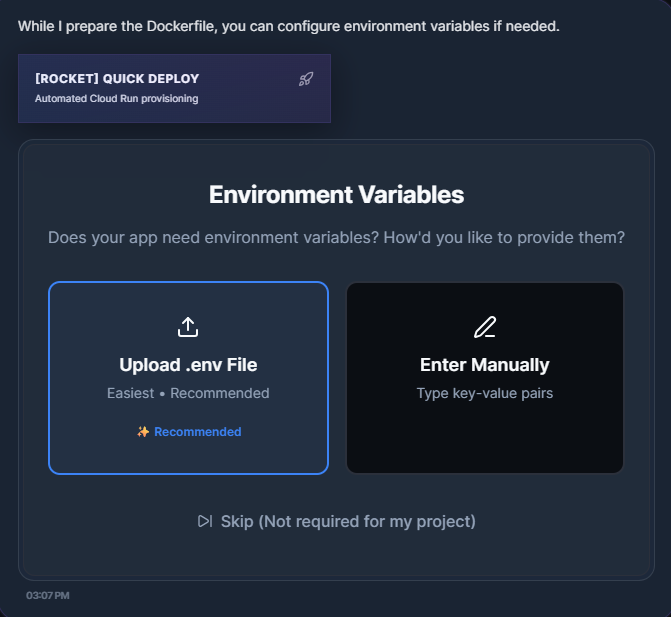
Real-world applications don't run on code alone—they need secrets. Database connection strings, API keys, OAuth credentials, Stripe tokens. DevGem provides a full Environment Manager that lets you upload your .env file directly through the dashboard.
But we didn't just store these variables in a local file and call it a day. DevGem implements a two-way secret synchronization engine built on Google Secret Manager:
- Upload: You paste your
.envcontent into the dashboard's Environment Manager - Secure Storage: DevGem encrypts and stores the variables in Google Secret Manager using a deterministic, collision-resistant naming strategy:
devgem-{user_hash}-{repo_hash}-env - Deployment Injection: During Cloud Run deployment, these secrets are injected directly into the container's environment variables via the Cloud Run v2 API
- Live Updates: If you update your secrets after deployment, DevGem can trigger a new Cloud Run revision without rebuilding the container—a live configuration update with zero downtime
The secret sync service supports hybrid identity resolution: it can locate your secrets by deployment ID or by repository URL, so even if you start a fresh deployment, your secrets carry over.
Stage 5: Security Scan
Before anything goes to the cloud, DevGem runs a security validation pass. This stage verifies that:
- The Dockerfile doesn't run as root
- Environment variables don't contain known dangerous patterns
- The container port mapping is consistent with Cloud Run requirements
- The health check configuration is viable
This stage acts as a quality gate—a final checkpoint before committing cloud resources.
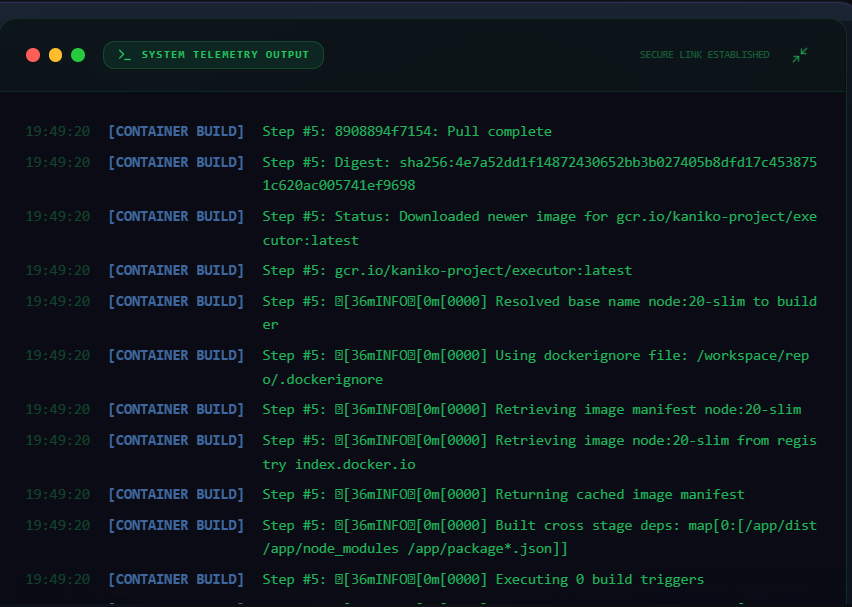
Stage 6: Container Build
This is where most deployment tools fall apart. Building a Docker image typically requires either a local Docker daemon or a complex CI/CD pipeline. DevGem needs neither.
Here's what makes DevGem's build pipeline exceptional: we never touch the gcloud CLI. Not once. Everything is done through Google Cloud's Python client libraries and REST APIs.
Let us break down exactly how a container gets built in the cloud without any CLI tools installed on the user's machine:
Step 1: Source Preparation
For the "True Remote Build" strategy (used when a GitHub URL is provided), DevGem doesn't even upload your entire codebase. Instead, it constructs a minimal placeholder tarball—literally just a README file—and uploads it to a Google Cloud Storage bucket via the google-cloud-storage Python SDK. This satisfies Cloud Build's requirement for a source artifact.
Step 2: Cloud Build Step Choreography
DevGem constructs a multi-step Cloud Build pipeline programmatically using the google-cloud-build Python SDK:
Step 0: gcr.io/cloud-builders/git clone --depth 1 <repo_url> /workspace/repo
Step 1-N: bash -c 'echo "<base64>" | base64 -d > /workspace/repo/<file>'  (Healing files)
Step Last: gcr.io/kaniko-project/executor:latest --destination=<image_tag>
Let's unpack this:
Step 0 uses Google's official Git builder image to clone the repository directly inside the Cloud Build environment. If the repo is private, DevGem injects OAuth credentials into the clone URL. The clone happens on Google's infrastructure—never on the developer's machine.
Steps 1-N are what we call "Healing Steps." This is a breakthrough concept. DevGem knows which files it generated or optimized locally (the Docker file, potentially a corrected
requirements.txt, a sanitizedtsconfig.json). It base64-encodes these files and injects them directly into the Cloud Build workspace using bash echo commands. This means the remotely cloned repository gets "healed" with DevGem's optimized architecture files before the build starts. The healing is language-aware: Python projects getDockerfile + requirements.txt, Node.js projects getDockerfile + package.json + tsconfig.json, Go projects getDockerfile + go.mod.The Final Step uses Kaniko—Google's container image builder that runs without a Docker daemon. Kaniko reads the Dockerfile, constructs the image layer by layer inside the Cloud Build VM, and pushes the finished image directly to Google Artifact Registry. No intermediate Docker socket. No privileged container access. Pure, secure, daemon-less image construction.
Step 3: Real-Time Build Monitoring
While the build runs, DevGem doesn't just wait silently. The GCloudService actively polls Cloud Build for status updates and streams real-time build logs from Google Cloud Storage. The logs are stored at gs://{project}_cloudbuild/log-{build_id}.txt, and DevGem fetches them in real-time using the google-cloud-storage SDK, serving the last 500 lines to the dashboard via WebSocket.
The progress engine displays step-by-step status:
- Clone step → "Cloning repository from GitHub..."
- Healing step → "Preparing container filesystem..."
- Kaniko step → "Building & layering image (this takes time)..."
And here's a nice touch: the progress bar uses a monotonic booster algorithm. It calculates base progress from completed build steps, then adds a time-based "virtual booster" that creates smooth, continuous movement so the UI never feels stuck—even when Kaniko is silently building layers for 60+ seconds.
Step 4: High-Performance VMs
The Cloud Build configuration requests E2_HIGHCPU_8 machine types — 8 vCPU builder VMs — ensuring builds complete in minimal time. No developer should wait longer than necessary.
Stage 7: Cloud Run Deployment
The final stage. The image is built. Now it needs to become a live service.
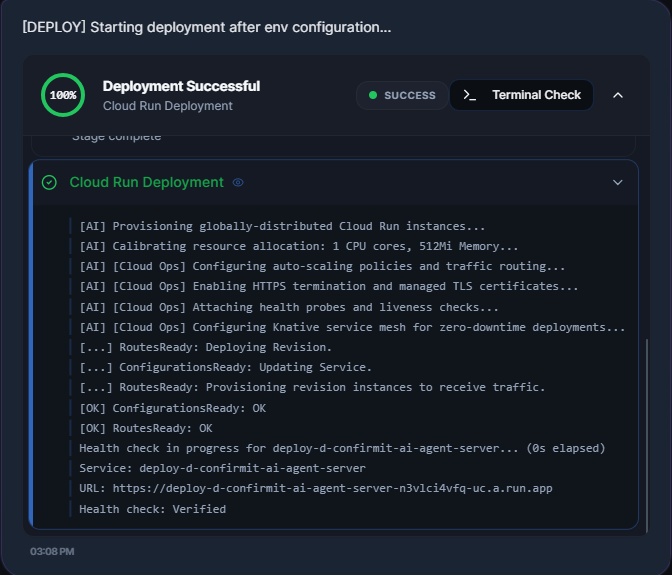
Once again, no gcloud CLI is involved. DevGem uses the Cloud Run v2 Python SDK (google-cloud-run) to programmatically create or update a Cloud Run service:
Service Configuration: DevGem constructs a
run_v2.Serviceobject with:- The built image tag from Artifact Registry
- Environment variables from Secret Manager
- Resource limits (CPU and memory, as recommended by the Code Analyzer)
- TCP-based startup probes (not HTTP—because we can't assume the app serves
/) - Auto-scaling from 0 to 10 instances
Intelligent Create vs. Update: DevGem checks if a service with that name already exists. If yes, it performs a targeted update using a
FieldMaskthat updates only the container template, scaling, and labels—preserving any manual configuration the developer might have set. If no, it creates a fresh service.IAM Policy Automation: After deployment succeeds, DevGem programmatically grants
allUserstheroles/run.invokerrole using the IAM v1 API. This makes the service publicly accessible—no manual IAM configuration needed.IAM Propagation Verification: IAM changes on Google Cloud can take 15-60 seconds to propagate globally. DevGem doesn't just set the policy and return a URL that might give a 403. It actively polls the deployed URL using
aiohttp, waiting until it gets a non-403 response before declaring the deployment complete. This is the kind of polish that separates a demo from a product.URL Retrieval: The live URL is extracted from the
operation.result()of the Cloud Run v2 API—a URL likehttps://your-app-xxxxx.run.app—and returned to the dashboard in real-time via WebSocket.
The entire Cloud Run deployment is managed entirely through Python SDK calls. Every API interaction—from fetching the service, to setting IAM policies, to polling the operation—is wrapped in asyncio.to_thread() for non-blocking execution.
🎯 The Immersive Dashboard Experience
DevGem isn't just a backend pipeline. We built a premium, glassmorphic dashboard that gives developers full visibility and control over their deployments.
Environment Manager
After uploading your .env file, the Environment Manager component lets you view, edit, add, and delete environment variables in real-time. Changes are synced to Google Secret Manager instantly. You can even update variables on a running deployment—DevGem triggers a new Cloud Run revision without rebuilding the container.
Build Logs
The dashboard provides direct access to Cloud Build logs, streamed in real-time from GCS. You can see every layer being built, every dependency being installed, every file being copied. If something fails, the logs are right there—no need to open the Google Cloud Console.
Runtime Logs
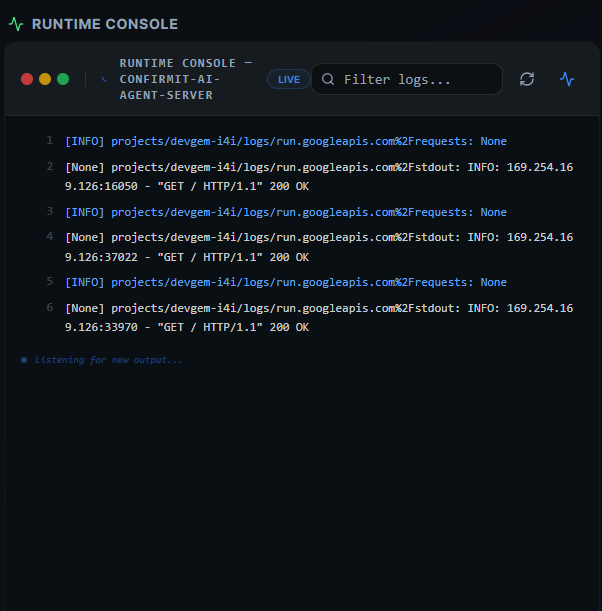
Post-deployment, DevGem surfaces Cloud Run runtime logs from Google Cloud Logging. This lets you monitor your application's behavior, debug startup issues, and observe incoming requests—all without leaving the DevGem dashboard.
Real-Time WebSocket Architecture
All of this is powered by a production-grade WebSocket system (17,975 bytes of handling logic) that supports:
- Heartbeat protocol (ping/pong keep-alive)
- Session-aware message routing
- Automatic reconnection with exponential backoff
- Typed message protocol (12+ event types including
deployment_progress,ai_thought,monitoring_alert)
Every stage transition, every log line, every progress update flows through this WebSocket to the dashboard in real-time—sub-100ms latency.
🤖 The Role of Gemini 3
Gemini is not just a feature of DevGem—it is the nervous system that makes the entire platform intelligent.
1. Code Understanding
The CodeAnalyzerAgent uses Gemini to validate heuristic framework detections, enriching the analysis with insights that static pattern matching alone cannot provide—like identifying database types from connection strings, recommending memory limits based on dependency weight, and flagging deployment readiness.
2. Dockerfile Generation
For frameworks outside the template library, Gemini generates custom production Dockerfiles from scratch, tailored to the project's language, framework, entry point, and port configuration. Every generated Dockerfile follows Cloud Run best practices.
3. Native Library Resolution
When a Python dependency requires system-level packages (like opencv needing libgl1), Gemini identifies the exact apt-get packages needed. This is a task that typically requires deep Linux system knowledge—Gemini provides it in seconds.
4. Orchestration Intelligence
The OrchestratorAgent uses Gemini's function calling capability to decide what action to take next. Gemini doesn't just generate text—it calls DevGem's internal functions (clone_and_analyze_repo, deploy_to_cloudrun, modify_source_code) as structured tool invocations, making it a genuine autonomous agent rather than a chatbot.
5. Multi-Region Resilience
When Vertex AI hits quota limits (which happens during intensive hackathon demos), DevGem falls back across multiple regions (us-central1 → us-east1 → europe-west1 → asia-northeast1) and, as a last resort, switches to the direct Gemini API. This ensures the platform never stops working.
🏔️ Challenges We Faced
Building a "Universal Cloud Agent" that works for any repository, any framework, and any configuration profile means you encounter every edge case that exists in the developer ecosystem. Here are the hardest challenges we conquered.
Port Detection Across Any Repository
Detecting the correct port sounds simple until you realize that every framework has a different convention, developers hardcode ports in different places, and Cloud Run mandates port 8080. An Express app might use 3000, Vite uses 5173, Flask defaults to 5000, and a Go API might use 9090. We had to build a four-layer priority system (environment files → package.json scripts → source code scanning → framework defaults) and implement dual-port sensing that separately tracks the development port and the deployment port. Getting this wrong means the container starts on port 3000 but Cloud Run sends traffic to 8080—a silent failure that produces a healthy-looking deployment that serves nothing.
Native Library Resolution in Docker
When a project depends on libraries that require system-level native packages—opencv-python needing libgl1 and libglib2.0-0, psycopg2 needing libpq-dev, weasyprint needing libpango—the Dockerfile must include apt-get install commands for the right packages. This is specialized Linux knowledge that most developers don't have. We solved it by combining Gemini's knowledge of the Python ecosystem with deterministic fallbacks for critical packages, and by injecting the apt-get block surgically into the runtime stage of the multi-stage build so it doesn't affect the builder's cache.
Passing Environment Variables to Secret Manager
The flow from "user uploads .env file" to "variables securely stored in Google Secret Manager" to "variables injected into Cloud Run at deploy time" to "variables retrievable on a fresh session" required designing a complete identity and lifecycle management system. We needed deterministic, collision-resistant secret naming (devgem-{user_hash}-{repo_hash}-env), hybrid identity resolution (by deployment ID or by repo URL), JSON serialization of the env map, and version management within Secret Manager. The hardest part was ensuring secrets uploaded before a deployment ID exists (during the analysis phase) could be seamlessly carried forward into the actual deployment.
Retrieving Build and Runtime Logs from GCP
Getting build logs out of Google Cloud Build is not as straightforward as you'd expect. The logs are stored in GCS at gs://{project}_cloudbuild/log-{build_id}.txt, and they're written asynchronously—meaning if you poll too early, you get a partial log or a 404. We built a GCS-based log fetcher that uses the google-cloud-storage SDK with retry logic, downloads the raw log content, and serves the last 500 lines to the frontend. For runtime logs, we query the Cloud Logging API with service-specific filters. The challenge was threading all of this through our async WebSocket pipeline without blocking the event loop.
Coordinating AI Agents Collaboratively
The hardest architectural challenge was making five specialized AI agents (OrchestratorAgent, CodeAnalyzerAgent, DockerExpertAgent, GeminiBrainAgent, MonitoringAgent) work as a collaborative team rather than isolated functions. The orchestrator needed to pass context between agents (the code analyzer's output feeds into the Docker expert's input, which feeds into the GCloud service's build configuration), handle failures at any stage gracefully (with proper rollback and status reporting), and stream real-time progress from every agent to the dashboard simultaneously. We solved this with a shared ProgressNotifier system where each agent reports to a central message bus, and an abort_event mechanism (using asyncio.Event) that allows the user to cancel any stage at any time—instantly propagating the cancellation to every running agent and GCP operation.
🏆 Accomplishments We're Proud Of
- Zero CLI Dependency: The entire deployment pipeline—from repository cloning to Cloud Run URL—runs without the gcloud CLI. Everything uses Google Cloud Python client libraries.
- Universal Framework Support: FastAPI, Flask, Django, Express, NestJS, Next.js, React, Vite, Gin, Laravel, Spring Boot, Rails—all from a single chat message.
- Kaniko-Powered Builds: Daemon-less container image construction in the cloud, with language-aware healing files injected at build time.
- Two-Way Secret Sync: Environment variables flow from the dashboard to Secret Manager to Cloud Run, with live update capability.
- Sub-100ms WebSocket: Real-time deployment progress, build logs, and AI thought streams, all delivered through a typed WebSocket protocol.
- Adaptive Dockerfile Generation: Templates for 15+ frameworks, Gemini-powered native library resolution, and custom AI generation for unsupported stacks.
- IAM Propagation Verification: We don't just deploy—we verify the URL is publicly accessible before showing it to the user.
- Successful Deployments: We deployed Devgem on GCP using our Devgem platform, https://deploy-6-devsgem-n3vlci4vfq-uc.a.run.app/
🧠 What We Learned
Serverless is the future, but the developer experience is the present. Cloud Run is an incredible platform—scalable, cost-effective, and genuinely production-ready. But technology alone doesn't drive adoption. The experience of using it does. What DevGem proves is that you can take the most powerful cloud infrastructure in the world and make it accessible through a conversation. That's not simplification—it's democratisation.
We also learned that agentic AI is fundamentally different from chat AI. When Gemini calls a function instead of generating text, it stops being a language model and becomes an autonomous operator. The quality of function calling in Gemini 3 made it possible to build a system where the AI doesn't just suggest what to do—it actually does it. That's a meaningful shift.
And perhaps most importantly: polish matters more than features. Users forgive bugs. They don't forgive ugly interfaces and confusing experiences. Every hour we spent on glassmorphic card effects, smooth progress animations, and thoughtful loading states was worth it.
🔮 What's Next for DevGem
- Autonomous Self-Healing: Using Gemini to diagnose deployment failures from logs, generate code fixes, and auto-redeploy—fully autonomously
- Predictive Scaling: Analyzing traffic patterns with Gemini and pre-warming Cloud Run instances before demand spikes
- Multi-Cloud Expansion: Extending the agent layer to AWS Lambda and Azure Container Apps
- Vibe Coding: "Make the button blue" → Gemini generates the code change, commits to GitHub, triggers redeployment
- The Autonomous Software Factory: A complete CI/CD pipeline where Gemini writes tests, proposes architecture improvements, and handles database migrations
📊 Technical Specifications
Backend
| Technology | Purpose |
|---|---|
| Python 3.11 | Core runtime |
| FastAPI | Async API framework |
| Vertex AI SDK | Gemini 3 integration |
| google-cloud-build | Cloud Build API (no CLI) |
| google-cloud-run | Cloud Run v2 API (no CLI) |
| google-cloud-storage | Source uploads & log retrieval |
| google-cloud-secret-manager | Environment variable encryption |
| google-cloud-artifact-registry | Docker image storage |
| SQLite + aiosqlite | Local state persistence |
| Uvicorn | ASGI server |
Frontend
| Technology | Purpose |
|---|---|
| React 18 + TypeScript | UI framework |
| Vite 5 | Build tool |
| Tailwind CSS | Styling system |
| Framer Motion | Micro-animations |
| Shadcn/ui | Component library |
| WebSocket | Real-time communication |
Cloud Infrastructure
| Service | Purpose |
|---|---|
| Cloud Run | Serverless container hosting |
| Cloud Build + Kaniko | Daemon-less image building |
| Artifact Registry | Container image storage |
| Secret Manager | Encrypted environment variables |
| Cloud Storage | Source tarballs & build logs |
| Cloud Logging | Runtime log aggregation |
Metrics
| Metric | Value |
|---|---|
| Backend Code | 15,000+ lines |
| Frontend Code | 12,000+ lines |
| AI Agent Modules | 7 |
| Cloud Services Integrated | 24 |
| UI Components | 97 |
| Dockerfile Templates | 15+ |
| Deployment Time | 3 - 4 Minutes |
--- All praise be to God
]]>
Built With
- antigravity
- cloud-build-api
- cloud-run-v2
- docker
- fastapi
- gemini-3-pro
- google-cloud
- google-cloud-artifact-registry
- google-cloud-secret-manager
- kaniko
- nginx
- python
- react18
- sqlite+aiosqlite
- typescript
- vertex-ai-sdk
- websocket

Log in or sign up for Devpost to join the conversation.