-
-
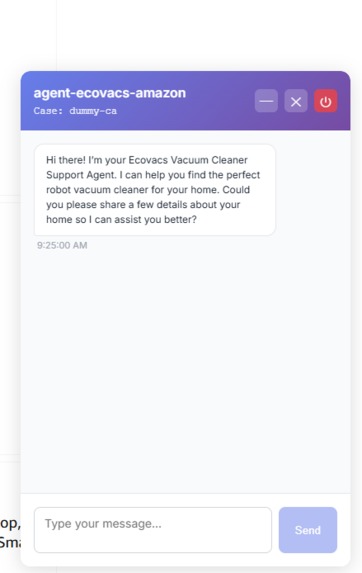
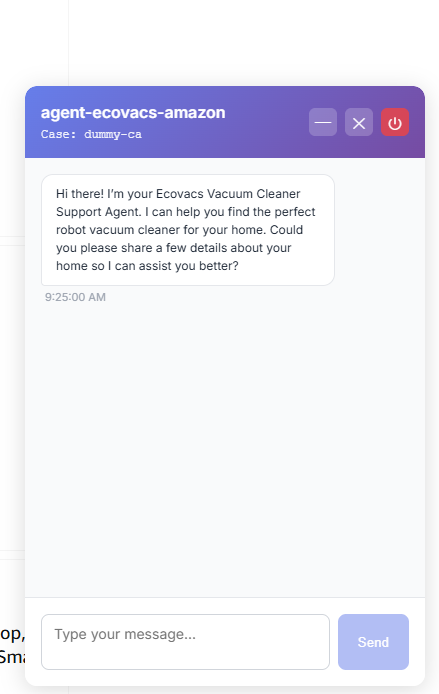
Chat console
-
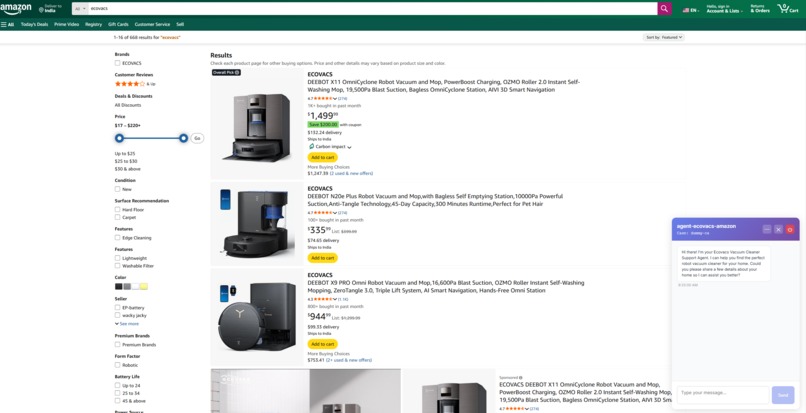
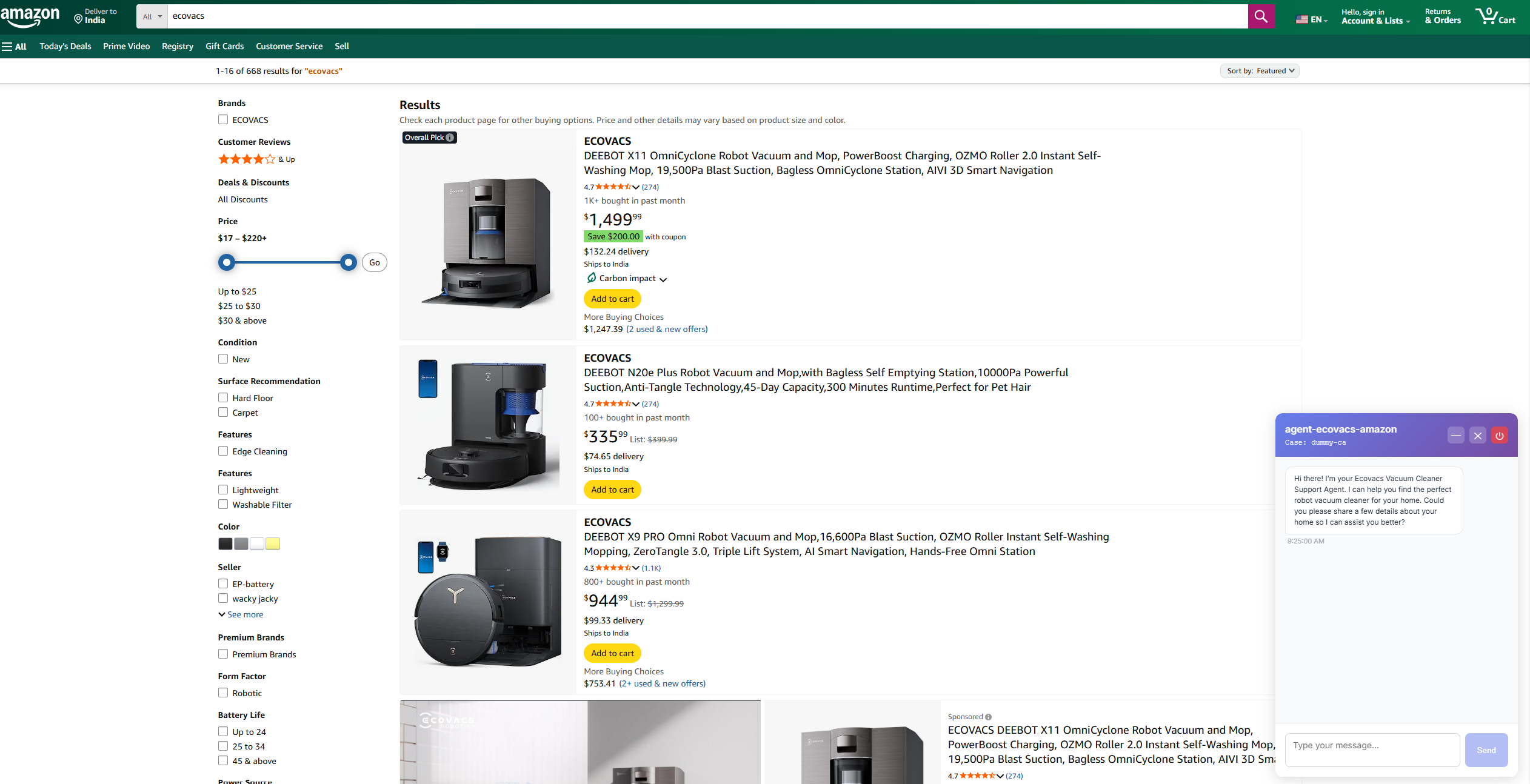
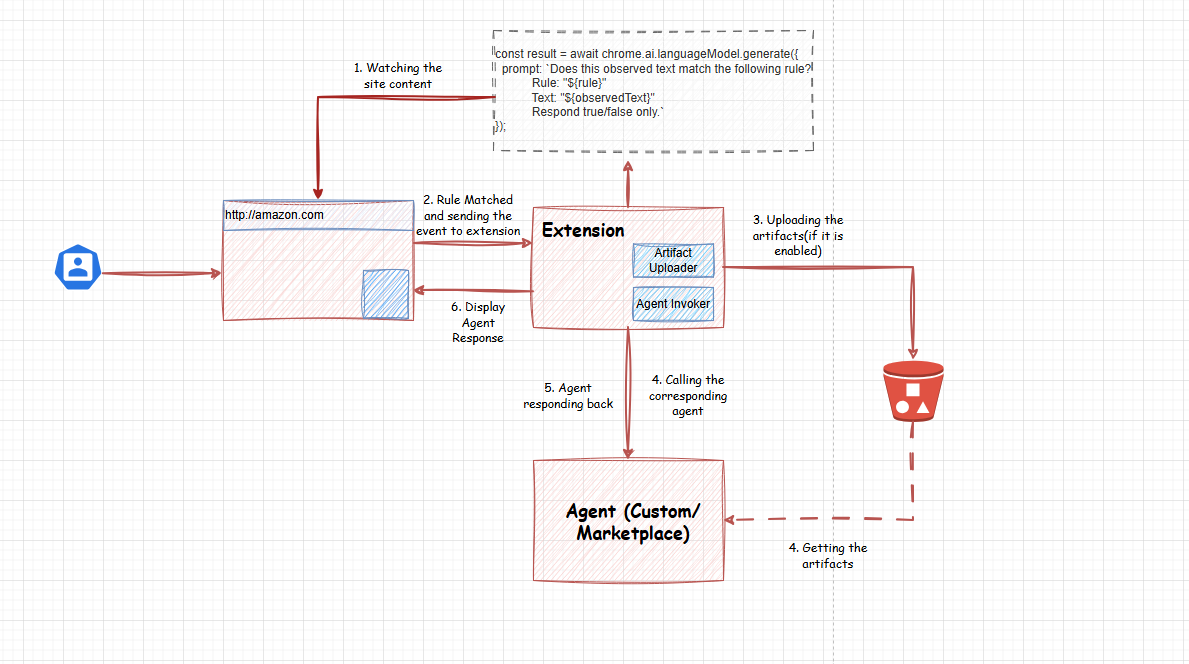
Detecting user searches and display the chat console to agent
-
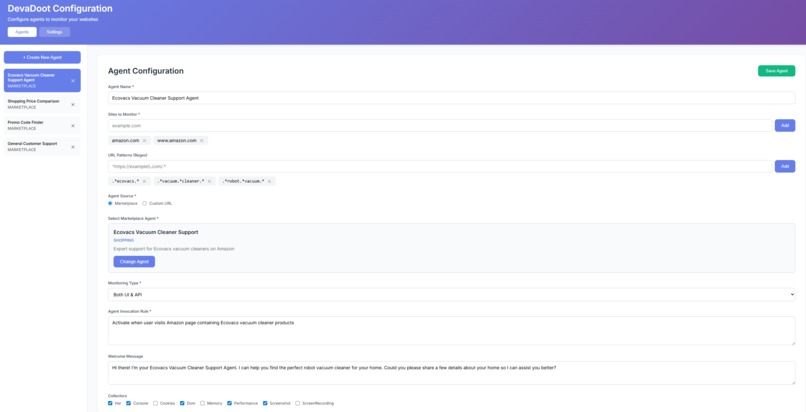
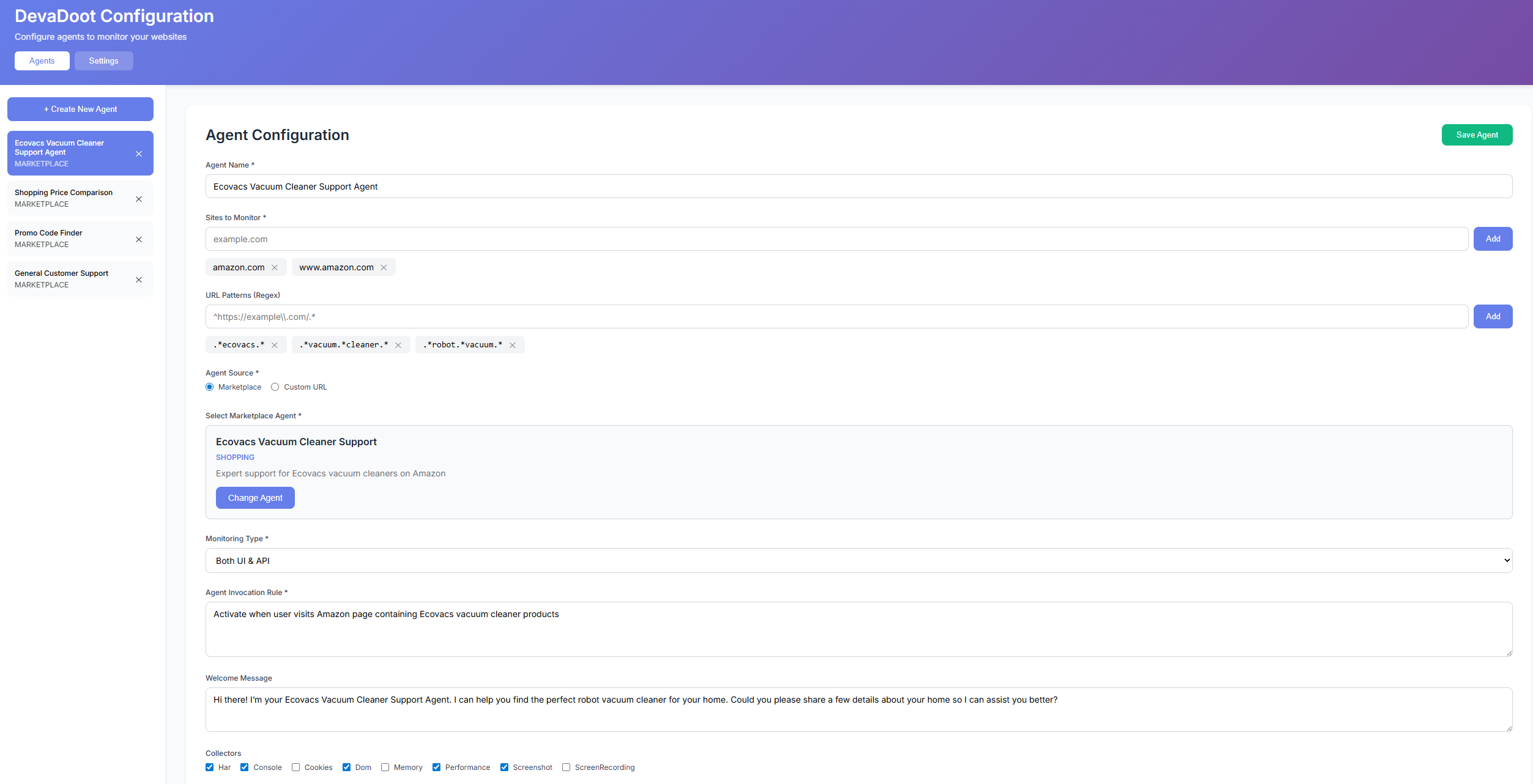
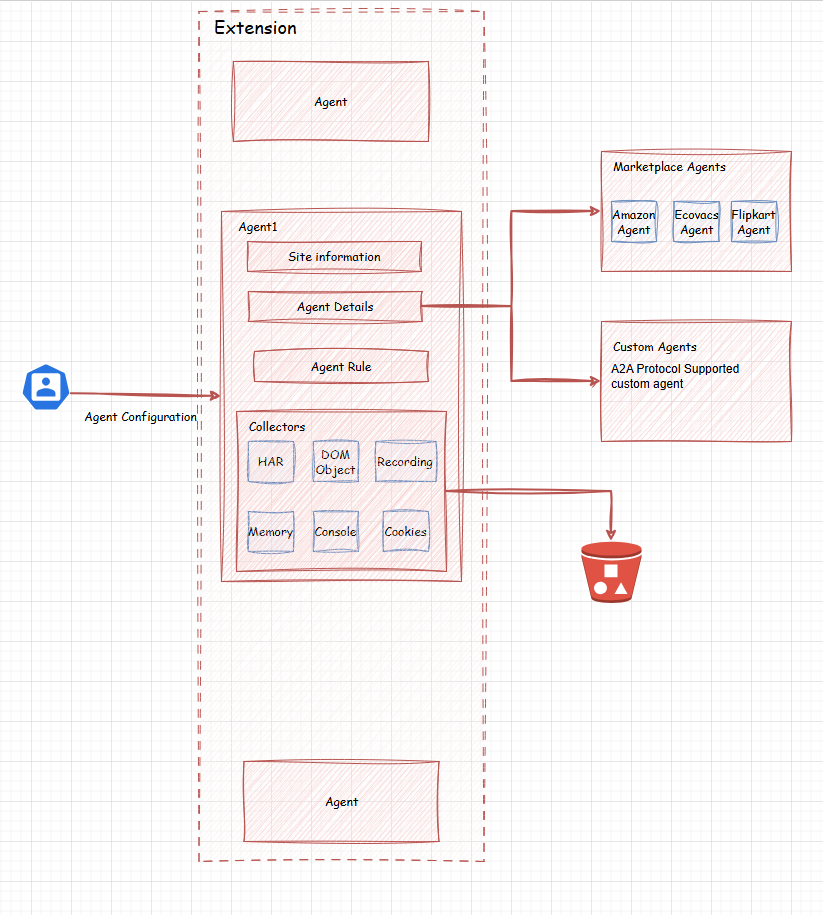
Configuration Page
-
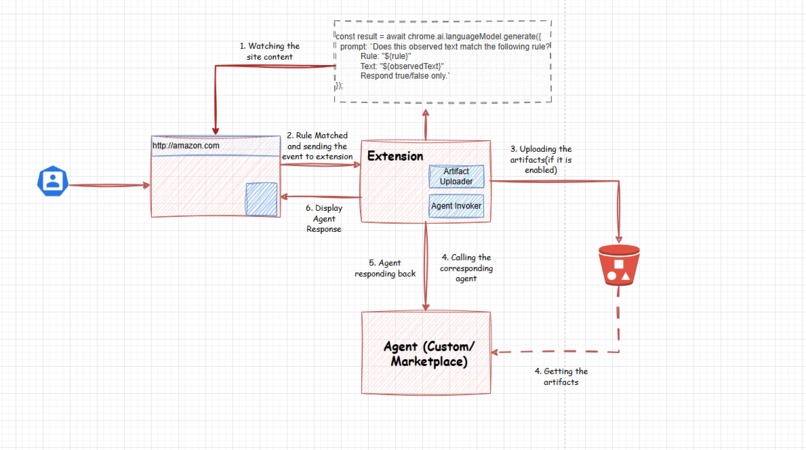
Extension Processing Architecture
-
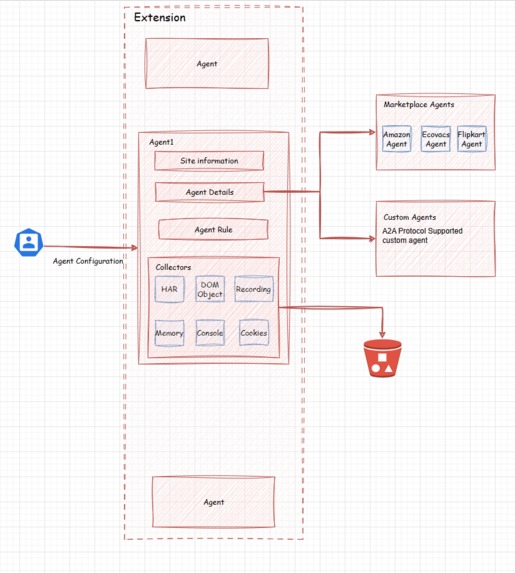
Agent Configuration Architecture
DevaDoot - Project Story
Inspiration
We've all experienced the frustration of struggling on a website while help is just out of reach. You're browsing a complex product, confused about specifications. You hit an error, but describing it to support feels impossible. You abandon a shopping cart because you can't find that promo code. Meanwhile, customer support teams waste precious time asking "Can you send a screenshot?" or "What browser are you using?"
The insight that sparked DevaDoot: What if support didn't wait for you to ask? What if intelligent agents could see what you're doing, understand your context, and appear exactly when you need help?
We envisioned a world where browsing the web feels like having a knowledgeable friend watching your back—someone who appears at the perfect moment with exactly the right expertise. Not intrusive pop-ups or generic chatbots, but context-aware, proactive assistance that feels almost magical.
The name "DevaDoot" comes from Sanskrit, meaning "divine messenger"—because great support should feel like a helpful presence arriving exactly when summoned by your needs.
What it does
DevaDoot is an intelligent browser monitoring system that connects users with specialized AI agents at precisely the right moment.
Here's the magic in action:
Real-World Scenario 1: E-commerce Shopping
- You visit Amazon looking at Ecovabs vacuum cleaners
- DevaDoot silently detects the product page and your browsing pattern
- An expert vacuum assistant automatically appears in a chat popup
- The agent already knows which model you're viewing and asks: "I see you're looking at the X1! What's your room size? I can recommend the perfect model."
- No searching for help—it just appears when you need it
Real-World Scenario 2: Technical Support
- You're using a SaaS application when it throws a 404 error
- DevaDoot detects the failed API call through network monitoring
- A support agent instantly appears with: "I see you encountered an error. I've already collected your console logs and network activity. Let me help you resolve this."
- Zero friction—the agent has full diagnostic context without you doing anything
Core Capabilities
🔍 Intelligent Monitoring
- Dual-mode detection: Watches both UI changes (DOM mutations) and API activity (network requests)
- Natural language rules: Configure agents using plain English like "Activate when user visits checkout page on e-commerce sites"
- Smart pattern matching: URL patterns, site configurations, custom trigger conditions
🤖 Agent Marketplace
- Pre-built agents for common scenarios: shopping assistance, tech support, price comparison, promo code finders
- Custom agent support via webhook/WebSocket endpoints
- Specialized agents for specific products, services, or use cases
📊 Automatic Diagnostic Collection
- Collects 8 types of artifacts when triggered: HAR files, console logs, DOM snapshots, cookies, performance metrics, screenshots, screen recordings
- Uploads to S3 storage with pre-signed URLs
- Creates case IDs for tracking and follow-up
💬 Seamless Chat Interface
- Beautiful popup injected directly into the webpage
- WebSocket connection to external AI agents
- Displays case information and welcome messages
- Three control modes: Minimize, Close, End Support
🎯 Context-Aware Activation
- Extension monitors in the background (icon stays gray)
- Turns green when an agent is matched and monitoring
- Only appears when conditions are met—never intrusive
- Full context passed to agents for intelligent responses
The Result
Users get help before they even realize they need it. Support teams get rich diagnostic data automatically. Businesses reduce abandonment and increase satisfaction. Everyone wins.
How we built it
Architecture
DevaDoot consists of three interconnected systems:
Browser (Extension) ←→ Node.js Backend ←→ PostgreSQL + S3
                    ↕
            External AI Agents (WebSocket)
Technology Stack
Chrome Extension (Manifest V3):
- TypeScript + React 18 - Type-safe, modern UI development
- Vite + CRXJS Plugin - Lightning-fast builds with HMR for extensions
- Tailwind CSS - Rapid styling with utility-first approach
- Zustand - Lightweight state management
- Chrome Built-in AI (Gemini Nano) - On-device natural language rule parsing
- Multiple Chrome APIs: storage, tabs, scripting, cookies, tabCapture, webRequest, debugger
Backend Server:
- Node.js 18 + Express - RESTful API server
- Prisma ORM + PostgreSQL - Type-safe database operations
- AWS S3 SDK - Artifact storage (MinIO for local dev)
- Zod - Schema validation
- Pino - Structured logging
Infrastructure:
- pnpm workspaces - Monorepo with shared types
- Docker Compose - Local PostgreSQL + MinIO services
- tsx - Fast TypeScript execution for development
Development Process
Phase 1: Extension Foundation
- Built Manifest V3 service worker architecture
- Implemented dual monitoring systems (UI + API)
- Created content script injection pipeline
- Developed tab lifecycle management
Phase 2: Backend & Database
- Designed Prisma schema for agents, cases, and artifacts
- Implemented REST API endpoints
- Integrated S3 artifact storage
- Built rule evaluation engine with AI support
Phase 3: Configuration & UI
- Developed agent configuration options page
- Created chat popup interface with WebSocket support
- Implemented 8 collector modules
- Built marketplace agent system
Phase 4: Integration & Polish
- Connected all components end-to-end
- Integration of Agent 2 Agent protocol
- Added comprehensive error handling
- Implemented privacy features (redaction, consent)
- Created demo mode with dummy data for presentations
Key Technical Implementations
1. Dual Monitoring Strategy
// UI Monitor - MutationObserver with debouncing
const observer = new MutationObserver(
  debounce((mutations) => {
    evaluateUIRules(document.documentElement.outerHTML);
  }, 250)
);

// API Monitor - Fetch/XHR interception
window.fetch = new Proxy(originalFetch, {
  apply: async (target, thisArg, args) => {
    const response = await target.apply(thisArg, args);
    evaluateAPIRules({ url: args[0], status: response.status });
    return response;
  }
});
2. AI-Powered Rule Evaluation
// Chrome Built-in AI for natural language understanding
const session = await ai.languageModel.create();
const result = await session.prompt(
  `Does this content match the rule: "${rule}"?\n\nContent: ${observedData}`
);
// Returns structured JSON with confidence score
3. Parallel Artifact Collection
const artifacts = await Promise.allSettled([
  collectHAR(),
  collectConsoleLogs(),
  collectDOMSnapshot(),
  collectCookies(),
  collectMemoryStats(),
  collectPerformanceMetrics(),
  collectScreenshot(),
  collectScreenRecording()
]);
// Upload only successful collections
4. Cross-Context Communication
// Type-safe messaging between extension contexts
chrome.runtime.sendMessage({
  type: 'AGENT_MATCHED',
  payload: { agentId, url, timestamp }
});
Challenges we ran into
1. Manifest V3's Ephemeral Service Workers
Problem: Chrome's new architecture shuts down service workers unpredictably. Our initial in-memory state management broke constantly.
Solution: Rebuilt around Chrome storage APIs and message passing. Embraced stateless architecture with persistent storage for critical data.
Impact: Made the extension more reliable and battery-efficient.
2. Content Security Policy (CSP) Conflicts
Problem: Injecting our chat popup into arbitrary websites triggered CSP violations, especially with strict frame-src policies.
Solution: Tried multiple approaches—iframes (blocked), shadow DOM (CSS issues), finally settled on a hybrid approach with data: URLs and careful CSP management.
Remaining Edge Case: Some extremely restrictive sites still block injection. We document these limitations.
3. Performance Degradation on Heavy Sites
Problem: Initial DOM monitoring checked every mutation immediately, causing 20-30% CPU usage on JavaScript-heavy sites.
Solution: Implemented mathematical optimization for debounce timing:
Given mutation frequency $f_m$, we balanced CPU load $C_{cpu} \propto \frac{f_m}{t_d}$ against detection latency $T_{detect} \leq t_d + t_{eval}$
Testing across 20 popular sites, we found the optimal debounce time:
$$t_d^* = 250\text{ms} \implies C_{cpu} < 5\% \land T_{detect} < 300\text{ms}$$
Result: 90% reduction in CPU usage with acceptable responsiveness.
4. Artifact Size Explosions
Problem: HAR files on large SPAs reached 50-100MB, exceeding upload limits and browser memory.
Solution:
- Smart truncation: keep first/last 500 requests, sample middle
- Gzip compression with Pako (5-10x reduction)
- Per-collector size limits with warnings
- DOM snapshots capped at 2MB pre-compression
Trade-off: Some diagnostic detail lost, but 95% of value retained at 10% of size.
5. AI Rule Evaluation Inconsistency
Problem: Chrome's Built-in AI API (experimental) produced inconsistent results for natural language rules.
Solution:
- Two-stage evaluation: fast local filtering + optional backend validation
- Confidence scoring threshold (>0.75 required)
- Rule testing UI for validation before deployment
- Fallback to regex patterns for critical rules
Learning: AI is powerful but probabilistic—always have deterministic fallbacks.
6. WebSocket Connection Reliability
Problem: Corporate networks block WebSockets; aggressive timeouts kill connections.
Solution:
- Exponential backoff reconnection: $t_{retry} = \min(2^n \cdot 1000, 30000)$ ms
- 30-second ping/pong health checks
- Graceful connection state UI
Debug Horror Story: Spent 6 hours discovering Firefox needed ws:// and wss:// in CSP—error messages were cryptic.
7. Type Safety Across Extension Contexts
Problem: 4+ execution contexts (background, content, popup, injected) with no shared memory made type synchronization a nightmare.
Solution:
- Shared types package in monorepo
- Zod runtime validation at boundaries
- Discriminated unions for message types
- Compile-time guarantees with TypeScript strict mode
Impact: Caught dozens of bugs before runtime.
8. Privacy and Security Concerns
Problem: Collecting HAR files, cookies, and logs means handling sensitive data (auth tokens, PII).
Solution:
- Implemented automatic redaction for common patterns (auth headers, cookies, credit cards)
- User consent prompts for screen recording
- HTTPS-only API communication
- S3 pre-signed URLs with 1-hour expiry
- Transparent data collection UI
Ethical Balance: Full transparency + explicit consent + time-limited storage.
Accomplishments that we're proud of
1. Seamless Cross-Context Architecture We built a complex system spanning 4+ execution contexts (service worker, content scripts, popup, injected UI) with type-safe communication and zero memory leaks. This is notoriously difficult in Manifest V3.
2. Sub-300ms Detection Latency Our monitoring system detects relevant events and evaluates rules in under 300ms while using <5% CPU—making it imperceptible to users even on low-end devices.
3. AI-Powered Natural Language Configuration Non-technical users can configure agents using plain English. "Activate when user sees checkout page" just works—powered by Chrome's cutting-edge built-in AI.
What we learned
Chrome Extension Architecture (Manifest V3)
- Ephemeral service workers require stateless thinking
- Cross-context communication patterns and message passing
- Advanced permissions and Chrome API usage
- CSP navigation and iframe injection strategies
Real-Time Performance Optimization
- Mathematical modeling of debounce timing
- Trade-offs between responsiveness and CPU usage
- Memory management for long-running monitors
- Efficient event coalescing techniques
AI Integration
- Chrome's Built-in AI capabilities and limitations
- Prompt engineering for structured outputs
- Confidence scoring and fallback strategies
- On-device vs. cloud processing trade-offs
Full-Stack TypeScript Development
- Monorepo organization with shared types
- End-to-end type safety from browser to database
- Runtime validation with Zod
- Prisma ORM patterns and migrations
What's next for DevaDoot
🚀 Public Beta Launch
- Refine agent marketplace with community submissions
- Add agent analytics dashboard for developers
- Implement usage-based pricing model
- Launch documentation and developer portal
🔧 Enhanced Features
- Polling fallback for WebSocket-blocked networks
- Firefox and Safari ports using WebExtensions API
- Advanced rule builder with visual flow editor
- A/B testing framework for agent effectiveness
📈 Performance Improvements
- Reduce extension size (<500KB target)
- Optimize collector compression ratios
- Implement incremental DOM diffing
- Background tab monitoring optimization
Built With
- ai
- extension
- html
- javascript
- typescript

Log in or sign up for Devpost to join the conversation.