Inspiration
The idea for DevDock came from a problem I experienced while working on different development projects: I was constantly switching between websites just to complete small tasks.
Sometimes I needed to format or validate JSON. Other times I needed to generate a UUID, test a regular expression, encode or decode Base64, generate a password, work with colors, create a hash, convert timestamps, or quickly save a piece of code for later.
None of these tasks are particularly difficult, but when they are spread across many different websites, they start interrupting the development workflow. I would open one website for one task, another website for something else, and then return to my code editor. Over time, all of those small interruptions became frustrating.
That made me think:
Why not put the tools I actually use into one workspace?
That question became the starting point for DevDock.
I wanted DevDock to feel less like a random collection of online utilities and more like a small developer workspace that I could actually keep open while coding.
My main goal was to reduce unnecessary tab switching and make common developer tasks available from one place.
I also wanted to build something that solved a real problem for me instead of creating a project simply because a technology was popular.
What it does
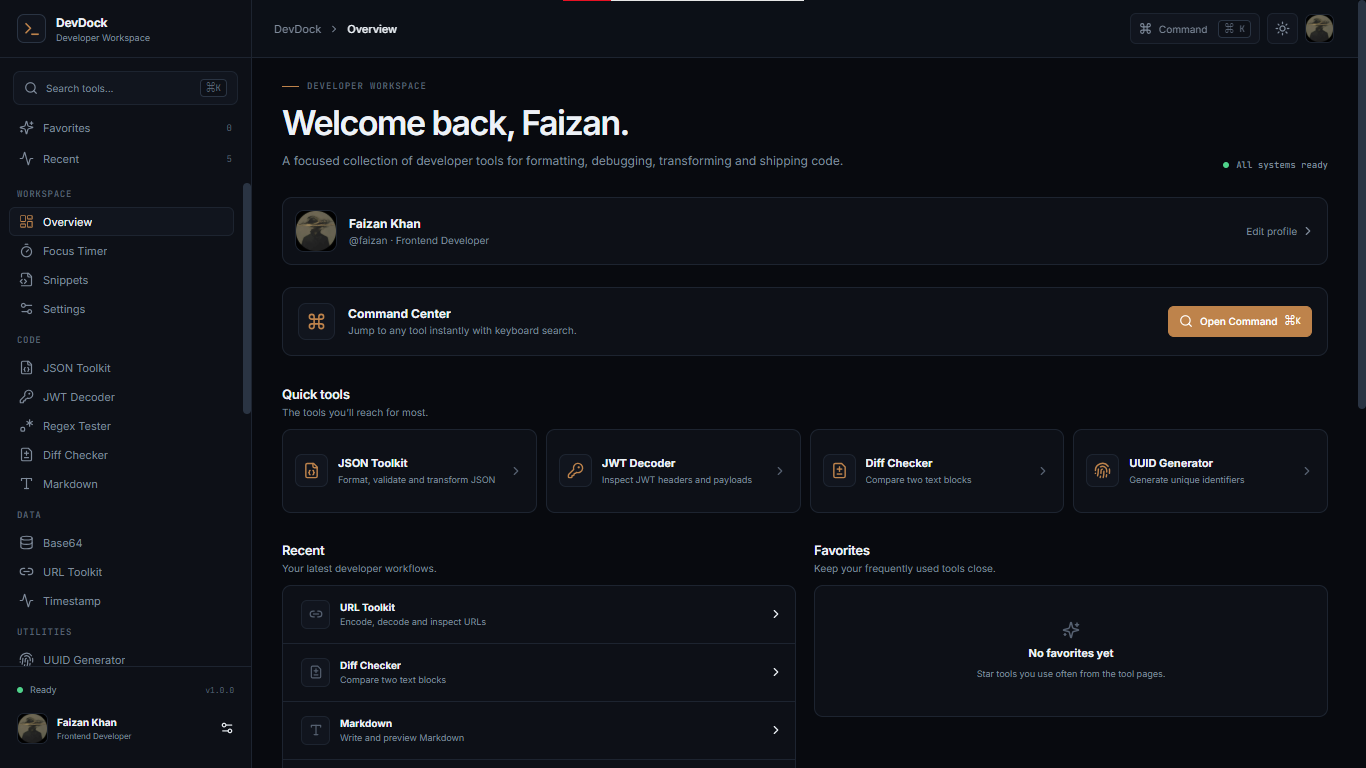
DevDock is a browser-based developer workspace that combines a variety of useful development utilities and productivity features into one application.
The idea is that instead of searching for a different website whenever I need a small utility, I can open DevDock and find the tool I need from the workspace.
Some of the tools currently included in DevDock are:
Developer Utilities
JSON Tools
I can work with JSON directly inside the application instead of opening another online JSON formatter.
Base64
The Base64 tool allows quick encoding and decoding of text.
UUID Generator
UUIDs can be generated instantly whenever I need unique identifiers during development.
Password Generator
The password generator provides a quick way to generate random passwords without relying on another website.
Regex Tester
The regex tool allows me to test regular expressions against text and quickly see whether a pattern behaves as expected.
Hashing
DevDock includes hashing functionality for common development workflows.
URL Tools
The URL utilities make it easier to work with URL-related transformations.
Timestamp Tools
Timestamp utilities are available for working with date and time values that commonly appear during development.
Color Lab
The Color Lab provides a dedicated space for working with colors and different color values.
Productivity
DevDock isn't only focused on utilities.
I also wanted it to help with the actual development workflow, which is why it includes features such as a Focus Timer and Snippet Manager.
The snippet functionality allows useful pieces of code to be kept inside the workspace instead of being repeatedly searched for or stored somewhere else.
The Focus Timer is designed around the idea of working in focused sessions and reducing distractions while coding.
Workspace Experience
The application also includes quick navigation, themes, persistent preferences, and a centralized interface for accessing the different tools.
The overall experience is designed around one principle:
I shouldn't have to leave my developer workspace for every small task.
How I built it
I built DevDock using React and Vite, with JavaScript, HTML, and CSS.
I chose React because the application contains many different interactive tools, and component-based development makes it much easier to keep those features organized.
Instead of treating DevDock as one huge interface, I structured the application around individual tools and reusable UI components.
The main workspace provides the overall application structure, while individual tools handle their own interactions and functionality.
For example, the JSON tool handles JSON-specific operations, the Regex Tester handles pattern testing, and the Focus Timer manages its own timing and state.
This approach makes it easier to continue adding tools without having to redesign the entire application every time.
I also used Lucide icons throughout the interface to keep the navigation and controls visually consistent.
Client-Side Functionality
One of the things I wanted from the beginning was for DevDock to remain lightweight.
For utilities that can be handled entirely in the browser, I process the data on the client side using JavaScript and browser APIs.
This means many operations don't need to be sent to a server just to perform a simple transformation.
I also used Local Storage for features that benefit from persistence, such as user preferences and saved local data.
This allows parts of the workspace to remain available even after refreshing or reopening the application.
Deployment
After building the application, I deployed DevDock using GitHub Pages.
The project uses Vite for development and production builds, and the deployment setup allows the public version of DevDock to be accessible directly from the browser.
Challenges I ran into
One of the biggest challenges was designing an application that contains many different tools without making the interface feel overwhelming.
A developer utility website can easily become a long list of buttons and forms. I didn't want DevDock to feel like that.
I wanted the application to have a clear structure where I could quickly understand where everything was and access a tool without spending time searching through a complicated interface.
Another challenge was making completely different tools feel like they belong to the same application.
A JSON formatter, password generator, regex tester, color tool, snippet manager, and focus timer all have completely different purposes.
Each tool needs different inputs, outputs, controls, and interactions.
I had to think about how to give each tool enough space while still maintaining a consistent design system across the application.
Keeping it Lightweight
Another challenge was deciding which features actually needed a backend.
For many of the utilities, a backend would add unnecessary complexity because the operation can happen directly inside the browser.
I therefore focused on client-side functionality wherever it made sense.
This also helped keep the application fast and simple.
State and Persistence
Managing state across multiple interactive tools was another challenge.
Some tools only need temporary state, while others benefit from persistence.
For example, a timer needs to keep track of its current state, while saved snippets and preferences need to remain available after the page is refreshed.
Using React state together with browser Local Storage helped me handle these different requirements.
Deployment
Getting the project from a local development environment to a working public application also taught me about the differences between development and production environments.
Making sure the Vite build, asset paths, routing, and GitHub Pages deployment worked correctly required debugging and testing rather than simply running the application locally.
Accomplishments that I'm proud of
The biggest accomplishment for me is that DevDock started as an idea and became a complete working application that I can actually use.
I'm proud that I didn't stop at creating a basic interface. I continued expanding the project into a workspace containing multiple functional developer utilities and productivity features.
I'm especially proud of the variety of tools because they represent different types of development problems.
Instead of building ten versions of the same type of utility, I built features that solve different parts of a developer's workflow.
I'm also proud of the client-side approach.
A large part of DevDock can work directly in the browser without requiring an account or a complicated backend system. This keeps the experience simple and makes the tools immediately accessible.
Another accomplishment I'm proud of is building the project with a structure that can continue to grow.
DevDock isn't designed around a fixed number of tools. I can continue adding new utilities and improving existing ones without throwing away the entire application.
Most importantly, I built something based on a problem I personally experienced.
That makes the project more meaningful to me than simply building another demo application.
What I learned
Building DevDock taught me much more than just how to create individual React components.
I learned how different features need to work together as part of one larger application.
I gained more practical experience with React component architecture, especially when building multiple interactive tools that need to share the same overall interface.
I also became more comfortable with state management, because almost every tool has some kind of changing state.
Working with Local Storage taught me how browser-based applications can persist information without needing a traditional database.
I also learned more about using browser APIs and JavaScript to perform useful operations directly on the client.
Another important lesson was about UI and product design.
At first, it can be tempting to keep adding features because more features make a project look bigger.
While building DevDock, I realized that adding a feature isn't enough. The feature also needs to be easy to find, easy to understand, and actually useful.
I learned to think more about the user's workflow rather than just the implementation.
I also gained more experience with Vite, production builds, deployment, and debugging issues that don't always appear during local development.
Most importantly, DevDock taught me that a good developer project can come from noticing small frustrations in your own workflow and trying to solve them.
What's next for DevDock
I don't consider DevDock finished.
The current version provides the foundation for a much larger developer workspace, and there are several directions I want to take it.
One of the biggest improvements I want to make is a more powerful Command Palette.
Instead of manually navigating through the sidebar, I want developers to be able to search for a tool, action, or feature and open it instantly using the keyboard.
I also want to improve the Snippet Manager by adding better organization, search, editing, and import/export functionality.
Another planned feature is an API Request Builder that would allow developers to create and test HTTP requests directly inside DevDock.
I also want to build a more complete Developer Playground where developers can experiment with code and small ideas without leaving the workspace.
Other future improvements include:
- More advanced Markdown tools
- Better Diff utilities
- JWT tools
- Additional encoding and decoding utilities
- More developer-focused converters
- More keyboard shortcuts
- Improved search
- Workspace customization
- Snippet import/export
- Better organization of saved tools and data
- More responsive layouts
- Additional productivity features
My long-term goal is for DevDock to become more than a collection of utilities.
I want it to become a developer workspace that I can keep open next to my code editor throughout an entire development session.
The original idea was simply to stop switching between different websites for small tasks.
The next step is to keep expanding that idea until DevDock becomes a place where more and more of the everyday development workflow can happen in one focused workspace.
DevDock is built around a simple idea: spend less time switching between tools, and more time building.


Log in or sign up for Devpost to join the conversation.