-
-
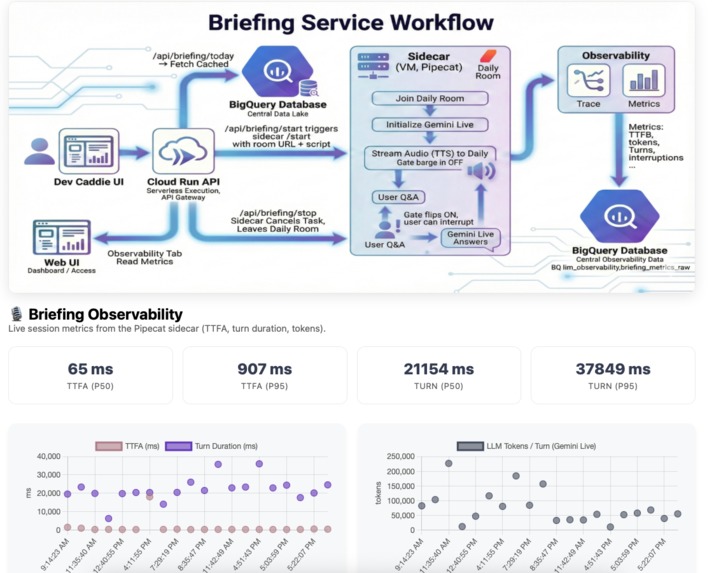
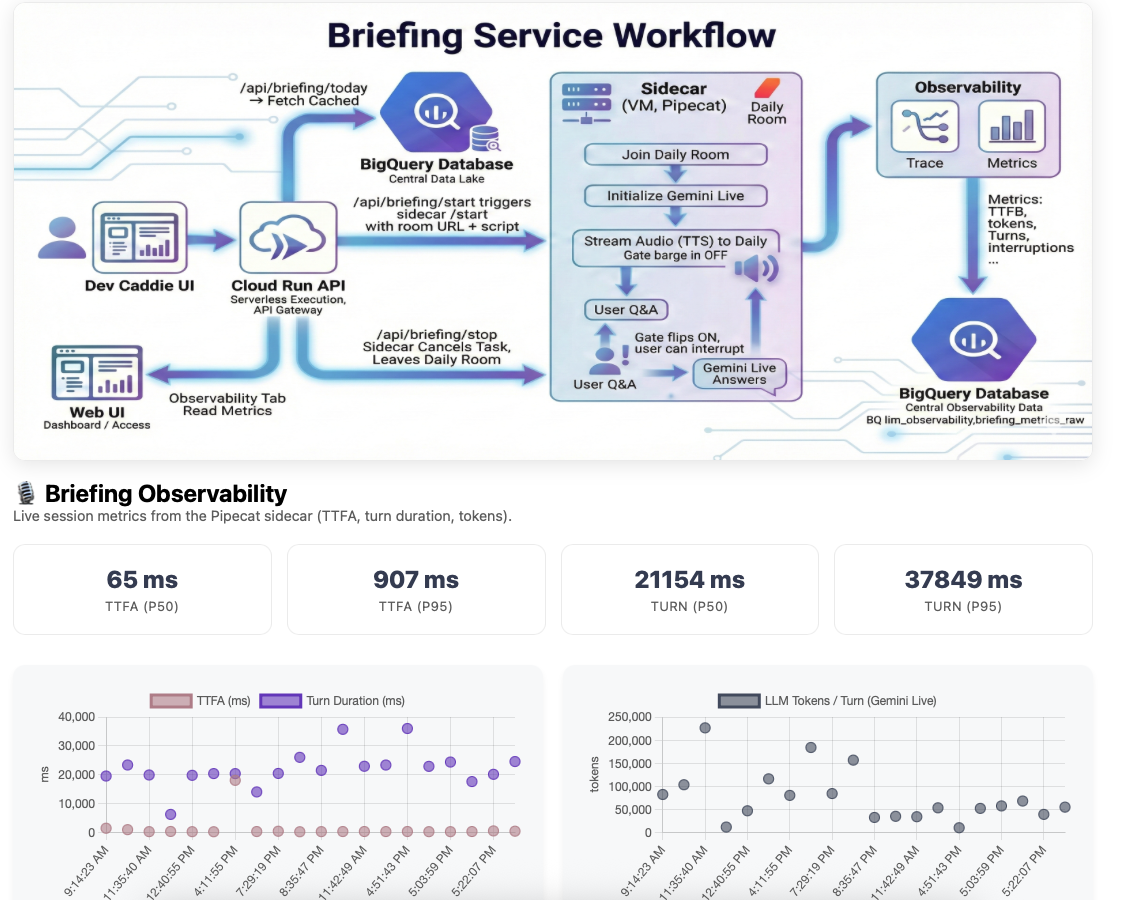
Briefing Service workflow and live stats
-
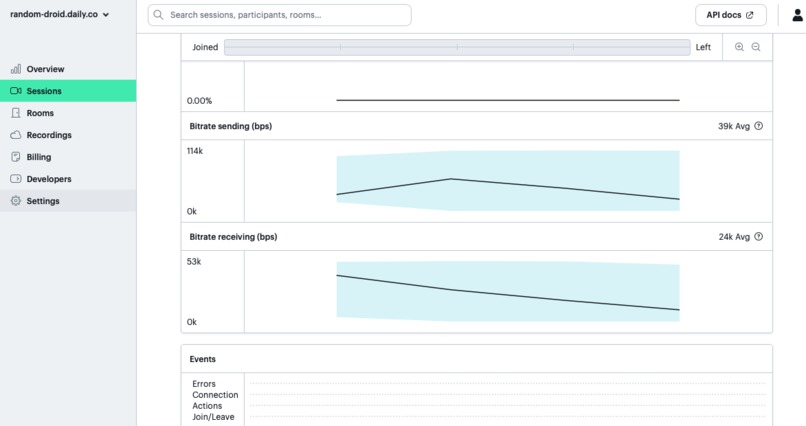
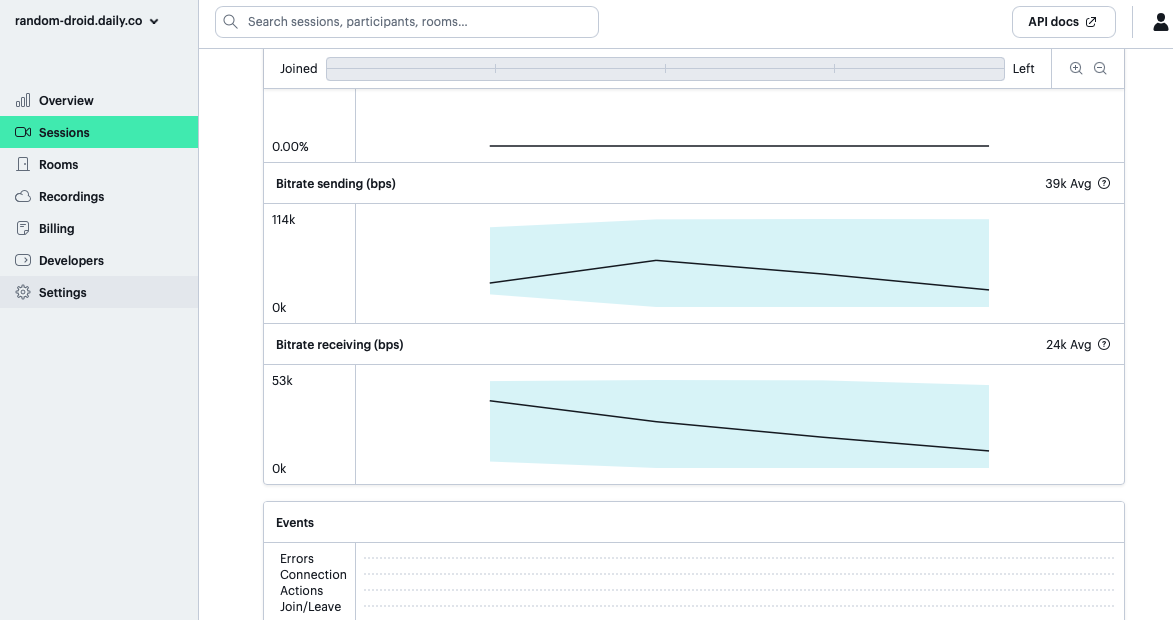
Audio bitrate graph of briefing bot
-
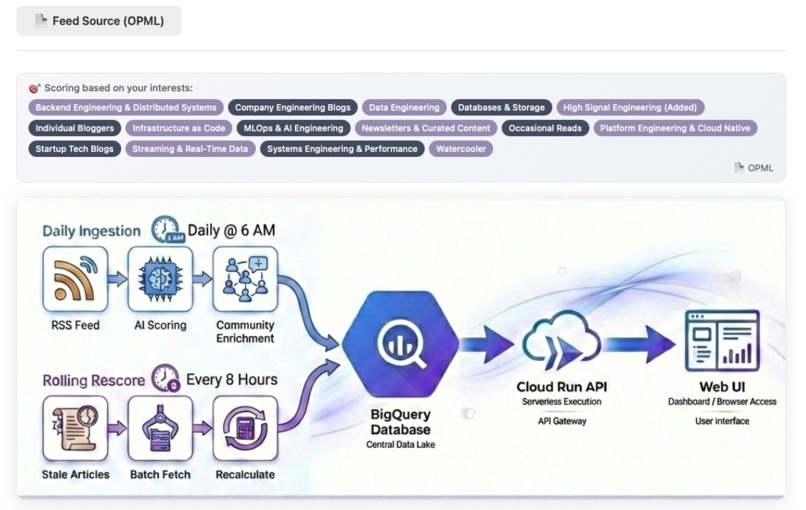
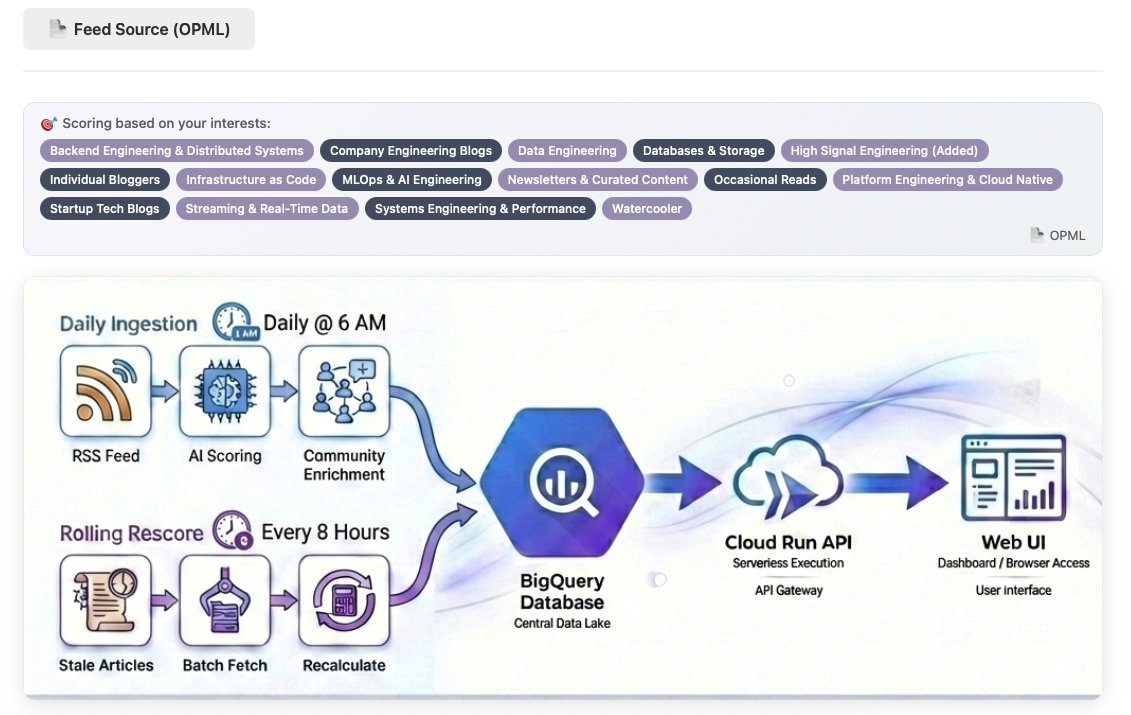
Smart Feed workflow from OPML to curated outputs
-
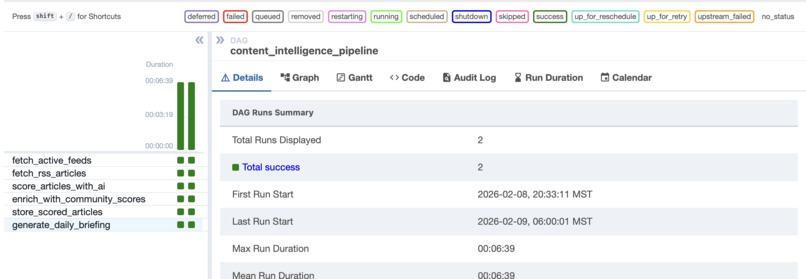
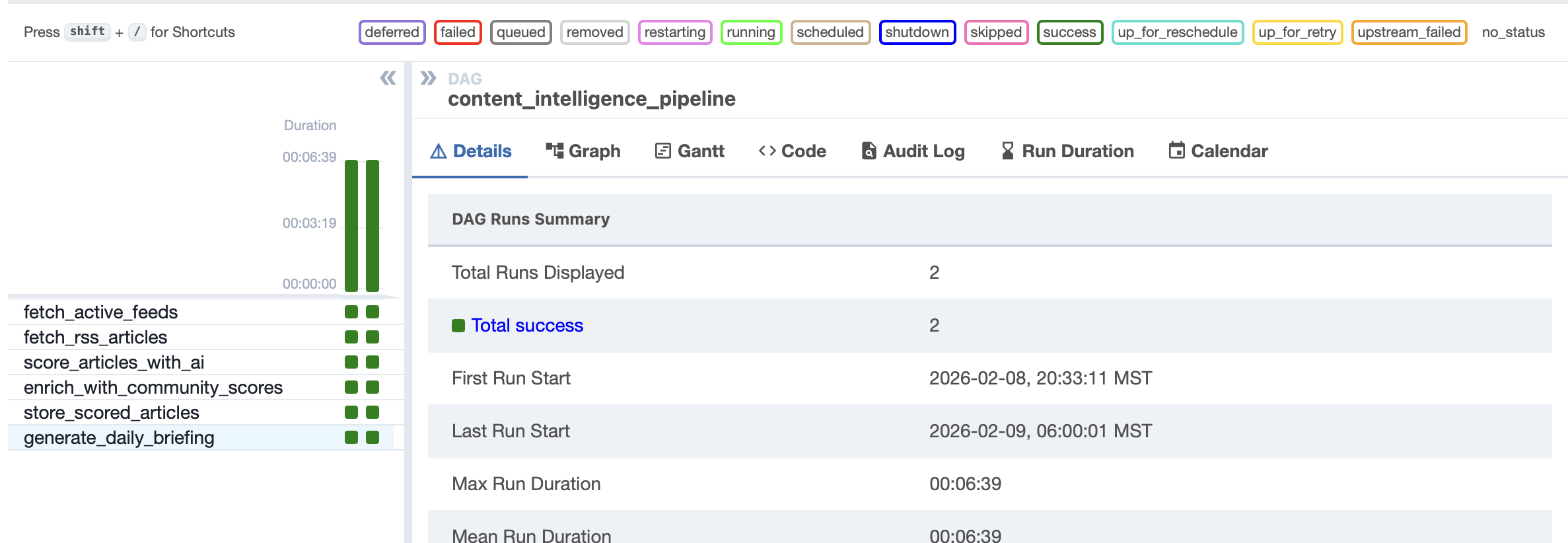
Article scoring DAG's task split
-
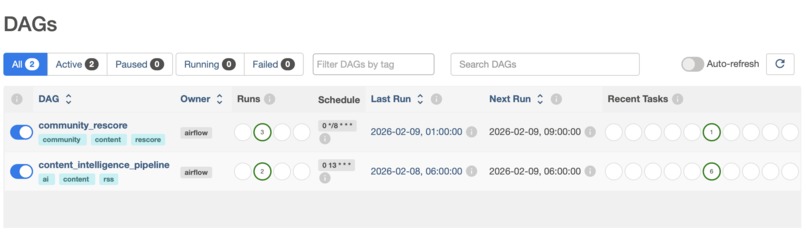
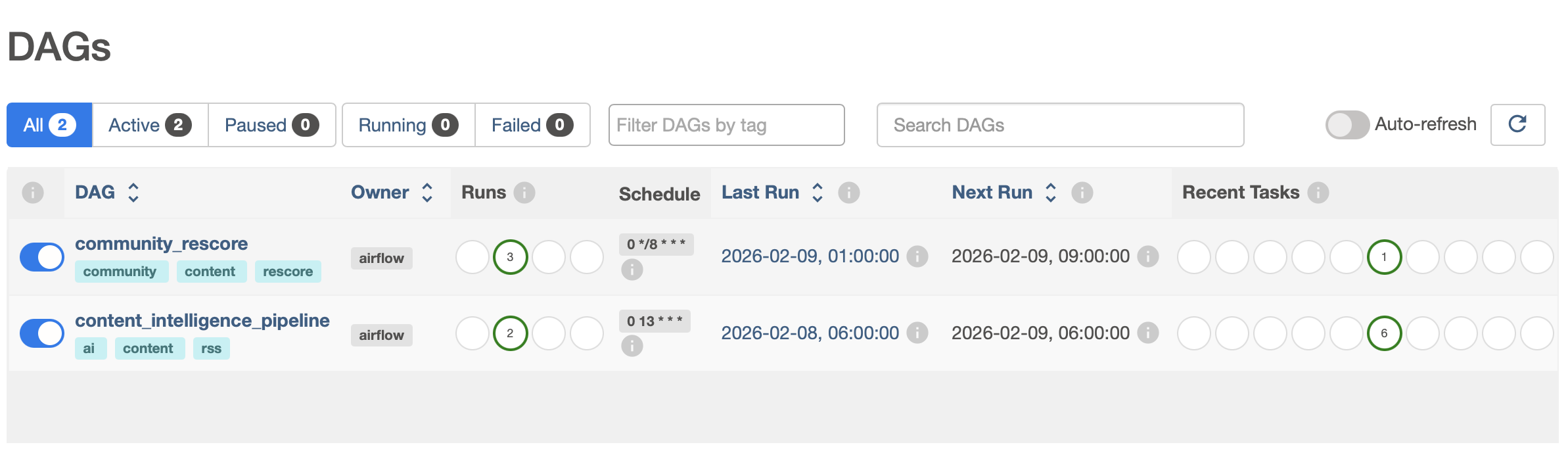
Airflow DAGs daily schedule to score/rescore articles
Inspiration
I built Dev Caddie because I kept missing high-signal engineering posts in the noise of daily feeds. I wanted a short, trustworthy briefing that feels like a personal caddie: it picks the best reads, tells me why they matter, and lets me ask questions live.
"The AI that learns your interests and stays with you all day" — morning briefing to start, lecture companion while learning, feed to discover. Developer was just the first corpus. The architecture is the same whether someone is watching a medical lecture, a law review, or a systems design video. The platform and the caddie works for ANY knowledge worker/student who reads RSS or learns from video lectures.
The inspiration also came from the "latency gap" in current AI assistants. Models are smart, but the transition from reasoning to real-time conversation often feels disjointed. I wanted a system where the caddie could process complex inputs and respond with the immediacy of a human partner.
What it does
- Voice Briefing: Turns 100s of daily engineering articles into a concise, interactive audio briefing.
- Live Q&A with Barge-In: Supports natural, interruptible conversation. You can ask questions mid-briefing, "Tell me parallel tools that are used for similar use cases."
- Smart Feeds: Ranks content by blending Gemini AI relevance (personal goals) with Community Signals (HN/Lobsters) to eliminate noise.
- Feed Assistant: A natural-language search engine over your entire scored corpus (stored in BigQuery).
- Video Lectures: Deconstructs YouTube course content into structured, time-indexed Cornell Study Notes with visual snapshots.
- LLM Observability: A live dashboard tracking real-time KPIs like cost, latency, and token usage.
How we built it
Used a distributed hybrid architecture to separate UI orchestration from real-time execution:
- Cloud Run (Orchestration): Handles the UI surface, API gateway, and session management.
- GCE VM + Pipecat (Real-Time Sidecar): A dedicated sidecar VM handles the persistent WebSocket connections for **Gemini Live, ensuring low-latency audio streaming and stability.
- Airflow VM + BigQuery (Data Pipeline): Manages ingestion, dual-scoring, ranking, and briefing script generation.
- The AI Stack: gemini-2.5-flash: Used for content scoring, script generation, Feed Assistant, and lecture processing. gemini-2.5-flash-native-audio: Powers the real-time voice briefing and live Q&A.
Challenges we ran into
The Dual-Scoring Problem: Single-dimension AI scoring treats an obscure blog post the same as a viral Netflix engineering article if both match your interests. By combining AI relevance with community validation (HN/Lobsters), I get personalized AND field-tested recommendations.
Barge-in gating: Letting users interrupt during Q&A but not during scripted narration required an in-house gate mechanism (\(allow_interruptions\)) and real-time UI sync via Pipecat's \(TransportMessageUrgentFrame\).
Live Stats, Not Estimates: Both dashboards show real numbers pulled from BigQuery—article counts, scores, and the LLM Observability tab displays live KPIs (TTFA, Tokens, Score, Latency) from the metrics table.
Cost Control + Fairness: Rate limiting prevents one user from exhausting the 1,500 requests/day free quota. Budget guard ($2/day) provides a safety net if I switch to paid tier. Airflow batch scoring is staggered to stay within RPM limits.
Session Reliability: Keeping Daily + Gemini Live stable across browser refreshes and session restarts required strict teardown and room cleanup.
Accomplishments that we're proud of
- Deterministic Briefing + Live Q&A: Successfully blending a scripted daily update with free-form, interruptible AI conversation without context resets.
- Real-time barge-in gating synchronized to the UI
- Dual-scoring that resists "obscure blog post" bias
- Solo build: entire system designed and built by one person
- Production-ready: This isn't just a demo; it’s running live with real RSS feeds, real daily briefings, and a live BigQuery backend with scalable architecture.
- Cost-Efficiency: All infrastructure runs on free tiers (Vertex AI 15hrs audio, Daily.co 10k min, Cloud Run, BigQuery); cascade scoring pre-filters articles by community signal before any Gemini call — variable AI cost is zero.
Cascade scoring: Community signals (HN/Lobsters RSS — free) and deduplication gate every article before Gemini sees it. Most of 500+ daily articles never reach an AI call. Gemini only scores what already has signal and is new.
What we learned
- Sidecars are Powerful: Offloading real-time media handling to a Sidecar VM keeps the main Cloud Run app lean and scalable.
- Orchestration Matters: Prompt design is only half the battle; data flow and state management are the rest.
- Real-Time Audio Needs Infra: While Cloud Run is great for APIs, persistent audio streams (Gemini Live + Daily) require the stability of a GCE VM with \(systemd\).
What's next for Dev Caddie
- Temporal Visual Indexing: Leveraging \(FFmpeg\) for event-driven video segmentation to build a searchable, multimodal knowledge base where Gemini reasons across both visual frames and transcript data.
- Live Article/Lecture Lookup: Enabling function calling for follow-up questions like "Summarize lecture 3" mid-conversation.
- Knowledge Graph Grounding: Exploring topological memory to map connections between articles and lectures. User Favourites: Feeding explicit user signals back into the scoring engine for hyper-personalization.
- Scalability and Personalization: Architecture is designed to accommodate IAM and support features like Bring Your Own RSS/Signal source list, Caddie personas etc.
Built With
- airflow
- bigquery
- cloud-run
- daily-webrtc
- fastapi
- firestore
- gemini-2.5-flash
- gemini-live
- pipecat
- python
- vertex-ai

Log in or sign up for Devpost to join the conversation.