📖 Project Story — DevVoice
💡 Inspiration
I'm someone who talks to their home. Lights, plugs, music — I want it all controlled by voice, naturally, the way I actually speak.
The problem? Every mainstream voice assistant — Alexa, Google Home, Siri — is built for one language, one accent, one culture. When I say "plug band karo" (turn off the plug, in Hindi), they stare blankly. When I switch mid-sentence between Hindi and English the way most Indians do daily, they give up entirely.
I also didn't want a giant cloud box listening to everything in my home, phoning data back to a corporation. I wanted something mine — running on my own machine, talking to my own devices, in my own words.
That's what sparked Dev — a personal voice assistant that understands how I speak, not how Silicon Valley thinks I should.
🏗️ How I Built It
The Pipeline
Every voice command travels through a carefully orchestrated pipeline:
Microphone → VAD → STT → Wake Detection → LLM Intent → Action → TTS → Speaker
Each stage was built and integrated independently:
1. 🎤 Voice Activity Detection (VAD)
I used WebRTC VAD — the same algorithm powering Google Meet — to detect when the user is actually speaking. It classifies short audio frames as speech or silence using energy thresholds and spectral analysis.
The energy-based silence gate:
$$E = \frac{1}{N} \sum_{i=1}^{N} x_i^2$$
where $x_i$ are audio samples and $N$ is the frame size (typically 480 samples at 16kHz). Frames with $E$ below a tuned threshold are discarded before sending to the STT API — saving both latency and API costs.
2. 🗣️ Speech-to-Text — Sarvam AI
I chose Sarvam AI's saarika:v2.5 model specifically because it's trained on Indian languages and accents. It handles Hindi, transliterated Hindi (Hinglish), and Indian-accented English far better than generic STT APIs.
3. 🔍 Wake Word Detection
A lightweight regex + string matching layer checks for phrases like "hi dev", "hey there", "hi there" before invoking the expensive LLM. This keeps the system efficient — the LLM only runs when the user is actually commanding Dev.
4. 🧠 Intent Classification — Google Gemini API
The heart of the system. I engineered a detailed system prompt that classifies transcribed speech into one of 9 structured intent types, returning strict JSON:
$$\text{intent} = \arg\max_{t \in \mathcal{T}} \, P(t \mid \text{transcript}, \text{context})$$
where $\mathcal{T} = {\text{control, reminder, note_add, note_read, calendar_list, query, music, chat, unknown}}$.
Using gemini-2.0-flash gave me fast, cheap, and highly accurate intent parsing — no GPU, no local 17GB model, just an API call.
5. ⚡ Action Routing
A clean router in server.py dispatches each intent to the right service — Tuya local API for smart plugs, yt-dlp for music, Google Calendar API for reminders, wttr.in for weather, DuckDuckGo for web search.
6. 🔈 Text-to-Speech — Sarvam AI
Responses are synthesized using Sarvam AI's bulbul:v2, which produces natural Indian-accented speech and supports Hindi text natively.
7. 📊 Real-time Frontend
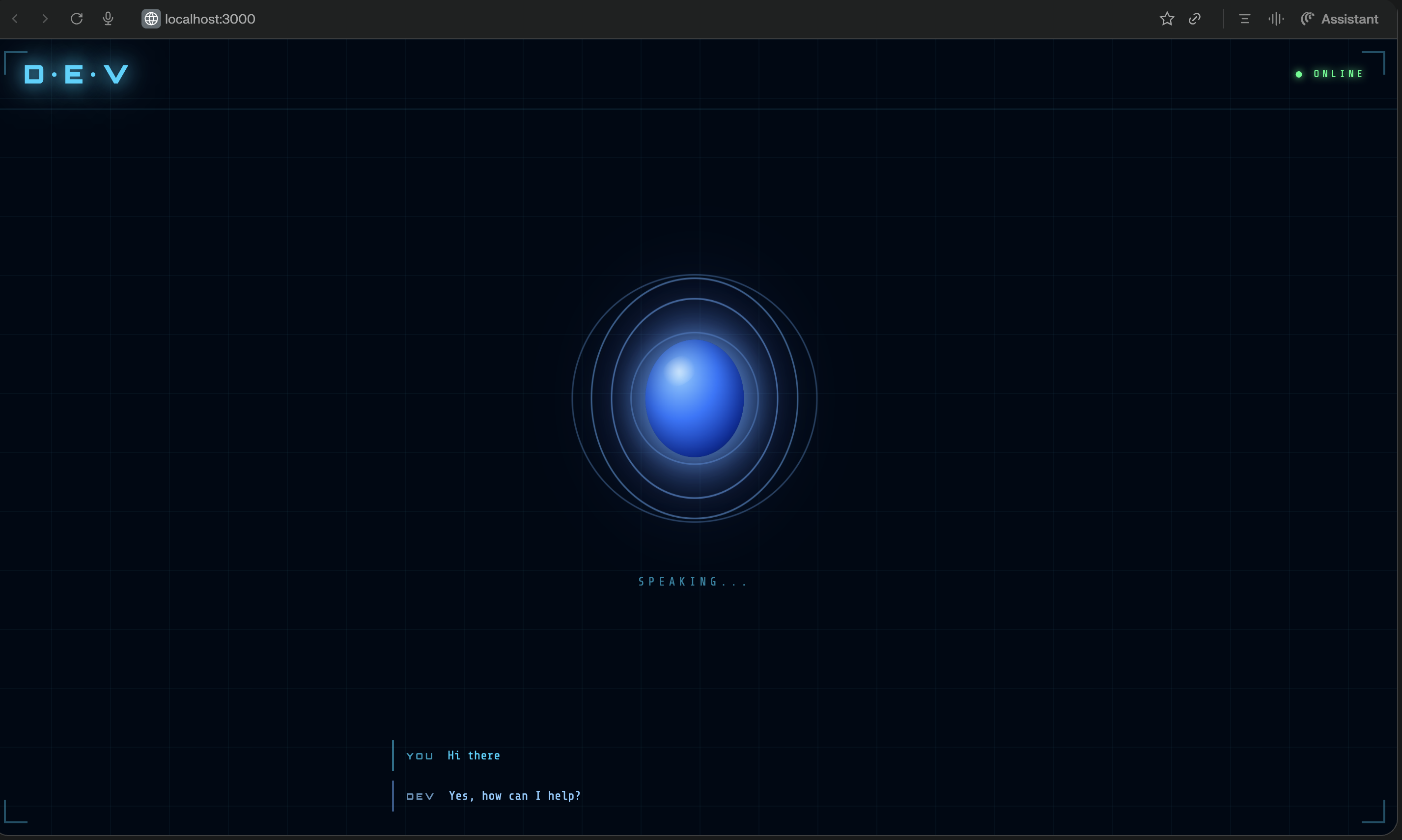
A React + Vite dashboard shows live state (idle → listening → thinking → speaking) via WebSocket. The animated voice orb gives the assistant a visual presence.
📚 What I Learned
Prompt Engineering is Everything
Getting Gemini to return only valid JSON — no markdown fences, no explanations, no apologies — required iterative prompt refinement. The key insight: show, don't tell. Filling the prompt with 20+ concrete examples was far more effective than writing rules in prose.
API Design Matters for Latency
Running STT, LLM, and TTS sequentially means latency compounds. I used asyncio + run_in_executor to keep the FastAPI server non-blocking, and WebSocket state broadcasts to keep the frontend feeling responsive even when the pipeline takes 2–3 seconds end-to-end.
Bilingual NLP is Hard
Hindi text from Sarvam sometimes arrives in Devanagari (गाना बंद करो), sometimes in transliterated Latin (gana band karo), and sometimes mixed. Gemini handles this remarkably well — but only if your prompt explicitly trains it on both forms with real examples.
Local IoT Integration
TinyTuya communicates with smart plugs over the local LAN using an encrypted protocol — no Tuya cloud required. Getting the device's local_key involved reverse-engineering the Tuya mobile app pairing flow — a rabbit hole worth going down for the privacy win.
🧗 Challenges
1. Wake Word False Positives
Sarvam AI mishears English words in surprising ways. "Hey there" was getting transcribed as "high there" or "hi dear". Solution: maintain a list of phonetically similar mishearing variants in config.py and match against all of them.
2. VAD Tuning
WebRTC VAD's aggressiveness (0–3) needed careful tuning. Too sensitive → cuts off the end of commands. Too loose → sends silence frames to STT wasting API quota. I landed on aggressiveness=2 with a trailing silence buffer of 0.8 seconds.
3. Switching from Ollama to Gemini API
The original architecture used a local Ollama + Gemma 4 26B setup (~17GB model, required a powerful Mac). While powerful, it was inaccessible for most users. Migrating to the Google Gemini API made the assistant:
- ✅ Accessible on any machine (no GPU needed)
- ✅ Faster (network RTT < local model inference time)
- ✅ Cheaper (Gemini Flash free tier is generous)
The refactor required abstracting the LLM interface cleanly — one _gemini_chat() function replacing all httpx calls to Ollama's local REST API.
4. Music Playback State
Knowing whether music is currently playing — without blocking the async server — required spawning yt-dlp + afplay as a subprocess and polling proc.poll(). Keeping wake-word detection alive during music (so users can say "stop" without the wake phrase) needed a music-aware override in the wake state logic.
🚀 What's Next
- Streaming TTS — start speaking before the full audio is synthesized
- On-device wake word — a tiny TensorFlow Lite model to detect "Hey Dev" purely offline
- Multi-device support — control more than one Tuya device
- Memory — let Gemini remember context across conversation turns
- Mobile companion app — trigger Dev from your phone
Dev is proof that a personal AI assistant doesn't have to be a black box from a tech giant. It can be yours — built by you, running for you, speaking your language.
— Basudev 🚀
Built With
- duckduckgo-search-api
- fastapi
- google-calendar-api
- google-gemini-api
- google-generativeai
- httpx
- javascript
- macos
- numpy
- python
- react
- sarvam-ai
- scipy
- sounddevice
- tinytuya
- uvicorn
- vite
- webrtc-vad
- websocket
- wttr.in
- yt-dlp

Log in or sign up for Devpost to join the conversation.