Inspiration
A white cane helps people understand the ground ahead. A hanging sign, an open cabinet, or a low branch can sit outside its normal sweep.
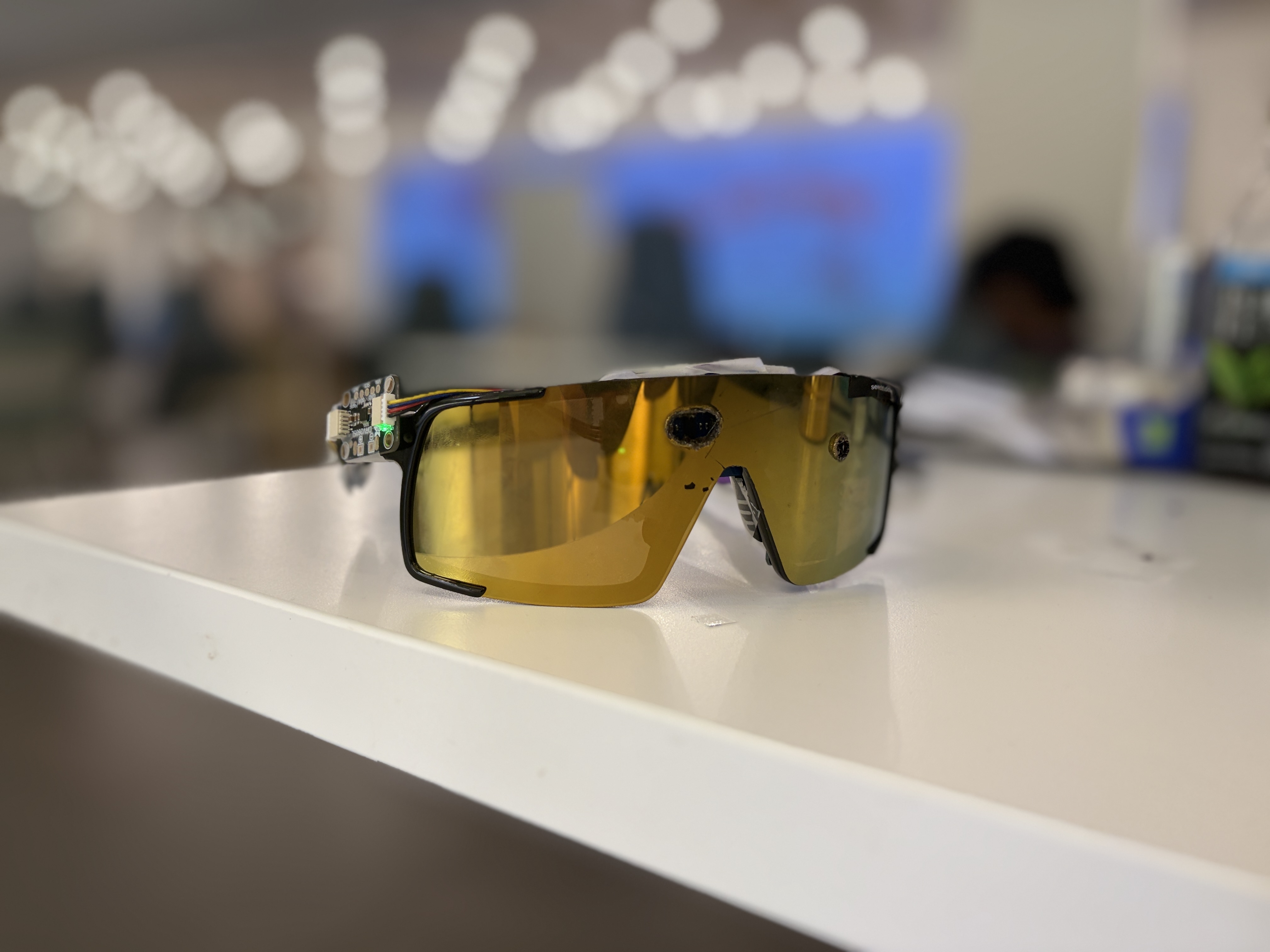
We wanted to explore a complementary layer of awareness: glasses that sense what is directly ahead and turn that information into a cue you can feel. Not another screen to watch or a constant stream of instructions.
That became Determine: complementary by design.
What it does
Determine combines forward distance sensing, haptic feedback, and optional camera-based scene descriptions.
A sensor on the glasses measures distance directly ahead. The phone processes that information and controls a single vibration motor, making the response more urgent as an obstacle approaches. Our current warning envelope is deliberately limited to 1.2 metres.
The working ESP32 camera module provides a separate source of visual context. On request, a camera frame can be processed by an OpenAI vision model for a short scene description. This is separate from the distance-to-haptic warning loop: cloud AI is not responsible for deciding when to warn.
We also built Determine Studio, a browser workspace for engineers and researchers. It lets users explore simulated environments, adjust live output profiles, inspect engine responses, and configure hardware-in-the-loop sessions.
Determine is a research prototype designed to complement a cane, not replace it.
How we built it
The hardware uses a XIAO ESP32-C3, an Arduino Modulino Distance sensor, one Modulino Vibro, and an ESP32-CAM. The glasses handle sensing and feedback while the phone runs the warning logic.
We implemented the phone engine in Kotlin and built Python bridges to connect it to simulated or physical boards. The browser simulation uses Three.js and sends scene-derived inputs through the actual phone engine, rather than reproducing its decisions with a separate mock.
The website and Studio use Svelte, TypeScript, and Bracket components. Live configuration changes wait for acknowledgement from the engine, so the interface distinguishes between a requested setting and an accepted one.
Scene descriptions use a separate Describe API with an OpenRouter backend for OpenAI models. Provider credentials stay server-side.
We also developed transparent-frame CAD studies in FreeCAD and rendered them in Blender to explore component placement and present the concept.
Challenges we ran into
One of our earliest problems was getting reliable distance readings. The purchased sensor identified as a VL53L4ED rather than the model we originally expected, so the initial driver rejected it. We also discovered that the distance board needed external I²C pull-ups. Resolving both issues got the sensor tracking a hand on the bench.
Another challenge was keeping hardware, simulation, and the interface consistent. A disconnected board must appear disconnected. A configuration change should not look successful before the engine accepts it. A board acknowledgement also does not prove that a physical motor moved.
We had to make those distinctions visible without overwhelming the demo with technical detail.
Accomplishments that we're proud of
- Bringing up the distance sensor and camera module
- Connecting a 3D simulation to the real phone warning engine
- Applying live output-profile changes with engine acknowledgements
- Building a hardware-in-the-loop workflow alongside the browser simulation
- Keeping optional AI descriptions separate from the immediate warning loop
- Creating a cohesive product website, interactive model, and professional workspace
The most satisfying part was seeing a simulated obstacle produce a real engine decision and an acknowledged haptic command across the complete software pipeline.
What we learned
The difficult part is not simply detecting something. It is deciding what information to communicate, when to communicate it, and how much attention that response demands.
We also learned how much hardware assumptions matter. Sensor identity, bus pull-ups, component dimensions, and mounting constraints all affected the implementation.
Simulation helped us inspect behavior and iterate quickly, but it cannot establish physical sensing performance, comfort, or usefulness to a person wearing the device. Those require separate validation.
What's next for Determine
Our next priority is validating the physical system: sensing reliability, vibration response, camera-to-description behavior, and end-to-end latency.
We want to refine the frame design, improve mounting and power arrangements, and make Studio easier to use for supervised hardware experiments.
Most importantly, we want to work with blind and low-vision participants and orientation-and-mobility specialists to understand whether the cues are useful, understandable, and comfortable. That feedback should guide the device, not just our assumptions.
Built With
- arduino-modulino-distance
- blender
- bracket
- c++
- esp32-c3
- esp32-cam
- freecad
- kotlin
- modulino-vibro
- openai
- openrouter
- platformio
- python
- svelte
- three.js
- typescript
- vite

Log in or sign up for Devpost to join the conversation.