Destutter
Record naturally. Edit by words. Create more—fully offline.
Inspiration
Destutter started with a personal problem: I stutter frequently while speaking or recording videos. A short recording can require multiple takes, and editing every repeated word, filler word, and awkward pause takes far longer than recording the content itself.
This problem is not limited to professional creators. Today, almost everyone needs to create content—product demos, tutorials, presentations, courses, social posts, or updates for coworkers and customers. Working people should not need advanced editing skills or hours of free time to communicate clearly.
I wanted to build a tool that lets people speak naturally and cleans up the recording afterward.
What it does
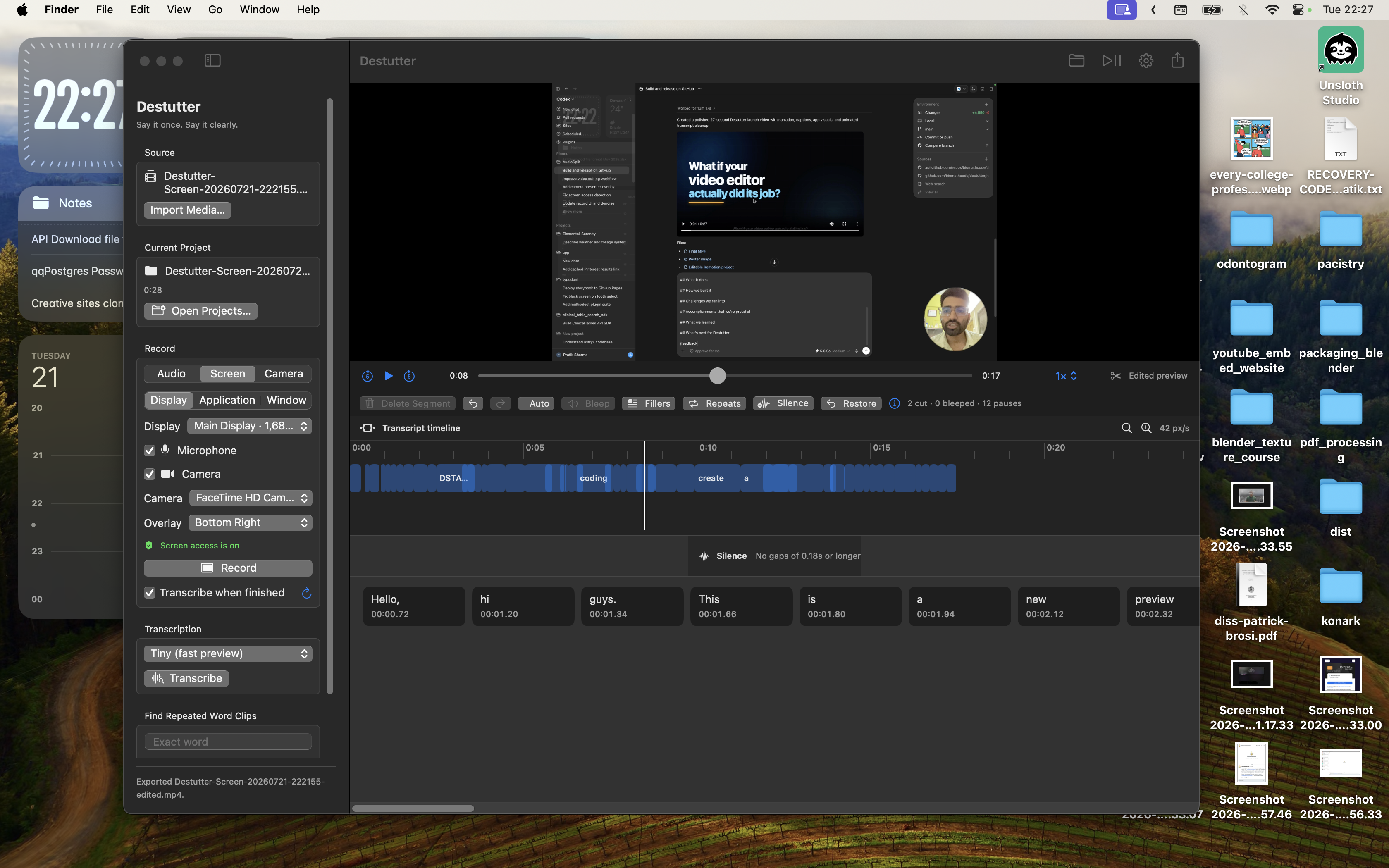
Destutter is an offline macOS recording and transcript-based editing application.
Users can:
- Record their screen, microphone, camera, or themselves.
- Import existing audio and video.
- Generate a word-by-word transcript using Whisper.
- Automatically detect repeated words, filler words, and long silences.
- Remove unwanted segments directly from the transcript.
- Preview the edited result with every deleted segment removed.
- Undo or redo edits without modifying the original recording.
- Export polished audio or video with optional captions and metadata.
- Save projects locally and continue editing later.
Instead of carefully editing a complicated video timeline, users can edit their recording like text. Destutter turns a rough take into a cleaner result while keeping the entire workflow on the user’s Mac.
How we built it
Destutter is a native macOS application built with Swift and SwiftUI.
The application uses:
- WhisperKit for on-device, word-level transcription.
- AVFoundation for media playback, editing, composition, and export.
- ScreenCaptureKit for recording displays, applications, windows, system audio, and the cursor.
- SwiftUI for the editor, settings, onboarding, recording controls, and project management.
- FFmpeg for optional acoustic silence detection.
- Local file storage for projects, transcripts, edit decisions, and export locations.
I used Codex throughout the end-to-end development process—not only to generate code, but to create an iterative engineering loop:
- Describe a feature or problem.
- Inspect the existing architecture.
- Implement the change.
- Compile the application.
- Run automated tests.
- Investigate failures.
- Refine the implementation and documentation.
Codex helped build features, diagnose ScreenCaptureKit and AVFoundation issues, expand the test suite, prepare documentation, package release builds, and create the launch video.
Regards
I didn't know you were giving 100$ credits for this hackathon. I missed out on that. Please give me credits please. email -> [email protected]. Thanks tibo for the resets.
Challenges we ran into
One of the biggest challenges was making transcript edits behave like real video edits.
Removing a word from the interface is easy. Correctly removing its exact time range from audio, video, preview playback, captions, and the final export is much harder. Destutter needed a shared edited timeline so every part of the application produced the same result.
Screen recording also introduced several platform-specific challenges:
- Managing macOS Screen Recording and microphone permissions.
- Avoiding repeated permission prompts.
- Handling incomplete ScreenCaptureKit frames.
- Recovering when a recording is stopped by the user or system.
- Mixing microphone narration with system audio.
- Supporting full displays, individual applications, and specific windows.
- Keeping camera overlays positioned correctly across different output sizes.
Packaging was another challenge. A public macOS application needs universal builds, code signing, notarization, integrity verification, and clear installation documentation.
Accomplishments that we're proud of
I am especially proud that Destutter:
- Works locally without uploading private recordings to a server.
- Provides word-level editing without requiring traditional video-editing expertise.
- Produces a real edited preview instead of simply jumping over cuts during playback.
- Physically removes unwanted segments from exported media.
- Supports screen, microphone, camera, and system-audio recording in one application.
- Preserves the original media through non-destructive editing.
- Saves projects locally so users can return to their work.
- Includes automated tests for timeline calculations, deleted ranges, project persistence, recording behavior, bleeped audio, and media exports.
- Can package universal builds for both Apple silicon and Intel Macs.
Most importantly, Destutter turns a problem that used to make me avoid recording into a workflow that makes publishing feel achievable.
What we learned
We learned that transcript-based editing is fundamentally a timeline-mapping problem. Every deleted segment changes the edited position of everything that follows it. Preview playback, captions, word selection, the playhead, and exported media must all use the same mapping.
We also learned that “offline” is more than a feature label. It affects the entire architecture: model management, media storage, project persistence, performance, and user trust.
Finally, working with Codex showed us how effective AI-assisted development can be when paired with tight feedback loops. Prompts alone were not enough—the best results came from repeatedly building, testing, examining real failures, and improving the design.
What's next for Destutter
The next goal is to launch Destutter as a one-time-purchase macOS application. I want creators to own their editing tool without paying another monthly subscription.
Future plans include:
- More natural cuts and configurable audio crossfades.
- Manual transcript correction.
- Improved speaker and sentence detection.
- Additional caption styles and social-media export presets.
- Faster transcription and export performance.
- More automatic cleanup controls.
- Better camera-overlay customization.
- Signed and notarized public releases with a simple update experience.
The long-term vision is simple: you record, Destutter edits, and you publish more.
Built With
- codex
- macos
- swift
