-
-
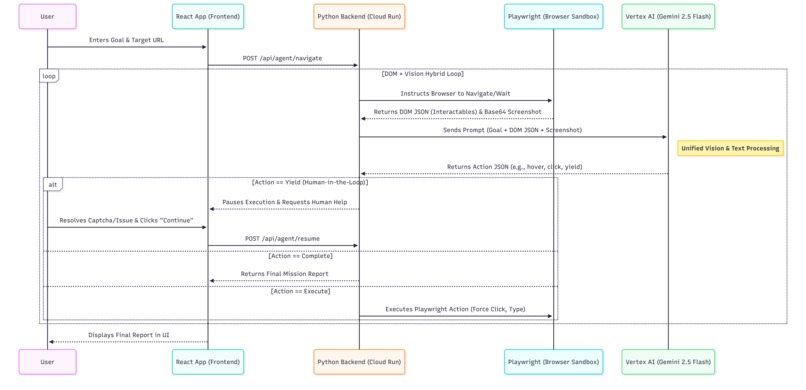
Architecture
-
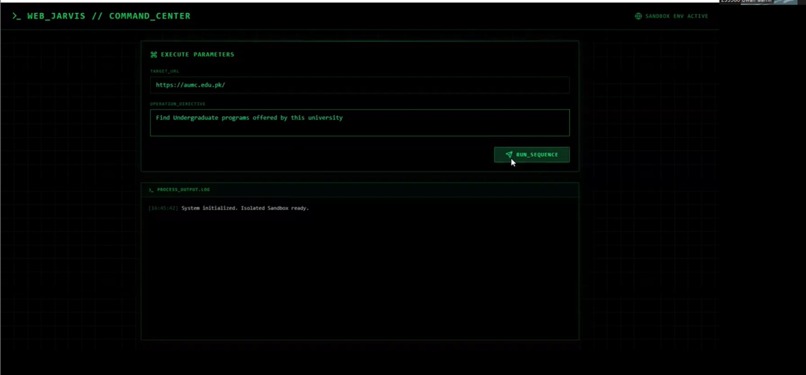
UI interface
Inspiration
Current AI web agents struggle with precision. If an agent relies purely on vision, it suffers from "spatial hallucinations"—guessing the wrong pixel coordinates and clicking empty space. If it relies purely on HTML scraping, it gets blocked by dynamic CSS and modern web apps. We wanted to build a UI Navigator that had the visual context of a human, but the deterministic accuracy of a machine, all while ensuring a safe, sandboxed environment.
What it does
DesktopSight is an autonomous, OS-agnostic UI Navigator. Instead of hijacking the user's physical mouse, it operates inside an isolated Playwright browser sandbox. Users give the React Command Center a URL and a goal (e.g., "Find undergraduate programs"). DesktopSight opens the site, navigates complex nested dropdown menus, bypasses pop-ups, and extracts the target data into a clean "Mission Report."
Crucially, it features a Human-in-the-Loop (Yield) Architecture. If the agent encounters an unsolvable roadblock like a CAPTCHA, it safely pauses its execution loop, pings the frontend UI with the reason it's stuck, and waits for the human to resolve it and click "Continue."
How we built it
- The Brain: Google Cloud Vertex AI (Gemini 2.5 Flash).
- The Orchestrator: A Python FastAPI backend that manages the agent's state machine.
- The Hands: Playwright (Sync API) to interact with the web elements natively.
- The UI: A React and Tailwind CSS terminal interface, deployed via Firebase Hosting.
We engineered a DOM + Vision Hybrid Engine. Instead of forcing Gemini to read pixels, Playwright executes JavaScript to extract and categorize all interactable tags (<a>, <button>). We send this clean JSON array alongside a base64 viewport screenshot to Gemini in a single, unified prompt. Gemini looks at the picture to understand the layout, reads the JSON to find the exact button name, and tells Playwright what to execute.
Challenges we ran into
- The 429 Rate Limit Death Spiral: Initially, we used a heavy "Pre-Research" phase using native search tools. This triggered hidden burst rate limits on the API. We solved this by pivoting to the highly optimized single-prompt Hybrid Engine, drastically reducing token burn.
- The "Dropdown Trap": The agent kept failing to click nested sub-menus because CSS animations hadn't finished rendering. We solved this by engineering a custom
hovertool, teaching Gemini to hover over parent menus and wait for the UI to stabilize before clicking child links.
Accomplishments that we're proud of
We are incredibly proud of the Human-in-the-Loop Yield state. Getting a Python while-loop to gracefully pause an AI agent, hand control back to a React frontend, and resume a Playwright browser session without crashing the context was a massive architectural win.
What we learned
We learned that LLMs are incredible reasoning engines, but terrible at coordinate math. By offloading the "finding" to Python (DOM scraping) and reserving Gemini purely for "decision making" (Vision + Text synthesis), the accuracy of the agent skyrocketed to near 100%.
What's next for DesktopSight
We plan to expand the isolated sandbox into a full local-OS executor, allowing DesktopSight to safely manage local files, open desktop applications, and be interrupted via real-time voice commands using the Gemini Live API.
Built With
- css
- fastapi
- firebase
- gemini-2.5-flash
- google-cloud
- playwright
- python
- react
- tailwind
- vertex-ai

Log in or sign up for Devpost to join the conversation.