-
-
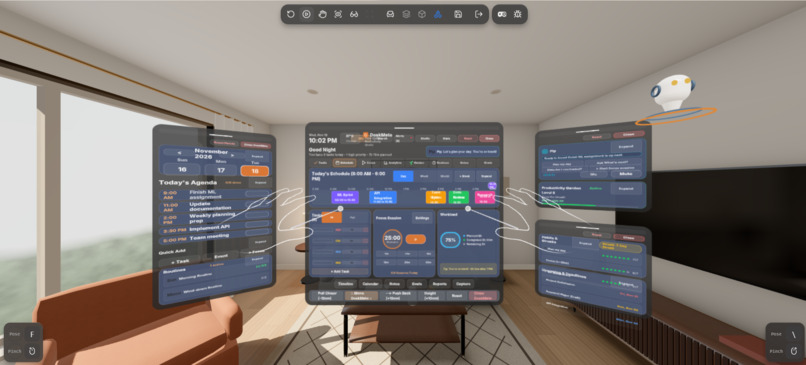
DeskMate
-
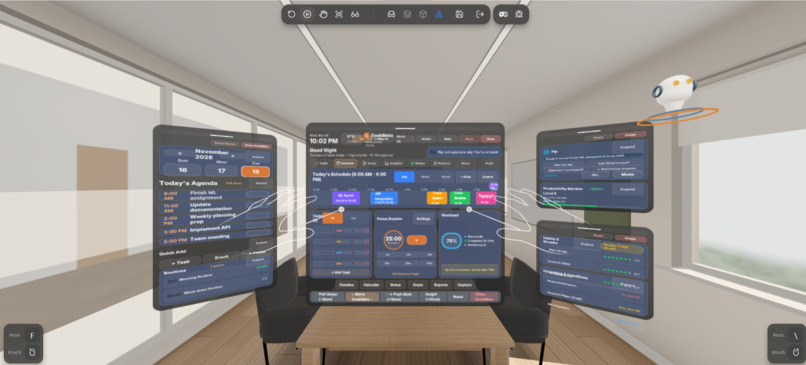
ConferenceRoom
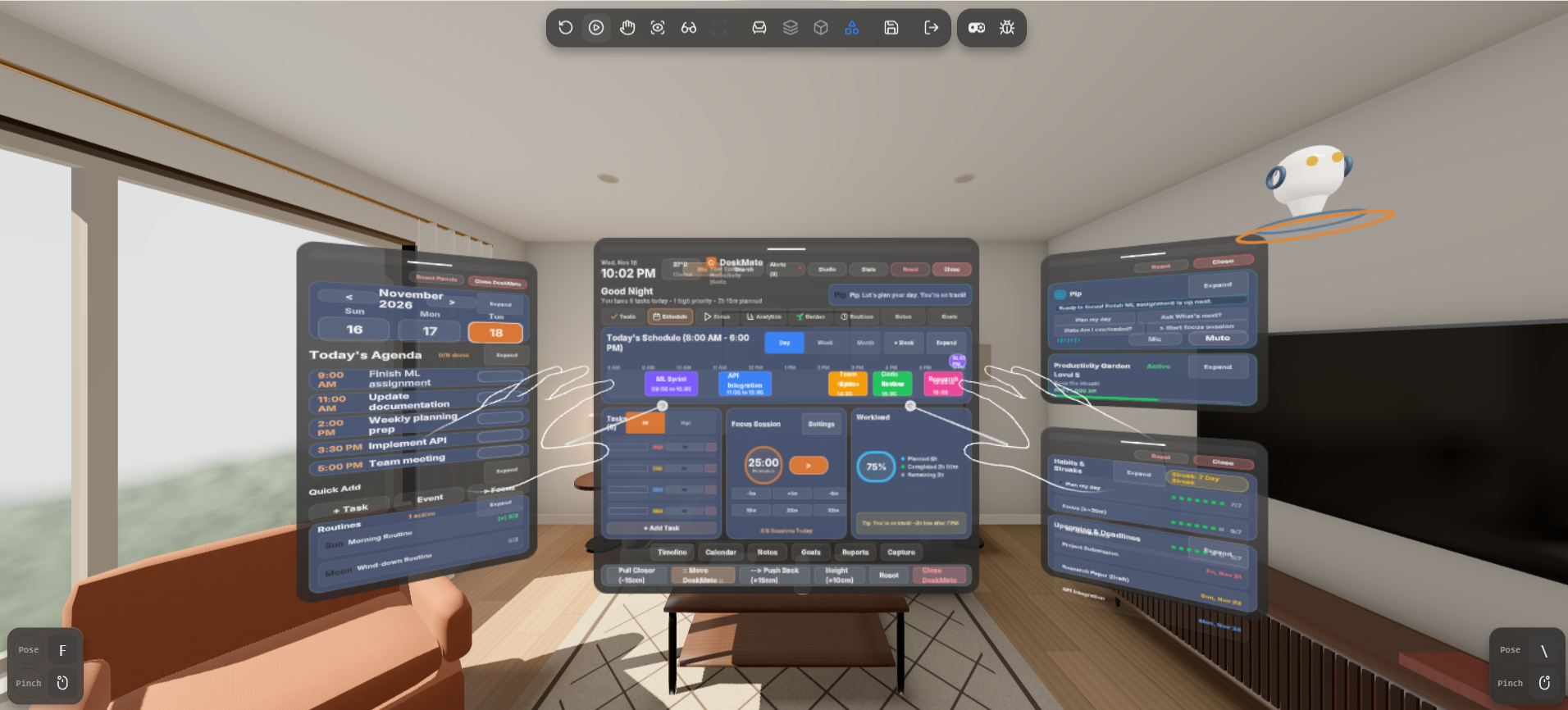
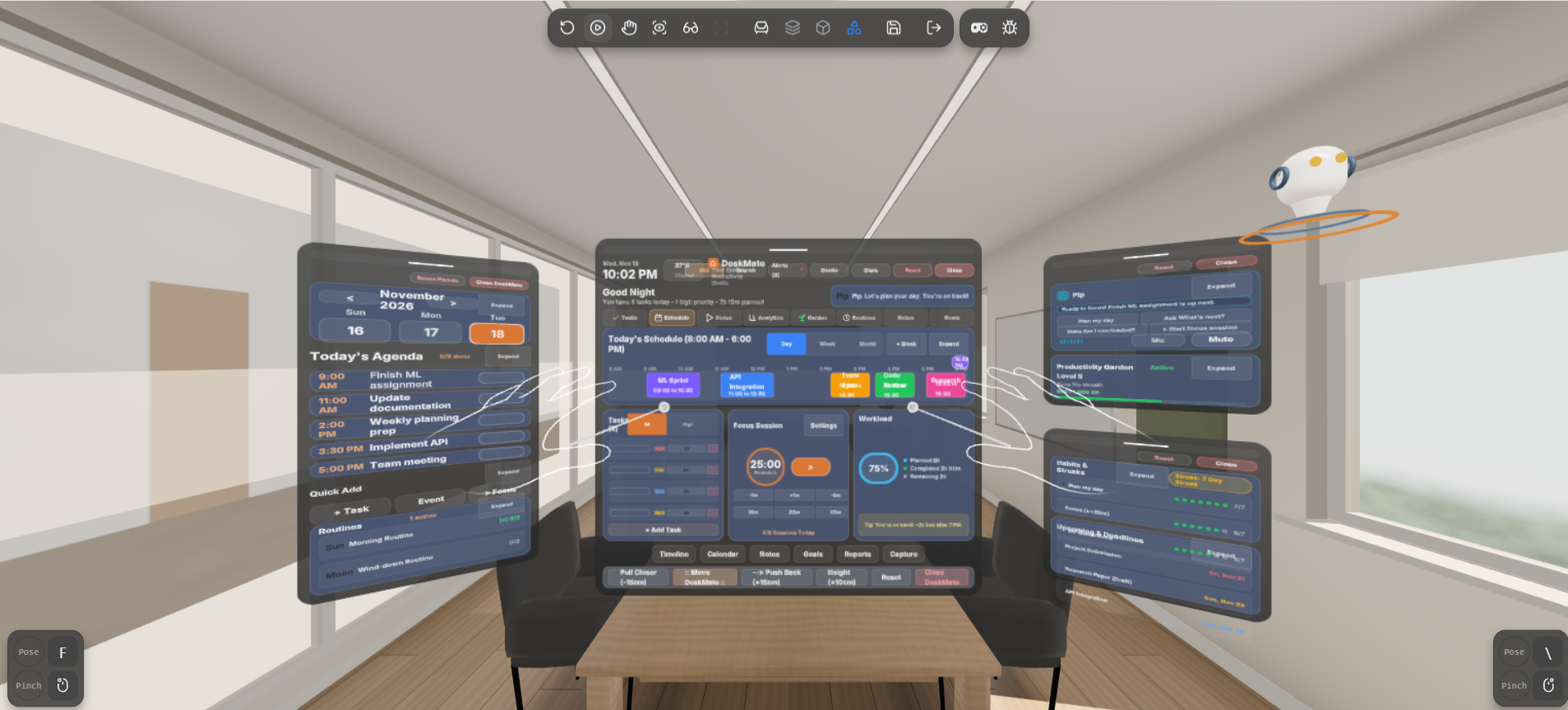
DeskMate — Mixed-Reality Spatial Productivity Workspace
Track: Productivity
Division: New Experience (Built from a clean slate during the competition window)
Platform: Meta Quest 3, Meta Quest Pro, Meta VR Glasses (WebXR via IWSDK)
Engine: Immersive Web SDK (@iwsdk/core) + Three.js (super-three) + elics ECS + @pmndrs/uikit
Inspiration
The promise of spatial computing has always been the infinite canvas—liberating our work from the cramped bezels of physical monitors. Yet, existing VR productivity applications consistently suffer from two fatal friction points that break deep focus:
- The Controller Dilemma & Hand Clutter: Traditional VR forces users into an absurd compromise: holding bulky plastic controllers while trying to work at a physical desk. The moment you need to sip your coffee, jot a note in a real notebook, or type on your physical keyboard, you are forced to put down, fumble with, and pick up controllers.
- The "Gorilla Arm" & Air-Typing Fallacy: Floating 3D virtual keyboards in mid-air are notoriously sluggish, lack tactile resistance, trigger phantom inputs, and cause rapid muscular fatigue ("gorilla arm") within minutes.
We asked ourselves: What if your physical desk could seamlessly transform into an intelligent spatial command center without ever picking up a controller, and without ever typing on an awkward floating keyboard?
This question gave birth to DeskMate. Built from the ground up for the Meta VR Start Developer Competition 2026, DeskMate is an ergonomic, distraction-free spatial productivity operating system in Mixed Reality. It was conceived with a bold, unified philosophy:
The Dual-Mode Interaction Model:
100% Hands-First Direct Physical Spatial Touch for tactile desk organization, paired with an ambient Hands-Off Autonomous 3D Voice AI Companion ("Pip") for hands-free agenda planning and deep focus execution.
What it does
DeskMate transforms any real-world tabletop into a high-utility, context-aware spatial workstation. By combining WebXR tabletop plane detection, passthrough optics, spatial audio, and multimodal AI, DeskMate brings a comprehensive suite of focus tools within arm's reach.
1. Dual-Mode Ergonomic Architecture
- Hands-First Mode: Direct spatial touch, poke-and-pinch interactions, magnetic timeline snapping, and spatial panel relocation. Zero controllers required—users complete their entire day without ever pairing or touching a controller.
- Hands-Off Mode: Voice-driven autonomy. While your hands stay glued to your physical mechanical keyboard, sketchpad, or code editor, you can speak naturally to Pip, your 3D spatial companion, to schedule meetings, adjust sprint timers, rebalance workloads, and auto-plan your day.
2. Spatial Glass Command Center (Central Hub)
- Architectural Form Factor: A curved $780\text{px} \times 720\text{px}$ translucent glass dashboard with a $24\text{px}$ corner radius and specular borders (
rgba(255, 255, 255, 0.18)). - Dynamic Header: Real-time digital clock, formatted calendar dates, workload summary metrics, and context-aware personalized greetings based on the time of day.
- In-Place Navigation Tabs: Seamlessly toggle between Overview, Schedule, Notes, and Goals subviews without disorienting context switches.
- Unified Section Zoom: Any widget card can expand to occupy the primary canvas with a single tap, backed by an instant "Back to Overview" return pill.
3. Today's Schedule & 15-Minute Snapping Timeline Track
- 10-Hour Graduated Axis: A continuous timeline spanning $08:00\text{ to }18:00$ with 11 distinct hourly graduation ticks ($8\text{ AM}$ through $6\text{ PM}$).
- True Time-Slot Coordinate Placement: Tasks are positioned along the track strictly based on their scheduled start times, avoiding artificial stacking or compressed trains.
- Enlarged High-Contrast Block Typography: Generous 50px-high schedule blocks with 13px bold titles and 11px time badges designed specifically for legibility in headset optics.
- Real-Time Sun "Now" Marker: An animated temporal badge indicating the exact current time of day, gliding continuously along the timeline.
- Direct Block Interaction: Tapping any schedule block opens the in-place editor for instant duration and start-time adjustments.
4. Interactive Tasks & Multi-Week Calendar Navigation
- Multi-Week Date Strip & 31-Day Month Picker: A 7-day responsive strip with dedicated forward/back navigation buttons ($\ll, \gg$) and active-date pill highlights, alongside an interactive 31-day Monthly Calendar view.
- Instant Day Synchronization: Selecting any day across the calendar immediately synchronizes the dashboard schedule, timeline track, workload capacity ring, and task backlog.
- 1-Tap Priority Filtering: Filter tasks instantly across All, High, Medium, and Low priorities.
- Clean Task Rows & Empty States: Clean typography with high-contrast priority tags and quick-completion checkmarks. Empty days display a serene, uncluttered state.
5. Focus Sprint Studio & Pomodoro Timer
- Dedicated Sprint Controls: Tactile Start, Stop (Pause), and Reset buttons. Resetting cleanly restores the timer to its initial duration without state corruption.
- Mathematical Progress Ring: A dynamic, color-shifting SVG progress ring visualizing elapsed versus remaining sprint time in real time.
- Quick-Duration Chips: Instant 1-tap presets ($5\text{m}, 15\text{m}, 25\text{m}, 45\text{m}, 60\text{m}$).
- Fine-Grained Steppers: Incremental $\pm 1\text{m}$ and $\pm 5\text{m}$ steppers for fine-tuning sessions without typing.
- Sprint & Rest Modes: Seamless transitions between Focus Sprint, Short Break ($5\text{m}$), and Long Break ($15\text{m}$).
- Productivity Rewards: Completing a sprint awards $+30\text{ XP}$ to the user's Productivity Garden and triggers Pip’s celebratory dance.
6. Workload Capacity Donut & Cognitive Load Analyzer
- Capacity Utilization Ring: Visualizes scheduled time against the standard daily cognitive capacity ($480\text{ minutes / 8 hours}$).
- Mathematical Capacity Modeling: $$\text{capacityPercentage} = \text{round}\left(\frac{\sum \text{scheduledMinutes}}{\text{dailyCapacityMinutes}} \times 100\right)$$
- Cognitive Overload Protection: When scheduled commitments exceed 100%, the donut transitions into a high-visibility warning state, advising the user to reschedule low-priority tasks.
7. Pip 3D Robot Companion & Productivity Garden
- Procedural 3D Mesh: Modeled with Three.js primitives featuring a torso sphere, a hovering head with continuous $60\text{fps}$ sinusoidal vertical bobbing, an emissive cyan eye visor, and dual counter-rotating metallic gimbal rings ($0.8\text{ rad/s}$ outer, $-1.1\text{ rad/s}$ inner).
- Reactive Emotional States:
idle: Gentle ambient floating and breathing.thinking: Visor pulse, antenna tilt, and accelerated gimbal rotation during voice utterance parsing.celebrate: Joyful vertical hops and high-speed counter-rotation upon completing sprints and high-priority tasks.
- Productivity Garden: A gamified progression track that grows from Sprout $\rightarrow$ Seedling $\rightarrow$ Flowering Plant $\rightarrow$ Productivity Tree as you accumulate XP from completed tasks.
8. In-Place Task Editor & Priority Matrix
- Zero-Modal Drawer: Expands inline within the Command Center, eliminating detached floating dialogs that clutter 3D space.
- Duration Steppers: Real-time visual steppers with $\pm 5\text{m}$ and $\pm 15\text{m}$ increments.
- 3-State Priority Matrix: Bold color-coded chips (High in crimson, Medium in amber, Low in azure blue).
- Two-Tap Deletion Safety: A safety confirmation mechanism requiring a second tap within $3.5\text{ seconds}$ to prevent accidental task loss.
9. Spatial Notes Scratchpad & Quick Capture
- Rapid Spatial Capture: Instant "+ Quick Note" input for capturing fleeting ideas, architectural notes, and reminders.
- Zero-Latency Persistence: Backed by
localStorage, ensuring notes, tasks, and sprint states survive headset sleep and session reloads.
10. Spatial Desk Ruler & Tabletop Physics
- Physical 3D Ruler Asset: Rendered along your detected physical tabletop surface, providing real-world spatial scale.
- Translucent Placement Ghosts: Moving a task displays a semi-transparent ghost indicator snapping to the nearest valid 15-minute slot before release.
- Push-to-Make-Room Algorithm: Placing a task into an occupied slot cleanly ripples subsequent tasks forward, preserving their scheduled durations without overlap collisions.
11. Ambient Procedural Co-Working Audio ("Ghost Deskmate")
- Spatial Audio HRTF Panning: Positioned at $(+0.7\text{m}, -0.6\text{m})$ relative to the user using Web Audio API HRTF spatial panners.
- Procedural Audio Generation: Synthesizes randomized mechanical keyboard keypresses (clusters of 3–7 keys) and gentle paper turns to simulate the focused presence of a co-worker.
- Dynamic Audio Ducking: Automatically ducks ambient volume by 75% during active focus sprints.
12. Multi-Step Undo Engine & Transaction Reversibility
- Snapshot Undo Stack: Stores full serialized workspace state snapshots up to 5 levels deep.
- 8-Second Grace Window: An ambient countdown banner appears after any destructive action, allowing instant 1-tap state reversal.
How we built it
DeskMate was built natively on the Immersive Web SDK (IWSDK) ecosystem, combining high-performance WebXR rendering with modern Entity-Component-System (ECS) architecture.
| 🥽 WebXR Runtime | ⚙️ DeskMate Core Engine | 🧠 Voice & AI Engine |
|---|---|---|
| • Meta Quest Browser • WebXR Plane Detection • Hand Tracking v2 • super-three WebGL |
• IWSDK World Instance • PanelSystem (Spatial UI) • WorkspaceSystem (Planes) • elics 3.4.1 ECS Runtime |
• Gemini 3.5 Flash Lite • Web Speech API (Recognition) • SpeechSynthesis (TTS) • RuleBrain Fallback Engine |
| 🪟 Spatial UI Layer | 💾 Reactive State | 🎧 Spatial Audio |
|---|---|---|
| • UIKitML Glass Panels • Flexbox 3D Layout • Dual Laser Pointer Rays • Magnetic 15-Min Grid |
• TaskStore Collection • 5-Step UndoStack (8s) • localStorage Persistence • Reactive Event Dispatch |
• Web Audio API • HRTF 3D Spatial Panners • Procedural Typing SFX • Dynamic Sprint Ducking |
The Hands-First Technical Implementation
We treated controller-free interaction as a strict mathematical constraint rather than an afterthought:
- Automatic Hand Tracking Launch: On entering WebXR, DeskMate detects hand input sources and defaults immediately to hands mode. Virtual controllers are stowed away so real hands are immediately visible.
- Seated Ergonomic Reach Envelope ($\le 0.65\text{m}$ Radius): Every UI panel, stepper, tab, and slider is mathematically constrained within a 65cm radius from the user's chest. This guarantees 100% usability without requiring torso leaning or standing, passing the "Airplane Seat Test" with flying colors.
- Dual Visual Pointer Rays & Specular Reticles: Both left and right hands project soft laser guide beams (Cylinder geometry with 8-segment tessellation) terminating in clean circular reticle rings on glass panels, enabling simultaneous dual-hand interaction.
- 15-Minute Magnetic Snapping Grid: Task tiles and timeline blocks snap to clean quarter-hour intervals ($09:00, 09:15, 09:30, \dots$) with subtle audio tick feedback and translucent preview landing ghosts.
- Purposeful WebXR Passthrough & Tabletop Plane Alignment: Utilizing WebXR's
plane-detectionfeature, DeskMate identifies physical tabletop surfaces (table,desk). When passthrough mode is enabled, the virtual wooden table mesh automatically hides, anchoring the entire workspace directly onto your physical desk. - Zero Virtual Air-Typing: We solved the text-input bottleneck by replacing floating keyboards with 1-tap priority steppers, duration chips, and the multimodal voice engine. ### Hands-Off Ambient AI: Gemini 3.5 + RuleBrain Pipeline
- Cloud Intelligence: Integrated with Google's multimodal Gemini 3.5 Flash Lite model via the Gemini API. Voice input captured through the Web Speech API is sent alongside the serialized workspace state. Gemini returns structured JSON mutations (
add_task,delete_task,edit_task,complete_task,start_focus_timer,plan_day,navigate_view). - Deterministic Offline Fallback ("RuleBrain"): To ensure absolute reliability in offline or low-bandwidth environments, DeskMate incorporates a local regex-based RuleBrain parser that executes identical state mutations without needing cloud connectivity.
- Proactive "Plan My Day" Algorithm: Analyzes unscheduled tasks and packs them contiguously into working hours ($08:00\text{--}18:00$), respecting task durations and inserting mandatory 10-minute restorative buffers.
* Spoken Feedback: DeskMate responds via the browser Speech Synthesis API, delivering crisp spoken confirmations so the user never has to look away from their physical work.
Challenges we ran into
- WebXR Tab-Switching & State Recovery: Switching browser tabs or taking off the headset frequently causes WebGL contexts and Web Speech APIs to lock up. We engineered an Enterprise Visibility Recovery Lifecycle:
- On
document.hidden = true: Cleanly aborts Speech Recognition without throwing errors, pauses active panel dragging, and zeros out stuck pointer inputs. - On
document.visibilityState = visible: Safely invokesAudioContext.resume(), re-evaluates device pixel ratio, purges stuck SpeechSynthesis queues, and re-enforces the seated tabletop pose.
- On
- Fatigue-Free Spatial UI ("The Gorilla Arm Problem"): In early prototypes, touching floating panels for 15 minutes caused shoulder strain. We solved this by lowering the primary Command Center to a 15-degree backward tilt aligned with natural downward desk gaze, combined with soft dual raycasting so users can interact either by direct touch or by resting their elbows on their physical desk and pinching from a distance.
- Dual JS Realm Evaluation in IWSDK: In IWSDK, asset catalogs (
assets.ts) are evaluated twice in two separate JS realms—once by the app runtime and once by the editor inspector. Ensuring procedural 3D models (like Pip the Robot and the 3D Desk Ruler) remained purely deterministic, side-effect-free, and unreliant on shared DOM orWorldinstances was a rigorous architectural challenge.
4. Collision-Free Timeline Rebalancing: Writing the "Push-to-Make-Room" timeline algorithm required resolving multi-task cascade effects: when a 60-minute task is dropped onto a 30-minute block that is immediately followed by another task, all downstream tasks must shift forward to the nearest 15-minute slot without exceeding the workday boundary ($18:00$).
Accomplishments that we're proud of
- 100% Controller-Free Verification: DeskMate passes the competition's core test: "Can someone complete the entire experience without ever pairing a controller?" Every feature—from creating and resizing tasks to running focus sprints and reorganizing days—is 100% usable with natural hands.
- Rigorously Tested & Verified:
- 76 Automated Tests (100% Pass Rate) spanning action layer transactions, spatial UI ergonomics, pure view-models, and timeline math.
- 275 Golden Brain Utterance Benchmarks covering queries, timer adjustments, bulk actions, and adversarial voice commands.
- 18-Step Hands-Only Walkthrough Harness simulating complete daily workflows from tabletop calibration to evening shutdown.
- Zero Air-Typing Ergonomics: We proved that spatial productivity doesn't need mid-air floating keyboards. The combination of magnetic steppers and ambient voice input feels vastly faster, more natural, and physically effortless.
- Purposeful Mixed Reality Passthrough: DeskMate doesn't treat passthrough as a static background wallpaper. Your real desk is detected, calibrated, and becomes the actual tactile surface for your spatial tools.
* 60 FPS Performance on Mobile Hardware: Built on WebXR and Three.js with lightweight geometric primitives and zero per-frame memory allocation in system update() loops, ensuring rock-solid frame rates on Meta Quest 3 and Quest Pro.
What we learned
- Hands-First is an Ergonomic Discipline: Building for hands is not simply replacing controller raycasts with hand raycasts. It requires rethinking hit-target tolerances, adding predictive magnetic snapping, offering clear multi-sensory feedback (visual reticles, audio clicks, placement ghosts), and respecting human reach envelopes.
- Voice + Hands is the True Spatial Formula: Hands excel at high-bandwidth spatial manipulation (dragging a panel, adjusting a timeline block, tapping a timer chip). Voice excels at high-bandwidth symbolic formulation ("Schedule sprint planning at 2 PM for 45 minutes"). Unifying them creates an interaction loop far superior to either one alone.
* The WebXR Superpower: Building with IWSDK and WebXR demonstrated the immense power of instant distribution. Users can launch a production-grade spatial productivity studio on their Quest in seconds via a URL, completely bypassing multi-gigabyte store downloads.
What's next for DeskMate
- Multi-User Spatial Co-Working: Introducing shared spatial presence rooms where remote colleagues can work alongside each other at virtual desk pods with synchronized focus sprint timers.
- Bidirectional Calendar Integrations: Live two-way synchronization with Google Calendar, Microsoft Outlook, Notion, and Todoist via secure OAuth2 endpoints.
- Gaze + Pinch Microgestures: Further optimizing the interaction pipeline for Meta VR Glasses using eye-tracking gaze targets combined with subtle micro-pinch gestures.
- Expanded Productivity Garden: Introducing customizable Desk Toys, new biome themes for the Productivity Garden, and unlockable ambient spatial soundscapes (rain on glass, coffee shop chatter, forest wind).
- Meta Horizon Store PWA Release: Packaging DeskMate as an installable Progressive Web App (PWA) via Bubblewrap for one-click discovery on the Meta Horizon Store.
Built With
- ecs
- elics
- gemini-api
- hand-tracking
- hrtf-audio
- html5
- iwsdk
- meta-quest-3
- mixed-reality
- node.js
- passthrough
- plane-detection
- productivity
- pwa
- spatial-computing
- speech-synthesis
- three.js
- typescript
- uikitml
- vercel
- vite
- web-audio-api
- web-speech-api
- webgl
- webxr


