Inspiration
Most of our real work happens at a desk: planning the day, sketching an idea, roughing out a model, thinking through a story. Headsets usually pull you away from that desk into a floating room of windows and laser pointers. We wanted the opposite: mixed reality that sits down at your table with you, uses the hands you already work with, and treats the desk as the place where things are made and kept.
Two observations shaped it. First, pinching with your thumb and index finger feels like using something (a pen, a dial, a button), while closing your thumb and middle finger feels like holding something. That gave us a two-gesture vocabulary that works the same in every tool. Second, physical desks have memory: what you leave there is still there tomorrow. We wanted a virtual desk that behaves the same way.
What it does
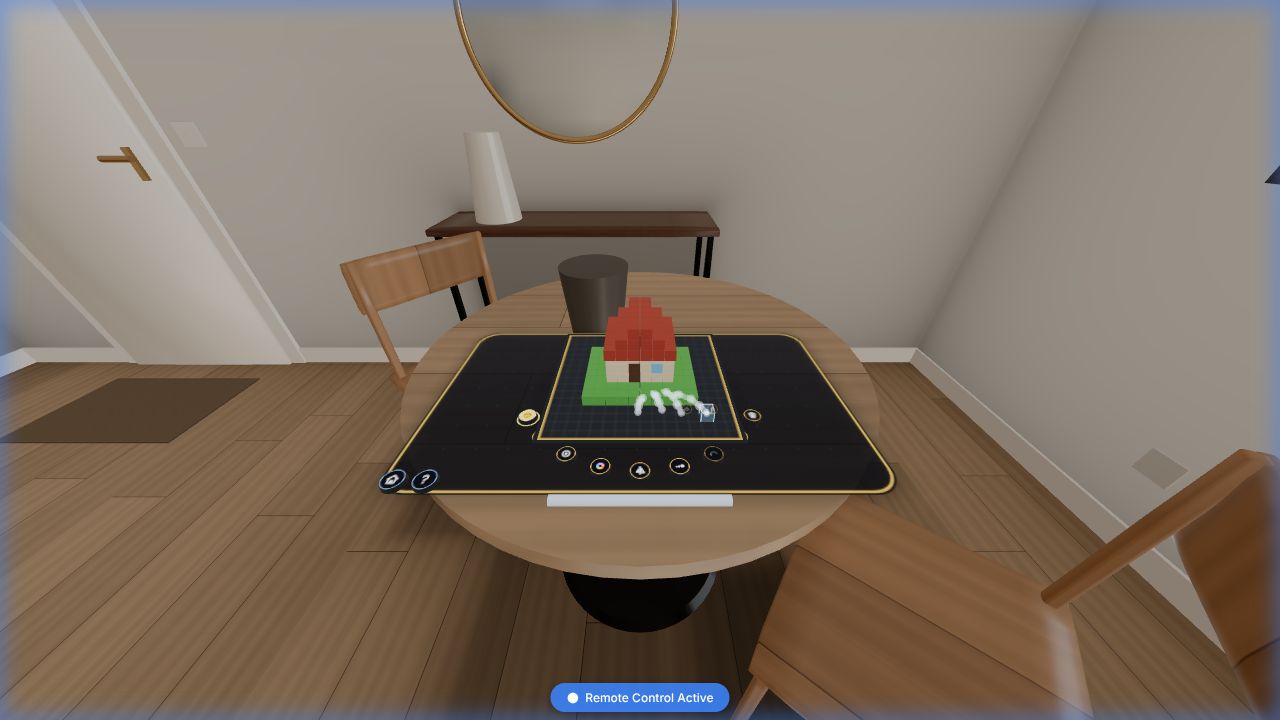
Put on a Meta Quest, open a link, and Deskcraft finds your real table and lays a workspace on it. Everything runs on two gestures: pinch (thumb + index) to use something, grab (thumb + middle) to hold and move it. Small icons by your fingertips show what each pinch does right now, and turning your left palm up opens a hand menu (Home, How to, Undo, Clear desk, Sound, Passthrough).
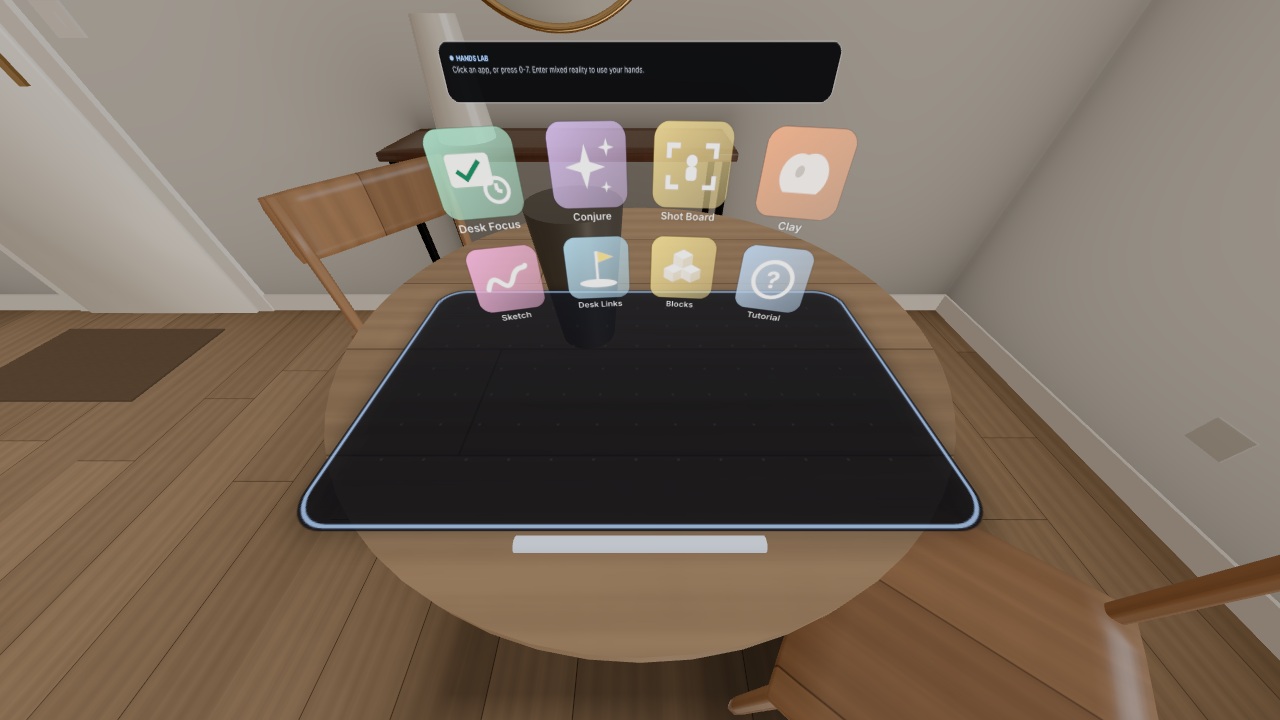
The tools:
- Desk Focus: a Kanban-style planner. A board stands at the back of the desk with Inbox, Today and Done; grab a task card and drop it anywhere, put one on the focus pad, twist a timer dial to start, and grow a streak plant as you finish things.
- Conjure: say or type what you want and a 3D model appears on a pedestal, built instantly offline or upgraded by an AI model service.
- Shot Board: frame shots with both hands like a director, anywhere in the room. Dress a small stage from your library, and the shots collect on a 3D storyboard you can reorder and play as an animatic.
- Clay: sculpt with your fingertips on a turntable, then print a solid copy you can pick up.
- Sketch: draw in the air with either hand, then grab, scale and recolour strokes.
- Blocks: build with voxel blocks on a plate; pinch where you want a block and drag to lay a wall.
- Desk Links: a daily nine-hole fingertip mini-golf course, for a break.
What ties it together is the desk itself. Prints, photos, strokes, creations and builds stay on the desk across every app and every session. You can pin them (so the bin will not take them), resize them with both hands, or save them to a library and pull them into a Shot Board scene later. It runs in the Quest browser with no install, and also works on a desktop with a mouse.
How we built it
- Platform: WebXR in the Quest browser, built with Meta's Immersive Web SDK (IWSDK) on Three.js, in TypeScript with Vite. Deployed to GitHub Pages on every push, so judges open a link instead of sideloading an APK.
- Mixed reality: plane detection finds a real table and wall; anchors keep the desk where you put it between sessions. If no table is found, you pinch to place it.
- One host, many tools: a single host system owns everything the apps share: hand tracking and gestures, far rays for out-of-reach targets, round desk buttons that you poke or pinch, the hand menu, fingertip hints, the two-hand camera frame, the bin, desk objects and the library. Each app is a small module the host runs. Layers update in a fixed order, and a layer that uses a pinch consumes it, so one gesture never triggers two things.
- Hands first, everything else too: controllers map to the same gestures (trigger = pinch, grip = grab), and a mouse works on desktop, which made fast iteration possible.
- Procedural everything: the art, icons, props, sculpt meshes, voxel builds and sounds are generated in code, so the whole app is light and loads quickly. Conjure has an offline generator that turns prompts into 3D models instantly, with optional Meshy or Tripo upgrades through a small proxy or a user's own key.
- Testing: pure logic (gesture thresholds, the voxel grid and ray casting, golf hole generation, the planner and its streaks, the intent parser) has 67 unit tests. 36 browser test suites drive the real app in the IWER headset emulator with emulated hands, controllers and the mouse on every change.
Challenges we ran into
- Telling a pinch from a grab. Thumb + index and thumb + middle are close together, and fingers drift as you let go. We added hysteresis (a wider release distance than press distance), made the two exclusive per hand, and track a stable "hold point" so objects do not jump on release.
- Gestures colliding. With buttons, rays, desk objects, a camera frame and an app all listening, one pinch could do three things. A strict update order where each layer consumes what it uses fixed whole classes of bugs.
- Rays that swung when you pinched. Aiming from the pinch point made the ray jump as the fingers closed. Aiming from shoulder to palm keeps it steady, and rays only appear for things out of reach.
- Clutter. An early "desk OS" with windows, docks and panels was powerful but overwhelming. We cut it, moved controls onto round desk buttons with icons, and kept text off the desk wherever possible.
- Performance on a standalone headset. Profiling showed repeated scene-graph updates on large groups every frame; fixing them cut the app's own per-frame time from about 6 ms to about 3.5 ms in the emulator.
- Testing hands without a headset. We built browser test suites that pose emulated hands joint by joint, so every gesture path is checked automatically.
Accomplishments that we're proud of
- A gesture language you learn once. Pinch to use, grab to hold, palm up for the menu: the same in all seven tools, explained by the fingertip icons as you go.
- The hand-framed camera. Make a frame with your thumbs and index fingers anywhere in the room, let go, and the shot lands on your storyboard and pops out as a little photo print on the desk.
- A desk that remembers. Things you make carry across apps and sessions; you can pin, resize, bin or save them to a library and reuse them in a scene.
- No install. A link opens it in the Quest browser; the same build runs with a mouse on a laptop.
- Working offline. Conjure always produces a model, even without an AI service; AI only upgrades it.
- Tested end to end. 67 unit tests and 36 browser suites with emulated hands, controllers and the mouse, all passing.
What we learned
- Fewer, consistent gestures beat clever ones. Every special gesture we added had to be taught; the two-gesture rule needed almost no explaining.
- Within reach is the best UI. Seated, poking a button on the desk was quicker and steadier for us than pointing at a panel. Rays are only worth it for things genuinely out of reach.
- Icons over text. In a headset, text on panels is slow to read and easy to ignore. Round desk buttons with icons, plus a tooltip on hover, made every tool calmer.
- Less is more. Our most ambitious feature (a windowed desk OS) was the one we removed. Focused tools that share one desk felt better than one tool that did everything.
- Persistence changes how it feels. Once things stayed on the desk, it started to feel like a place rather than a demo.
- Emulators get you far, but not all the way. Automated hand tests caught most regressions, but tuning comfort and thresholds needs a real headset and real hands.
What's next for Deskcraft
- Tuning on real hands. Playtests on Quest to tune pinch and grab thresholds, reach distances and the palm menu angle for comfort.
- Projects. Save the whole desk as a named project and switch between them, so the desk becomes a place you return to for each piece of work.
- Quick capture. Palm up, say a note, and a card lands in your Inbox.
- Export and share. Storyboards to PDF or an animatic video, Clay and Blocks to glTF or STL for 3D printing, and a link that opens a read-only copy of your desk on a phone or laptop.
- An assistant across tools. One voice entry point that can set up a scene, block out a build or turn notes into a plan.
- Together. A shared desk for two people using the same anchors, and comfort modes (seated, one-handed, reach-limited) for longer sessions.
- Store release. Package it as a progressive web app for the Meta Horizon Store so it opens straight into the experience.
Built With
- claude
- iwsdk
- quest3

