-
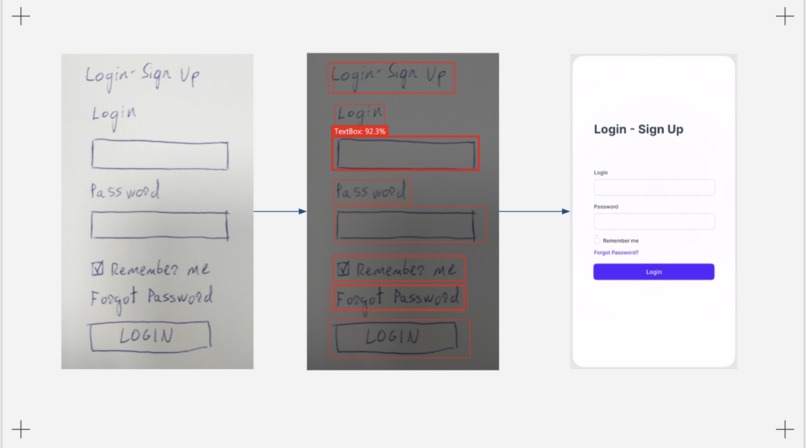
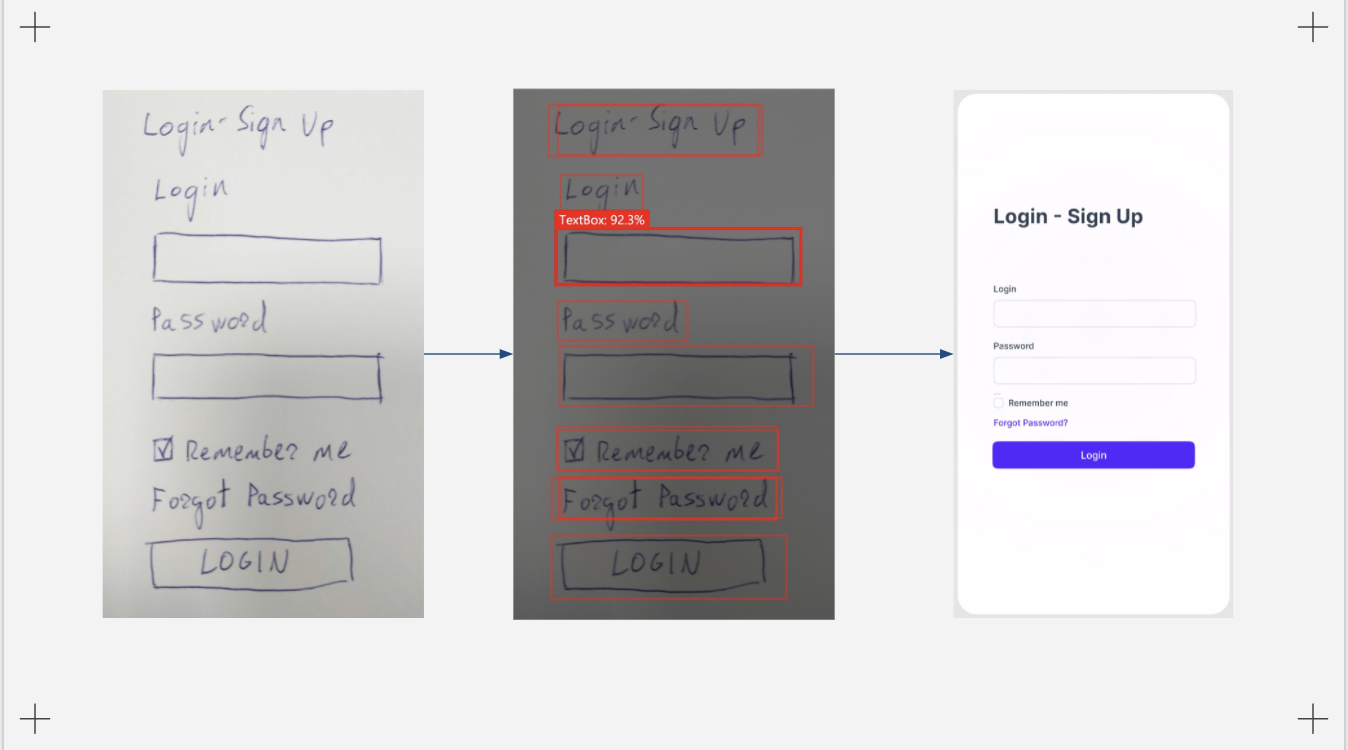
Re-designing design. The flow of FigmAI. Your drawing to a design in seconds.
-
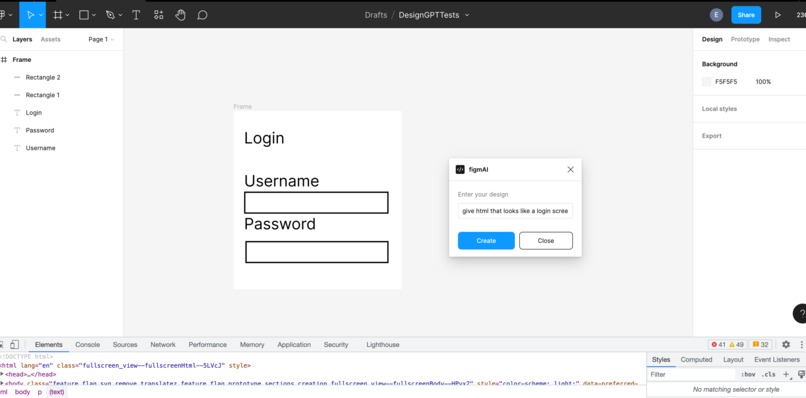
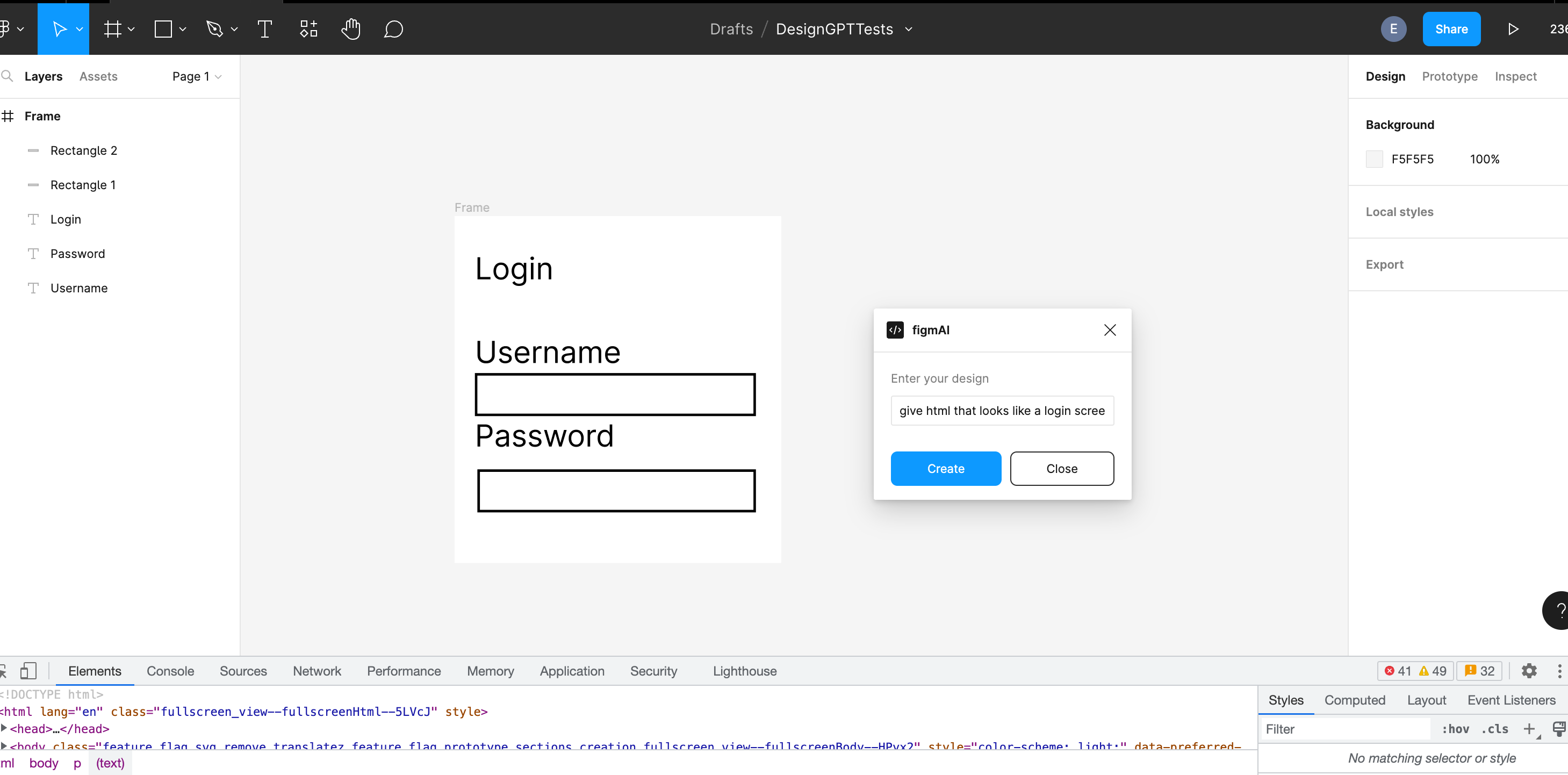
Sample Figma output from text interaction using FigmAI plugin
Inspiration
As a team with diverse skill sets, ranging from computer science to art and philosophy, we wanted to build something that encapsulated a problem and an interest that we all shared. This intersection was design. We realized, we've all gravitated towards design at some point in our academic careers. However, we realized that most of our design experience was related to drawing or ideating about products, and not so much of actual implementation in tools like Figma.
We realized that this is because there is an inherent barrier to learning how to use tools like Figma before designs and ideas can be realized. On this note, last year, almost 18% of surveyed marketers revealed that they spend an average of over 20 hours per week creating visual content. Inspired by the mass gains in productivity accomplished through tools such as ChatGPT for programmers (i.e. no more forgetting how to implement Union-Find then searching up on Google how to implement it (๑•̀ㅂ•́)و) , our team was inspired to create an AI-driven vision/language design assistant that can also decrease the amount of time new designers spend on the "in-between" processes, such as transferring their drawings over to a Figma board, or creating a component that is styled in a certain way.
Thus, our mission is to empower people new to UI/UX graphic design to spend more time thinking creatively about an idea and less time figuring out how to get a curve at the perfect angle on Figma.
What it does
Our tool is an interactive AI-powered design assistant manifested as a Figma plugin, that streamlines and personalizes your design process by converting a drawing to a Figma design in seconds. Once the design is on the screen, you can then (in Figma!) use ChatGPT to ask for components that fit the style you are going for. This allows you to not waste time trying to re-draw rectangles, make sure the borders are rounded correctly, check the color... (you get the point). We wanted to leverage the power of large language models to interpret this certain styles of designs we are thinking of automatically, and give to us in Figma, thereby minimizing potentially redundant work. Since it is a plugin, there is minimal barrier to entry for new designers trying to get engaged in the visual design space.
We note for full transparency that the description above is the ideal product. While we definitely made strides and had major accomplishments our team was proud of, our final coded product was a portion of this (more specifically, two components of the platform) that we didn't have time to fully integrate. However, we did make our ideas of turning some form of HTML to Figma Components a reality. We elaborate more on this below.
How we built it
Our team decided to split the project up into two primary components: 1) Going from drawing --> HTML 2) Creating a Figma plugin that can go from HTML --> Figma elements.
The first part was developed by iterating on Microsoft's SketchToCode. While this was a useful starting point, most of the code was outdated to some degree, so our team had to refactor the code base to get the model to train on a set of hand-labeled drawing datasets. The model we trained was an instance segmentation model hosted in Azure to determine common visual components in drawings such as Buttons, TextFields, Text, etc.
The second part involved using Figma's Plugin API which uses TypeScript and HTML, and drawing upon APIs such as OpenAI's ChatGPT as well as other Figma plugins that have functionality to translate websites from URLs into Figma components. While we were developing, we were able to track our progress by using Figma Desktop to visualize the UI/UX of our plugin, and observing how it translated to the output that we desired. We also hosted a server in Node.js and Express that makes calls to the ChatGPT API.
Challenges we ran into
During the hackathon, our team ran into several bugs with existing APIs. For instance, the team members working on the drawing to HTML portion of our project tried to iterate on Microsoft's SketchToCode AI, which is reasonably outdated. Thus, a lot of time was spent trying to refactor some of the code that we initially hoped would work out of the box. Another example is the incorporation ChatGPT into to the Figma plugin. Our team members were new to working with TypeScript, so there were several errors/debugging incorporating some node modules with the Figma plugins.
Accomplishments that we're proud of
We're proud after struggling for a long time on trying to incorporate ChatGPT into a Figma plugin (mostly due to Typescript issues), we were able to finally get to a point where users could input data into ChatGPT through a Figma plugin, and achieve some visual output on Figma components. We're also proud that we were able to train an instance segmentation model that obtained ~84% accuracy on predicting common UI components in drawn designs.
Most importantly, we're proud that our team was able to stumble across an idea that we all thought was cool, and that we could see ourselves carrying out to completion over the next few weeks.
What we learned
From the technical standpoint, we learned that while it is usually a good idea to use existing APIs to get a project off the ground, sometimes its OK to start something new from scratch. We feel that a lot of the friction that prevented us from getting our product off the ground was attempting to use APIs that were inherently flawed / buggy.
We also found a lot of interesting ways to interact with Figma programmatically . Prior to this hackathon, none of our team members had built Figma plugins.
What's next for FigmAI
Next steps include a full integration of the drawing to code pipeline with the html to Figma component pipeline. (i.e. adding images through Figma, fixing issues with styling, etc.)
Moving forward, our team was also thinking about a similar pipeline but for CAD (which has an even higher barrier to entry for most). In other words, what if you could draw a component on paper, and then port that design to a CAD model to start with? Our team brainstormed ways to incorporate Reinforcement Learning algorithms to teach an agent in CAD / Figma to perform a set of actions to minimize the difference between a ground truth output and a model output.


Log in or sign up for Devpost to join the conversation.