déjàPic — your screenshots, sorted.
StormHacks 2026 · SFU Burnaby · Oct 3–4 · Repo: https://github.com/nimaansari/dejapic
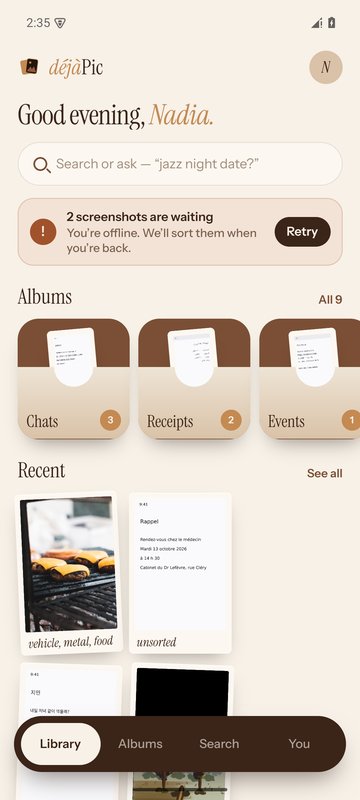
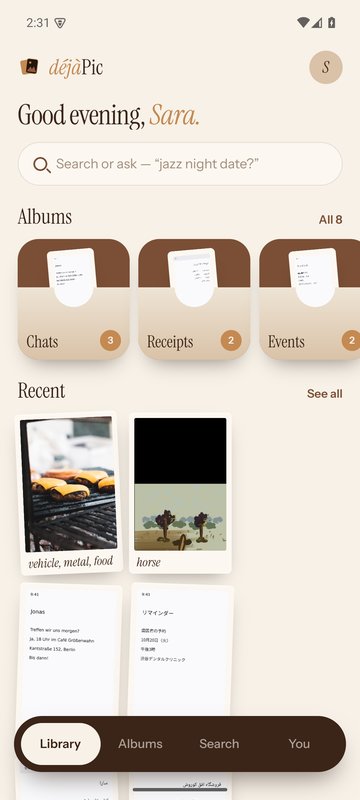
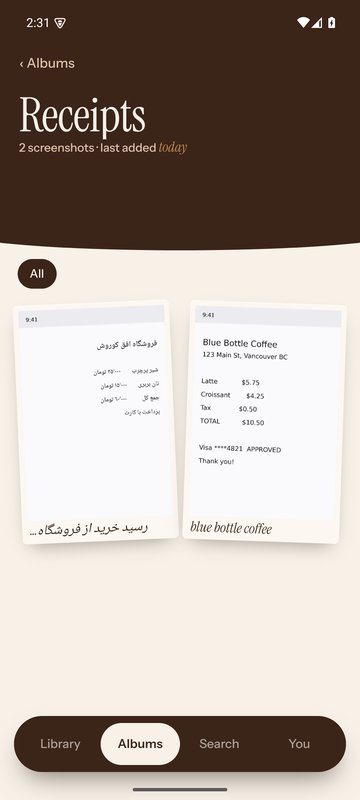
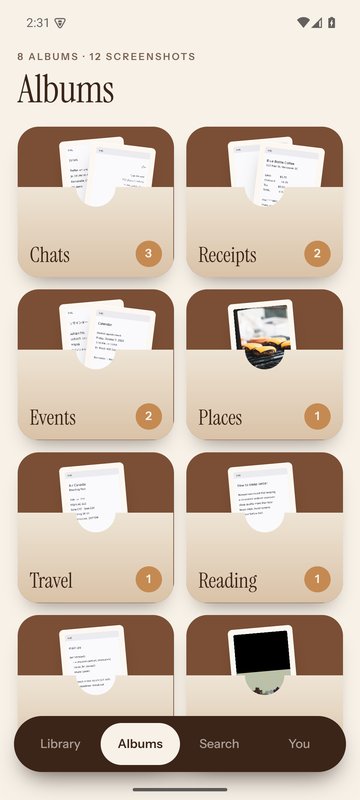
déjàPic is a phone app for iOS and Android. It sorts every screenshot on your phone into albums (receipts, travel, events, chats, code, places…), writes a caption and search words onto the photo itself, and finds any screenshot when you ask for it in plain words, in any language.
💡 What inspired us
Everyone has thousands of screenshots: a boarding pass, a receipt, a recipe, an address a friend sent, a concert poster. We take them so we won't forget, and then we can never find them again. The Photos app treats them all as one grey pile.
We started with a bigger idea: make screenshots actionable, turning an event into a calendar entry or an address into a map pin. Before writing a single line of code, we checked who had already built it. Apple and Google both already ship versions of that, and Pixel Screenshots only works on Pixel phones, in a handful of languages. So we cut the idea down to the part nobody does well. Sort every screenshot automatically. Find any of them by asking in your own words, in any language. And keep the answer on the photo, so it travels with the file instead of being locked inside our app.
The name comes from that feeling of déjà vu: "I've seen this before… where was it?" The logo is two stacked instant prints, the back one a faint echo of the front.
🛠️ How we built it
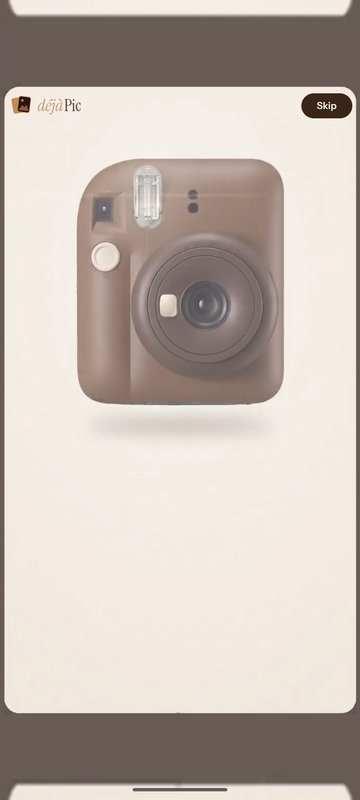
The app. We built déjàPic in React Native with Expo SDK 57 and TypeScript. It has a warm "chocolate & milk" look and a 9.5-second intro film: a chocolate instant camera snaps three screenshots, the prints develop, and they tuck themselves into album pockets. The app draws its logo and real buttons over the film, so the film doubles as the welcome screen.
Reading the screenshot. The phone reads each screenshot's text first, for free: Google ML Kit on Android, Apple Vision on iOS. Then the screenshot goes through a cheapest-first chain. Simple rules catch the obvious ones, like a receipt with a total or a boarding pass with a flight number. The phone's image labels handle real photos. Everything else goes to the AI, which writes a short caption, picks one category, and adds tags, search keywords and visual words (colors, objects, food). It even adds words that aren't on screen, like "dentist" for "Dr. Patel". When the phone can't read the alphabet (Georgian, Amharic…), the AI reads the image itself.
Choosing the model. We didn't want to guess, so we ran a bake-off: seven vision models, tested on reading 25 languages and recognizing food photos. Google Gemini 3.1 Flash-Lite won on the balance of accuracy, speed and price, so one model does everything, called directly through the Gemini API with our own Gemini API key:
| Model | Reading 25 languages | Food photos | Time / shot | Cost / 1,000 |
|---|---|---|---|---|
| gemini-3.1-flash-lite ✅ | 99.2% | 96% | 1.7 s | $0.44 |
| gemini-3-flash-preview | 99.4% | 96% | 2.0 s | $0.93 |
| gemini-2.5-flash | 99.0% | 100% | 1.7 s | $0.86 |
| gemini-2.5-flash-lite | 98.4% | 96% | 2.1 s | $0.25 |
| qwen3.7-flash | 98.9% | 96% | 3.6 s | $0.04 |
Models and pricing. Everything runs on Google's Gemini API, billed to our own Google Cloud project at Google's list prices:
| Role | Gemini model | Input / 1M tokens | Output / 1M tokens |
|---|---|---|---|
| Main: sorting, captions, image reading, visual words, search agent | Gemini 3.1 Flash-Lite | $0.25 | $1.50 |
| Fallback: when the main model refuses a picture | Gemini 3.5 Flash-Lite | $0.30 | $2.50 |
In practice that's about $0.0008 to sort one screenshot (a text call plus a visual description) and $0.001 per smart search. A heavy user's whole backlog of a few thousand screenshots costs a couple of dollars once, then pennies a month. (We ran our first experiments and the model bake-off through OpenRouter, which passes Google's prices through unchanged. For the final app we moved to the Gemini API directly, with our own key and project, so the numbers stay the same.)
Saving it on the photo. On iOS 27 the caption and keywords go into the Photos app's own fields, so you can even find a screenshot from Apple's Photos search without opening déjàPic. On Android they go into the photo's EXIF data, through our own Kotlin module, with a single "allow modify N photos?" dialog per batch. A small text-only copy is also kept on the phone, so nothing is ever sorted, or paid for, twice. We never store copies of the screenshots themselves.
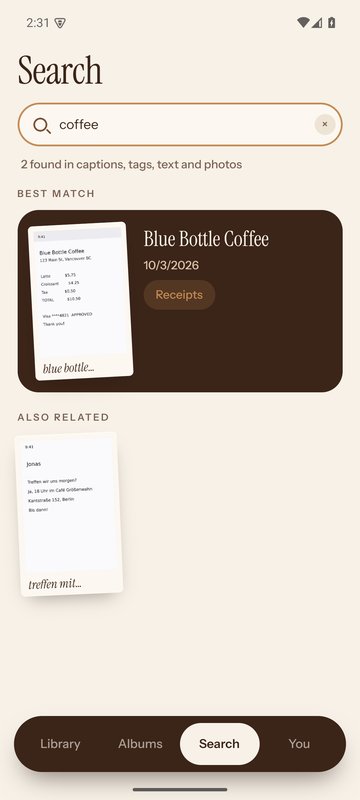
Search. There's one search box. Plain words get instant results on the phone, with no AI. Anything more goes to our search agent, powered by Gemini 3.1 Flash-Lite through the Gemini API. It looks through captions, tags, keywords, visual words and dates, tries up to three searches, and returns at most ten screenshots, or none. You can type "coffee", "رسید" (Persian for receipt), "the flight to Toronto" or a booking code like "QX7P2M", and each smart search costs about a tenth of a cent.
Fallbacks. If Gemini 3.1 Flash-Lite refuses to describe a picture, a backup model, Gemini 3.5 Flash-Lite, takes over. (We first used Gemini 2.5 Flash-Lite, but testing our new Gemini API key showed it's closed to new API users, so the server quietly runs the fallback on 3.5 instead, and phones already installed keep working.) If Google is briefly busy or rate-limits a burst of calls, our server waits the delay Google suggests and retries. If Google cuts a reply off halfway, the call is retried once. When the phone is offline or hits its daily limit, new screenshots simply wait their turn, and nothing is lost.
The backend. Supabase handles accounts (sign up, sign in, password reset, delete account) and a server function that holds our Gemini API key, so it never ships inside the app. Every AI call goes from the phone to that function and straight to the Gemini API. That function enforces per-user daily limits and a global spending cap, and logs the real cost of every call. The database is locked down with row-level security.
Testing. We treated testing as part of building, not something for the end. Jest (Meta's JavaScript testing framework) with React Native Testing Library renders every screen in a simulated app and checks what a person would see and tap. On the back-end, every bug we fixed got a test that failed before the fix and passes after it. Then we went further and drove the real release app against the real backend on an Android emulator, like a person would. We also ran robustness tests: the user taps "Don't allow", the app is force-closed in the middle of sorting, a long album is scrolled to the end, Back is pressed on every screen, and everything runs on a small 720×1280 phone. Those check that the app survives the messy things real people and phones do, not just the happy path.
| Test suite | Result |
|---|---|
| Back-end tests (9 layers, from the pipeline to live production) | 268 pass |
| Fixed bugs guarded by a regression test | 38 |
| Front-end tests (Jest) | 96 pass |
| End-to-end journey on the real backend (20 steps) | 20 / 20 |
| Robustness tests | 5 / 5 |
| Gemini API on production: sorting 25 languages, image reading, visual words, search agent, on the main and the fallback model | 27 / 27 |
Finally, we built in the cloud with Expo EAS (iOS on Xcode 27, and Android) and shipped to TestFlight and Google Play internal testing.
🧗 Challenges we ran into
Our biggest wall was Apple: before iOS 27 there is no way for an app to save text onto a photo, or even read it back. We decided to build for iOS 27+ instead of hiding a database inside the app, which meant building with Xcode 27 in the cloud.
Android had its own trap. Its permission to edit photos only lasts while the app is open. Our end-to-end test caught a sneaky bug from this: after a restart, "Move to another album" looked like it worked, then quietly undid itself, because the write to the photo failed and the next refresh read the old album back. We fixed it so the latest edit always wins, and added tests that fail without the fix.
Other alphabets were humbling. Android's text reader read Russian as look-alike Latin letters ("NaTëpoyKa"), and the AI then confidently invented items from that garbage. iOS read Hebrew and Georgian as junk. Now we detect garbled text and let the AI read the image instead.
Switching to the Gemini API mid-hackathon taught us about quotas the hard way: a new key starts on the free tier, which allows only a few requests a minute, and one phone's first sort sends dozens at once. Our real-key test caught it before any user did, and we taught the server to wait and retry instead of telling people they'd hit their daily limit.
Some problems were about money. A model setting meant to hide its "reasoning" was still billing about 670 hidden tokens per screenshot. Turning reasoning off made sorting 13× cheaper, and it fixed empty Persian replies as a bonus. Our first full test also showed sorting starting on the sign-up screen, paying for 27 AI calls before anyone had an account. Now nothing runs until someone signs in.
Production surprised us too. New Supabase projects grant no table permissions by default, and our first server function reacted by letting every call through without limits or logging. We fixed the permissions and made the function refuse calls whenever it can't check the limits.
Finally, we had two codebases, a front-end and a back-end built in parallel, to merge in a day. We merged them with both histories kept, wired every screen to real data, and split the result into a public open-source repo with no secrets and a private one with the keys. A git hook blocks anything that looks like a key from reaching the public repo.
🏆 Accomplishments that we're proud of
We're proud that déjàPic really works, end to end: the release Android app passes all 20 journey steps and all 5 robustness tests against the live backend, with real AI calls, and cleans up after itself.
We're proud that it speaks everyone's language. 25 languages in 17 scripts were sorted with none left unknown. Smart search found the right screenshot for about 91–95% of 29 questions in 15+ languages, and 99% of what it showed was correct.
We're proud that it's cheap enough to be free to try: about $0.0008 to sort a screenshot and $0.001 per smart search. 281 real screenshots were sorted in 102 seconds for under two cents.
We're proud that there's no lock-in: the labels live on your photos, survive deleting the app, and on iOS 27 even Apple's own Photos search can find them.
And we're proud of how honestly we tested. Every number comes from a run's own files, and when one of our own checks turned out too weak, we strengthened it and re-ran it instead of counting the pass. By day two, déjàPic was in testers' hands on TestFlight and Google Play.
📚 What we learned
The most valuable hour of the hackathon was the one before we coded: checking who had already built our idea turned "do everything with screenshots" into something sharper and more useful.
We learned that the platform shapes the product: one missing iOS API decided our whole design. We learned to measure instead of guess: the cheapest model wasn't the best deal, and an "obvious" setting was secretly expensive. We learned that testing like a person finds bugs unit tests never will: permission timing, consent that expires, sorting that starts too early. And we learned that security is a default you have to set yourself: keys stay on the server, limits fail closed, and secrets never touch the public repo.
🚀 What's next for déjàPic
Next we take déjàPic through the store launch: the Google Play closed test and App Store review, then a public release with proper sign-up emails. We want captions in your phone's language, which is more reliable for rare scripts and what you actually read. We want a cleanup mode ("poof, 3,000 screenshots gone") that finds duplicates and expired screenshots like old boarding passes and clears them in one tap. And we want to bring back our original idea, done right and opt-in: add an event to your calendar, open an address in Maps, copy a booking code. Where phones support it, we'll move the AI on-device for more privacy and zero cost.
The plan is a simple subscription with no ads: free to try, then about $29.99 a year. Each user costs us only pennies a month, so it can be both generous and sustainable.
🧰 Built with
React Native · Expo (SDK 57, EAS Build) · TypeScript · Kotlin · Swift · Google ML Kit · Apple Vision · Supabase (Postgres, Auth, Edge Functions) · Gemini API · Google Gemini 3.1 Flash-Lite · Gemini 3.5 Flash-Lite (fallback) · Jest · React Native Testing Library · GitHub Actions · TestFlight · Google Play Console
Built With
- apple-vision
- deno
- eas
- expo.io
- ffmpeg
- gemini
- github-actions
- google-ml-kit
- google-play
- higgsfield
- jest
- kotlin
- openrouter
- postgresql
- react
- react-native
- supabase
- swift
- testflight
- typescript


Log in or sign up for Devpost to join the conversation.