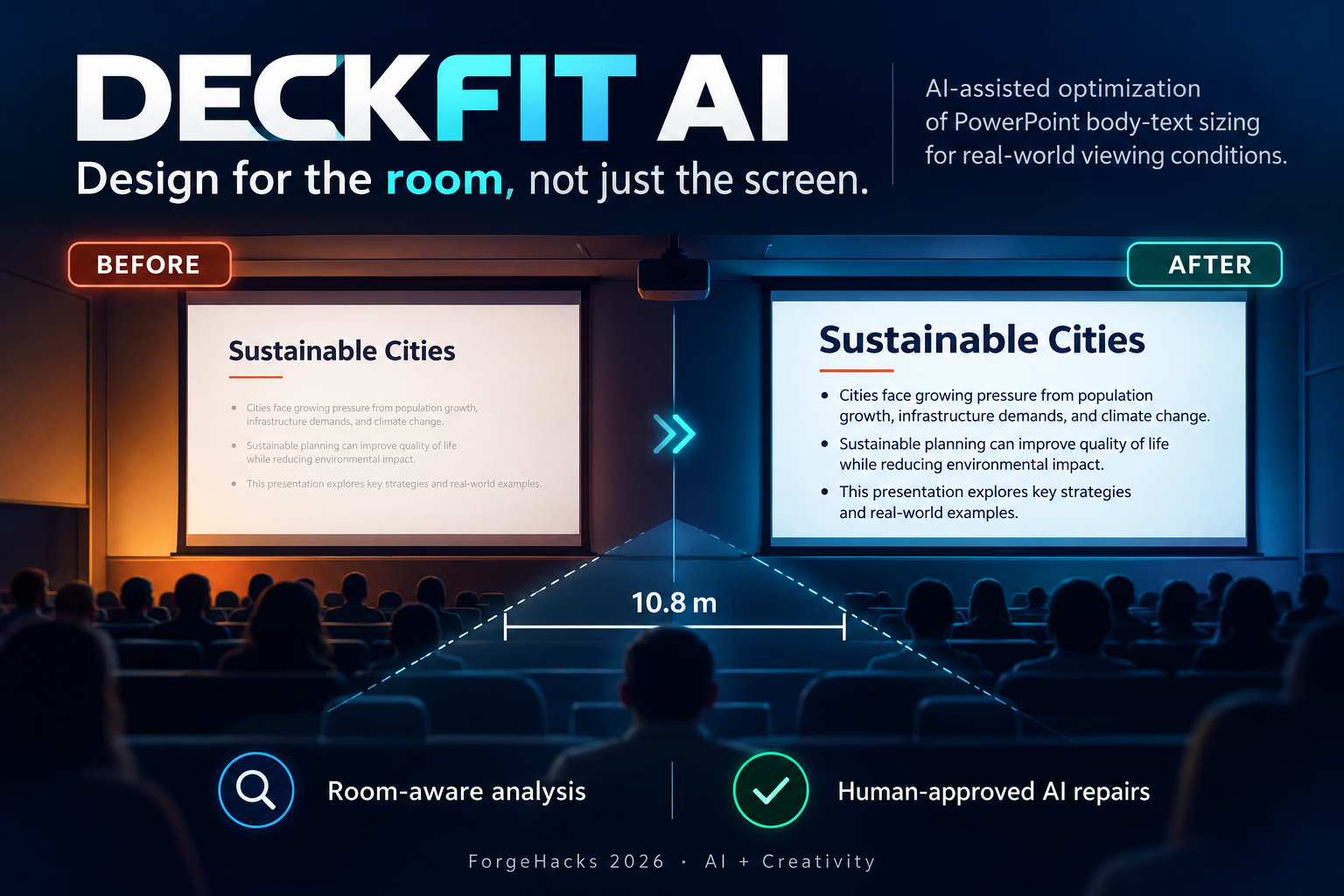
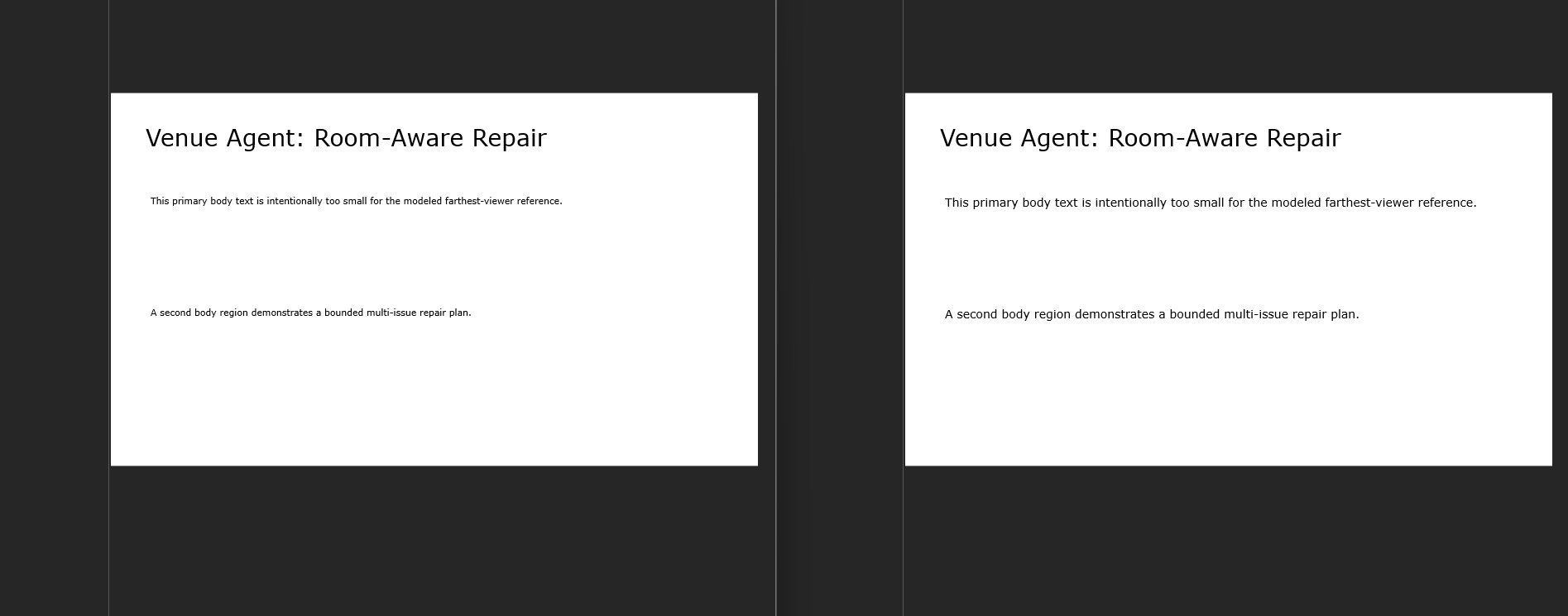
What if presentations adapted to rooms, just as websites adapt to screens?
We design presentations on laptops. But our audiences experience them in classrooms, lecture halls, and auditoriums.
A slide that looks fine while editing can become difficult to follow from the back of a room. Yet most presentation tools know nothing about the physical space where that slide will be shown.
The slide hasn't changed. The viewing conditions have.
That is the idea behind DeckFit AI: bringing responsive-design thinking into physical presentation spaces.
Instead of generating another deck from scratch, DeckFit AI helps presenters improve existing PowerPoint content using room-aware analysis, bounded AI planning, human approval, and independent verification of the saved file.
Design for the room, not just the screen.
Try the real application
Live demo: https://venue-agent-production.up.railway.app/
Source code: https://github.com/saikiranpulagalla/deckfit-ai
The public application includes a built-in demo, so judges can explore the workflow without creating an account.
How it works
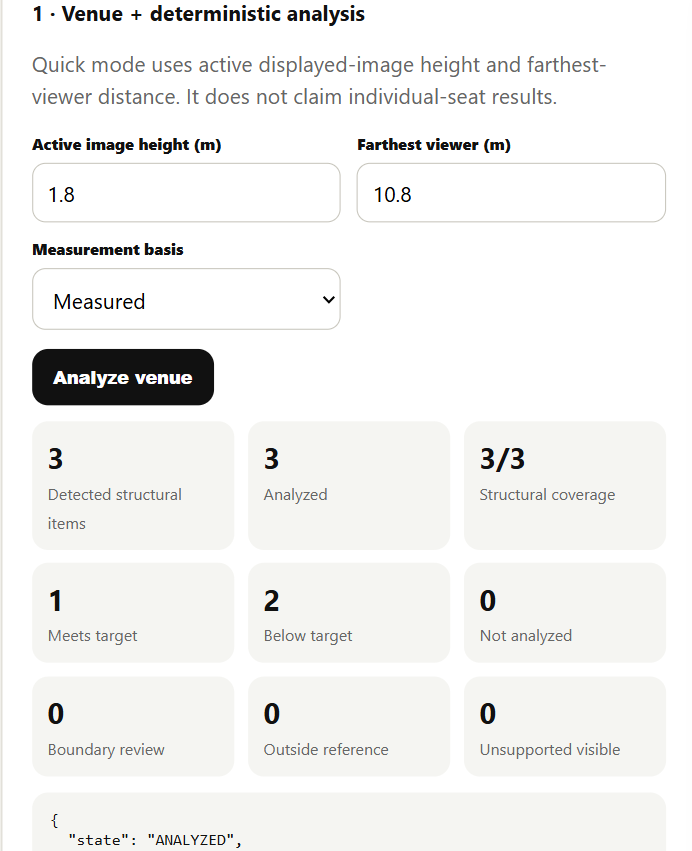
Imagine preparing a presentation for a classroom where the displayed image is 1.8 meters high and the farthest viewer sits 10.8 meters away.
DeckFit AI lets you enter those conditions and analyze supported text in your PowerPoint.
The workflow has six stages:
- Understand the presentation. Upload an editable PPTX or use the built-in example.
- Analyze the room. Combine user-supplied display geometry, viewing distance, PowerPoint structure, rendered text evidence, and a versioned viewing-demand reference.
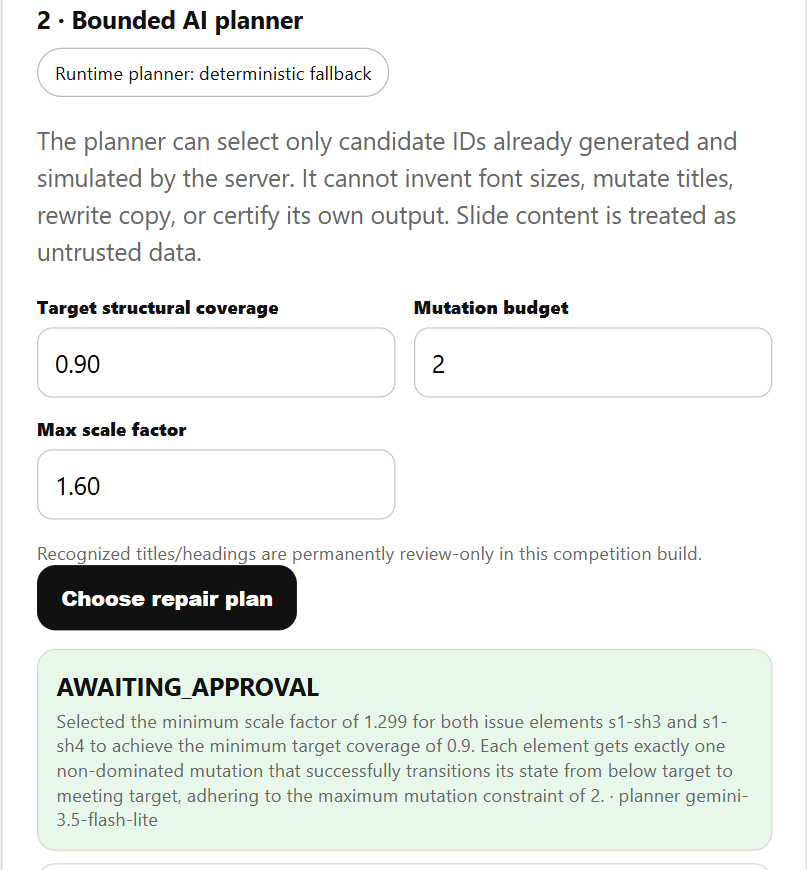
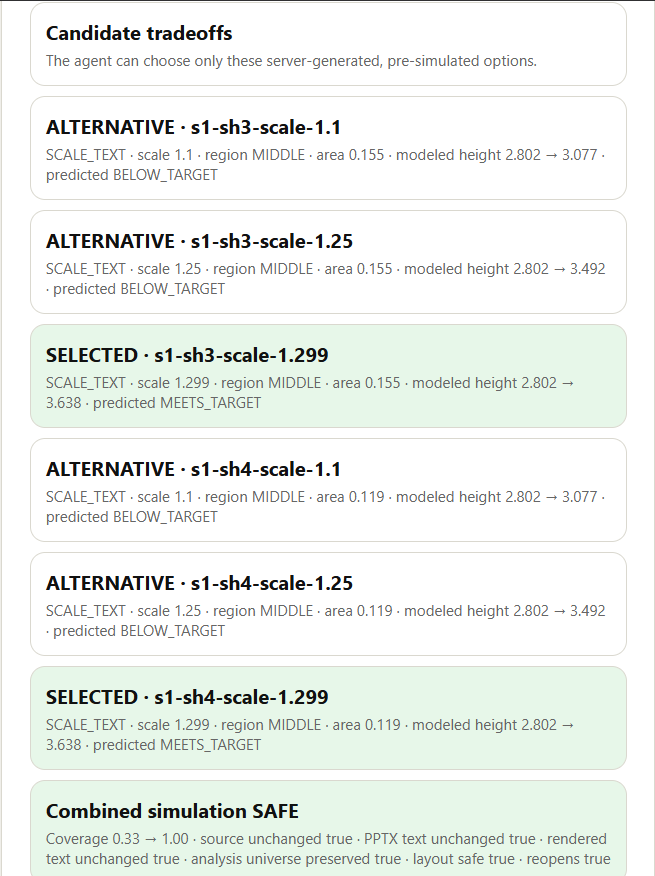
- Explore possible changes. Generate bounded body-text scaling candidates and simulate their effects.
- Plan with Gemini. Let Gemini select among server-approved candidates, with a rationale for its recommendation.
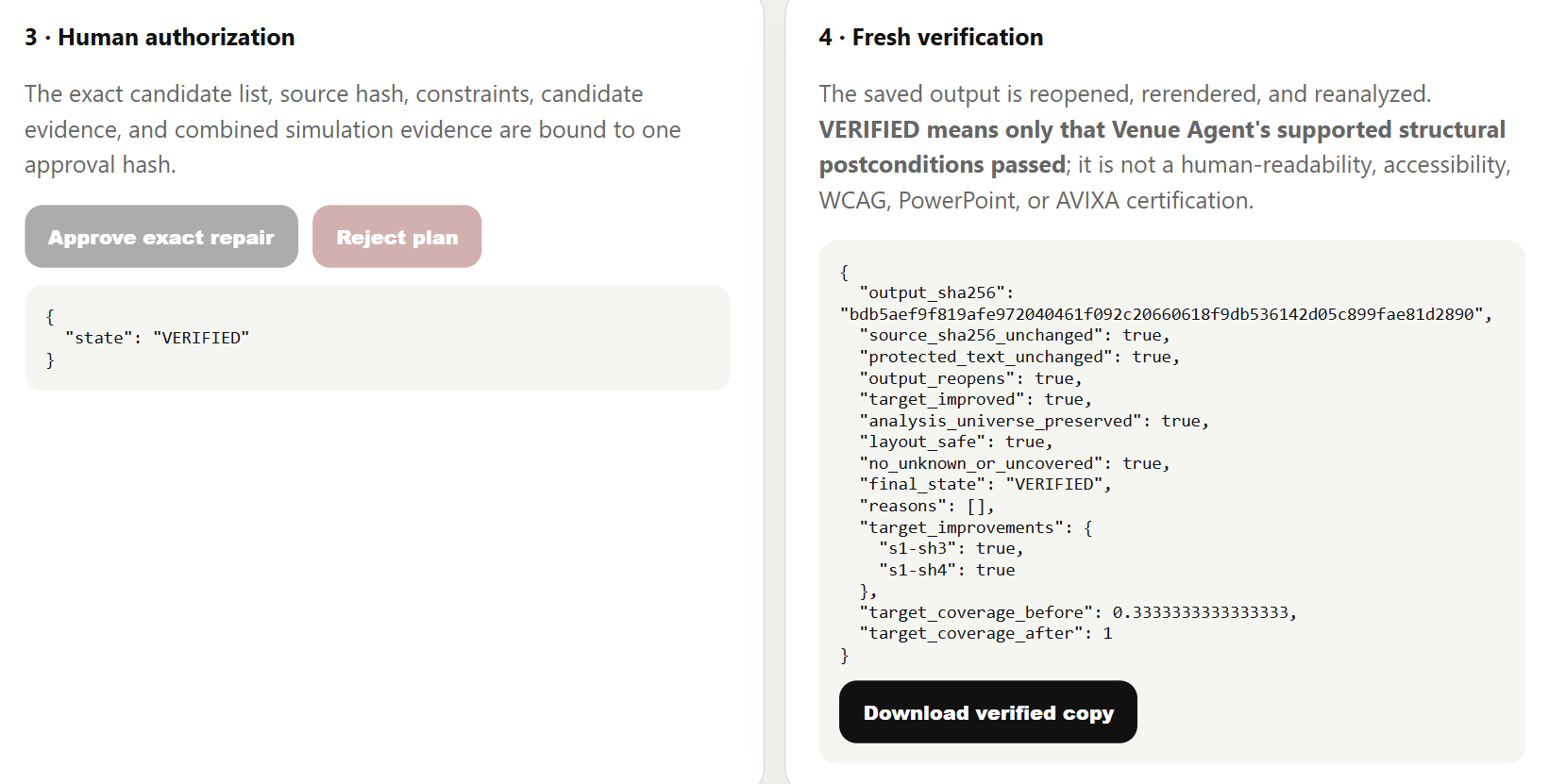
- Approve the exact plan. Require human authorization before making any change.
- Verify the saved result. Modify a copy, reopen and rerender the actual PowerPoint, and check its supported postconditions independently.
The output is a downloadable, editable PowerPoint—not merely a recommendation or simulated preview.
What makes DeckFit AI different?
Most AI presentation tools focus on creating slides, generating content, or rewriting text.
DeckFit AI focuses on how people experience a presentation in a real physical environment.
Its second difference is how AI is used.
Gemini does not receive unlimited authority to modify the deck. The server first generates legal repair candidates and simulates their consequences. Gemini then recommends among those candidates.
The model can select approved candidate IDs and explain its choices. It cannot invent arbitrary transformations, rewrite the slide content, or certify its own results.
The application independently validates the proposal, requires the user's approval, and checks the actual saved artifact.
The planner recommends. The verifier decides.
This separation allows AI to contribute to design decisions without becoming the sole authority over document integrity.
How I built it
The system combines deterministic document engineering with a constrained AI planning layer.
- Python, FastAPI, and Pydantic: API development, structured models, validation, and workflow control.
- python-pptx: PowerPoint structural inspection and supported copy-only mutations.
- LibreOffice: Headless presentation rendering.
- PyMuPDF: Rendered-PDF text measurement and analysis evidence.
- Google Gemini 3.5 Flash-Lite: Bounded selection among pre-simulated repair candidates.
- Deterministic verification: Candidate validation, source and plan integrity, approval checks, and fresh output analysis.
- Docker and Railway: Deployment of the working application.
The runtime Gemini planner receives derived candidate and simulation metadata, rather than raw uploaded PowerPoint files, screenshots, or slide text.
The original presentation is preserved. Only the approved copy is modified.
The hardest engineering challenges
1. Knowing when not to trust a result
PowerPoint files can contain pictures, grouped elements, inherited visual styles, hidden slides, and complex layout relationships.
A parser might understand the text while missing an object that visually obscures it.
I worked on conservative unsupported-content detection and safeguards to prevent an uncertain visual situation from being reported as fully verified.
2. Making verification independent of the planner
A simulated repair is not proof that the saved PowerPoint is correct.
DeckFit AI reopens and rerenders the modified artifact, then checks the implemented postconditions using fresh evidence.
This also required addressing rendering differences between LibreOffice versions and aligning the deployed renderer with the validated environment.
3. Integrating Gemini without weakening safety
The Gemini API introduced practical timeout and structured-output schema constraints.
After diagnosing and correcting those issues, the production planner successfully selected server-approved repairs while retaining strict response parsing, deterministic candidate validation, and fallback protection.
What works today?
The R8.1 release was tested locally and through the deployed public workflow.
The recorded validation includes:
- 186 collected automated tests, with 150 non-resource tests passing and the mandatory isolated renderer/resource gate passing.
- A public end-to-end workflow covering analysis, planning, human approval, modification, verification, download-hash equality, and session deletion.
- Five successful public Gemini-backed planning runs with zero fallbacks.
- A passing technical submission-freeze check against the deployed release.
These are results from the tested release, not claims of universal reliability or measured improvements in student learning.
What I learned
The biggest lesson was that AI should not be given more authority than its evidence supports.
An AI model can recommend a useful change without being responsible for deciding whether that change is permitted or whether the saved output is correct.
I also learned that physical context can become part of a creative workflow without turning every presentation into an unconstrained AI-generated artifact.
Responsible AI design is not only about what the model can do. It is also about what the system can independently prove.
Current limitations
DeckFit AI deliberately keeps automatic repairs narrow.
It supports bounded scaling of eligible ordinary body text. Recognized titles and headings remain protected, while unsupported or ambiguous content is handled conservatively through review states.
The application does not automatically rewrite content, redesign every slide type, or guarantee readability for every viewer.
A VERIFIED result means the saved output passed the application's defined structural and rendering checks. It does not imply WCAG certification, universal accessibility, or identical rendering across all presentation software.
Development history and AI-use disclosure
DeckFit AI evolved from work originally developed under the name Venue Agent, including work for a separate hackathon during the same October build period.
For the ForgeHacks release, that foundation was extended and hardened through adversarial document-handling tests, session-lifecycle protections, renderer consistency work, Gemini integration, public deployment validation, and the DeckFit AI submission experience.
This entry does not claim that every underlying component was originally created exclusively for ForgeHacks.
I used AI coding assistants, including ChatGPT and Codex, for development assistance, debugging, testing, and review. That development-time assistance is separate from the application's runtime Gemini planner.
Consequential safety, authorization, mutation, and verification decisions remain under deterministic application controls.
What's next?
The longer-term goal is to support more editable presentation elements, richer physical venue configurations, and real-world evaluations with presenters and audiences.
Ultimately, I'd like choosing a room to become as natural a part of presentation design as choosing a screen size is in web design.
DeckFit AI — Design for the room, not just the screen.
Try the live application | Explore the source code
ForgeHacks 2026 · AI + Creativity

Log in or sign up for Devpost to join the conversation.