Inspiration
Construction teams already have strong systems for drawings, issues, schedules, budgets, and change orders. But one part of the workflow still depends heavily on people manually connecting all of that context: deciding what to do when something changes.
A field conflict is rarely just a drawing problem. A decision may affect constructability, cost, schedule, contracts, and downstream approvals at the same time.
That made construction change decisions a strong fit for WebMCP.
Instead of building another chatbot beside a project-management interface, we wanted to explore a different interaction model: what if the construction workspace itself could become understandable and actionable to a browser agent?
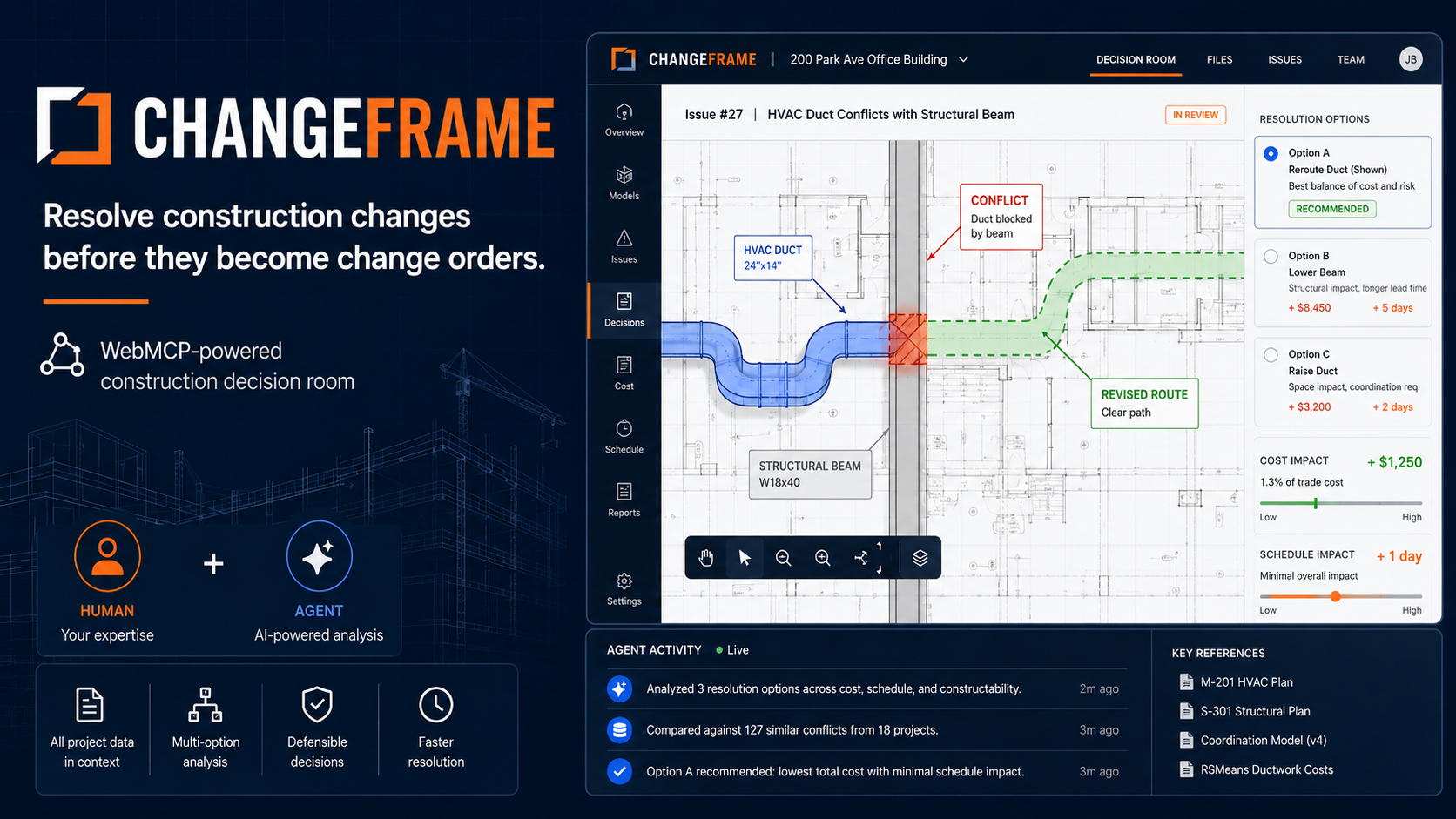
That became ChangeFrame — a shared construction decision room where humans contribute field knowledge and retain authority, while agents investigate alternatives, react to live constraints, simulate impact, and prepare downstream artifacts.
What it does
ChangeFrame lets a construction project manager and a browser agent resolve a field coordination issue together inside the same live workspace.
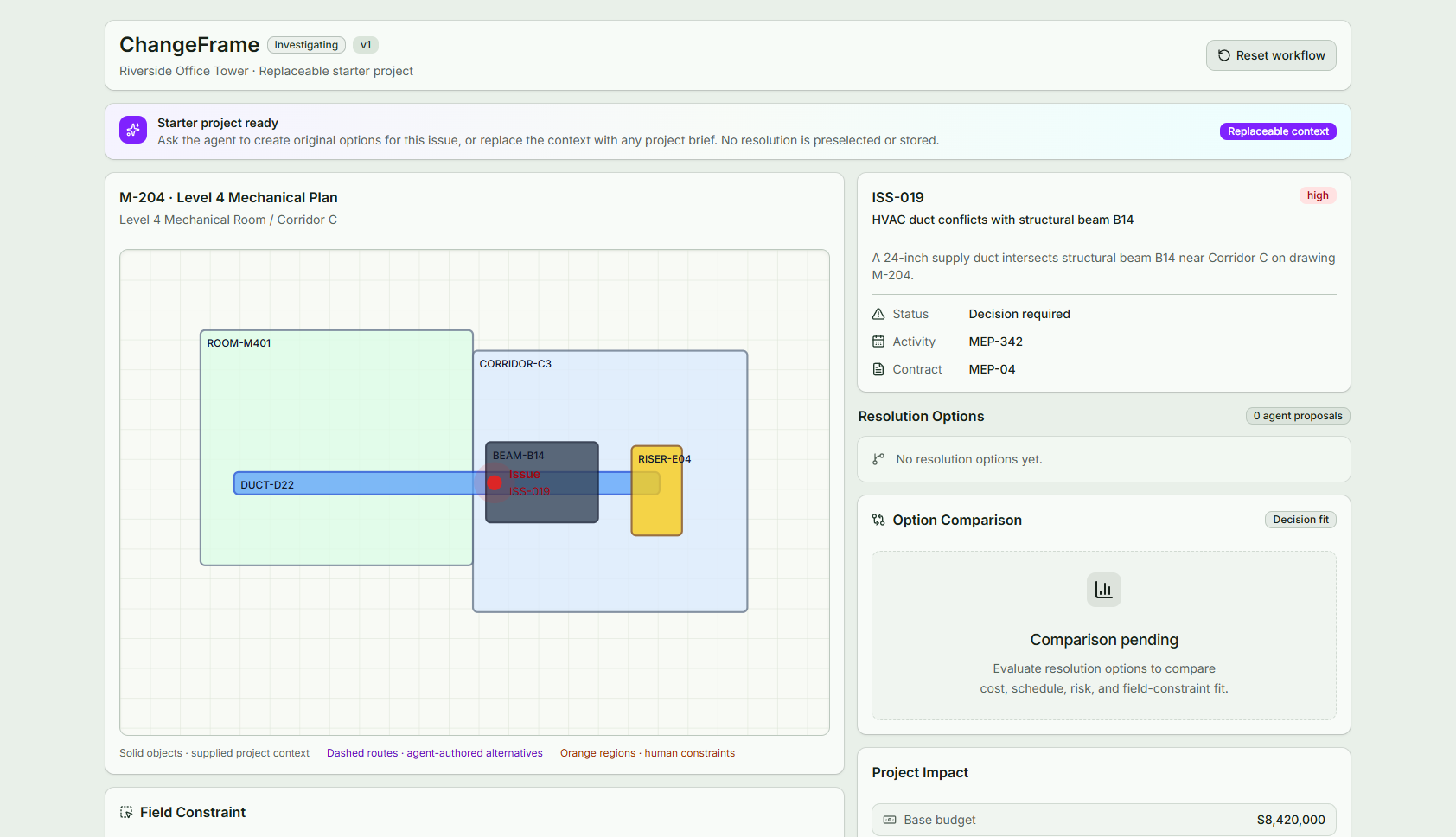
The demo starts with a synthetic construction scenario at Riverside Office Tower where HVAC duct D22 conflicts with structural beam B14.
The agent can inspect the current issue through WebMCP and propose multiple resolution strategies with estimates, assumptions, risks, and route geometry.
The project manager can then add information that the agent did not previously know.
For example, the human can draw a blocked region directly on the construction plan to indicate that a proposed duct route cannot pass through an electrical riser.
The agent can immediately discover that new constraint through WebMCP and revise the affected solution without the human having to describe the geometry again in chat.
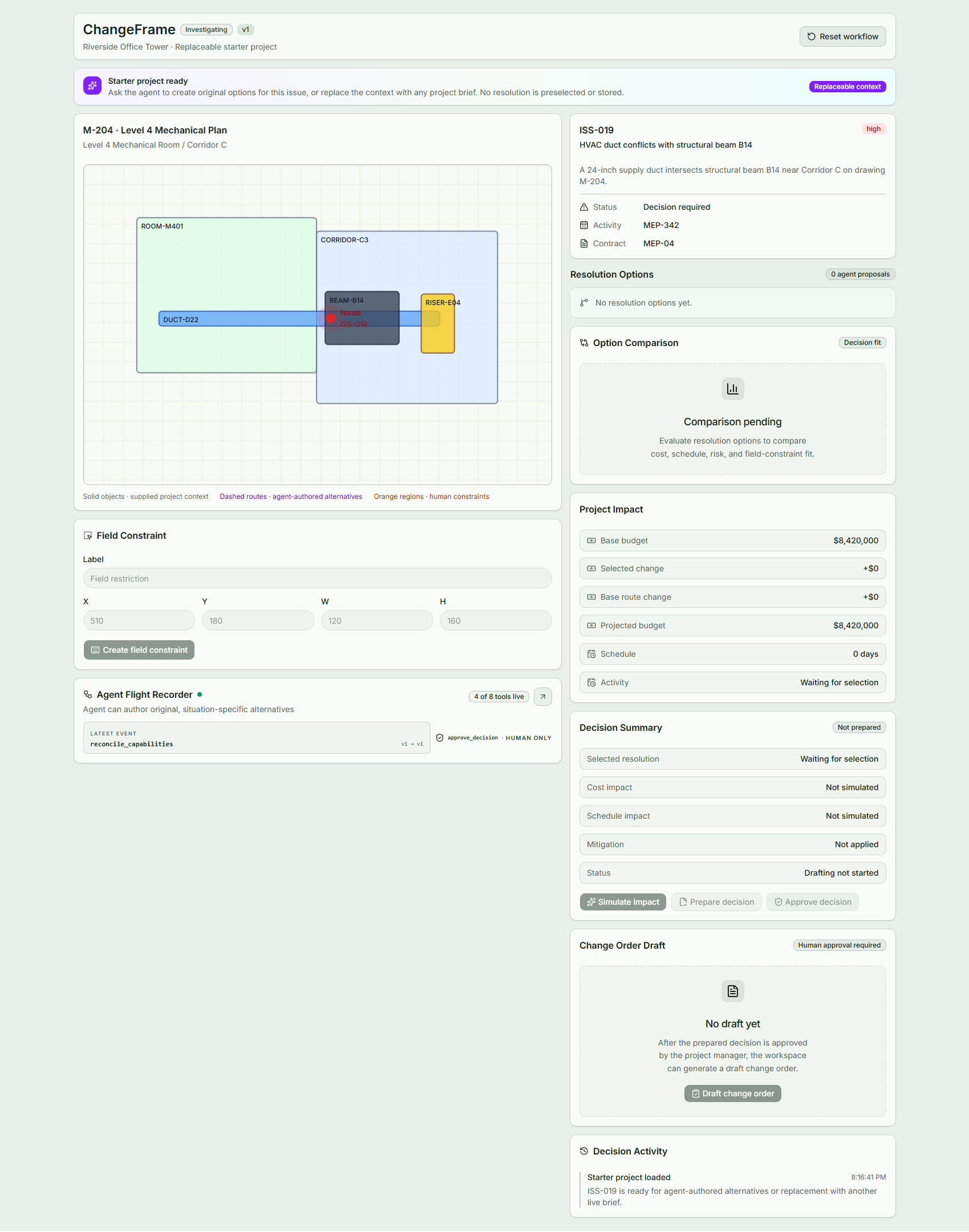
From there, ChangeFrame supports the rest of the decision workflow:
- the agent proposes and revises resolution alternatives
- the human compares, rejects, and selects options
- the agent simulates cost and schedule impact
- the agent can propose mitigation for schedule impact
- the agent prepares the decision for review
- the human retains the only approval path
- after approval, the agent can draft the resulting change order
The key idea is that the human and agent operate on the same versioned application state.
The agent is not clicking around the interface or working from a copied snapshot of the project. ChangeFrame exposes structured construction capabilities directly through WebMCP, and every agent action updates the same Decision Room that the project manager is reviewing.
We also built an Agent Flight Recorder that makes the collaboration visible by showing human actions, agent tool calls, state versions, and changes in available capabilities.
How we built it
ChangeFrame is a frontend-only application built with:
- React
- TypeScript
- Vite
- Zustand
- Tailwind CSS
- shadcn/ui
- SVG-based construction-plan rendering
The application is organized around a central domain state machine.
The human interface and the WebMCP tool executors both call the same domain actions. This was important because we did not want separate “agent state” and “UI state” that could drift apart.
WebMCP integration is implemented with:
document.modelContext.registerTool(...)
ChangeFrame exposes typed, domain-level capabilities rather than low-level UI actions.
Examples include:
The browser agent works against the same live decision state the project manager sees. It does not scrape cards or guess through the DOM. Tools appear only when their action is valid:
| Tool | Purpose |
|---|---|
get_decision_context |
Read the complete live context and current alternatives |
get_user_constraints |
Read human-authored field constraints |
configure_decision_context |
Structure an arbitrary user project brief into the workspace |
evaluate_resolution_options |
Submit 2–5 original alternatives with assumptions and confidence |
revise_resolution_option |
Submit a complete route revision that is geometry-checked |
simulate_project_impact |
Add an optional agent mitigation; ChangeFrame calculates the totals |
prepare_change_decision |
Prepare the selected result for human review |
draft_change_order |
Draft an artifact only after human approval |
There is deliberately no tool for selecting, rejecting, or approving an alternative.
The collaboration loop
- The user keeps the visible starter project or describes a different project issue to the browser agent.
- For a different brief, the agent calls
configure_decision_contextwith the facts, relationships, and plan geometry it has. - The agent reads the current state and authors original alternatives.
- The human reviews the rationale and assumptions and draws a field constraint.
- Any intersecting route is marked
needs_revisionautomatically. - The agent reads that new constraint and submits a revised route.
- ChangeFrame rejects the revision if the route still intersects the constraint.
- The human selects an eligible alternative.
- The agent may propose an evidence-backed mitigation; ChangeFrame performs the arithmetic.
- The agent prepares the decision, the human approves it, and only then can a draft change order be created.
Every mutation carries expectedStateVersion. Stale calls fail without side effects. Agent inputs and capability changes are recorded in the Agent Flight Recorder.
The available tool set changes depending on the current decision phase.
For example, the agent cannot draft a change order before a human has approved the decision because that tool is not available yet.
Selection, rejection, and final approval are deliberately reserved for the human interface and are never exposed as agent capabilities.
We also added optimistic concurrency using a versioned application state. Mutation tools receive an expected state version, and stale calls fail without modifying the project.
This protects the workflow from retries or agent actions based on outdated context.
The MVP does not depend on a backend or its own LLM service. The browser agent supplies the reasoning, while ChangeFrame supplies the live domain state, structured tools, deterministic calculations, and visible workspace.
Why WebMCP?
ChangeFrame is a strong fit for WebMCP because construction decisions depend on live, structured application state.
The agent needs to understand more than what is visible in a screenshot. It needs semantic access to things such as:
- the active construction issue
- the current drawing and affected elements
- human-drawn field constraints
- resolution alternatives
- the option selected by the project manager
- cost and schedule impact
- the current decision phase
- whether human approval has occurred
- the latest application state version
Without WebMCP, the project manager would have to repeatedly copy this information into a conversation, or an agent would have to infer application state by reading the DOM, interpreting screenshots, and clicking through the interface.
ChangeFrame instead exposes explicit construction capabilities through:
document.modelContext.registerTool(...)
This lets the browser agent work directly with the same state that powers the human interface.
The result is not simply faster browser automation. It enables a different collaboration model.
What people and agents can now do together
The project manager contributes the information that requires human judgment and real-world context.
For example, while reviewing a proposed duct reroute, the project manager can draw a blocked region directly onto the construction plan because they know that area contains an electrical riser.
The agent does not need the user to describe that region again in chat.
It can discover the new constraint through WebMCP, understand its geometry and applicability, revise the proposed route, recalculate the impact, and update the same Decision Room the project manager is already viewing.
The collaboration continues throughout the workflow:
- The agent investigates the issue using structured project context.
- The agent proposes multiple resolution strategies and materializes them in the workspace.
- The human adds field knowledge directly through the visual interface.
- The agent discovers that new state and revises its solution.
- The human compares and selects the preferred direction.
- The agent simulates cost and schedule consequences and prepares the decision.
- The human explicitly approves the outcome.
- Only after approval does the agent gain the capability to draft the change order.
This division of responsibility is intentional.
The agent handles work where scale and computation help:
- retrieving context
- exploring alternatives
- revising solutions
- comparing trade-offs
- calculating impact
- preparing structured artifacts
The human retains work that requires judgment or authority:
- providing field context
- rejecting unsuitable alternatives
- selecting the preferred solution
- accepting commercial consequences
- approving the decision
WebMCP makes this possible because both participants operate on one shared application state instead of passing context back and forth between a website and a chatbot.
It also lets ChangeFrame control what the agent can do at each stage. Tools appear only when their corresponding action is valid, while sensitive actions such as selecting the winning option, approving the decision, authorizing cost, or signing a change order are never exposed to the agent.
For ChangeFrame, WebMCP is therefore not an integration added on top of the product.
It is the interaction model that makes the product possible: the human provides judgment and authority, the agent provides analysis and execution, and the web application is the shared workspace between them.
Challenges we ran into
The hardest part was not drawing the construction interface. It was designing the boundary between what the agent should be allowed to do and what the human must control.
A naive implementation would simply expose every button as a tool.
That would technically use WebMCP, but it would miss the point.
We instead designed tools around construction goals and workflow states. The agent can investigate, calculate, revise, and draft, but it cannot silently select the preferred solution or approve a commercial decision.
Another challenge was dynamic WebMCP lifecycle management.
The tools available to the agent change as the decision advances. We had to make sure that after a mutation:
- the domain state was updated
- the visible interface reflected that state
- the WebMCP registry reflected the new phase
- only then did the tool return success
Otherwise the agent could observe a state where the UI and available capabilities disagreed.
Retries and stale agent calls were another problem.
We introduced state versions and duplicate-safe mutations so stale operations fail cleanly and repeated calls cannot accidentally create duplicate options, decisions, activity events, or change-order drafts.
We also had to make the visual plan useful without pretending to build a full BIM or CAD engine.
For the hackathon, the construction scenario uses structured synthetic project data and an SVG plan so the demo can focus on the WebMCP interaction rather than spending the entire build on geometry parsing.
Accomplishments that we're proud of
The part we are most proud of is the human-to-agent handoff around the construction plan.
A project manager can draw a blocked region directly onto the plan.
The agent can discover that constraint from the live application state and revise its proposed route without the user restating the geometry in the conversation.
That interaction captures what we wanted to explore with WebMCP: the website itself becomes a shared working environment for the human and the agent.
We are also proud that human authority is enforced at the capability level.
The agent can prepare a decision, but it cannot approve it.
Even if the user tells the agent:
“Approve this.”
there is no WebMCP approval tool for it to call.
The human must explicitly approve the decision in the interface before the downstream change-order capability becomes available.
We also built the workflow to tolerate stale agent actions, retries, dynamic tool registration, page reloads, and non-WebMCP browsers without breaking the human experience.
What we learned
The biggest lesson was that WebMCP is most interesting when it is treated as more than a cleaner replacement for browser automation.
Simply exposing existing API endpoints as tools is useful, but it does not necessarily create a new product experience.
The more interesting pattern is a shared stateful workspace.
Humans are good at judgment, exceptions, physical-world context, and authority.
Agents are good at searching, comparing, calculating, revising, and preparing structured work.
WebMCP can connect those strengths inside the same interface.
We also learned that tool design matters enormously.
A tool surface should represent meaningful user goals, not every possible UI interaction. Dynamic tool availability can communicate workflow state and permissions directly to the agent.
Finally, we learned that agent-facing software needs different reliability assumptions than ordinary UI code.
Agents can retry calls, act on stale context, or choose an unexpected but schema-valid action. Versioning, idempotency, validation, observability, and explicit authority boundaries became first-class product requirements rather than backend implementation details.
What's next for ChangeFrame
The hackathon version deliberately focuses on one decision workflow so we could make the human-agent collaboration reliable and understandable.
The next step would be connecting the same interaction model to real construction systems and project data.
Future directions include:
- Procore and Autodesk Construction Cloud integrations
- real project issue and drawing ingestion
- schedule integration with Primavera or similar tools
- deeper cost and contract context
- multiple simultaneous field constraints
- richer resolution comparison
- engineering and subcontractor review workflows
- persistent decision history across projects
- multi-user collaboration and role-based authorization
- RFI, submittal, and decision-package drafting
- CAD, IFC, and BIM-aware plan interaction
The long-term idea is not to replace construction systems of record.
It is to add a decision layer on top of them where project teams and their agents can investigate changes, explore consequences, and reach an informed human-approved decision before that decision becomes a formal project artifact.
ChangeFrame is our attempt to explore what construction software looks like when the interface is designed for both people and agents from the beginning.
Built With
- javascript
- mcp
- react
- tailwind
- typescript
- vite

Log in or sign up for Devpost to join the conversation.