-
-
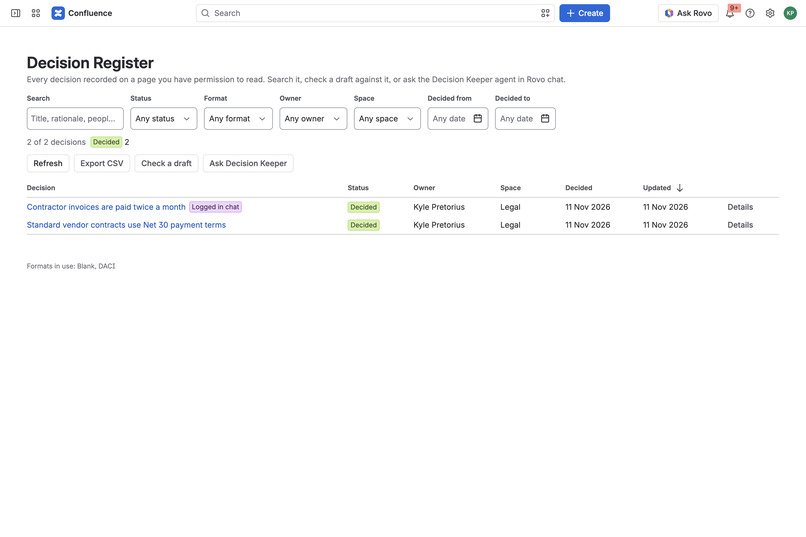
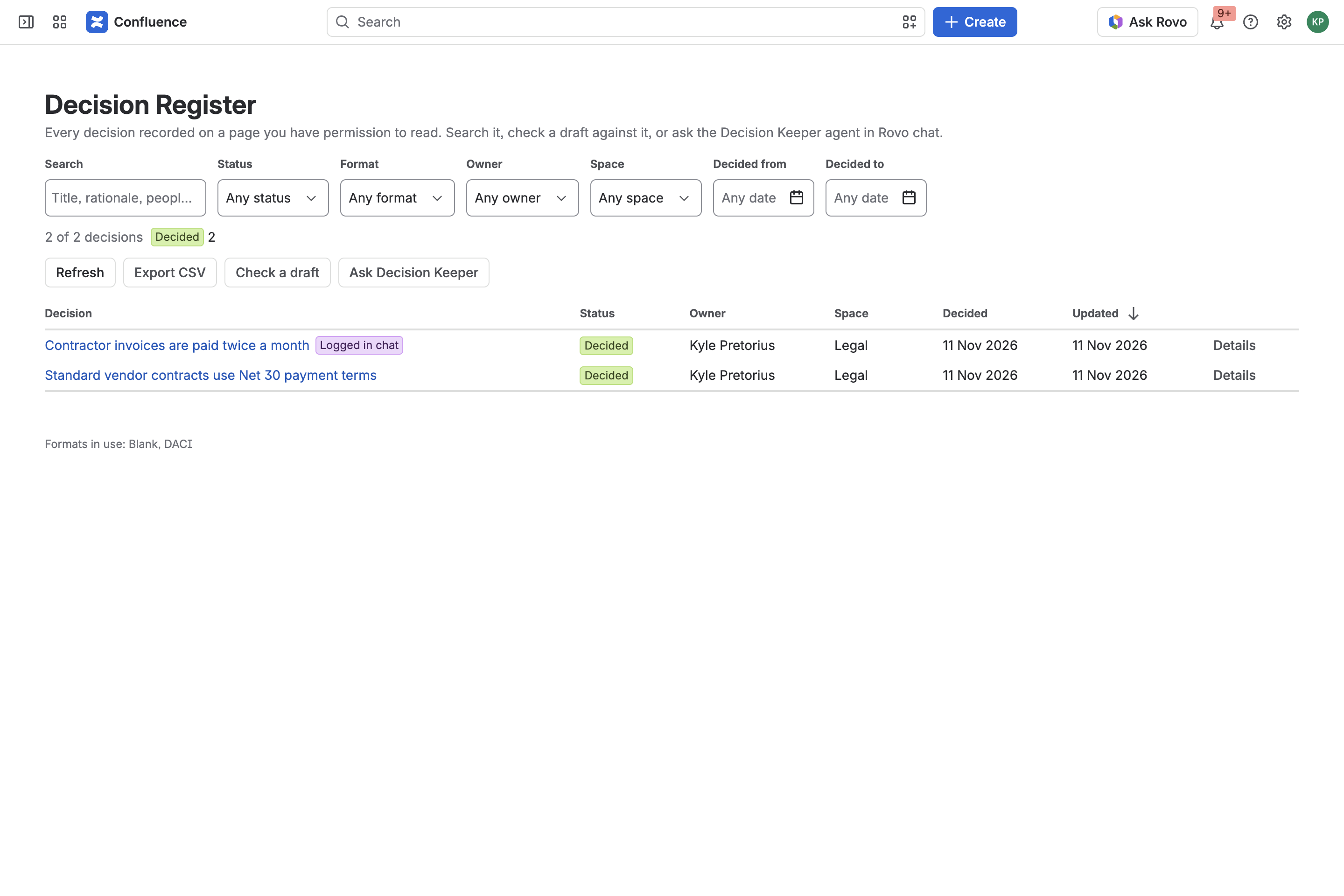
Decision Register: every decision on pages you can open, with search, filters and CSV export. Demo site data.
-
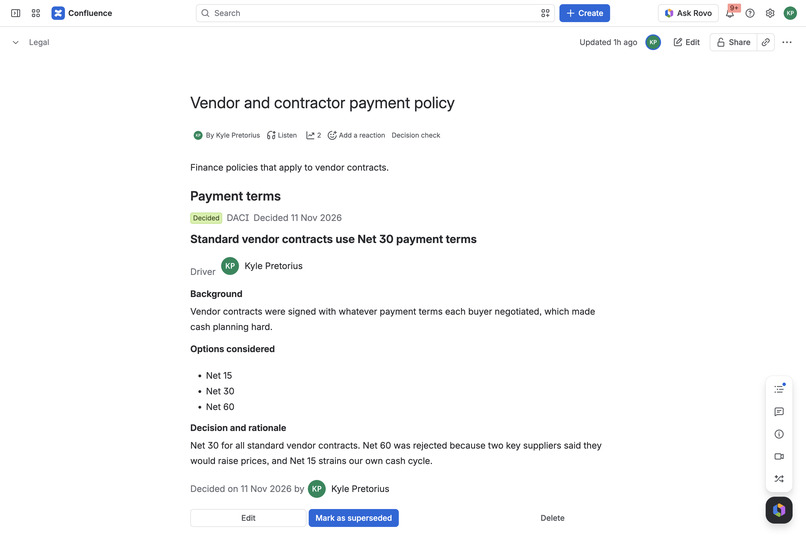
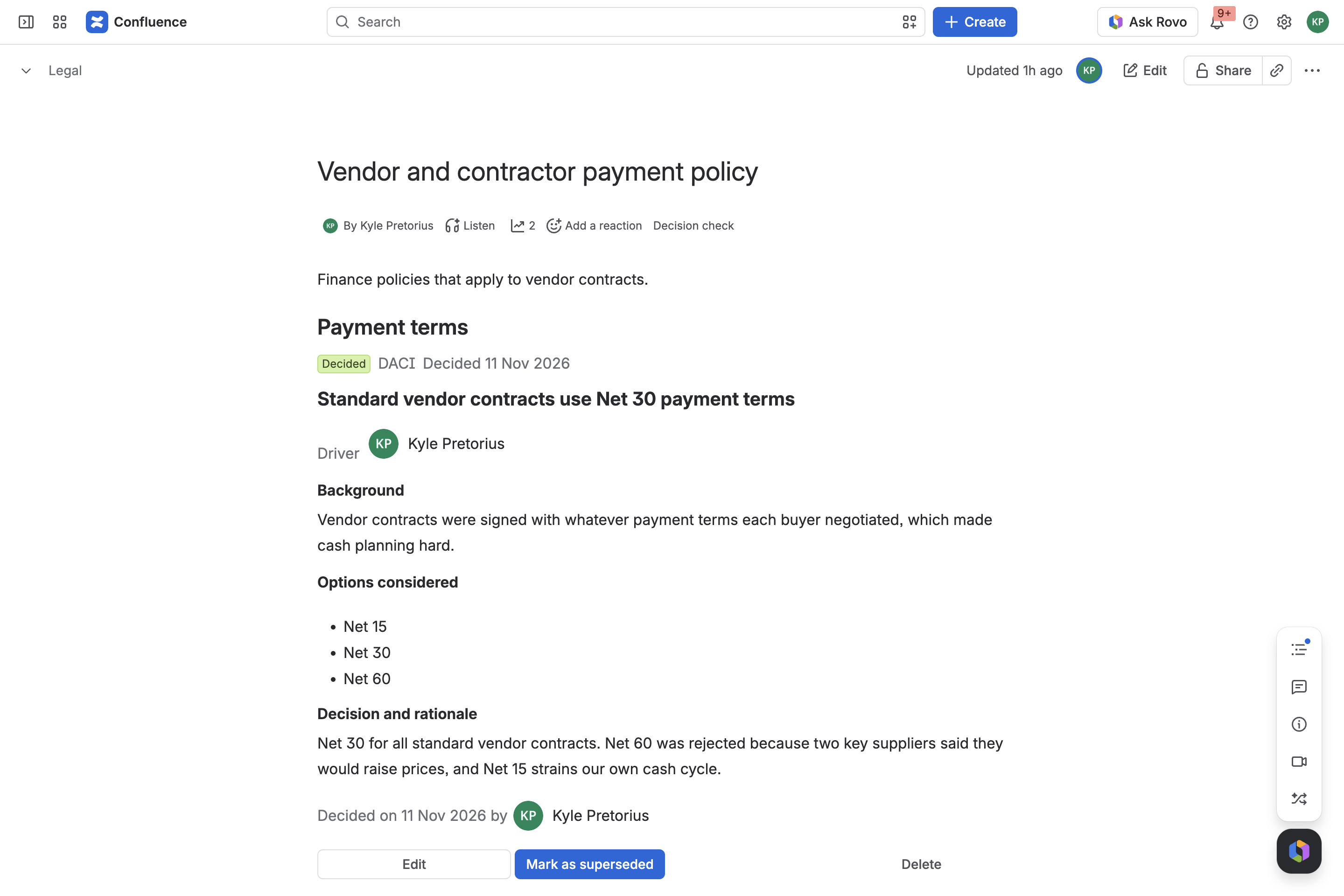
Decision Record macro on a Confluence page (DACI format), added with /decision.
-
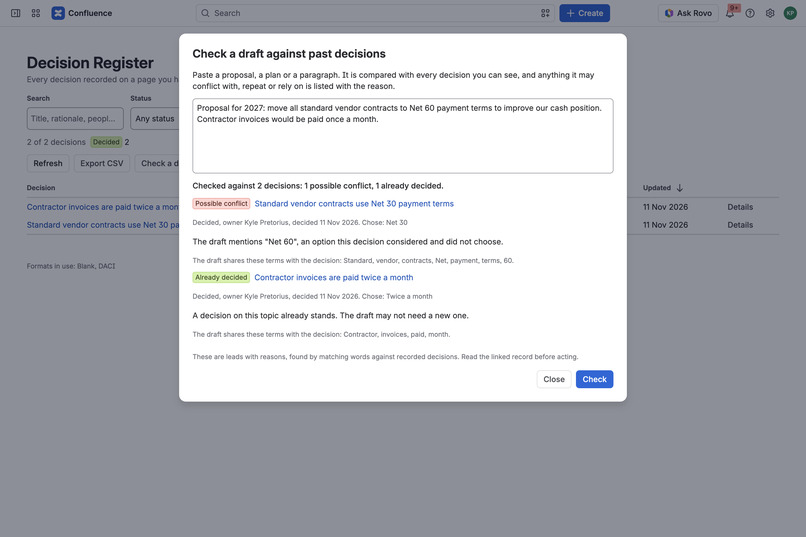
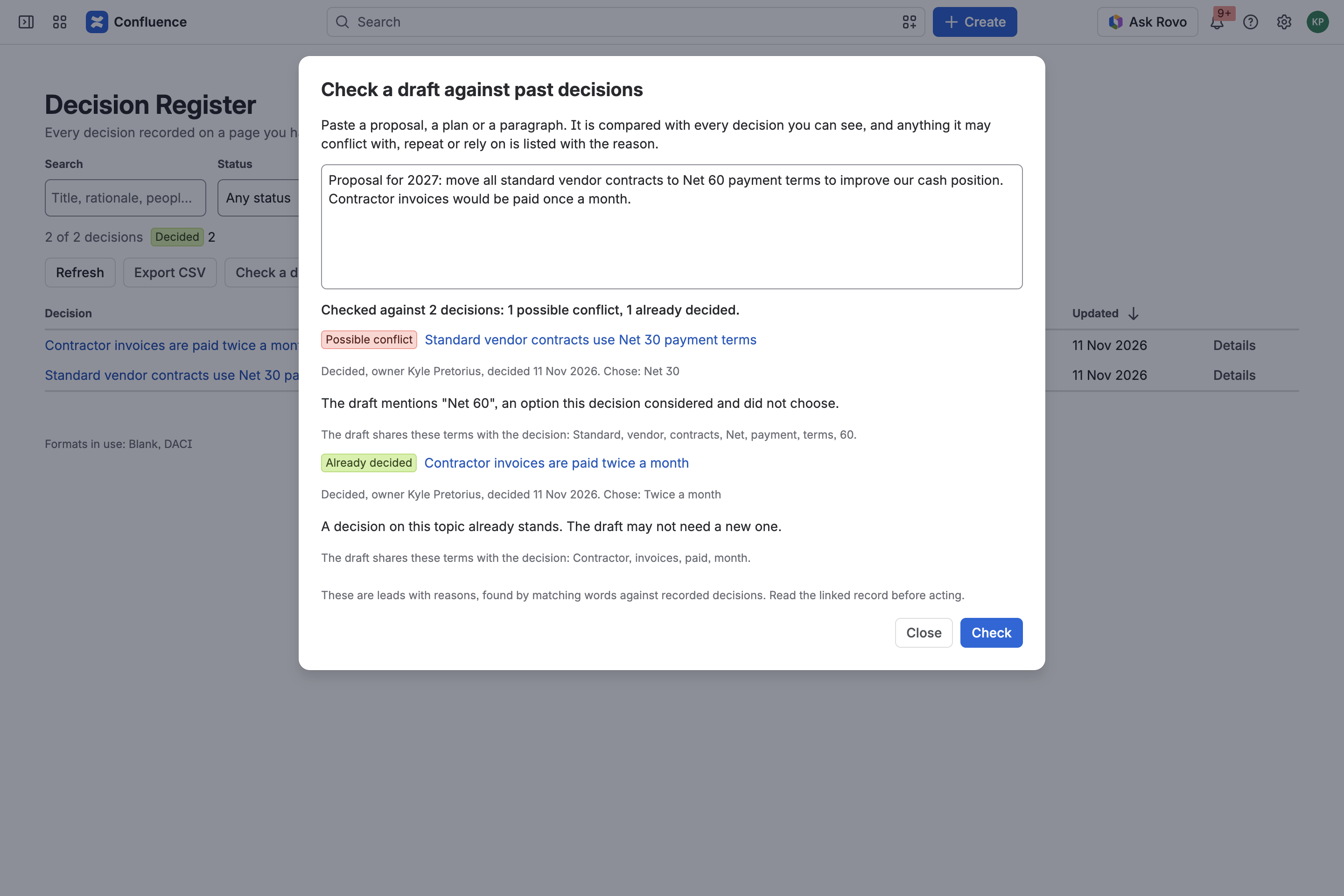
Check a draft: paste a proposal and see what it may conflict with or repeat, with the reason for each finding.
-
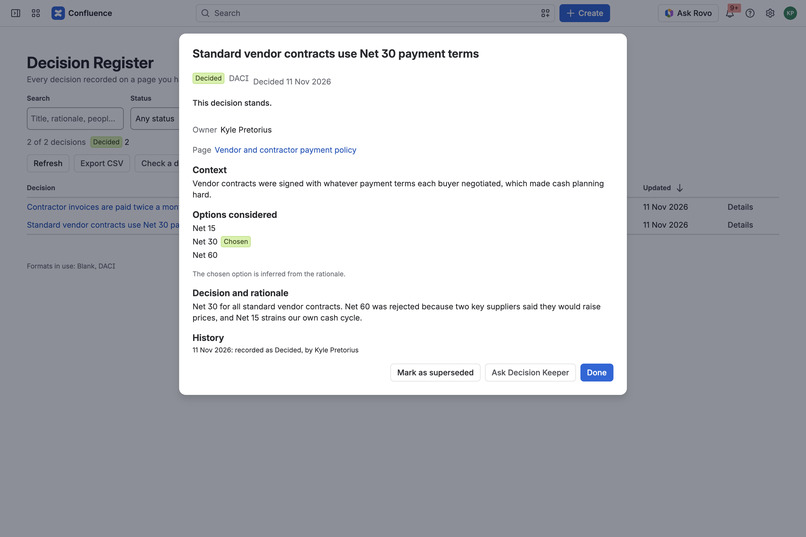
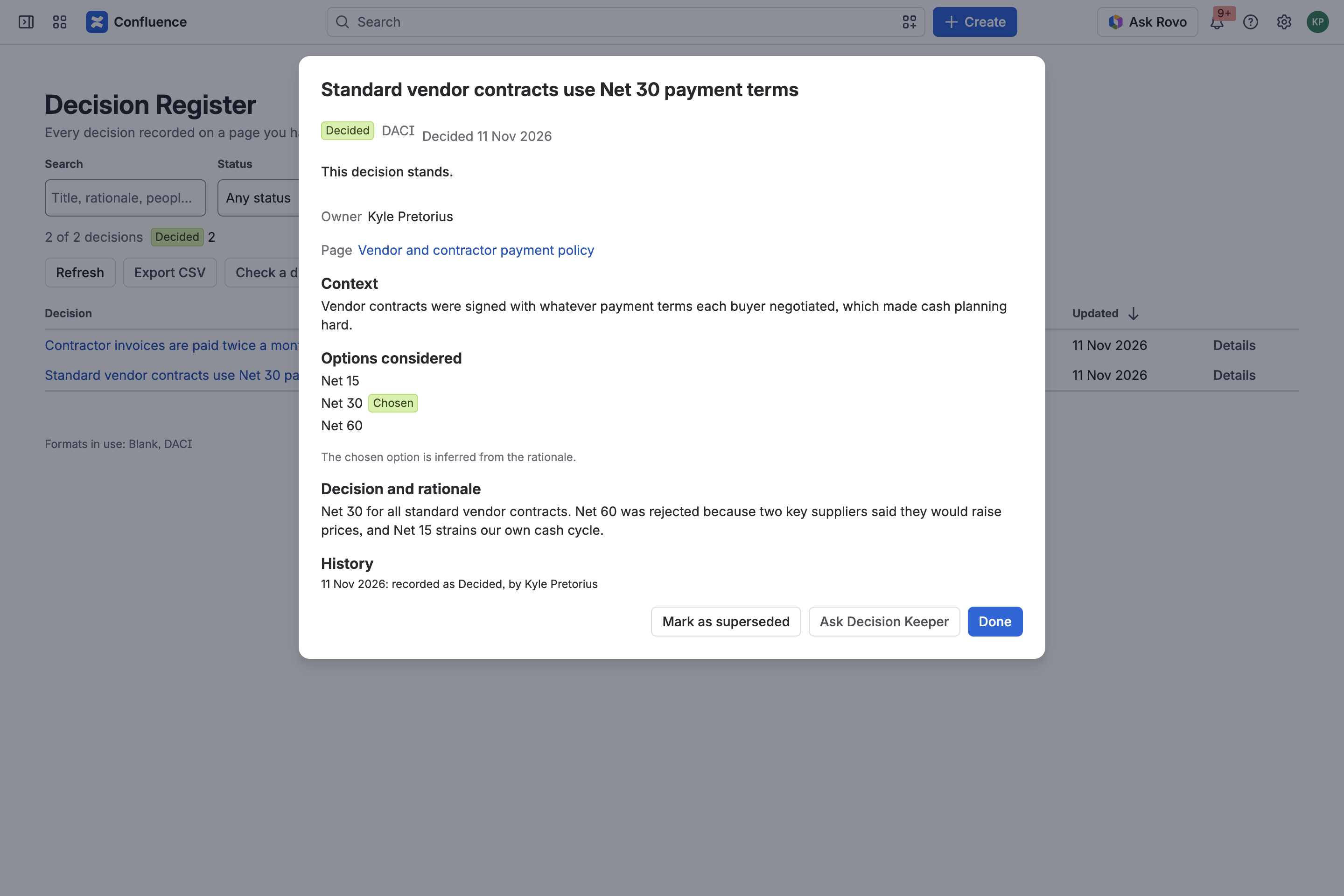
Decision details: owner, context, options considered, the chosen option, rationale and history.
-
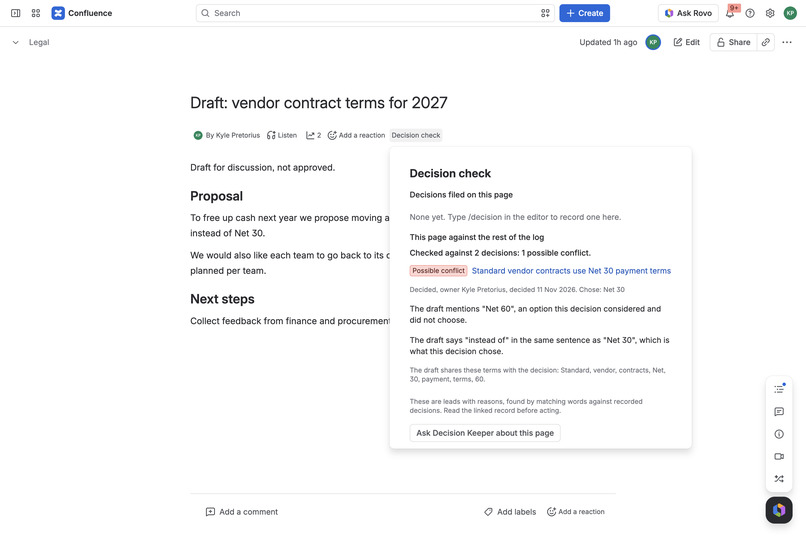
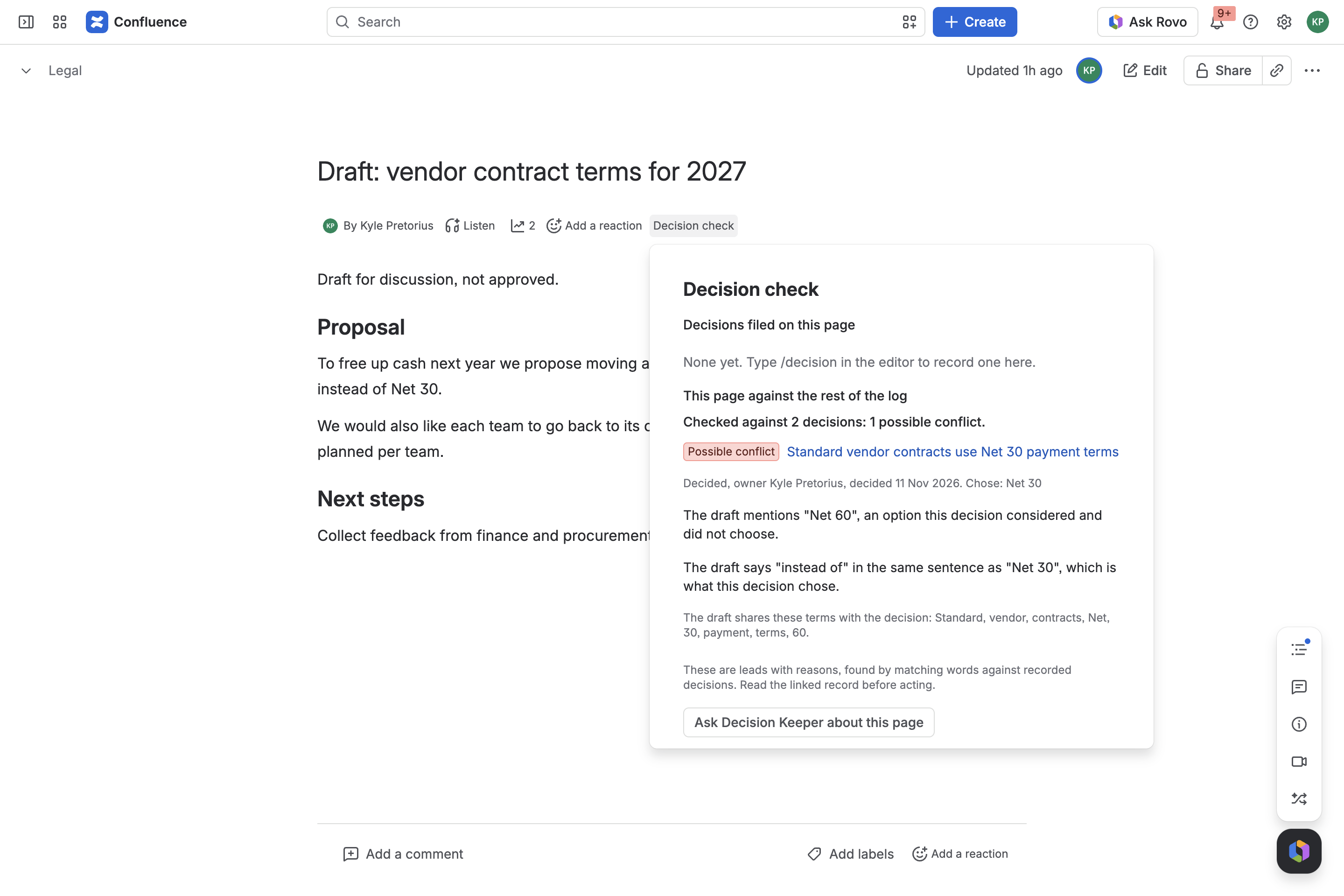
Decision check under the page title flags a possible conflict with a past decision and links to the record.
-
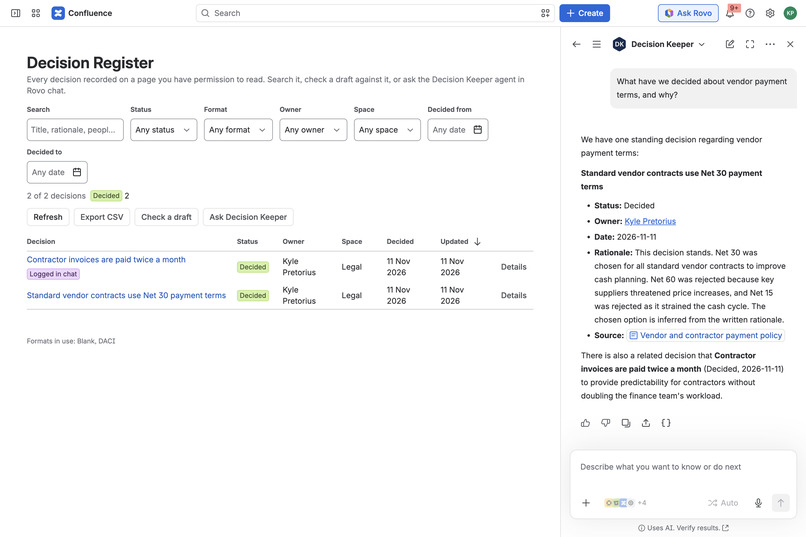
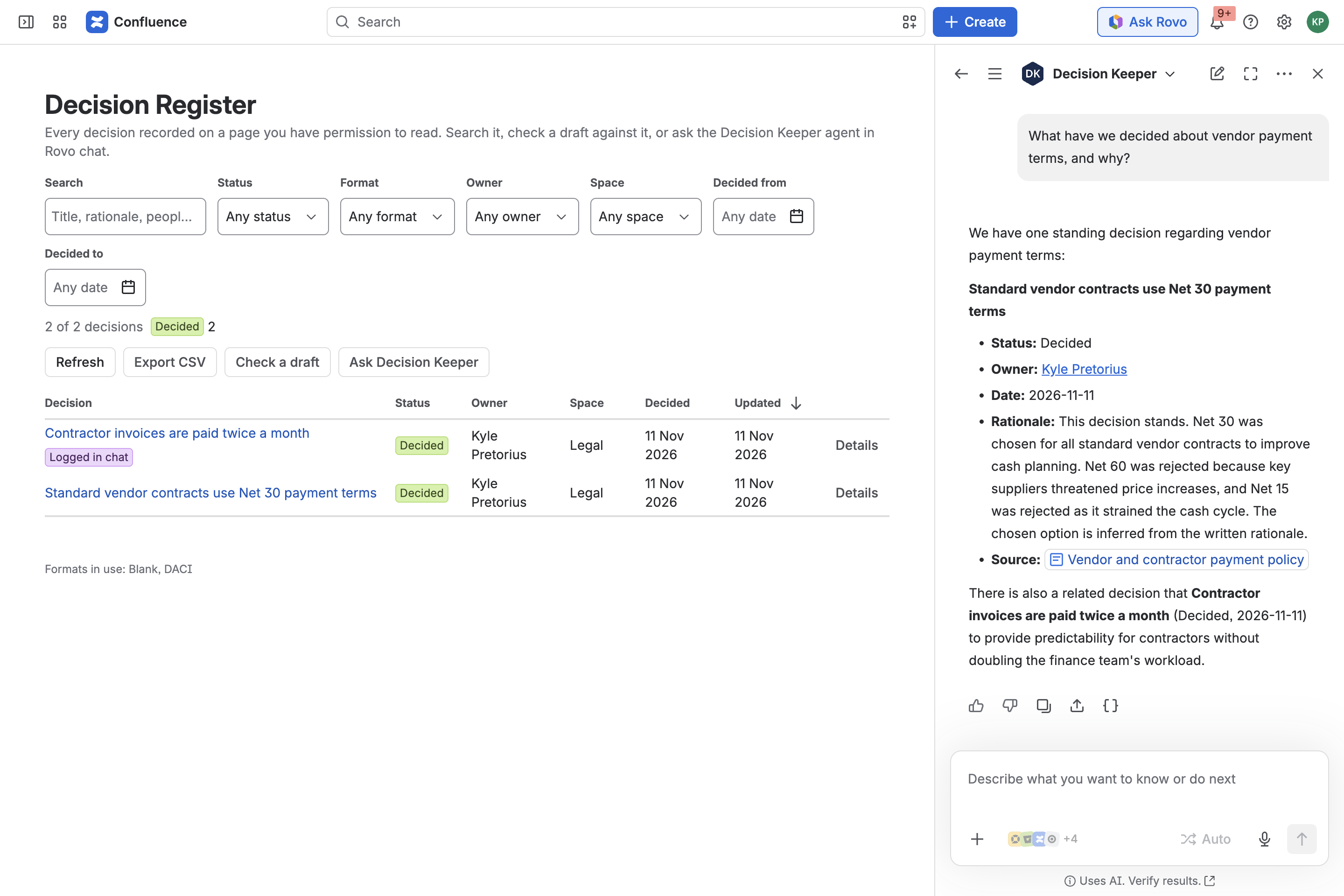
Decision Keeper, the Rovo agent, explains a decision and gives a Source link to the page it is recorded on.
-
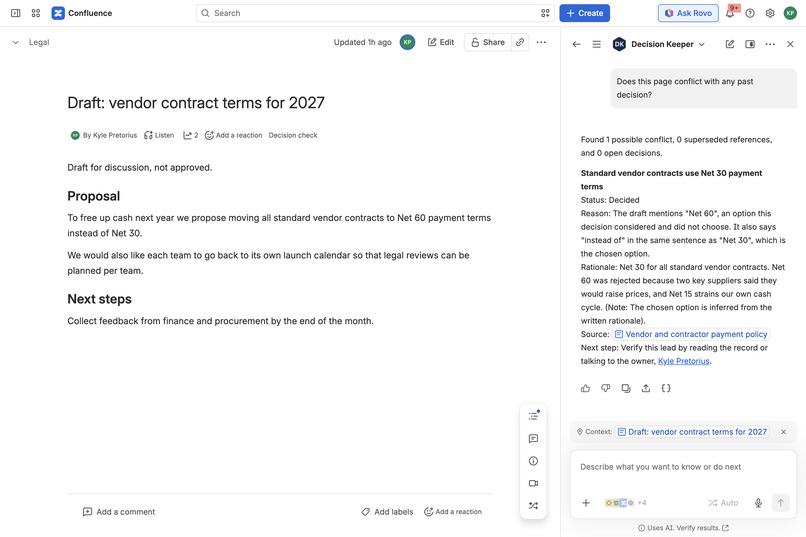
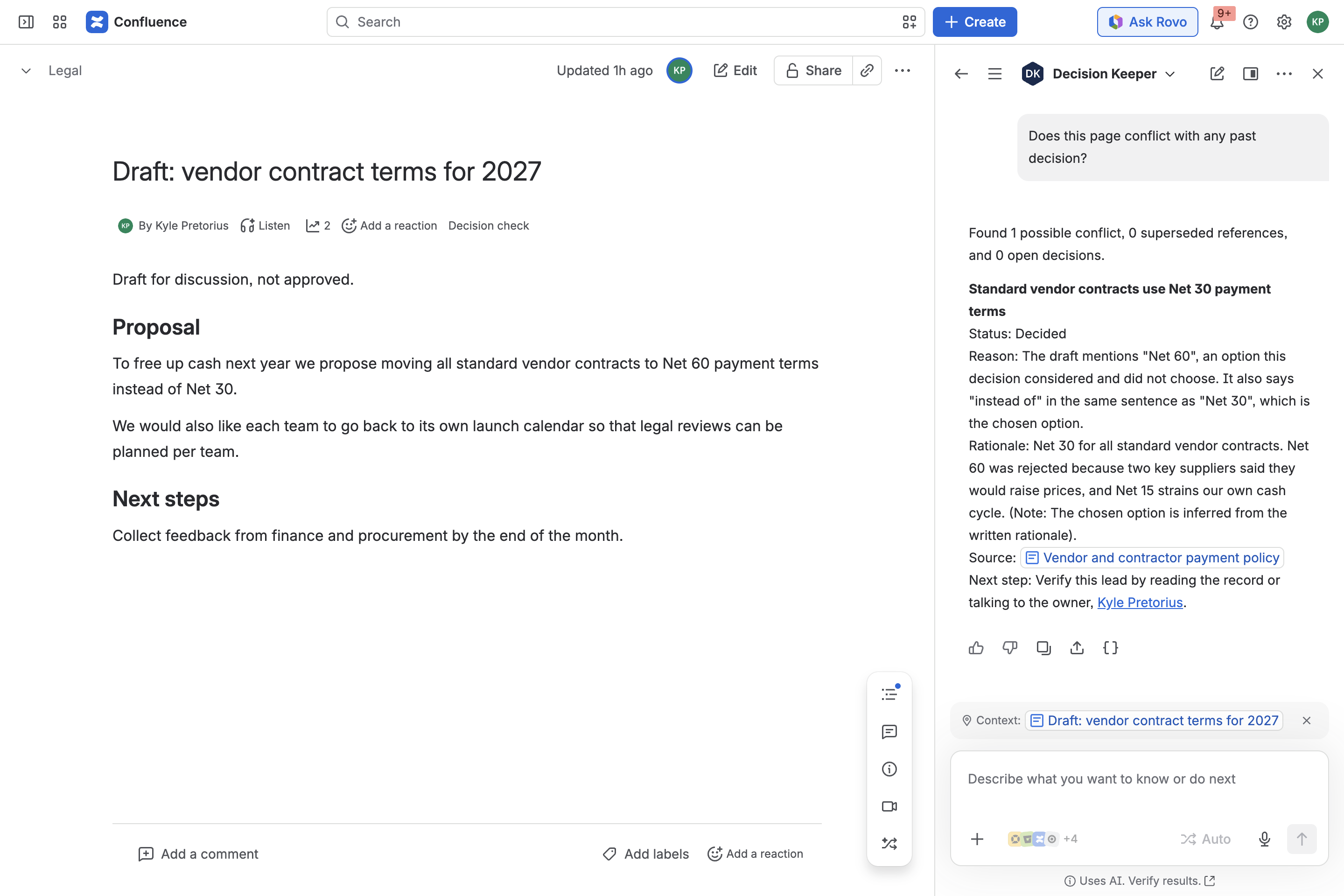
The agent checks the page in view against past decisions and states the reason for the conflict.
-
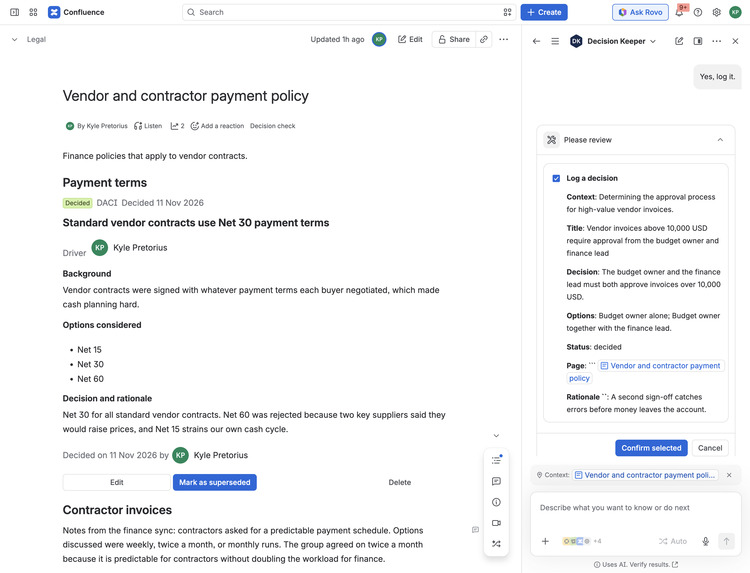
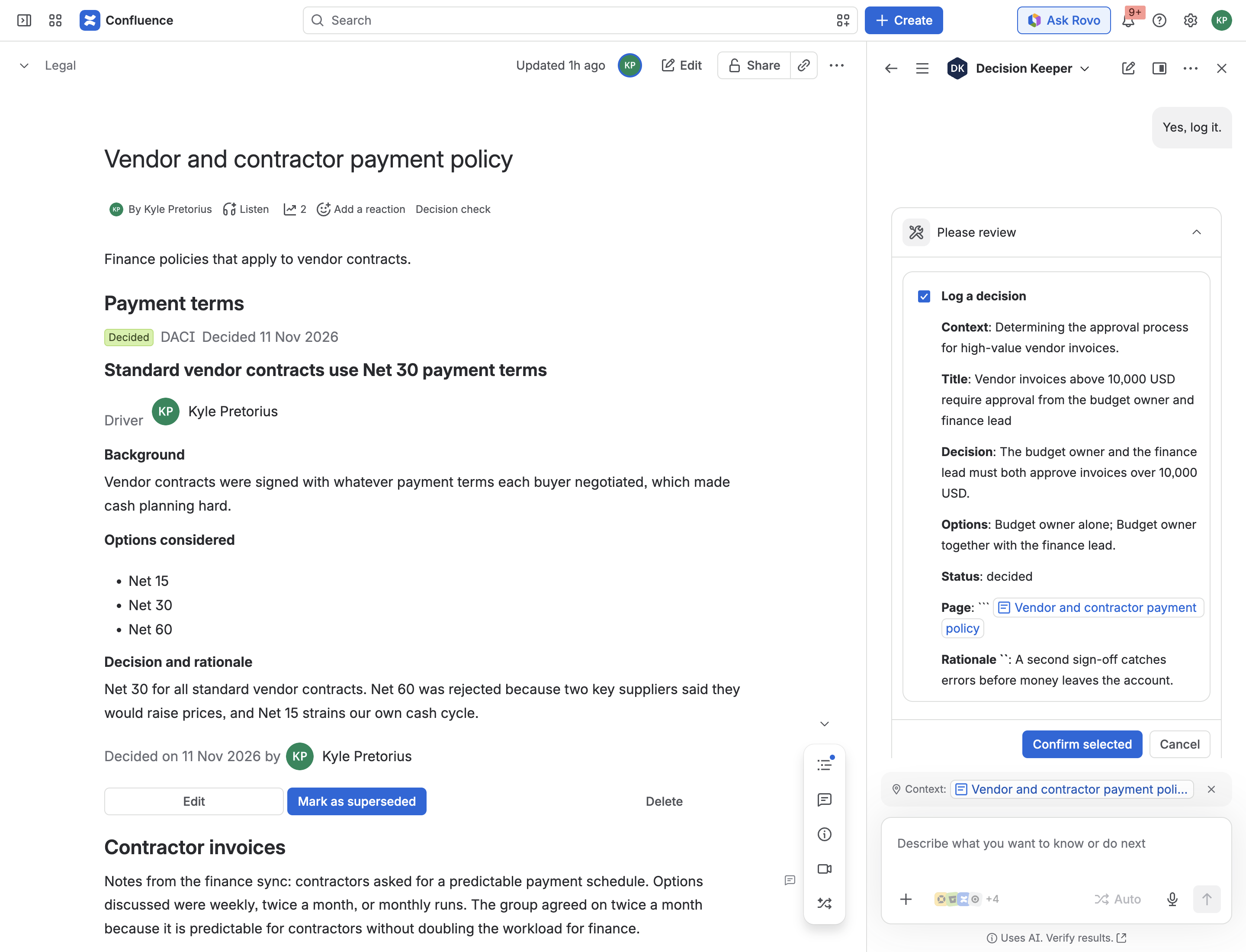
Rovo's confirmation card before the agent logs a decision from page notes. Nothing is saved until you confirm.
Inspiration
Business teams decide things all day: payment terms, pricing rules, who approves what, which calendar is the real one. Six months later someone writes a plan that quietly reverses one of those decisions, because nobody remembers it was made, or why. The decision is sitting on a Confluence page somewhere. Nobody finds it until the plan is already in motion.
Codegeist 2026 asks for apps that use context so teams can act with confidence. For a finance, legal, marketing or people team, the most useful context is often the plainest: what did we already decide, does it still stand, and does this new page run against it?
What it does
Decision Keeper for Confluence keeps a team's decisions as structured records on the Confluence pages where they belong, and puts them in front of people at the moment they matter.
- Decision Record macro. Type
/decisionon any page. Pick DACI, ADR, RFC or blank, then record the title, owner, context, options considered, the decision and its rationale. Statuses are Draft, Proposed, Decided and Superseded, with a history of who changed what and when. Superseding a decision links the old and new records. - Decision Register. One page under Apps lists every decision you are allowed to see, with search, filters, a details view, CSV export and a banner for decisions that have been open more than 14 days.
- Decision check on every page. A "Decision check" item under each page title reads the page and lists anything it may conflict with: a decided record whose rejected option the page proposes, a superseded decision the page still relies on, or a related decision that is still open. Every finding states its reason and links to the record.
- Check a draft. Paste a proposal into the register and get the same check before it becomes a page.
- Decision Keeper, a Rovo agent. Ask "What have we decided about vendor payment terms, and why?" or "Does this page conflict with any past decision?". The agent can also log a new decision from the notes on the page you are viewing, after showing you a summary to confirm, and can change a decision's status.
- Tools for other agents. The same seven actions are declared in a
rovo:mcpmodule. In Rovo Studio they show up under Add tools, Connected apps, and we ran one from a custom agent there. We have not tested an external MCP client.
People only ever see decisions on pages they can open. One function decides that for the register, the page check and every action, so it also holds for the agent and for tools used from other agents.
How we built it
It is a Forge app for Confluence and Rovo, written in JavaScript with UI Kit. It makes no network calls outside Atlassian and is eligible for Runs on Atlassian.
- Forge modules:
macro,confluence:globalPage,confluence:contentBylineItem,rovo:agent, sevenactionmodules, tworovo:skillmodules, onerovo:mcpmodule, and ten Forge functions. - Storage: Forge key-value storage. Records hold Atlassian account ids only. Display names are looked up from Confluence when a record is shown and are never stored.
- Permissions: four scopes:
storage:app,read:page:confluence,read:space:confluence,read:user:confluence. The app cannot write to Confluence content. Every Confluence read is made as the signed-in user, which is how page permissions are enforced. - The context layer is ordinary code, not a prompt. Search, explain, conflict check and follow-up review are pure functions over stored records (
src/lib/insight.js). The conflict check works out which option a decision chose and which it rejected, then looks in the draft for a rejected option, or for change wording such as "instead of" in the same sentence as what was chosen. The agent only words the result. The app itself calls no AI model. - Seven actions:
find-decisions,explain-decision,check-against-decisions,review-open-decisions,read-page,log-decision,set-decision-status. The caller's identity is taken from the Forge context, never from an input. - Skills at run time: Rovo's "Debug response" view shows the agent loading the matching skill ("Read Skills for agents") before it calls the actions. We saw this for both skills on 11 Nov 2026:
decision-conflict-reviewon a page check anddecision-capturewhen logging from notes. - Tests: 94 automated tests run the pure functions, the action functions and the resolvers against in-memory Forge fakes, including tests that a decision on a restricted page never appears in an agent answer.
This project started before the hackathon as a macro and a register (September 2026). Everything described above from "Decision check" onward was built during the submission period: the Rovo agent, the actions, skills and MCP module, the page check, the draft check, the details view, first-run sample decisions and the switch to storing account ids only.
Built by SKILLMERC with an AI coding agent; all features shown are implemented and tested.
Challenges we ran into
- Honest conflict detection. Matching words can only produce leads. Every finding therefore carries its reason, the wording says "possible conflict", and "no overlap found" comes with a note that it is not proof.
- Knowing which option was chosen. Records list options and a free-text rationale. The app infers the chosen option from the opening sentence of the rationale, says when the choice is inferred, and declines to guess when two options tie.
- Permissions inside an agent. App storage has no permission model. One function decides visibility for every surface, by asking Confluence as the user which pages they can open.
- Two apps from one codebase. An app with licensing in its manifest cannot have an installation link, so the judge build is an unlicensed twin of the Marketplace build, generated by a script.
Accomplishments that we're proud of
- When nothing is recorded, the actions return an explicit "no match" and the agent is instructed to say so, so it has nothing to invent a decision from.
- Logging a decision from chat uses Rovo's own confirmation step, and the record is filed on the page so the right people can see it.
- The page check and draft check work without Rovo, so the app is useful on any Confluence site.
What we learned
Rovo actions are most useful when they return small, labelled facts and a line of guidance, and leave the wording to the agent. A read-page action was needed before the agent could draw a decision out of meeting notes. Storing account ids only is simpler and safer than storing names.
What's next
- A Jira issue panel that lists decisions linked to the issue.
- An explicit "chosen option" field in the macro so nothing has to be inferred.
- A weekly digest of open and superseded decisions per space.
Known limits
- The conflict check matches words and states its reasons. It can miss a paraphrase and can flag agreement. The interface says so.
- The agent shows its initials as an avatar. The icon in the app is not picked up by Rovo yet (SVG and PNG both tried).
- Rovo words the answers, so the wording differs between runs. The facts come from the actions.
- The demo video is a screen recording of the judge build on a Confluence Cloud site. Waiting times are shortened and nothing is mocked.
Setup instructions for judges
- Open the installation link and install the app on a Confluence site where you are an admin. Approve the four permissions. A site with Rovo is needed for the agent; everything else works without it.
- In Confluence, open Apps, then Decision Register. Choose Add sample decisions. Five invented decisions load, each marked "Sample".
- Choose Check a draft, then Use the sample draft, then Check. You should see one possible conflict, one superseded decision and one open decision, each with reasons.
- Choose Details on any row to see the full record.
- Create a Confluence page that says "We propose moving standard vendor contracts to Net 60 payment terms instead of Net 30." Publish it and choose Decision check under the title.
- On a page, type
/decision, insert Decision Record, publish, and record a decision of your own. It appears in the register. - With Rovo: choose Ask Decision Keeper in the register (it opens the agent with a first question about decisions that are waiting), or open Rovo chat, choose the agent menu and search for Decision Keeper. Try "What have we decided about vendor payment terms, and why?", "Does this page conflict with any past decision?" and, on a page with meeting notes, "Log a decision from the notes on this page."
- To use the actions from your own agent: in Rovo Studio create an agent, choose Add tools, then under Connected apps choose Decision Keeper for Confluence, tick the tools you want and choose Add.
- Remove sample decisions in the register clears the sample data.
Documentation: https://skillmerc.github.io/decision-log-confluence/ Privacy policy: https://skillmerc.github.io/decision-log-confluence/privacy/
Bonus prizes
- Best Agents (Rovo). This is the bonus we are entering. The app includes a
rovo:agentmodule (Decision Keeper), sevenactionmodules and tworovo:skillmodules (decision-conflict-review,decision-capture). All seven actions have been run in real Rovo chat on a Confluence Cloud site, both skills were seen being loaded at run time, and the write actions go through Rovo's confirmation card. The actions are plain Forge functions over the app's stored data and are covered by automated tests. - Atlassian MCP (not the bonus we selected). The same seven actions are declared as tools in a
rovo:mcpmodule named "Decision Keeper tools". They list in Rovo Studio and ran from a custom agent there. We have not connected an external MCP client, so we make no claim beyond that. - Marketplace (not claimed yet). The licensed build has been submitted for listing as "Decision Keeper for Confluence" and is in Atlassian's review queue. It is not published yet. Review ticket: https://ecosystem.atlassian.net/browse/ECOHELP-184259
Built With
- atlassian-forge
- atlassian-rovo
- confluence
- forge-ui-kit
- javascript
- mcp
- node.js
- react
- rovo
