-
-
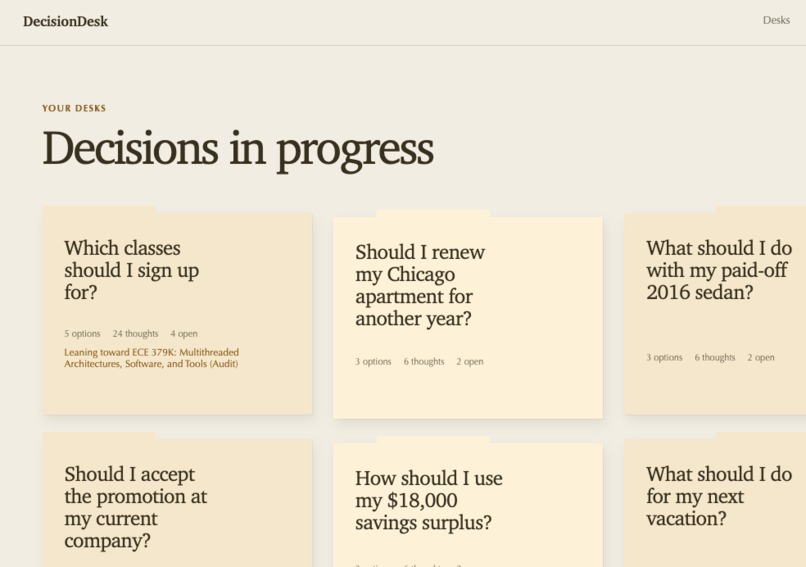
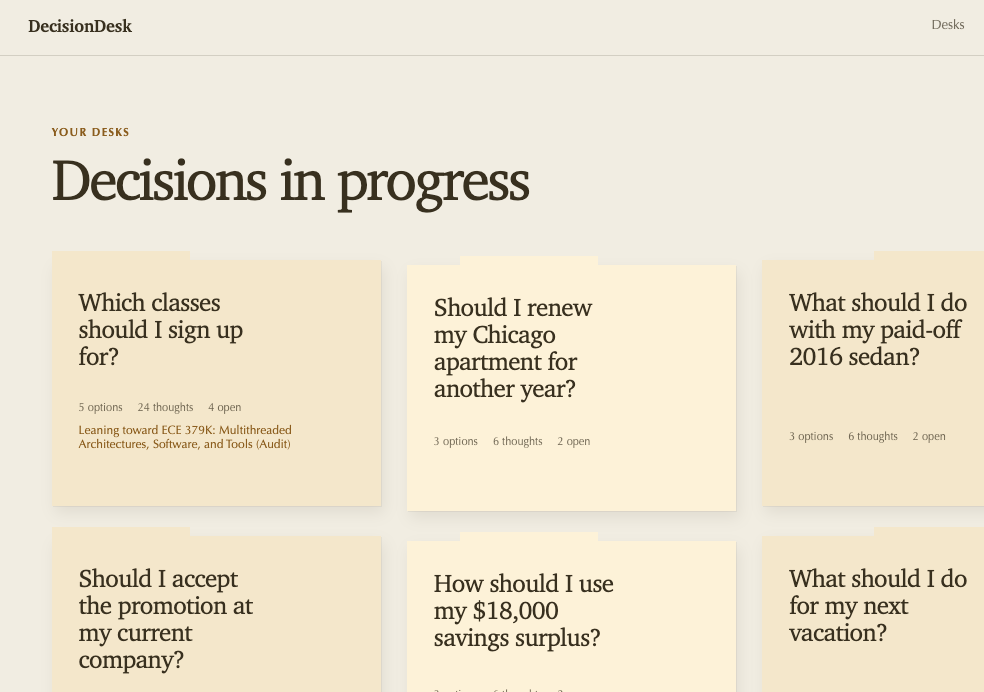
Home Page / Decision Desk Overview
-
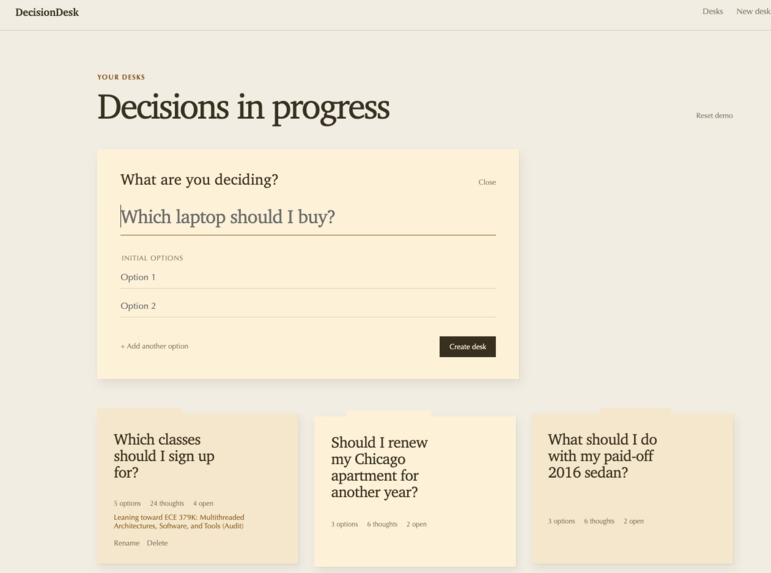
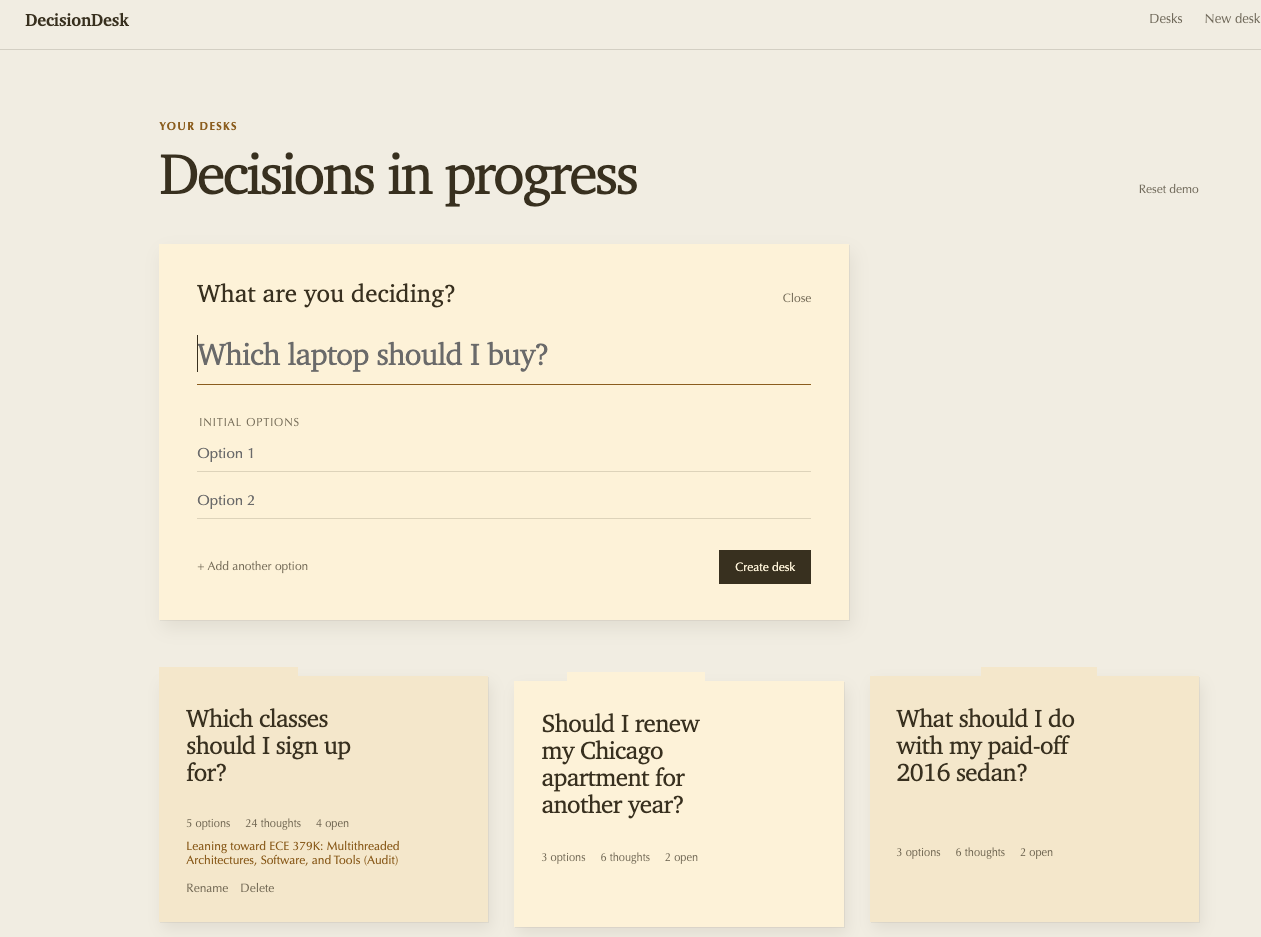
Manual Desk Creation
-
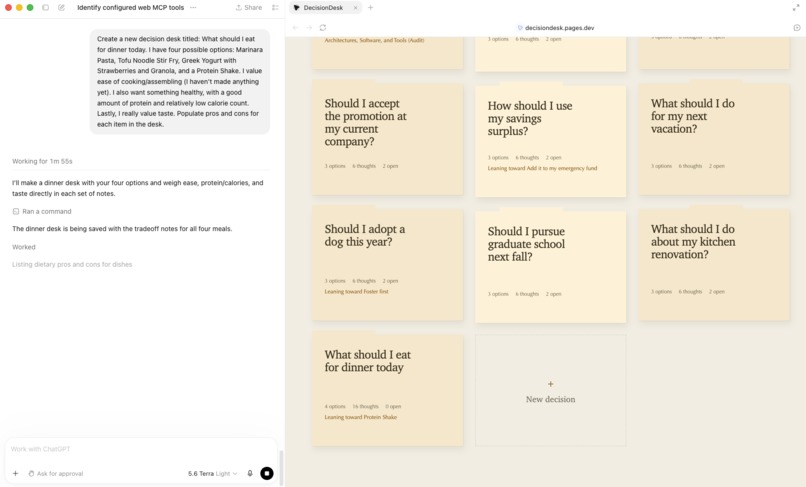
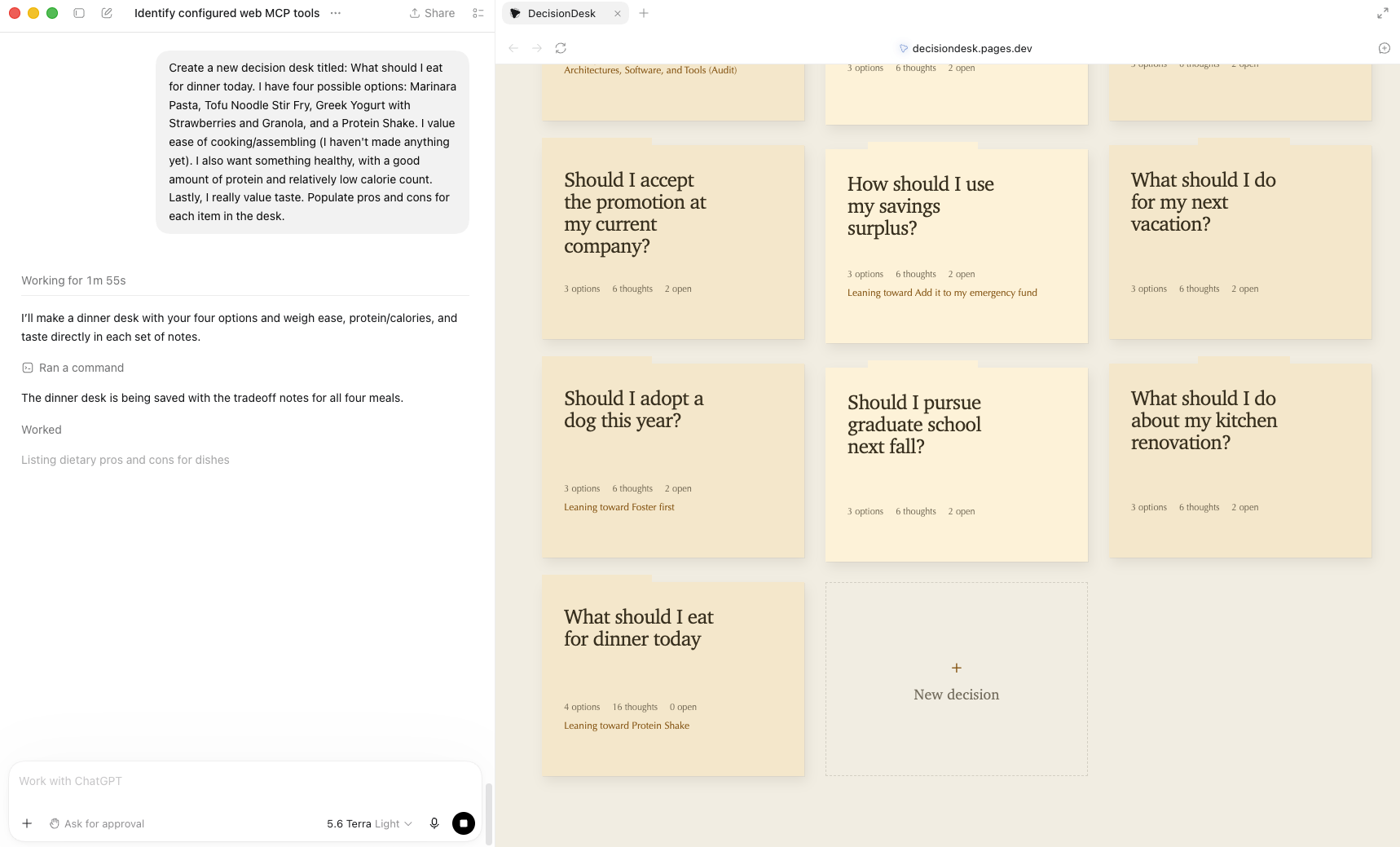
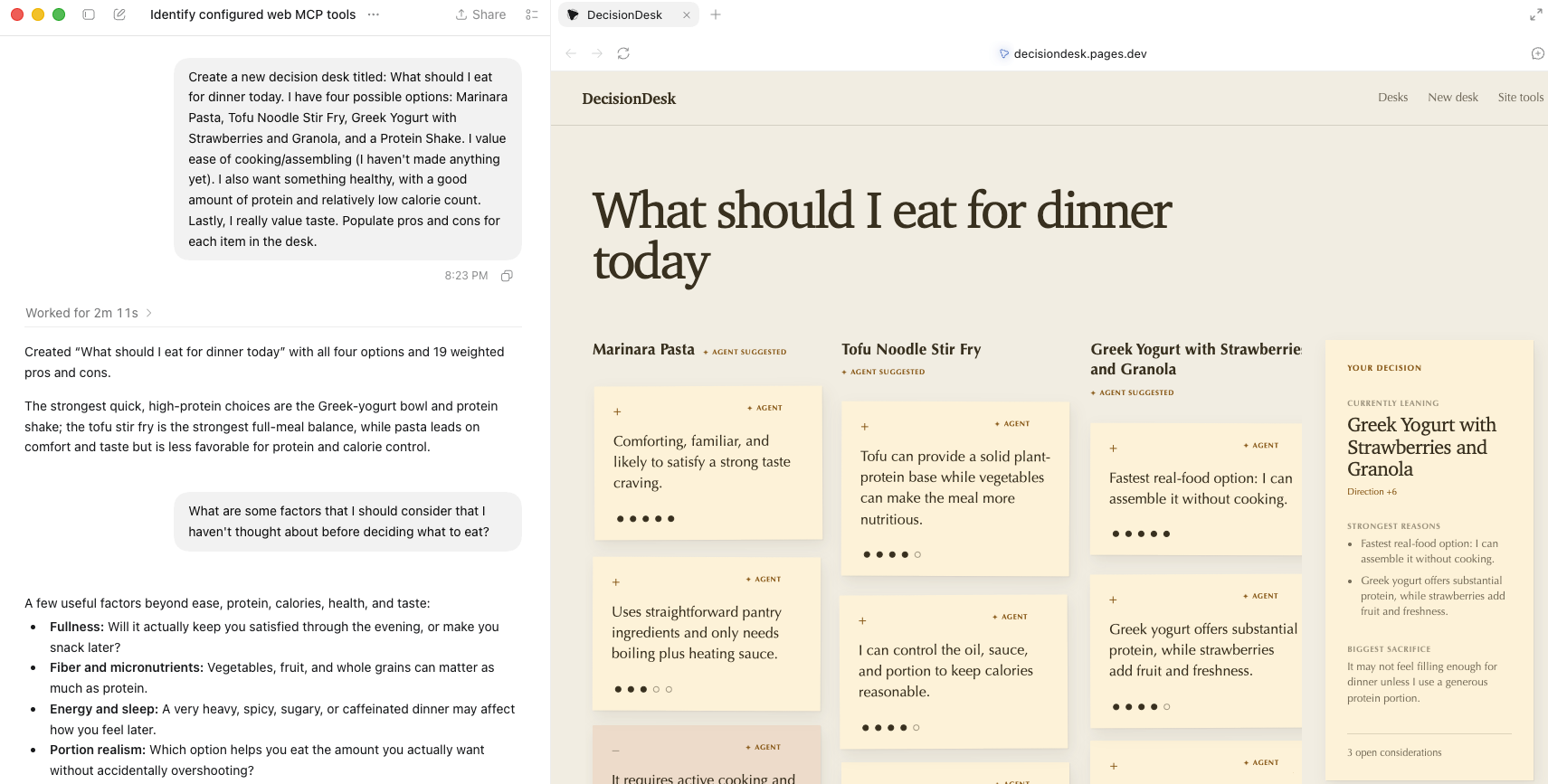
WebMCP, creating a desk
-
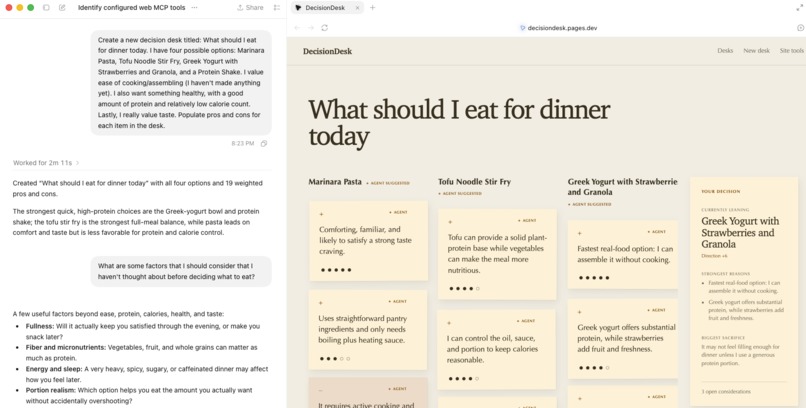
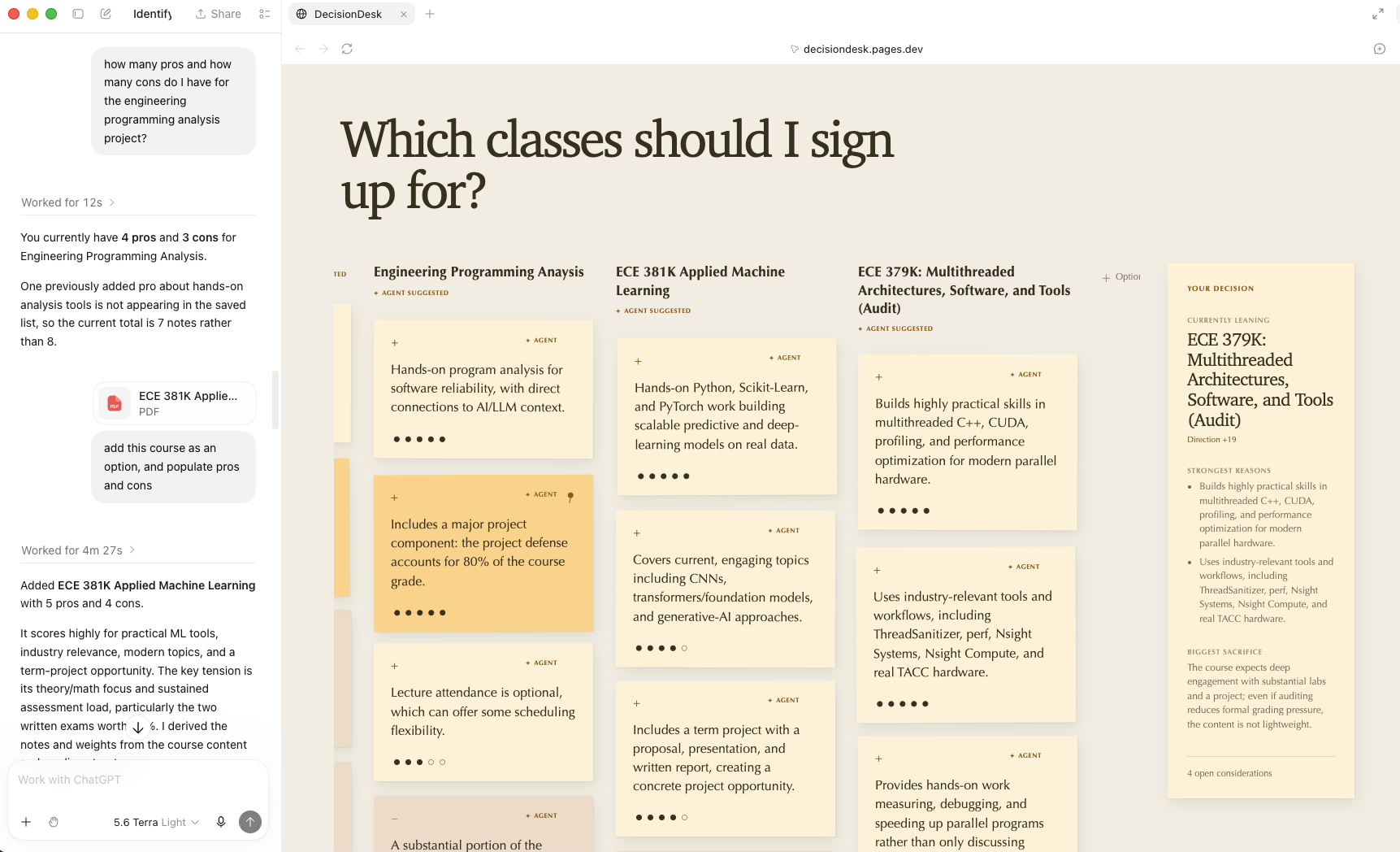
WebMCP, interacting with decisions, options, and tradeoffs (pros and cons)
-
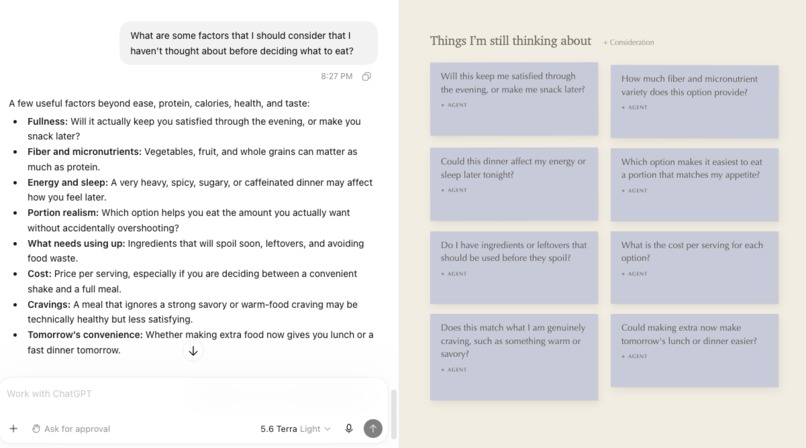
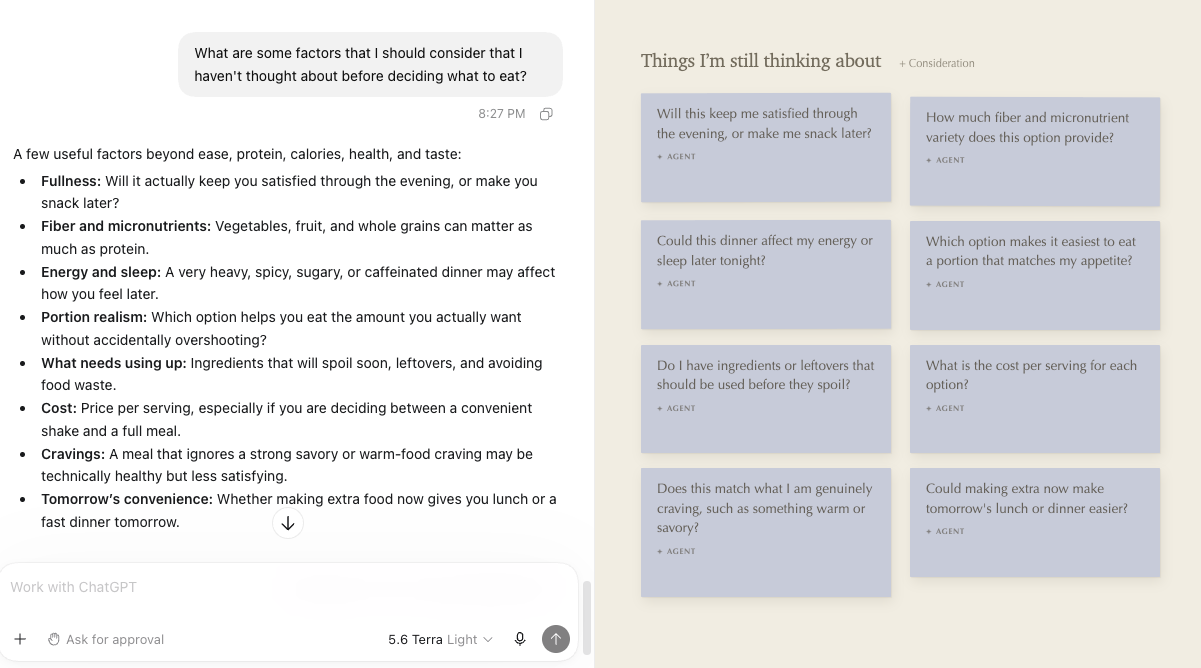
WebMCP, adding unresolved considerations
-
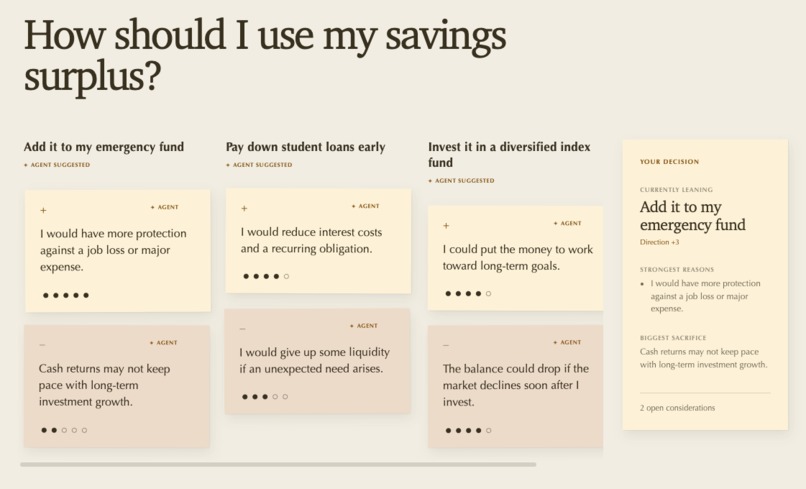
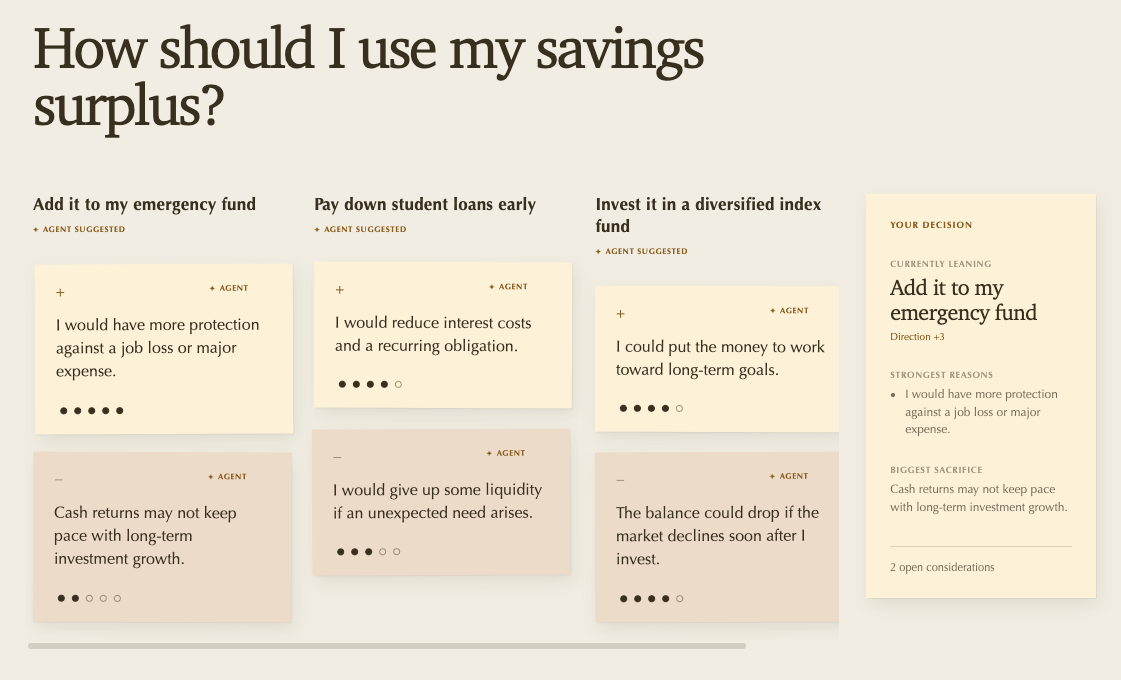
Desk UI
-
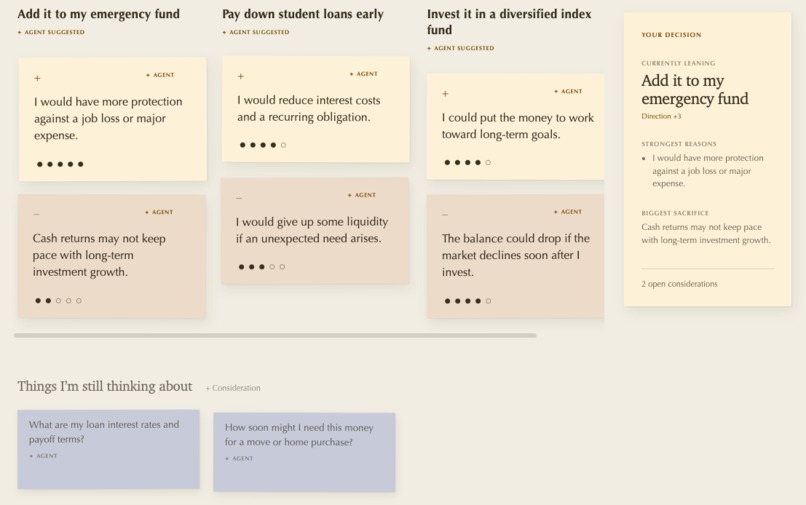
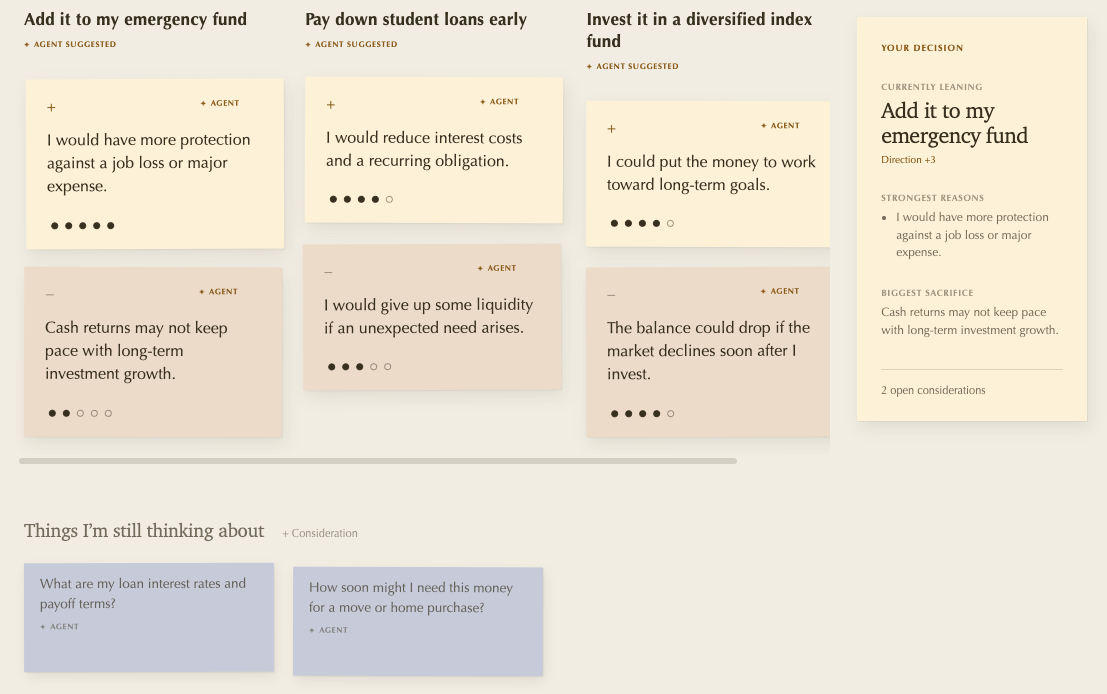
Desk UI (including blue unresolved consideration sticky notes)
-
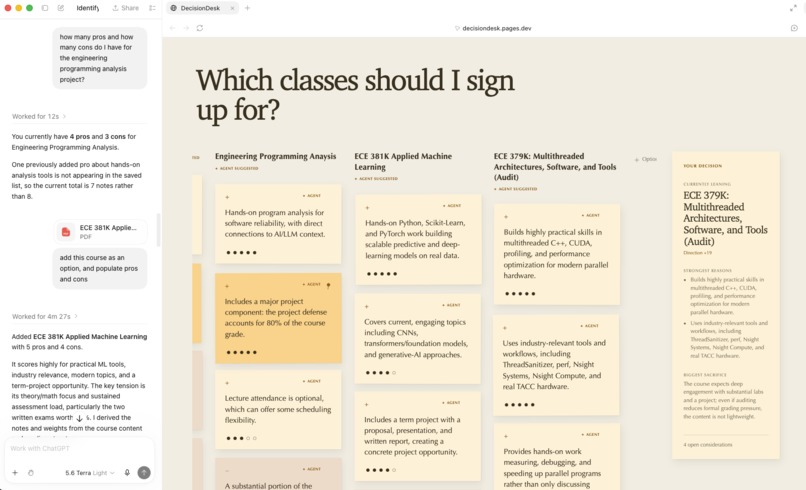
WebMCP, linking external sources (my own pdf files)
-
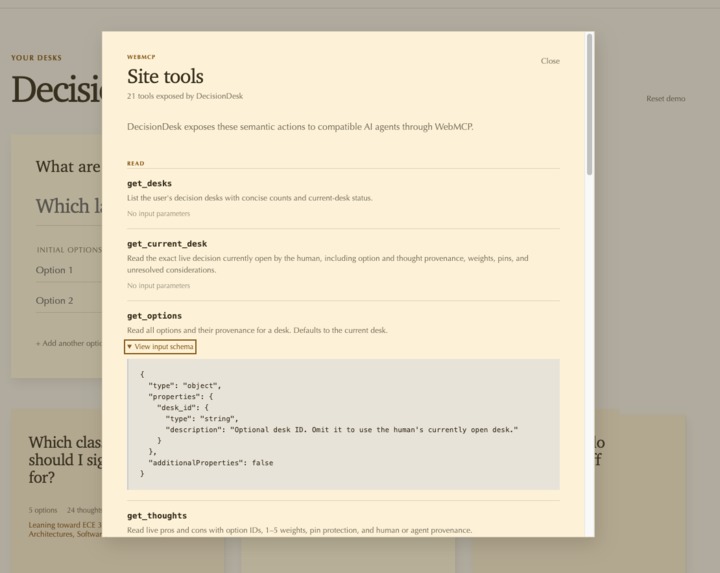
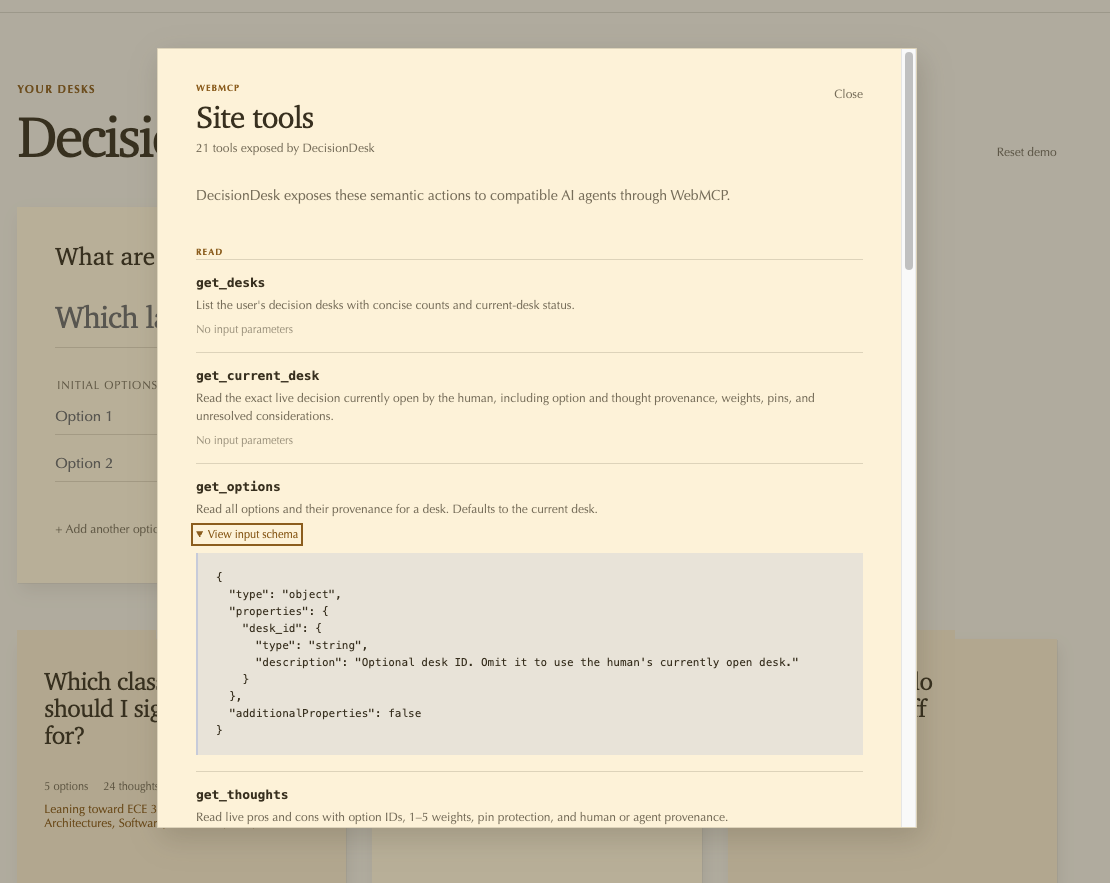
Popup showing list of WebMCP tools (revealed by "Site tools" button in top right corner)
Inspiration
I just finished registering for classes at university this semester. Part of that registration process involved finalizing which classes I would take, and which ones I would not. There were three classes, all of which I was interested in taking, all scheduled for the same time. I spent days deliberating which class to take, which class would teach me the most, and which class would just leave me with the highest feeling of FOMO. I later mentioned this to my friend, and we discussed tradeoffs, compared value vs. effort vs. interest. This structured process made the decision way more straightforward to make.
I've noticed that I tend to deliberate endlessly when I have many options to choose from (whether it is deciding what classes to take, what laptop to buy, or how to spend my afternoon). I thought that if there was a tool to help me structure and visualize my decision making process, I would greatly benefit from it. So, I decided to build Decision Desk :). It has already streamlined the decision making process in my life, and I truly believe this tool will be immensely beneficial to many others.
What it does
Decision Desk gives its users a visual space to structure a decision, instead of keeping all of the options and tradeoffs in their head. Users can create a "Desk" for a given problem or situation that they need to address. They can then add columns to the desk representing various decisions that they can take. users can add virtual sticky notes of pros and cons for each option, and unresolved considerations that they value. Pros and cons can be weighted based on how important they are, and users can pin certain judgments that matter especially strongly to them.
Where Decision Desk becomes more interesting is through WebMCP. An AI agent can inspect the same Desk the user is looking at, understand the options and tradeoffs that the user has already added, add new options that the user might not have thought about, contribute pros and cons, and pose unresolved questions or considerations the user may have missed. The user can then accept, edit, remove, reweight, or pin the agents' contributions. The goal is not for the AI to make the decision, but to help structure it for the user. The agent contributes reasoning and perspective, while the user remains in control of what actually matters to them.
How I built it
I started Decision Desk by first coming up with the higher level idea of what I wanted the application to be. From there, I worked with Codex to break that idea down into a staged implementation plan. Each stage had a specific goal, a set of tasks, and some exit criteria that had to be satisfied before I moved on. I would refine a stage, implement it, test and verify it, and only move onto the next stage once I was happy with how it worked. This ended up being a really useful way to build the project because I always had a relatively small problem in front of me instead of the entire application at once. I have also included the original Plan.md in the repository. Keep in mind that several design changes were made during implementation, so the Plan.md isn't an active source of truth for the codebase.
Decision Desk itself is a fully client-side React and TypeScript application built with Vite and deployed as a static site through Cloudflare Pages. I intentionally avoided adding a backend, database, or authentication system as it is intended to be a lightweight tool. Desks are persisted locally in the browser using localStorage, and that saved state is validated before the application restores it.
Probably the most important architectural decision I made was having the React interface and WebMCP share the exact same application state and business logic. I created a central store and action layer containing operations such as addOption, addPro, addCon, setThoughtWeight, pinThought, and addConsideration. React does not directly mutate the underlying state, and the WebMCP tools do not implement their own separate version of these operations. If I click "add pro" in the interface or an agent calls the add_pro tool, they both eventually call the same underlying action. State updates are then published through useSyncExternalStore. Because of this, something I change manually is immediately visible the next time an agent reads the Desk, and something the agent changes immediately appears in front of me.
Decision Desk exposes 21 WebMCP tools using document.modelContext.registerTool, with 7 read tools and 14 mutation tools. The read tools allow an agent to inspect things like the current Desk, options, thoughts, weights, pins, unresolved considerations, tradeoffs, and the current lean. The mutation tools allow the agent to actually contribute to that same Desk by adding and modifying options, pros, cons, weights, pins, and considerations.
I also spent quite a bit of time thinking about trust between the human and the agent. Agent-created content is marked with an agent tag so that it is always possible to tell what came from the agent. Humans can pin thoughts that are especially important to them, and the WebMCP tool descriptions tell agents to respect those pinned judgments. I also settled on a simple rule for uncertainty: if something is known, it can become a pro or con, but if something is unknown, it should become an unresolved consideration instead. The scoring system follows the same philosophy of keeping things simple. An option's score is just the sum of its pro weights minus the sum of its con weights, and Decision Desk presents this as a "lean" rather than pretending that a personal decision has some objectively correct mathematical answer.
Challenges I ran into
One of the biggest challenges was figuring out how to make the human and the agent actually feel like they were working on the same thing. It would have been fairly easy to build the interface normally and then bolt a few WebMCP tools onto it afterward, but I did not want the WebMCP integration to feel like a separate technical demo. The agent needed to read the exact state I was looking at, and if either of us changed something, the other needed to immediately see that change. This is what pushed me toward the shared store and action layer. It took more care when designing the state updates and APIs, but I think it made the final human-agent interaction much more natural.
Another challenge was deciding how much control the agent should actually have. There is a weird problem with decision making where some pieces of information are completely objective, while some of the most important pieces are incredibly subjective. An agent can understand that one apartment has a shorter commute than another, but it cannot decide for me how much I care about living near my friends. That is where weighted thoughts and pinned judgments came from. I wanted the AI to have enough control to genuinely help me reason through a decision, while still making it clear that the human's judgment is irreplaceable.
Uncertainty was another problem I had to think through. I did not want an agent to fill up a Desk with assumptions simply because those assumptions sounded plausible. For example, if the agent thinks parking price might matter but does not actually know what parking costs, it should not create a con saying "Expensive parking." Instead, it should add a consideration asking what parking costs. This eventually became the rule that known information becomes a sticky while missing information becomes a consideration. It seems simple in retrospect, but I think that distinction makes the agent significantly more useful.
Finally, getting the interface to look the way I wanted took several iterations. I knew that I wanted Decision Desk to feel a little bit like physically laying your thoughts out in front of you, and I did not want it to look like another generic SaaS dashboard. I eventually settled on horizontally arranged options, vertically stacked sticky notes, and subtle paper depth and animation. There is something useful about being able to literally look across all of the options in front of you, so I wanted the interface to stay focused on the decision itself rather than everything surrounding it.
Accomplishments that I'm proud of
Something that I am proud of is that Decision Desk functions as a standalone web application. However, WebMCP augments the application's functionality. You can essentially work alongside an agent in the browser, discussing tradeoffs, providing the agent with extra context, all while you visualize it. There is something nice about visually having all of your options laid out in front of you when making a decision, something that isn't possible with the textual interface of many LLMs. This app makes it possible to harness AI's reasoning capability with fine grained human input (which is irreplaceable of course).
What I learned
One of the biggest things I learned from building Decision Desk was how much usability and restraint matter compared to simply adding more features. I spent a lot of time simplifying the interface, improving visual hierarchy, and making the core interactions feel obvious instead of trying to cram in every idea I had.
Also, this was my first time working with WebMCP, and it changed how I think about agents interacting with websites. I also worked with Cloudflare pages for the first time, and it turned out to be super developer friendly and it was super simple to deploy my application.
I also learned how to optimize codebase quality when working with Codex by defining the product first, breaking it into implementation stages, refining each stage, and only moving on after testing and verifying the previous one. I spent a good amount of time involved in understanding each component of the codebase, identifying anti patterns, and encouraging Codex to implement best practices
What's next for Decision Desk
Sharing and collaboration! So many people consider the opinions of others (family, friends, colleagues, etc.) when making decisions.
Static Desk sharing is well within reach. A Desk could be encoded into a shareable link, allowing someone else to open Decision Desk on their own machine and reconstruct the same decision, including its options, tradeoffs, weights, and considerations.
I think real-time collaboration would be even more valuable. Multiple humans and their agents could work on the same Desk together (contributing options and tradeoffs, voting on how important certain considerations are, challenging assumptions, and reacting to each other's changes in real time). This expands Decision Desk's use case beyond personal decisions. Decision Desk could be useful for engineering design reviews, team planning, product decisions, comparing vendors, or any situation where a group needs to reason through competing tradeoffs together.
Built With
- cloudflare
- react
- vite
- webmcp

Log in or sign up for Devpost to join the conversation.