Inspiration
Time management is tricky - I find it particularly challenging to get ready to leave on time when I'm completely in the zone working on something... That's why I've been dreaming of an app like Daylish for years, but it wasn't technically feasible to build it until recently when Apple introduced the AlarmKit framework.
So when AlarmKit was announced at WWDC I immediately fired up Xcode and created a new project that's been keeping me very busy all summer!
What it does
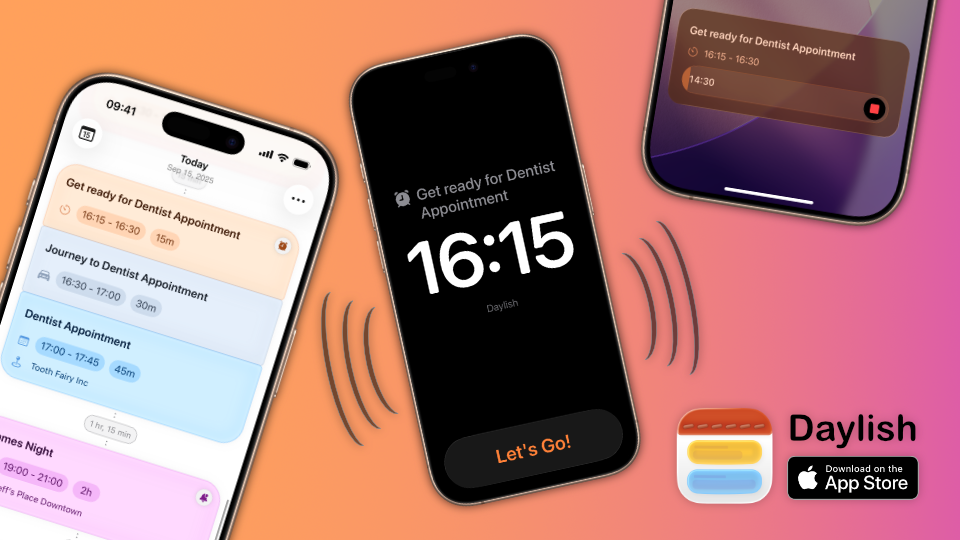
The basic idea is simple: Instead of having separate apps for calendars, timers and alarms, you have a single unified timeline where all of these items (and more) are displayed and linked to each other.
🗓️⏰ Event Alarms
For example, you could have a meeting at 9am and attach an alarm five minutes before to make sure you don't miss the meeting. If you then move the meeting event in Daylish, the alarm would get rescheduled automatically.
🔗🗓️Related Items
You can also create more complex sequences by adding related items to events. For example, you could have a preparation timer that starts 15 minutes before a presentation, allowing you to go over your slides one more time and make sure you're all set up.
⏰🎒 Leave On Time Routines
And for events that you have to get to first, there are "leave on time" routines that work backwards from the start of the event and take into account both the time it takes to get there as well as the time you need to prepare to actually leave the house ahead of time. When you need to start getting ready, an alarm will fire. The alarm will then transition into a countdown timer, showing you how much time you have until you actually have to be on the way to make it on time.
This feature has been a real game changer for me as it no longer feels like a struggle to be punctual consistently :)
How I built it
It's all written in Swift and 100% SwiftUI.
Having used Core Data for years, I really wanted to try something else because there were too many conceptual things I didn't love about it. And it seemed like Swift Data still had the same shortcomings for me personally, just with syntactic sugar on top...
That's why I decided to try Point-Free's SQLiteData for the first time and I haven't looked back. I can highly recommend it to anyone interested!
Accomplishments that I'm proud of
One aspect that brings me lots of joy is the smooth transition between the default agenda view and the scheduling mode where items are laid out proportionally on a timeline. It's best to check out the demo video to know what I mean. This took many iterations to get working smoothly and might very well be the most complex piece of SwiftUI code I've written thus far.
I was delighted when I saw that Daylish was prominently featured in multiple App Store storefronts on its launch day. It was also included in MacStories' iOS 16 review, had a dedicated article on AppAdvice and was mentioned in an article on TechCrunch, the hiro.report and a few other blogs and sites.
Overall, I couldn't be happier about how the launch went and how the app has been received so far, both on TestFlight and on the App Store.
What's next for Daylish
There are so many features that I originally wanted to have in version 1.0, but that simply didn't make the cut because otherwise I could not have launched alongside iOS 26...
Some of my favorites that I'm looking forward to are:
- MapKit integration to automatically calculate the travel time based on the location of an event and the location of the previous event and the selected mode of transport.
- Integration with reminders and maybe other to-do list services to see the tasks that are due for a given day and then allow quickly dragging them into your timeline to schedule a focus timer to work on them and allow marking them as done right from your timeline.
- Using Apple's Foundation Models to automatically generate emojis for calendar events (I already have a pretty solid prototype for this)
- Full support for editing calendar events with recurrence and other more complex fields + recurring alarms
- Support for other Apple platforms like watchOS, macOS and a proper iPad app as well as iCloud sync.
This is not necessarily the order in which I'll tackle them and there are many more features planned already based on early user feedback that will come before or in between these goals.
Ultimately my goal is that Daylish will be the ideal time management solution that links and interweaves everything that's happening throughout your day. This holistic view of your time allows you to effortlessly react to changes and go through your day - step by step.
Built With
- revenuecat
- sharinggrdb
- sqlitedata
- swift
- swiftui

Log in or sign up for Devpost to join the conversation.