-
-
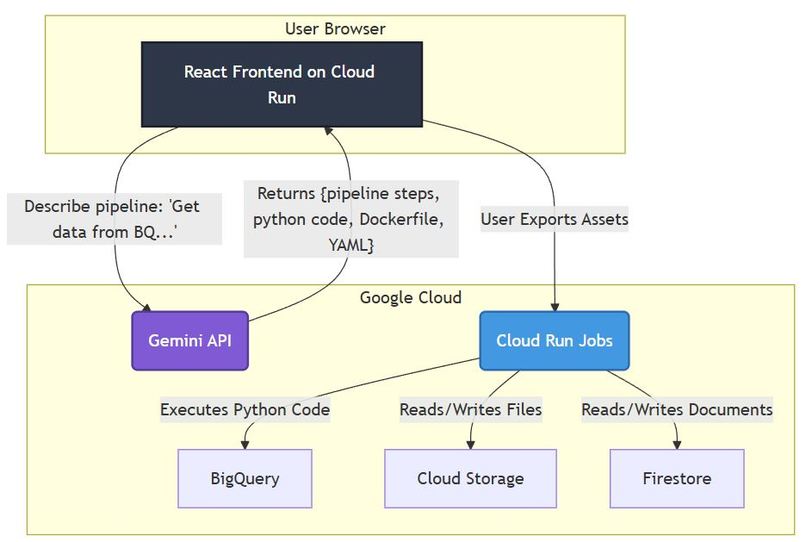
System architecture
-
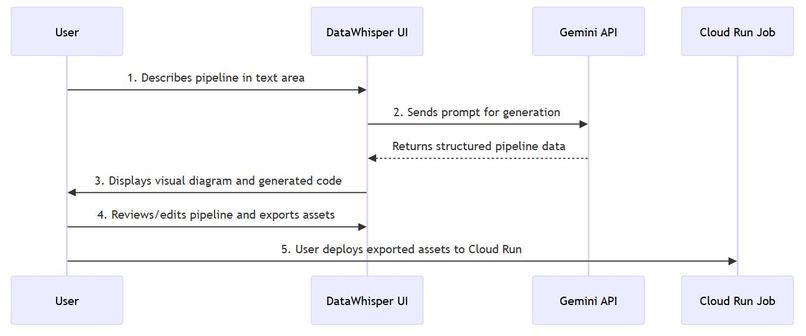
workflow
Inspiration
I've always felt a certain friction, a "translation cost," between an idea and its implementation. I could easily describe a data workflow in plain English: "First, pull the daily sales data from our Postgres database. Then, filter for transactions in the 'EMEA' region. After that, join it with the customer demographics from the CRM's BigQuery table. Finally, aggregate the sales by country and save the result as a CSV in our cloud storage bucket."
Describing it was simple. Building it was not. It meant wrestling with boilerplate code, juggling SDKs for different services, managing credentials, and writing intricate SQL queries. For every brilliant data idea, there was a mountain of tedious engineering that stood in the way. This friction was a creativity killer.
The "aha!" moment came while I was experimenting with Google's Gemini models. Their ability to understand context and generate structured data was astounding. The question hit me like a lightning bolt: What if I could bridge the gap between human language and machine execution? What if I could build a tool that let anyone, from an analyst to a CEO, simply describe a data pipeline and see it come to life?
That was the genesis of DataWhisper. The vision was to create an intuitive, visual interface where natural language prompts would be translated into executable data pipelines, effectively democratizing the world of data engineering.
What it does
DataWhisper is a natural language data pipeline builder. It allows users to describe their desired data workflow in plain English, and the application then translates this description into a visual, executable data pipeline.
At its core, DataWhisper:
- Translates Natural Language: Takes user prompts (e.g., "Extract sales data, filter by region, join with customer info, aggregate, and save to CSV").
- Generates Visual Pipelines: Converts the natural language description into a directed acyclic graph (DAG) representation, displayed interactively in the UI.
- Provides Code Output: Generates corresponding code (e.g., Python, SQL) for the described pipeline, making it immediately actionable.
- Offers Auxiliary Features: Includes functionalities like a template library for reusable pipelines, version history, and scheduling capabilities.
The goal is to democratize data engineering by making it accessible to a broader audience, reducing the need for extensive coding knowledge to build and manage data workflows.
How we built it
I built DataWhisper using a modern, component-based tech stack focused on interactivity and scalability:
- Frontend: Developed with React and TypeScript, leveraging Vite for a fast development experience. This allowed us to create a dynamic and responsive user interface.
- AI Integration: The core intelligence is powered by Google's Gemini API. Our geminiService.ts handles the communication, sending carefully crafted prompts to the LLM to ensure structured and valid JSON output representing the pipeline.
- Pipeline Logic: The pipelineUtils.ts module is responsible for parsing, validating, and transforming the AI's output into a usable graph data structure for the frontend.
- Visualization: The Visualizer.tsx component is central to the user experience, rendering the interactive DAG of the data pipeline.
- Component Architecture: The application is structured around reusable React components (e.g., PipelineInput.tsx, CodeOutput.tsx, DataTable.tsx, ThemeSwitcher.tsx, VersionHistory.tsx, SchedulerModal.tsx, SaveTemplateModal.tsx) to manage complexity and ensure a modular codebase.
- Testing: Comprehensive unit and integration tests (e.g., geminiService.test.ts, pipelineUtils.test.ts) were implemented to ensure reliability and maintainability.
The workflow involves the user entering a prompt, which is then sent to the Gemini API via our service. The AI's structured response is processed, validated, and then rendered visually, with options to generate code or manage the pipeline.
Challenges we ran into
Developing DataWhisper presented several significant challenges, primarily revolving around the inherent complexities of AI integration and interactive UI development:
LLM Output Consistency and Reliability: The biggest hurdle was ensuring the Large Language Model consistently produced valid, structured, and accurate JSON output from natural language prompts. Early iterations often resulted in "hallucinations" or malformed data. This required extensive prompt engineering, including detailed schema definitions, few-shot examples, and a robust validation and error-correction layer within pipelineUtils.ts to handle and gracefully recover from unexpected AI responses.
Complex Frontend State Management: As the interactive pipeline grew in complexity (with nodes, connections, user interactions, and AI-generated elements), managing the application's state became a significant challenge. We had to carefully design our state architecture, utilizing React's Context API (ThemeContext.tsx) for global concerns and a combination of useState and useReducer for local and component-specific state, to avoid "prop-drilling" and maintain a predictable data flow.
Dynamic Graph Visualization: Building the Visualizer.tsx component to dynamically render and interact with a Directed Acyclic Graph (DAG) was technically demanding. This involved complex algorithms for node positioning, efficient edge routing to prevent overlaps, and ensuring smooth interactivity (e.g., dragging nodes, adding connections) without sacrificing performance. I had to delve into graph layout algorithms and optimize rendering for a fluid user experience.
Accomplishments that we're proud of
First and foremost, I'm incredibly proud of successfully lowering the barrier to entry for data engineering. I created a tool that empowers data analysts, scientists, and business users—not just seasoned engineers—to construct complex data pipelines using simple, natural language. Seeing a plain English sentence transform into a visual, structured pipeline on the screen is the core accomplishment of this project.
I'm also proud of the intuitive and interactive user interface. By breaking the application down into a suite of modular React components like Visualizer.tsx, PipelineInput.tsx, and DataTable.tsx, I built a fluid and responsive experience. The visual feedback is immediate, allowing users to instantly validate their ideas.
Finally, we're proud of the robust AI integration. Engineering the geminiService.ts to reliably convert unstructured language into a strict, predictable JSON format was a major challenge. Through rigorous prompt engineering and building a validation layer in pipelineUtils.ts, we achieved a high degree of accuracy, making the tool not just a novelty, but a genuinely useful piece of software.
What we learned
This project was a significant learning experience, reinforcing several key principles of modern software and AI development.
Prompt Engineering is a Discipline: We learned that the quality of the AI's output is directly proportional to the quality of the input prompt. Crafting the perfect prompt is an iterative science. It requires providing clear instructions, few-shot examples, and a well-defined schema to guide the model toward the desired output consistently.
Abstraction is Power: Modeling the data pipeline as a formal mathematical graph, $G = (V, E)$, was critical. This abstraction simplified everything from the backend logic that processes the pipeline structure to the frontend code in Visualizer.tsx that renders it. It provided a clear blueprint for managing complexity.
The Importance of a Solid Foundation: Our choice of a modern tech stack (TypeScript, React, Vite) and a component-based architecture paid dividends. It allowed for rapid development, easier debugging, and a high degree of code reuse. Furthermore, our early focus on creating a comprehensive test suite (e.g., geminiService.test.ts, pipelineUtils.test.ts) saved us countless hours by catching regressions before they became major issues.
What's next for DataWhisper - Natural Language Data Pipeline Builder
I'm just scratching the surface of what's possible. Our roadmap is focused on evolving DataWhisper from a pipeline builder into a complete, intelligent data orchestration platform.
Real-time Execution & Monitoring: The next major step is to move beyond just generating code. We plan to integrate with backend services like Google Cloud Run or Argo Workflows to allow users to execute their pipelines directly from the UI. This will include a monitoring dashboard to track run history, status, and performance.
Expanded Connectivity: We will be constantly adding to our library of data connectors. The goal is to support a vast ecosystem of databases, data warehouses, and SaaS applications, making DataWhisper the central hub for any data-related task.
AI-Powered Optimization: We plan to leverage AI for more than just generation. The next version will include an "Optimize" button that uses an AI agent to analyze the user's pipeline and suggest improvements for cost-efficiency, speed, or reliability.
Collaborative Workflows: We envision a future where teams can collaborate on data pipelines in real-time, much like they do in a Google Doc. This will involve adding features for sharing, commenting, and multi-user editing.
Built With
- cloudrun
- gcp
- gemini
- node.js
- postgresql
- react
- typescript
- vite

Log in or sign up for Devpost to join the conversation.