-
-
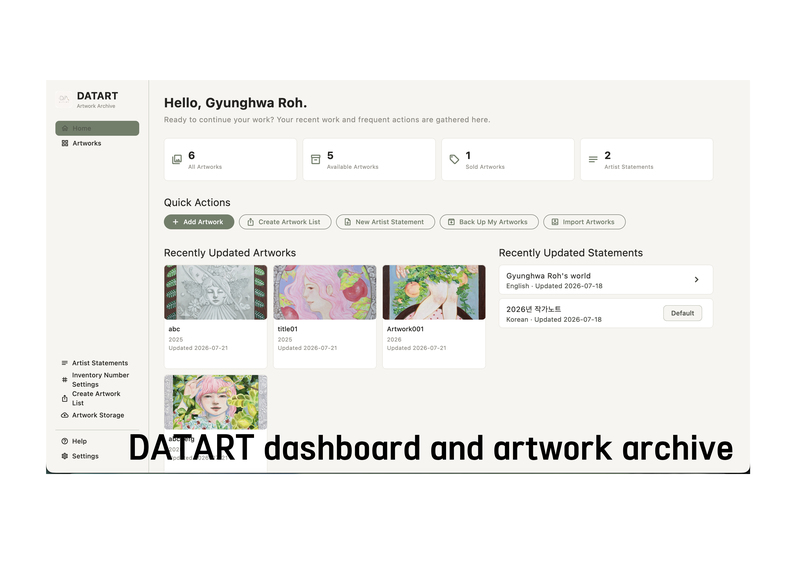
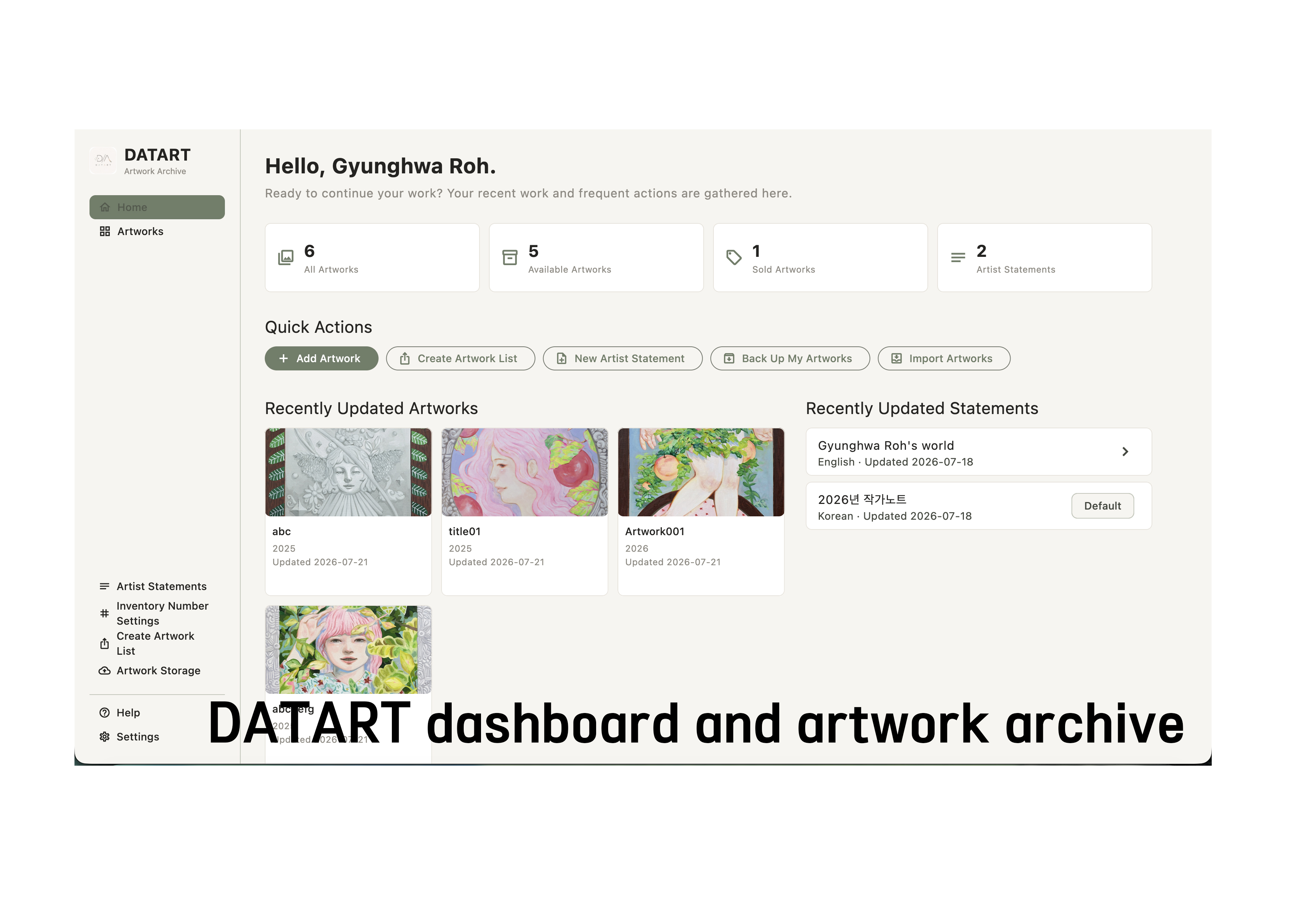
DATART Dashboard
-
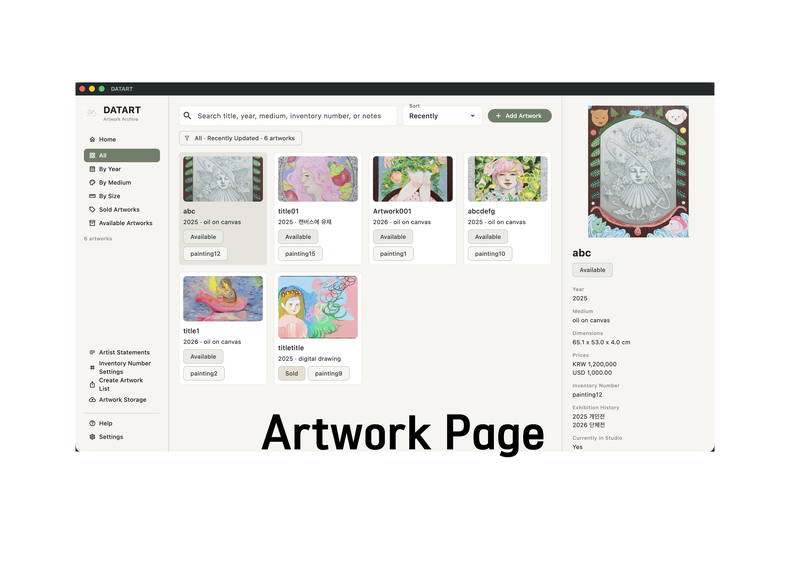
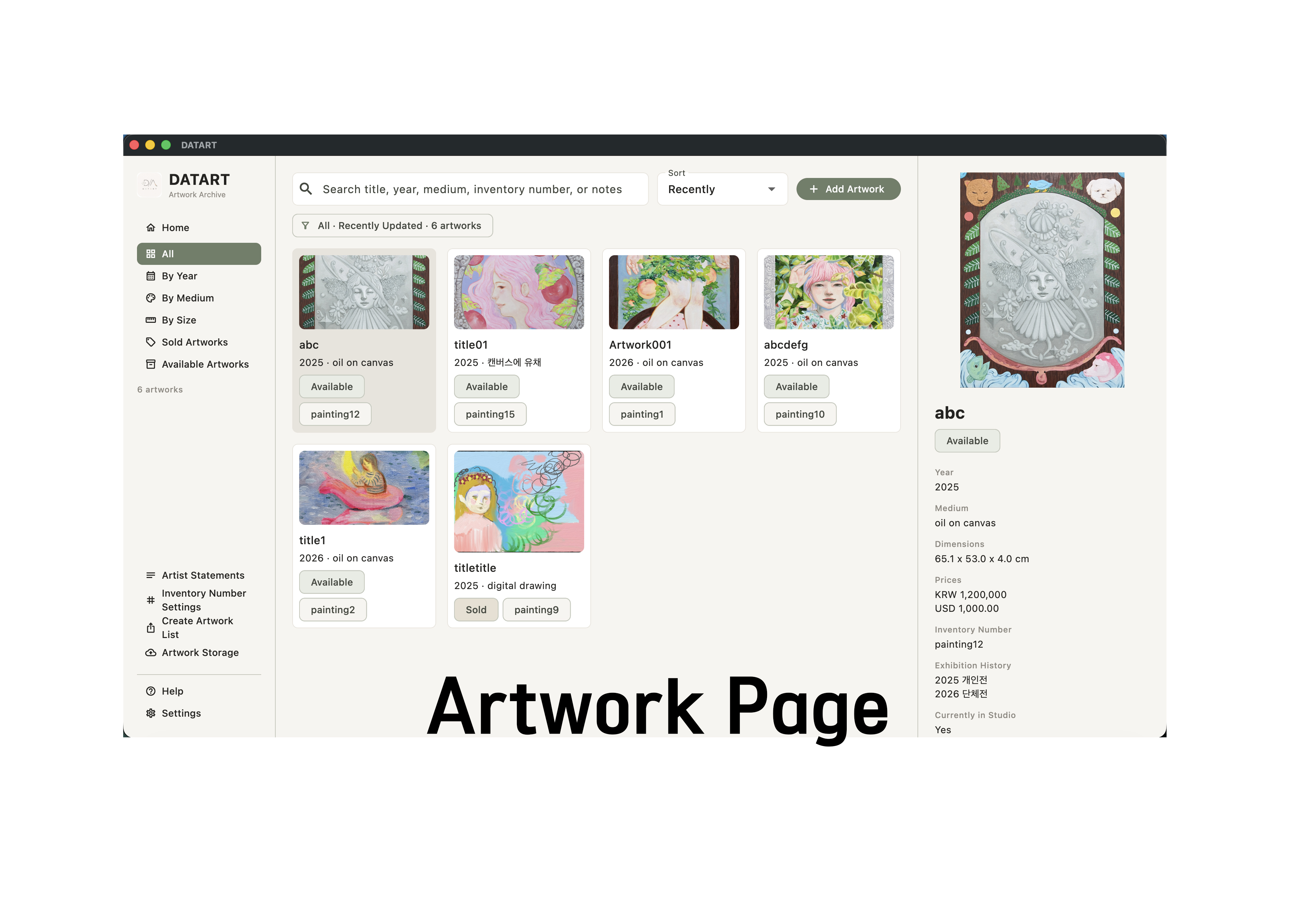
DATART Artwork Page
-
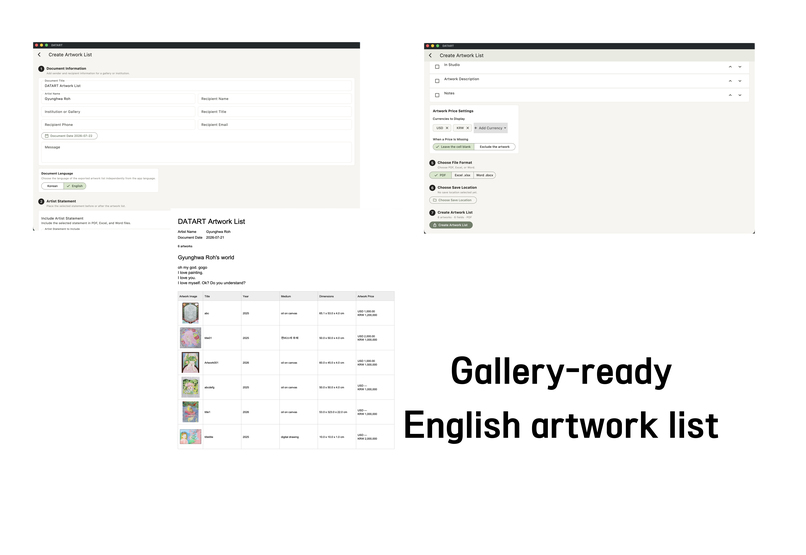
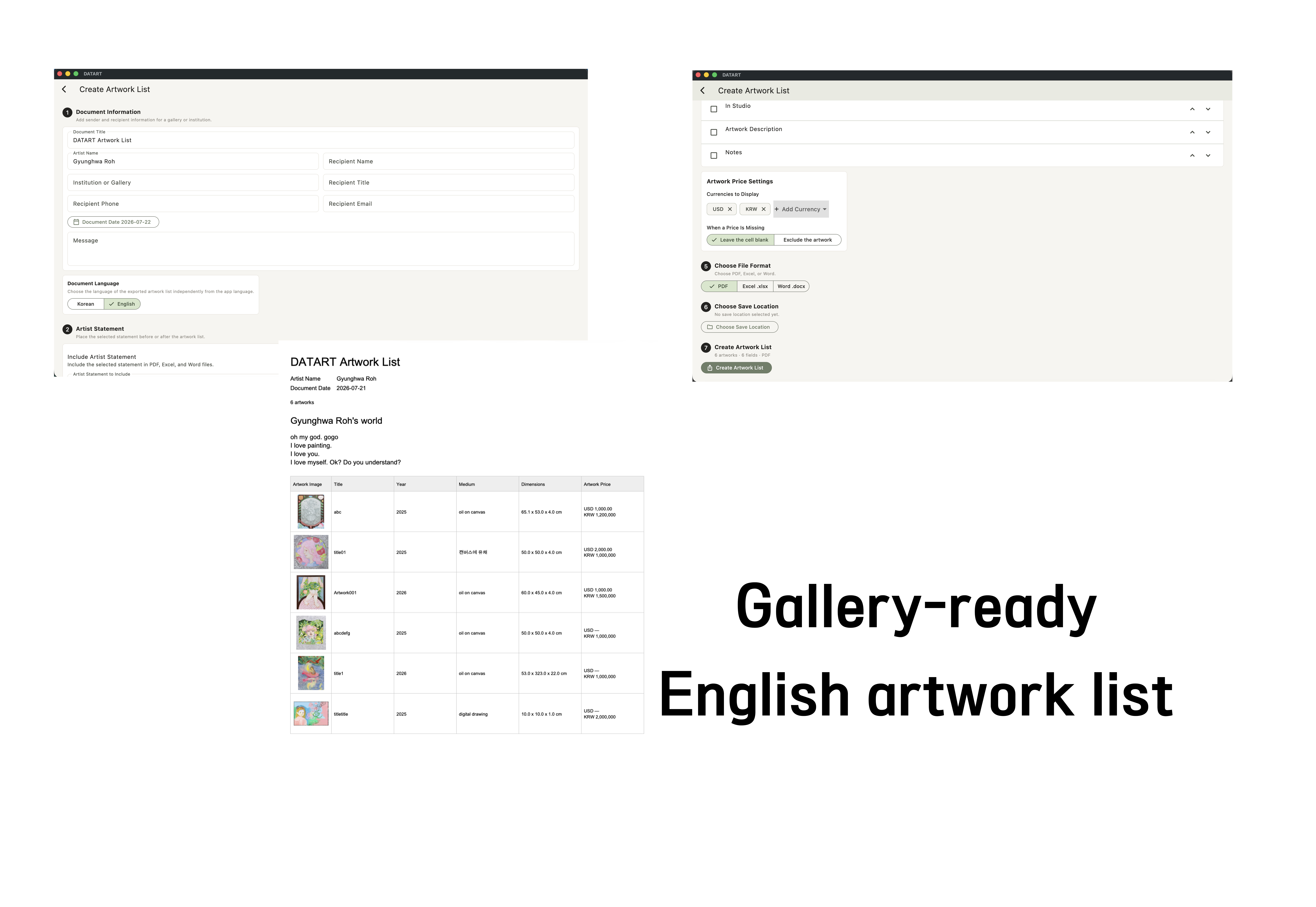
Create Artwork List
-
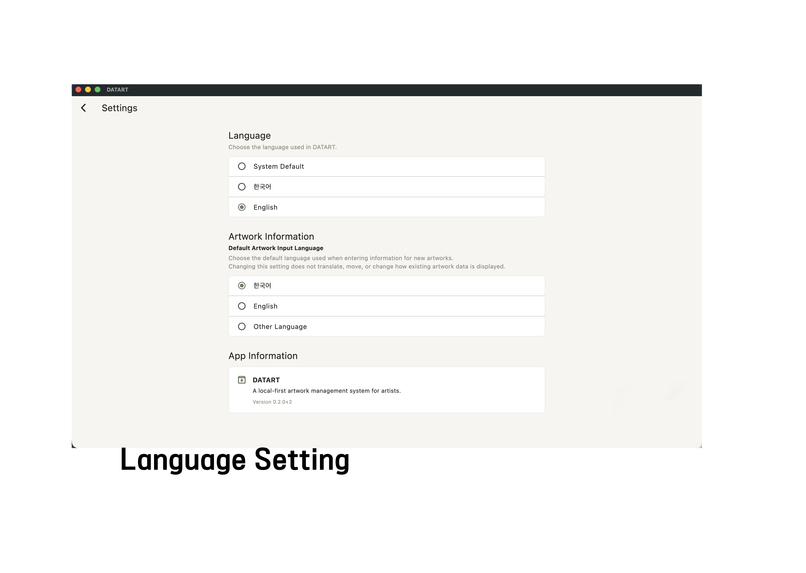
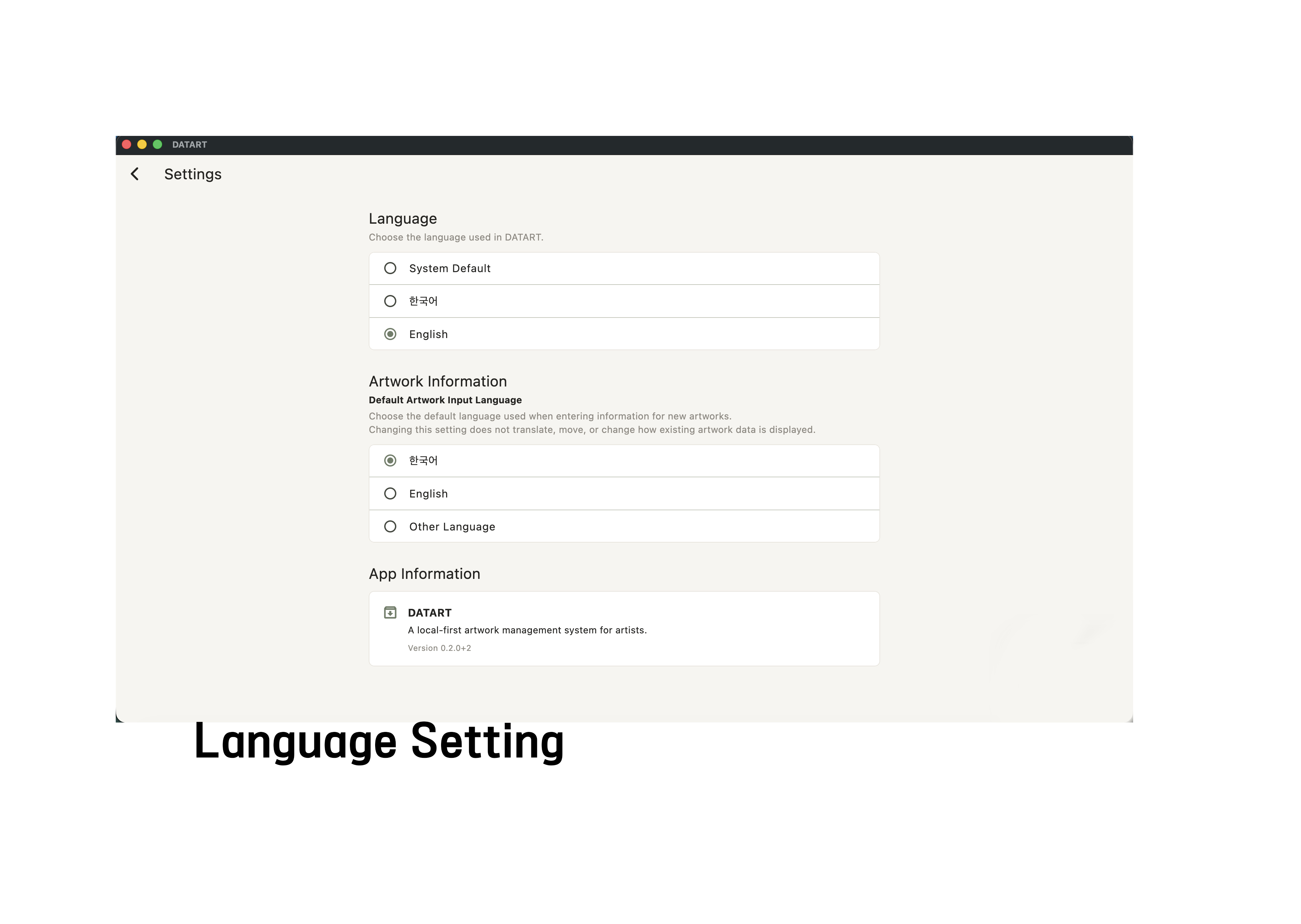
Language Setting
Inspiration
Artists may spend decades creating and exhibiting work, yet the records surrounding those works are often far more fragile than the works themselves.
I have always found it painful to see artists lose important information because their records were never managed consistently. In other cases, years of artworks accumulate before anyone begins digitizing them, turning archiving into an expensive and time-consuming project.
Incomplete documentation can also make it harder for artists to establish provenance and protect themselves when questions of authenticity arise.
I built DATART while thinking about the artists around me. I wanted to create a tool that would preserve not only images of their work, but also the information and history that allow each work to remain identifiable over time.
My goal was to make artwork management approachable enough for artists to use regularly, while still providing the structure required for professional archives, exhibitions, sales, and gallery communication.
What it does
DATART is a bilingual, local-first artwork management system built by an artist, for artists.
It allows artists to manage:
- Artwork images and thumbnails
- Titles, years, media, dimensions, and descriptions
- Original-language and optional English metadata
- Inventory numbers
- Exhibition and sales information
- Artist profiles and artist statements
- Prices in multiple currencies
- Artwork availability and storage status
Artists can search, filter, sort, and organize their archive, then create professional artwork lists in Korean or English.
The language used in the application is independent from the language of the exported document. This means an artist can work in Korean while creating an English artwork list for an international gallery.
Artists can also select only the currencies required for a specific recipient. Before export, DATART checks whether any selected artworks are missing prices in those currencies. The user can leave missing prices blank or exclude those artworks from the document.
DATART generates:
- PDF documents for presentation and sharing
- DOCX documents for further editing
- XLSX spreadsheets with numeric price cells for calculation and sorting
- CSV and JSON data exports
- ZIP backups containing artwork data and images
DATART is intentionally local-first. Artwork records, images, artist information, prices, and backups remain on the user’s computer unless the user explicitly exports them.
How we built it
This project did not begin by asking Codex to build an undefined idea.
I first designed the structure of DATART in a text document. I considered what information artists need, how the screens should connect, and how artwork records should be stored, searched, exported, backed up, and restored.
I then discussed the plan with ChatGPT and refined the product structure before implementation.
The development process became a continuous back-and-forth workflow:
- I defined the artistic and practical problem.
- ChatGPT helped me examine the product logic and prepare detailed implementation plans.
- Codex inspected the existing repository and implemented the changes.
- I manually tested the results as both the creator and a real working artist.
- When I discovered a problem, I returned to ChatGPT to reconsider the workflow and then asked Codex to revise and verify the implementation.
During OpenAI Build Week, I used GPT-5.6 in Codex as an engineering collaborator to meaningfully extend the existing DATART project.
GPT-5.6 and Codex helped with:
- Inspecting the existing Flutter, Riverpod, and Drift architecture
- Designing an ARB-based localization system
- Creating a backward-compatible database migration
- Replacing a single-price model with a multi-currency structure
- Separating app language, input language, and export document language
- Preserving older backups and imported data
- Testing PDF, DOCX, XLSX, JSON, CSV, and ZIP workflows
- Finding and correcting layout problems in smaller windows
- Verifying the macOS Release build, entitlements, DMG, and checksum
DATART itself does not require AI or an internet connection at runtime. GPT-5.6 and Codex were used as development collaborators rather than as features embedded inside the application.
Challenges we ran into
Supporting artists with decades of unstructured records
DATART can immediately help artists who are just beginning their careers, as well as artists who already maintain relatively organized records.
But I kept thinking about artists who have worked for several decades without managing their data consistently. How can a program help someone who may already have hundreds or thousands of undocumented works?
There is no completely effortless solution. Someone still has to spend time identifying, photographing, and entering the works. Software cannot eliminate that labor entirely.
What it can do is give that labor a clear structure, preserve the results safely, and prevent the same problem from continuing into the future.
This question also led me to think about future workflows for importing and organizing large legacy archives more efficiently.
Why I chose desktop first
When I first imagined DATART, I considered creating a lightweight mobile archiving tool. Taking a photograph with a phone and immediately creating a record seemed extremely convenient.
However, that convenience also revealed an important limitation.
For visual art, the quality of the master image matters. A photograph taken quickly on a phone can easily become the primary archival image, even when it was never intended to serve that purpose.
Modern phone cameras are powerful, but they still cannot fully replace a controlled photography environment, a dedicated camera, and a properly managed color workflow. For paintings and other color-sensitive works, accurate capture and color management are essential.
Many artists already overlook these standards. I became concerned that releasing a mobile-first version could make low-quality documentation easier to produce and harder to correct later.
For that reason, I decided to begin with macOS and Windows desktop applications. After gathering enough real user experience, I may develop a mobile companion that supports the archive without encouraging casual phone images to replace properly produced master files.
Preserving existing data
Another challenge was introducing multilingual metadata and multi-currency pricing without damaging existing records.
DATART already had artwork data, backups, exports, and a previous release. The new system needed to preserve older KRW prices, existing images, JSON data, and ZIP backups while adding a more flexible international workflow.
This required a backward-compatible database migration and extensive regression testing.
Manual QA also revealed problems that automated tests did not immediately expose, including truncated English descriptions, inconsistent sidebar menus, and language settings that could have changed the interpretation of existing artwork records.
These issues were found quickly, and Codex was able to correct them precisely.
Accomplishments that we're proud of
Before Build Week, DATART already included Korean-first artwork management, image storage, search, filtering, document exports, and local backup and restore.
During Build Week, I meaningfully expanded the project with:
- Full Korean and English localization
- Independent app, input, and document language workflows
- Original-language and optional English artwork metadata
- A one-to-many multi-currency artwork price model
- Migration of existing single-currency KRW prices
- Currency-selectable PDF, DOCX, and XLSX exports
- Missing-price review and export policies
- Backward-compatible JSON and ZIP workflows
- Unified sidebar navigation
- Universal macOS support for Apple Silicon and Intel Macs
- Removal of an unnecessary Release debug entitlement
- A verified macOS DMG and SHA-256 checksum
- Expansion of the automated test suite to 165 passing tests
I am especially proud that these changes were not added as isolated features. They form a coherent workflow that connects private studio records with bilingual metadata, international pricing, and gallery-ready documents.
What we learned
The most important lesson was that careful planning is more efficient than immediately beginning implementation.
When the data model, user flow, and edge cases were discussed before coding, Codex produced more accurate results and fewer errors.
The combination of planning with ChatGPT, implementation with Codex, automated testing, and manual QA created a much more reliable process than unstructured trial and error.
I also learned how important domain knowledge is.
I am not only building software for artists. I am an artist who has lived with the problem this software addresses.
During manual testing, I could recognize when a feature was technically correct but did not yet match the way artists actually work. Those observations led to important decisions, such as separating app language from document language, allowing selective currency exports, and treating the default artwork language as an input preference rather than changing the meaning of existing records.
Compared with some of my previous development experiences, this project felt remarkably stable. Problems occasionally appeared during manual QA, but they were usually easy to identify, reproduce, and correct.
What's next for DATART
The next major step is a Windows version.
After more artists have used DATART and enough real-world feedback has been collected, I want to explore a carefully designed mobile companion rather than simply reproducing the full desktop application on a phone.
I am also interested in creating better workflows for artists who already have decades of accumulated, unstructured records.
Possible future directions include:
- More efficient bulk data entry
- Assisted organization of legacy archives
- Additional languages and regional formats
- Flexible measurement and currency preferences
- A mobile companion for reference and lightweight updates
- Improved workflows between artists, galleries, and archives
DATART began as an attempt to prevent artistic histories from disappearing into folders, spreadsheets, and memory.
My goal is for it to become a quiet but dependable part of an artist’s studio practice—one that helps each work remain connected to its image, information, and history.

Log in or sign up for Devpost to join the conversation.