-
-
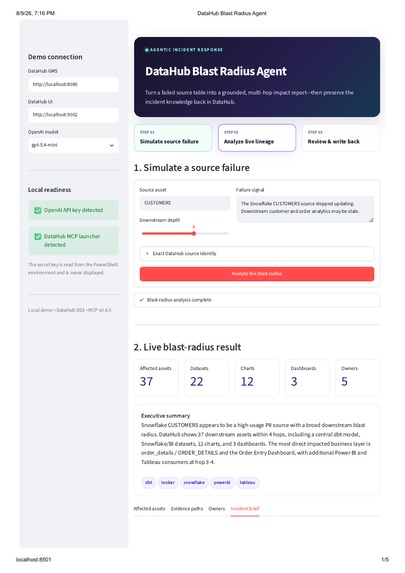
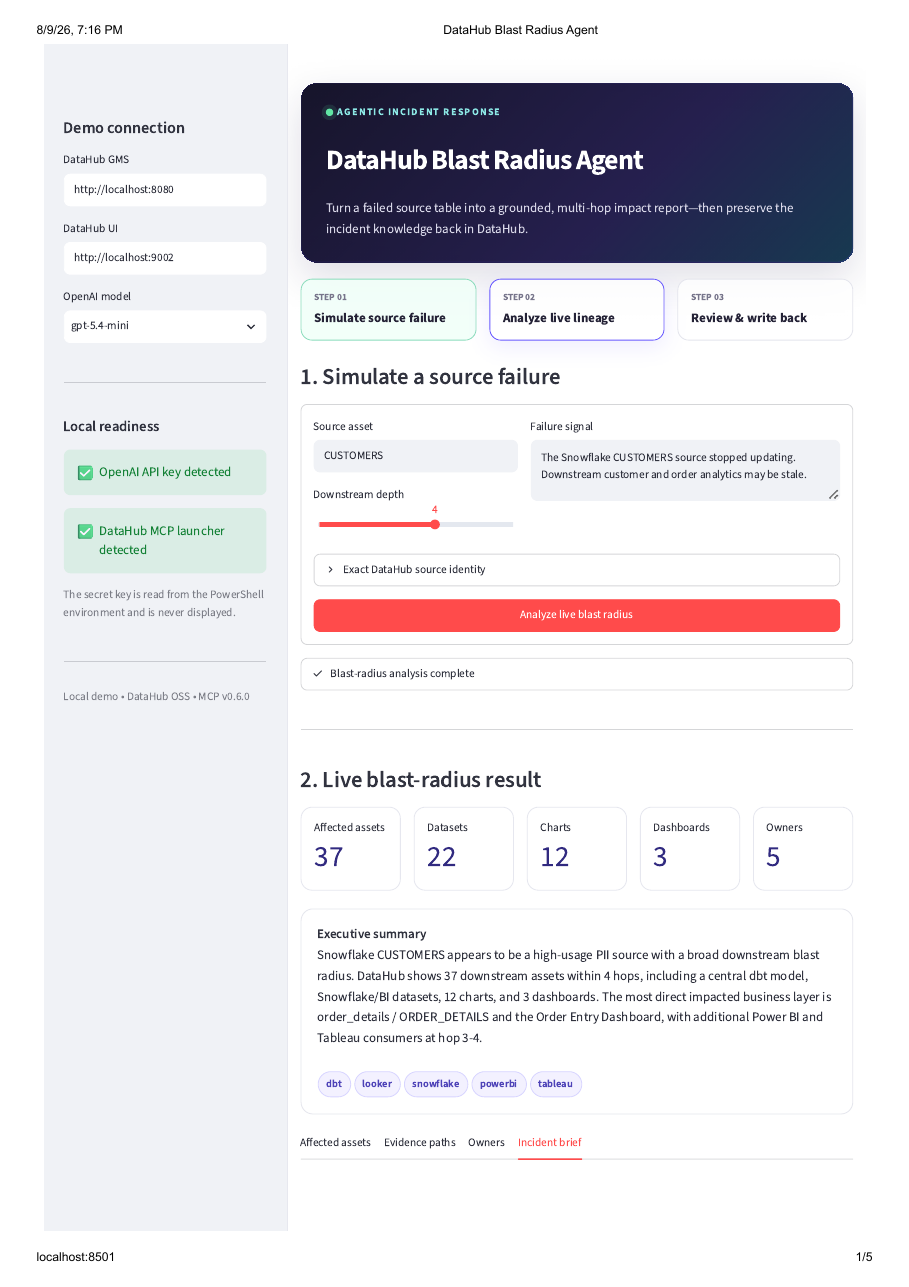
Live blast-radius analysis traced the Snowflake CUSTOMERS failure through 4 lineage hops to 37 downstream assets across 5 platforms.
-
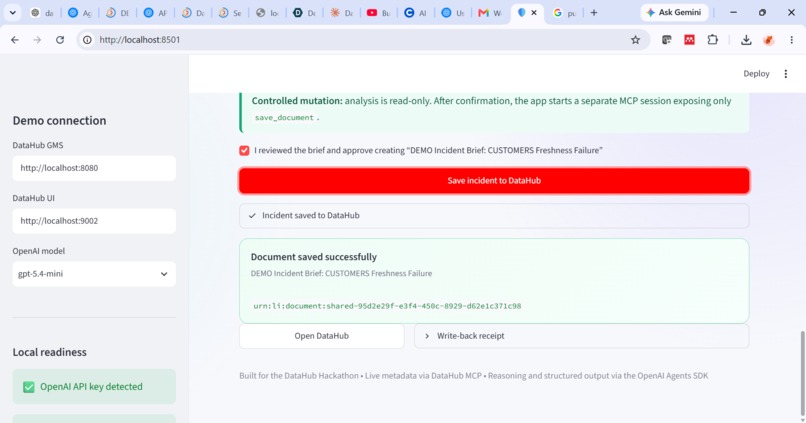
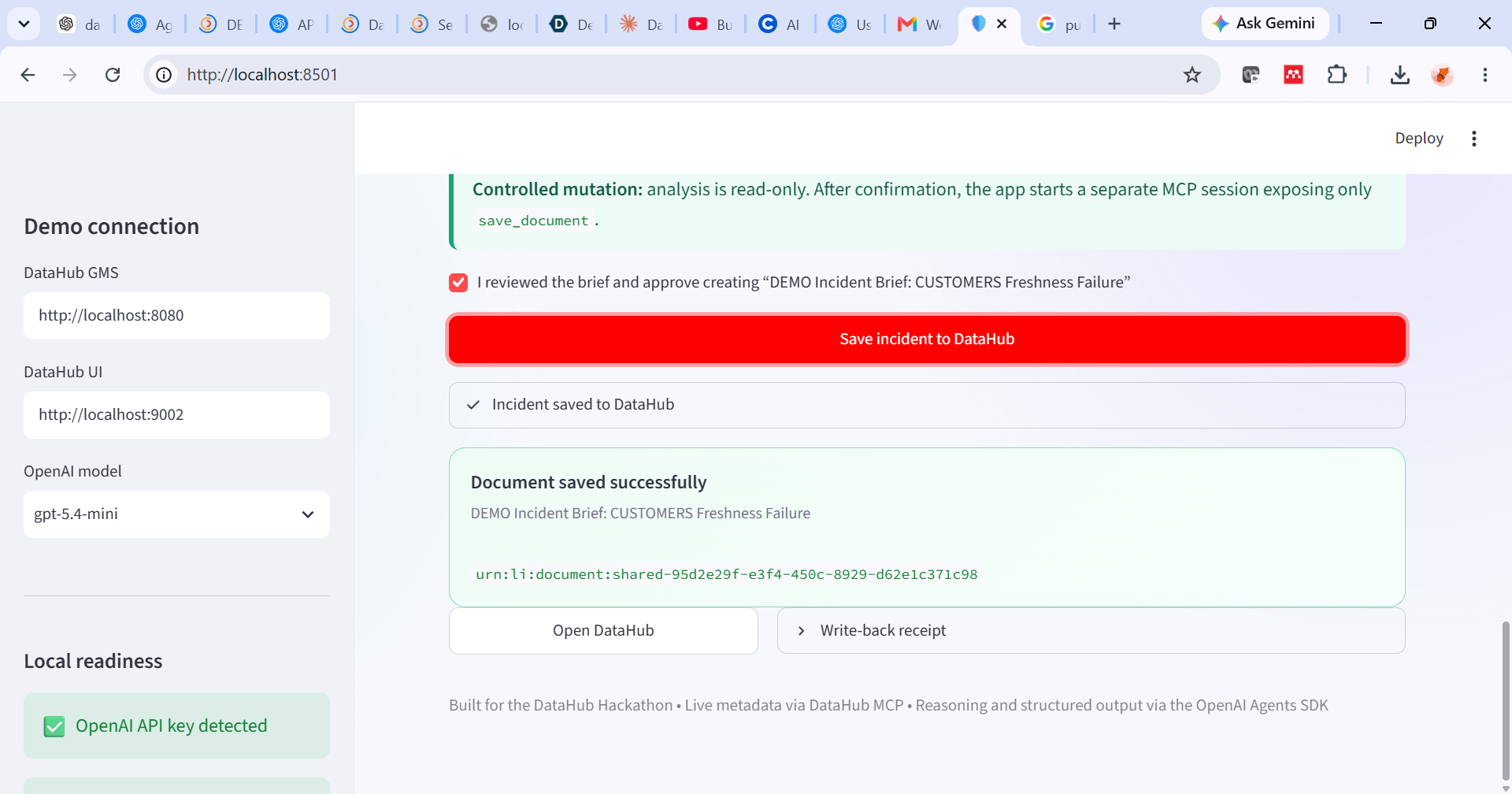
Human-approved write-back saved the reviewed incident brief to DataHub; the returned document URN confirms successful completion.
Inspiration
Every data engineer knows this moment: a source table silently stops updating, and the first part of the incident is not spent fixing anything; it is spent figuring out what is actually affected. Which dashboards are now stale? Which teams need to know? Who owns the downstream assets that depend on this table?
That context often exists inside a metadata graph, but manually clicking through lineage across dbt, Snowflake, Looker, Tableau, and Power BI during a live incident is slow and error-prone.
I wanted to explore whether an AI agent, grounded directly in DataHub’s live metadata graph instead of a static runbook, could dramatically shorten that initial investigation. Just as importantly, I wanted it to preserve the findings so that the next engineer—or another agent—would not have to repeat the same work.
What it does
DataHub Blast Radius Agent accepts a failed source asset, its exact DataHub URN, a failure description, and a requested lineage depth. It then:
- Resolves the exact source entity in DataHub.
- Traverses downstream lineage across the requested number of hops using the DataHub MCP Server.
- Retrieves affected datasets, charts, dashboards, platforms, evidence paths, and tool-verified ownership information.
- Produces a structured incident report and a human-readable Markdown brief.
- Clearly identifies missing or incomplete metadata under Data Gaps.
- Waits for explicit human approval before performing any write action.
- Writes the approved incident brief back to DataHub as a new analysis document.
This closes the incident-response loop: the investigation becomes reusable institutional knowledge inside the same metadata platform that grounded the analysis.
In my verified demonstration against a local DataHub instance, the agent traced one simulated freshness failure on the Snowflake CUSTOMERS table through four lineage hops.
The result was:
$$ 22\ \text{datasets} + 12\ \text{charts} + 3\ \text{dashboards} = 37\ \text{downstream assets} $$
These assets spanned dbt, Snowflake, Looker, Tableau, and Power BI. The report also returned 5 tool-verified owner entries and successfully wrote the approved incident document back to DataHub.
How I built it
I built the project using:
- DataHub Core, running locally through Docker, as the metadata graph and source of truth.
- DataHub MCP Server as the agent’s interface for reading lineage, entity context, and ownership metadata.
- OpenAI Agents SDK to manage the agentic tool-use loop.
- Pydantic to validate the structure and types of agent output before it is rendered or used for write-back.
- Streamlit to provide a simple incident console for starting an analysis, reviewing its evidence, and approving the final document.
The user selects the required lineage depth. The agent then decides which DataHub MCP read tools to call and what supporting entity context to retrieve instead of following a hard-coded asset list.
Returned assets are deduplicated by DataHub URN, classified by entity type, and assigned to their nearest verified lineage hop. The application also checks that the final report still refers to the exact source URN supplied by the user.
After validation, deterministic Python code converts the structured IncidentReport into the final Markdown incident brief.
Safety architecture
The most important design decision was separating analysis and write-back into two strictly controlled MCP sessions.
The read-only analysis session has DataHub mutation tools disabled. It can inspect lineage and metadata, but it cannot modify DataHub.
The write session is created only after the user reviews the report and explicitly approves the action. This new session exposes only the save_document tool.
This means the safety control is enforced at the tool and session level—not only through prompting. Even if the model attempted an unexpected action, the available tool permissions would tightly limit what it could do.
Challenges I ran into
Keeping the report honest about metadata gaps
Lineage and ownership metadata are not always complete. Some assets may have no recorded owner, while other results may contain missing roles or incomplete context.
Rather than allowing the model to infer plausible-looking information, I restricted ownership claims to information returned by DataHub tools. I also made Data Gaps a required part of the typed report so that missing metadata is disclosed instead of silently ignored.
Constraining the write path
Using one long-lived MCP session for both analysis and mutation would have been simpler, but it would also have given the agent unnecessary write access throughout the investigation.
Creating a fresh, post-approval session filtered to only save_document required additional implementation work, but it produced a much stronger and more auditable safety model.
Deduplicating a multi-platform lineage graph
Multi-hop lineage across several platforms can return the same logical entity through different dependency paths. Counting each path independently would exaggerate the blast radius.
I therefore deduplicated affected assets by their DataHub URNs while retaining evidence paths and the nearest verified hop. This made the final count of 37 downstream assets meaningful and reproducible.
Local environment integration
Running DataHub Core, Docker, the MCP server through uvx, the OpenAI Agents SDK, and Streamlit together on Windows required environment and startup debugging.
I also needed to handle MCP initialization, tool availability, structured responses, timeouts, and write-back receipts while keeping the interface understandable for someone responding to an incident.
Accomplishments that I'm proud of
I completed a working end-to-end agent rather than only a lineage visualisation or generated summary.
The application:
- Investigates live, multi-hop DataHub lineage instead of using a hard-coded dependency list.
- Preserves evidence paths and clearly discloses missing metadata.
- Validates structured output before displaying or saving it.
- Separates read-only analysis from human-approved write-back at the MCP session level.
- Restricts the write session to save_document and returns the new document URN as proof.
- Includes reproducible setup instructions, tests, screenshots, and a complete sample incident report.
I am particularly proud that the project closes the loop: it not only explains the incident but also preserves the reviewed investigation inside DataHub for the next engineer or agent.
What I learned
Grounding an agent in a live metadata graph through MCP enables a different kind of workflow from prompting an LLM with a static schema dump. The agent can select tools, retrieve additional context, and follow relationships in the graph as part of its investigation.
I also learned that typed, validated output and an explicit representation of unknown information contribute more to trustworthiness than simply prompting a model to “be careful.”
Finally, separating read and write capabilities at the tool and session level creates a much stronger safety boundary than separating them only through instructions. This is a pattern I would reuse for any agent that can modify shared infrastructure.
What's next for DataHub Blast Radius Agent
The current demonstration uses a simulated freshness failure against a local DataHub sample graph. The next version could:
- Receive real Airflow on_failure_callback events or observability alerts.
- Persist incident state across application restarts.
- Prevent duplicate incident documents for the same failure.
- Notify verified owners through Slack, Teams, email, or PagerDuty.
- Trigger approved downstream pause, rerun, or backfill operations.
- Recheck source freshness after recovery.
- Update or close the DataHub incident document automatically.
- Compare recurring incidents and identify fragile, high-impact dependencies.
The longer-term goal is a governed incident-response agent that does not merely explain what broke but safely coordinates recovery while preserving the evidence and decisions for the next engineer or agent.
AI assistance disclosure
I used OpenAI ChatGPT/Codex for ideation, implementation support, debugging, testing, and documentation. I also used Anthropic Claude to review the repository against the official hackathon requirements and help draft the elevator pitch and an initial project-story outline, which I then reviewed and rewrote in my own words. I reviewed the code, validated the project claims, and verified the complete end-to-end workflow.


Log in or sign up for Devpost to join the conversation.