
Lists catch what we know. Data Receipt catches what we don't.
Inspiration
When you open a free game on your phone, you see a game. You don't see everyone else who shows up.
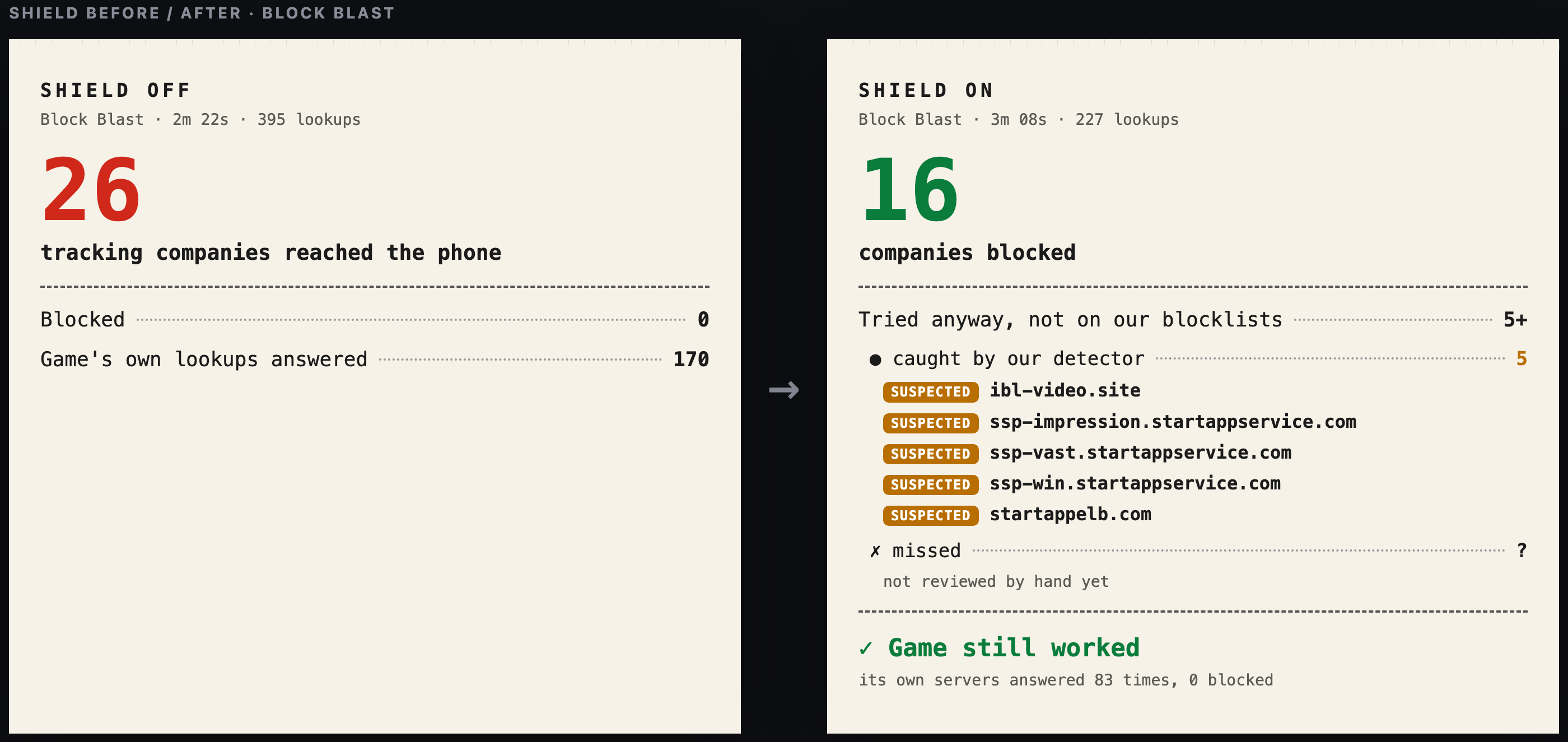
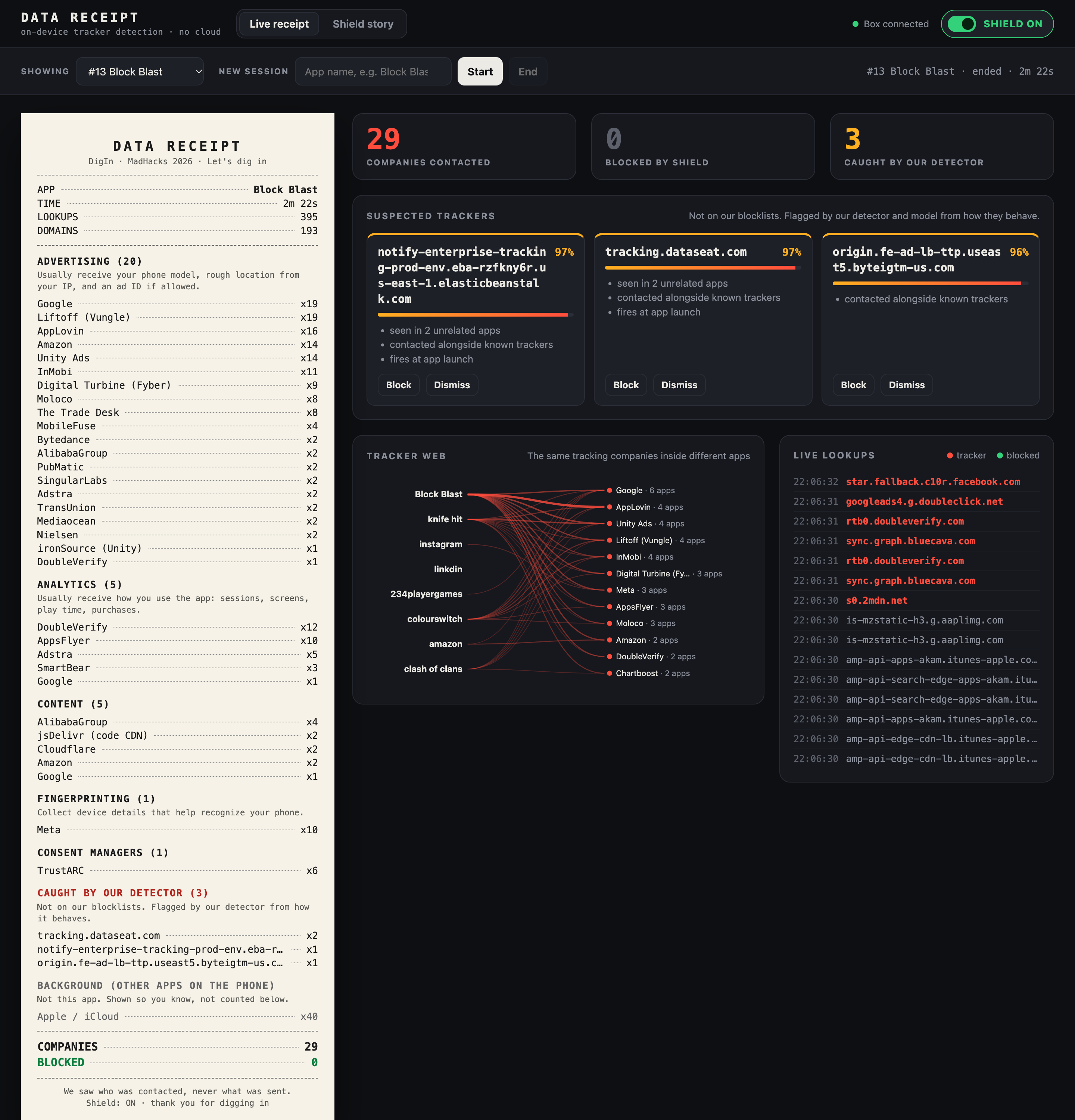
We connected a phone to our own Wi-Fi and played Block Blast for about two minutes. In that time the game looked up 193 different internet addresses, and 26 advertising and tracking companies reached the phone. Each one typically gets your phone model, your rough location, and your advertising ID (a number that follows you from app to app).
Nobody asked us, and there was nothing on the screen to show it was happening.
We also noticed that ad blockers don't really fix this. They work like a bouncer with a list of banned names. If a tracker changes its name tag, it walks right in. A popular blocklist recognized only 36% of the addresses Subway Surfers used.
The theme was "Let's Dig In," so we did: we dug into what our apps actually do.
What it does
Data Receipt is a small box that creates its own Wi-Fi network (called "DigIn"). Join it with your phone, and the box shows you every company your apps talk to. It also blocks the bad ones and catches trackers nobody has listed yet.
Think of it like a mail room for your house. Every app has to look up an address before it can send anything, a bit like writing the address on an envelope. The box reads the addresses on the envelopes. It never opens the letters, so it doesn't decrypt or read your messages, photos, or passwords.
It does three things:
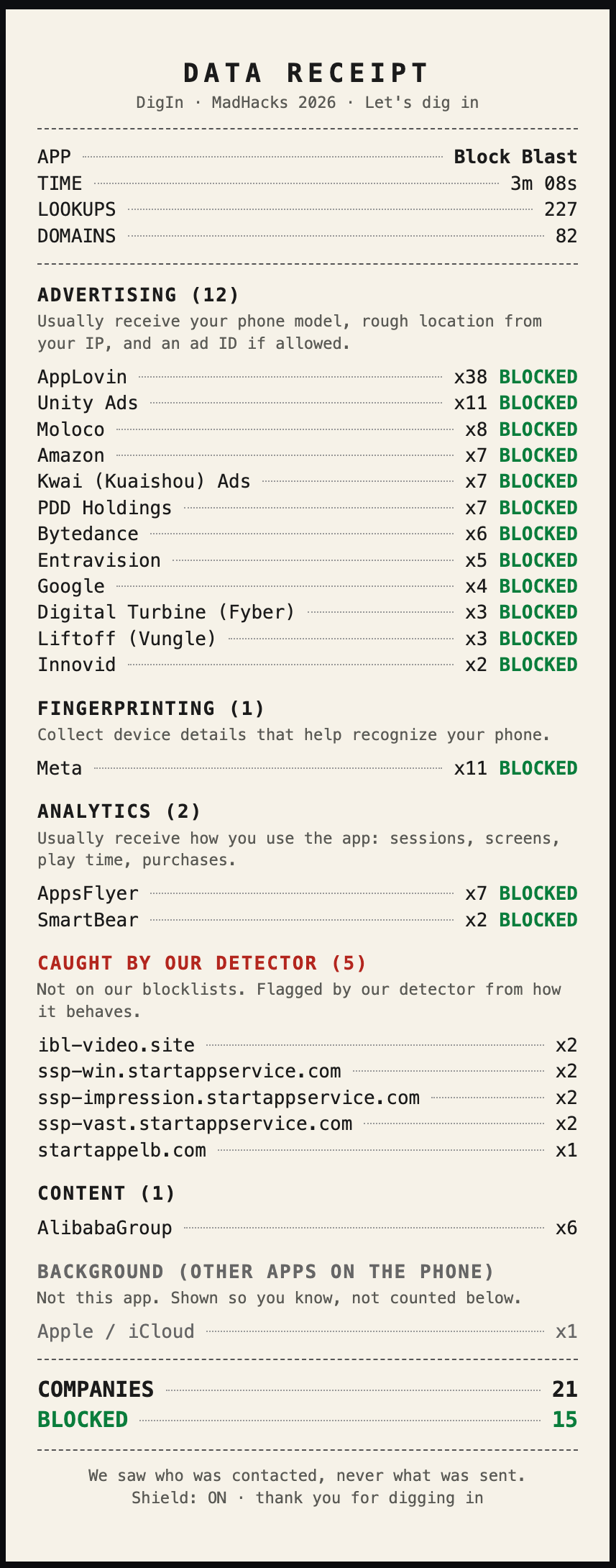
1. Receipt: "Who did this app talk to?" Like a store receipt, but for your data. For every app session it prints the list of companies the app contacted, grouped by what they do (advertising, analytics, fingerprinting), and what each kind usually collects.
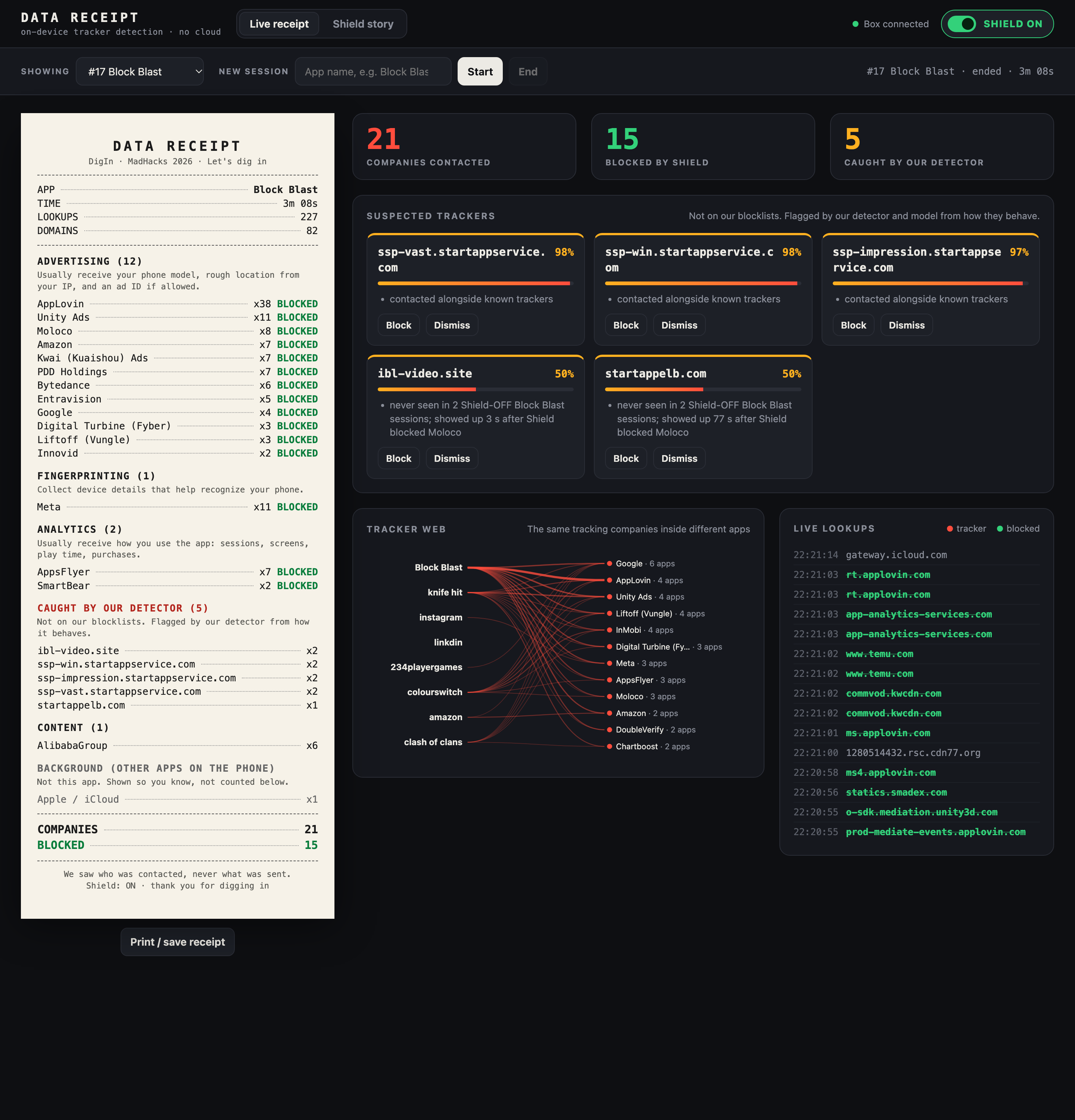
2. Shield: "Block the known trackers." One switch. Known trackers get a fake "nowhere" address (0.0.0.0), so their requests go nowhere. The app keeps working. With Shield on, Block Blast had 134 of 227 lookups blocked, 0 of the game's own 83 addresses were blocked, and the game played normally.
3. Detectors: "Catch the trackers no list knows about." This is the part we're most excited about. Instead of checking a tracker's name, our detectors look at how it behaves, like a store guard who watches what someone does instead of checking their ID.
- When does it show up?
- Who does it show up with?
- Where does it really live?
- How does it talk?
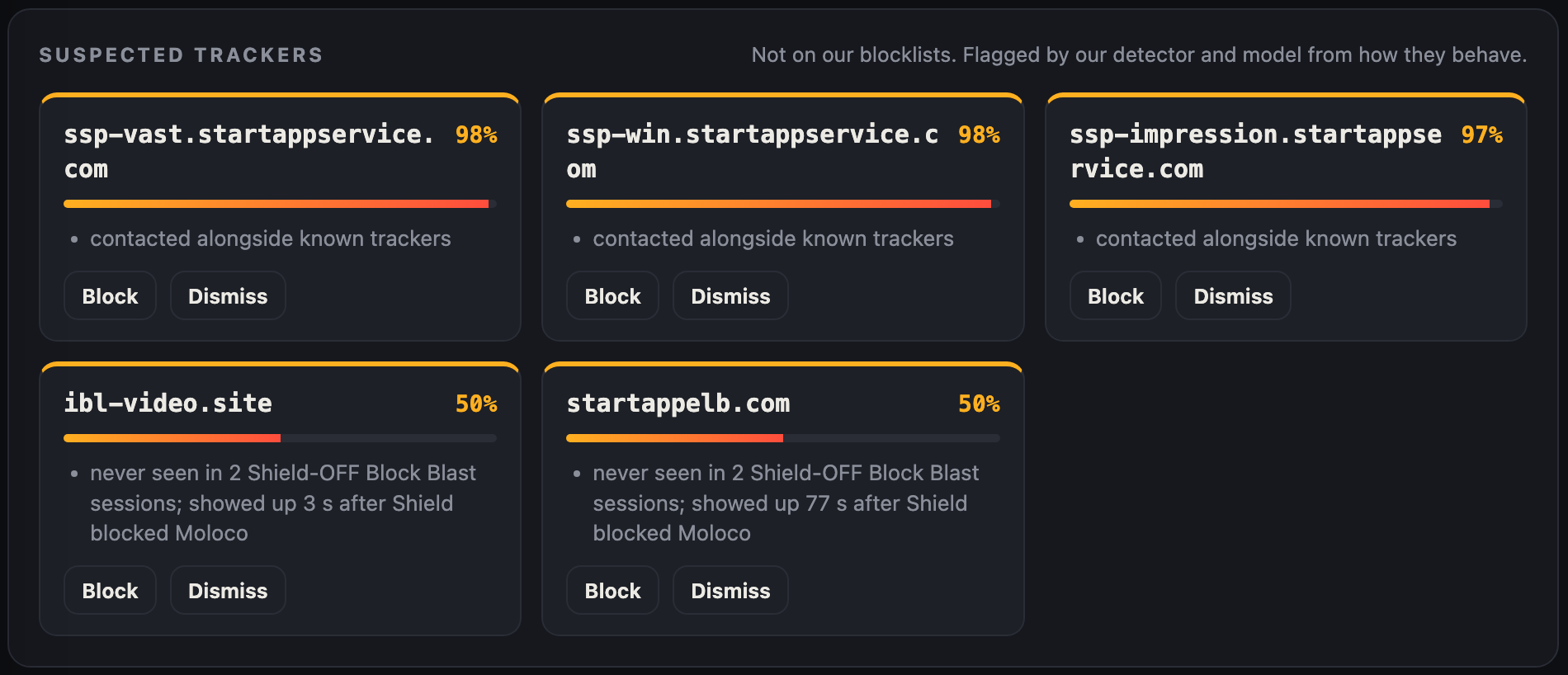
When something looks like a tracker, it gets flagged with the evidence, and a person decides whether to press Block.
A real example from our box:
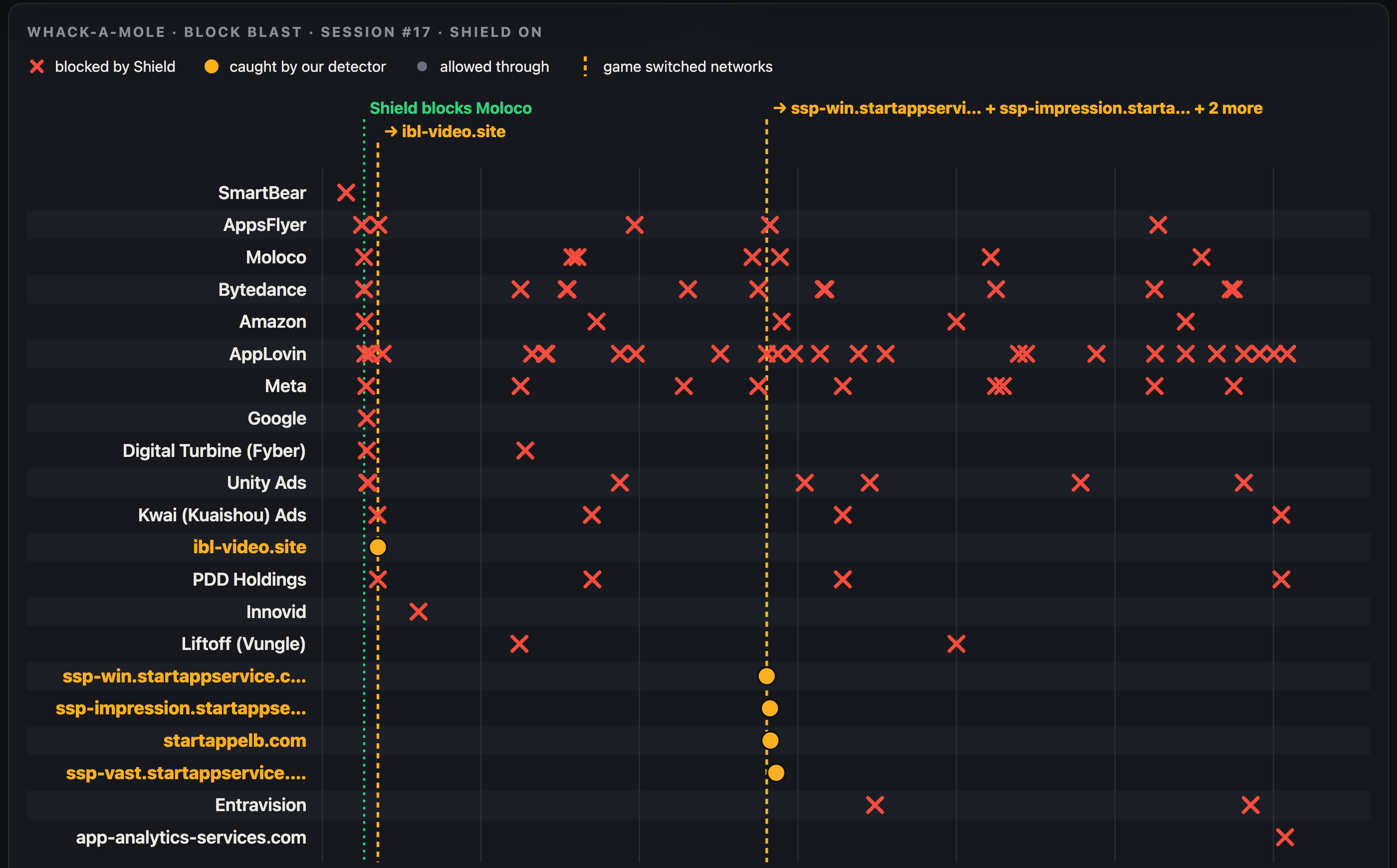
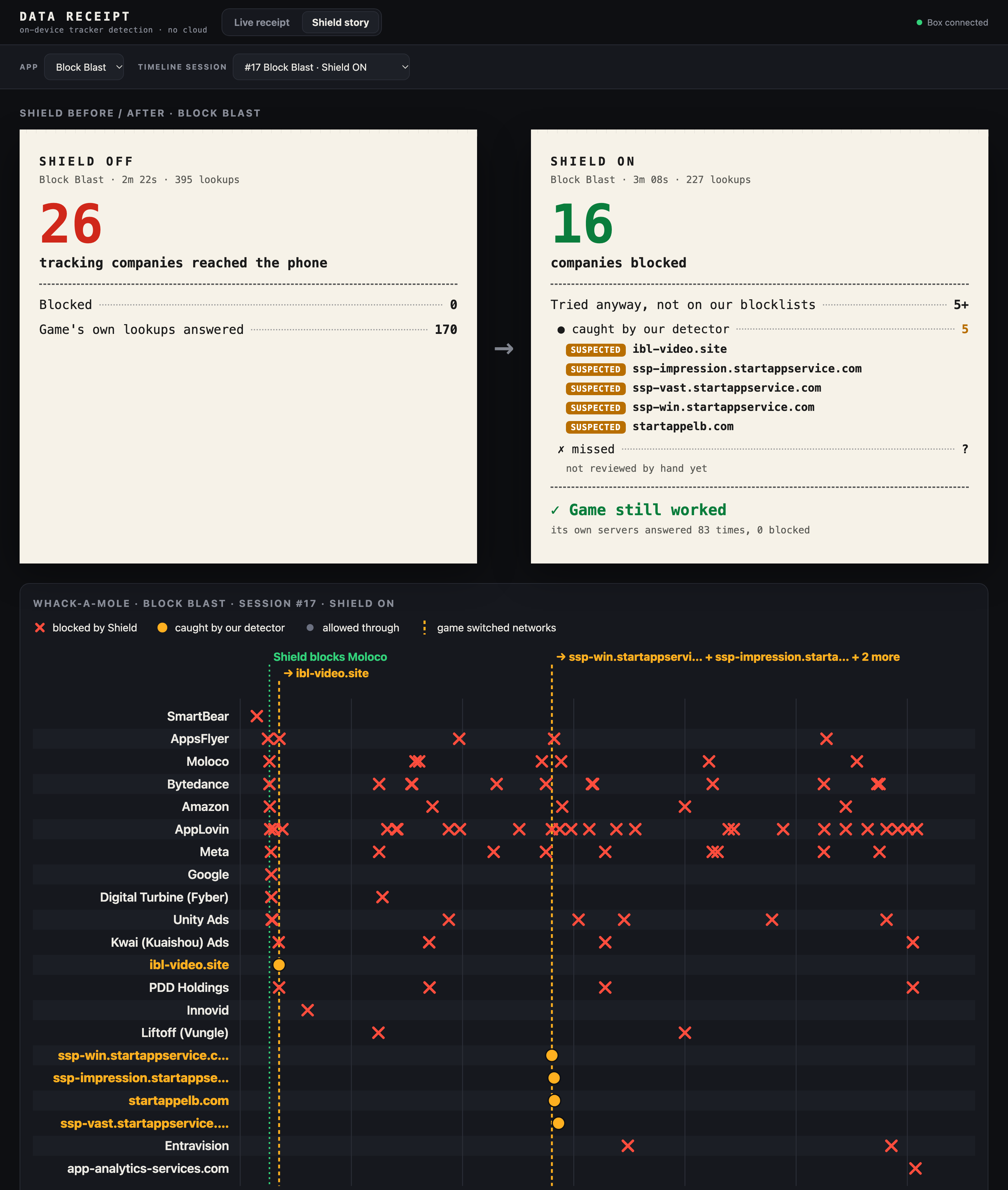
We turned Shield on and it blocked Moloco, an ad network. 3 seconds later, the game tried a different ad company. 76 seconds later it tried another one, StartApp. None of these were on any blocklist. Our model flagged one of StartApp's addresses (ssp-win.startappservice.com) with 98% confidence, using its behavior alone: it showed up right after a block, alongside known trackers. One tap, and it's blocked too.
Works on every device on the Wi-Fi, with nothing to install on any of them, and nothing leaves your home.
How we built it
- The box: an Arduino Uno Q, a palm-sized board that runs Linux on a quad-core ARM chip, about as powerful as a home router. It runs the DigIn Wi-Fi hotspot.
- No sneaking around it: the box forces every phone's address lookups (DNS) through itself and refuses encrypted DNS to the big public providers, so apps can't quietly go around it.
- Logger + Shield: records every lookup and blocks known trackers using shared blocklists plus our own mobile list. It also "uncloaks" trackers that hide under the app's own name. For example,
moloco.rtb.afafb.comlooks like Block Blast's own address but is really Moloco's ad server. - Two detectors:
- A rules detector with simple, readable red flags.
- A machine-learning model (gradient-boosted decision trees, scikit-learn) that uses 17 behavior signals and checks for new trackers every 5 seconds. It scored a whole app session in 0.06 seconds, on the box itself.
- Training data: we recorded about 30 real app sessions this weekend, with 426 tracker addresses and 141 normal addresses that we checked by hand.
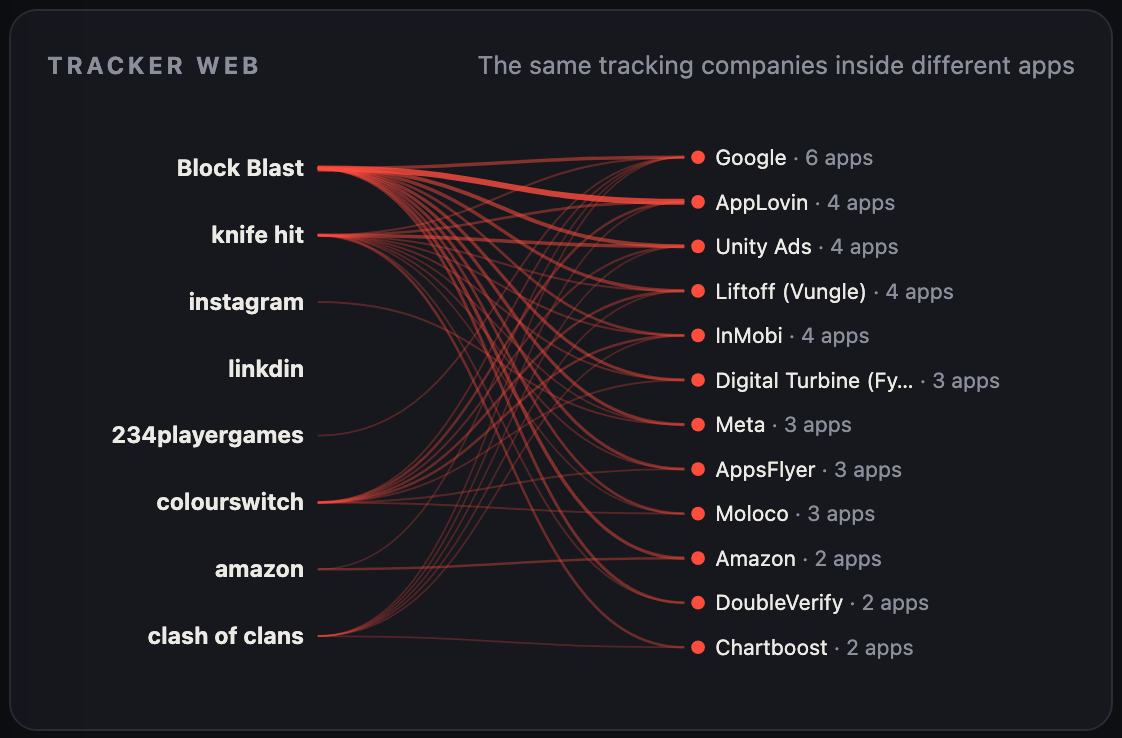
- Live dashboard: the Receipt, a Tracker Web showing which companies appear across many apps, a Shield story page showing what happens when you block, and a Suspected trackers panel.
Challenges we ran into
- Trackers fight back. When we blocked one ad network, the game switched to another within seconds. That's why a list alone will never be enough, and why we built the detectors.
- Trackers in disguise. Some hide under the app's own web address, and some live on huge shared clouds (Amazon, Azure, Alibaba, Fastly) that you can't just block.
- Phones try to go around you. Many phones and apps use encrypted DNS that skips the local network. We had to make the box catch and redirect those lookups.
- Not breaking the apps. Blocking too much breaks games and apps. We had to make sure the app's own servers were never blocked (0 of 83 in our test), and we made blocks expire after 30 seconds so any mistake fixes itself quickly.
- Testing honestly. It's easy for an AI model to "cheat" by memorizing names. To be sure it really learns behavior, we removed two real ad companies (InMobi and Vungle) from every list and from the training data, then checked whether it could still find them.
Accomplishments that we're proud of
- It catches trackers that lists can't. In that hidden-company test, blocklists caught 0 of 29 addresses. Our model caught 13 of 29 with zero false alarms (0 of 61 normal addresses wrongly flagged).
- It held up on new data. On fresh sessions recorded after we froze the model, 8 of 9 high-confidence flags were real trackers.
- We repeated it for ten different companies. It found about half of each never-seen company's addresses, and 94% of what it flagged were real trackers on average.
- The apps keep working. Shield blocked 15 of 21 tracking companies in our Block Blast test without breaking the game.
- It's all on one small box. No cloud, no app to install, and it works for every device in the house.
What we learned
- Free apps talk to far more companies than we expected. Google showed up in 6 of the 8 apps we recorded. AppLovin, Unity Ads, Liftoff (Vungle) and InMobi each showed up in 4 of 8.
- Blocklists are always one step behind. New tracker names appear constantly, and apps switch networks the moment one is blocked.
- Behavior is harder to fake than a name. A tracker can change its name in a day, but it still acts like a tracker.
- Honest testing matters more than big numbers. We report exactly what we measured, including the misses, and keep a person in charge of every block.
What's next for Data Receipt
- Built into your internet router. The box runs on router-class hardware, so an internet provider could offer it as an opt-in feature on home Wi-Fi gateways. Families would get the protection, and the provider still wouldn't see anyone's browsing.
- Protecting the box's own data: encrypting and auto-deleting logs, and password-protecting the dashboard.
- Smarter detectors: more apps, more companies, and more training data so the model catches a larger share of never-seen trackers.
- Simpler controls: per-device and per-app settings, so a parent can set "block trackers on the kids' tablet" in one tap.


