Inspiration
The idea for Data Alchemist was born from a common, frustrating reality I've seen in many teams: the "tangle of spreadsheets." Vital business information—client requests, worker availability, and task requirements—is often scattered across multiple files, each with its own format and potential for human error. This operational chaos creates a huge gap between having data and having actionable intelligence. I was inspired to build a bridge across that gap for the non-technical manager who understands their business perfectly but shouldn't need to become a data engineer to do their job. The guiding question was: "What if an application could be as intuitive to talk to as a helpful colleague?"
What it does
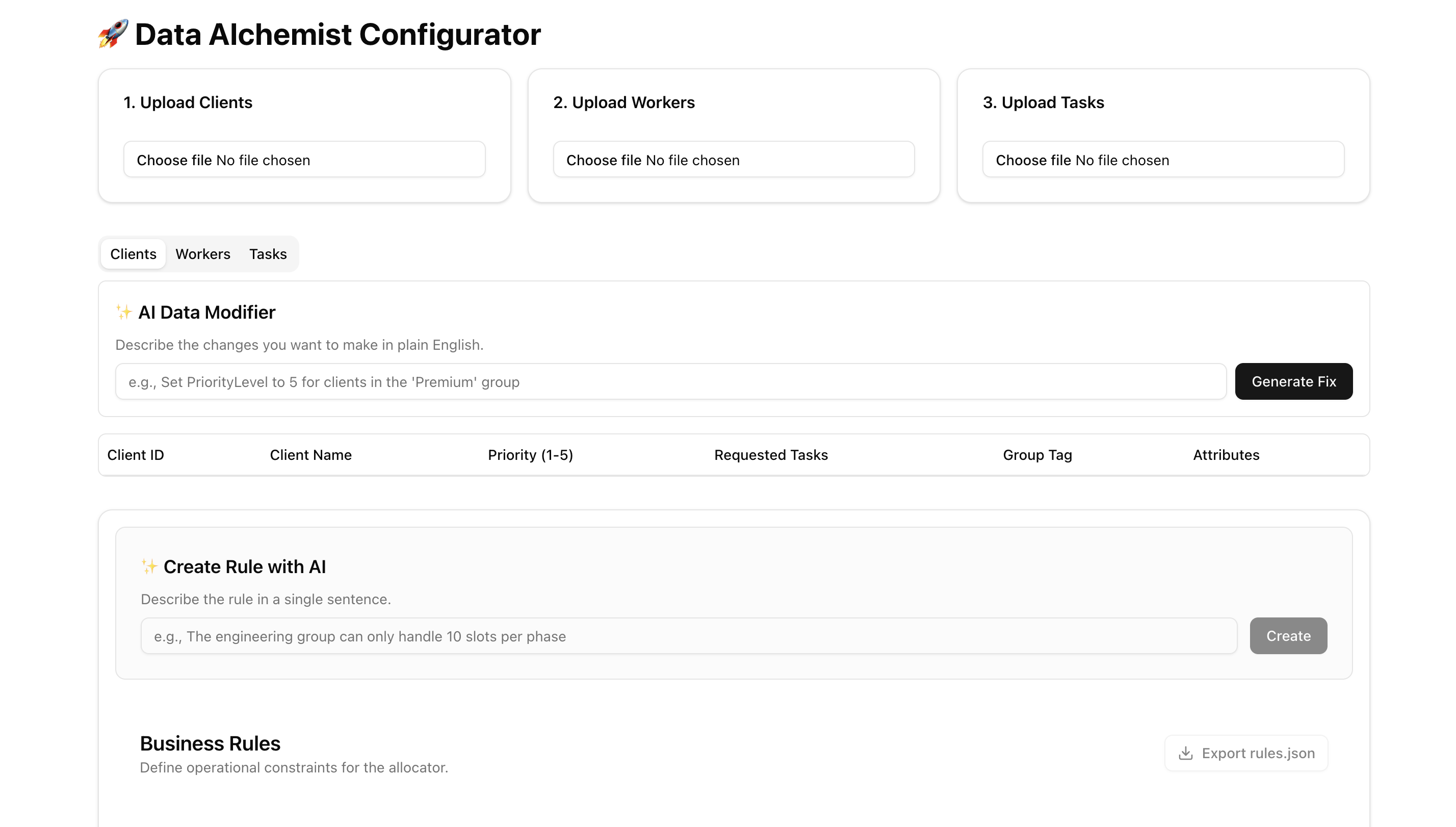
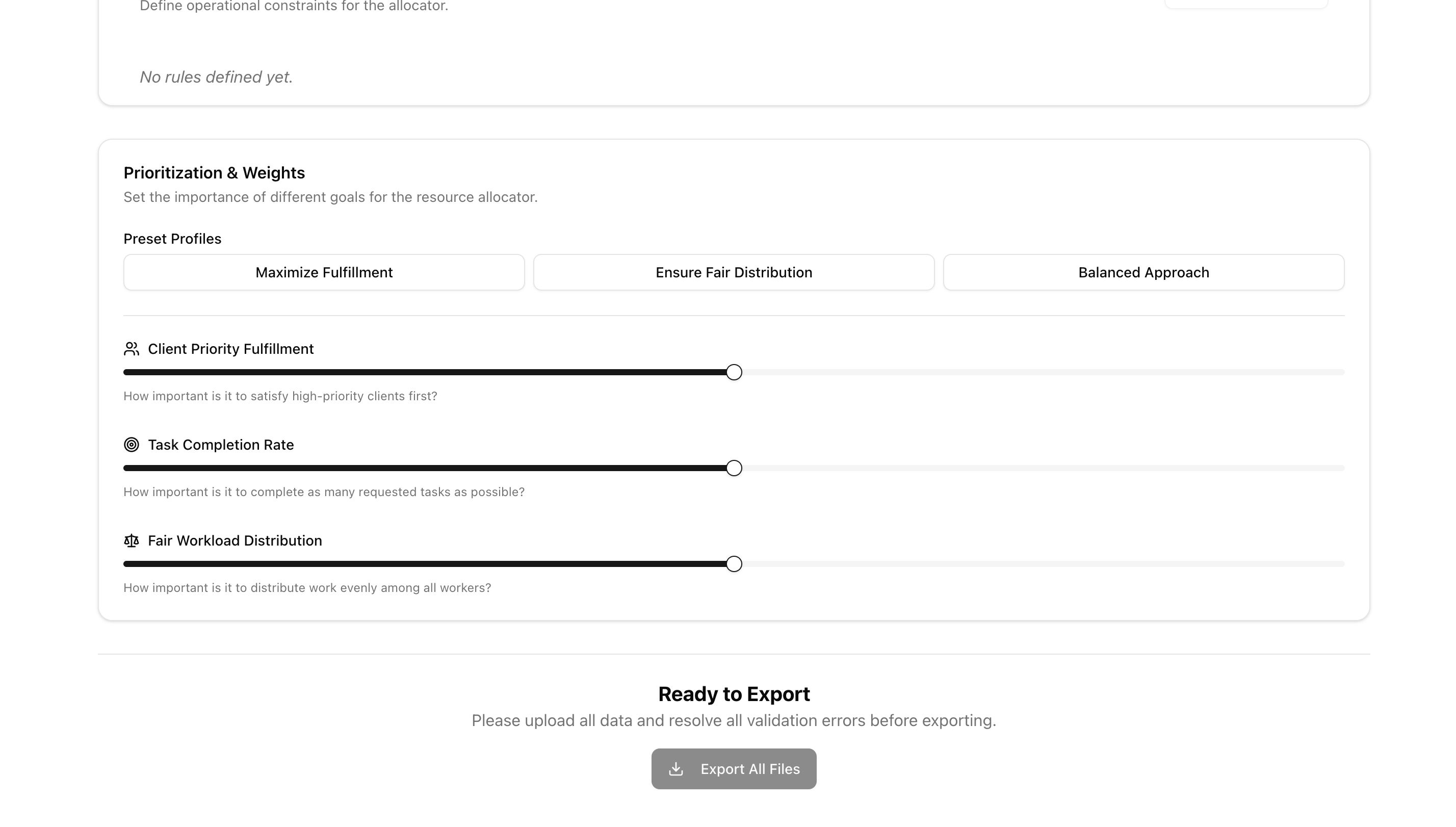
Data Alchemist is a web application that transforms the chaotic process of resource planning into an intelligent, streamlined workflow. It allows users to: 1). Ingest Data Easily: Upload client, worker, and task data from .csv or .xlsx files. 2). Validate Instantly: The app automatically runs over 12 complex business rules to find errors, from simple duplicates to complex issues like skill-coverage gaps. 3). Clean and Edit: Data is displayed in an interactive grid where errors are highlighted. Users can edit data directly or use AI to perform bulk updates using plain English commands. 4). Define Business Logic: A user-friendly interface allows for the creation of structured business rules (like co-running tasks or setting workload limits). The AI can also convert plain English sentences into these formal rules. 5). Set Priorities: Users can assign weights to strategic goals using interactive sliders to guide the downstream allocation process. 6). Export a Complete Package: Once all data is validated, the app exports cleaned .csv files and a rules.json file containing all the defined rules and priorities, ready for the next stage.
How we built it
Building this project was a methodical process of layering intelligence on top of a solid foundation, using a modern tech stack: 1). Foundation: The application is built with Next.js and TypeScript. I used SheetJS and PapaParse for file handling and TanStack Table to create the editable data grids. Global state is managed centrally with Zustand. 2). The Brain: I created a dedicated validationService that runs every time data changes, checking for errors and inconsistencies across all datasets. 3). AI Magic: I built several dedicated Next.js API routes to act as a secure backend for the Google Gemini API. Each AI feature required careful "prompt engineering" to translate user intent into structured JSON data for features like the AI Data Modifier and the AI Rule Converter. 4). UI & UX: The user interface was built with Shadcn/UI and Tailwind CSS to create a clean, responsive, and intuitive command center for all features.
Challenges we ran into
1). Reliable AI Responses: The biggest challenge was ensuring the Gemini API always returned a clean, parseable JSON object. This required refining the prompts to be extremely specific, giving the AI clear instructions on the exact output format and providing "few-shot" examples within the prompt itself. 2). State Management Reactivity: A single manual edit in the grid needed to trigger a cascade of actions: update the state in Zustand, re-run the entire validation service, and have the UI instantly reflect the change. Managing this reactive loop efficiently was crucial. 3). Performance on the Frontend: Applying bulk updates from the AI was initially slow. I refactored the update logic to use a JavaScript Map as a lookup table, which dramatically reduced the complexity from O(n*m) to a much faster O(n+m), ensuring the UI remained snappy.
Accomplishments that we're proud of
We are incredibly proud of creating a tool that feels less like a program and more like an intelligent partner. Key accomplishments include: 1). A Comprehensive Validation Engine: Building a system that can instantly spot over a dozen complex, interconnected errors that would be nearly impossible for a human to find manually. 2). Intuitive AI Interaction: Successfully engineering the AI prompts to allow users to modify data and create complex rules using simple, natural language. 3). A Seamless User Workflow: Designing a complete, end-to-end user journey—from uploading messy spreadsheets to exporting a clean, validated, and logically-sound configuration package—all within a single, user-friendly interface. 4). High-Performance Frontend: Overcoming performance bottlenecks to ensure that the application, despite its complexity, feels fast and responsive to the user.
What we learned
This project was an incredible learning experience, solidifying my skills in several key areas: 1). AI as a UX Tool: I learned that AI is far more than just a chatbot. It can be a powerful tool for simplifying user experience, turning tedious tasks into simple, conversational commands. 2). The Art of Prompt Engineering: The success of the AI features depended entirely on the quality of the prompts. I learned to think like both a developer and a teacher, providing the AI with the context, constraints, and examples it needed to perform its task reliably. 3). Full-Stack Development with Next.js: Using Next.js for both the interactive frontend and the secure backend API routes streamlined the development process immensely, creating a cohesive architecture that was easy to manage and deploy.
What's next for Data Alchemist: AI-Powered Resource Allocation Configurator
Data Alchemist has a strong foundation, but the journey isn't over. Future enhancements could include: 1). AI-Powered Rule Recommendations: Proactively analyzing the data to suggest potentially useful rules to the user (e.g., "Tasks T12 and T14 are often requested together. Would you like to create a co-run rule?"). 2). More Advanced Rule Types: Expanding the UI to support more complex rules, like pattern-matching or precedence overrides. 3). User Accounts & Saved Configurations: Allowing users to create accounts to save, load, and manage multiple different data configurations. 4). Visualizations: Adding a dashboard with charts and graphs to give users a visual overview of their data, such as worker load distribution or skill coverage.
Built With
- google-gemini-api
- next.js
- papaparse
- shadcn/ui
- sheetjs
- tailwind-css
- tanstack-table
- typescript
- zustand

Log in or sign up for Devpost to join the conversation.