Inspiration
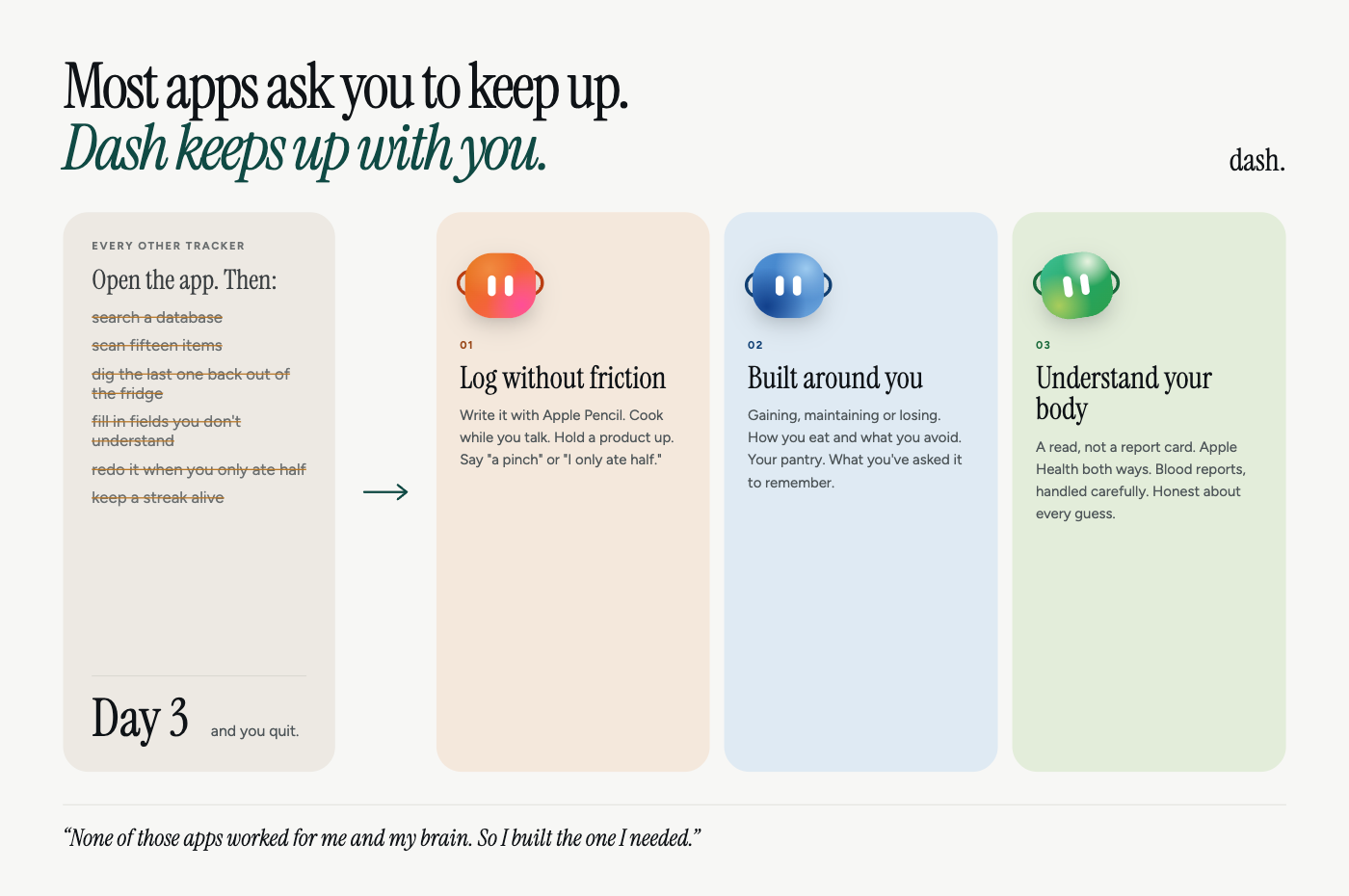
I've been trying to gain weight my entire life. I'm allergic to meat and eat a very restrictive diet, so getting enough food in is already hard. I also have ADHD, which turns every extra step into a wall. I've tried every tracking app on the market, and they all ask for the same things: open the app, search a database, scan fifteen items, dig the one you put back out of the fridge, fill in fields like fiber that I barely understood, and redo it all when I only ate half. If a meal isn't logged the moment I eat it, it's gone. By day three I'd fall behind, feel like I'd failed, and stop.
None of those apps were built for how my brain works. So I built the one I needed: nothing to remember to open, nothing to search, no streak to break, and a log that remembers the half I didn't finish so I don't have to. I hope it does the same for other people, whether they're trying to reach a goal or just understand their food and their body a little better.
I'm a designer at heart, and that shaped Dash as much as the problem did. Every tracker I quit felt like a spreadsheet with a login. I wanted Dash to feel like something you'd actually want in your kitchen: warm, a little playful, and never judgmental. So I spent as much time on who Dash is as on what it does.
The research backs the instinct. In dietary self-monitoring studies, logging frequently and consistently mattered more than logging completely. A rough log you keep beats a perfect one you abandon on day three.
What it does
Dash is an iOS and iPadOS nutrition companion with three jobs: make logging effortless, fit the person using it, and help you understand what your food is doing for your body.
1. Logging without friction
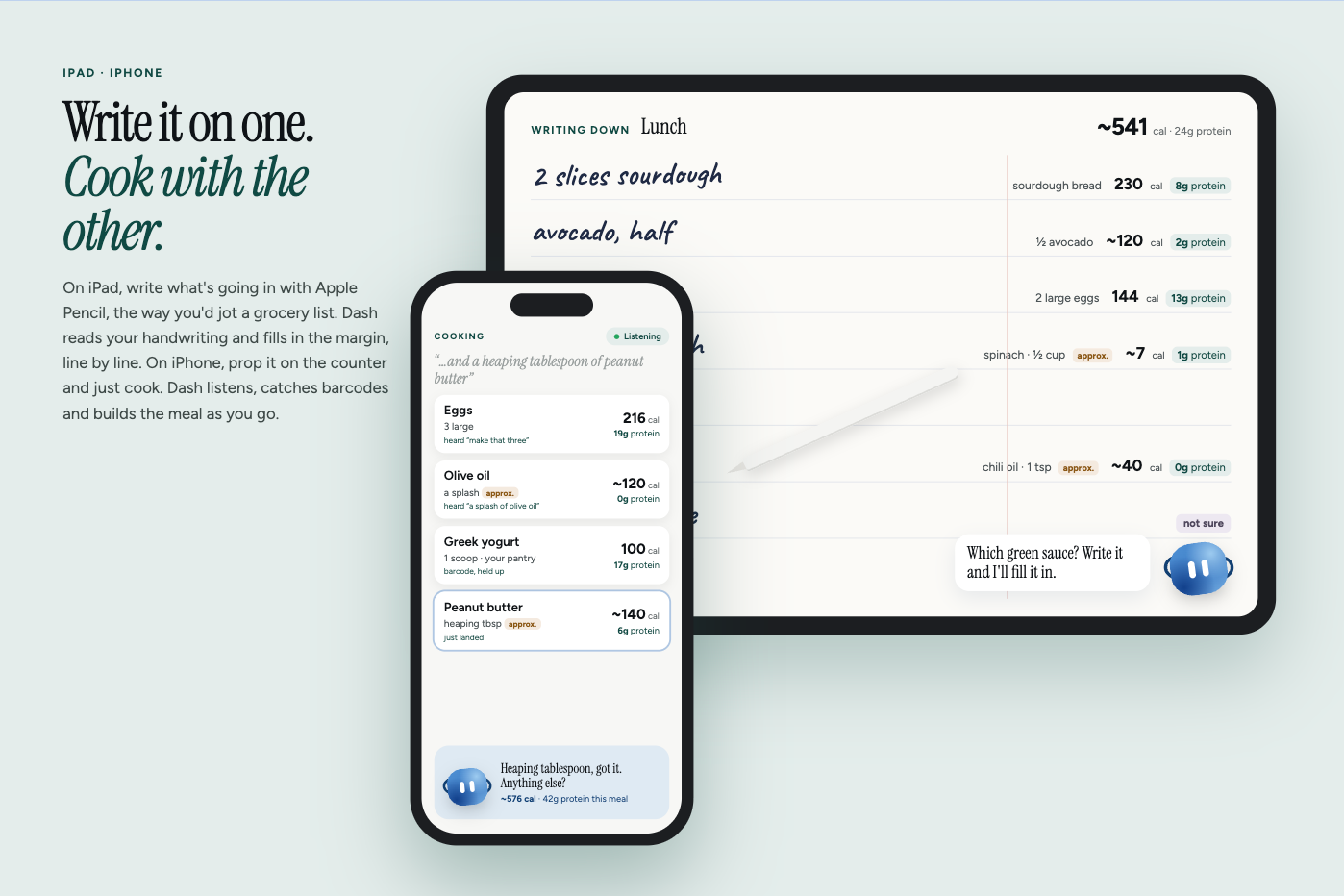
- Write it. On iPad, list what's going into your food with the Apple Pencil, the way you'd write a grocery list. Dash works out the nutrition behind each line, and you can tap any number to change it.
- Cook it. Put your iPhone or iPad in cooking mode and cook. Talk to it naturally: "a splash of olive oil, two eggs, actually make that three." The camera runs the whole time as an on-device barcode sensor, so holding up a product adds it. There's no scan button, no preview, and nothing recorded or uploaded.
- Say it how you'd say it. "A heaping tablespoon," "a couple of scoops," "just a pinch" all become real amounts, marked as approximate.
- Eat what you actually eat. "I ate half" tonight and "I finished it" two days later both land on the right meal.
2. Built around you
- Your goal. Dash asks whether you're gaining, maintaining or losing, and sets your targets from it. For gaining, that's a calorie surplus and a protein target based on your weight. Height and weight come from Apple Health, so it doesn't ask what your phone already knows.
- How you eat. Vegetarian, vegan or pescatarian, plus allergies and anything you always avoid.
- Your kitchen. Sweep the camera across your cupboards once. After that, "a scoop of the yogurt" means the tub in your fridge, with the numbers from its label.
- Your preferences. "Remember I love spice." Dash keeps it in your own words, and you can see it and take it back.
3. Understanding your body
- A read, not a report card. Your day is summarized in one plain sentence, like "you're a little under today, worth a look?", with macros one tap away. No streaks and no scolding. Missing a day shouldn't feel like failing.
- Apple Health, both ways. Meals are written back as dietary data, so nothing is trapped in Dash.
- Blood reports, carefully. Add a lab report and Dash flags only the markers outside the range your lab printed, alongside the nutrient in your food that relates to each one. It gives no diagnosis and never invents a range.
- Honest numbers. Every value keeps where it came from (your pantry, a barcode, a food database or an AI estimate) and how confident Dash is. Guesses are marked "~" or get one short question.
How I built it
iOS and iPadOS app (SwiftUI). Listening uses Apple's on-device
SpeechAnalyzer, with a speech detector in front so kitchen noise never reaches the transcriber. Apple's on-device model parses what you said, never what it contains. Kitchen amounts are read byQuantityPhrase, a hand-built parser with no model and no network. Barcodes and handwriting use Vision on-device. Core logic lives in a Swift package, DashCore, with 122 unit tests.Design. I designed the brand, the three characters and every screen myself. Each character is built from one shared face, expressed through posture, gaze, eye shape, tempo and the marks around its head, so the three feel distinct without becoming three different drawings. The landing site even has a hidden demo where the Dashes follow your hand through the webcam and wave back when you wave.
Resolution, your kitchen first. Each food is matched against your pantry first, then the backend's chain: shared cache → Open Food Facts (barcodes) → USDA FoodData Central (imported locally) → branded search → Gemini. The first answer above a 0.8 confidence threshold wins.
Gemini handles the messy language databases can't, and reads blood reports into structured markers. It uses structured output, gets the rest of the meal as context, and has thinking turned off: on my prompt that was ~1.5s instead of ~3.5s for the same answer. Its confidence is capped at 0.9 so it never outranks a scanned label.
ElevenLabs (Flash v2.5) is Dash's voice in cooking mode. Common replies are generated at boot and cached, so the first one is instant.
Backend: FastAPI, 37 endpoints. Landing and research site: React.
Challenges I ran into
Dash kept hearing itself. Cooking mode turns off echo cancellation for clean transcription, so the mic hears the speaker perfectly. I built EchoGuard, a content-based filter that recognizes Dash's own words coming back in.
The on-device model was a single point of failure. On phones without Apple Intelligence, every spoken instruction failed the same way while barcodes kept working. I added a pattern-matching parser so voice works on any device.
"Remember" means three things in a kitchen. "Remember to buy tahini," "remember this as my morning shake," and "remember I love spice" belong to the grocery list, saved meals, and your profile. Telling them apart took its own parser and tests.
A camera that's always on can't be noisy. A carton in frame produces the same barcode thirty times a second. The scanner only reports a code once it's stable across frames, and suppresses repeats.
Accomplishments that I'm proud of
- Three ways to log (Pencil, voice, camera) that all write to the same meal with the same honesty about confidence.
- Vague kitchen amounts turned into real numbers without a model call.
- Half-eaten meals that stay correct across days.
- Health context handled with restraint: goals, diet, allergies and blood work, without pretending to be a doctor.
- 122 Swift tests and end-to-end backend tests, built solo at ShellHacks (as someone who typically runs away from backend work, working Solo forced me to handle both sides and I'm pretty proud with the result)!
What I learned
Every tap I removed mattered more than any feature I added. And the best split of work was strict: on-device code understands you, while your pantry, food databases and Gemini supply the numbers.
What's next for Dash
Dash by text and call. A number you can text "I ate half of it," or call to ask "the family wants Thai, what on the menu would I like?" It texts like a person, never in walls of text, and checks in when you've gone quiet. Then point-and-say for unlabeled food ("two scoops of this"), personal measures ("that's my scoop"), and TestFlight with people who, like me, have never kept a food log past a few days, including other people with ADHD.
Built With
- apple-foundation-models
- apple-pencil
- elevenlabs
- fastapi
- gemini
- healthkit
- ipados
- open-food-facts
- postgresql
- python
- react
- speechanalyzer
- swift
- swiftui
- tiger-data
- timescaledb
- usda-fooddata-central
- vision


Log in or sign up for Devpost to join the conversation.