Inspiration
Working in IT, I see breaches all the time due to weak password security. People reusing passwords, having generally weak passwords, passwords that have been involved in breaches. It's become a problem that needs addressed. Password security is a major thing many people lack, and it's time for change.
We also do have some inspiration for the name. Being that we wanted the app to be aimed toward non-tech-savvy individuals, we wanted a name that sets it apart and makes it memorable. Like a dad does with his kids, this tool is here to give advice and help people. Think of it as some fatherly-bonding, but with your password security.
What it does
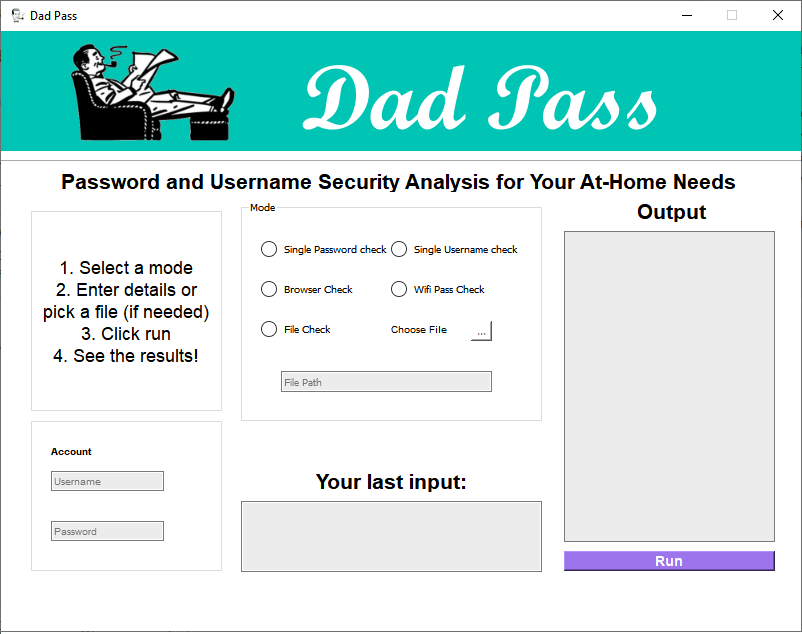
Dad Pass is an application to check and audit your passwords and accounts. You can specify an individual email/username and it'll tell you if it's been involved in a breach. Enter a password and it'll tell you the strength of the password, tips to improve it and whether or not it's been seen in a breach. You can also pass a file to have it check a full list of accounts and passwords. Don't have a file saved? It can pull your login information you've saved in your browser. It can even show the security of your Wi-Fi passwords. The app is built with simplicity in mind to allow anyone to check their password security.
How we built it
The application is written in Python, with the goal of being able to easily take this cross platform. Breach information is obtained via the HaveIBeenPwned API. Password Strength is calculated via the zxcvbn library created by Dropbox. With these two tools in hand, we simply had to write applications to interface and pull everything together. The GUI was created using PyQt5, allowing the program to be ported to mobile in the future.
Challenges we ran into
None of us have ever done any GUI design or programming before. We knew going in that this would be a major hurdle, as we wanted the app to be user friendly. Finding a good starting point to learn how to use PyQt was a challenging task.
Another challenge we ran into was the use of the HaveIBeenPwned API. Previously, this was a free API to access. However, now you're required to register and pay for an API Key, mostly to prevent abuse. Since the API key is tied to us, we do not want it released to the public. Thus, the app cannot process account breaches without a key provided to the application. It does not, however, prevent the app from processing any of the password information.
Accomplishments that we're proud of
As previously mentioned, this is our first time doing any GUI work. We are very proud with how the GUI turned out. Are there improvements that can be made? Of course there is, as with any project. Is the current solution user friendly? For the most part, it is, and we are very proud of it.
What we learned
Having an idea going in, we were able to focus more time into planning of the project. Being early in our Computer Science majors, we have not done much development in a team setting. This project really allowed us to learn some project planning and teamwork in an application scenario.
We also learned quite a bit about GUI programming in Python; much more than we did going in.
What's next for Dad Pass
Given our interest in Information Security, we feel this is a tool we'd really love to keep improving upon and adding functionality to. Currently, here's some of the ideas we have:
- Firefox Password Support
- Ability to generate and save full reports
- Better file support with Document Parsing and recognition to allow users to select the Word or Excel document where they store their passwords.
- A Memorable-Password generation tool
- More recommendations for ways to improve passwords
- More supported platforms
Built With
- haveibeenpwned
- pyqt5
- python
- zxcvbn

Log in or sign up for Devpost to join the conversation.