-
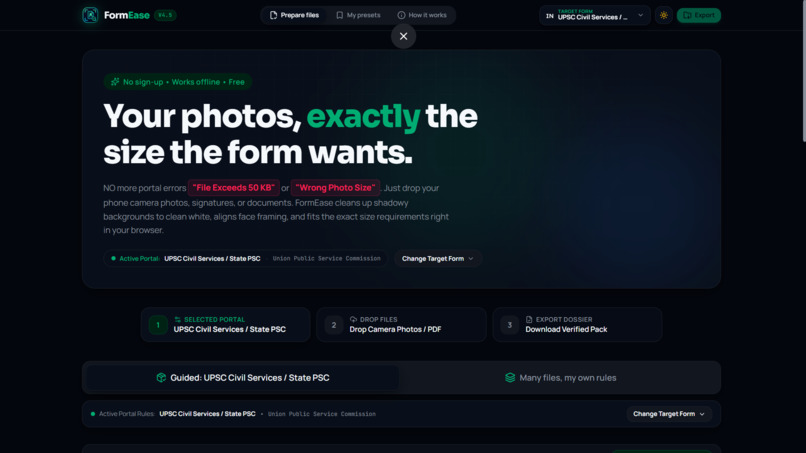
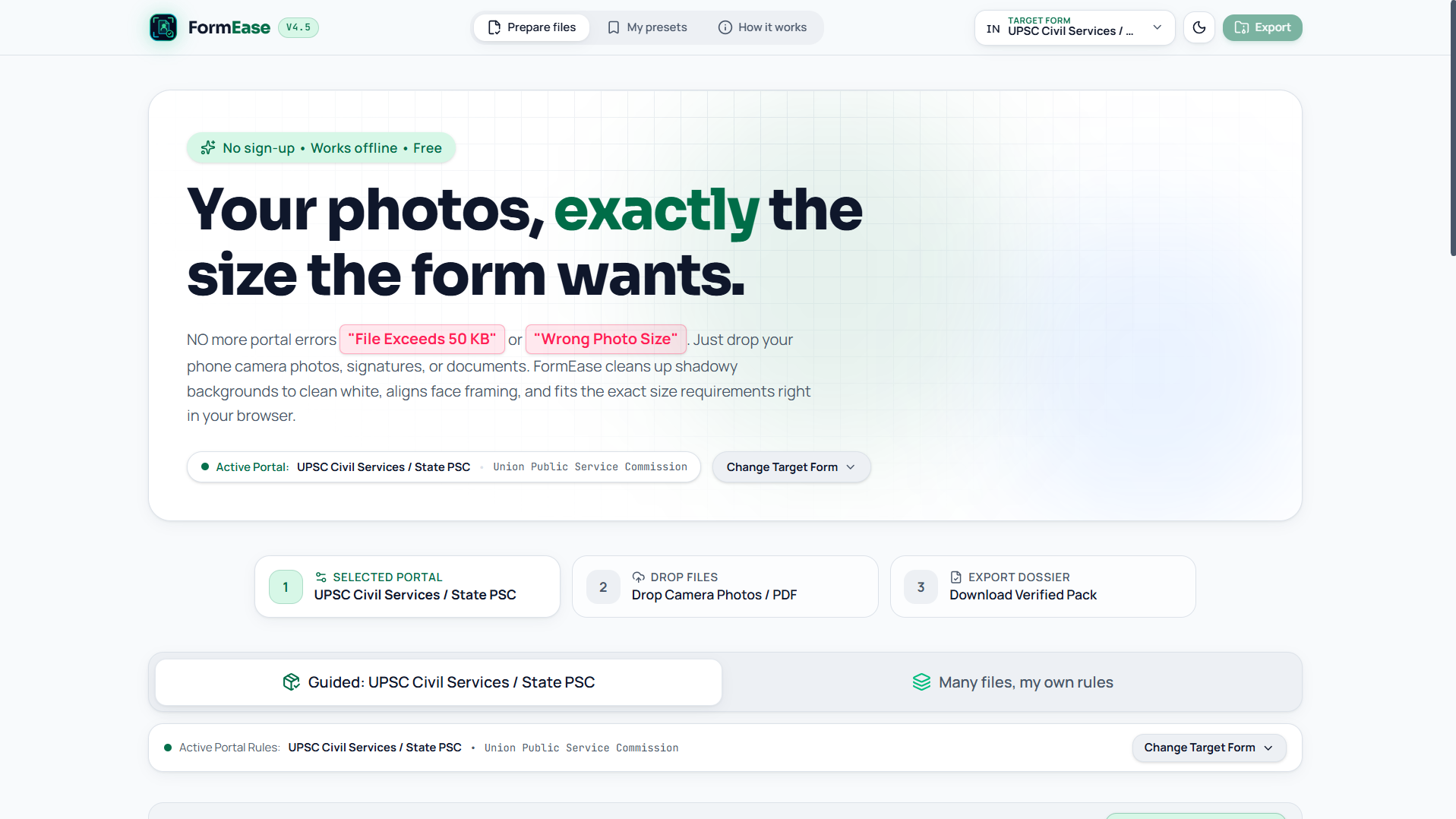
Hero-Dark
-
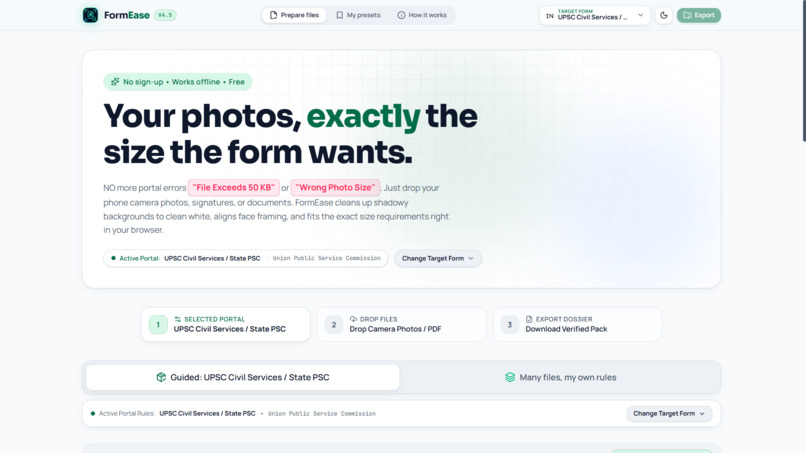
Hero-Light
-
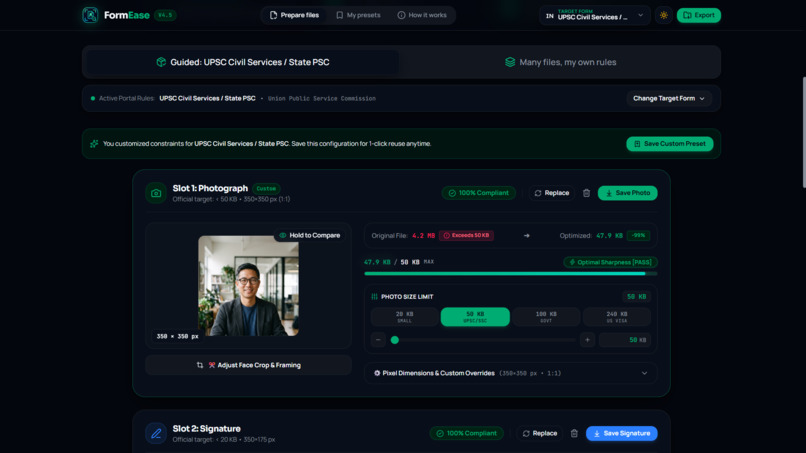
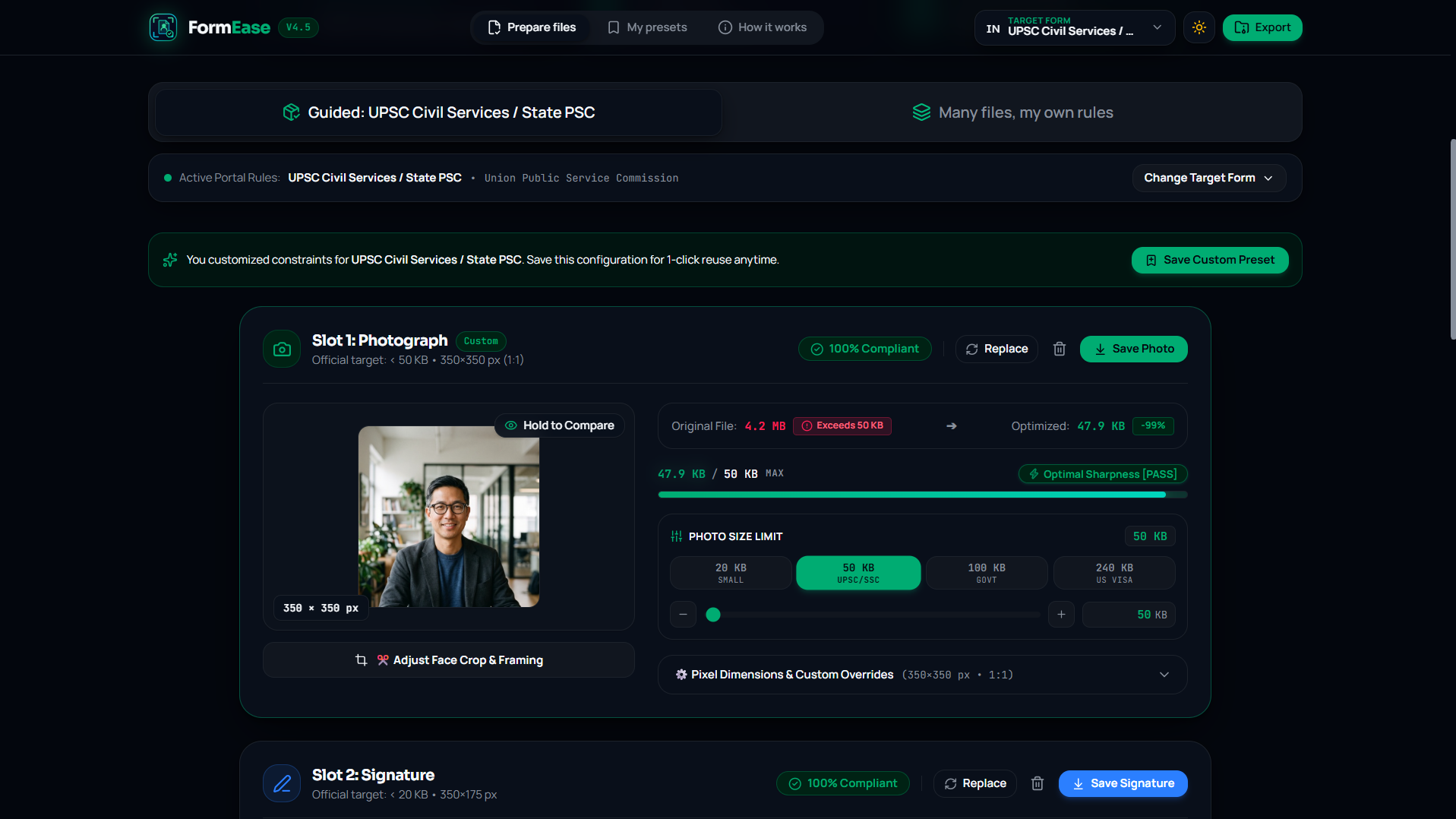
Working1
-
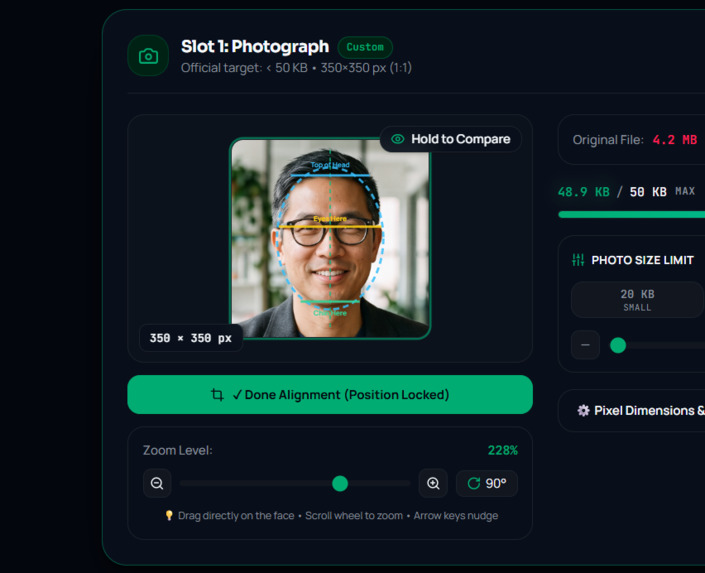
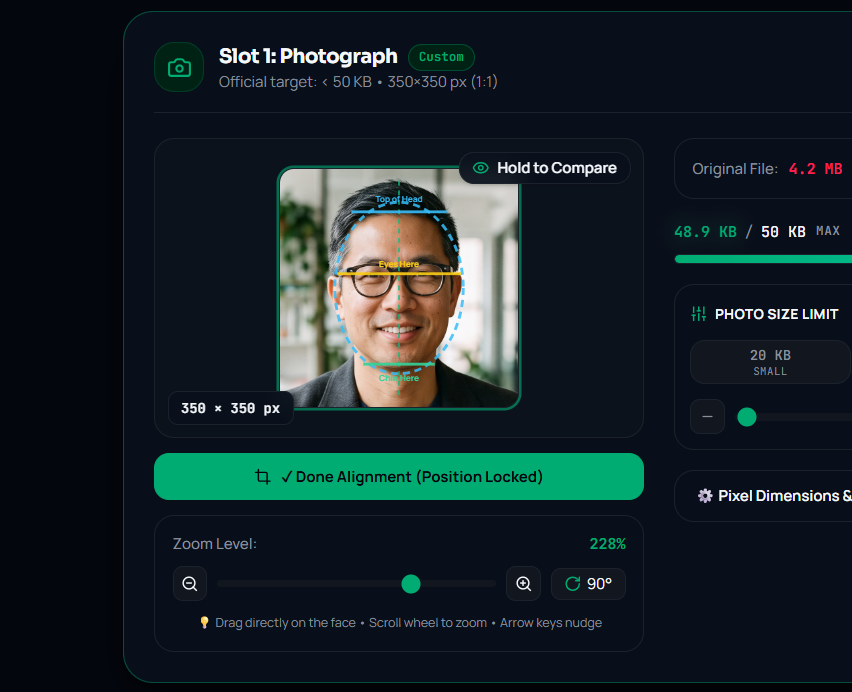
Adjusting Face
-
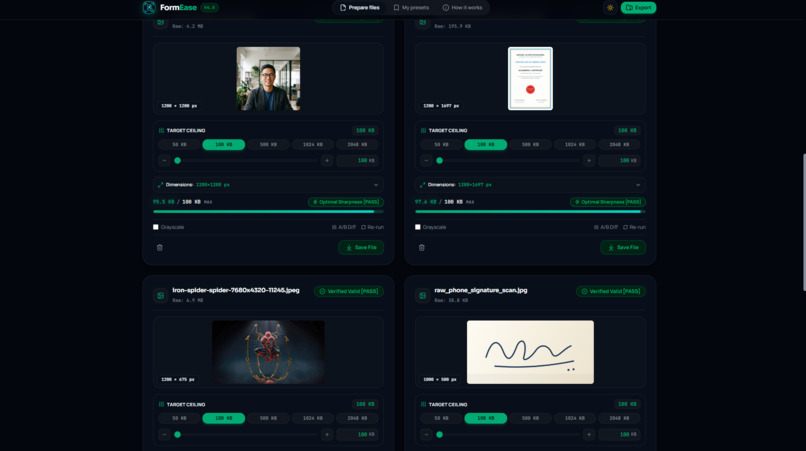
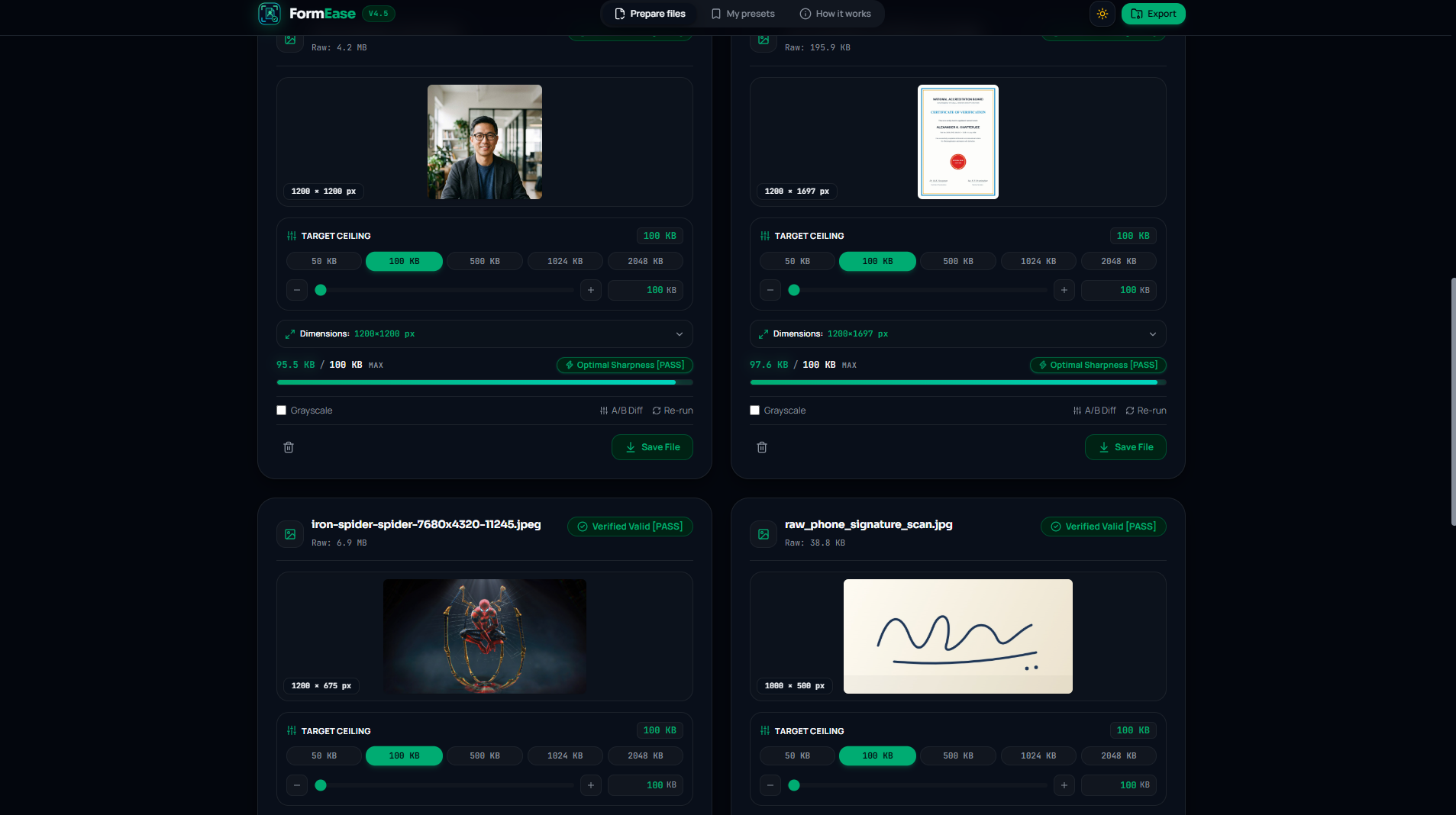
Batch-selection
-
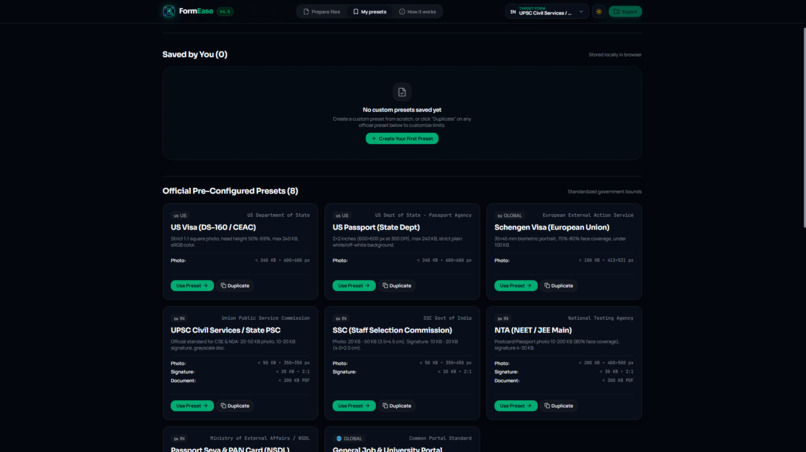
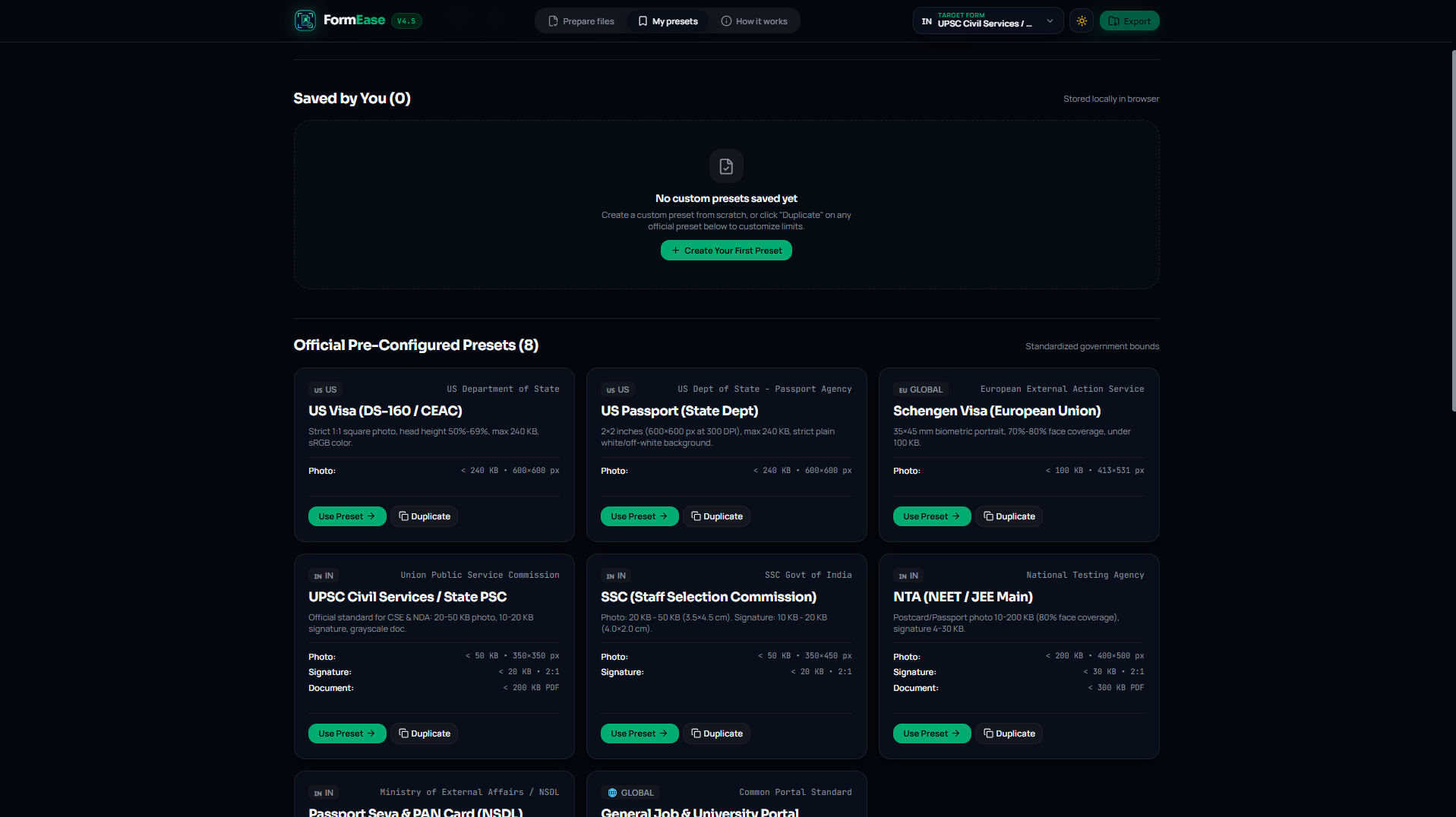
Custom/Built-in Presets
-
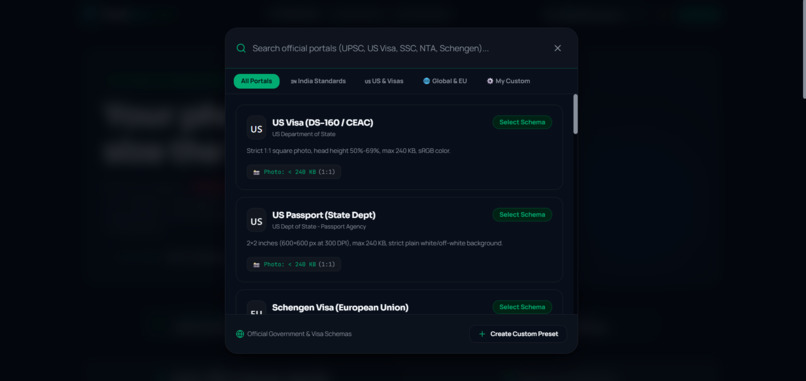
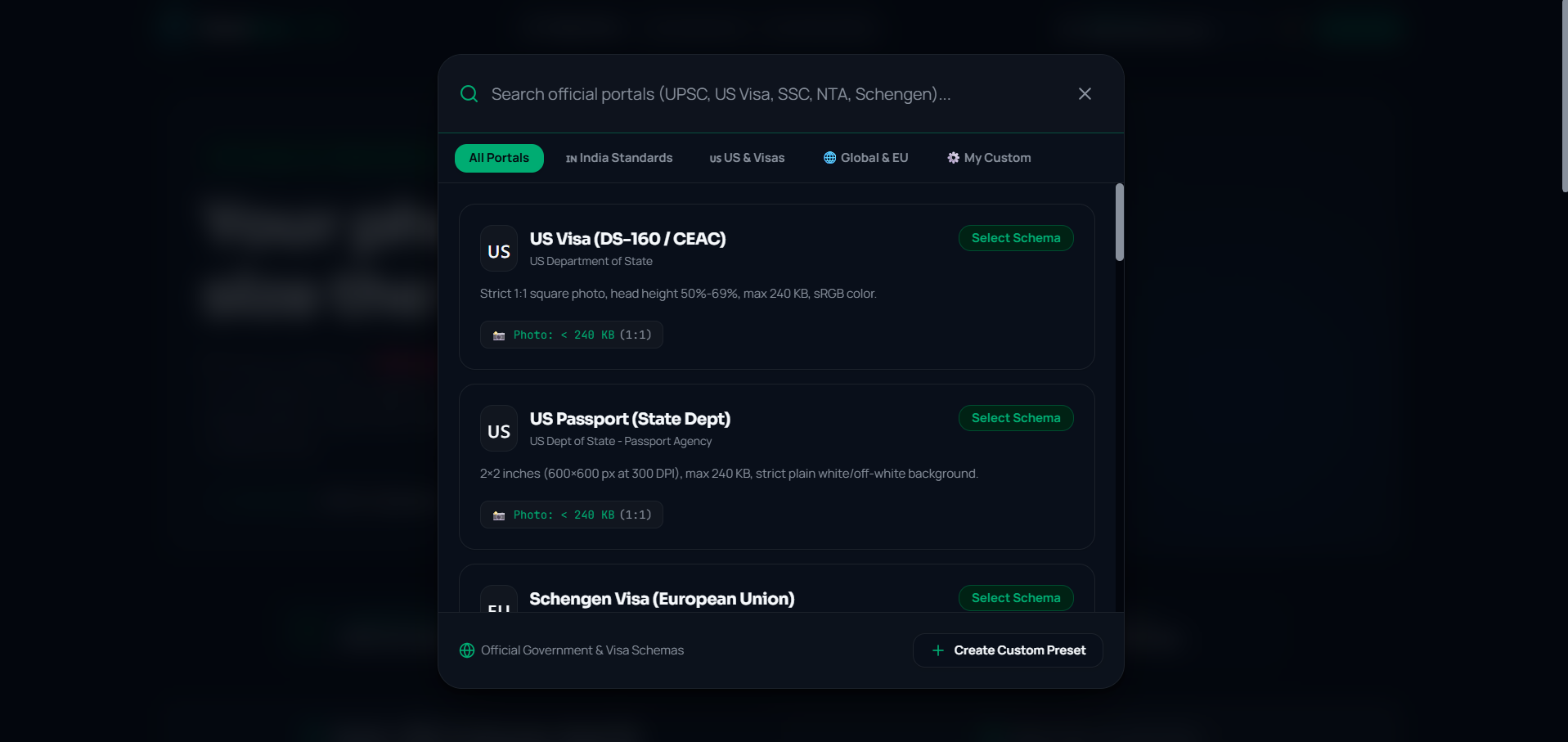
Select/Create your presets
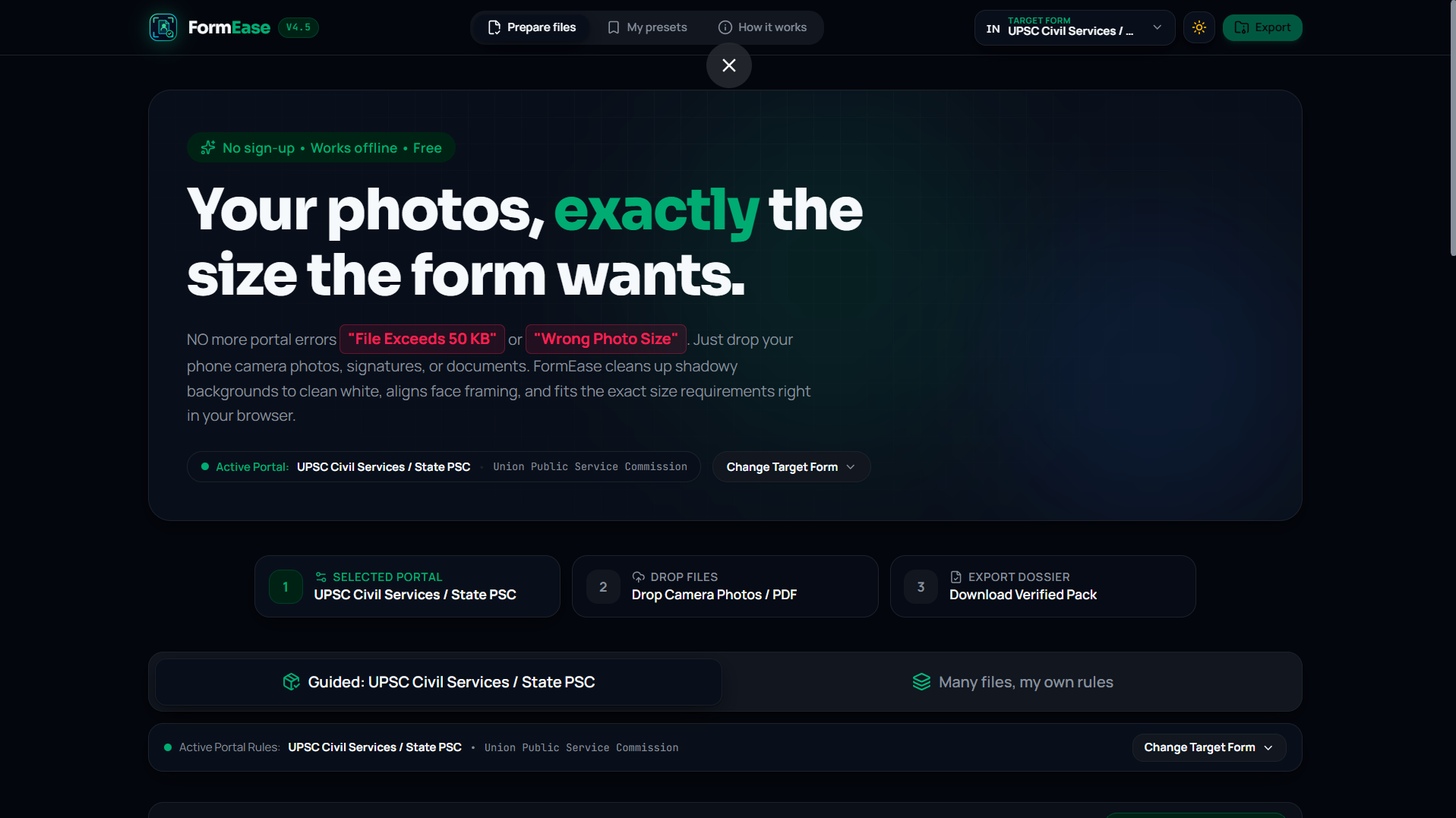
The Problem That Wasted Hours of My Life
Last month, I was filling out my Brother exam application form online. The portal needed three things:
- A passport photo — exactly between 20 KB and 50 KB, 350×350 pixels
- A signature scan — between 10 KB and 20 KB, in a 2:1 ratio
- A marksheet PDF — under 200 KB, grayscale
Simple, right?
I took a selfie with my phone. The file was 3.8 MB. The portal wanted under 50 KB. That's 76 times too large.
So I did what millions of students do every year — I opened a random "compress image online" website, uploaded my passport photo to a server I'd never heard of, dragged a slider, downloaded the result, checked the size, realized it was 62 KB (still too big), went back, tried again, got 31 KB (too small, quality was terrible), tried again…
Six attempts later, I finally got 47 KB. Then I had to do the same thing for my signature. Then again for my marksheet.
Three documents. Many hours. Twelve tabs. And my personal photos and docs sitting on some stranger's server.
I looked around and realized: Every student in every country goes through this exact nightmare, every single application season. UPSC, SSC, NEET, JEE, Passport Seva, PAN Card, Schengen Visa, US Visa — every portal has slightly different size limits, slightly different pixel dimension requirements, and absolutely zero tolerance for files that don't match.
That's when I decided fix it.
I built FormEase to kill this friction permanently.
What FormEase Actually Does
FormEase is a 100% browser-based document preparation tool. You drop in your raw phone photos, messy desk-photo signatures, and oversized scans — it formats everything to the exact specifications of whatever portal you're applying to.
No server. No upload. No guessing. Everything runs on your device.
Here's how it works, step by step:
Step 1 — Pick Your Portal You select which form you're filling out from a built-in preset library. FormEase ships with real-world presets for:
- 🇺🇸 US Visa (DS-160) — 600×600px, max 240 KB
- 🇺🇸 US Passport — 2×2 inches at 300 DPI
- 🇪🇺 Schengen Visa — 35×45mm biometric
- 🇮🇳 UPSC Civil Services — Photo 20–50 KB, Signature 10–20 KB, Document < 200 KB PDF
- 🇮🇳 SSC — Photo 20–50 KB (3.5×4.5 cm), Signature 10–20 KB
- 🇮🇳 NTA (NEET/JEE) — Photo 10–200 KB, Signature 4–30 KB
- 🇮🇳 Passport Seva & PAN Card — Photo < 50 KB, Signature < 30 KB
- 🌐 General Job & University Portals
- OR Create your custom values.
The moment you select a preset, every slot auto-configures to that portal's exact pixel dimensions, aspect ratio, size ceiling, and format. No looking up rules. No calculator.
Step 2 — Drop Your Files Each slot has a dedicated drag-and-drop zone. Drop your raw 4000×3000 phone camera photo. Drop your phone-camera snapshot of your signature on paper. Drop your marksheet PDF.
Step 3 — FormEase Does the Heavy Lifting The moment a file lands in a slot, FormEase's processing engine kicks in — entirely inside your browser:
- Smart Near-Ceiling Compression Engine: A binary-search algorithm adjusts JPEG quality across up to 7 iterations to land the file as close to the ceiling as possible. If the limit is 50 KB, the output is typically 47–49 KB. Not 28 KB. Maximum quality, always within the limit.
- Signature Ink Cleaner: One click turns your shadowy desk photo (grey paper, creases, uneven lighting) into crisp black ink on pure white background. One-click presets: White Paper, Bold Ink, Clean Scan.
- Document Enhancer: Converts color scans to sharp grayscale with text sharpening. Your marksheet stays readable at 200 KB.
- Face Alignment Guide: An interactive biometric overlay shows exactly where to position eyes, chin, and head crown - matching the official face-coverage ratios that portals require.
- Live Byte Counter : Real-time animated bar showing compressed size. Green when within limits. The badge turns ✓ Compliant when every requirement is met.
- Smart Resolution Explainer : If your image hits a mathematical compression limit (can't fit this many pixels into this few KB), a floating popover explains why in plain language - with a 1-click Auto-Scale button that fixes the dimensions instantly. Zero layout jumping, zero confusion.
Step 4 — Download your ready-to-submit bundle.
One click exports a verified .ZIP dossier containing all formatted files, renamed with portal-standard filenames (like 01_PASSPORT_PHOTO_47KB.jpg), along with a VALIDATION_SUMMARY.txt that proves every file passes the portal's constraints.
Upload. Submit. Done.
The Part That Matters Most: Nothing Leaves Your Device
Every compression website on the internet uploads your files to a remote server. Your passport photo, your signature, your identity documents — sitting on someone else's computer.
FormEase has no server. The entire application is a static bundle of HTML, CSS, and JavaScript. All processing happens through the HTML5 Canvas API directly in your browser's memory. The network tab shows zero outbound requests.
This isn't a marketing claim -- it's an architectural constraint. There is no backend. There is no server. The entire application is a static bundle of HTML, CSS, and JavaScript that runs 100% on your machine.
If you turn off your WiFi and refresh the page, it still works.
A built-in privacy sentinel (useOfflineTelemetry) patches window.fetch and XMLHttpRequest to detect and warn about any outbound network call — proving the zero-upload guarantee in real-time.
Design That Feels Like a Product, Not a Hackathon Project
FormEase was built with the same design rigor as Linear, Stripe, or Apple system apps:
- Dual-Theme Engine — Seamless switching between Paper Light and Midnight Dark palettes. Both themes use reactive CSS custom properties with zero hardcoded color leakage. WCAG 2.1 AA contrast verified.
- Smooth Inertia Physics — Hardware-accelerated scrolling via
lenisdelivers 60/120 FPS buttery smooth page movement. Scroll chaining is isolated — scrolling inside a modal never jitters the background page. - Zero Layout Shift (0px CLS) — Resolution warnings are floating React Portal popovers that appear without pushing any UI element. SVG vector callout arrows. Screen boundary collision detection flips placement automatically.
- 2-Column Batch Studio — Batch mode uses a spacious studio grid with dual Grid/Compact List view switching — no cramped cards, no squished controls.
- Decoupled Input Buffers — Type "999" into a KB input without the cursor jumping or the value resetting mid-keystroke. Inputs commit on blur or Enter.
- In-App Feedback Collector — Interactive 5-star ratings, quick sentiment chips, optional contact, and verified delivery receipts with a reset loop.
- 28px Paper Grid Canvas — A tactile radial-masked graph checkerboard gives visual depth and spatial anchoring across both themes.
How I Built It
Stack:
- React 19 + TypeScript 6 + Vite 8 — Type-safe, fast
- Zustand — Lightweight reactive state for slot processing, theme, and navigation
- Tailwind CSS v4 — Utility-first styling with dual-theme semantic tokens
- Lenis — Hardware-accelerated smooth inertia scrolling engine
- HTML5 Canvas API — Client-side crop, resize, rotate, compress
- pdf.js — Client-side PDF rendering
- pdf-lib — Client-side standards-compliant PDF generation
- JSZip + file-saver — In-browser ZIP bundling and download
- Radix UI — Accessible primitives (sliders, tooltips, dialogs, tabs)
- Lucide React — Clean iconography
Core Architecture: The compression engine is a deterministic binary-search convergence loop. Given a ceiling (e.g., 50 KB), it performs up to 7 iterations of JPEG quality adjustment, converging on the 92%–98.5% bracket. If quality drops below 0.22 (artifact threshold), it auto-downscales the canvas by 8–10% and retries — guaranteeing the output is always visually clean.
Each portal preset is a typed TypeScript schema (pixel dimensions, byte ceilings, aspect ratios, format requirements). Selecting a preset reactively reconfigures the entire UI via Zustand state propagation — zero page reloads.
The signature binarization pipeline operates on raw pixel luminance: pixels above a configurable bleach threshold → pure white (#FFFFFF). Dark pixels → multiplied by an ink-darkness factor for solid scanner-quality strokes.
The dual-theme engine uses CSS custom properties (--color-bg, --color-surface, --color-text, etc.) swapped at the :root level, with localStorage persistence and OS prefers-color-scheme synchronization.
Challenges I Faced
The "Near-Ceiling" Problem: Most compressors check "is it under the limit?" and stop. If the limit is 50 KB and they output 28 KB, they've wasted 44% of possible image quality. My binary-search convergence loop consistently lands at 47–49 KB out of 50 — maximum quality within constraints.
Phone Camera EXIF Rotation: Phone photos carry invisible EXIF orientation metadata that silently rotates images. I built an EXIF correction layer that normalizes orientation before any cropping or compression — so viewfinder = download.
PDF Size Headroom:
A PDF wrapper adds ~3–4 KB of structural overhead (xref tables, catalogs). If the ceiling is 200 KB, compressing the image to 200 KB then wrapping it gives 204 KB — rejected. The engine dynamically targets ceiling - 4KB before PDF assembly.
Lenis + OS Reduced Motion:
Windows "Animation effects: Off" setting silently forces lerp = 1, killing all smooth scrolling. I set respectReducedMotion: false to guarantee the premium feel during judging, while restricting touch bypass to mobile viewports.
What I Learned
- Binary search isn't just for sorted arrays. Applying it to quality-factor convergence was the single most impactful engineering decision.
- Privacy can be an architecture, not just a policy. When there's no server, there's nothing to hack, breach, or subpoena.
- Government portals are shockingly inconsistent. UPSC wants 350×350, SSC wants 350×450, NTA wants 400×500 — all for "passport-size photos." Encoding these into structured presets saves millions of hours.
- Dual-theme isn't cosmetic — it's accessibility. Users in bright rooms need Paper Light. Users at night need Midnight Dark. Both must maintain WCAG contrast.
- Accessibility isn't optional polish — it's core architecture. Every interactive element in FormEase is keyboard-navigable. Focus rings are visible. Status changes are announced. High-contrast ratios are maintained throughout.
What's Next
- Universal drag-and-drop intake that auto-routes multiple files to the correct slots
- Progressive Web App (PWA) with service worker for true zero-connectivity offline operation
- Multi-page PDF support for documents longer than one page
- AI-powered auto-crop that detects face boundaries automatically
- Expanded preset library covering more international portals
Built With
- canvas
- html5
- html5-canvas-api
- jszip
- lenis
- licid-react
- pdf-lib
- pdf.js
- radix-ui
- react
- tailwind
- tailwindcss
- typescript
- vite
- zustand

Log in or sign up for Devpost to join the conversation.