Inspiration
Video editing still starts with one of the slowest parts of the creative process: watching everything.
Creators often spend hours reviewing raw clips, finding usable takes, removing mistakes, deciding on story structure, arranging footage, and making small timeline edits before they even reach a usable first cut.
I wanted to explore a different workflow:
What if you could give AI your raw footage, tell it what you want to make, and let it act like both a director and an editor?
That idea became CutPilot AI.
CutPilot turns raw footage into an explainable, editable first cut using GPT-5.6 — then lets the creator refine the edit through natural language.
Don’t learn the editor. Tell the editor what you want.
What it does
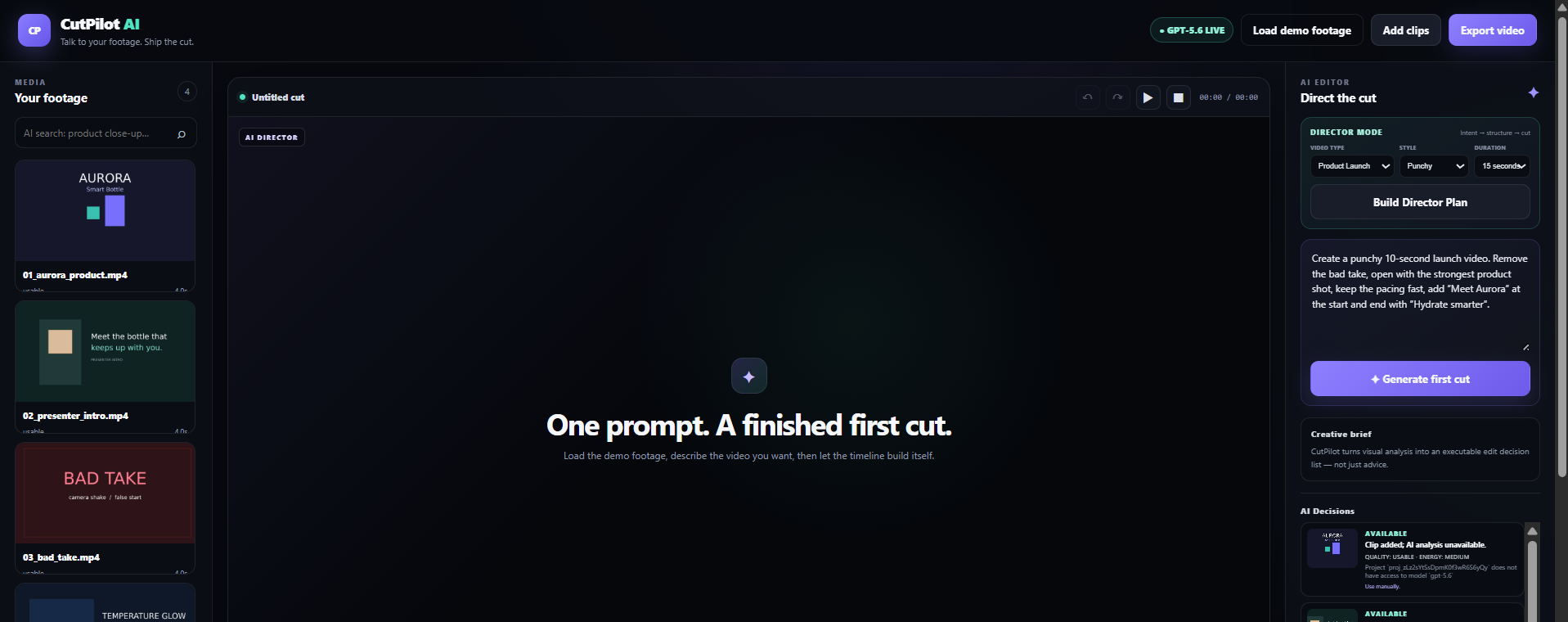
CutPilot AI is an AI video director and editor.
Users can upload raw clips or load built-in demo footage.
GPT-5.6 analyzes sampled frames from each clip and determines:
- what the clip contains
- whether it should be selected or skipped
- its visual quality and usefulness
- how it could contribute to the final video
- why the AI made that decision
Instead of hiding the reasoning, CutPilot exposes it through an AI Decisions panel.
AI Director Mode
Users choose:
- Video type: Product Launch, Social Reel, Founder Story, or Tutorial
- Style: Punchy, Cinematic, Minimal, or Energetic
- Target duration
GPT-5.6 then creates an explainable directing plan containing sections such as:
- Hook
- Story
- Proof / Feature
- CTA
Each section includes the selected clip and the reason it was chosen.
The plan is then converted into an executable Edit Decision List and used to build the first cut.
Chat-to-edit
After the first cut is created, users can edit it conversationally.
For example:
"Make the second clip one second shorter."
Instead of regenerating the entire project, GPT-5.6 produces a structured editing operation such as:
trim_clip
The operation is validated before it is applied.
CutPilot supports operations including:
- add clip
- remove clip
- trim clip
- move clip
- set transition
- set text
AI and manual edits participate in the same Undo / Redo history.
Users can preview the sequence and export the final video directly from the browser.
How we built it
CutPilot uses a browser-based video editing architecture with a lightweight Node.js backend.
The browser samples frames from uploaded videos using HTML5 Video and Canvas APIs.
Those frames are sent through the server to GPT-5.6 for visual understanding.
GPT-5.6 is used for three core tasks:
Visual clip analysis
Understanding what is inside each clip and whether it is useful.AI Director Mode
Turning creative intent into an explainable Hook → Story → Proof → CTA structure.Conversational editing
Converting natural-language requests into validated, structured editing operations.
The editing core uses an operation-based EDL engine instead of allowing AI to directly replace application state.
The flow is:
**User Intent → GPT-5.6 Structured Decision
Challenges we ran into
One of the biggest challenges was making AI editing reliable.
In the first version, a small conversational request could cause the AI to regenerate the entire timeline. That meant unrelated clips could be reordered or changed unexpectedly.
We redesigned the editor around a validated, operation-based EDL engine. Instead of replacing the project, GPT-5.6 now produces precise operations such as trim_clip, remove_clip, move_clip, and set_text.
Another challenge was browser-based video rendering. We had to coordinate video seeking, Canvas rendering, transitions, MediaRecorder, and export finalization while keeping the timeline deterministic.
We also had to make AI decisions explainable. Instead of only showing the final result, CutPilot exposes why clips were selected or skipped and how the Director Plan was constructed.
Finally, we focused heavily on reliability. Codex helped us identify architectural weaknesses, improve validation and error handling, and expand the project from 4 initial tests to 30 passing automated tests.
Accomplishments that we're proud of
- Built a working AI video director and editor instead of a text-only AI assistant.
- Used GPT-5.6 for real visual analysis of video frames.
- Built an explainable AI Director Mode that creates a structured Hook → Story → Proof → CTA plan.
- Automatically identifies and skips weak or unusable footage.
- Converts natural-language editing requests into validated, reversible timeline operations.
- Preserves stable clip IDs across edits, Undo, and Redo.
- Supports preview and real browser-based WebM export.
- Built an AI Decisions panel that explains why each clip was selected or rejected.
- Grew the automated test suite from 4 tests to 30 passing tests with 0 failures.
- Verified Director Mode across 48 combinations of video type, directing style, and target duration.
- Used Codex to materially redesign and strengthen the core editing architecture.
The accomplishment we are most proud of is that CutPilot does not just give editing advice — it actually turns raw footage into an editable first cut.
What we learned
The biggest lesson was that giving an LLM direct control over application state is not enough.
AI becomes much safer and more useful when it operates through a constrained execution layer:
User Intent → GPT-5.6 Structured Decision → Validation → Editing Operation → Timeline
This architecture makes AI edits testable, reversible, and predictable.
We also learned that explainability is important in creative AI. Creators do not only want an AI-generated result; they want to understand why certain footage was selected, why another clip was rejected, and how the story was structured.
Another major lesson was how valuable Codex can be as an engineering partner. It did more than generate code: it audited the initial architecture, identified weaknesses, helped redesign the editing engine, implemented changes, ran tests, and verified regressions.
Finally, building video tooling directly in the browser taught us a lot about HTML5 Video, Canvas, MediaRecorder, timeline synchronization, rendering, and the challenges of turning AI decisions into deterministic media operations.
What's next for CutPilot AI
The current version proves the core workflow:
Raw Footage → AI Understanding → Director Plan → First Cut → Conversational Editing → Export
Next, we want to expand CutPilot into a production-ready AI-first video creation platform.
Planned improvements include:
- Cloud rendering with FFmpeg or Remotion for faster and more reliable exports.
- MP4 / H.264 and higher-resolution export.
- Speech transcription and semantic editing based on spoken content.
- Automatic silence, repetition, and filler-word removal.
- Waveform and advanced audio editing.
- True video and audio crossfades.
- Persistent cloud projects and media storage.
- Brand kits for fonts, colors, logos, and reusable styles.
- Specialized directing modes for YouTube, TikTok, podcasts, advertisements, and tutorials.
- Collaboration, comments, and team approval workflows.
- Long-form footage summarization into short-form content.
The long-term vision is:
Upload hours of raw footage and get an intelligent, editable rough cut in minutes.
CutPilot aims to make professional video editing feel less like operating complex software and more like collaborating with an AI director.


